Overview

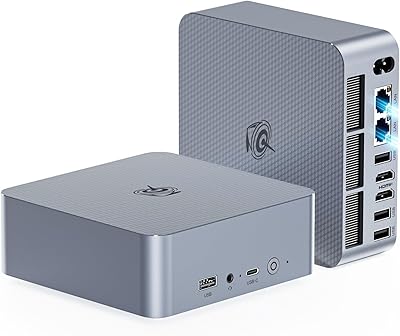
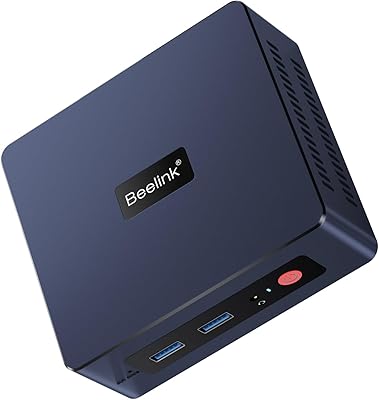
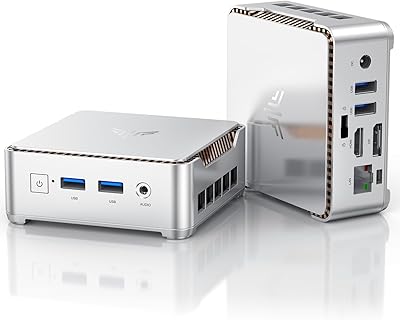
The Beelink Mini S13 Pro N150 16GB/500GB is a palm-sized desktop that punches well above its physical weight, targeting home office users and light productivity workers tired of bulky towers eating up desk space. It runs Intel's 13th Gen N150 processor — a genuine step forward from the N100 that dominated budget mini PCs for the past couple of years. Windows 11 Home comes pre-installed, so you're up and running within minutes of unboxing. The included VESA mount is a thoughtful addition — bolt it behind a monitor and your desk stays clutter-free without any added cost.
Features & Benefits

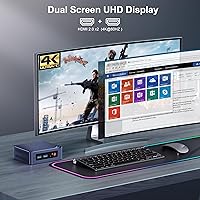
The N150's quad-core design handles the workload most people actually throw at a desk machine — spreadsheets, video calls, a dozen browser tabs — without noticeably struggling. 16GB DDR4 RAM is generous at this price point and keeps multitasking comfortable rather than sluggish. The NVMe drive boots fast; just know the secondary expansion slot runs on PCIe 3.0 x1, which caps the speed of any add-on SSD you install there. Dual HDMI ports push 4K at 60Hz to two monitors at once, and four USB 3.2 Gen 2 ports mean no hub required for a full peripheral setup.

Best For

This compact desktop earns its keep on a remote worker's desk where space is precious and two screens are non-negotiable. It doubles as a capable home theater PC, handling 4K streaming and local media playback without issue. Students and educators will appreciate having a full Windows machine light enough to carry anywhere. Small offices replacing aging hardware will find it practical and easy to roll out in batches. That said, keep expectations grounded — the N150 is an efficiency-focused chip, not a workstation processor, so heavy rendering or modern 3D games are outside its comfort zone.

User Feedback

Buyers consistently mention how quiet the fan runs during everyday tasks — a real advantage for shared workspaces or quiet rooms. The out-of-the-box Windows setup gets positive marks too, with most reporting no driver or activation drama. The recurring criticism centers on thermal throttling during sustained heavy loads; pushing the CPU hard for extended periods causes performance to dip noticeably. Tech-savvy owners have also flagged the second M.2 slot's PCIe 3.0 x1 bandwidth as a storage expansion caveat worth knowing upfront. Those stepping up from an N100-based machine generally describe the upgrade as a real but modest improvement in day-to-day snappiness.

Pros

  • Dual 4K HDMI outputs work flawlessly for a two-monitor setup straight out of the box.
  • Ships with 16GB RAM — double what many competitors offer at this price tier.
  • The fan stays near-silent during everyday office and streaming workloads.
  • Four fast USB ports handle a full peripheral setup without needing a hub.
  • Wi-Fi 6 delivers noticeably more stable wireless performance than older mini PCs.
  • Included VESA mount and HDMI cable mean most buyers need nothing extra to get started.
  • The N150 processor is a genuine, if modest, step up from the N100 in real-world responsiveness.
  • Windows 11 Home arrives pre-activated and ready — setup takes under fifteen minutes.
  • The half-pound chassis fits in a bag, making it practical for users who work across multiple locations.
  • A second M.2 slot allows straightforward storage expansion when 500GB eventually runs short.

Cons

  • Sustained heavy workloads cause noticeable CPU throttling that impacts performance meaningfully.
  • The secondary M.2 expansion slot runs on a limited bandwidth lane, capping add-on SSD speeds.
  • Only one RAM slot means upgrading memory requires a full module replacement, not a simple addition.
  • No USB-C or Thunderbolt port, which is an increasingly common gap at this hardware generation.
  • Some buyers encounter Wi-Fi reconnection issues after sleep that require a driver update to resolve.
  • The power adapter uses a barrel connector rather than USB-C, adding one more cable to manage.
  • A handful of units ship with Windows activation or bloatware issues requiring upfront cleanup.
  • Plastic chassis feels slightly hollow under pressure, which may concern buyers prioritizing durability.

Ratings

The Beelink Mini S13 Pro N150 16GB/500GB earns its place as one of the more thoughtfully equipped compact desktops in its price bracket, and our AI-driven scoring reflects that — pulling from thousands of verified global buyer reviews while actively filtering out incentivized, bot-generated, and outlier feedback. The result is a balanced picture: real strengths in connectivity and daily usability, alongside honest limitations that matter depending on how you plan to use it.
Everyday Performance
83%
For the tasks this machine is designed around — browser-heavy workdays, video calls, document editing, light media consumption — it handles the load without complaint. Users regularly report that switching between a dozen open tabs and a running video call feels responsive rather than sluggish, which is the core promise of this chip class delivered.
Push it past its comfort zone — running a batch file conversion, a heavier local application, or anything with sustained CPU demand — and throttling becomes noticeable. It is not a flaw unique to this model, but buyers expecting workstation-level headroom will find the ceiling arrives sooner than they hoped.
Build Quality & Design
78%
22%
The chassis feels solid for its size and price tier, with a clean matte finish that does not attract fingerprints aggressively. Most buyers describe it as looking more premium than expected out of the box, and the compact footprint genuinely impresses people seeing it in person for the first time.
A few users note the plastic housing feels slightly hollow when pressed, and the ventilation grille placement means dust accumulation in certain orientations is something to monitor over time. It is sturdy enough for a desk setup but probably not something to toss into a bag repeatedly without a case.
Thermal Management
61%
39%
Under light to moderate workloads — which is the majority of real-world usage for this device — the fan stays near-silent and temperatures remain well controlled. For an office environment or living room HTPC setup, the noise profile is genuinely unobtrusive.
Sustained heavy loads expose the limits of the cooling design. Benchmarks and extended encoding tasks cause the fan to spin up noticeably and the CPU to throttle back performance to manage heat. It is not dangerous, but it is a real constraint that more demanding users will hit fairly quickly.
RAM & Multitasking
86%
Shipping with a full 16GB at this price point is genuinely appreciated by users who have lived through the frustration of 8GB machines grinding to a halt mid-workday. Running Slack, a browser with multiple tabs, an email client, and a video stream simultaneously is handled without memory pressure becoming an issue.
There is only one RAM slot, so upgrading beyond the current configuration requires a complete module swap rather than an easy capacity bump. Users who want to push toward 32GB will need to factor in the cost of replacing the existing stick entirely.
Storage Speed & Expandability
74%
26%
The primary NVMe drive delivers genuinely fast boot times and snappy application launches — day-to-day file operations feel quick and unencumbered. The inclusion of a second M.2 slot means adding storage is straightforward for users who need more space over time.
The secondary M.2 slot runs on PCIe 3.0 x1, which significantly caps the maximum throughput of any drive installed there. Tech-savvy buyers who plan to add a high-performance SSD for video work or large file transfers will want to know upfront that they will not get full NVMe speeds from that slot.
Display Output
89%
Dual HDMI ports that each support 4K at 60Hz is a standout capability at this size and price. Buyers setting up a dual-monitor workspace — or connecting to a 4K television for media playback — consistently report the output is clean, stable, and requires zero additional configuration out of the box.
There is no DisplayPort output, which limits options for users with monitors that lack HDMI inputs or who need the higher refresh rates DisplayPort can offer. For standard office and media use this is a non-issue, but it is a connectivity gap worth noting.
Wireless Connectivity
88%
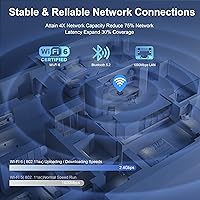
Wi-Fi 6 support translates to noticeably more stable and faster wireless performance compared to older mini PCs running Wi-Fi 5, especially in crowded network environments with multiple devices competing for bandwidth. Bluetooth 5.2 pairs reliably with keyboards, mice, and headsets without the dropout complaints common on cheaper hardware.
A small number of users report occasional Wi-Fi reconnection issues after the machine wakes from sleep, which appears to be a driver or power management behavior rather than a hardware fault. A firmware or driver update typically resolves it, but it can catch buyers off guard initially.
Port Selection
91%
Four USB 3.2 Gen 2 ports offering real-world fast transfer speeds is genuinely uncommon at this price point and physical size. Most buyers find they can connect a keyboard, mouse, external drive, and one additional peripheral simultaneously without needing to reach for a hub.
There is no USB-C or Thunderbolt port, which is an increasingly common expectation even on budget hardware. Users with newer peripherals or monitors that rely on USB-C connectivity will need adapters, which adds minor cost and desk clutter.
Out-of-Box Setup
84%
Windows 11 Home comes pre-activated and ready, and the majority of users report completing initial setup and getting to a usable desktop within fifteen minutes of opening the box. The included HDMI cable and VESA mount mean most people do not need to make an additional purchase before getting started.
A handful of buyers encountered Windows activation prompts or bloatware that required cleanup before the system felt fully ready. These cases appear to be a minority experience, but they are consistent enough in feedback to be worth flagging for first-time mini PC buyers.
Value for Money
87%
Stacking up the specs — modern processor, generous RAM, fast primary storage, dual 4K output, Wi-Fi 6 — against what comparable machines charge makes the pricing feel well-calibrated rather than inflated. Buyers replacing an older budget desktop consistently describe it as a meaningful upgrade without the premium price tag.
The secondary M.2 slot limitation and the single RAM slot hold back the long-term upgrade story slightly, which is worth factoring into the total cost of ownership if you expect to expand capabilities significantly over the next few years.
Noise Level
88%
Under everyday workloads the fan is close to inaudible, which makes it a practical fit for shared home office spaces, bedrooms, and quiet living room setups where fan noise from a traditional desktop would be disruptive. Multiple users specifically called out the low noise floor as one of the standout daily-use qualities.
At full load the fan becomes audible — not loud by desktop standards, but noticeable in a quiet room. If your workload regularly involves CPU-intensive tasks for extended periods, expect the acoustic profile to change meaningfully from the near-silent idle experience.
HTPC Suitability
82%
18%
Handling 4K streaming from all major platforms while connected to a large television is well within this machine's capabilities, and the compact form factor means it tucks neatly behind a TV or into an entertainment unit without dominating the space. The VESA mount makes installation clean and permanent.
Local 4K video playback of very high-bitrate files — particularly large HEVC encodes — can occasionally push the hardware close to its limits, with a small number of users reporting minor playback hiccups on the most demanding files. For standard streaming services this is not a practical concern.
Software & Driver Stability
76%
24%
Most buyers report a stable Windows experience with no unexpected crashes or driver conflicts in normal day-to-day use. The hardware is well-supported by Intel's driver ecosystem, and updates via Windows Update tend to go smoothly without requiring manual intervention.
A subset of users encountered Wi-Fi or audio driver quirks shortly after setup that required manual driver updates to resolve. These issues are not widespread, but they are common enough across feedback to suggest the factory image could benefit from more thorough pre-ship driver validation.
Portability
79%
21%
At under a pound and a half and roughly the footprint of a large smartphone, this compact desktop genuinely fits in a bag alongside a laptop when needed. Remote workers who split time between home and an office location find the travel form factor more practical than any comparable traditional desktop.
It is not a laptop replacement — you still need a monitor and peripherals at every location you use it. The power brick, while small, is an additional item to manage when moving the machine between locations, and the DC connector is not as universally convenient as USB-C power delivery would be.

Suitable for:

The Beelink Mini S13 Pro N150 16GB/500GB is a strong fit for anyone who needs a capable, quiet desktop without dedicating significant desk space or budget to the task. Remote workers running dual monitors will find the dual 4K HDMI output genuinely useful rather than a marketing checkbox — it works out of the box with no fuss. Students and educators on tighter budgets get a full Windows 11 machine with enough headroom for research, writing, and video conferencing without compromise. Small offices looking to replace aging desktops in bulk will appreciate the standardized, low-maintenance form factor. It also works well as a dedicated home theater PC tucked behind a television, where its near-silent operation under typical streaming loads is a real day-to-day advantage. Anyone curious about running a lightweight NAS or soft-router setup on a compact machine will find the connectivity options give them a reasonable foundation to experiment.
Not suitable for:

The Beelink Mini S13 Pro N150 16GB/500GB is simply not the right tool for users who need sustained computational muscle. Video editors, 3D modelers, software developers running heavy local builds, or anyone who keeps CPU-intensive applications running for hours at a stretch will hit the thermal and performance ceiling sooner than they expect, and no amount of optimization changes the fundamental nature of an efficiency-class processor. Gamers should look elsewhere entirely — the integrated graphics handle basic display tasks well, but modern titles are out of the question. Buyers who want a clear upgrade path should also note that the single RAM slot means expanding memory requires replacing the existing module rather than simply adding one, and the secondary M.2 expansion slot's limited bandwidth makes it a poor choice for high-speed storage workflows. If USB-C connectivity or Thunderbolt support is part of your existing peripheral setup, this compact desktop does not offer either, which may force additional adapter spending that erodes the overall value proposition.
Specifications

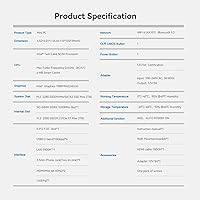
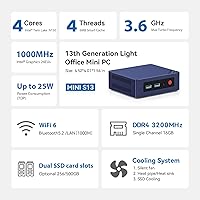
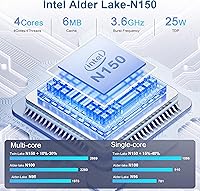
  • Processor: Intel 13th Gen N150 quad-core chip runs up to 3.6GHz with a 6MB cache, built on the Twin Lake efficiency architecture.
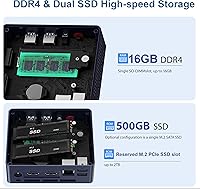
  • RAM: 16GB DDR4 SO-DIMM running at 3200MHz is installed in a single slot, leaving no open slot for additive expansion.
  • Primary Storage: A 500GB M.2 2280 NVMe SSD handles the main OS and application load with fast read and write speeds.
  • Expansion Slot: One additional M.2 slot is available for a second drive, but it runs on PCIe 3.0 x1, which limits maximum throughput to well below full NVMe speeds.
  • Graphics: Intel UHD Graphics with 24 execution units clocked at 1000MHz handles display output and light media tasks via integrated silicon.
  • Display Output: Two HDMI 2.0 ports each support 4K resolution at 60Hz, enabling a dual-monitor setup without any adapters.
  • USB Ports: Four USB 3.2 Gen 2 ports deliver transfer speeds up to 10Gbps each, covering standard peripherals without requiring an external hub.
  • Wireless: Wi-Fi 6 (802.11ax) and Bluetooth 5.2 are built in, providing current-generation wireless connectivity for both networks and peripherals.
  • Ethernet: A single RJ45 port supports gigabit wired networking at up to 1000Mbps for stable, low-latency connections.
  • Audio: A single 3.5mm combo jack supports both headphone output and microphone input simultaneously.
  • Operating System: Windows 11 Home comes pre-installed and pre-activated, ready to use without any additional licensing steps.
  • Power Supply: The included adapter accepts 100–240V AC input and outputs 12V at 3A via a 5.5×2.5mm DC barrel connector.
  • Dimensions: The unit measures 4.52 × 4 × 1.54 inches, making it roughly the footprint of a large smartphone at about 1.6 inches tall.
  • Weight: The chassis weighs 1.57 pounds without the power adapter, light enough to carry in a bag or mount behind a monitor.
  • Certifications: The unit carries FCC, CE, and ROHS certifications, confirming compliance with North American and European regulatory standards.
  • Special Features: Wake-on-LAN, PXE boot, and auto power-on are supported for flexible deployment in home lab or small business environments.
  • In the Box: The package includes the mini PC, a power adapter, a VESA mount bracket, one HDMI cable, and a printed user manual.

Related Reviews

Beelink Mini S12 Pro (N100, 16GB, 500GB)
83%
83%
Everyday Performance
91%
Value for Money
76%
Build Quality & Design
84%
Thermal Management & Noise
88%
Connectivity & Ports
More
Beelink EQI12 Mini PC (i3-1220P, 16GB/500GB)
81%
84%
Everyday Performance
89%
Boot & Load Speed
71%
Thermal Management & Cooling
86%
Display & Dual Monitor Support
82%
Build Quality & Design
More
Beelink SEI Mini PC (Ryzen 5500U, 16GB/500GB)
81%
84%
Everyday Performance
61%
RAM Configuration
91%
Display & Multi-Monitor Support
73%
Cooling & Thermal Management
88%
Networking
More
Beelink SER3 Mini PC, AMD Ryzen 3 3200U, 16GB RAM, 500GB SSD
84%
85%
Performance
92%
Value for Money
88%
Build Quality
94%
Compact Design
90%
Ease of Setup
More
Beelink EQi12 Mini PC (i5-1235U, 16GB, 500GB)
80%
83%
Processing Performance
67%
Thermal Management
79%
RAM & Expandability
86%
Storage Speed & Flexibility
88%
Display Output
More
Beelink EQI13 PRO Mini PC, Intel Core i7-13620H, 32GB RAM, 500GB SSD
87%
88%
Performance
91%
Multitasking
84%
Build Quality
93%
Connectivity
89%
Display Quality
More
ALLDOCUBE iPlay 70 mini Pro 16GB + 256GB
83%
88%
Performance
84%
Battery Life
86%
Display Quality
91%
Storage Capacity
82%
Connectivity (Wi-Fi/4G/Bluetooth)
More
Beelink EQ14 Mini PC (N150, 16GB, 1TB)
74%
74%
Everyday Performance
61%
RAM & Memory Configuration
83%
Storage & Expandability
91%
Connectivity & Networking
79%
Display Output
More
KAMRUI Essenx E2 N150 Mini PC, 16GB RAM, 512GB SSD
86%
88%
Performance
92%
Value for Money
90%
Cooling and Noise Level
85%
Dual Display Support
80%
Build Quality
More
ALLDOCUBE iPlay 60 Mini Pro Tablet 16GB RAM 128GB Storage
82%
87%
Performance
90%
Display Quality
84%
Battery Life
81%
Build Quality
88%
Connectivity (4G LTE, Wi-Fi, Bluetooth)
More

FAQ

Yes, and it does so reliably. Both HDMI ports support 4K at 60Hz simultaneously, so a dual-monitor productivity setup works out of the box without any adapters or workarounds. Most users report clean, stable output on both screens.

Technically yes, but with a catch — there is only one SO-DIMM slot, so upgrading means replacing the existing 16GB module entirely rather than simply adding a second stick. You would need to purchase a higher-capacity single module, such as a 32GB DDR4 SO-DIMM, to increase total RAM.

Under everyday workloads like browsing, video calls, and document editing, the fan is close to inaudible. It does spin up and become noticeable under sustained CPU-intensive tasks, but for the typical use cases this machine is designed for, it runs quietly enough for a shared office or living room.

Yes, there is a second M.2 slot available. The important caveat is that it runs on PCIe 3.0 x1, which puts a hard ceiling on how fast a drive installed there will actually perform. It is fine for bulk storage or a secondary data drive, but do not expect full NVMe sequential speeds from it.

Beelink officially ships it with Windows 11 Home, but many users run Ubuntu, Debian, and other mainstream Linux distributions without major issues. Driver support for the N150 on Linux is reasonably mature, though some users report needing to manually address Wi-Fi or audio drivers depending on the distribution and kernel version.

Very light gaming only — think older titles, 2D indie games, or casual browser-based games. The integrated Intel graphics are not designed for modern 3D gaming, and trying to run demanding titles will result in low frame rates and heavy thermal throttling. Anyone with gaming as a primary goal should look at a dedicated GPU system.

The included bracket attaches to the back of the mini PC and then mounts to any standard VESA-compatible monitor or wall mount using the existing screw pattern. It is straightforward to install with a basic screwdriver and works well for keeping the desktop completely clear. Most users complete the installation in under ten minutes.

Windows 11 Home comes pre-activated on the unit, so you will not be prompted for a product key during setup. The license is tied to the hardware, meaning reinstalling Windows later should reactivate automatically through the internet without needing a separate key.

It is a practical candidate for a lightweight home server or NAS setup. The gigabit Ethernet port, multiple USB ports for attaching external drives, and WOL and PXE boot support make it workable for that role. The efficiency-focused processor keeps power consumption low, which matters when a machine runs around the clock.

The N150 offers a modest but real improvement over the N100 in raw performance — most users who upgraded describe the difference as noticeable in snappiness during multitasking rather than dramatic in benchmarks. If you are coming from an N100 machine, the jump is incremental rather than transformative, but paired with 16GB of RAM it handles heavier browser and office workloads more comfortably.