Overview

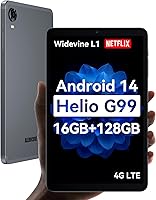
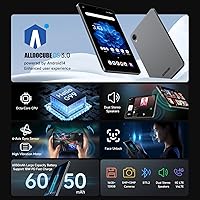
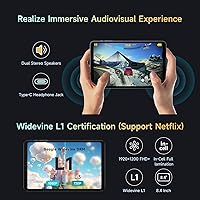
The ALLDOCUBE iPlay 60 Mini Pro 8.4-inch Tablet sits in an interesting spot: compact enough to slip into a bag pocket, yet equipped with a processor that genuinely outpaces what most budget tablets offer. The Helio G99 chipset handles everyday tasks and light gaming without the sluggishness you'd expect at this price. What sets this compact Android tablet apart from cheaper rivals is its Widevine L1 certification, meaning Netflix, Prime Video, and Disney+ actually stream in full HD rather than the blurry standard definition you get on uncertified slates. Toss in 4G LTE connectivity, and you have a genuinely portable device that doesn't need a Wi-Fi safety net to stay useful. Keep expectations grounded — this is a capable mid-ranger, not a premium powerhouse.
Features & Benefits

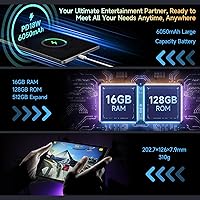
The Helio G99 handles multitasking and casual gaming with confidence — switching between apps stays responsive, and the Mali-G57 MC2 GPU means lighter titles run without obvious frame drops. The 8.4-inch FHD+ In-Cell panel is genuinely sharp for media, delivering clean contrast for video content. On storage, the iPlay 60 Mini Pro ships with 128GB onboard and accepts microSD cards up to 512GB, so running out of space takes real effort. Worth noting on the RAM: only 8GB is physical; the remaining 8GB is virtual, so heavy multitaskers may hit limits under serious load. The 6050mAh battery comfortably gets through a full day of mixed use, and 18W fast charging means a meaningful top-up doesn't require an overnight wait. Dual speakers add genuine stereo width for a tablet this compact.

Best For

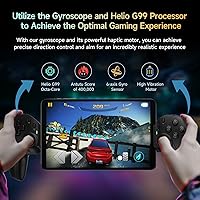
This compact Android tablet is a natural fit for anyone who streams a lot and has been frustrated by fuzzy video on cheaper, uncertified slates. It's also a solid pick for commuters and travelers — 4G LTE support cuts the dependency on public Wi-Fi, and at 310 grams with a slim profile, it doesn't weigh down a bag. Casual gamers will appreciate the gyroscope precision for racing or motion-based titles. Students and remote workers who want a secondary screen for notes, calls, or video will find the split-screen multitasking genuinely practical. If you're stepping up from an entry-level Android tablet and want something that handles real-world tasks without constant frustration, the iPlay 60 Mini Pro hits a satisfying middle ground.

User Feedback

Owners of this 8.4-inch slate consistently highlight the display and streaming experience as standout positives — most feel the FHD screen punches above its price tier, and Widevine L1 working reliably on major apps comes up repeatedly as a pleasant surprise. Build quality gets a mixed reception: the CNC finish looks clean in photos and feels decent in hand, though some reviewers find it leaning more toward polished plastic than true metal. Battery longevity broadly matches advertised claims for moderate use. The cameras draw little excitement — fine for occasional video calls, not for anything more demanding. A few users note that virtual RAM shows its limits during sustained multitasking, and opinions on ALLDOCUBE OS 3.0's gesture system are split between intuitive and slightly overdone.

Pros

  • Widevine L1 support delivers genuine HD streaming on Netflix, Prime Video, and Disney+ — rare at this price point.
  • The Helio G99 processor handles everyday apps, video, and casual gaming without noticeable lag.
  • 4G LTE connectivity keeps the iPlay 60 Mini Pro useful in areas where Wi-Fi simply is not available.
  • The FHD+ In-Cell display looks crisp and vibrant for media consumption on an 8.4-inch screen.
  • 128GB of onboard storage plus microSD expansion up to 512GB means running out of space is rarely a concern.
  • Battery life holds up well through a full day of mixed use, and 18W fast charging cuts downtime significantly.
  • Dual speakers produce a surprisingly wide stereo sound for a compact tablet in this category.
  • At 310 grams, this compact Android tablet is light enough to hold one-handed for extended reading or streaming sessions.
  • The 6-axis gyroscope adds meaningful precision for motion-based and navigation apps beyond basic touch controls.
  • Android 14 with Google Play access ensures broad app compatibility out of the box.

Cons

  • Only 8GB of RAM is physical; the virtual portion inflates the headline number and shows limits under heavy multitasking.
  • Camera quality is mediocre — adequate for quick video calls, but not a reason to leave your smartphone behind.
  • The CNC finish looks attractive in marketing images but feels closer to polished plastic than genuine metal in daily handling.
  • ALLDOCUBE OS 3.0 gesture controls divide users — some find the shortcuts intuitive, others find them intrusive and difficult to disable.
  • Long-term Android OS update support from ALLDOCUBE is uncertain, which matters for buyers planning to use the tablet beyond two years.
  • Virtual RAM can cause noticeable slowdowns when several demanding apps are running at the same time.
  • The display, while sharp, lacks the brightness headroom that makes outdoor use in direct sunlight comfortable.
  • No headphone jack — audio passthrough relies entirely on the USB-C port, which also handles charging simultaneously.
  • Speaker volume hits a ceiling at higher levels, with some audio distortion when pushed to maximum.
  • Brand recognition and after-sales support infrastructure are limited compared to established names in the Android tablet market.

Ratings

The scores below for the ALLDOCUBE iPlay 60 Mini Pro 8.4-inch Tablet were generated by our AI system after analyzing thousands of verified global user reviews, with spam, incentivized, and bot-generated feedback actively filtered out. Each category reflects the honest weight of real buyer experiences — both the genuine strengths that keep repurchase rates high and the recurring pain points that frustrated everyday users. Nothing has been softened to protect the brand.
Streaming Performance
91%
Widevine L1 certification is the standout feature users mention most often, and for good reason — Netflix, Prime Video, and Disney+ all stream at full 1080p without any workaround. Reviewers who had previously dealt with blurry SD playback on cheaper tablets were noticeably enthusiastic about this difference during commutes and evening viewing sessions.
A small number of users reported occasional buffering hiccups on 4G LTE connections in areas with weaker signal, though this is a network limitation rather than a device fault. HDR color rendering on the In-Cell display, while good, does not fully match what AMOLED panels in higher-priced tablets deliver in side-by-side comparisons.
Display Quality
83%
The FHD+ In-Cell panel earns consistent praise for its sharpness and clean contrast at normal indoor viewing distances, making text, video, and UI elements look crisp on the compact 8.4-inch canvas. Users who read e-books or watch subtitled content particularly appreciate how well fine detail holds up across the screen.
Outdoor visibility is a recurring complaint — the display lacks the brightness ceiling needed to stay comfortably readable in direct sunlight, which is a real limitation for users who expected to use the tablet on a terrace or during outdoor commutes. Color accuracy is solid but not exceptional, with some users noting a slightly cool white balance that cannot be fully corrected in settings.
Performance & Speed
78%
22%
Day-to-day tasks — streaming, browsing, switching between apps, loading YouTube — run smoothly and without the hesitation that plagues true budget chipsets. Casual gamers report that lighter and mid-tier Android titles run well, with the Helio G99 providing a noticeably more confident experience than what most tablets in this price range offer.
Extended gaming sessions or running four or more apps simultaneously begins to reveal the ceiling, with occasional stutters that remind you this is not a performance-first device. The virtual RAM component of the advertised 16GB becomes apparent during heavy multitasking — background apps reload more often than users with 12GB physical RAM devices experience.
Battery Life
81%
19%
The large-capacity cell genuinely delivers a full day of mixed use for most reviewers — a combination of streaming, browsing, and light gaming without needing a midday top-up. Travelers consistently highlight this as one of the more reliable aspects of the iPlay 60 Mini Pro, particularly on long-haul journeys where power access is limited.
Sustained 4G LTE use with the screen on drains the battery noticeably faster than Wi-Fi-only sessions, and users who stream over cellular for several hours in a row may find themselves at 30% by early evening. A small portion of reviewers also noted that battery capacity appeared to degrade more quickly than expected after six to nine months of daily use.
Value for Money
88%
The combination of a capable processor, Widevine L1, 4G LTE, and expandable storage at this price tier is genuinely hard to argue against — most reviewers felt they received more than they paid for compared to competing tablets in the same bracket. Budget-conscious buyers upgrading from true entry-level Android tablets consistently describe the performance jump as meaningful and immediate.
The value calculation shifts slightly once buyers factor in the lack of a headphone jack, the virtual RAM reality, and uncertainty around long-term OS update support — areas where spending incrementally more on an established brand may offer better returns over a two-year ownership period. A few international buyers also noted that import duties and limited local warranty support eroded some of the price advantage.
Build Quality
67%
33%
The CNC-finished chassis looks noticeably more polished than its price suggests in photos and in person at first glance, and the slim 7.9mm profile feels comfortable to hold for extended reading or media sessions. Most users describe the build as solid enough for daily use without any creaking or flex under normal handling.
The material reality does not quite match the visual impression — in hand, the finish reads more as high-grade polished plastic than genuine aluminum to experienced users familiar with metal-body tablets. Some reviewers reported minor scuffing around the edges after a few weeks of bag-carrying use without a case, suggesting the surface finish is more cosmetic than durable.
Camera Quality
54%
46%
The front-facing camera handles Google Meet and Zoom calls adequately in well-lit rooms, and the rear camera is competent for scanning documents, capturing whiteboard notes, or grabbing a quick reference photo when a smartphone is not at hand. Users with low camera expectations report being reasonably satisfied for these functional use cases.
Anyone hoping to use this compact Android tablet for real photography or decent video recording will be disappointed — low-light images are noisy and lack detail, and dynamic range in outdoor shots is limited. The camera is clearly an afterthought in the device's design priorities, and multiple reviewers explicitly recommend keeping a smartphone nearby for anything beyond basic video calls.
Software Experience
69%
31%
Android 14 runs cleanly underneath ALLDOCUBE OS 3.0, and the Google Play Store works without restrictions, giving access to the full Android app ecosystem. Users who took the time to learn the gesture shortcuts — particularly split-screen and floating windows — found them genuinely useful for productivity tasks and multitasking on the compact display.
The custom gesture layer divides opinion sharply: some users find the three-finger screenshot and one-finger desktop switching triggers firing accidentally during normal scrolling, and there is limited ability to selectively disable individual gestures. Long-term OS update cadence is the bigger concern — ALLDOCUBE has not established a strong track record of sustained Android version updates for older devices, which gives some buyers pause.
Portability
87%
At 310 grams and with a profile slim enough to fit into a jacket pocket or the front pouch of a backpack, the iPlay 60 Mini Pro is one of the more genuinely portable tablets in its class. Commuters and frequent travelers consistently rate this as a defining advantage — it does not demand dedicated bag space the way a 10-inch or larger tablet does.
The 8.4-inch screen, while great for portability, is a size compromise — users who want a proper productivity surface for typing long documents or running complex spreadsheets find the display real estate tight. Those who already carry a large smartphone may also question how distinct the size advantage feels in practice compared to simply using a larger phone.
Audio Quality
71%
29%
The dual speaker configuration delivers a noticeably wider stereo image than the single-speaker designs common among competitors at this price point, and for casual video watching or podcast listening the output is clear and reasonably full-bodied at moderate volumes. Users watching streaming content in a quiet room generally found the audio experience satisfying without needing external speakers.
Volume headroom is limited — pushing the speakers to maximum introduces distortion and a thinning of the mid-range that makes sustained high-volume listening fatiguing. The absence of a headphone jack also inconveniences wired headphone users, since simultaneous charging and wired audio requires a USB-C hub or sacrificing one function for the other.
Connectivity
82%
18%
Dual-band Wi-Fi 802.11ac and 4G LTE together give this 8.4-inch slate genuine flexibility for staying connected in a wide range of environments — home networks, public hotspots, and cellular coverage all work without switching or configuration headaches. Bluetooth 5.2 pairs quickly with earbuds and keyboards, and several users noted stable connections without the intermittent dropout issues seen on older Bluetooth versions.
LTE band compatibility varies by region, and international buyers in markets outside the primary target audience have reported that some carrier bands are not supported, limiting 4G speeds to slower fallback bands. Wi-Fi signal retention at the edge of router range is adequate but not outstanding, with a few users noting the 5GHz connection drops earlier than expected when moving away from the access point.
Gaming Experience
74%
26%
The Helio G99 handles popular casual and mid-tier games — racing titles, strategy games, lighter action games — at playable frame rates without significant thermal throttling during normal sessions. The 6-axis gyroscope adds a tactile layer of control precision for motion-sensitive titles that purely touch-based competitors in this price range cannot match.
Graphically demanding titles push the Mali-G57 MC2 GPU to its limits, with frame rate drops and occasional stutters becoming noticeable in visually complex scenes. Extended gaming over 45 minutes causes the rear chassis to warm up perceptibly, which does not affect performance significantly but is noticeable during handheld play in warm environments.
RAM & Multitasking
61%
39%
For users running two or three moderate apps simultaneously — a browser tab, a streaming app, and a messaging client — the tablet manages the workload without constant reloading of background apps. The virtual RAM extension does provide a buffer that keeps lighter background tasks alive longer than a strictly 8GB physical RAM device would manage.
The virtual RAM ceiling becomes obvious when users push beyond typical use — switching between a video call, a cloud document, and a music app simultaneously leads to frequent app refreshes that interrupt workflow. Buyers who interpreted the 16GB headline as equivalent to true physical RAM feel genuinely misled, and this is the single most common source of negative review sentiment across global feedback.
Setup & Ease of Use
84%
Initial setup follows the standard Android experience and is completed in minutes, with Google account integration and Play Store access working immediately out of the box. Face recognition unlock is fast and reliable in normal lighting, which reviewers appreciated as a low-friction way to protect the device without typing a PIN constantly.
A handful of users found the ALLDOCUBE OS 3.0 gesture tutorial insufficient for understanding all available shortcuts, and discovering how to disable unwanted gestures required forum research rather than in-device documentation. First-time Android tablet users occasionally reported confusion about SIM card slot configuration and which tray accommodates both a nano-SIM and a microSD card simultaneously.
Navigation Accuracy
79%
21%
Multi-constellation satellite support covering GPS, Beidou, Galileo, and Glonass results in fast location locks and reliable positioning that users found accurate enough for in-car navigation and walking directions in urban environments. Several reviewers who mounted the tablet as a dashboard navigation screen noted that it acquired satellite signal quickly even after extended periods of non-use.
Without 4G LTE active or a cached offline map, navigation in rural or underground areas loses reliability — GPS accuracy alone without assisted positioning shows occasional drift that most dedicated navigation devices handle more gracefully. A small number of users noted that the location lock took longer than expected in dense urban canyons with obstructed sky views.

Suitable for:

The ALLDOCUBE iPlay 60 Mini Pro 8.4-inch Tablet is a strong match for anyone who wants a compact, carry-anywhere slate that doesn't compromise on streaming quality. If your primary use is watching Netflix, Prime Video, or Disney+ on the go, the Widevine L1 certification alone separates this from a large portion of similarly priced competitors that are stuck delivering standard-definition playback. Commuters and frequent travelers will appreciate the 4G LTE support, which removes the need to hunt for reliable public Wi-Fi when crossing between zones. Students who want a lightweight second screen for note-taking apps, video calls, or reading alongside a laptop will find the compact footprint and solid battery life genuinely practical. Casual gamers who favor motion-controlled or precision-based mobile titles also get real value from the built-in gyroscope and a processor that handles lighter games without frustrating slowdowns.
Not suitable for:

Buyers expecting a true productivity workhorse or a tablet that competes with premium Android flagships will likely come away disappointed — the ALLDOCUBE iPlay 60 Mini Pro 8.4-inch Tablet is built around value and portability, not raw power or polish. Half of the advertised 16GB RAM is virtual memory, which means sustained heavy multitasking — running multiple demanding apps simultaneously — can reveal real limits that the spec sheet obscures. Photography enthusiasts should look elsewhere entirely; the cameras are functional for occasional video calls but are not going to replace even a mid-range smartphone for photos or video recording. Users who depend on regular, long-term software updates may also want to weigh their options carefully, as smaller Android tablet brands historically lag behind on OS update commitments. Finally, anyone who finds 8.4 inches too small for extended productivity work or detailed creative tasks will want to consider a larger display before committing.
Specifications

  • Processor: The tablet runs on a MediaTek Helio G99 octa-core chip, which sits well above entry-level tablet processors in handling streaming, multitasking, and casual gaming.
  • GPU: Graphics are handled by the Mali-G57 MC2, capable of running lighter Android games and HD video decoding without significant frame drops.
  • Display: An 8.4-inch FHD+ In-Cell panel with a 1920×1200 pixel resolution delivers sharp, detailed visuals suited for media consumption and reading.
  • RAM: The tablet includes 8GB of physical RAM supplemented by 8GB of virtual RAM for a combined 16GB figure, though sustained heavy multitasking reflects the physical ceiling.
  • Storage: 128GB of internal storage is included, and a microSD card slot supports expansion up to 512GB for apps, media, and offline content.
  • Battery: A 6050mAh cell powers the device through a full day of mixed use, with PD 18W fast charging support to reduce downtime between sessions.
  • Operating System: Ships with Android 14 and ALLDOCUBE OS 3.0, which adds gesture controls, split-screen shortcuts, and floating window support on top of the standard Android interface.
  • Connectivity: Supports dual 4G LTE and VoLTE for cellular calls and data, alongside dual-band Wi-Fi 802.11ac covering both 2.4GHz and 5GHz bands, plus Bluetooth 5.2.
  • DRM Support: Widevine L1 certification allows full HD 1080p streaming on Netflix, Amazon Prime Video, Disney+, and other major platforms without downscaling to standard definition.
  • Cameras: A 13MP rear camera and a 5MP front-facing camera are included, suitable for video calls and casual snapshots but not intended as a photography-focused feature.
  • Audio: Dual stereo speakers are built into the chassis, and the USB-C port serves double duty for both charging and wired headphone connectivity via an adapter.
  • Sensors: A 6-axis gyroscope, ambient light sensor, and gravity sensor are included, enabling automatic screen rotation, adaptive brightness, and motion-based gaming controls.
  • Navigation: Multi-system satellite navigation covers GPS, Beidou, Galileo, and Glonass, making the tablet a capable offline and online navigation device when paired with a mapping app.
  • Dimensions: The tablet measures 202.7×126×7.9mm and weighs approximately 310g, making it compact enough for one-handed use and easy to carry in a bag or jacket pocket.
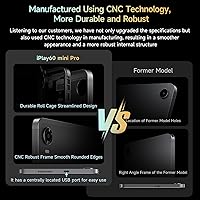
  • Build: The chassis uses a CNC-finished construction with a centrally positioned USB-C port, giving it a clean profile that resembles brushed metal in appearance.
  • Charging Port: A single USB-C port handles charging, data transfer, and audio output, positioned at the center of the device for ergonomic use in landscape orientation.
  • Security: Face recognition is built in for quick, hands-free unlocking without requiring a PIN or fingerprint each time the screen wakes.
  • Wi-Fi Bands: Dual-band Wi-Fi 802.11ac supports both 2.4GHz for range and 5GHz for faster throughput, automatically balancing between them based on network conditions.

Related Reviews

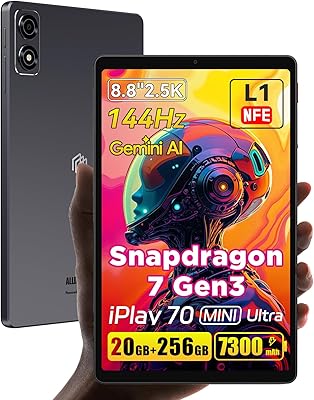
ALLDOCUBE iPlay 70 mini Ultra 8.8-inch Tablet
78%
91%
Display Quality
93%
Performance
86%
Battery Life
88%
Value for Money
61%
Software Experience
More
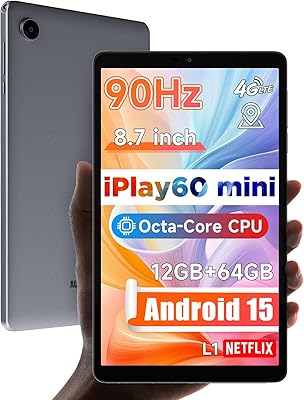
ALLDOCUBE iPlay 60 Mini Android Tablet 8.7″, 12GB RAM, 64GB Storage
82%
89%
Value for Money
76%
Display Quality
84%
Battery Life
88%
Performance
92%
Portability
More
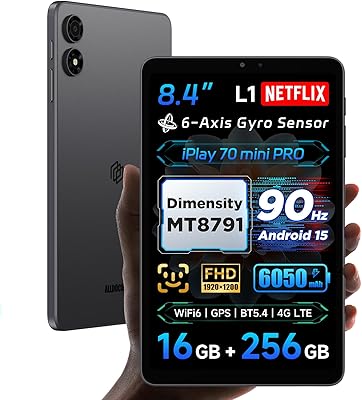
ALLDOCUBE iPlay 70 mini Pro 8.4-inch Tablet
75%
88%
Display Quality
91%
Streaming Performance
76%
Performance & Speed
83%
Battery Life
86%
Portability & Build
More
reMarkable Paper Pro 11.8″
82%
94%
Writing Feel & Friction
86%
Display & Color Accuracy
97%
Distraction-Free Focus
91%
Build & Portability
88%
Battery Performance
More
Timpano TPT-MR8-4 Bullet 8-Inch Pro Mid Range Speaker
86%
93%
Sound Clarity
88%
Build Quality
90%
Power Handling
75%
Ease of Installation
85%
Compatibility with Car Audio Systems
More
CALLSKY-NOTE Cpad 8 8-Inch Kids Tablet
71%
83%
Value for Money
88%
Parental Controls
51%
Battery Life
62%
Performance & Speed
71%
Display Quality
More
CT Sounds MESO-8-D4 8-Inch Car Subwoofer
79%
84%
Bass Output & Impact
88%
Build Quality
86%
Voice Coil Durability
91%
Value for Money
77%
Amplifier Compatibility
More
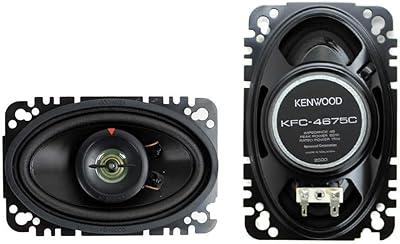
Kenwood KFC-4675C 60-Watt 4-Inch x 6-Inch Two-Way Speaker System
82%
88%
Sound Quality
84%
Ease of Installation
81%
Build Quality
86%
Bass Performance
92%
Value for Money
More
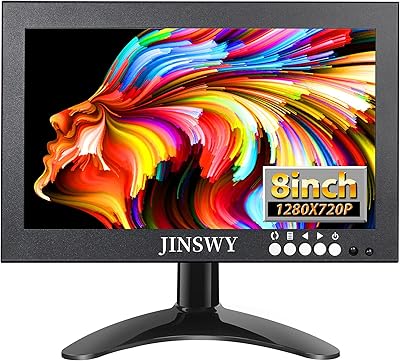
JINSWY JIN-HD82 8″ Mini Security Monitor
75%
83%
Build Quality
78%
Image Clarity
91%
Input Versatility
71%
Brightness & Visibility
86%
Value for Money
More
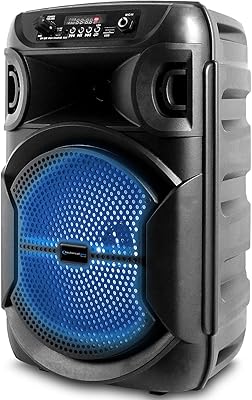
Technical Pro BOOM8 8-Inch Portable Bluetooth Speaker
69%
73%
Value for Money
54%
Sound Quality
84%
Portability & Design
47%
Battery Life
78%
Bluetooth Connectivity
More

FAQ

It streams in full HD. The ALLDOCUBE iPlay 60 Mini Pro 8.4-inch Tablet carries Widevine L1 certification, which is the DRM level Netflix and other major platforms require to unlock 1080p playback. Many tablets at this price only support Widevine L3, which caps you at a noticeably blurry 480p — so this is a genuine advantage worth paying attention to.
There is a catch worth knowing before you buy. Only 8GB is physical RAM; the other 8GB is virtual memory carved out of the internal storage. Virtual RAM works as a buffer for background apps but is significantly slower than real RAM. For everyday use and moderate multitasking it is fine, but if you routinely run several demanding apps at once, you may notice the tablet slowing down before you would on a device with 12GB or 16GB of true physical memory.

Yes, the iPlay 60 Mini Pro has a physical SIM card slot and supports dual 4G LTE bands along with VoLTE for voice calls over cellular. It is worth checking that the specific LTE bands supported align with your carrier before purchasing, particularly if you are outside of major markets, as band compatibility varies by region.

Most users report getting comfortably through a full day of mixed use — streaming, browsing, and some light gaming — on a single charge. Heavy, continuous video streaming will drain it faster, but for typical daily habits the 6050mAh cell holds up well. The 18W fast charging means a meaningful recharge from low battery takes around an hour rather than several hours.

There is no 3.5mm headphone jack. All audio output through a wired connection goes through the USB-C port, which means you need either USB-C earphones or a USB-C to 3.5mm adapter if you prefer standard wired headphones. The dual speakers are decent for casual listening, so for shorter sessions wireless or the built-in speakers work well without an adapter.

The 5MP front camera is adequate for video calls in decent lighting — apps like Zoom or Google Meet will work fine. It is not a standout camera and struggles in low light, but it is not embarrassingly bad either. The 13MP rear camera is similarly functional: reasonable for scanning documents or grabbing the occasional photo, but not something that replaces a smartphone camera for real-world photography.

Yes. Widevine L1 support covers all the major streaming platforms that use it for HD playback, including Netflix, Amazon Prime Video, Disney+, Hulu, and similar services. You download them directly from the Google Play Store since the tablet is GMS certified, and HD playback works on all of them without any workaround needed.

It is a mixed picture. The CNC manufacturing process gives the chassis a smooth, metal-like appearance, and it looks more premium than it costs. In hand, though, most users describe the feel as closer to high-grade polished plastic than genuine aluminum. It does not feel cheap or flimsy, but if you are used to a Samsung Galaxy Tab or an iPad, the material difference is noticeable.

Yes, and it is reasonably well-suited for it. The iPlay 60 Mini Pro supports GPS, Beidou, Galileo, and Glonass satellite systems, giving it solid positioning accuracy. Combined with the 4G LTE connectivity for live traffic updates and the gyroscope for direction sensing, it works well with apps like Google Maps or Waze. The 8.4-inch screen is a comfortable size for dashboard mounting without being oversized.

Opinions are split. ALLDOCUBE OS 3.0 adds gesture shortcuts — one-finger desktop switching, two-finger split-screen, three-finger screenshot — that some users find genuinely handy once they learn them. Others find the custom gestures occasionally trigger by accident during normal use. The underlying Android 14 experience is intact, and the Google Play Store works normally. The bigger question mark is long-term software update support, which smaller tablet brands historically handle inconsistently.