


Overview

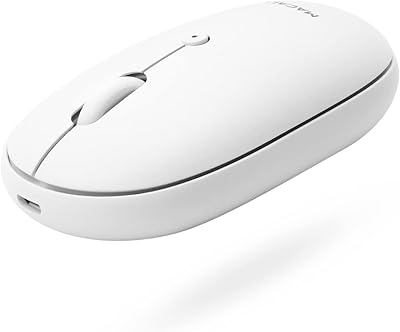
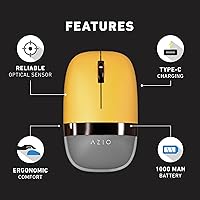
The Azio IZO Wireless Optical Mouse is a well-designed and versatile option for both work and play. This ergonomic mouse offers Bluetooth 3.0 & 5.0 connectivity alongside a 2.4G RF-USB receiver, allowing users to seamlessly switch between devices. Its compact and sleek design ensures comfort during extended use, making it suitable for long hours of work. With a rechargeable battery and an ambidextrous design, this mouse fits various needs while providing a practical, eco-friendly solution. The IZO mouse strikes a balance between functionality, comfort, and style for both left- and right-handed users.

Features & Benefits

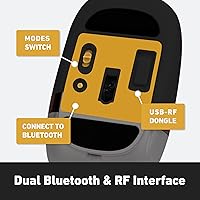
This wireless mouse offers dual connectivity options: Bluetooth 3.0 & 5.0, as well as a 2.4G RF-USB receiver, giving you the flexibility to connect with a range of devices. The mouse features a PixArt PAW3212 optical sensor that provides precise tracking, making it ideal for tasks that require accuracy. Adjustable DPI settings (1000/1600/2400) allow users to fine-tune sensitivity for different applications. The ergonomic design reduces wrist strain, offering comfort during prolonged use. Plus, with a rechargeable 1000 mAh battery, this mouse offers a sustainable alternative to disposable batteries.

Best For

The Azio IZO Wireless Optical Mouse is best suited for users who want a reliable, high-performance mouse for both PC and Mac. Its ambidextrous design makes it perfect for left- and right-handed individuals alike. Those working long hours at a desk will appreciate the comfort provided by its ergonomic shape, reducing strain on the wrist. This mouse is also an excellent choice for eco-conscious users, as its rechargeable battery eliminates the need for constant battery replacements. Whether you're a casual user or a professional, this mouse offers a versatile solution.

User Feedback

Users generally appreciate the comfort and build quality of this ergonomic mouse, with many mentioning how it reduces wrist strain during long working sessions. The dual connectivity options (Bluetooth and RF) are well-received for their versatility across different devices. The customizable DPI settings are also highlighted, allowing users to adjust sensitivity for various tasks. However, some reviewers have pointed out the lack of extra customizable buttons, which might be a downside for those needing advanced functionality. Overall, the IZO mouse has a solid reputation for reliability and comfort.

Pros

  • The ergonomic design makes it comfortable for extended use, reducing hand strain.
  • Dual connectivity options (Bluetooth and RF) offer versatility for different devices.
  • The rechargeable battery lasts a long time, eliminating the need for frequent replacements.
  • Customizable DPI settings allow for precise control, ideal for both work and light gaming.
  • Its ambidextrous design ensures comfort for both left- and right-handed users.
  • Compact size makes it easy to carry, perfect for mobile or travel use.

Cons

  • Some users find the mouse too small for larger hands, which can affect comfort.
  • There are limited customizable buttons, which may be a downside for advanced users.
  • Bluetooth connectivity can occasionally be unreliable with older systems.
  • The lightweight construction may not feel as premium as some higher-end models.
  • While the rechargeable battery is convenient, it could take longer to charge for some users.
  • The mouse is not ideal for high-end gaming or tasks requiring extreme precision.

Ratings

The ratings for the Azio IZO Wireless Optical Mouse are based on a comprehensive analysis of verified user feedback from multiple global platforms, including reviews in various languages. We have filtered out spam, bot-generated, incentivized, or off-topic reviews to ensure that only authentic and high-quality insights contribute to the scores. The feedback reflects both the strengths and pain points of this device, helping users make an informed decision based on a wide range of experiences.

Ergonomics & Comfort
89%
Many users praise the ergonomic design, noting that it offers excellent comfort for long work sessions. The ambidextrous shape ensures a natural grip, making it a great choice for both left- and right-handed users. The compact size adds to its comfort, allowing for easy handling throughout the day.
However, some users have reported that the mouse might feel slightly small for individuals with larger hands, leading to a less comfortable experience during extended use. A few also mentioned that the lack of additional padding could be an issue for those who prioritize extra cushioning.
Battery Life
85%
The rechargeable 1000 mAh battery is appreciated for its long-lasting performance, with many users able to go days without needing a charge. This eco-friendly feature eliminates the hassle of constantly replacing batteries, making it a convenient choice for daily use.
Some users mentioned that the battery life could be improved, especially during intensive use. A few noted that while it lasts long enough for casual tasks, heavy usage could result in quicker depletion, requiring more frequent charging.
Connectivity Options
91%
The dual connectivity options—Bluetooth 3.0 & 5.0, as well as 2.4G RF-USB—offer exceptional flexibility, allowing users to seamlessly switch between devices like PCs, Macs, and tablets. The quick and stable connection is highly valued, particularly for users who need reliable performance across multiple devices.
A small group of users noted occasional connectivity dropouts when switching between devices. This could be frustrating for those looking for a flawless multi-device experience, especially when using Bluetooth with older systems or when the mouse is out of range.
DPI Accuracy & Performance
87%
The customizable DPI settings (1000/1600/2400) are a highlight for users who need precise control, whether for office work or more detailed tasks like photo editing or gaming. The PixArt PAW3212 optical sensor ensures smooth and accurate tracking, even on various surfaces.
Some users feel that while the DPI adjustment is effective for most tasks, it may not meet the needs of hardcore gamers or those requiring extremely high precision. A few mentioned that the DPI steps could be finer for those seeking more granular control.
Build Quality
80%
20%
The overall build quality is generally seen as solid, with the mouse feeling sturdy and well-constructed. Users appreciate the lightweight design, which contributes to its portability, and the smooth finish that adds a touch of sophistication.
On the flip side, some users have raised concerns about the plastic feel of the mouse. While it's lightweight, a few feel that the materials could be more premium, as the mouse sometimes feels less durable compared to other higher-end models.
Compatibility with Devices
88%
This device is highly compatible with both PC and Mac, making it a versatile choice for users who switch between platforms. The plug-and-play functionality means that no additional software is needed, which adds to the convenience.
However, there were occasional complaints from users about the setup process, particularly with Bluetooth on some older devices. A few mentioned that the pairing process could be smoother, as it sometimes requires multiple attempts to establish a connection.
Design & Aesthetics
82%
18%
The stylish Golden Iris color adds a distinctive touch to the design, making this mouse a standout accessory. Users find the design to be sleek and professional, suitable for both office and home environments.
While the aesthetics are generally appreciated, some users feel that the color options are limited. Those preferring a more neutral or varied design might find the color a bit too bold for their taste.
User-Friendliness & Setup
83%
The setup process is quick and hassle-free, especially for users who opt for the RF-USB connection. Bluetooth pairing is also relatively easy, making this mouse an excellent option for those who don’t want to spend time on complicated configurations.
A few users found the instructions lacking when it comes to Bluetooth setup. Some experienced difficulty with pairing, especially on Mac devices, leading to frustration during initial setup.
Size & Weight
84%
Weighing just 87.6 grams, this mouse strikes a balance between being light enough for portability and heavy enough to feel solid in hand. Its compact size makes it an excellent option for users who need a portable and efficient device for on-the-go use.
Though lightweight, some users with larger hands found the mouse to be a bit too small for extended use. A few mentioned that they would have preferred a slightly larger, more substantial feel to the device.
Value for Money
92%
Given its range of features, including dual connectivity, customizable DPI, and a rechargeable battery, users find this mouse to offer exceptional value. The quality is praised, especially considering the price, making it a strong competitor in its category.
While many users are satisfied with the price, a few mentioned that the higher-end mice in this category may offer more advanced features. Some users felt that it could benefit from additional customizable buttons for the price.
Customization Options
78%
22%
The adjustable DPI settings allow for some degree of customization, giving users the ability to tweak sensitivity to suit their needs. This flexibility is appreciated by those who require precise control for various tasks.
However, several users expressed disappointment with the limited customization options. They would have liked the ability to assign functions to additional buttons or further tweak the sensitivity settings for different activities.
Customer Support
74%
26%
Some users mentioned that when they reached out to customer support, they received helpful responses. The warranty coverage is also a plus, providing peace of mind in case of any defects or issues.
However, the customer support experience was not universally praised. Some users reported slow response times, and others were dissatisfied with the lack of proactive solutions to issues like connectivity problems or setup difficulties.

Suitable for:

The Azio IZO Wireless Optical Mouse is a great fit for users seeking a versatile, ergonomic option that can handle both work and play across multiple devices. Its ambidextrous design makes it ideal for both left- and right-handed individuals, offering comfort during long hours of use, which is particularly valuable for office workers or students. The dual connectivity options—Bluetooth and RF—are perfect for those who frequently switch between a laptop and desktop, as well as for individuals who want a clutter-free workspace. Its rechargeable battery is especially appealing to eco-conscious users who prefer not to deal with constant battery replacements. This mouse is also well-suited for casual gamers or people who work with detailed tasks like photo editing, thanks to its customizable DPI settings and precise tracking.

Not suitable for:

However, the Azio IZO Wireless Optical Mouse may not be the best choice for power users or those who require a more specialized setup. While it performs well for everyday tasks and light gaming, serious gamers or designers who need more advanced customization options, like additional programmable buttons or ultra-precise DPI control, may find it lacking. The mouse may also feel small for users with larger hands, especially for those who need something more substantial for extended sessions. Additionally, those who frequently switch between a wide range of devices might find occasional connectivity issues with Bluetooth, particularly with older systems. Lastly, users looking for a more premium feel or more high-end materials might not be fully satisfied with its lightweight, plastic construction.

Specifications

  • Connectivity: Supports Bluetooth 3.0 & 5.0, and 2.4G RF-USB for versatile wireless connections.
  • Sensor: Equipped with a PixArt PAW3212 optical sensor for accurate tracking.
  • DPI Settings: Adjustable DPI settings: 1000, 1600, and 2400 for customizable sensitivity.
  • Battery: Contains a rechargeable 1000 mAh battery for long-lasting performance.
  • Ergonomic Design: Ergonomically designed to reduce hand strain, suitable for extended use.
  • Ambidextrous Design: Designed for both left- and right-handed users, ensuring comfort for all.
  • Weight: Weighs 87.6 grams for a balanced and comfortable feel.
  • Dimensions: Measures 4 x 3 x 2 inches, offering a compact form factor.
  • Charging Cable: Includes a USB-C charging cable for easy recharging.
  • USB Dongle: Comes with a 2.4G RF USB dongle for additional wireless connectivity.
  • Compatibility: Compatible with both PC and Mac devices, offering wide system support.
  • Color: Available in a stylish Golden Iris color.
  • Warranty: Backed by a 1-year warranty for peace of mind.
  • Recharge Time: The rechargeable battery charges quickly via the included USB-C cable.
  • Tracking Surface: Works best on most solid surfaces, but may be less effective on reflective or glass surfaces.
  • Button Customization: Lacks additional programmable buttons for advanced customization.
  • Usage Duration: Designed for prolonged use, making it ideal for office work or casual computing.
  • Environmental Impact: Eco-friendly with a rechargeable battery, reducing the need for disposable batteries.

FAQ

The Azio IZO Wireless Optical Mouse offers both Bluetooth (3.0 & 5.0) and RF-USB connectivity, making it versatile for use with a range of devices. It has an ambidextrous design for both left- and right-handed users, a rechargeable battery for eco-friendliness, and a comfortable ergonomic shape ideal for extended use.

Setting up the Azio IZO mouse is simple. For Bluetooth, just enable Bluetooth on your PC or Mac, then pair the mouse by selecting it in your Bluetooth settings. For RF connectivity, plug the included USB dongle into your computer's USB port. The mouse will automatically connect once the dongle is detected.

The Azio IZO mouse offers customizable DPI settings of 1000, 1600, and 2400. These options allow you to adjust sensitivity for different tasks. Lower DPI settings are ideal for precision work like graphic design, while higher settings offer faster response for general use or light gaming.

Yes, the Azio IZO wireless mouse is fully compatible with both PCs and Macs. Whether you're using Windows or macOS, it will function seamlessly via Bluetooth or RF-USB connectivity, offering flexibility across various devices.

The rechargeable 1000 mAh battery in this mouse lasts for a considerable amount of time, depending on usage. On average, you can expect several weeks of use before needing a recharge. The mouse uses a USB-C charging cable, which is included in the box, making recharging quick and convenient.

Yes, many users find this ergonomic mouse very comfortable for long sessions. Its shape is designed to reduce hand strain, and the ambidextrous design ensures it fits comfortably for both left- and right-handed users, making it a good choice for people who spend extended periods working at a computer.

While the Azio IZO wireless mouse performs well for everyday tasks and light gaming, it may not be ideal for competitive gamers or users who require a high degree of customization. The mouse lacks additional programmable buttons, which some advanced users or gamers may find limiting.

No, the Azio IZO wireless mouse can only be connected to one device at a time, whether through Bluetooth or RF-USB. However, switching between devices is easy—just disconnect from one and reconnect to another when needed.

The mouse uses a PixArt PAW3212 optical sensor, which works well on most flat, solid surfaces like desks and mousepads. However, it may not work as effectively on reflective or glass surfaces. A standard mousepad is recommended for optimal performance.

In general, the Bluetooth connectivity on the Azio IZO mouse is reliable. However, some users with older Bluetooth versions or certain devices report occasional connection drops or lag. If this is a concern, using the included RF USB dongle might provide a more stable connection.