Overview

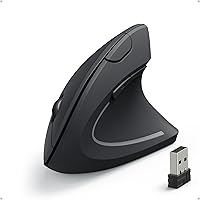
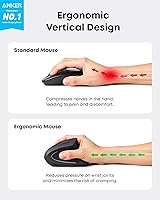
The Anker AK-98ANWVM-UBA Wireless Vertical Mouse has been a go-to entry-level option for people dealing with wrist and arm fatigue since it first appeared in 2013. Unlike a traditional flat mouse, a vertical design holds your hand in a natural handshake position, which takes pressure off the forearm muscles and tendons over long sessions. Connection is handled by a tiny 2.4G USB receiver — no drivers, no pairing headaches. It has ranked among the top 50 in Computer Mice on Amazon for years, which says something about its staying power. That said, this is an affordable ergonomic tool, not a precision device, so set your expectations accordingly.
Features & Benefits

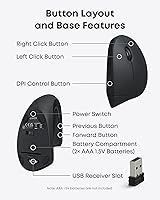
This wireless ergonomic mouse gives you three DPI settings — 800, 1200, and 1600 — so you can dial in cursor speed whether you're working on a single monitor or spreading out across a wide display. The nano USB receiver tucks neatly into the base of the mouse, which makes it easy to grab and go without losing the dongle. Five buttons total, including dedicated back and forward keys that speed up web browsing considerably. It plays nicely with Windows, Mac, and Linux out of the box. One practical note: it enters a power-saving sleep mode after eight minutes idle, though it wakes instantly with a click. Worth knowing upfront — AAA batteries are not included.

Best For

This vertical mouse makes the most sense for office workers and remote employees who clock long hours at a desk and want something to ease the daily grind on their wrists. It's also a sensible starting point if you're curious about ergonomic mice but aren't ready to spend serious money on a high-end model — trying the concept at a low price is a reasonable way to find out if the vertical form factor actually works for you. Frequent web browsers will appreciate those navigation buttons. People who switch between workstations will like how compact and self-contained the setup is. Left-handed users should look elsewhere — this is a right-hand-only design.

User Feedback

With more than 52,000 ratings and a 4.2-star average, the Anker ergonomic mouse has clearly struck a chord with a wide range of users. The most consistent praise is about comfort — many buyers report a real drop in wrist discomfort within the first week of switching, and setup gets high marks for being genuinely instant. On the flip side, the scroll wheel draws repeated complaints: it tends to feel stiff and lacks the smooth, tactile response you get on pricier mice. Users with larger hands also note the grip can feel tight during extended sessions. The DPI button placement is another adjustment for newcomers. And almost every critical review mentions the same thing: bring your own AAA batteries.

Pros

  • The vertical grip puts your wrist in a natural handshake position, reducing forearm tension during long work sessions.
  • Plug the nano receiver in and it works — no drivers, no software, no setup friction on Windows, Mac, or Linux.
  • The receiver stores inside the mouse base, so you never have to worry about losing the dongle while traveling.
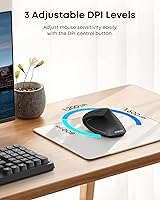
  • Three DPI settings give enough range for switching between precise tasks and fast navigation on larger screens.
  • Dedicated back and forward thumb buttons make web browsing noticeably faster after just a day or two of use.
  • Auto-sleep kicks in after eight minutes idle, which meaningfully stretches battery life between swaps.
  • Over 52,000 verified ratings averaging 4.2 stars across more than a decade on the market signals reliable consistency.
  • At its price point, this vertical mouse is one of the lowest-risk ways to test whether ergonomic mousing actually helps your wrists.
  • Lightweight at under five ounces, making it easy to carry between a home office and a workplace without adding bulk.

Cons

  • AAA batteries are not included in the box, which catches many first-time buyers off guard on day one.
  • The scroll wheel feels stiff and imprecise compared to mice even slightly higher in price.
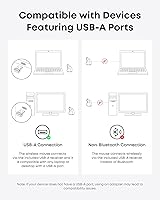
  • No Bluetooth option means you need a free USB-A port, which is increasingly scarce on modern laptops.
  • Users with large hands frequently report that the grip feels cramped well before the end of a full workday.
  • The DPI toggle button is awkwardly placed and easy to bump accidentally mid-task.
  • No button remapping or companion software means zero customization beyond the three preset DPI levels.
  • The main click buttons produce a louder click sound than average, which can be disruptive in quiet shared offices.
  • Long-term durability concerns surface in extended-use reviews, particularly around scroll wheel wear after heavy daily use.

Ratings

The scores below for the Anker AK-98ANWVM-UBA Wireless Vertical Mouse were generated by our AI engine after processing thousands of verified global buyer reviews, with spam, incentivized posts, and bot activity actively filtered out. The result is an honest, data-driven snapshot that reflects what real users consistently praise and where they consistently push back. Both the strengths and the friction points are represented without sugarcoating.
Ergonomic Comfort
83%
The handshake grip position is the single biggest reason people buy this mouse, and most users report genuine relief from wrist and forearm tension within the first week of daily use. For office workers logging six or more hours at a desk, that shift in posture alone makes a meaningful difference.
Results are not universal — users with wider palms or longer fingers often find the grip angle less natural than expected. A small but vocal group report that comfort plateaus or even reverses after extended sessions due to the compact body size.
Build Quality
71%
29%
The plastic shell feels solid enough for everyday desk use, and the matte finish resists fingerprints reasonably well. For the price tier, it does not feel cheap or hollow, and nothing rattles out of the box.
Compared to mid-range competitors, the materials feel noticeably budget-grade on close inspection. The scroll wheel housing in particular has a slightly loose, plasticky feel that makes the overall build seem less refined than the ergonomic design suggests.
Scroll Wheel Performance
58%
42%
The scroll wheel functions reliably for standard browsing and document reading. It gets the job done without any skipping or misfiring during normal vertical scrolling tasks.
Stiffness is the most repeated complaint in user reviews — many describe it as requiring noticeably more force than expected, especially coming from a conventional mouse. Precision scrolling through long spreadsheets or documents can feel frustratingly coarse over time.
Wireless Connectivity
86%
The 2.4G nano receiver delivers a stable, lag-free connection that most users never have to think about. Plug-in and it just works across Windows, Mac, and Linux without hunting for drivers or toggling settings.
There is no Bluetooth option, so users who prefer a dongle-free setup or work on tablets and modern laptops with limited USB-A ports will need an adapter. Losing the receiver would effectively disable the mouse, though the base storage helps prevent that.
Ease of Setup
93%
Setup is about as frictionless as it gets — pull the receiver from the base, plug it in, and the mouse is ready in under thirty seconds. Cross-platform compatibility means there is nothing to install regardless of operating system.
The only real setup friction is remembering to supply your own AAA batteries, which are not included. First-time users occasionally miss that the receiver is stored inside the mouse base, leading to brief confusion before the first use.
DPI & Cursor Control
72%
28%
Three DPI steps give enough flexibility for most office tasks — lower settings work well for precise work like photo editing at a basic level, while 1600 DPI covers fast navigation on larger screens or multi-monitor setups.
The DPI button placement on the body takes getting used to, and some users accidentally trigger it mid-task. Power users will also find the top DPI ceiling limiting compared to higher-end mice that offer 3200 DPI or more.
Battery Life
78%
22%
The auto-sleep function kicking in after eight minutes of idle time does a solid job of stretching battery life, and most users report weeks of regular use before needing to swap batteries. Waking from sleep is instant with a button press.
Relying on AAA batteries is an ongoing cost and inconvenience, especially since they are not included in the box. Users who forget to stock extras or travel frequently find this more disruptive than a rechargeable alternative would be.
Navigation Buttons
81%
19%
The dedicated back and forward thumb buttons are well-positioned and responsive, making web browsing noticeably faster for users who rely on them daily. Researchers, writers, and heavy browser users consistently single these out as a practical highlight.
The buttons have a slightly mushy click feel compared to the main buttons, and users with smaller hands sometimes find them slightly awkward to reach without shifting their grip. They are not remappable out of the box on all platforms.
Hand Size Compatibility
63%
37%
Small to medium hands fit naturally into the vertical grip, and most users in that range report that the sizing feels intentional rather than accidental. The angle stays consistent throughout a workday without requiring constant grip readjustment.
Users with large hands repeatedly flag this as a genuine limitation — the mouse body simply does not offer enough surface area to rest the palm comfortably. Over a full workday, this can create tension in the fingers rather than relieving it.
Portability
84%
At under five ounces with the receiver tucked into the base, this wireless ergonomic mouse is easy to drop into a laptop bag without adding meaningful weight or bulk. Road warriors and hybrid workers who switch between home and office setups appreciate the no-fuss carry.
The vertical form factor, while compact for its type, still takes up more bag space than a flat travel mouse. Users who prioritize the smallest possible footprint may find the height slightly awkward to pack alongside other gear.
Click Feel & Responsiveness
74%
26%
The left and right main buttons have a satisfying, crisp click with low actuation force, which suits long typing-adjacent sessions well. Response latency over the 2.4G connection is effectively imperceptible for standard office tasks.
The click sound is on the louder side, which some users in shared or open-plan offices find distracting. The middle click on the scroll wheel also requires more deliberate pressure than expected, making it impractical as a quick shortcut button.
Value for Money
88%
As an entry point into ergonomic mousing, the price-to-benefit ratio is hard to argue with — especially for users who are simply trying to find out whether a vertical design actually helps their wrist before committing to a premium model. The long market track record adds confidence.
Anyone who has used a mid-range or premium ergonomic mouse will notice the quality gap fairly quickly. For users planning to rely on this as a long-term daily driver rather than a trial purchase, the scroll wheel and build limitations may push them toward spending more sooner.
Software & Driver Experience
89%
The complete absence of required software is genuinely appreciated by users who are tired of bloated companion apps. It works across all three major operating systems purely through plug-and-play, which is especially convenient for IT-managed work machines.
The flip side of having no software is having no customization — button remapping, DPI fine-tuning, and polling rate adjustments are simply not available. Power users who want granular control will find this limiting fairly quickly.
Longevity & Durability
69%
31%
The product has been on the market since 2013 and continues to sell at high volume, which suggests the design holds up well enough for most users over a reasonable lifespan. Build consistency appears stable across production batches based on long-term owner feedback.
Heavy daily users report that the scroll wheel and side buttons show wear faster than the main clicks. A handful of long-term reviews note degradation in the wireless signal reliability after one to two years of intensive use, though this is not the majority experience.

Suitable for:

The Anker AK-98ANWVM-UBA Wireless Vertical Mouse is a strong fit for right-handed office workers and remote employees who spend six or more hours a day at a computer and have started noticing tension in their wrist or forearm. It is especially well-suited for people who want to try the vertical form factor without committing significant money upfront — if the ergonomic concept does not work for your hand, the financial risk is low. Those recovering from mild repetitive strain issues, or trying to get ahead of them, will find the handshake grip a meaningful change from a flat mouse. Frequent web browsers benefit directly from the back and forward navigation buttons, which become second nature within a few days. It also works well for anyone who moves between multiple workstations — the receiver stores in the mouse base, so the whole setup travels in one piece with no loose parts to lose.
Not suitable for:

This wireless ergonomic mouse is not a good match for left-handed users — there is no ambidextrous or mirrored version, and the thumb buttons are positioned exclusively for right-hand use. Users with large hands should also approach with caution: the compact body measures under four inches tall, and multiple buyers with bigger palms report that the grip becomes uncomfortable well before the end of a long workday, which defeats the ergonomic purpose entirely. Anyone expecting a premium build — smooth scroll wheel, whisper-quiet clicks, or customizable button mapping — will find the experience underwhelming compared to what mid-range competitors offer at a higher price. Gamers and graphic designers who need precise, high-DPI cursor control will hit the ceiling of what this device can do. Finally, if you strongly prefer rechargeable mice, the AAA battery requirement will be a recurring inconvenience, particularly since batteries are not included in the box.

Specifications

  • Brand: Manufactured by Anker, model number AK-98ANWVM-UBA.
  • Connectivity: 2.4G wireless connection via a nano USB receiver that stores inside the base of the mouse.
  • DPI Settings: Three selectable DPI levels — 800, 1200, and 1600 — switchable via a dedicated button on the mouse body.
  • Buttons: Five-button layout including left click, right click, scroll wheel click, and dedicated back and forward navigation buttons.
  • Handedness: Designed exclusively for right-hand use; no left-handed or ambidextrous variant is available.
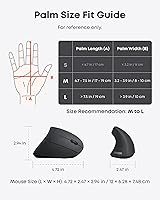
  • Dimensions: The mouse measures 3.98 x 3.23 x 3.15 inches (approximately 101 x 82 x 80 mm), sized for small to medium hands.
  • Weight: The mouse weighs 4.5 ounces (approximately 128g), not including batteries.
  • Power Source: Powered by 2 x AAA batteries, which are not included in the box.
  • Auto Sleep: Enters a full power-off sleep mode after 8 minutes of inactivity; wakes instantly when a button is pressed.
  • Tracking Tech: Uses optical tracking technology suited for smooth, consistent performance on most standard desk surfaces.
  • OS Compatibility: Compatible with Windows, macOS, and Linux operating systems with no driver installation required.
  • Receiver Storage: The nano USB receiver is stored in a dedicated slot on the underside of the mouse when not in use.
  • Warranty: Backed by an 18-month hassle-free warranty provided directly by Anker.
  • Market Debut: This product has been commercially available since February 2013, giving it over a decade of market presence.
  • Sales Rank: Ranked #31 in the Computer Mice category on Amazon, based on a dataset of over 52,000 verified customer ratings.
  • Package Contents: Box includes the wireless mouse and nano USB receiver only; batteries and additional accessories are not included.
  • Color: Available in black with a matte finish that resists minor fingerprint smudging during regular use.

Related Reviews

Acer Ergonomic Vertical Wireless Mouse
80%
92%
Ergonomics & Comfort
88%
Battery Life
85%
Build Quality
90%
Wireless Connectivity
80%
DPI Adjustability
More
Woddlffy Ergonomic Vertical Wireless Mouse
83%
89%
Ergonomic Comfort
82%
Build Quality
88%
Wireless Performance
85%
DPI Accuracy
75%
Size and Fit for Small Hands
More
Logitech MX Vertical
79%
88%
Ergonomic Comfort
61%
Adjustment Period
83%
Build Quality
86%
Multi-Device Connectivity
91%
Battery Life
More
UGREEN Vertical Wireless Ergonomic Mouse

84%
88%
Ergonomic Comfort
84%
Connectivity Performance
80%
Ease of Use
91%
Design and Build Quality
82%
Battery Life
More
DeLUX M618mini Wireless Vertical Mouse
83%
88%
Ergonomics and Comfort
91%
Battery Life
86%
Connectivity Options
82%
Build Quality
89%
Ease of Use
More
seenda Ergonomic Vertical Wireless Mouse
86%
90%
Wrist Comfort & Ergonomics
87%
Battery Life & Charging
91%
Quiet Click Performance
85%
Compatibility & Connectivity
88%
Build Quality & Durability
More
Lekvey XC-05 Vertical Wireless Mouse

75%
83%
Ergonomic Comfort
66%
Build Quality
88%
Battery Life
54%
Sleep Mode & Wake Responsiveness
81%
Wireless Connectivity
More
SHARE SUNSHINE Ergonomic Vertical Wireless Mouse
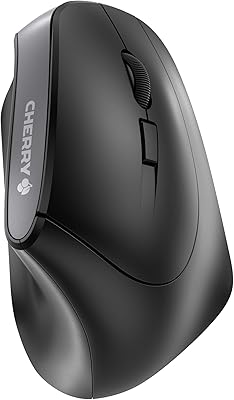
74%
83%
Ergonomic Comfort
79%
Adjustable Tilt Angle
71%
Build Quality
74%
Palm Rest Comfort
88%
Wireless Connectivity
More
Cherry MW4500 Wireless Vertical Ergonomic Mouse
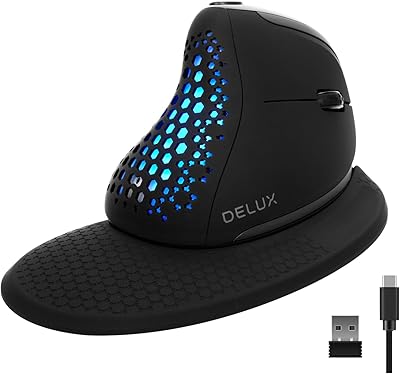
83%
89%
Ergonomics & Comfort
74%
Battery Life
81%
DPI Performance
77%
Ease of Use
85%
Build Quality
More
DeLUX Seeker M618XSD Wireless Ergonomic Vertical Mouse
85%
88%
Ergonomics & Comfort
93%
Connectivity Options
85%
Customizability (DPI & RGB)
91%
Display & Functionality
82%
Battery Life
More

FAQ

No, there is nothing to install. Plug the nano USB receiver into any available USB-A port and the mouse is ready to use within seconds on Windows, macOS, and Linux. It is a true plug-and-play device.

Yes, it is fully compatible with macOS without any additional drivers or software. The plug-and-play USB receiver handles the connection automatically, though you will need a USB-A port or a USB-C adapter if your MacBook only has USB-C ports.

It runs on 2 x AAA batteries, and no, they are not included in the box — this catches a lot of buyers off guard, so it is worth picking up a pack before your order arrives. Standard alkaline AAA batteries work fine and typically last several weeks of regular daily use thanks to the auto-sleep feature.

Unfortunately, no. The body is shaped specifically for right-hand use, and the thumb buttons are positioned on the left side of the mouse. There is no left-handed or mirrored version of this particular model available.

This is a genuine concern worth thinking about. The mouse is sized for small to medium hands, measuring just under four inches tall, and a meaningful number of users with larger hands report that the grip feels cramped during long sessions. If your hands are on the larger side, it may be worth considering a larger vertical mouse from the mid-range market before committing to this one.

There is a small DPI button on the top of the mouse body that cycles through the three levels — 800, 1200, and 1600 — with each press. Some users initially find the button placement easy to trigger accidentally, so it can take a day or two to build the muscle memory of where it sits.

Battery life varies depending on usage intensity, but most users report several weeks of regular daily use on a single set of AAA batteries. The mouse does not have an explicit battery level indicator, so the first sign of low power is usually an intermittent or sluggish cursor response — that is your cue to swap batteries.

The optical sensor performs reliably on most standard desk surfaces including wood, plastic desks, and most mouse pads. Like most optical mice, it can struggle on highly reflective or completely transparent surfaces such as glass desks, so a basic cloth or hard mouse pad is recommended for consistent tracking.

In everyday office use, the 2.4G connection is effectively lag-free for tasks like browsing, document editing, and general navigation. This is not a gaming mouse, so it is not designed for ultra-low-latency performance, but for typical work tasks interference and delay are not a realistic concern.

The receiver pairs to one mouse only, so you cannot switch it between devices on the fly the way a Bluetooth multi-device mouse can. If you want to use it on a second computer, you would need to physically move the USB receiver to that machine. For users who frequently switch between two workstations, this is a practical limitation to factor into your decision.