Overview

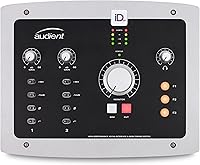
The Audient iD22 USB Audio Interface has been sitting on home studio desks since 2014, and the fact that it still draws serious attention says something real about its staying power. This isn't a beginner's two-channel box — it's a 10-in/14-out desktop interface built for producers and semi-pro engineers who need genuine routing flexibility in a compact form. The all-metal chassis immediately separates it from the sea of plastic budget options, and USB 2.0 connectivity covers both Mac and Windows environments. A decade on the market hasn't made it irrelevant; it's made it proven.
Features & Benefits

The iD22's real calling card is its two Class-A preamps, derived from Audient's professional console lineage. Class-A circuitry runs continuously rather than switching off between signal cycles, which translates to a cleaner, more open sound with less distortion coloring your recordings. There's also a discrete JFET instrument input on the front panel — plug in a guitar or bass directly and you get a warm, high-impedance signal path without needing a separate DI box. Routing 10 inputs and 14 outputs gives small studios real monitoring flexibility, while the ScrollControl encoder doubles as a DAW transport controller, saving meaningful time during longer sessions.

Best For

This desktop interface fits a specific kind of buyer well: someone moving past their first interface who wants professional preamp quality without buying into a rack system. Singer-songwriters who need to record both a microphone and an instrument simultaneously will find the input combination genuinely practical. Mac users get a notably smooth experience — plug in via USB and the unit is recognized immediately, no driver needed. Windows users can absolutely use it too, but should expect a short setup process. Small home studios needing multiple headphone or monitor outputs will also appreciate the flexible output routing this unit provides.

User Feedback

Owners consistently praise the low noise floor and preamp transparency — for vocal tracking and acoustic instruments, many describe it as a clear step above what they used before. Build quality earns repeat mentions too; long-term users say the metal housing has held up through years of daily use. That said, the picture isn't entirely rosy. Windows users have reported driver installation headaches and, in some configurations, latency inconsistencies that required troubleshooting. The unit also runs noticeably warm during extended sessions, though no owners report hardware failures from it. At 4.2 out of 5 across over a hundred reviews, it's a strong but not universally flawless option.

Pros

  • Class-A preamps deliver a clean, low-noise signal that holds up well against interfaces costing significantly more.
  • The built-in JFET instrument input lets guitarists and bassists record direct without a separate DI box.
  • Mac users get true plug-and-play operation — no driver installation required, ever.
  • Ten inputs and fourteen outputs provide routing flexibility that genuinely exceeds this price tier.
  • The all-metal chassis feels built to last and resists the RF interference that plagues cheaper plastic units.
  • ScrollControl encoder doubles as a DAW transport wheel, reducing how often you reach for the mouse mid-session.
  • Long-term owners consistently report the unit still performs reliably years after purchase.
  • Compact desktop footprint leaves usable desk space even in tight studio setups.
  • Audient's console heritage translates to a preamp character that flatters vocals and acoustic instruments.

Cons

  • Windows driver setup can be frustrating, and some users have encountered latency issues that required manual troubleshooting.
  • The unit runs noticeably warm during extended sessions, which may be uncomfortable in small or poorly ventilated rooms.
  • No bus power — the iD22 requires a dedicated power connection, limiting portability for mobile recording.
  • With over a decade since launch, buyers should verify that current driver versions are actively maintained for modern OS releases.
  • The depth of routing and output options may overwhelm new users who just want a straightforward two-channel setup.
  • No onboard DSP or built-in effects processing, which some competing interfaces at this level now include.
  • The review pool of 106 ratings is relatively modest, making it harder to assess reliability trends across a large user base.
  • Windows users without prior audio interface experience may face a steeper learning curve than the product packaging implies.

Ratings

The scores below reflect our AI-driven analysis of verified global buyer reviews for the Audient iD22 USB Audio Interface, with spam, bot-generated, and incentivized feedback actively filtered out before scoring. Each category is weighted against real usage patterns reported by home studio producers, engineers, and musicians who rely on this desktop interface day-to-day. Both the standout strengths and the genuine frustrations are reflected honestly — nothing has been smoothed over.

Preamp Quality
91%
Users consistently single out the Class-A preamps as the iD22's defining feature, describing vocals and acoustic instruments as noticeably cleaner and more open than what they recorded on previous interfaces. The low noise floor holds up even when tracking quiet sources like fingerpicked guitar or breathy vocals at low gain.
A small number of reviewers with backgrounds in higher-end studio work feel the preamps, while clean, lack a distinctive character compared to boutique or transformer-coupled options. For tracking at very high gain settings, a few users noticed a subtle hardness that does not appear at moderate levels.
Build Quality
88%
The all-metal chassis earns repeated praise from long-term owners who have used the unit daily for several years without any structural deterioration. Buttons and the encoder feel solid and deliberate, which matters in a studio environment where gear gets handled constantly.
Some users report that the front panel knobs feel slightly looser after extended use, though this appears to be a minority experience rather than a systematic flaw. The silver finish also shows fingerprints and smudges more visibly than darker-finished rivals.
Sound Transparency
89%
Buyers upgrading from budget interfaces describe the iD22 as adding nothing unwanted to the signal — what goes in comes out faithfully, which is exactly what you want for mixing decisions that hold up across different listening environments. This neutrality is especially valued for vocal production and podcast-quality speech recording.
The same transparency that engineers praise can feel uninspiring to producers who prefer an interface with a little warmth or color baked in. Users looking for a characterful, vintage-flavored sound will need outboard gear to add that quality — this desktop interface does not provide it on its own.
Windows Driver Stability
58%
42%
Windows users who carefully follow Audient's driver installation instructions and set appropriate ASIO buffer sizes generally report stable day-to-day operation once the initial setup is complete. ASIO performance under DAWs like Ableton and Reaper is rated positively by users who took time to configure their systems properly.
This is the most consistently flagged pain point across Windows reviews — installation complexity, driver conflicts on certain configurations, and occasional latency spikes that do not appear to affect Mac users at all. Non-technical buyers on Windows PCs have described the setup process as unexpectedly frustrating, and a subset never fully resolved the issues.
Routing Flexibility
86%
Ten inputs and fourteen outputs put the iD22 in a different league from most two-channel interfaces, letting small studios run multiple monitor pairs, a headphone mix, and digital gear simultaneously without a patchbay. Reviewers who moved from simpler interfaces consistently mention that the output count alone justified the purchase.
The routing depth can feel overwhelming for users who only need a basic two-in/two-out workflow, and Audient's mixing software has been described as less intuitive than rival control panels. New users sometimes spend time digging through the manual to understand signal flow that should be more self-evident.
Mac Compatibility
93%
Class Compliant USB operation means the unit works on macOS immediately on connection — no driver downloads, no restarts, no compatibility checks needed. Mac-based producers describe the setup experience as one of the most friction-free of any interface they have owned.
While day-to-day operation is smooth, a handful of macOS users report that after major OS version upgrades the interface occasionally requires a reconnect or DAW restart to be recognized properly. This is rare and minor, but worth noting for users who update their operating system frequently.
Value for Money
79%
21%
For buyers who use the full feature set — both preamps, the instrument input, and multiple outputs — the iD22 represents strong return on investment, particularly given the Class-A preamp quality that competes with significantly pricier alternatives. Long-term owners who have used it for five or more years feel the cost per year of use is low.
Buyers who only need one microphone input or basic recording functionality may feel they are paying for routing capabilities they will never use. The competitive landscape has also shifted since 2014, and some newer interfaces offer comparable preamp quality with more modern features at a similar or lower price.
Ease of Setup
67%
33%
For Mac users, setup genuinely takes under two minutes — plug in, open the DAW, select the device, record. Even on Windows, technically confident users report completing driver installation and buffer configuration within 20 to 30 minutes on a clean system.
The gap in setup experience between Mac and Windows is stark enough that it reads almost like two different products. Windows users without prior audio interface experience frequently report confusion about driver selection, ASIO configuration, and why their DAW is not detecting the unit — issues that Audient's documentation does not always resolve clearly.
Instrument Input Quality
84%
The discrete JFET instrument input is consistently praised by guitarists who describe the direct signal as warm and dynamically responsive — notably better than the instrument inputs found on many interfaces using cheaper op-amp designs. Singer-songwriters who track guitar and vocal at the same time find the input combination genuinely practical.
There is only one instrument input, which limits simultaneous direct recording to a single guitar or bass. Producers who regularly track two instrumentalists at once will need a separate DI box for the second source, which partially offsets the convenience advantage.
Thermal Performance
63%
37%
The warmth generated during extended sessions is a known byproduct of Class-A circuitry rather than a flaw, and long-term owners report that the unit has not suffered any heat-related hardware failures even after years of daily use in home studio environments.
In smaller or poorly ventilated studio spaces, the heat output becomes noticeable enough to be uncomfortable. A few users report the unit becoming uncomfortably hot to the touch after four or more hours of continuous operation, which is not reassuring in a cramped desktop setup with other gear running nearby.
ScrollControl Usability
76%
24%
Users who work heavily in DAWs like Logic, Ableton, or Pro Tools describe ScrollControl as a genuine workflow improvement — scrolling through long sessions and nudging clips without reaching for the mouse adds up to meaningful time saved across a recording session.
ScrollControl behavior varies depending on DAW and OS configuration, and some users report that it requires manual setup and occasional re-enabling after software updates. A minority of reviewers found the feature unreliable enough that they stopped using it altogether.
Longevity & Durability
87%
The iD22 has one of the stronger long-term ownership track records in its category — a notable proportion of positive reviews come from buyers who have owned the unit for three years or more and explicitly say they have no intention of replacing it. The metal build clearly contributes to this.
With the unit first released in 2014, prospective buyers should consider that the hardware is aging and eventual driver discontinuation on future OS versions is a realistic risk, not a hypothetical one. Some older units have reportedly experienced encoder wear after heavy daily use over many years.
Software & Control Panel
61%
39%
Audient's console mixer software gives users meaningful control over monitor routing, cue mixes, and digital signal routing from within a single application, which reduces reliance on DAW-level routing for basic monitoring tasks.
The control panel interface has been described by multiple users as dated and less intuitive compared to software bundled with newer rival interfaces. First-time users often need to consult online tutorials or the manual to understand basic functions that competing software handles more transparently.
ADAT Expansion
81%
19%
The inclusion of ADAT optical connectivity allows users to add external preamps and expand the input count significantly without replacing the interface itself — a feature that experienced engineers flag as a major long-term investment advantage over interfaces without digital expansion.
ADAT expansion requires purchasing and connecting separate hardware, and newer users are sometimes unaware this capability exists or how to configure it properly. The benefit is real but only materializes for users whose workflow genuinely outgrows the two built-in mic inputs.

Suitable for:

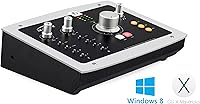
The Audient iD22 USB Audio Interface is a strong match for home studio producers and semi-pro engineers who have outgrown their starter interface and want professional preamp quality without investing in a full rack setup. Singer-songwriters who regularly record vocals and guitar or bass simultaneously will find the combination of two Class-A mic preamps and a dedicated JFET instrument input genuinely practical rather than just a spec-sheet bonus. Mac users in particular get an unusually frictionless experience — the unit is Class Compliant, meaning it is recognized immediately without installing any drivers, which matters if you just want to open your DAW and record. Small project studios that need to run multiple monitor pairs or headphone mixes will also appreciate the 14 available outputs, which go well beyond what most interfaces in this category offer. If you value build quality and plan to use the same interface for several years, the all-metal chassis and Audient's track record of long-term support make the iD22 a sensible long-term investment.
Not suitable for:

The Audient iD22 USB Audio Interface is not the right choice for Windows users who are not comfortable troubleshooting driver installations or adjusting DAW buffer settings — the setup process is more involved than on Mac, and a subset of users have reported persistent latency issues on certain Windows configurations that required real patience to resolve. Complete beginners who only need one microphone input and want something they can plug in and use within five minutes would likely be better served by a simpler, more stripped-back interface. The iD22 also runs noticeably warm during long sessions, which may be a concern for anyone working in a poorly ventilated space or running other heat-generating gear nearby. Buyers who need on-the-go portability — recording in different rooms or on location regularly — may find the 4.5-pound metal unit less convenient than lighter, bus-powered alternatives. And if your workflow is purely in-the-box with no external instruments or microphones, the routing depth here is more capability than you will ever use.
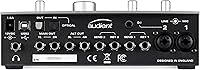
Specifications

  • Form Factor: Desktop unit designed to sit on a studio desk or workstation surface, not rack-mountable.
  • Dimensions: The unit measures 8.86 x 7.09 x 2.36 inches, occupying a modest footprint on a standard desk.
  • Weight: At 4.5 pounds, the all-metal chassis is solid and substantial without being difficult to reposition.
  • Chassis Material: Full metal construction in silver finish, which reduces RF interference pickup compared to plastic housings.
  • Total Inputs: The interface provides 10 total inputs across mic, line, instrument, ADAT, and S/PDIF connections.
  • Total Outputs: Fourteen outputs are available, supporting multiple monitor pairs, headphone mixes, and digital routing simultaneously.
  • Mic Preamps: Two Class-A microphone preamplifiers are derived from Audient's professional mixing console circuit designs.
  • Instrument Input: One discrete JFET instrument input on the front panel accepts guitar or bass directly at high impedance.
  • Connectivity: USB 2.0 is the primary host connection, compatible with standard USB ports on both Mac and Windows computers.
  • Mac Compatibility: The unit is USB Class Compliant on macOS 10.6.8 and later, requiring no driver installation for basic operation.
  • Windows Support: Windows 7 and later are supported via dedicated ASIO and WDM drivers, which must be downloaded and installed separately.
  • Digital I/O: ADAT optical and S/PDIF connections allow expansion with external preamps or digital gear beyond the two analog mic inputs.
  • ScrollControl: The main output encoder doubles as a DAW ScrollControl, letting users scroll or nudge tracks without touching the mouse.
  • Model Number: The official model identifier is iD22, as designated by Audient for this specific interface in their iD product range.
  • Release Date: The iD22 was first made available in April 2014, giving it over a decade of real-world field testing and user feedback.
  • Amazon Rating: The unit holds a 4.2 out of 5 star aggregate rating based on 106 customer reviews on Amazon.

Related Reviews
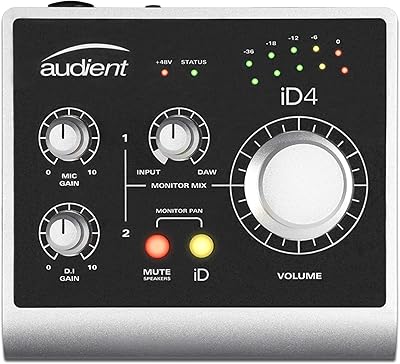
Audient iD4 USB Audio Interface
80%
93%
Preamp Quality
88%
Build Quality
71%
Value for Money
91%
Ease of Setup
84%
Headphone Performance
More
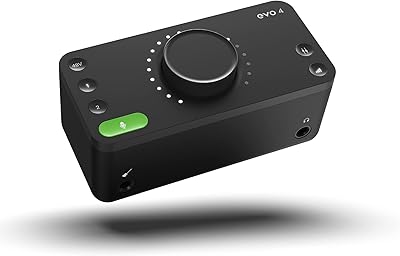
Audient EVO 4
Audient EVO 4
89%
96%
Ease of Setup
92%
Preamplifier Clarity
89%
Software Loopback
94%
Portability & Form Factor
71%
Build Materials
More
Black Lion Audio Revolution 2x2 Audio Interface

75%
88%
Preamp Quality
91%
Audio Transparency
86%
Clocking Performance
87%
Build Quality
73%
Value for Money
More
M-Audio M-Track 2X2 USB Audio Interface

76%
84%
Build Quality
76%
Preamp Performance
82%
Ease of Setup
58%
Driver Stability
79%
Value for Money
More
M-Audio M-Track Duo
M-Audio M-Track Duo
83%
88%
Preamp Clarity
93%
Value for Money
62%
Build Quality
91%
Ease of Installation
87%
Portability
More
Antelope Audio Zen Go Synergy Core Interface
76%
93%
Preamp Quality
88%
Onboard Effects
54%
Software Experience
57%
Windows Stability
91%
Portability
More
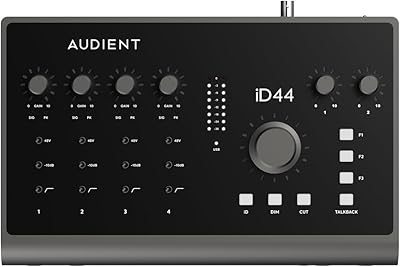
Audient iD44 Audio Interface
80%
88%
Preamp Quality
61%
Driver Stability
91%
I/O Versatility
84%
Build Quality
73%
Value for Money
More
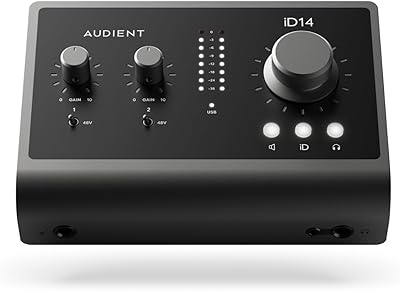
Audient iD14 MKII
Audient iD14 MKII
87%
94%
Preamplifier Transparency
92%
Build Quality and Weight
89%
Headphone Output Versatility
91%
Digital Expandability
86%
Instrument DI Character
More
MOTU 8pre USB Audio Interface
80%
86%
Preamp Quality
91%
Build Quality
88%
Channel Count & I/O
79%
Value for Money
61%
CueMix DSP Software
More
Roland Rubix44 4-In/4-Out USB Audio Interface
80%
91%
Preamp Quality
94%
Build Quality
88%
Noise Performance
58%
Windows Driver Experience
74%
Value for Money
More

FAQ

No. The iD22 is USB Class Compliant, which means macOS recognizes it automatically as soon as you plug it in. You can open your DAW and start recording without downloading or installing anything, which is one of the more convenient aspects of using it on Apple hardware.

More involved than on Mac, honestly. You will need to download and install Audient's ASIO and WDM drivers before the interface works properly with most DAWs on Windows. The installation itself is straightforward for most users, but a small number of people have reported latency quirks on specific Windows configurations that required some buffer size adjustments to resolve.

Yes, and it works well. The front panel has a dedicated JFET instrument input designed specifically for high-impedance sources like electric guitar and bass. You get a clean, warm signal path without the added cost or cable clutter of an external DI box.

It is one of its strongest use cases. The two Class-A preamps are quiet and transparent, which means your condenser or dynamic microphone gets a clean signal with a low noise floor. Vocalists and singer-songwriters consistently rate the preamp quality as a noticeable upgrade from entry-level interfaces.

Not really. This is a known characteristic of Class-A circuitry, which runs continuously rather than switching off between signal cycles — that continuous operation generates some heat. Owners who have used the iD22 for years report no hardware failures related to warmth, but it is sensible to give it some open airspace around the unit rather than boxing it into a tight shelf.

The input count itself is not a problem — you do not have to use all ten inputs to get value from the unit. That said, if you genuinely only record one microphone at a time and want the simplest possible setup, there are more affordable and straightforward options that might suit you better without the extra routing complexity.

For Mac, the Class Compliant design means it typically works without issue on current macOS versions. For Windows, you should check Audient's website for the latest driver release and confirm it covers your specific Windows version before purchasing, since driver support for decade-old hardware can occasionally lag behind new OS updates.

Yes, and this is one of the practical reasons the iD22 appeals to small project studios. The fourteen available outputs give you the flexibility to run multiple monitor pairs and headphone mixes simultaneously, which is genuinely more capability than most competing interfaces at this level offer.

The main volume encoder on the front panel can be switched into a mode where it controls your DAW's timeline scrolling, track selection, or transport functions depending on your software. In practice it means you can nudge through a session or adjust plugin parameters without grabbing the mouse, which becomes a real workflow convenience during mixing.

For the right buyer, yes. The analog circuitry and preamp quality do not go out of date the same way software or codecs do. The routing depth, the Class-A preamps, and the metal build are all still competitive. The main caveat is to verify current driver support if you are on Windows, and to compare it against newer alternatives at a similar price point before committing.

Where to Buy