Overview

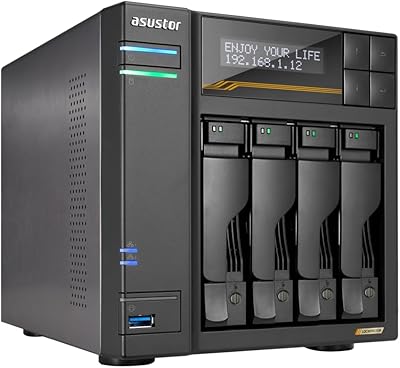
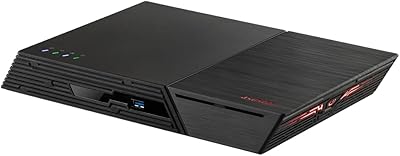
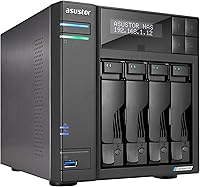
The Asustor Lockerstor 4 Gen2 4-Bay NAS lands squarely in the mid-to-premium tier, built for home power users and small businesses who have outgrown entry-level boxes but don't need a rackmount. The generational jump centers on the Intel Celeron N5105 — a meaningful processor upgrade — paired with an NVMe-first architecture that genuinely separates this unit from older designs. It ships diskless, so buyers should budget for drives separately; that upfront transparency matters when comparing sticker prices. Against Synology and QNAP at similar price points, this Asustor NAS competes credibly, though Asustor's software ecosystem remains less established for users switching from those more dominant platforms.
Features & Benefits

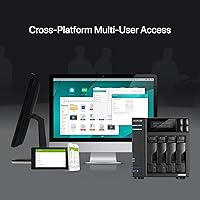
The quad-core N5105 handles Plex transcoding and multi-user file access without straining under typical workloads — a real step up from the older Celeron J-series chips found in prior generations. What truly distinguishes the Lockerstor 4 Gen2 is its four M.2 NVMe slots (PCIe 3.0), letting you build a fast cache tier without sacrificing a single spinning-disk bay. The dual 2.5GbE ports can be aggregated for close to 5Gbps combined throughput, and a PCIe expansion slot keeps 10GbE networking within reach when your infrastructure demands it. RAM starts at 4GB but scales to 16GB, providing real headroom for Docker containers or light virtualization inside ADM.

Best For

This 4-bay unit is a strong match for home lab enthusiasts who want NVMe caching alongside four full-size drive bays — a combination that's genuinely uncommon at this price level. Small offices running centralized file shares will value the 2.5GbE headroom today and the 10GbE upgrade path for later. Plex and Jellyfin operators benefit from the N5105's integrated graphics handling 4K transcoding without falling back to software decoding. Photographers and video editors can pair fast NVMe cache with high-capacity spinning disks for a tiered local backup workflow. Users migrating from an older 4-bay will notice a clear performance difference — this is not a marginal refresh.

User Feedback

Sentiment around this Asustor NAS skews positive, with build quality drawing consistent praise — the alloy and aluminum chassis feels solid and purposeful rather than budget. Experienced NAS users find ADM setup approachable, but those migrating from Synology's DSM frequently mention a steeper learning curve than anticipated. Fan noise under sustained load is a recurring complaint; the unit runs audibly louder than some rivals, which matters if it's sitting in a living room. A handful of buyers have flagged NVMe compatibility quirks with certain drive brands. Asustor support gets mixed reviews for responsiveness. That said, most owners feel the price-to-performance ratio holds up well against comparable Synology or QNAP configurations.

Pros

  • Four dedicated M.2 NVMe slots enable real caching performance without consuming any SATA drive bays.
  • The N5105 processor handles 4K Plex transcoding and multi-user workloads far better than older J-series chips.
  • Dual 2.5GbE ports with link aggregation support push throughput well beyond standard gigabit setups.
  • The alloy and aluminum chassis feels genuinely solid — this is not a unit that flexes or rattles.
  • RAM is expandable to 16GB via a standard SO-DIMM slot, making upgrades simple and inexpensive.
  • A PCIe expansion slot offers a credible 10GbE upgrade path without replacing the entire enclosure.
  • ADM supports Docker, scheduled backups, media serving, and surveillance — covering most prosumer use cases.
  • This 4-bay unit consistently outperforms similarly priced Synology and QNAP configurations on raw hardware specs.
  • Drive bays accept both 3.5-inch and 2.5-inch SATA drives, giving flexibility to mix HDDs and SSDs freely.

Cons

  • Fan noise under sustained heavy workloads is noticeably louder than competing units in the same price range.
  • ADM's app ecosystem lags behind Synology DSM in polish and available third-party integrations.
  • NVMe slots use PCIe 3.0, not 4.0 — cache speeds are real but not class-leading by current standards.
  • Some NVMe drives require firmware updates or compatibility checks before the slots recognize them reliably.
  • Asustor customer support response times are consistently rated slower than Synology or QNAP equivalents.
  • The diskless price tag is deceptive — a fully loaded build with drives and a 10GbE card costs substantially more.
  • Users switching from Synology face a meaningful learning curve that support forums only partially offset.
  • A single SO-DIMM slot means no dual-channel memory support, which limits certain memory-intensive workloads.
  • 10GbE expansion requires a separately purchased PCIe card with its own compatibility verification process.

Ratings

The Asustor Lockerstor 4 Gen2 4-Bay NAS earns an overall rating built from a careful analysis of verified buyer reviews worldwide — with AI filtering applied to remove incentivized, duplicate, and bot-generated submissions. Scores reflect what real owners actually experience day-to-day, from initial rack setup to long-term reliability, covering both the hardware strengths and the software friction points that show up after the honeymoon period ends. Strengths are credited where earned; recurring pain points are reflected honestly.
Processing Performance
83%
The Intel Celeron N5105 handles simultaneous 4K Plex transcoding and multi-user SMB file transfers without the kind of stuttering that plagued older J-series chips. Home lab users running Docker containers alongside active file shares report the processor holds up well under the kind of mixed workloads a busy household or small office throws at it daily.
Push it toward heavier virtualization or run multiple concurrent 4K streams and you will start to feel the ceiling. The N5105 is competent, not unlimited — users expecting workstation-class headroom will find themselves bumping against it sooner than anticipated.
NVMe Cache & M.2 Flexibility
88%
Having four dedicated M.2 NVMe slots is genuinely rare at this price tier, and buyers who configure even a basic read-write cache layer notice snappier response times for frequently accessed files. Critically, those slots do not consume any of the four SATA drive bays, so you get caching without a storage penalty.
The slots run PCIe 3.0, not 4.0, so sequential cache speeds are capped compared to what newer platforms offer. A small number of users also reported compatibility hiccups with specific NVMe brands, requiring firmware updates or drive swaps before the slots were recognized reliably.
Network Throughput
81%
19%
Dual 2.5GbE ports cover most home and small-office scenarios well, and link aggregation brings combined throughput close to what a single 5GbE connection would deliver. Users on 2.5G switches report noticeably faster large file transfers compared to standard gigabit setups they upgraded from.
If your switch is still gigabit-only, you will not see any real-world benefit from those 2.5G ports until you upgrade your network infrastructure too — an added cost many buyers overlook. The 10GbE path requires purchasing a separate PCIe card, which adds both expense and another compatibility variable.
Build Quality & Chassis
91%
The alloy steel and aluminum construction gives this 4-bay unit a noticeably premium feel compared to the all-plastic enclosures common in this category. Drive trays click in with satisfying firmness, and the overall rigidity of the chassis makes it feel like something built to run continuously for years rather than sit on a shelf.
At 7.7 pounds it is not light, which matters if desk placement changes frequently. A handful of buyers noted that while the exterior finish looks great initially, it does attract fingerprints and minor scuffs more readily than matte-finish competitors.
Fan Noise & Thermal Management
62%
38%
Under light to moderate loads — routine backup jobs, media streaming to one or two devices — the unit runs quietly enough to sit in a home office without becoming a distraction. Asustor's fan control software does allow some manual tuning for users willing to dig into the settings.
Under sustained heavy workloads, the fan ramps up to a level that multiple reviewers specifically called out as louder than expected for a device in this price bracket. Users placing this unit in living rooms or bedrooms have reported it being audible enough to cause frustration, especially during overnight backup jobs.
RAM & Expandability
78%
22%
Starting at 4GB DDR4 is adequate for straightforward NAS duties, and the fact that it is a standard SO-DIMM slot means upgrading to 16GB is straightforward and relatively inexpensive. Users running Docker apps and lightweight containers find 8GB a comfortable operating point after a simple upgrade.
The unit ships with only a single SO-DIMM slot populated, so reaching maximum capacity requires sourcing compatible DDR4-2933 RAM — a spec not always easy to find at local retailers. A few buyers expected dual-channel support and were disappointed to find the architecture does not offer it.
ADM Software Ecosystem
69%
31%
For users coming in without a strong attachment to Synology DSM or QNAP QTS, ADM is functional and covers the core use cases well — scheduled backups, media indexing, Docker deployment, and surveillance camera integration all work without requiring third-party workarounds. The interface has a clean layout that experienced NAS users can navigate quickly.
Users migrating from Synology in particular report a meaningful adjustment period; certain ADM app equivalents lag behind DSM counterparts in polish and update frequency. Community support forums are smaller than those surrounding the two dominant platforms, which matters when you hit an obscure configuration issue at 11 p.m.
Setup & Initial Configuration
74%
26%
Hardware setup is genuinely straightforward — drive installation is tool-free, and the initial ADM wizard walks through network configuration and RAID selection clearly enough for technically confident users to be up and running within an hour. The 2.5GbE ports are auto-detected without manual driver intervention on current ADM versions.
Absolute beginners without prior NAS experience will likely find the initial configuration more overwhelming than Synology's famously polished out-of-box experience. RAID decisions made at setup are not always easy to revisit later, which a few first-time buyers flagged as a source of anxiety during initial configuration.
Plex & Media Server Performance
82%
18%
The N5105's integrated GPU handles hardware-accelerated transcoding for Plex Pass subscribers meaningfully better than older Celeron J-series NAS units. Households streaming one or two simultaneous 1080p or 4K transcoded streams consistently report smooth playback without the buffering that plagued lower-spec units.
Plex Pass is required to unlock hardware transcoding — without it, the unit falls back to software decoding and the processor shows its limits quickly with multiple 4K streams. Users running Jellyfin report slightly more configuration effort to get hardware acceleration working compared to Plex's more guided setup.
Drive Compatibility & Bay Versatility
77%
23%
The four SATA bays accept both 3.5-inch and 2.5-inch drives interchangeably, giving buyers flexibility to mix high-capacity spinning disks with 2.5-inch SSDs in a single enclosure. Popular NAS-grade drives from Seagate IronWolf and WD Red lines are widely reported as working without issues.
Compatibility with some less common or older drives has produced occasional hiccups that required a manual compatibility check against Asustor's published list. Enterprise-grade SAS drives are not supported, which is expected at this tier but worth confirming for buyers coming from server environments.
Value for Money
76%
24%
When you price out a comparable Synology or QNAP unit with equivalent NVMe slots and 2.5GbE networking, this Asustor NAS often comes in at a noticeably lower figure for the hardware alone. Buyers focused on raw specification-per-dollar tend to view the value proposition favorably, especially given the 10GbE upgrade path included without a premium chassis upcharge.
The diskless configuration means the purchase price is just the starting point — add four NAS-grade HDDs and a pair of NVMe SSDs for caching and the total outlay climbs substantially. Buyers who factor in the full build cost sometimes feel the gap versus Synology narrows more than the hardware specs alone would suggest.
10GbE Upgrade Path
72%
28%
The PCIe expansion slot gives this 4-bay unit a credible future-proofing story that most direct competitors in its price range simply cannot match. Users who anticipate network infrastructure upgrades in the next one to two years value not having to replace the entire NAS to get there.
The 10GbE card is a separate purchase that adds cost and requires verifying PCIe card compatibility with ADM — not all cards work without manual driver installation. A handful of buyers also noted that the enclosure's internal airflow becomes slightly more restricted with a PCIe card installed, contributing marginally to the thermal concerns already noted.
Power Consumption
79%
21%
Running four spinning disks, the unit draws a reasonable amount of power for its capabilities, and scheduled sleep states work reliably for home users who do not need 24-7 active access. Several buyers specifically mentioned electricity cost as a positive factor compared to older, higher-wattage NAS units they replaced.
With NVMe drives populated across all four M.2 slots plus four spinning HDDs active simultaneously, total system draw climbs more than some buyers anticipated. Users in regions with high electricity costs may want to model out realistic power consumption before committing to a fully loaded configuration.
Customer Support
58%
42%
Asustor's support team does respond to tickets and the knowledge base covers common setup scenarios adequately for the majority of standard use cases. Users who submit detailed bug reports through official channels have occasionally received firmware fixes addressing their specific issues within reasonable update cycles.
Response times are widely described as slower than what Synology or QNAP users report from their respective support channels, and live chat availability is inconsistent. When issues fall outside documented scenarios — especially around NVMe compatibility or third-party app behavior — users often find community forums more useful than official support.

Suitable for:

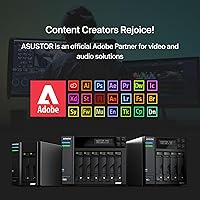
The Asustor Lockerstor 4 Gen2 4-Bay NAS is purpose-built for technically confident users who want more than a basic shared drive but are not ready to commit to rackmount hardware. Home lab enthusiasts will appreciate the four M.2 NVMe slots that allow a proper caching layer without giving up a single spinning-disk bay — a combination that is genuinely hard to find at this price tier. Small offices running centralized file sharing, light virtualization, or Docker-based applications will find the expandable RAM and 2.5GbE networking covers their needs today with a believable 10GbE upgrade path for later. Plex and Jellyfin operators who have already hit the ceiling on an older, weaker NAS will notice a real difference in transcoding headroom thanks to the N5105's integrated graphics. Photographers and video editors who want tiered local backup — fast NVMe cache feeding into high-capacity spinning disks — will find this 4-bay unit a practical and cost-effective setup for that exact workflow.
Not suitable for:

The Asustor Lockerstor 4 Gen2 4-Bay NAS is not the right call for buyers who are brand-new to NAS hardware and expect a polished, hand-holding setup experience. Users deeply embedded in the Synology ecosystem will face a real adjustment period with ADM — it covers the bases, but it does not match DSM's breadth of third-party app support or the depth of its community knowledge base. Anyone placing storage hardware in a quiet living room or bedroom should weigh the fan noise complaints carefully; under sustained load, this unit is audible in a way that lighter-use NAS boxes are not. The diskless configuration means the purchase price is only the beginning — add four NAS-grade hard drives, a pair of NVMe SSDs for caching, and potentially a 10GbE expansion card, and the total build cost climbs significantly. Users who need enterprise-grade SAS drive support, redundant power supplies, or out-of-band management will need to look at rackmount solutions that operate in an entirely different tier.
Specifications

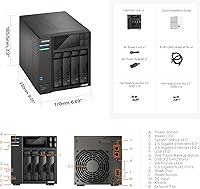
  • Processor: Intel Celeron N5105 quad-core running at 2.0GHz base with burst speeds reaching up to 2.9GHz.
  • RAM: 4GB DDR4-2933 SO-DIMM installed at factory, expandable to a maximum of 16GB via a single slot.
  • Drive Bays: Four SATA III bays supporting both 3.5-inch and 2.5-inch hard drives and SSDs interchangeably.
  • M.2 Slots: Four dedicated M.2 NVMe slots running on PCIe 3.0, independent of the four SATA drive bays.
  • Network Ports: Two 2.5 Gigabit Ethernet ports supporting speeds of 2.5G, 1G, and 100M with link aggregation capability.
  • 10GbE Expansion: One PCIe expansion slot supports an optional 10GbE network card for higher-bandwidth infrastructure upgrades.
  • USB Ports: Two USB 3.2 Gen 2x1 ports rated at up to 10Gbps for external drive connections and peripheral attachments.
  • Operating System: Asustor Data Master (ADM), a Linux-based NAS operating system supporting Docker, backup, media, and surveillance apps.
  • Chassis Materials: Enclosure is constructed from alloy steel and aluminum for structural rigidity and passive heat dissipation.
  • Dimensions: The unit measures 9.45″ deep, 12.6″ wide, and 11.81″ tall in desktop tower orientation.
  • Weight: The bare enclosure without drives installed weighs 7.7 pounds.
  • Form Factor: Desktop tower configuration designed for shelf or desk placement rather than rack mounting.
  • Drive Included: Sold as a diskless enclosure — no hard drives, SSDs, or NVMe drives are included in the box.
  • Max Raw Storage: Maximum raw capacity depends entirely on installed drives; the four SATA bays support current high-capacity NAS HDDs.
  • Memory Type: Uses DDR4-2933 SO-DIMM format, the same module type found in many laptops, making upgrades straightforward.
  • Amazon Ranking: Ranked #32 in the Network Attached Storage category on Amazon with a 4.2 out of 5 star average from 428 ratings.
  • Model Number: Official Asustor model designation is AS6704T, part of the Lockerstor Gen2 product family.
  • Availability Status: Listed as not discontinued by the manufacturer as of its product page, remaining an active product in the Asustor lineup.

Related Reviews

Asustor Lockerstor 4 Gen3 AS6804T 4-Bay NAS
84%
91%
Performance
88%
Build Quality
94%
Network Speed
87%
Storage Expandability
89%
Ease of Setup
More
Asustor Drivestor 4 Pro AS3304T 4-Bay NAS
78%
88%
Network Performance
83%
Software & ADM Interface
74%
Media Playback & Transcoding
76%
App Ecosystem
57%
RAM & Multitasking
More
Asustor AS5404T 4-Bay NAS Enclosure
80%
88%
Build Quality
82%
Processing Performance
93%
NVMe Storage Flexibility
87%
Network Throughput
76%
Software Ecosystem (ADM OS)
More
Asustor Lockerstor 8 AS6508T 8-Bay NAS
77%
91%
Network Performance
84%
Value for Money
88%
Build Quality
62%
Software (ADM)
83%
SSD Caching
More
Asustor Lockerstor 10 Gen3 AS6810T 10-Bay NAS
87%
95%
Network Performance
92%
Drive Flexibility
93%
CPU & Processing Speed
90%
Memory Reliability
78%
Setup & Installation
More
Asustor Lockerstor 6 Gen3 AS6806T 6-Bay NAS
79%
93%
Raw Throughput Performance
91%
NVMe Cache Flexibility
89%
Network Connectivity
88%
CPU & Processing Headroom
86%
Build Quality & Chassis
More
Asustor Lockerstor 10 Pro AS7110T 10-Bay NAS
83%
92%
Performance
96%
Storage Capacity
89%
Connectivity
62%
Setup and Installation
90%
Build Quality
More
Asustor Drivestor 2 Pro Gen2 2-Bay NAS
76%
83%
Setup & Initial Configuration
89%
Network Performance (2.5GbE)
71%
4K Transcoding Performance
67%
Software & ADM Ecosystem
86%
Build Quality & Physical Design
More
Asustor FLASHSTOR 6 Gen2 FS6806X 6-Bay M.2 SSD NAS
88%
94%
Performance
89%
Ease of Setup
92%
Build Quality
93%
Data Transfer Speed
88%
Storage Flexibility
More
Asustor Flashstor 12 Pro Gen2 NAS
76%
93%
Read/Write Performance
61%
SSD Compatibility
89%
Noise & Thermal Management
47%
USB4 / Thunderbolt Connectivity
84%
Build Quality & Design
More

FAQ

No, it does not. The Asustor Lockerstor 4 Gen2 4-Bay NAS ships as a diskless enclosure, meaning you need to purchase your own hard drives, SSDs, or NVMe drives separately. Factor that cost into your total budget before buying — a fully loaded build with four NAS-grade HDDs and a couple of NVMe cache drives can add several hundred dollars on top of the unit price.

You can physically install desktop drives, but it is not recommended for 24-7 operation. NAS-grade drives like Seagate IronWolf or WD Red are engineered for continuous workloads, vibration tolerance in multi-drive setups, and longer mean-time-between-failure ratings. Desktop drives running around the clock in a NAS tend to fail earlier and may also void drive warranties.

The four M.2 slots support NVMe PCIe 3.0 drives in the M.2 2280 form factor, which covers the vast majority of consumer and prosumer NVMe SSDs on the market. That said, a small number of buyers have reported that certain drives required a firmware update or were not recognized without a compatibility check. It is worth cross-referencing Asustor's published compatibility list before ordering specific NVMe brands.

For basic file sharing, scheduled backups, and media streaming, 4GB is workable. If you plan to run Docker containers, multiple apps simultaneously, or any light virtualization, upgrading to 8GB or 16GB is worth doing early. The slot takes standard DDR4-2933 SO-DIMM modules, so the upgrade is inexpensive and takes about five minutes.

Under light to moderate loads it is quiet enough for a home office without being distracting. However, when the unit is under sustained heavy workload — large backup jobs, intensive transcoding, or RAID rebuilds — the fan ramps up noticeably. Several owners specifically mention it is not ideal for bedroom or living room placement if you are sensitive to fan noise. A dedicated closet or utility room is a more comfortable long-term location.

Yes, and it does it well relative to older NAS units in this category. The Intel Celeron N5105 includes integrated graphics that handle hardware-accelerated transcoding for Plex Pass subscribers. One or two simultaneous 4K transcoded streams is realistic; pushing beyond that will start straining the processor. Note that Plex Pass is required to unlock hardware transcoding — without it, everything falls back to software decoding.

ADM is functional and covers the core use cases — backups, media indexing, Docker, surveillance — without requiring workarounds. That said, if you are coming from Synology's DSM, expect a real adjustment period. DSM has a larger app library, a more mature third-party ecosystem, and a significantly larger community forum when you hit an unusual problem. ADM is not bad; it just has less surrounding infrastructure built up around it.

Yes, the enclosure includes a PCIe expansion slot specifically for this purpose. You would need to purchase a compatible 10GbE PCIe card separately and verify it against Asustor's compatibility list, as not all cards work without manual driver installation. It is a legitimate upgrade path, but it adds cost and one more compatibility variable to manage.

This 4-bay unit supports JBOD, RAID 0, RAID 1, RAID 5, RAID 6, and Asustor's own hybrid RAID mode through ADM. For most home and small-office users, RAID 5 across four drives offers a reasonable balance of redundancy and usable capacity. Just remember that RAID is not a backup strategy — it protects against drive failure but not accidental deletion, ransomware, or enclosure failure.

If you are coming from an older Celeron J-series NAS, the performance jump is meaningful and you will feel it in transcoding, transfer speeds, and app responsiveness. The bigger consideration is whether you are comfortable leaving the Synology ecosystem for ADM. The hardware is genuinely compelling for the price, but factor in the time investment of learning a new operating system and potentially reconfiguring your apps and backup workflows from scratch.

Where to Buy