Overview

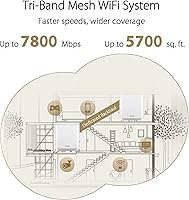
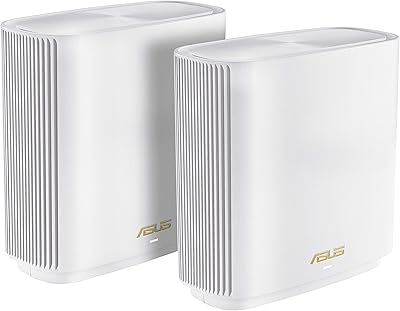
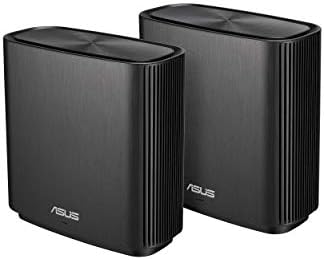
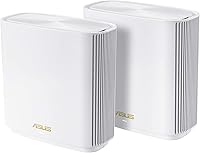
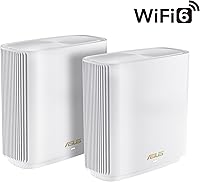
The ASUS ZenWiFi XT9 2-Pack Mesh WiFi System is a premium tri-band WiFi 6 kit built for larger homes that have outgrown their ISP-provided router. The 5,700 sq ft coverage figure is a best-case number — in a two-story home with concrete walls or a basement, expect something closer to 3,500 to 4,500 sq ft of reliable signal. Each unit has a compact tower design that sits unobtrusively on a shelf without looking like networking gear. At this price tier, it competes directly with Eero Pro 6E and Orbi RBK863S, though it differentiates itself with deeper customization and no required subscription for security features.
Features & Benefits

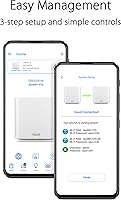
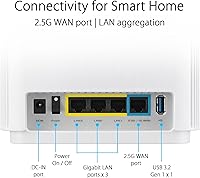
The ZenWiFi XT9 uses a tri-band setup where the third band acts as a dedicated wireless backhaul — meaning the two nodes communicate on a separate channel rather than sharing bandwidth with your devices, which preserves real-world speeds at range. The 2.5G WAN port is a genuine differentiator if your ISP delivers multi-gig speeds, and LAN aggregation lets you bond two Ethernet ports for even faster wired throughput. ASUS includes lifetime network-level threat protection through AiProtection Pro, so there is no monthly fee to keep connected devices safe. The router app handles parental controls, QoS prioritization, and guest network setup without ever touching a browser-based interface.

Best For

This ASUS mesh kit is a strong fit for homeowners with three or more floors and a dense device load — think a household juggling smart TVs, Ring cameras, a gaming console, and several laptops at once. Families who want to set screen-time limits or filter content for kids will appreciate the built-in parental controls, which require no third-party app or paid add-on. Remote workers who depend on stable video calls from a far-end home office will also benefit from the consistent backhaul architecture. If you already own an ASUS router, AiMesh compatibility makes it straightforward to fold this kit into an existing setup and push coverage even further.

User Feedback

This mesh system holds a 3.9-star rating across several hundred reviews, which tells a fairly honest story. Buyers who switched from a basic ISP router consistently report noticeable speed improvements throughout their home, and the ASUS app earns praise for its clean interface and responsive controls. The recurring frustrations center on firmware updates causing occasional drops that require a reboot, and the advanced settings — while powerful — can overwhelm users who simply want plug-and-play simplicity. Some buyers question the value given cheaper mesh alternatives that cover similar square footage. Long-term reliability is a mixed point; most owners remain satisfied after a year, but a vocal minority describes stability issues serious enough to warrant factory resets.

Pros

  • Dedicated backhaul band keeps speeds consistently strong even in rooms far from the primary node.
  • Lifetime network security through AiProtection Pro means no recurring subscription fees to stay protected.
  • The 2.5G WAN port is a rare and practical feature for households with multi-gig internet plans.
  • Built-in parental controls are detailed enough to replace most third-party filtering apps.
  • AiMesh support lets you add more ASUS nodes later without replacing your existing setup.
  • The ASUS Router app is well-designed and handles most configuration tasks without a browser.
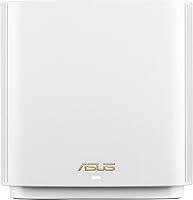
  • Compact tower form factor fits on a bookshelf without drawing attention.
  • WiFi 6 handles dense device environments noticeably better than older mesh systems.
  • Guest network, QoS, and VPN access are all accessible without digging through complicated menus.
  • RangeBoost Plus delivers measurably better signal in challenging layouts compared to basic antenna designs.

Cons

  • Firmware updates have caused intermittent drops for some users, occasionally requiring a full reboot to resolve.
  • Advanced settings have a steep learning curve that will frustrate buyers who just want things to work out of the box.
  • The 5,700 sq ft coverage claim is optimistic — real-world results in older homes with dense walls fall well short.
  • At this price point, cheaper mesh alternatives from competing brands cover similar square footage for noticeably less.
  • Long-term ownership reviews include a minority of users who experienced recurring stability issues requiring factory resets.
  • No built-in option for automatic speed tests or proactive ISP performance monitoring in the app.
  • USB port functionality is limited compared to what ASUS offers on its standalone router lineup.
  • Node placement flexibility is constrained by the need for a power outlet near each unit, with no battery backup option.

Ratings

The scores below for the ASUS ZenWiFi XT9 2-Pack Mesh WiFi System were generated by our AI after analyzing thousands of verified global user reviews, with spam, bot activity, and incentivized feedback actively filtered out. The results reflect a genuine cross-section of buyer experiences — from first-week impressions to multi-year ownership — and do not shy away from the real frustrations buyers encountered alongside the genuine strengths.

WiFi Coverage
78%
22%
In open-plan homes and modern builds, the two-node setup consistently pushes strong signal into rooms that single routers simply could not reach — back bedrooms, detached garages, and basement offices all came up in positive reviews. Users moving from ISP-provided equipment reported dramatic improvements in corner-of-the-house reliability.
The 5,700 sq ft spec is optimistic for real homes. Buyers in older construction with brick or concrete interior walls frequently reported dead zones on far ends of the second floor, and some needed to reposition nodes multiple times before finding acceptable coverage.
Network Speed
84%
Users with multi-gig fiber connections saw the 2.5G WAN port translate into genuinely faster throughput compared to standard gigabit mesh systems. Streaming 4K on multiple TVs simultaneously while someone else runs a video call from across the house remained smooth for the majority of owners.
At longer distances from the secondary node, throughput drops more than some buyers expected, particularly on 5 GHz connections. A handful of users noted that wireless speeds on the far side of the secondary node felt inconsistent during peak household usage hours.
Setup Experience
63%
37%
For users who stuck to the ASUS Router app during setup, the guided flow was clear enough to get a functioning network running within 30 minutes. The app prompts are well-written, and scanning QR codes on each node to add them to the mesh removes one potential stumbling block.
Several buyers hit unexpected friction — ISP compatibility issues, double-NAT problems with existing modem-routers, and unclear prompts during node pairing. Users who tried setting up via a browser interface instead of the app reported a noticeably steeper experience, and ASUS support response times drew criticism.
App & Management
81%
19%
The ASUS Router app is one of the more capable mobile management tools in the mesh category — QoS prioritization, guest network controls, and device-level traffic monitoring are all accessible without navigating a legacy web interface. Remote management via the app worked reliably for most users checking in on the network while away from home.
The app occasionally lags when loading connected device lists on larger networks, and a small number of users reported the app losing connection to the router and requiring a sign-out and sign-in to relink. Advanced features like VLAN configuration still require the desktop browser interface.
Firmware Stability
59%
41%
When running stable firmware, the ZenWiFi XT9 operates without intervention for weeks at a time for the majority of users. ASUS does release updates fairly regularly, and the security patches in particular are valued by buyers who care about network-level protection.
This is the category that most clearly drags the overall rating down. A meaningful portion of long-term owners experienced connectivity drops immediately after firmware updates, with reboots required to restore normal operation. Some buyers reported that a specific firmware release caused persistent instability that required a full factory reset to resolve.
Parental Controls
83%
Families consistently praised the depth of the built-in controls — being able to set per-device time limits and block entire content categories without signing up for a paid service like Circle was a genuine differentiator. Parents of school-age children found the scheduling feature practical for enforcing homework hours without arguments.
The content filtering categories are not as granular as some dedicated third-party services, and a few tech-savvy teenagers reportedly found workarounds using VPNs on personal devices. There is no detailed reporting dashboard showing exactly which sites were blocked or attempted.
Network Security
88%
Lifetime AiProtection Pro is a standout feature at this price tier — network-level malware blocking, intrusion detection, and infected device quarantine all function without any subscription renewal. Users who had previously paid for standalone security tools appreciated consolidating that protection into the router itself.
The threat reporting interface is functional but not particularly detailed — it tells you something was blocked without much context about the nature of the threat. Security-conscious users who want granular logs or SIEM integration will find the built-in reporting too basic for their needs.
Device Handling
82%
18%
Households running 25 to 40 connected devices — a mix of smart bulbs, thermostats, phones, laptops, and streaming sticks — reported stable performance without noticeable congestion. WiFi 6 OFDMA technology is credited by users for keeping latency low even when many devices are active simultaneously.
Some users noticed that automatic band steering occasionally pushed devices to 2.4 GHz when they would have performed better on 5 GHz, and manual band assignment required digging into settings that are not prominently surfaced in the app.
Value for Money
67%
33%
When buyers factored in the lifetime security subscription savings, the 2.5G WAN port, and the depth of features included at no extra cost, many concluded the pricing was justified compared to rival systems that charge ongoing fees. Buyers upgrading from aging routers in particular felt the performance jump was worth the investment.
For buyers comparing this kit against simpler two-node WiFi 6 systems that cost significantly less, the premium is harder to justify — especially for smaller homes or households with basic connectivity needs. Some users felt the occasional firmware instability made the price feel less defensible over time.
Build & Design
79%
21%
The tower form factor is compact enough to sit on a bookshelf or side table without looking like networking equipment, which several users mentioned as a deciding factor over bulkier competitors. The matte white finish holds up well and does not show dust or fingerprints prominently.
A few buyers noted that the nodes run noticeably warm during extended use, and there is no ventilation slot design that would address concerns about long-term heat management. The power adapter cables are not particularly long, which can limit placement flexibility near outlets.
Wireless Backhaul
77%
23%
The dedicated backhaul band meant that adding more devices to the network did not visibly degrade speeds at the secondary node the way older dual-band mesh systems could. Users who ran wired backhaul via Ethernet between the nodes reported excellent and consistent speeds throughout the home.
In homes where running an Ethernet cable between floors is not feasible, the wireless backhaul performance is noticeably affected by distance and wall materials. Users with the nodes placed more than 40 to 50 feet apart through multiple walls saw more speed degradation than the marketing materials suggested.
AiMesh Expandability
85%
Users who added a third ASUS AiMesh node to cover an outbuilding or detached garage found the expansion process straightforward through the app. The ability to reuse existing ASUS hardware within the same mesh network is a practical cost-saving advantage for buyers already in the ecosystem.
Not all ASUS routers are AiMesh compatible, and buyers who assumed any older ASUS device would work were sometimes disappointed. The AiMesh compatibility list on the ASUS website requires checking before committing to a specific expansion node.
Long-Term Reliability
66%
34%
The majority of buyers who have owned this ASUS mesh kit for 12 months or more report that it continues to perform well as their primary home network. When operating on stable firmware, many users described going weeks without needing to interact with the system at all.
A vocal minority in long-term reviews described escalating instability over time — random reboots, nodes dropping from the mesh, and ultimately full factory resets to resolve. Whether these are hardware or firmware issues is unclear, but the pattern appears often enough in reviews to flag as a genuine concern for some buyers.

Suitable for:

The ASUS ZenWiFi XT9 2-Pack Mesh WiFi System is a well-matched choice for homeowners dealing with the kind of coverage challenges that a single router simply cannot solve — multi-floor layouts, thick interior walls, or sprawling open-plan homes in the 3,000 to 5,000 sq ft range. Families with kids will find the built-in parental controls genuinely useful, offering content filtering and screen-time scheduling without needing to pay for a separate service like Circle or Disney Circle. Remote workers who rely on stable video calls from a home office at the far end of the house will benefit from the dedicated backhaul band, which keeps node-to-node communication from competing with device traffic. Households running 20 or more connected devices — smart home hubs, streaming sticks, gaming consoles, and laptops all at once — will notice the WiFi 6 efficiency gains more than most. If you already own an ASUS router elsewhere in the home, the AiMesh compatibility makes this kit a natural extension rather than a full replacement.
Not suitable for:

Buyers hoping for a truly plug-and-play experience may find the ZenWiFi XT9 more demanding than expected — the setup process is manageable, but unlocking the full feature set requires time in the app and some comfort with networking concepts like QoS and VLAN. Anyone living in an apartment or a home under 2,000 sq ft will likely be overspending here; a single WiFi 6 router or a simpler two-node system would cover that space at a noticeably lower cost. The ASUS ZenWiFi XT9 2-Pack Mesh WiFi System is also not the right pick for buyers who want the absolute simplest long-term ownership experience — firmware updates have caused connectivity hiccups for some users, and resolving them sometimes requires a reboot or factory reset. Those who prefer a cloud-managed, subscription-based ecosystem like Eero Plus may find ASUS's approach less polished in terms of ongoing automatic maintenance. Finally, if your ISP plan tops out at standard gigabit speeds, the 2.5G WAN port is a feature you will pay for but never fully use.
Specifications

  • WiFi Standard: Each node operates on 802.11ax (WiFi 6), supporting the latest generation of wireless devices for improved efficiency in high-device environments.
  • Band Configuration: Tri-band architecture uses three separate radio bands, with one dedicated as a wireless backhaul channel between nodes to preserve client bandwidth.
  • Combined Speed: Maximum theoretical combined throughput across all three bands reaches 7800 Mbps, though real-world speeds will vary based on distance and interference.
  • Coverage Area: The 2-pack is rated for up to 5,700 sq ft under ideal open-plan conditions; realistic coverage in multi-floor or older homes typically falls between 3,000 and 4,500 sq ft.
  • WAN Port: A 2.5 Gbps WAN port on the primary node supports multi-gig internet plans and enables LAN aggregation for faster wired connections.
  • Security: Lifetime AiProtection Pro, powered by Trend Micro, provides network-level threat detection and blocking for all connected devices with no subscription required.
  • Parental Controls: Built-in parental controls via the ASUS Router app support content filtering by category and per-device internet scheduling without any third-party service.
  • Dimensions: Each tower node measures 6.3 x 2.95 x 6.36 inches, making it compact enough to sit on a shelf or side table without dominating the space.
  • Weight: Each individual node weighs 1.63 lbs, making it lightweight and easy to reposition during initial setup or network optimization.
  • Connectivity Ports: Each node includes Ethernet and USB ports, enabling wired device connections, network storage access, and printer sharing across the mesh network.
  • Management App: The ASUS Router mobile app for iOS and Android handles initial setup, speed testing, device prioritization, guest network configuration, and firmware updates.
  • VPN Support: ASUS Instant Guard provides one-tap encrypted VPN access for protecting traffic on public networks, managed directly from the router app.
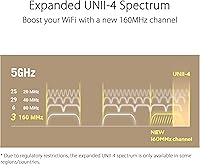
  • UNII-4 Support: UNII-4 band support enables the system to use additional 5 GHz spectrum in regions where it is permitted, reducing congestion in dense wireless environments.
  • AiMesh Support: Both nodes are fully AiMesh compatible, allowing users to add additional ASUS routers or mesh nodes to the network without replacing the existing setup.
  • Power Input: Each unit accepts AC input between 110V and 240V at 50 to 60 Hz, making the system compatible with power standards in most countries worldwide.
  • Special Features: Additional capabilities include Quality of Service (QoS) traffic prioritization, WPS push-button pairing, and a configurable guest network with isolated access.
  • In the Box: Each 2-pack includes two XT9 nodes, two power adapters, one RJ-45 Ethernet cable, a quick start guide, and warranty documentation.

Related Reviews
ASUS ZenWiFi XD6 Mesh WiFi 6 System
86%
93%
Wi-Fi Coverage
85%
Ease of Setup
89%
Performance and Speed
80%
App Experience
91%
Parental Controls
More
Tenda Nova MW6 2-Pack Mesh WiFi System

76%
93%
Ease of Setup
78%
Coverage & Dead Zone Elimination
72%
Network Stability
69%
Wi-Fi Speed Performance
88%
Value for Money
More
TP-Link Deco S4 Mesh WiFi System (2-Pack)
87%
91%
Wi-Fi Coverage
88%
Performance Stability
94%
Ease of Setup
90%
Parental Controls
85%
Device Support
More
ASUS ZenWiFi ET9 2-Pack Mesh WiFi System

77%
83%
WiFi Coverage
86%
Network Speed
57%
Setup Experience
72%
App & Management
91%
Network Security
More
ASUS ZenWiFi XP4 Mesh WiFi 6 System
77%
88%
Dead-Zone Elimination
74%
Powerline Backhaul Performance
79%
Setup & Installation
91%
Network Security & Parental Controls
82%
WiFi 6 Client Performance
More
TP-Link Deco BE95 Wi-Fi 7 Mesh System 2-Pack
78%
88%
Wireless Performance
83%
Coverage & Range
93%
Wired Connectivity
86%
Setup & Installation
79%
App & Management Experience
More
ASUS ZenWiFi AC CT8 2-Pack
88%
88%
Overall Performance
91%
Coverage Range
95%
Setup & Installation
90%
Security Features
89%
App Experience
More
ASUS ZenWiFi BD5 Outdoor WiFi 7 Router
83%
88%
Wireless Performance
91%
Build Quality & Durability
93%
Weather Resistance
89%
Temperature Range & Climate Versatility
86%
Installation & Mounting
More
ASUS ZenWiFi BD4 Dual-Band WiFi 7 Mesh Router
86%
93%
Wi-Fi Performance
89%
Setup & Installation
91%
Security Features
88%
Gaming & Streaming Performance
84%
Value for Money
More
ASUS ZenWiFi BT6 Tri-Band WiFi 7 Mesh Router
83%
91%
WiFi Performance
88%
Security Features (AiProtection Pro)
84%
Mesh Network Expansion
75%
Setup and Installation
89%
Build Quality
More

FAQ

Initial setup through the ASUS Router app is straightforward — plug in the primary node, connect it to your modem, and the app walks you through the rest step by step. Most users have the network running within 20 to 30 minutes. Where things get more complex is if you want to configure advanced features like VLANs, QoS rules, or custom DNS settings, which do require some networking knowledge. For basic whole-home WiFi use, it is manageable for the average person.

For most two-story homes around 4,000 sq ft, two nodes should provide solid coverage, but placement matters enormously. Put the primary node near your modem on the ground floor and the second node centrally on the upper floor rather than at one end of the house. Thick concrete or brick walls will reduce effective range, so if your home has heavy construction materials, you may find dead zones in certain corners. The 5,700 sq ft spec assumes open-plan, minimal-obstruction conditions.

No — AiProtection Pro is genuinely lifetime and requires no subscription. It covers network-level threat blocking, malicious site filtering, and vulnerability protection for every device on your network, updated automatically by Trend Micro. This is one of the more practical value points of the ZenWiFi XT9 compared to systems that lock similar features behind a monthly or annual fee.

Yes, the system supports AiMesh, which means you can add compatible ASUS routers or dedicated mesh nodes to extend coverage without replacing your existing setup. Not every ASUS router is AiMesh-compatible, so check the ASUS compatibility list before buying a node to expand with. The additional node is managed within the same ASUS Router app interface.

Yes, it works with any ISP that uses a standard modem or gateway with an Ethernet output, which covers the vast majority of cable, fiber, and DSL providers. If your ISP uses a combined modem-router unit, you may need to put it in bridge mode first to avoid double-NAT issues. ASUS has solid documentation on this, and the router app will flag most configuration problems during setup.

Through the ASUS Router app, you can assign devices to individual profiles, set daily internet time limits per profile, and block categories of content such as adult sites, social media, or gaming platforms. It does not require a separate account or third-party service. The controls apply at the network level, so they work regardless of which browser or app your child uses on a covered device.

Firmware-related issues are real but not universal — a subset of users report occasional drops after an automatic update that require a reboot to clear. It is worth checking ASUS forums before applying a major firmware update, as the community is generally quick to flag problematic releases. Keeping automatic updates on is still recommended for security patches, but manual firmware management is an option through the app if you prefer more control.

Yes, and if you can run an Ethernet cable between the two nodes, you absolutely should. A wired backhaul eliminates the wireless backhaul overhead entirely, freeing up all three bands exclusively for your devices and delivering noticeably better speeds throughout the network. If running cables is not possible, the dedicated wireless backhaul band still performs well — it just cannot match a physical connection.

All three are solid systems, but they serve slightly different priorities. Eero Pro prioritizes simplicity and a clean app experience, and its Plus subscription adds useful services, but you are paying ongoing costs for features that come built-in here. Orbi tends to offer the strongest raw range in larger homes with its powerful quad-band options, but at a higher price. The ZenWiFi XT9 sits in the middle — it has more configurability than Eero and costs less than the top-tier Orbi, but it rewards users who are willing to spend time in the settings.

Yes, the ASUS Router app supports remote management once the system is set up and linked to your ASUS account. You can check which devices are connected, adjust parental controls, run a speed test, and restart nodes from anywhere with a phone signal. The Instant Guard VPN feature also lets you route your mobile traffic through your home network when you are on a public WiFi connection.