Overview

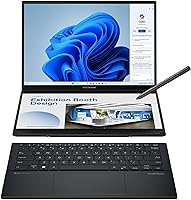
The ASUS Zenbook DUO 14 Core Ultra 9 285H 32GB/1TB is one of the rare laptops that actually rethinks the form factor rather than just refreshing specs. Two full 14-inch OLED panels sit stacked in a chassis that weighs under 3.7 lbs and measures barely over half an inch thick — a genuinely unusual engineering achievement. A detachable Bluetooth keyboard and built-in kickstand mean you can configure it like a proper workstation wherever you land. Powered by Intel's Core Ultra 9 285H, the Zenbook DUO competes in the premium ultraportable space alongside the Dell XPS 14 and LG Gram, but it occupies its own lane. This is a niche powerhouse — capable and compact, but built for a specific kind of user.
Features & Benefits

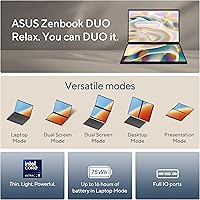
The dual OLED panels are the obvious headline, and they genuinely deliver: each screen runs at 2880x1800 with a 120Hz refresh and 500-nit HDR peak brightness, making colors look rich and accurate whether you're editing photos or watching video on a flight. The four usage modes — Laptop, Dual Screen, Desktop, and Sharing — translate to real-world flexibility. Keep your browser above and your notes below in Dual Screen mode, or detach the keyboard and go full Desktop mode at a standing desk. The 32GB LPDDR5x RAM and 1TB SSD give you genuine multitasking headroom. Battery life reaches 16 hours in Laptop mode, but drops to 9 hours with both screens running — an honest trade-off worth knowing before you buy.

Best For

ASUS's dual-display ultraportable is purpose-built for people whose workflow genuinely doesn't fit on one screen. Graphic designers and video editors will appreciate the Pantone-validated color accuracy and the ability to keep a timeline or tool panel open on the lower display. Frequent travelers who used to haul a laptop plus an external monitor will find this a meaningful upgrade. Developers juggling multiple terminals or documentation tabs will feel right at home too. It also makes sense for anyone already invested in Windows 11 AI features — the integrated NPU provides real headroom for tools like Adobe's generative AI functions and real-time background processing tasks. One caveat: if you've never used a multi-screen setup before, expect a genuine adjustment period.

User Feedback

Among verified buyers, this dual-screen laptop holds a solid 4.5-star rating from over 170 reviews, and the praise is consistent: display quality draws nearly universal admiration, and most buyers are genuinely surprised by how portable the whole setup feels in person. Build quality — especially given the MIL-STD-810H certification — earns regular mentions too. That said, criticism exists. Several users flag that the chassis runs warm under sustained workloads, and the multi-mode workflow takes real adjustment if you're coming from a traditional laptop. The detachable keyboard is comfortable on a desk but noticeably less stable on your lap. Most long-term owners feel the premium asking price is justified — but only if you will actually use both screens daily.

Pros

  • Two 14-inch OLED panels with 120Hz refresh and accurate DCI-P3 color are exceptional for creative professionals.
  • The whole setup weighs under 3.7 lbs — genuinely portable for a dual-screen workstation.
  • 32GB LPDDR5x RAM handles heavy multitasking without slowdowns across both displays.
  • Four usage modes offer real workflow flexibility for different environments throughout the day.
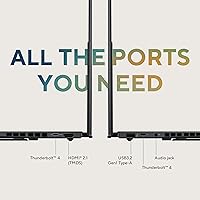
  • Dual Thunderbolt 4 ports plus full-size HDMI 2.1 means most users never need a dongle.
  • MIL-STD-810H certification gives meaningful confidence for frequent travelers and daily commuters.
  • The Zenbook DUO runs quietly and cool during typical office and productivity workloads.
  • FHD IR webcam produces noticeably sharper video quality than competing ultrabooks at this tier.
  • Fast-charge via Thunderbolt 4 gets you back to usable battery quickly between meetings or flights.
  • Single-screen Laptop mode stretches battery life to a full workday for lighter use cases.

Cons

  • Thermal throttling under sustained heavy workloads noticeably limits the processor's full output.
  • Running both OLED screens simultaneously drops real-world battery life to six or seven hours.
  • The detachable keyboard is unstable on laps — flat desk use is essentially required for comfort.
  • Glossy OLED panels pick up glare in bright offices and outdoor settings more than matte alternatives.
  • Only one USB-A port means users with multiple legacy peripherals will still need adapters.
  • Windows driver updates occasionally cause display or wake-from-sleep instability specific to the dual-screen setup.
  • There is no SD card slot, which is a recurring frustration for photographers using this as a mobile editing station.
  • The dual-screen workflow requires a genuine adjustment period — productivity may dip in the first week.
  • Third-party app support for window management across the two stacked displays remains inconsistent.
  • The NPU-driven AI features provide limited day-to-day benefit for buyers not already using AI-accelerated software.

Ratings

The ASUS Zenbook DUO 14 Core Ultra 9 285H 32GB/1TB has been evaluated by our AI system after analyzing verified global buyer reviews, with spam, bot-generated, and incentivized feedback actively filtered out. The scores below reflect a genuine cross-section of real-world experiences — including the frustrations buyers rarely mention in headline reviews. Both standout strengths and recurring pain points are represented transparently so you can make an informed decision.
Display Quality
94%
The dual OLED panels consistently draw the strongest praise across all buyer segments. Photographers and video editors frequently describe colors as immediately trustworthy straight out of the box, with the Pantone-validated calibration noticeably reducing the need for post-purchase profiling. The 120Hz smoothness is a daily comfort users mention even for basic tasks like scrolling.
A small but vocal group of buyers report visible reflections on the glossy OLED surfaces in brightly lit offices or outdoor settings. The lower screen, depending on desk angle, can also catch glare more than the upper panel, which a few users found distracting during extended work sessions.
Dual-Screen Functionality
83%
For buyers who committed to the dual-screen workflow, the payoff is real. Developers keeping documentation on one screen and their IDE on the other consistently report measurable productivity gains. The mode-switching between Laptop, Dual Screen, Desktop, and Sharing feels intuitive after a short adaptation period.
The learning curve is steeper than most buyers anticipate. Several reviewers describe spending their first week defaulting back to single-screen habits before the workflow clicked. Windows 11 window-snapping behavior across two stacked displays is still imperfect, and a few buyers mention occasional driver hiccups when waking from sleep.
Portability & Form Factor
91%
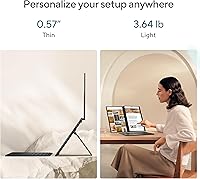
At 3.64 lbs and just over half an inch thick, this dual-screen laptop genuinely surprises buyers who expected it to feel like carrying two laptops. Frequent flyers and café workers consistently note that it slides into a regular laptop bag without drama — something they did not expect from a dual-screen machine.
While thin, the chassis does add noticeable width compared to a standard 14-inch ultrabook, and a handful of buyers found it slightly cramped in economy airplane tray tables. The built-in kickstand, while convenient, requires a flat surface to work properly and is not ideal for true lap use.
Performance & Processing Speed
88%
The Core Ultra 9 285H handles heavy multitasking — multiple browser tabs, video exports, and AI-assisted tools running simultaneously — without the stuttering that plagued older dual-screen designs. Buyers running Adobe Premiere or DaVinci Resolve alongside reference windows on the second screen report smooth day-to-day performance.
Under sustained workloads like long video renders or large file compressions, the chassis heats up noticeably around the upper deck. Several users flag that thermal throttling kicks in sooner than expected during prolonged heavy tasks, which slightly undermines the top-tier processor's full potential in extended sessions.
Thermal Management
61%
39%
For light to moderate workloads — browsing, office applications, video calls — the cooling system stays quiet and surface temperatures remain comfortable. Buyers using the Zenbook DUO for everyday productivity report rarely noticing any heat buildup during typical work hours.
This is one of the most frequently cited frustrations. During sustained creative workloads, the area above the keyboard gets warm enough to be distracting, and fan noise becomes audible in quiet environments. A few buyers specifically note that running both screens at full brightness while rendering amplifies the thermal problem significantly.
Battery Life
74%
26%
In standard Laptop mode with the lower screen off, runtime comfortably covers a full workday for most buyers — typically landing between 11 and 14 hours for mixed productivity use. The fast-charge capability via Thunderbolt 4 is a practical plus that frequent travelers appreciate.
Running both OLED displays simultaneously drops battery life to roughly 9 hours under moderate use, and real-world heavy-use figures in Dual Screen mode can fall closer to 6–7 hours. Buyers who bought this specifically for an all-day dual-screen experience at conferences or on long trips express clear disappointment.
Keyboard & Input Experience
69%
31%
The detachable Bluetooth keyboard is well-regarded when used on a flat desk surface — key travel is adequate for extended typing sessions, and several buyers compare it favorably to other premium thin-and-light keyboards. Pairing is quick and reconnection after sleep is generally reliable.
Lap use is genuinely awkward. Without a rigid surface, the keyboard shifts and the kickstand provides minimal stability. Buyers who frequently type in lounges, on couches, or during commutes express consistent frustration, and a small number of users report occasional Bluetooth dropout on the keyboard, particularly after a cold boot.
Build Quality & Durability
89%
The MIL-STD-810H certification resonates with buyers who travel regularly and treat their equipment roughly. The aluminum chassis feels premium, and buyers who have owned the device for several months report no flex, creaking, or hinge loosening — a genuine durability signal for an unconventional design.
The hinge mechanism that holds both OLED panels together draws some concern in long-term ownership reviews. While no widespread failures are reported, a subset of buyers express uncertainty about multi-year reliability of the dual-panel mechanism, given how uniquely engineered it is compared to a standard laptop lid.
Value for Money
72%
28%
Buyers who fully utilize both screens and the multi-mode system broadly agree the price is justified relative to what it would cost to buy a high-end ultrabook plus a quality portable monitor. For that specific use case, the integrated solution is both cheaper and far more convenient.
Buyers who primarily use it as a standard single-screen laptop feel the premium is hard to rationalize. Several reviews mention that the second screen goes unused for days at a time, leading to genuine buyer's remorse. The value equation hinges almost entirely on how committed you are to a dual-screen workflow.
Display Versatility (Modes)
81%
19%
The Sharing Mode earns particular praise in workplace and presentation contexts — being able to show content to a colleague on the lower screen while keeping your own view on the upper display is a genuinely useful feature in meeting rooms and client-facing settings.
Some buyers feel the four modes, while well-conceived, are underserved by ASUS's own software tools. Third-party app support for snapping windows specifically to the lower display is inconsistent, and buyers relying on niche productivity software sometimes find the dual-screen management more manual than expected.
Webcam & Video Call Quality
77%
23%
The FHD IR front camera produces noticeably sharper video than the 720p units still found on competing ultrabooks at similar price points. Buyers working in hybrid environments and taking frequent video calls appreciate the clarity difference, particularly in lower-light home office settings.
The camera placement is fixed to the upper display, which means in Desktop mode — with the kickstand deployed and the keyboard detached — the angle can become awkward unless the screen is deliberately tilted. A few remote workers noted that colleagues occasionally commented on an unflattering downward camera angle.
Port Selection & Connectivity
86%
Having two Thunderbolt 4 ports alongside a full-size HDMI 2.1 and a USB-A port means most buyers never reach for a dongle. Travel-oriented users specifically praise the HDMI port for hotel TV connections and conference room displays without needing additional hardware.
A single USB-A port is a limitation that comes up in reviews from users with legacy peripherals or those connecting multiple wired devices simultaneously. Buyers who rely on SD card slots — photographers especially — note the absence as a daily inconvenience that requires an adapter.
AI & NPU Features
67%
33%
Buyers using Adobe Creative Cloud apps with AI-acceleration features, or running Copilot-integrated tasks on Windows 11, report that the NPU provides real, if modest, performance headroom for those specific operations. Background noise cancellation during calls is one consistent day-to-day benefit cited by remote workers.
The broader NPU benefit is still largely theoretical for most buyers today. Several reviewers note they cannot identify tangible real-world differences in their workflows attributable specifically to the AI Boost NPU. The value of this feature is currently more forward-looking than immediately practical for the average buyer.
Software & Driver Stability
63%
37%
Out-of-the-box setup is straightforward, and Windows 11 Home runs without notable bloatware. Buyers transitioning from older ASUS machines report the initial configuration experience is cleaner and faster than prior generations.
Driver stability is an area where the Zenbook DUO shows its niche-product complexity. Display driver updates have caused wake-from-sleep issues for some buyers, and dual-screen-specific software behavior after Windows updates is inconsistent enough that several users recommend delaying major updates until ASUS confirms compatibility.

Suitable for:

The ASUS Zenbook DUO 14 Core Ultra 9 285H 32GB/1TB is purpose-built for professionals whose work genuinely spills beyond a single screen. Graphic designers, video editors, and photographers will get immediate, tangible value from two Pantone-validated OLED panels that remove the need to carry a portable monitor on the road. Developers and data analysts who live inside multiple terminals, dashboards, or documentation windows simultaneously will find the stacked dual-screen layout cuts real friction from their daily workflow. Frequent business travelers are another strong fit — the machine packs a legitimate workstation experience into a bag-friendly chassis that weighs under four pounds. If you already use AI-assisted tools inside Adobe Creative Cloud or Windows 11 Copilot features, the integrated NPU provides meaningful acceleration for those specific tasks today, with room to grow as software catches up.
Not suitable for:

The ASUS Zenbook DUO 14 Core Ultra 9 285H 32GB/1TB is a poor match for buyers who want a straightforward, no-compromise laptop experience without a learning curve. If you primarily work in a single application at a time, or if your workflow is largely browser and email-based, the second screen adds cost and complexity without proportional benefit. Lap workers should approach this with caution — the detachable keyboard and kickstand design assumes a flat surface, and using it comfortably on a couch or in an economy seat is genuinely awkward. Anyone who needs maximum battery endurance while running both screens all day will be disappointed; real-world dual-screen runtime rarely exceeds seven to eight hours under moderate workloads. Budget-conscious buyers or those who occasionally do creative work but mostly handle light tasks are likely to find a conventional premium ultrabook a smarter, more cost-effective choice.
Specifications

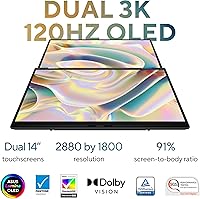
  • Display: Dual 14-inch OLED touchscreens, each running at 2880x1800 resolution with a 120Hz refresh rate and 500-nit HDR peak brightness.
  • Color Accuracy: Both panels are Pantone validated and cover 100% of the DCI-P3 color gamut for professional-grade color fidelity.
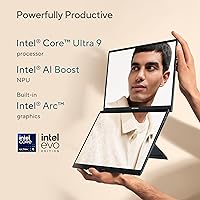
  • Processor: Intel Core Ultra 9 285H with integrated AI Boost NPU, designed for demanding multitasking and AI-accelerated application workloads.
  • Graphics: Intel Arc integrated graphics handle display output across both OLED panels and support hardware-accelerated media encoding and decoding.
  • RAM: 32GB LPDDR5x memory operating at 5600 MHz provides substantial headroom for running multiple resource-intensive applications simultaneously.
  • Storage: 1TB NVMe SSD delivers fast read and write speeds suitable for large creative project files and rapid application launches.
  • Battery: 75Wh lithium-ion battery offers up to 16 hours of video playback in single-screen Laptop mode, or approximately 9 hours with both displays active.
  • Weight: The complete unit weighs 3.64 lbs, which is notably light for a laptop incorporating two full-size OLED display panels.
  • Dimensions: Measures 12.34 x 8.58 x 0.57 inches, making it thin enough to slide into most standard 14-inch laptop sleeves and bags.
  • Ports: Connectivity includes 2x Thunderbolt 4 USB-C, 1x USB 3.2 Gen 1 Type-A, HDMI 2.1 TMDS, and a combo 3.5mm audio jack.
  • Keyboard: Detachable full-size Bluetooth keyboard is included in the box and pairs wirelessly without requiring a USB receiver or wired connection.
  • Webcam: Front-facing FHD IR camera supports Windows Hello facial recognition for passwordless login and delivers 1080p video for calls.
  • Wireless: Wi-Fi 6 (802.11ax) with Bluetooth 5.3 handles both high-speed network connections and peripheral pairing including the bundled keyboard.
  • Operating System: Ships with Windows 11 Home pre-installed, which supports the dual-screen mode management and native Copilot AI integration.
  • Durability: Chassis meets MIL-STD-810H military-grade standards, covering resistance to drops, vibration, temperature extremes, and humidity.
  • Usage Modes: Supports four distinct configurations: Laptop Mode, Dual Screen Mode, Desktop Mode with detached keyboard, and Sharing Mode for co-viewing.
  • Charging: Fast-charge technology is accessible via either Thunderbolt 4 USB-C port, allowing flexible charging from compatible power adapters and power banks.
  • Color: Available in Inkwell Gray, a dark matte-finish aluminum colorway that resists visible fingerprints better than lighter chassis finishes.

Related Reviews

Beelink SEI14 Mini PC with Intel Core Ultra 9 185H, 32GB RAM, 1TB SSD
86%
92%
Performance
87%
Build Quality
94%
Usability & Setup
88%
Display Support
85%
Connectivity
More
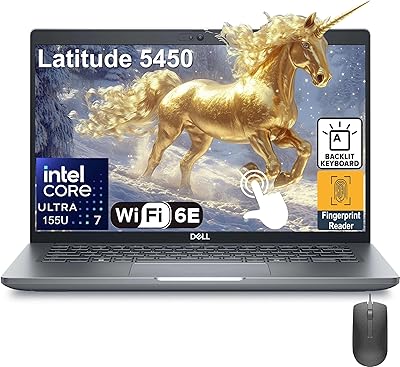
Dell Latitude 5450 14″ Touchscreen Business Laptop, Intel Core Ultra 7, 32GB RAM, 1TB SSD
86%
92%
Performance
88%
Display Quality
86%
Build Quality
79%
Battery Life
84%
Portability
More
Alienware Aurora ACT1250
79%
94%
Gaming Performance
88%
Build Quality
76%
Thermal Management
91%
CPU Multi-Tasking
61%
Storage
More
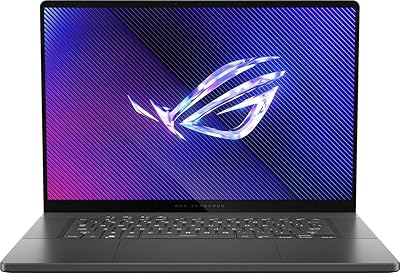
ASUS ROG Zephyrus 2024 16″ OLED Gaming Laptop, Intel Core Ultra 9 185H, 16GB RAM, 1TB SSD, NVIDIA RTX 4070
85%
93%
Performance
97%
Display Quality
89%
Build Quality
82%
Portability
68%
Thermal Management
More
Dell 14 Plus Laptop DB14250-14-inch 2.5K, Intel Core Ultra 7, 16GB RAM, 1TB SSD
85%
91%
Performance
94%
Display Quality
85%
Battery Life
88%
Build Quality
86%
Keyboard Usability
More
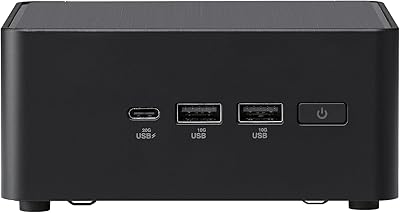
ASUS NUC 14 Pro Tall Barebone with Intel Core Ultra 7 155H
86%
93%
Performance
88%
Upgradeability
91%
Connectivity
86%
Compact Size
85%
Build Quality
More
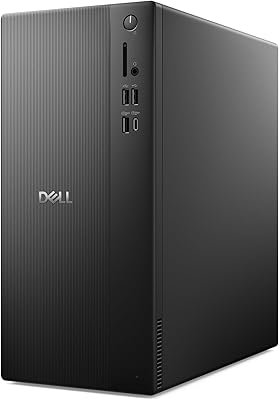
Dell Tower Desktop ECT1250 - Intel Core Ultra 7, 32GB RAM, 1TB SSD
86%
91%
Performance
88%
Build Quality
85%
Ease of Setup
94%
Multitasking Capabilities
70%
Graphics Performance
More
GMKtec M3 Ultra Mini PC with Intel Core i7-12700H, 32GB RAM, 1TB SSD
86%
88%
Overall Performance
91%
Multitasking & Processing Power
78%
Graphics Performance
84%
Build Quality & Design
93%
Ease of Setup
More
GMKtec Nucbox K9 Mini PC Intel Core Ultra 5 125H 32GB RAM 1TB SSD
85%
89%
Performance
85%
Build Quality
90%
Energy Efficiency
88%
Connectivity Options
87%
Display Support
More
GMKtec EVO-T1 AI Mini PC Workstation Ultra 9 285H, 64GB RAM, 1TB SSD
85%
91%
Performance
89%
Gaming Experience
93%
AI and Machine Learning Performance
85%
Connectivity
88%
Design and Build Quality
More

FAQ

Both displays are touch-enabled, but the Zenbook DUO does not ship with a stylus and does not natively support active pen input out of the box. You would need to verify compatibility with a third-party stylus before purchasing if pen input is central to your workflow.

The lower screen is a fully independent 14-inch OLED display — you can run separate applications on each panel with their own windows, not just a toolbar or touch pad extension. In Dual Screen mode it behaves like two stacked monitors connected to the same machine, giving you genuine dual-monitor real estate in a single chassis.

The built-in kickstand props the entire device at a comfortable viewing angle when you detach the keyboard and use it in Desktop mode. It is solid on flat surfaces like desks and tables, but it does require a stable, hard surface — it is not designed for lap use, and on soft surfaces like beds or couches it can shift or tip.

The ASUS Zenbook DUO 14 Core Ultra 9 285H 32GB/1TB uses soldered LPDDR5x RAM, which means memory cannot be upgraded after purchase. The SSD may be accessible depending on the exact board configuration, but ASUS does not officially support user upgrades, and opening the device typically voids the warranty.
For typical office tasks — web browsing, email, video calls, and document editing — the thermal management handles things quietly and surface temperatures stay comfortable. Heat buildup becomes more noticeable during sustained creative workloads like video rendering or large file exports, particularly around the upper deck of the chassis.

Yes, the HDMI 2.1 port and Thunderbolt 4 ports both support external display output, so technically you can drive a third screen alongside the two built-in OLEDs. However, whether Windows 11 handles three simultaneous displays smoothly in your specific workflow is something worth testing, as triple-display configurations can stress both the graphics driver and system resources.

On a desk, the keyboard is comfortable for extended typing — key travel is adequate and the layout is full-sized. The main limitation is that it is not physically attached, so it moves around slightly more than a standard laptop keyboard, and lap use is genuinely awkward since there is no rigid base to rest it on.

Yes, running both OLED panels simultaneously increases power draw significantly regardless of workload, because each display is actively lit and refreshing. Even during light tasks like browsing or note-taking in Dual Screen mode, you should plan for roughly half the battery life compared to single-screen Laptop mode.

The Zenbook DUO is primarily a productivity and creative tool — Intel Arc integrated graphics can handle light gaming and older titles at moderate settings, but it is not positioned as a gaming laptop and will not compete with dedicated GPU machines for demanding games. If gaming is a priority alongside dual-screen productivity, you would likely want to look at machines with a discrete GPU.

ASUS typically provides a standard one-year international warranty covering manufacturing defects, with options to purchase extended coverage. Given the uniquely engineered dual-panel design, repairs may need to go directly to an authorized ASUS service center rather than a generic repair shop, since the hinge and display assembly are non-standard components.