



Overview

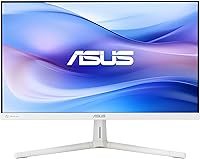
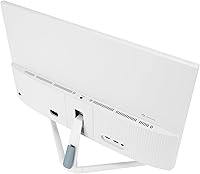
The ASUS VU249HFI-W 24-inch IPS Monitor arrived in December 2024 and has already built a solid reputation, collecting nearly 700 ratings and holding a 4.4-star average — a strong signal for a monitor this new. It sits in a practical sweet spot: full HD at 24 inches is sharp enough for everyday work, video, and casual browsing without demanding a premium budget. The white finish is a genuine differentiator in a category where black is basically the default, and it stands out on cleaner, modern desk setups. Perhaps the most surprising spec is a built-in nano-ion generator — an air-purifying feature you rarely see on any monitor, let alone one at this price tier.

Features & Benefits

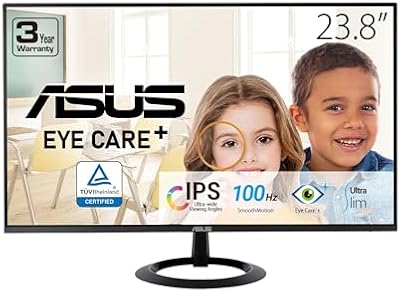
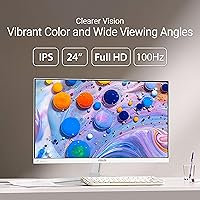
The IPS panel delivers 178-degree viewing angles that hold up well when colleagues lean in to look at your screen or when you angle a second monitor beside it. The 100Hz refresh rate paired with 1ms MPRT makes scrolling and everyday motion noticeably smoother than a standard 60Hz display — not a gaming powerhouse, but a comfortable step up for video calls and light gaming alike. Adaptive Sync keeps things consistent under variable loads. The Eye Care Plus suite — TÜV Rheinland-certified blue light filtering plus flicker-free operation — matters a lot for anyone sitting in front of a screen for six or more hours a day. VESA compatibility rounds things out for anyone planning a wall-mounted or articulating arm setup.

Best For

This ASUS monitor hits hardest for remote workers and students who spend the better part of their day at a desk. The white design is a real draw for people building bright, minimal workspaces — it pairs naturally with white desks, MacBook setups, or light-colored accessories without much deliberation. If you want 100Hz without buying a dedicated gaming panel, the VU249HFI-W is a sensible pick — the added smoothness is a genuine quality-of-life upgrade even outside gaming. It also works well as a secondary display given its VESA compatibility and compact footprint. First-time monitor buyers will appreciate how straightforward it is to set up and dial in right out of the box.

User Feedback

Most buyers come away happy. The most common praise centers on image clarity and how clean the white chassis looks in person — several reviewers specifically mention the color was a deciding factor in the purchase. Setup gets consistently described as simple and fast. On the critical side, the stand offers limited adjustability with no height raise unless you add a VESA arm, and there is no USB-C port, which can frustrate laptop users. Some note the brightness ceiling feels modest in very bright rooms. The 1080p resolution draws occasional comparisons to 1440p alternatives, though most agree it looks sharp at this size. The bundled Adobe Creative Cloud trial is a welcome bonus for creative users.

Pros

  • IPS panel delivers accurate, consistent colors and wide viewing angles that hold up well from any seat.
  • 100Hz refresh rate makes everyday scrolling and video noticeably smoother than a standard 60Hz office monitor.
  • TÜV Rheinland-certified blue light filter and flicker-free tech genuinely reduce eye strain during long sessions.
  • The white colorway is a rare and appealing option for users building minimal or light-toned desk setups.
  • Built-in nano-ion generator is an unusual feature that may help improve air quality in enclosed home office spaces.
  • VESA compatibility makes this 24-inch IPS display easy to mount on a wall or articulating arm.
  • Adaptive Sync keeps motion smooth and consistent across varying frame rates without tearing.
  • Strong early reputation with a 4.4-star average across nearly 700 real buyer ratings.
  • Bundled Adobe Creative Cloud trial adds genuine value for designers or creative professionals.
  • Three-year warranty provides solid peace of mind at this price tier.

Cons

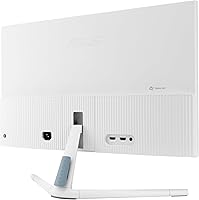
  • The stand has no height adjustment, which can be a real ergonomic problem for taller users or those with specific positioning needs.
  • No USB-C port limits convenience for laptop users who prefer a single-cable connection.
  • Maximum brightness may struggle in very bright or sunlit rooms, reducing visibility and comfort.
  • 1080p resolution will disappoint buyers who have used 1440p panels and are used to sharper detail.
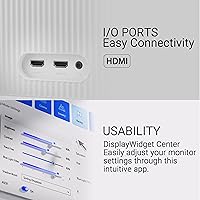
  • Port selection is minimal overall, which can be a headache if you need to connect multiple devices.
  • The nano-ion feature, while interesting, has no measurable output data provided, making its real-world impact hard to verify.
  • At this screen size and price, the stand feels basic — a monitor arm is almost a necessary added purchase for ergonomic setups.
  • Not competitive for fast-paced or competitive gaming where higher refresh rates and lower input lag matter significantly.

Ratings

The scores below reflect an AI-assisted analysis of verified global buyer reviews for the ASUS VU249HFI-W 24-inch IPS Monitor, with spam, bot-submitted, and incentivized feedback actively filtered out before scoring. Each category is rated based on patterns across real purchase experiences, not manufacturer claims — meaning genuine strengths and recurring frustrations are both captured honestly. Where buyers consistently praised something, the score climbs; where meaningful complaints surfaced, it drops accordingly.

Image Quality
86%
Buyers consistently describe the picture as clean, well-balanced, and easy on the eyes during long work sessions. The IPS panel handles color accuracy well enough for everyday tasks, and most users note that text looks crisp and comfortable to read across long documents or spreadsheets.
A subset of users upgrading from 1440p panels find the 1080p resolution noticeably softer, particularly when working with dense spreadsheets or detailed creative assets. At 23.8 inches, the pixel density is adequate but not exceptional by today's standards.
Eye Comfort
91%
The TÜV Rheinland-certified blue light filter and flicker-free backlight draw consistent praise from users who spend six or more hours daily at their desk. Several buyers specifically mention reduced headaches and less eye fatigue compared to their previous monitors, which is the kind of feedback that carries real weight.
At the highest blue light filter settings, the screen takes on a noticeably warm amber cast that some users find distracting during color-sensitive work. A few reviewers also noted that the feature requires manual adjustment through the OSD menu, which is not the most intuitive interface to navigate.
Refresh Rate & Motion
82%
18%
The step from 60Hz to 100Hz is genuinely appreciated by users who were not even expecting it at this price point. Scrolling, window dragging, and casual gaming all feel more fluid, and Adaptive Sync keeps the experience consistent without tearing during video playback or light GPU loads.
For anyone coming from a 144Hz or 165Hz panel, 100Hz will feel like a downgrade rather than an upgrade. Competitive gamers in particular flag that the motion handling is not in the same league as purpose-built gaming monitors, and the 1ms MPRT rating is not the same as a native 1ms GtG response time.
Build Quality & Design
79%
21%
The white chassis is the standout talking point — buyers who wanted a monitor that blends into a light or minimal desk setup consistently mention it as a deciding factor. The overall build feels solid for the price tier, and the matte screen coating adds a premium touch that resists fingerprints reasonably well.
The stand feels basic and slightly plasticky compared to the rest of the chassis, and a few users note wobble when adjusting the tilt. The lack of a cable management channel is a minor annoyance that becomes more noticeable in tidy, minimal setups where the white aesthetic is the whole point.
Ergonomics & Stand
54%
46%
The stand is stable enough for stationary desk use and the tilt adjustment covers the most common viewing angles for seated work. VESA compatibility at least gives buyers a clear upgrade path if they want height adjustment or arm mounting without replacing the whole monitor.
No height adjustment is the single most common complaint in the review pool, and it is a real limitation for taller users or anyone with a standing desk that shifts positions throughout the day. Without a monitor arm, finding a comfortable eye-level position often means stacking the monitor on books or a riser, which feels like a workaround rather than a solution.
Port Selection
57%
43%
The available display inputs cover the most common connection scenarios for desktop users, and the included DisplayPort cable means you can get up and running immediately out of the box without hunting for cables.
The absence of USB-C is the most cited connectivity complaint, particularly among laptop users who expect a single-cable setup. The overall port count is lean, and buyers who need to switch between two source devices frequently will likely need an external switch or KVM solution.
Brightness & Visibility
67%
33%
In a typical indoor office or home environment with controlled lighting, the brightness level is comfortable and consistent across the panel. The matte coating helps manage glare from overhead lights better than a glossy alternative would at this price point.
In bright rooms or near windows, several buyers report that the maximum brightness falls short of what they need to stay comfortable without pulling blinds or repositioning the monitor. Users accustomed to higher-nit displays will notice the ceiling fairly quickly in less controlled lighting conditions.
Nano-ion Feature
71%
29%
Buyers who work in small, enclosed home offices tend to view the nano-ion generator as a genuine and thoughtful addition rather than a gimmick — it operates silently in the background and does not require any setup. The novelty of the feature also plays well with buyers who appreciate that ASUS included something genuinely different at this price level.
There is no way for the average user to measure whether the nano-ion output is actually improving air quality in any meaningful way, which leaves its real-world benefit in a gray area. Some buyers are openly skeptical and treat it as a marketing feature, and that skepticism is understandable given the lack of third-party validation for the specific output levels.
Setup & Installation
88%
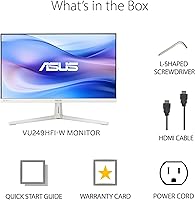
Unboxing and assembling this 24-inch IPS display takes under ten minutes for most buyers, and the included screwdriver for stand assembly is a small but appreciated practical touch. Multiple reviewers describe it as plug-and-play, with Windows recognizing it immediately without manual driver installation.
The OSD menu navigation using physical buttons on the back of the chassis is fiddly, particularly when adjusting eye care settings for the first time. A few buyers mention the button placement is awkward to reach without moving the monitor, which is a common trade-off on slim-bezel designs but still a friction point.
Value for Money
89%
At this price point, the combination of an IPS panel, 100Hz refresh rate, eye care certification, three-year warranty, and an Adobe Creative Cloud trial is genuinely hard to beat. Buyers frequently describe it as one of the better-specified monitors they have found without spending significantly more.
Buyers who stretch slightly further into the budget can find 1440p options that make the 1080p resolution here feel like a dated choice for a brand-new monitor. The missing USB-C and limited stand adjustability also add hidden costs if you end up needing an adapter and arm to fill the gaps.
Warranty & Support
83%
The three-year warranty stands out as above-average coverage for this category and gives buyers meaningful confidence in the long-term investment. ASUS has a well-established service network, which adds practical reassurance beyond the paper warranty terms.
A small number of buyers report slow response times when initiating warranty claims through ASUS support channels, though outright defect reports are rare in the review pool. The warranty card is included in the box but the claim process is not clearly explained in the quick start guide.
Eco & Sustainability
76%
24%
The paper-based packaging and energy-efficient operation genuinely resonate with environmentally aware buyers, and several mention it as a positive differentiator when comparing this model against alternatives. It is one of the few budget monitors where the eco credentials feel like a deliberate design decision rather than an afterthought.
There is limited publicly available data on the specific energy consumption figures or lifecycle environmental impact, which makes it difficult for buyers to independently verify the sustainability claims. The nano-ion feature also consumes a small amount of additional power, which slightly undercuts the energy-efficiency angle for the most detail-oriented eco-conscious buyers.

Suitable for:

The ASUS VU249HFI-W 24-inch IPS Monitor is a strong fit for remote workers, students, and home office users who want a reliable, comfortable daily display without stretching their budget. If you log long hours at a desk, the TÜV-certified blue light filter and flicker-free technology make a tangible difference over time — this is not just marketing language, it is a feature set that holds up under extended daily use. The white finish is a deliberate aesthetic choice that resonates with people building clean, light-toned workspaces, and it genuinely stands out compared to the sea of black panels at this price point. Casual gamers or general users who want smoother motion than a 60Hz screen provides will find the 100Hz refresh rate a quiet but noticeable quality-of-life improvement. The VESA mount support also makes it a practical pick for dual-monitor setups or anyone using a monitor arm to reclaim desk space.

Not suitable for:

The ASUS VU249HFI-W 24-inch IPS Monitor is not the right call for buyers who have already set their sights on 1440p or higher resolution — at 24 inches, 1080p looks clean, but if you are coming from a sharper panel or doing detailed photo and video work, you may find yourself wanting more pixel density. Serious or competitive gamers will likely find the 100Hz ceiling and 1ms MPRT underwhelming compared to purpose-built gaming monitors with higher refresh rates and more advanced motion handling. The stand provides limited ergonomic flexibility — there is no height adjustment unless you invest in a separate VESA arm, which can be frustrating for users who need precise positioning. Anyone who relies on USB-C for laptop connectivity should also look elsewhere, as this display lacks that port entirely. If you work in a very bright environment, the brightness ceiling may also fall short of what you need to comfortably see the screen.

Specifications

  • Screen Size: The viewable screen area measures 23.8″ diagonally, fitting comfortably on most standard desks without dominating the workspace.
  • Resolution: Native resolution is 1920x1080 Full HD, delivering a clean and sharp image for everyday office work, browsing, and video playback.
  • Panel Type: IPS (In-Plane Switching) technology provides accurate color reproduction and wide 178-degree viewing angles both horizontally and vertically.
  • Refresh Rate: The display runs at up to 100Hz, offering noticeably smoother motion compared to standard 60Hz monitors for general use and light gaming.
  • Response Time: MPRT response time is rated at 1ms, reducing motion blur during fast-moving content and video playback.
  • Adaptive Sync: Adaptive Sync support helps eliminate screen tearing by synchronizing the monitor's refresh rate with the output of a compatible GPU.
  • Blue Light Filter: The built-in blue light filter is TÜV Rheinland certified and adjustable, allowing users to reduce potentially eye-straining blue light emissions.
  • Flicker-Free: ASUS Flicker Free technology eliminates backlight flickering across all brightness levels, reducing eye fatigue during extended viewing sessions.
  • Nano-ion Generator: A built-in nano-ion generator is integrated into the monitor body, designed to help improve indoor air quality in enclosed workspaces.
  • Aspect Ratio: The panel uses a standard 16:9 widescreen aspect ratio, which is compatible with virtually all modern content formats and operating systems.
  • Screen Surface: The matte screen coating reduces glare and reflections from ambient light sources, making it easier to use near windows or under overhead lighting.
  • VESA Mount: The monitor is VESA wall mount compatible, allowing it to be paired with a third-party monitor arm or mounted directly to a wall.
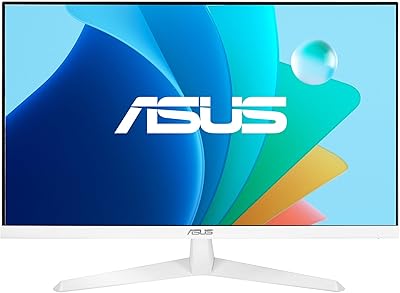
  • Color: The chassis is finished in white, a relatively uncommon colorway in this product category that suits light-toned and minimal desk setups.
  • Weight: The monitor weighs 8.82 pounds including the stand, making it easy to reposition or move between workspaces without much effort.
  • Warranty: ASUS provides a three-year manufacturer warranty with this display, which is above average coverage for a monitor in this price tier.
  • In the Box: The package includes a DisplayPort cable, power cord, L-shaped screwdriver, quick start guide, and warranty card.
  • Eco Packaging: The monitor ships in paper-based packaging as part of ASUS's environmental sustainability initiative, avoiding single-use plastics in the box.
  • Adobe Bundle: A one-month Adobe Creative Cloud trial is included with purchase, valid through August 31, 2026, adding value for creative and design users.
  • Launch Date: This model was first made available in December 2024, making it a relatively recent release with a strong early rating history.
  • Energy Efficiency: The VU249HFI-W is designed to meet current energy efficiency standards, drawing low power during typical operation and in standby mode.

Related Reviews
ASUS VA24DQSB 24-inch IPS Monitor
78%
93%
Ergonomic Adjustability
88%
IPS Panel Color Accuracy
61%
Brightness & Glare Handling
91%
Eye Comfort & Fatigue
84%
Build Quality & Stability
More
ViewSonic VG2448A 24-inch IPS Monitor
83%
93%
Ergonomic Adjustability
88%
Eye Comfort
86%
Connectivity & Port Selection
74%
Image Quality
81%
Build Quality
More
HP Series 5 524sf 24-inch Monitor
75%
78%
Display Quality
71%
Color Accuracy
67%
Brightness
86%
Eye Comfort
74%
Build Quality
More
ASUS VZ24EHF 24-inch Eye Care Monitor
86%
91%
Value for Money
88%
Display Quality
93%
Eye Care Technology
86%
Refresh Rate & Performance
85%
Build Quality
More
Dell E2420H 24-inch FHD IPS Monitor
88%
88%
Display Quality
90%
Color Accuracy
87%
Viewing Angles
92%
Ease of Setup
91%
Energy Efficiency
More
ViewSonic VP2468a 24-Inch IPS Monitor
76%
93%
Color Accuracy
89%
Connectivity
61%
Resolution & Pixel Density
86%
Build Quality
91%
Ergonomics
More
ReHisk 241KV2 24-inch Gaming Monitor
73%
91%
Refresh Rate Performance
88%
Adaptive Sync
79%
Panel & Color Quality
54%
Brightness & HDR
67%
Build Quality
More
KTC H24T27 24-inch QHD Gaming Monitor
68%
88%
Image Clarity
84%
Color Accuracy
74%
Gaming Performance
41%
HDR Quality
46%
Ergonomics & Adjustability
More
ASUS BE24ECSBT 24-inch Touch Monitor
76%
83%
Touch Accuracy
91%
USB-C Connectivity
67%
Display Quality
88%
Build & Ergonomics
72%
Value for Money
More
Dell P2419H 24-Inch IPS Monitor
84%
88%
Color Accuracy
91%
Viewing Angles
89%
Eye Comfort
93%
Stand Ergonomics
87%
Build Quality
More
Z-Edge U24I 24-inch IPS Monitor
85%
88%
Display Quality
92%
Value for Money
85%
Build Quality
84%
Gaming Performance
80%
Ergonomics & Design
More

FAQ

It works with both. The Windows label in the spec sheet refers to the operating system used for driver support documentation, but the display connects via standard DisplayPort or HDMI and functions normally with macOS, ChromeOS, and Linux systems. No special driver installation is needed for basic use.

For most people, yes. At 23.8 inches, 1080p sits at a pixel density where text and images look clean and defined during everyday tasks like browsing, document work, and video calls. If you are doing detailed photo editing or coming from a high-resolution display, you might notice the difference — but for general home and office use, it holds up well.

Yes, the ASUS VU249HFI-W 24-inch IPS Monitor is VESA compatible, so it works with any standard VESA 100x100mm monitor arm or wall mount bracket. Many buyers actually prefer this route since the included stand does not offer height adjustment.

The included stand supports basic tilt adjustment but does not offer height raise or swivel. If ergonomic positioning is important to you, pairing this monitor with an aftermarket VESA arm is a straightforward and relatively affordable fix.

No, this monitor does not include a USB-C port. If you rely on USB-C for a single-cable laptop connection, you will need to use a separate adapter or dock, or consider a different display that includes USB-C input natively.

The built-in nano-ion generator emits negative ions, which ASUS claims can help reduce airborne particles and improve the air quality in your immediate workspace. It is a passive feature that runs quietly in the background — you do not need to configure or activate it separately. Whether you notice a tangible air quality difference is subjective, but it does not affect the display performance in any way.

At lower blue light filter settings, the color shift is barely noticeable. At the highest filter level, you will see a warmer, more amber tone to the image — this is normal for any blue light reduction mode. Most users find a mid-level setting comfortable for evening work without significantly affecting color accuracy.

It actually does make a difference for everyday use. Scrolling through web pages, moving windows around, and watching video all feel a bit smoother at 100Hz compared to a standard 60Hz panel. It is a subtle improvement rather than a dramatic one, but once you have used it, going back to 60Hz tends to feel sluggish.

No, the box includes a DisplayPort cable but not an HDMI cable. If your computer or laptop only has an HDMI output, you will need to supply your own cable or pick one up separately — standard HDMI cables are widely available and inexpensive.

Based on user reports, the white finish looks clean and holds its color well under normal use. Like any light-colored surface, it can show fingerprints or smudges more readily than a black chassis, but a quick wipe with a microfiber cloth keeps it looking fresh. Prolonged direct sunlight exposure over years could cause slight yellowing, as with most white plastics, but this is not a common complaint among current owners.