Overview

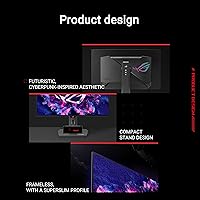
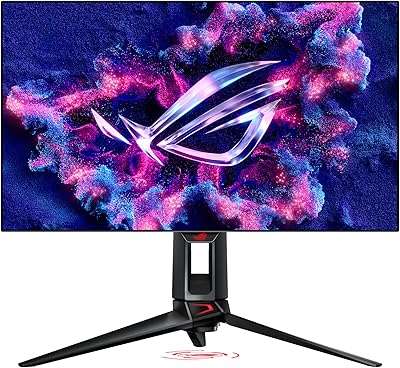
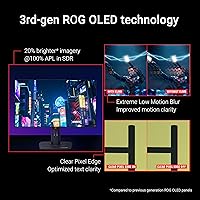
The ASUS ROG XG27AQDMG 27-inch OLED Gaming Monitor sits firmly in the premium tier of the high-refresh OLED market, built for gamers who refuse to trade color fidelity for speed. At its core is a 26.5-inch glossy WOLED panel powered by third-generation WOLED technology — a real generational step in brightness, text sharpness, and motion handling compared to earlier OLED displays. Against rivals in the same price bracket, this ROG OLED monitor is genuinely competitive. One honest caveat upfront: the glossy finish looks spectacular in a controlled, dim room, but it will work against anyone sitting near a bright window.
Features & Benefits

At 240Hz with a 0.03ms response time, the XG27AQDMG removes the ghosting and blur that made older panels feel sluggish — fast-paced shooters feel noticeably tighter and more responsive. ASUS pairs this with a custom heatsink and the OLED Care software suite, both aimed at managing heat and reducing long-term burn-in risk in practical, measurable ways. The ROG Anti-flicker system handles low-brightness flicker differently than standard PWM dimming, which tends to reduce eye fatigue during extended sessions. Rounding it out, 99% DCI-P3 coverage makes this 27-inch ASUS gaming display credible for color-accurate work beyond gaming, and G-SYNC compatibility keeps frame delivery smooth across supported GPUs.

Best For

This ROG OLED monitor is the natural pick for competitive PC gamers who want genuine OLED contrast without dropping below 240Hz. It also pulls double duty as a dual-purpose display for creators who need wide color coverage during work hours and want to game when the day is done — the DCI-P3 accuracy is broad enough to take that seriously. Upgraders coming from IPS or VA panels will notice the contrast difference immediately; it is not subtle. That said, if your desk sits under direct sunlight or bright overhead lights, the glossy panel will become a real daily annoyance. Ambient light control is not optional here.

User Feedback

Across more than 5,500 ratings at an average of 4.3 stars, the XG27AQDMG has earned wide, sustained approval from a large and varied buyer base. Most owners point to out-of-box color quality and motion smoothness as the standout strengths — qualities that are difficult to fully appreciate until seen in person. Build quality earns consistent praise. The most common complaint is glare and reflections in bright rooms, which is an honest trade-off with any glossy panel. Burn-in comes up regularly in reviews, though buyers who actively use the OLED Care features long-term generally report no meaningful degradation. A handful of users note minor DisplayWidget software quirks, but nothing that undermines the overall experience.

Pros

  • Third-generation WOLED technology delivers noticeably brighter whites and sharper text than earlier OLED monitors.
  • 240Hz refresh rate makes fast-paced gaming feel genuinely responsive, not just numerically impressive.
  • Out-of-box color accuracy is strong enough for color-sensitive creative work alongside gaming.
  • The custom heatsink and OLED Care suite offer practical, real burn-in protection without requiring much user effort.
  • ROG Anti-flicker technology reduces eye fatigue more effectively than standard PWM dimming during long sessions.
  • G-SYNC compatibility ensures smooth, tear-free frame delivery for supported Nvidia GPU setups.
  • A 3-year warranty on an OLED panel is meaningful reassurance for a long-term investment.
  • Build quality is consistently praised by buyers across a large pool of real-world ratings.
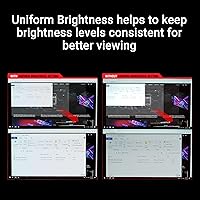
  • The uniform brightness mode provides consistent luminance for tasks where peak brightness variation would be distracting.
  • Over 5,500 ratings averaging 4.3 stars reflects broad, sustained satisfaction across diverse buyer types.

Cons

  • The glossy panel produces strong reflections in bright or sunlit rooms, making ambient light control a hard requirement.
  • Burn-in remains a real long-term consideration for OLED panels, even with mitigation tools in place.
  • DisplayWidget software has drawn occasional complaints about quirks and reliability from some users.
  • At 26.5 inches, buyers expecting a full 27-inch panel may feel slightly misled by the marketed size.
  • The glossy finish shows fingerprints and smudges more readily than matte alternatives.
  • Uniform brightness mode reduces peak brightness, requiring buyers to consciously manage the trade-off.
  • The price point puts it out of reach for buyers who want OLED quality on a tighter budget.
  • Console gamers or those with mid-range GPUs may not fully utilize the high refresh rate and sync features.

Ratings

The scores below for the ASUS ROG XG27AQDMG 27-inch OLED Gaming Monitor were generated by AI after analyzing thousands of verified global buyer reviews, with spam, bot submissions, and incentivized feedback actively filtered out. Both the genuine strengths and the recurring frustrations are reflected here without softening either side. The result is an honest, data-grounded picture of what real owners consistently experience across different setups and use cases.
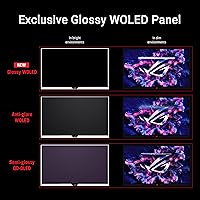
Image Quality
96%
The WOLED panel's contrast is the first thing owners mention — blacks are absolute, colors are vivid without looking artificial, and the overall picture quality hits in a way that IPS and VA panels simply do not replicate. Most buyers describe seeing their favorite games in a noticeably different light after the first session.
A small number of users note that the glossy surface can add a perceived saturation boost that, while flattering, makes strict color accuracy harder to evaluate without calibration tools. Those doing professional color grading should account for this.
Refresh Rate Performance
93%
At 240Hz, fast-paced games feel immediately more responsive compared to 144Hz or 165Hz panels — the smoothness is perceptible in daily play, not just during synthetic tests. Competitive players in shooters and MOBAs consistently note reduced perceived input lag and cleaner target tracking.
Buyers on mid-range GPUs occasionally find it difficult to sustain frame rates that fully utilize 240Hz, meaning some owners are effectively using a premium high-refresh panel at lower real-world rates most of the time.
Glare & Reflections
48%
52%
In a darkened or well-controlled room, the glossy surface enhances perceived contrast and color depth in ways that matte panels cannot match. Buyers with dim gaming setups or blackout setups specifically report the finish as a visual advantage rather than a liability.
In any room with natural light, overhead fluorescents, or lamps positioned behind the user, the reflections are severe and genuinely disruptive to the experience. This is the most consistently cited complaint across the review pool, and it is not something that software or settings can resolve.
Response Time & Motion Clarity
91%
The 0.03ms response time translates to near-zero visible ghosting in everyday use — fast-moving objects in games and high-frame-rate video retain sharp edges without trailing artifacts. Third-generation WOLED improvements to motion handling are specifically noted as an upgrade over earlier OLED panel generations.
Some users with very high visual sensitivity report subtle trailing in specific high-contrast motion scenarios, though this appears to be a minority experience and is far less pronounced than on competing IPS panels.
Burn-in Risk & Longevity
67%
33%
The OLED Care suite — combined with the custom heatsink managing panel temperature — gives buyers practical tools to actively reduce cumulative wear. Users who engage the pixel refresh schedules and avoid leaving static HUD elements on screen for extended periods report no visible degradation over months of regular use.
Burn-in anxiety is real among this buyer group, and OLED panels do carry inherent long-term risk that LCD alternatives do not. Buyers who frequently run games with persistent static overlays, desktop taskbars, or static widgets without using the mitigation tools face a genuine risk over multi-year ownership.
Color Accuracy
88%
Out-of-box color performance earns strong praise, with the 99% DCI-P3 coverage making the XG27AQDMG credible for photo editing and video color review alongside gaming. Many buyers who also do creative work report being genuinely surprised by how usable it is without additional calibration.
Factory calibration consistency varies slightly between units, and the glossy surface adds a degree of environmental variability. Buyers with strict professional accuracy requirements would benefit from hardware calibration to get the most reliable results.
Build Quality
84%
The monitor's construction feels premium and appropriately sturdy for the price tier — the stand is solid, there is minimal flex in the panel housing, and the overall aesthetic matches what ROG buyers expect from a flagship product. Buyers upgrading from mid-range monitors consistently comment on the quality difference.
A small number of buyers report minor cosmetic inconsistencies on delivery, such as slight bezel misalignment or subtle finish variations. Nothing functionally impactful, but noticeable for buyers who scrutinize premium hardware closely.
Eye Comfort
79%
21%
The ROG Anti-flicker technology makes a meaningful difference for users sensitive to PWM flicker, with several buyers noting they can game for longer sessions without the eye fatigue they experienced on previous monitors. This is a real-world comfort benefit that goes beyond marketing claims.
The glossy panel's high luminance and reflective surface can still contribute to visual fatigue in bright environments, independent of the flicker management. Users in suboptimal lighting situations may not experience the eye comfort benefits the technology is designed to deliver.
Ergonomics & Adjustability
76%
24%
The stand covers the essential adjustments — height, tilt, and swivel — which satisfies most buyers for single-monitor desktop setups. VESA compatibility allows users to swap in an aftermarket arm if they need more flexibility or want to free up desk space.
The stand does not support portrait pivot rotation, which limits flexibility for buyers who occasionally use vertical orientation for coding or document work. At 14.8 pounds, repositioning the assembled unit requires more effort than lighter alternatives.
Connectivity
74%
26%
Having two USB 3.0 ports on the monitor body is genuinely useful for keeping desk peripherals plugged in without routing cables back to the PC. Buyers in multi-device setups appreciate the reduced cable management burden this provides.
The port selection is considered lean by buyers accustomed to monitors with more extensive hub functionality — no USB-C with power delivery is a specific gap that comes up in comparisons with competing displays at this price point.
Software & OSD
63%
37%
DisplayWidget provides desktop-level access to monitor settings and OLED Care scheduling, which is genuinely more convenient than navigating hardware buttons for regular adjustments. Buyers who use the OLED Care automation features find it a low-effort way to manage panel health passively.
The software draws a consistent stream of complaints about stability, occasional crashes, and UI quirks that require workarounds. Several buyers note it feels underdeveloped relative to the hardware it supports, and a handful prefer to avoid it entirely in favor of manual OSD navigation.
Value for Money
72%
28%
For buyers who fully utilize the 240Hz refresh rate, OLED contrast, and wide color gamut across both gaming and creative work, the dual-purpose capability justifies the premium tier pricing more convincingly than a single-use gaming panel would. The 3-year warranty further supports the long-term value calculation.
Buyers who game primarily at lower frame rates, work in bright rooms, or do not need professional-grade color coverage may find the value proposition harder to rationalize against more affordable high-refresh IPS alternatives that lack the glare and burn-in concerns.
Setup & Out-of-Box Experience
82%
18%
Assembly is straightforward and the panel arrives with factory settings that are genuinely usable without immediately diving into calibration menus. Most buyers report being up and running with a good picture within minutes of unboxing, which is not always the case with high-end displays.
The included documentation is minimal, and buyers unfamiliar with OLED-specific settings like OLED Care scheduling or uniform brightness mode may not realize these features exist or how to configure them without external research.
Warranty & Support
86%
A 3-year warranty is a meaningful differentiator in the OLED monitor category, where burn-in and panel longevity are genuine buyer concerns. Knowing that ASUS stands behind the panel for three years lowers the perceived long-term risk for buyers committing to an OLED purchase.
Warranty claim experiences vary, with some buyers reporting smooth processes and others describing slower-than-expected support response times. The warranty is a strong policy on paper, but execution consistency appears to depend on regional support infrastructure.

Suitable for:

The ASUS ROG XG27AQDMG 27-inch OLED Gaming Monitor is built for a specific kind of buyer: someone who takes PC gaming seriously enough to want both competitive-grade speed and genuinely beautiful visuals in the same panel. Competitive players who run fast-paced shooters or action titles will feel the difference that 240Hz and near-instant response time makes in actual play, not just on paper. It also works exceptionally well as a dual-purpose display for creators who need wide, accurate color coverage during the day and a high-performance gaming screen at night — the 99% DCI-P3 gamut is broad enough to take color-sensitive work seriously. Upgraders coming from IPS or VA panels will find the contrast improvement striking and immediate. Anyone planning to keep their monitor for several years will appreciate the burn-in mitigation tools and the three-year warranty backing the investment. The one environmental requirement worth stating clearly: this display performs best in a room where you control the lighting.
Not suitable for:

The ASUS ROG XG27AQDMG 27-inch OLED Gaming Monitor is a harder sell for anyone whose desk sits near large windows, under bright overhead fluorescents, or in any workspace where ambient light is unpredictable. The glossy WOLED panel is genuinely stunning under controlled conditions, but in a bright room it becomes a mirror that competes with whatever is on screen — and no software feature fixes that. Budget-conscious buyers should also consider carefully: this is a premium-tier purchase, and if 1440p resolution feels like a step down from 4K for your use case, the trade-off may not sit well. Buyers who are deeply anxious about OLED burn-in and unwilling to adjust usage habits — like enabling screensavers, using the OLED Care suite, or avoiding prolonged static content — may find the ongoing mental overhead stressful. Console gamers or those running older GPU setups that cannot take advantage of G-SYNC compatibility or high frame rates will not get full value out of what this display offers.

Specifications

  • Panel Type: Third-generation glossy WOLED panel, offering deeper blacks and higher contrast than traditional IPS or VA displays.
  • Screen Size: The active display area measures 26.5 inches diagonally, marketed under a 27-inch product class.
  • Resolution: Native resolution is 2560 x 1440 (QHD), delivering sharp detail at standard desktop viewing distances.
  • Refresh Rate: Supports a maximum refresh rate of 240Hz, suitable for competitive gaming and fast-motion content.
  • Response Time: Rated at 0.03ms GTG, minimizing visible ghosting and pixel transition blur during fast-paced gameplay.
  • Color Gamut: Covers 99% of the DCI-P3 color space, making it appropriate for color-sensitive creative and production work.
  • Sync Technology: Certified G-SYNC Compatible, enabling adaptive sync with supported Nvidia GPUs to reduce screen tearing.
  • Anti-Flicker: ROG OLED Anti-flicker technology manages brightness fluctuation differently from standard PWM dimming to reduce eye fatigue.
  • Burn-in Protection: ASUS OLED Care software suite combined with a custom heatsink actively manages panel heat and pixel wear over time.
  • Uniform Brightness: An optional uniform brightness mode stabilizes luminance levels across the panel at the cost of reduced peak brightness.
  • Aspect Ratio: Standard 16:9 widescreen aspect ratio, compatible with all conventional gaming and productivity content formats.
  • USB Ports: Includes 2 USB 3.0 ports on the monitor for connecting peripherals directly without routing cables to the PC.
  • Dimensions: Physical footprint measures 8.62 x 23.82 x 20 inches (depth x width x height) with the stand attached.
  • Weight: Complete unit with stand weighs 14.8 pounds, which is typical for a monitor of this panel size and build quality.
  • Warranty: Covered by a 3-year ASUS warranty, which is notably longer than the 1-to-2-year standard common among competitors.
  • Software: DisplayWidget software provides on-screen display control and OLED Care management directly from the desktop.
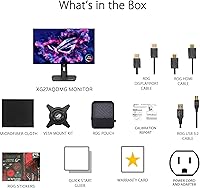
  • Bundle Inclusion: Includes a 3-month Adobe Creative Cloud subscription offer, valid through August 31, 2026, with qualifying purchase.
  • Color: Available in black finish; no additional color variants are offered for this model.

Related Reviews

ASUS ROG Swift PG27AQDM-R 27-inch OLED Gaming Monitor
88%
94%
Display Quality
92%
Color Accuracy
91%
Refresh Rate and Response Time
88%
Build Quality
89%
Ease of Setup
More
ASUS ROG Swift PG27UCDM 27-inch Gaming Monitor
82%
96%
Image Quality
97%
Black Levels & Contrast
93%
Gaming Performance
91%
Color Accuracy
88%
Text Clarity
More
ASUS ROG Swift PG279QM 27-inch 1440p Gaming Monitor
86%
93%
Display Quality
95%
Performance for Gaming
89%
Build Quality
91%
Color Accuracy
72%
Ease of Setup
More
ASUS ROG Strix XG27ACS 27-inch Gaming Monitor
79%
91%
Image Clarity & Sharpness
89%
Motion Performance & Refresh Rate
86%
Color Accuracy & Vibrancy
47%
HDR Performance
88%
Adaptive Sync & G-Sync Compatibility
More
ASUS ROG PG27AQDP 27-inch OLED Gaming Monitor
81%
97%
Refresh Rate Performance
96%
Panel Contrast & Black Levels
94%
Response Time & Motion Clarity
91%
Color Accuracy
63%
HDR Performance
More
ASUS ROG Swift PG32UCDM 32-inch OLED Monitor
82%
96%
Image Quality
93%
Motion Performance
94%
Color Accuracy
78%
HDR Performance
74%
Burn-In Risk & Longevity
More
ASUS ROG Strix XG27UCG-W 27-inch Gaming Monitor
79%
91%
Display Clarity
88%
Dual Mode Versatility
89%
Response Time & Motion
87%
Color Accuracy
61%
HDR Performance
More
ASUS ROG Strix XG27AQMR 27” Gaming Monitor
87%
94%
Gaming Performance
91%
Visual Quality
88%
Build Quality
96%
Refresh Rate & Response Time
87%
Color Accuracy
More
Alienware AW2725DF 27-inch OLED Gaming Monitor
89%
96%
Display Quality
94%
Gaming Performance
92%
Color Accuracy
90%
Build Quality
88%
Ease of Setup
More
ASUS VZ279QG1R 27-inch 1080P Gaming Monitor
83%
88%
Gaming Performance
91%
Smooth Visuals (Motion Blur Reduction)
93%
Value for Money
80%
Build Quality
85%
Display Quality (Color Accuracy, Brightness)
More

FAQ

It is a real consideration, not something to dismiss entirely, but it is also manageable. The XG27AQDMG includes ASUS OLED Care tools — pixel refreshing cycles, a pixel shift function, and a screensaver reminder — that meaningfully reduce cumulative panel stress. Buyers who use a diverse range of content and avoid leaving static images on screen for hours at a time report no meaningful degradation over extended use. Treating it the way you would treat any quality OLED display keeps the risk low.

It depends almost entirely on where your light sources are. In a room with windows behind or beside you, the reflections are noticeable and genuinely distracting. In a setup where you sit facing a window with the monitor between you and it, or in a room with controlled overhead lighting, the glossy surface looks beautiful and delivers richer perceived contrast than a matte equivalent. If your room lighting is unpredictable, this is the single most important factor to evaluate before buying.

The ASUS ROG XG27AQDMG 27-inch OLED Gaming Monitor carries G-SYNC Compatible certification, which is Nvidia-specific, but it also supports AMD FreeSync Premium through the same adaptive sync hardware. AMD GPU users can run adaptive sync without issues — the G-SYNC branding just reflects that ASUS submitted it for Nvidia's validation program as well.

Uniform brightness mode locks luminance to a consistent level across the entire panel rather than letting it peak in bright scenes. It is primarily useful for tasks where consistent white levels matter — document editing, photo review, or side-by-side comparisons. For gaming or HDR content where dynamic brightness is part of the visual experience, most users leave it off and only toggle it on when doing focused work.

At 26.5 inches, 1440p sits at a pixel density where sharpness is genuinely good — most people cannot distinguish individual pixels at a normal sitting distance. The practical benefit is that 1440p at 240Hz is far less demanding on your GPU than 4K at comparable frame rates, so you get more competitive performance from the same hardware. If your workflow genuinely demands 4K resolution, then waiting makes sense, but for gaming-focused buyers, this resolution-to-refresh trade-off is a deliberate strength, not a compromise.

For users sensitive to PWM flicker — which conventional monitors use to simulate lower brightness levels — the ROG Anti-flicker approach handles brightness reduction differently and tends to reduce that specific type of fatigue. It is not a guaranteed solution for everyone, since eye strain has multiple causes, but buyers who have struggled with PWM-based monitors in the past tend to report noticeably more comfortable long sessions on this display.

The 99% DCI-P3 coverage is wide enough to take color-sensitive work seriously. It is not a dedicated professional reference monitor with strict factory calibration, but the out-of-box color accuracy is consistently praised, and most creators who also game find it a practical dual-purpose display. If your work requires certified hardware-calibrated color accuracy for print production or broadcast, you would want to supplement it with proper calibration tools or a dedicated reference panel.

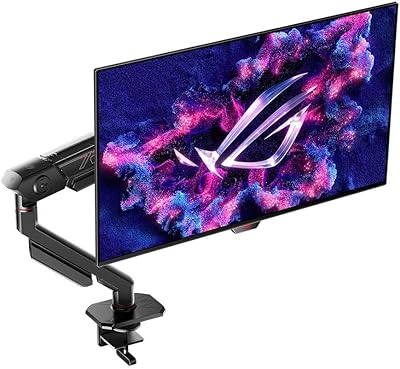
The ROG stand supports height adjustment, tilt, and swivel, which covers the ergonomic basics for most setups. The total footprint with stand installed is about 8.62 inches deep and 20 inches tall, which fits comfortably on most standard desk depths. Buyers who prefer a VESA mount arm can remove the stand; the panel is VESA compatible if you want to free up desk space entirely.

The third-generation WOLED panel in this display brings meaningful improvements over earlier versions, particularly in full-white window brightness, text rendering clarity, and motion handling. Earlier WOLED displays drew criticism for dimming significantly when large bright windows filled the screen — a common scenario in desktop productivity use. This generation addresses that more effectively, making it a noticeably better all-rounder for mixed gaming and work use rather than just a gaming-only panel.

DisplayWidget is ASUS's desktop software that lets you control the on-screen display settings — brightness, color profiles, OLED Care schedules — directly from Windows without using the physical buttons on the monitor. It is optional; everything can be managed through the monitor's hardware controls if you prefer not to install additional software. That said, scheduling automatic OLED Care routines is easiest through the app, so buyers who want hands-off burn-in management will find it useful.

Where to Buy