

Overview

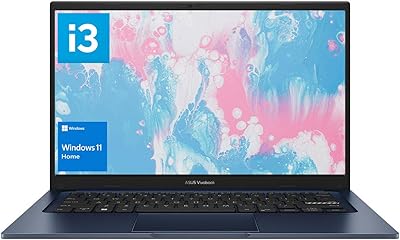
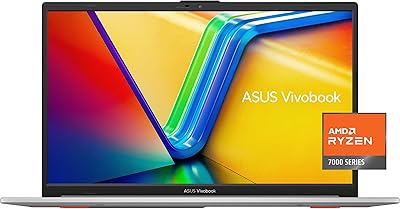
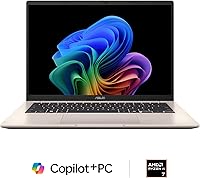
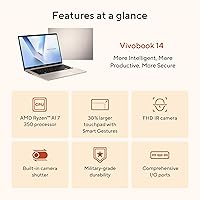
The ASUS Vivobook 14 Ryzen AI 7 Laptop sits in a practical middle ground — not a budget throwaway, not a premium flagship, but a genuinely capable machine aimed at students, remote workers, and light creatives who want modern AI features without overspending. What separates it from older Vivobook generations is the AMD Ryzen AI 7 350, a processor built with an integrated NPU that unlocks Microsoft's Copilot+ features on Windows 11. The 16:10 display ratio is a quiet but meaningful upgrade over standard widescreen panels, giving you more vertical space for documents and web pages. The Platinum Gold finish looks sharp, though fair warning: this Vivobook runs integrated graphics, so it is not chasing gaming benchmarks.

Features & Benefits

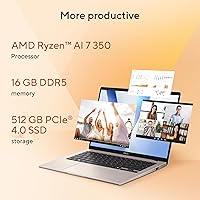
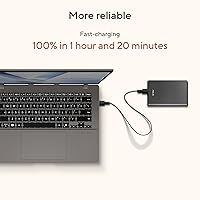
The heart of this Copilot+ laptop is the Ryzen AI 7 350 — an 8-core, 16-thread chip with AMD's XDNA neural processing unit capable of handling up to 50 TOPS of AI workloads locally. In practice, that means Live Captions and Windows Recall run without leaning on the cloud. The 14-inch WUXGA panel at 1920x1200 is crisp and tall, though 300 nits of brightness is adequate rather than exceptional in direct sunlight. Pairing 16GB of DDR5 memory with a PCIe 4.0 SSD keeps everyday tasks feeling sharp — apps open fast, browser tabs don't slow things down. WiFi 6 and Bluetooth 5.3 handle connectivity, and the FastCharge battery tops off in under 90 minutes.

Best For

This Vivobook is a natural fit for college students who need a reliable all-day machine — the 16:10 display makes reading and note-taking noticeably more comfortable than a standard widescreen, and the long battery life means fewer scrambles for an outlet between classes. Remote workers who lean on AI-powered Windows tools like Live Captions for meetings will appreciate the NPU handling those tasks locally. Light photographers or hobbyist editors can get real work done here, just without expecting GPU-intensive rendering speeds. Frequent travelers will value how compact and light this chassis is at just over five pounds. It is not built for serious gaming or heavy 3D workloads — and it was never trying to be.

User Feedback

Because the Ryzen AI 7 model only hit shelves in early 2025, the review pool is still growing — treat early patterns as signals rather than settled consensus. That said, early buyers tend to praise the keyboard comfort and the snappiness of daily tasks, with SSD speed drawing particular appreciation. The 60Hz panel draws some grumbling from users arriving from higher-refresh machines, and a handful report real-world battery life landing closer to seven or eight hours under active use rather than the rated twelve. Fan noise appears manageable under light loads but can ramp up during sustained CPU tasks. Port selection — just two USB 3.0 ports among others — gets flagged as limiting for anyone expecting a desktop-replacement setup.

Pros

  • The Ryzen AI 7 350 handles everyday multitasking, video calls, and light creative work without breaking a sweat.
  • 16GB of DDR5 RAM means juggling browser tabs, streaming, and productivity apps rarely causes slowdowns.
  • The PCIe 4.0 SSD makes boot times and app launches feel noticeably fast compared to older mid-range machines.
  • A 16:10 display ratio gives meaningfully more vertical screen space — a real comfort boost for documents and web browsing.
  • FastCharge technology brings the battery from empty to full in roughly 80 minutes, which is genuinely useful on busy days.
  • WiFi 6 support keeps connections stable and fast in crowded environments like libraries, cafes, or shared office spaces.
  • The backlit chiclet keyboard makes late-night work or dim-room use comfortable without straining your eyes.
  • At just over five pounds in a slim chassis, this Vivobook travels without adding bulk to a bag.
  • The onboard XDNA NPU enables Copilot+ features like Live Captions locally, which works even without a strong internet connection.
  • Windows 11 Home comes pre-installed and ready, with no separate OS purchase or setup headaches.

Cons

  • Real-world battery life under active mixed use tends to land well below the rated 12-hour figure for many users.
  • Only two USB 3.0 ports is limiting if you regularly connect a mouse, external drive, and peripherals simultaneously.
  • 300 nits of display brightness struggles in direct sunlight or brightly lit outdoor environments.
  • The 60Hz panel refresh rate feels sluggish to anyone accustomed to higher-refresh displays, even outside of gaming.
  • Fan noise ramps up noticeably during sustained CPU-intensive tasks, which can be distracting in quiet settings.
  • Copilot+ AI features are still maturing on Windows — the NPU advantage is real but not yet broadly impactful for most workflows.
  • The 512GB SSD fills up faster than expected if you store large media files or game libraries locally.
  • Integrated graphics cap rendering performance, making GPU-heavy creative tasks like 3D modeling or video effects slow.
  • Early buyers note the review pool is still thin given the March 2025 launch, so long-term reliability data is limited.
  • The 42Wh battery capacity is modest compared to competitors offering larger cells at a similar price point.

Ratings

The ASUS Vivobook 14 Ryzen AI 7 Laptop scores below are generated by our AI review engine after analyzing verified global buyer feedback, with spam, incentivized, and bot-flagged submissions actively filtered out before scoring. Because this model launched in March 2025, the review pool is still growing — scores reflect early but genuine buyer sentiment and will be updated as more data accumulates. Both consistent praise and recurring frustrations are transparently baked into every number you see here.

Everyday Performance
86%
The Ryzen AI 7 350 handles the kind of workloads most buyers actually throw at it — dozens of browser tabs, video calls, spreadsheets, and light photo work — without breaking a sweat. Users consistently report that the DDR5 memory keeps multitasking feeling snappy even after hours of use.
Push it into sustained CPU-heavy tasks like long video exports or large batch processing and thermal throttling starts trimming performance noticeably. It is not a workstation, and buyers expecting flagship-tier sustained throughput will find the ceiling sooner than they expect.
Display Quality
79%
21%
The 16:10 WUXGA panel earns genuine appreciation from buyers who spend their days in documents, code editors, or research tabs — that extra vertical height makes a real, daily difference. Colors look accurate and natural for productivity tasks, and text renders cleanly at native resolution.
At 300 nits sustained brightness, the screen struggles in sunlit environments like outdoor cafes or near bright windows, which frustrates commuters and travelers. The 60Hz refresh rate also draws consistent criticism from buyers arriving from higher-refresh displays, even for non-gaming use.
Battery Life
71%
29%
Under light loads — note-taking, browsing, streaming lectures — many users do get close to the rated figure, which is genuinely useful for a full day of classes or a long travel day without hunting for outlets. FastCharge is a standout feature that repeatedly earns praise for its real-world convenience.
Mixed workloads involving video calls, background syncing, and moderate screen brightness bring real-world endurance down to the seven-to-eight-hour range for most buyers. The 42Wh cell is on the smaller side for this category, which makes the gap between rated and actual life more pronounced than competing models with larger batteries.
AI & Copilot+ Features
63%
37%
Buyers who actively use Live Captions during online meetings or multilingual media report that the NPU handles it locally and reliably, without the lag that cloud-dependent solutions introduce. For remote workers in international teams, this is a genuinely useful differentiator over non-Copilot+ machines.
The honest reality is that most everyday buyers do not yet have workflows built around the NPU, and Windows Recall in particular remains a divisive and still-evolving feature. Several early reviewers note the AI functionality feels more like a future promise than a fully realized daily tool right now.
Build & Chassis
74%
26%
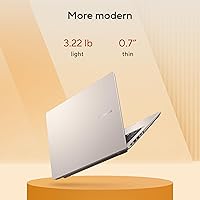
The Platinum Gold finish looks more professional and understated in person than the name implies, and the slim 0.7-inch profile fits easily into slim backpacks alongside textbooks or work gear. Buyers generally describe the build as feeling solid enough for daily carry without babying it.
Flex in the keyboard deck and lid under moderate pressure is noticeable and does not inspire confidence for buyers used to more rigid premium chassis construction. At just over five pounds, it is not heavy, but it is not the featherweight some students were hoping for either.
Keyboard & Typing Experience
81%
19%
Keyboard comfort is one of the more consistently praised aspects in early feedback — key travel feels satisfying for a laptop in this form factor, and the backlit layout makes late-night typing sessions or dim-room work comfortable without eyestrain. Typists who spend long hours writing report low fatigue.
The trackpad, while functional, draws occasional complaints about inconsistent palm rejection and slightly stiff click feedback near the edges. A few buyers also note the keyboard layout has minor quirks in key sizing that require a short adjustment period.
Port Selection
58%
42%
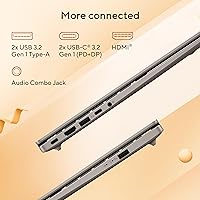
For users running a minimal setup — a mouse, maybe a USB drive — the available ports cover the basics without requiring a hub. The inclusion of HDMI is appreciated by buyers who want to connect to a projector or secondary monitor at home or in a classroom.
Two USB 3.0 Type-A ports is a recurring frustration for anyone running a fuller desk setup, and the absence of a card reader limits photographers who rely on SD card workflows. Multiple buyers specifically call out needing to purchase a USB hub as an unexpected added cost.
Thermal Management
67%
33%
During typical workloads the machine stays quiet and runs cool, which is exactly what students and remote workers need during long meetings or quiet study sessions. The fan profile is well-tuned for low-intensity use and rarely intrudes in calm environments.
Extended CPU loads push fan noise into a range that becomes distracting in library or shared office settings, and sustained heat buildup on the underside makes lap use uncomfortable during those sessions. Thermal performance is not poor, but it is not class-leading either.
SSD Speed & Storage
88%
The PCIe 4.0 SSD delivers noticeably faster boot times and application launches compared to the PCIe 3.0 drives still common in competing mid-range laptops, and buyers frequently cite how snappy the machine feels from a cold start. Large file transfers to external drives also benefit from the faster interface.
512GB fills up faster than many buyers anticipate, especially for those who store photos, project files, or even a handful of downloaded games locally. There is no secondary storage slot mentioned for easy expansion, which adds pressure on buyers to manage storage more actively from day one.
Wireless Connectivity
84%
WiFi 6 performs reliably in crowded network environments — coffee shops, university campuses, co-working spaces — where older WiFi 5 adapters often struggle with congestion. Bluetooth 5.3 pairs quickly and holds connections stably with common peripherals like wireless mice and earbuds.
A small number of buyers report occasional WiFi drops during sleep and resume cycles, though this appears to be more of a driver or Windows behavior issue than a hardware flaw. Range at the outer edges of home networks is solid but not exceptional.
Value for Money
77%
23%
For a machine that ships with a genuinely modern AI-capable processor, 16GB of DDR5 RAM, and a PCIe 4.0 SSD at this price point, buyers generally feel the hardware spec sheet is honest value compared to Intel-based alternatives in the same bracket. The included Game Pass and pre-installed Windows add tangible day-one utility.
Buyers who compare this Vivobook to AMD-powered competitors with larger batteries, higher-refresh panels, or better port selection will find the value proposition more contested. The integrated graphics also mean buyers with any gaming ambition need to spend more elsewhere, which narrows the sweet spot this machine genuinely serves.
Software & Out-of-Box Experience
72%
28%
Windows 11 Home is pre-installed and boots into a usable state quickly, and the Copilot+ certification means AI features are enabled from day one without manual configuration. The three-month Game Pass inclusion is a genuine perk that new buyers appreciate discovering.
Like most OEM Windows laptops, it ships with a handful of pre-installed apps and light bloatware that many buyers prefer to remove on first setup. ASUS-specific utilities are functional but not particularly polished, and a few buyers report minor driver conflicts that required a manual update pass after unboxing.
Portability
82%
18%
The slim chassis and compact footprint make this Vivobook easy to slide into a backpack alongside other gear, and commuters consistently describe it as a natural daily carry without feeling like a burden. The fast-charging capability reduces the need to haul a bulky power brick everywhere.
At 5.21 pounds it sits on the heavier end of the 14-inch category, and buyers cross-shopping true ultrabooks will notice the weight difference after carrying it across a large campus or through an airport. The charger itself adds to travel weight, though its compact size partially offsets that.

Suitable for:

The ASUS Vivobook 14 Ryzen AI 7 Laptop is a strong pick for anyone who needs a capable, modern daily driver without crossing into premium laptop territory. College students will find it particularly well-matched — the 16:10 display gives more vertical room for documents and research tabs, the battery holds up through a full day of classes, and the FastCharge feature means a short plug-in between sessions gets you back to full quickly. Remote workers who regularly use AI-assisted Windows tools like Live Captions in meetings or Copilot for drafting will actually get tangible value from the onboard NPU, since those features run locally rather than depending on a cloud connection. Light creatives — think hobbyist photographers, bloggers, or social media managers — will find the DDR5 memory and PCIe 4.0 SSD handle their workflows without frustrating lag. Frequent travelers who want something slim, light, and fast-charging without babying a fragile ultra-premium machine will also feel right at home with this Vivobook.

Not suitable for:

Buyers hoping to game seriously on this Copilot+ laptop should look elsewhere — the integrated AMD Radeon graphics are capable for casual use and video streaming, but they are not equipped for modern AAA titles at playable framerates or detail settings. The 60Hz display refresh rate will feel noticeably flat to anyone coming from a 120Hz or 144Hz panel, whether for gaming or just fast scrolling. Power users who regularly run virtual machines, heavy video encoding, or large datasets will likely bump into the ceiling of what integrated graphics and a 42Wh battery can sustain over long sessions. The two USB 3.0 ports are workable for light use but genuinely inconvenient if you run a multi-peripheral desk setup and were hoping to skip a hub. Anyone who needs a true desktop replacement — with expandability, wide port selection, and sustained performance under heat — will find this Vivobook undersized for the job.

Specifications

  • Processor: AMD Ryzen AI 7 350 with 8 cores and 16 threads, built on AMD's latest architecture for efficient everyday and creative workloads.
  • NPU: Integrated AMD XDNA Neural Processing Unit capable of up to 50 TOPS, enabling on-device AI features including Windows Recall and Live Captions.
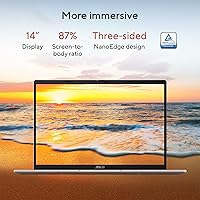
  • Display Size: 14-inch WUXGA panel with a 16:10 aspect ratio, offering more vertical screen space than a standard 16:9 widescreen layout.
  • Resolution: Native 1920x1200 pixel resolution delivers sharp, detailed visuals across documents, media, and creative applications.
  • Refresh Rate: 60Hz panel refresh rate, suitable for productivity and casual media consumption but not optimized for fast-paced gaming.
  • Brightness: Sustained brightness of 300 nits, which is adequate for indoor use but can appear washed out in direct sunlight.
  • RAM: 16GB of DDR5 memory installed, providing fast dual-channel bandwidth for multitasking, video calls, and light content creation.
  • Storage: 512GB PCIe 4.0 NVMe SSD delivers quick boot times and fast file transfers compared to older PCIe 3.0 drives.
  • Graphics: AMD Radeon integrated graphics share system memory and handle everyday visuals, streaming, and light photo editing without a discrete GPU.
  • Battery: 42Wh lithium battery rated for up to 12 hours of use, with FastCharge technology reaching a full charge in approximately 80 minutes.
  • Wireless: WiFi 6 (802.11ax) and Bluetooth 5.3 provide fast, stable wireless connectivity across modern routers and peripherals.
  • Operating System: Windows 11 Home comes pre-installed, with full Copilot+ PC feature support enabled by the onboard NPU.
  • Keyboard: Full-size backlit chiclet keyboard with soft white LED illumination for comfortable typing in low-light environments.
  • Dimensions: The chassis measures 12.41 x 8.8 x 0.7 inches, keeping the footprint compact enough for most laptop bags and backpacks.
  • Weight: At 5.21 pounds, this Vivobook is portable without being ultralight — reasonable for daily commuting or travel.
  • USB Ports: Two USB 3.0 Type-A ports are included for connecting peripherals and storage devices at high transfer speeds.
  • Connectivity Ports: Port selection includes USB 3.0 Type-A, USB-C, HDMI, and a headphone jack, covering core everyday connection needs.
  • Color: Available in Platinum Gold, a brushed metallic finish that reads as understated and professional rather than flashy.
  • Memory Type: DDR5 RAM operates at higher bandwidth and improved power efficiency compared to the DDR4 found in older mid-range laptops.
  • Copilot+ Status: Officially certified as a Copilot+ PC, meeting Microsoft's minimum 40 TOPS NPU requirement for AI-accelerated Windows 11 features.

Related Reviews
ASUS Vivobook 16 M1607KA (Ryzen AI 7 350, 16GB, 1TB)
74%
83%
Performance & Speed
76%
Display Quality
68%
Battery Life
61%
AI Features (Copilot+)
72%
Build Quality & Design
More
ASUS Vivobook 16 Laptop, AMD Ryzen AI 5 3400U, 16GB RAM, 512GB SSD
79%
88%
Performance
90%
Display Quality
82%
Battery Life
75%
Build Quality
72%
Portability
More
HP OmniBook X Flip 14″ 2K Touch-Screen 2-in-1 Laptop, AMD Ryzen AI 7 3500U, 24GB RAM, 1.5TB Storage
86%
92%
Performance
90%
Display Quality
88%
Multitasking & RAM
94%
Storage Capacity
84%
Portability & Weight
More
ASUS Vivobook S 14 OLED M5406WA
76%
94%
Display Quality
88%
Portability & Build
86%
CPU Performance
61%
Thermal Management & Fan Noise
67%
Battery Life
More
ASUS Vivobook 14 i3-1215U 16GB/512GB
75%
88%
Value for Money
82%
Performance & Speed
91%
RAM & Multitasking
61%
Display Quality
87%
Storage Capacity & Speed
More
ASUS Vivobook Go 15 E1504FA
72%
88%
Value for Money
83%
Build Quality
74%
Performance
61%
Display Quality
69%
Battery Life
More
ASUS TUF A16 Gaming Laptop, Ryzen 7 7735HS, 32GB RAM, 1TB SSD
84%
91%
Performance
88%
Display Quality
74%
Battery Life
86%
Build Quality
92%
Gaming Experience
More
ASUS TUF A15 Gaming Laptop, AMD Ryzen 7 7435HS, 64GB RAM, 2TB SSD
85%
92%
Gaming Performance
88%
Multitasking Capability
85%
Cooling System Efficiency
83%
Build Quality
70%
Portability
More
ASUS Vivobook Go 14-inch Laptop
67%
81%
Value for Money
47%
Performance
74%
Battery Life
88%
Portability
69%
Display Quality
More
ASUS TUF A16 Gaming Laptop, Ryzen 7 7735HS, 64GB RAM, 2TB SSD, 16″ 165Hz
84%
94%
Performance
90%
Display Quality
75%
Battery Life
65%
Portability/Weight
88%
Build Quality
More
Acer Aspire Go 15 AI Ready Laptop, Ryzen 7 5825U, 16GB RAM, 512GB SSD
85%
89%
Overall Performance
92%
Battery Life
85%
Display Quality
88%
Portability
87%
Multitasking Performance
More

FAQ

It is a strong fit for most college use cases. The 16:10 display is genuinely better for reading long documents and taking notes than a standard widescreen, the battery holds up through a full day of classes, and the SSD keeps things snappy when switching between apps. If gaming is a priority alongside schoolwork, you may want to manage expectations around the integrated graphics.

Casual and older titles can run at modest settings, but this machine was not designed with gaming as a core use case. The integrated AMD Radeon graphics can handle games like Minecraft, older indie titles, or less demanding esports games, but expect to lower settings significantly on anything released in the last few years. If gaming matters to you, a laptop with a discrete GPU is a better investment.

Battery life depends heavily on what you are doing. Light tasks like note-taking, browsing, or streaming video might get you close to that figure, but a mixed workload involving video calls, background apps, and screen brightness turned up will likely land you closer to seven or eight hours. The FastCharge feature is a practical backup — 80 minutes to full is genuinely useful when you have a short window to plug in.

The main ones most users will actually notice are Live Captions, which transcribes audio in real time during calls or media playback, and Windows Recall, which lets you search back through your activity to find things you worked on earlier. Both run locally using the NPU rather than sending data to the cloud. That said, these features are still being refined by Microsoft, so their usefulness will depend on your specific workflow and how much you lean into Windows AI tools.

Under light to moderate use — browsing, documents, video calls — it stays quiet and barely warm. Push it with sustained CPU loads like long video renders or large file transfers and the fan does spin up noticeably. It is not disruptive in most settings, but if you are in a quiet library or meeting room, you may notice it during intensive tasks.

For most students and remote workers, yes — but it fills up faster than you might expect if you store large photo libraries, video projects, or download games locally. Keeping cloud storage or an external drive handy for archiving media is a smart habit with this configuration. The PCIe 4.0 interface means file transfers to external drives are fast when you do need to offload things.

The 16:10 ratio is a genuine differentiator — you get noticeably more vertical space than the 16:9 panels common at this price, which makes a real difference for productivity. The resolution is sharp and text looks clean. Where it falls short is peak brightness at 300 nits, which is fine indoors but struggles outdoors, and the 60Hz refresh rate will feel flat if you are used to a higher-refresh display.

Yes, the laptop includes an HDMI port and a USB-C port, both of which can drive an external display. This makes it workable as part of a basic desk setup with a larger monitor, though the two USB-A ports may require a hub if you also want to connect a full set of peripherals at the same time.

ASUS has not officially confirmed user-upgradeable memory or storage on this model, and many modern thin laptops in this category have soldered RAM. It is worth checking ASUS support documentation or teardown resources before purchasing if upgradeability is important to you — do not assume it is possible without verifying first.

It ships with Windows 11 Home and includes three months of Xbox Game Pass for PC, which gives you access to a library of games if you want to try casual PC gaming. Beyond that, expect the usual light array of pre-installed apps that come with Windows OEM builds. Nothing is particularly intrusive, but it is worth doing a quick cleanup pass on first boot if you prefer a lean setup.

Where to Buy