Overview

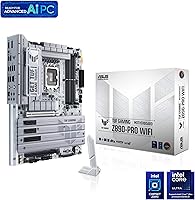
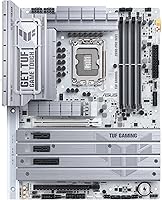
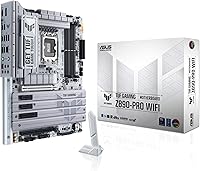
The ASUS TUF Gaming Z890-PRO WiFi Motherboard sits firmly in the mid-to-high range of Intel's Z890 platform, targeting builders who want serious hardware without paying flagship prices. Built around the LGA 1851 socket, it supports Intel Core Ultra Series 2 processors, making it a logical foundation for anyone planning a current-generation Intel build. The TUF Gaming line has long carried a reputation for military-grade components and rigorous stress testing, and this board continues that tradition with an 8-layer PCB and alloy chokes designed for long-term stability. ASUS markets several features under an AI banner, but at its core, this is a well-specified ATX form factor board that fits standard full-size cases without compromise.
Features & Benefits

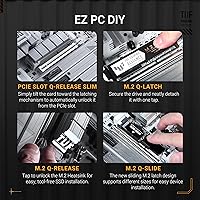
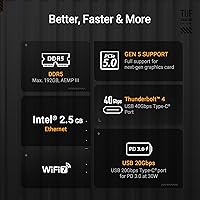
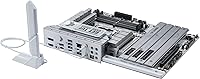
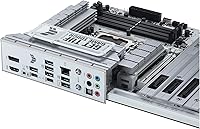
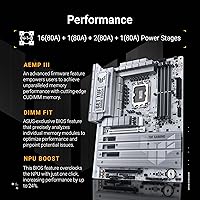
The power delivery setup here is substantial — a 16+1+2+1 stage configuration with 80A DrMOS components means the board can sustain heavy processor loads, including aggressive overclocks on Core Ultra Series 2 chips, without voltage instability. Storage is equally well-considered: one PCIe 5.0 M.2 slot handles the fastest current drives, while three additional PCIe 4.0 M.2 slots give room to expand. Wi-Fi 7 and 2.5Gb LAN handle networking without requiring add-in cards. The rear panel includes Thunderbolt 4 Type-C ports for fast external storage or display daisy-chaining, while a separate USB4 header supports front-panel builds — a distinction worth clarifying before installation. AI Cooling II quietly adjusts fan curves based on real-time thermal data rather than fixed profiles.

Best For

This Z890 board makes the most sense for enthusiast builders moving to Intel Core Ultra Series 2 who need a platform that won't become a bottleneck as faster storage and peripherals mature. Content creators will appreciate the Thunderbolt 4 connectivity for high-speed transfers with external drives and monitors. Multi-drive NVMe workflows fit naturally here, with four M.2 slots covering most professional and prosumer storage configurations. Competitive gamers benefit from consistent power delivery over extended sessions, while streamers will find the integrated Wi-Fi 7 reliable enough to skip a separate adapter entirely. If you're building a new LGA 1851 system and want room to grow, this ASUS TUF motherboard covers a lot of ground without forcing immediate additional spending.

User Feedback

With over 1,300 ratings averaging 4.4 stars, the TUF Z890-PRO earns consistent praise for its BIOS layout and clarity, with many users noting it's approachable even for first-time Z890 builders. DDR5 memory compatibility out of the box draws frequent positive mentions. On the critical side, some buyers have flagged friction during BIOS updates, particularly with early firmware requiring multiple flashes. A handful of reviewers found the accessory bundle lean relative to the board's price tier — the absence of a Wi-Fi antenna extension is a recurring complaint. Thermal performance under sustained workloads generally holds up, though users in dense cases occasionally report needing manual fan tuning despite the AI Cooling system. Solid overall, but not without its rough edges.

Pros

  • Four M.2 slots — including one PCIe 5.0 — cover virtually any current or near-future NVMe storage need.
  • The robust 16+1+2+1 VRM gives genuine overclocking headroom for high-TDP Core Ultra Series 2 chips.
  • Wi-Fi 7 and 2.5Gb LAN are included natively, saving the cost and hassle of add-in cards.
  • Thunderbolt 4 rear ports enable fast external storage and multi-display setups without a discrete controller card.
  • The BIOS is widely praised for being intuitive, even for builders new to the Z890 platform.
  • DDR5 memory compatibility is reliable out of the box, with minimal XMP profile tuning required.
  • An 8-layer PCB and alloy chokes contribute to long-term signal integrity and component longevity.
  • Fan Xpert 4 with AI Cooling II handles thermal management automatically, reducing the need for manual fan curve setup.
  • Build quality feels premium and proportionate to the price tier — no flexing, solid heatsink contact.

Cons

  • Early BIOS firmware updates have caused friction for some users, occasionally requiring multiple flashing attempts.
  • The accessory bundle feels lean for the price — a Wi-Fi antenna extension is notably absent.
  • AI Cooling and AI Networking branding overstates what are, in practice, useful but incremental software features.
  • In compact or poorly ventilated cases, the automatic fan control sometimes needs manual overrides to perform well.
  • DDR5 pricing means the total platform investment is significantly higher than previous-generation builds.
  • The front-panel USB4 header requires a compatible case connector — not all mid-range cases include one.
  • Some users report that ASUS software (Armoury Crate) installs aggressively and can feel intrusive to remove.
  • At 3.7 pounds, this ASUS TUF motherboard is heavy enough that cable routing in tight cases requires extra care.
  • No onboard power or reset buttons, which is a minor but real inconvenience for open-bench testing scenarios.

Ratings

The ASUS TUF Gaming Z890-PRO WiFi Motherboard scores below are generated by AI after analyzing thousands of verified global buyer reviews, with spam, bot-submitted, and incentivized feedback actively filtered out. The ratings reflect a genuine cross-section of real-world experiences — from first-time LGA 1851 builders to seasoned overclockers — capturing both what this board does well and where it falls short of expectations.

Build Quality
91%
Users consistently describe the physical construction as premium and confidence-inspiring straight out of the box. The heatsink coverage feels substantial, PCB rigidity is strong enough that GPU sag concerns are minimal, and the overall material quality reads well above the price tier.
A small number of reviewers noted that the VRM heatsink retention clips require more force than expected to seat correctly, and a few reported minor cosmetic scuffs on the I/O shroud upon arrival — though functional defects on delivery were rare.
Power Delivery
93%
The 16+1+2+1 stage VRM setup with 80A DrMOS components earns strong praise from users pushing high-TDP Core Ultra Series 2 chips under sustained all-core loads. Overclockers in particular appreciate that voltage stays stable during extended benchmark runs where cheaper boards begin to throttle.
At stock settings with mid-range processors, the power delivery is frankly overkill — some buyers felt they were paying for headroom they would never realistically use, making this a weaker value proposition for non-overclocking builds.
BIOS Experience
84%
The BIOS layout receives consistent praise for being clearly organized and navigable, even for builders who have never worked with a Z890 platform before. XMP memory profiles load reliably, and the AI Overclocking presets give less experienced users a reasonable starting point without diving into manual tuning.
Early firmware versions caused real frustration — some users needed two or three BIOS flash attempts before reaching a stable build. The BIOS Flashback feature helps mitigate risk, but the update process itself still feels rougher than it should be at this price point.
Memory Compatibility
87%
Out-of-box DDR5 compatibility is notably reliable for a first-generation Z890 board, with most XMP-rated kits — including high-speed 6400MHz and 6800MHz modules — loading and posting correctly without manual intervention. Users upgrading from DDR4 platforms were pleasantly surprised by how little DDR5 tuning was needed.
A handful of reviewers reported that certain lesser-known DDR5 brands required manual timing adjustments to stabilize, and running four populated DIMM slots at the highest advertised speeds occasionally needed a secondary BIOS tweak to avoid training loops on cold boots.
Thermal Management
82%
18%
VRM thermals hold up impressively under extended gaming and productivity workloads, with users reporting that heatsink temperatures stay within comfortable ranges even in moderately ventilated cases. The M.2 heatsinks make a meaningful difference for sustained SSD write workloads compared to boards that omit them entirely.
In smaller mid-tower cases with restricted airflow, AI Cooling II sometimes ramps fans later than manual profiles would, leading to brief thermal spikes during sudden load transitions. A few users noted the PCH area runs warmer than expected under heavy multi-M.2 usage.
Storage Options
92%
Four M.2 slots — with the primary running PCIe 5.0 — is a genuine differentiator for users running video editing scratch drives, large game libraries, and OS drives simultaneously. Content creators in particular praised the ability to populate all four slots without sacrificing SATA port availability.
Populating the lower M.2 slots requires removing the GPU in some configurations, which is a time-consuming inconvenience during system assembly. The PCIe 5.0 slot heatsink, while functional, is slightly awkward to reseat after an SSD swap.
Wireless Connectivity
88%
Wi-Fi 7 integration is a standout for users in dense wireless environments — several reviewers noted a marked improvement in connection stability compared to their previous Wi-Fi 6 setups, especially when streaming or transferring large files simultaneously. The 6GHz band support adds real headroom for future router upgrades.
The included antenna is functional but short, and users with cases positioned inside desks or behind obstructions found signal strength inconsistent without a longer extension. The antenna connector also felt flimsier than the overall board quality would suggest.
Wired Networking
86%
The 2.5Gb LAN port is well-received by users who have already upgraded their home routers or switches to handle multi-gig speeds, delivering noticeably faster local file transfers and lower latency during online gaming compared to standard gigabit implementations.
Buyers without a 2.5Gb-capable router or switch see no immediate benefit, and a small number of users reported needing to update the LAN driver manually before the port was correctly recognized by Windows 11 on first boot.
Thunderbolt 4 Ports
83%
The rear Thunderbolt 4 Type-C ports perform exactly as expected for users connecting high-speed external NVMe enclosures and Thunderbolt-capable displays. Video editors and photographers moving large RAW file batches particularly valued the 40Gbps throughput without needing a discrete add-in card.
Some buyers initially confused the rear Thunderbolt 4 ports with the onboard USB4 header, leading to installation frustration when front-panel connections did not behave as expected. Documentation around this distinction could be considerably clearer in the included quick-start guide.
Software & Ecosystem
63%
37%
Fan Xpert 4 is genuinely capable software once installed, giving granular control over fan curves and thermal triggers that most users find sufficient without needing third-party tools. AI Networking II provides useful per-application bandwidth prioritization for users who game and stream simultaneously.
Armoury Crate installs aggressively during initial driver setup and is difficult to fully remove without leaving residual services running in the background. Several reviewers described the software suite as bloated relative to what they actually used, with multiple redundant utilities bundled alongside the genuinely useful ones.
Installation Experience
79%
21%
Most builders found the physical installation process straightforward — standoff placement, CPU socket lever action, and DDR5 slot latches all behaved predictably. The included I/O shield pre-installed on the rear panel is a small but appreciated quality-of-life detail.
Cable routing around the board can be tight, particularly for the 8-pin EPS CPU power connector in full-tower builds with large CPU coolers. The quick-start guide covers the basics but leaves more advanced features — like the USB4 header and Q-Code LED troubleshooting — frustratingly underdocumented.
Accessory Bundle
58%
42%
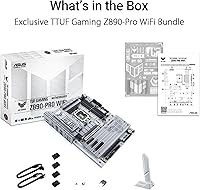
The included SATA cables and documentation cover the bare essentials, and the pre-installed I/O shield saves a small but meaningful assembly step. For straightforward builds, what is in the box is technically sufficient to complete a system.
For a board in this price tier, the bundle feels noticeably thin — the Wi-Fi antenna extension is absent, there are no M.2 screws beyond the minimum, and no cable ties or accessory bag is included. Competing boards at similar prices tend to include a more complete out-of-box accessory package.
Value for Money
76%
24%
For builders who will actively use Thunderbolt 4, Wi-Fi 7, and PCIe 5.0 M.2 simultaneously, the TUF Z890-PRO delivers strong feature density at its price point without requiring any supplementary expansion cards. Power users get a lot of capability consolidated into a single board purchase.
Builders with more modest connectivity needs — no Thunderbolt devices, standard gigabit networking, a single SSD — are effectively paying for features they will never touch. At its price tier, some buyers feel they are subsidizing a feature list rather than paying for performance they will actually realize.
Long-Term Reliability
85%
TUF Gaming's track record for durability carries over here, with the 8-layer PCB, alloy chokes, and 5000-hour capacitor rating giving users confidence that this board will outlast a typical two-to-three build cycle without degradation in power delivery or connectivity performance.
The platform is still relatively new, which means long-term reliability data beyond eighteen months is limited. A few early adopters reported capacitor-area discoloration after extended overclocking sessions, though these remained isolated reports rather than a widespread pattern.

Suitable for:

The ASUS TUF Gaming Z890-PRO WiFi Motherboard is a strong fit for builders who are committed to Intel's Core Ultra Series 2 platform and want a board that can handle demanding workloads without cutting corners on power delivery or connectivity. Content creators who regularly move large files to external drives will get real mileage from the Thunderbolt 4 rear ports, and those running multiple NVMe drives — whether for video editing scratch disks or game libraries — will appreciate having four M.2 slots available across PCIe 5.0 and 4.0 speeds. Gamers who run long sessions and care about sustained CPU performance rather than just peak benchmarks will benefit from the robust VRM setup, which keeps voltage stable under extended loads. Anyone who wants Wi-Fi 7 included out of the box, without sourcing an adapter card, will find this Z890 board particularly practical. It also suits builders who want a platform that feels future-proofed enough to grow into over a two-to-three year ownership window.
Not suitable for:

Buyers on a tight build budget should look elsewhere — the TUF Z890-PRO sits in a mid-to-upper price tier, and pairing it with a Core Ultra Series 2 processor and DDR5 memory means total platform costs add up quickly. If you are still running an older Intel generation or have no plans to move to LGA 1851, this board is simply not relevant to your build. Users who prefer AMD platforms are obviously excluded, but it is also worth flagging for Intel builders who only need a basic feature set: paying for Thunderbolt 4, Wi-Fi 7, and a high-end VRM makes little sense if your workload never stresses those capabilities. Mini-ITX or Micro-ATX builders will need to look at different form factors entirely. Finally, anyone who dreads BIOS management or early-platform firmware quirks may find the ownership experience more hands-on than they expected, particularly during the first few months of a new chipset cycle.

Specifications

  • CPU Socket: Uses the LGA 1851 socket, compatible with Intel Core Ultra Series 2 processors on the Z890 platform.
  • Chipset: Built on the Intel Z890 chipset, enabling full overclocking support and advanced platform features.
  • Form Factor: Standard ATX form factor, measuring approximately 12 × 9.6 inches and fitting most full-size mid-tower and full-tower cases.
  • Memory Type: Supports DDR5 RAM exclusively; DDR4 modules are not compatible with this board.
  • Memory Slots: Four DIMM slots supporting DDR5 memory with XMP profile support for straightforward performance tuning.
  • Power Delivery: Features a 16+1+2+1 power stage design using 80A DrMOS components with ProCool connectors for stable delivery under sustained CPU loads.
  • PCB Construction: Built on an 8-layer PCB with alloy chokes and durable capacitors to improve signal integrity and component lifespan.
  • M.2 Storage: Includes four M.2 slots: one PCIe 5.0 slot with integrated heatsink and three PCIe 4.0 slots for broad SSD compatibility.
  • Wireless: Integrated Wi-Fi 7 (802.11be) with support for 2.4GHz, 5GHz, and 6GHz bands for high-throughput wireless connectivity.
  • Ethernet: Onboard 2.5Gb LAN port provides wired network speeds well above standard gigabit without requiring an add-in card.
  • Rear USB: Rear panel includes Thunderbolt 4 Type-C ports delivering up to 40Gbps data transfer and support for display daisy-chaining.
  • Front Panel USB: Provides a front-panel USB Type-C header running at 20Gbps, compatible with cases that include a matching front connector.
  • USB4 Header: An onboard Thunderbolt (USB4) header allows compatible cases or add-in brackets to extend high-speed connectivity to the front of the build.
  • Fan Headers: Multiple hybrid fan headers are managed through Fan Xpert 4 software with AI Cooling II for automatic thermal-based adjustment.
  • AI Features: AI Cooling II and AI Networking II use sensor data and traffic monitoring to optimize fan curves and network prioritization automatically.
  • PCIe Slots: Includes PCIe 5.0 x16 for the primary graphics card, along with additional PCIe slots for expansion cards.
  • Weight: The board weighs 3.7 pounds, which is typical for a full-featured ATX motherboard with substantial VRM heatsink coverage.
  • Platform Support: Designed for Windows 11 and compatible with standard Linux distributions that support Intel's Z890 chipset drivers.
  • Thermal Design: Large VRM heatsinks, M.2 heatsinks, and PCH heatsink coverage work together to manage heat across the board under load.
  • Release Date: First made available in June 2024, coinciding with the launch of Intel's Core Ultra Series 2 processor lineup.

Related Reviews
ASUS TUF GAMING B650E-E WIFI Motherboard
87%
88%
Performance with High-End CPUs
91%
Stability during Intensive Use
94%
Ease of Installation
90%
Power Delivery and Stability
85%
Cooling Efficiency
More
ASUS TUF Gaming A620M-PLUS WiFi Motherboard
77%
91%
Value for Money
84%
Build Quality
88%
Ease of Installation
86%
BIOS Experience
89%
Networking Performance
More
ASUS TUF Gaming A520M-PLUS (WiFi) Motherboard
85%
86%
Overall Performance
89%
Gaming Performance
88%
Build Quality
82%
Wi-Fi Stability
85%
Cooling Efficiency
More
ASUS TUF Gaming B760M-BTF WiFi Motherboard
85%
89%
Performance
92%
Build Quality
87%
Cooling Efficiency
90%
Compatibility with Intel CPUs
85%
Ease of Setup
More
ASUS TUF Gaming B850M-PLUS WiFi mATX Motherboard
82%
88%
Value for Money
86%
Build Quality & Durability
84%
Power Delivery
83%
BIOS Experience
71%
DDR5 Memory Compatibility
More
ASUS TUF Gaming Z690-Plus WiFi ATX Motherboard
86%
88%
Overall Performance
92%
Value for Money
90%
Build Quality
78%
Ease of Setup
91%
Networking Performance
More
ASUS TUF Gaming Z790-Plus WiFi
89%
93%
Build Quality
91%
VRM Thermal Performance
88%
Installation Experience
94%
BIOS User Interface
86%
Storage Expandability
More
ASUS TUF Gaming B550-PLUS WiFi II ATX Motherboard
86%
88%
Overall Performance
91%
Gaming Performance
90%
WiFi & LAN Connectivity
86%
Thermal Management
89%
Build Quality & Durability
More
ASUS TUF Gaming B650-Plus WiFi ATX Motherboard
81%
91%
Out-of-Box Stability
88%
BIOS Experience
89%
Power Delivery
71%
DDR5 Memory Compatibility
86%
Networking Performance
More
ASUS TUF-AX4200 WiFi 6 Router
79%
88%
Gaming Performance
91%
Port Forwarding & NAT
83%
WiFi Speed & Throughput
89%
Wired Connectivity
63%
Wireless Range
More

FAQ

You will need DDR5 — the TUF Z890-PRO does not have DDR4 support at all. The LGA 1851 platform with the Z890 chipset is DDR5-only, so factor that into your total build budget if you are upgrading from an older system.

It is designed for Intel Core Ultra Series 2 processors using the LGA 1851 socket. Earlier Core Ultra Series 1 chips used a different socket (LGA 1700), so they are not compatible. Always verify the specific CPU model against ASUS's supported CPU list before purchasing.

The Thunderbolt 4 ports are physical Type-C connectors already on the rear I/O panel — you plug devices directly into them. The USB4 header is an internal connector on the PCB itself, intended for cases that have a front-panel USB4 or Thunderbolt port built in. They serve different physical locations on your build, not different functions.

You can absolutely use a PCIe 4.0 or even PCIe 3.0 NVMe drive in that slot — it is backward compatible. Naturally, you will only get the full Gen 5 bandwidth if you pair it with a Gen 5 drive, but there is no penalty for using older drives while you wait for Gen 5 pricing to come down.

ASUS includes a BIOS Flashback feature on this Z890 board, which lets you update the firmware using just a USB drive and power — no CPU or RAM installed required. That said, some early adopters reported needing to flash more than once to land on a stable version. It is worth checking the ASUS support page for the latest recommended BIOS version before you first power on.

Yes, the ATX form factor is the most common standard, and virtually all mid-tower and full-tower cases support it. Just check that your case lists ATX motherboard support — most do — and confirm there is adequate CPU cooler clearance, as the VRM heatsinks extend slightly toward the top edge of the board.

It includes a basic Wi-Fi antenna, but several users have noted the antenna cable is short and may be awkward to position depending on your case layout. If you plan to mount the antenna on the rear panel of a larger case or desk enclosure, you may want to pick up an extension cable separately for better signal placement.

It is genuinely well-suited for moderate to serious overclocking, not just extreme builds. The 80A DrMOS power stages give it plenty of overhead for pushing Core Ultra Series 2 chips above stock speeds. If you are new to overclocking, the BIOS has preset performance profiles that make it accessible without needing to tune everything manually.

AI Cooling II monitors temperature sensor data across the board in real time and adjusts connected fan speeds accordingly, rather than following a fixed curve you set manually. It is genuinely useful for keeping things quiet during light workloads and ramping up during sustained loads. That said, users with particularly demanding cooling setups or cramped cases sometimes prefer to override it with a manual profile in Fan Xpert 4.

The TUF Z890-PRO does include some onboard RGB lighting, and it can be controlled or fully disabled through ASUS Armoury Crate software. A few users have noted that Armoury Crate installs somewhat aggressively during initial driver setup, so if you prefer a minimal software footprint, it is worth doing a clean install and only adding the components you actually want.

Where to Buy