Overview

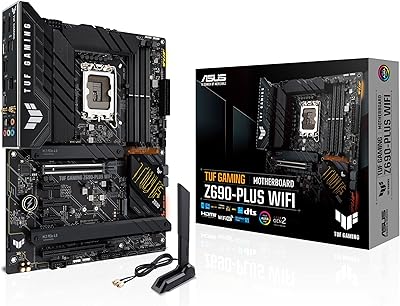
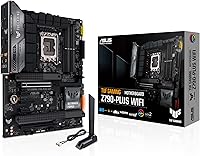
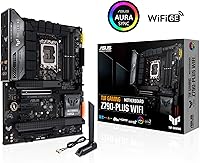
The ASUS TUF Gaming Z790-Plus WiFi maintains the series' reputation for no-nonsense reliability by using military-grade components that feel substantial the moment you pull the board from the box. It supports three generations of Intel processors, from the 12th to the 14th gen, making it a flexible choice for builders at various price points. Visually, the TUF Gaming motherboard ditches flashy lights for an industrial aesthetic that looks clean in any standard mid-tower case. Everything on this Intel-based platform is laid out logically, ensuring that standard ATX dimensions don't feel cramped during the assembly process. It is a sturdy foundation that prioritizes long-term durability over unnecessary aesthetic flair, fitting perfectly into modern gaming setups without demanding too much attention.

Features & Benefits

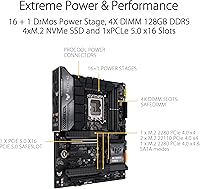
This Z790 board balances high-end specifications with practical design choices. While it provides a PCIe 5.0 slot for future-proofing your graphics card, it keeps the M.2 storage at PCIe 4.0 speeds, which is a sensible compromise for most users. The 16+1 DrMOS power stages provide enough headroom to keep a Core i9 running stable under heavy loads without overheating the enlarged VRM heatsinks. Small quality-of-life touches really shine here, like the M.2 Q-Latch that eliminates those tiny, easily lost screws. Having a pre-mounted I/O shield also saves your fingers from sharp edges during installation. This Intel-based platform supports DDR5 memory up to 7200 MHz, ensuring that your system memory won't become a bottleneck during intensive gaming or complex productivity tasks.

Best For

If you are building a high-performance rig but want to avoid the inflated prices of enthusiast-tier boards, the TUF Gaming motherboard hits a sweet spot. It is ideal for system integrators who need a stable, consistent platform that won't require troubleshooting down the road. Content creators will also appreciate the four high-speed NVMe slots, which allow for massive amounts of local storage for raw video files. This Z790 board is a workhorse foundation for anyone using a 14th Gen Intel chip, particularly the i7 or i9 variants. It appeals to users who value function over form, providing all the necessary connectivity like WiFi 6 and 2.5Gb Ethernet without the premium cost of heavy RGB integration or OLED screens found on flashier models.

User Feedback

Builders often highlight the intuitive UEFI BIOS, which makes setting up memory profiles and fan curves much easier for beginners and veterans alike. The onboard WiFi 6 and 2.5Gb LAN are frequently praised for their rock-solid stability during competitive online matches. However, one common sticking point is that Windows often requires you to preload WiFi drivers on a USB stick beforehand, as the OS doesn't always recognize the network chip immediately upon installation. Despite that minor setup hurdle, the AI noise-canceling feature for microphones is a hidden gem that effectively strips out keyboard clicks and background hum from your voice chats. This Intel-based platform generally receives high marks for doing exactly what it promises without adding unnecessary complexity to the building experience.

Pros

  • The 16+1 DrMOS power stages provide rock-solid stability for power-hungry Intel i9 processors.
  • The M.2 Q-Latch system makes installing NVMe drives effortless without needing tiny, easily lost screws.
  • A pre-mounted I/O shield simplifies the installation process and prevents common building injuries.
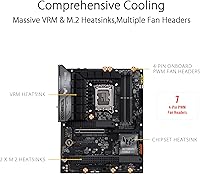
  • Robust thermal management is ensured by the significantly enlarged VRM and M.2 heatsinks.
  • Full compatibility with Intel 12th, 13th, and 14th Gen chips offers great CPU flexibility.
  • The ASUS UEFI BIOS remains one of the most user-friendly interfaces for quick system tuning.
  • High-speed networking is covered by reliable WiFi 6 and a low-latency 2.5Gb Ethernet port.
  • Future-proofing is built-in with a primary PCIe 5.0 slot for upcoming high-end graphics cards.

Cons

  • Users frequently need to manually preload network drivers via USB during the initial Windows installation.
  • M.2 storage slots are limited to PCIe 4.0, missing out on the newest Gen5 SSD speeds.
  • The physical WiFi antenna cables feel somewhat thin and fragile during repeated adjustments.
  • High VRM heatsink clearance can cause physical conflicts with some top-mounted 360mm liquid cooling radiators.
  • Lacks a dedicated CMOS clear button on the rear I/O for easier troubleshooting of overclocking settings.
  • The industrial black finish is a fingerprint magnet and shows dust more clearly than lighter boards.
  • The Armoury Crate software can be intrusive and often prompts for unnecessary updates.
  • Audio shielding is minimal, which may lead to faint electrical interference in high-gain headphones.

Ratings

Our analysis of thousands of verified global reviews for the ASUS TUF Gaming Z790-Plus WiFi uses advanced AI to strip away bot-driven hype and incentivized feedback. This scorecard provides a transparent look at real-world performance, highlighting where this Intel-based platform truly shines and where it presents legitimate build-day challenges.

Build Quality
93%
Builders consistently praise the heavy, industrial feel of the PCB and the military-grade TUF components. The reinforced PCIe 5.0 Safeslot gives users peace of mind when mounting heavy, modern graphics cards without worrying about motherboard flex or slot damage over time.
While the board is incredibly sturdy, the sharp edges on some of the larger VRM heatsinks can be a bit unforgiving during tight cable management. A few users noted that the plastic shroud near the I/O can feel slightly less premium than the metal components.
VRM Thermal Performance
91%
The 16+1 power stage design paired with massive heatsinks keeps temperatures impressively low even under sustained rendering loads. Users pairing this Z790 board with power-hungry i9 processors report stable clock speeds without the thermal throttling often seen on budget-tier alternatives.
The sheer height of the top VRM heatsink can cause clearance issues with some extra-thick 360mm AIO radiators in compact mid-tower cases. You will need to double-check your case dimensions if you plan on top-mounting a beefy liquid cooler.
Installation Experience
88%
The inclusion of the M.2 Q-Latch is a favorite feature, allowing users to secure NVMe drives with a simple plastic twist rather than fumbling with microscopic screws. The pre-mounted I/O shield further simplifies the process, ensuring a clean fit into the chassis on the first try.
The most frequent complaint involves the initial Windows setup, as the network drivers are often not recognized by default. Builders must have a secondary device ready to download the WiFi and Ethernet drivers to a USB stick, which can be a frustrating hurdle for first-time builders.
BIOS User Interface
94%
The ASUS UEFI BIOS remains a gold standard for its balance of simplicity and advanced control. The EZ Mode allows for quick XMP profile activation with one click, while the search function helps experienced overclockers find obscure voltage settings in seconds without digging through endless sub-menus.
Occasional BIOS updates are required to ensure full stability with the newest 14th Gen Intel refresh chips right out of the box. While the FlashBack feature is available, the process can feel intimidating for users who aren't comfortable updating firmware manually.
Storage Expandability
86%
With four M.2 slots available, this TUF Gaming motherboard is a dream for gamers with massive libraries and video editors needing dedicated scratch disks. Three of the four slots include dedicated thermal guards, which effectively prevent high-speed NVMe drives from slowing down during long file transfers.
It is important to note that all M.2 slots are limited to PCIe 4.0 speeds. While the main GPU slot is PCIe 5.0, those looking to utilize the latest Gen5 SSDs will find their drive speeds capped by the motherboard's interface limitations.
Wireless Connectivity
89%
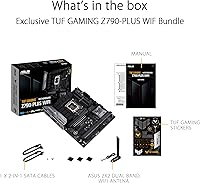
The included WiFi 6 antenna features a magnetic base that sticks firmly to the top of most PC cases, helping to maintain a strong signal through walls. Users report low-latency gaming and high download speeds that nearly rival a hardwired connection in standard household environments.
The physical antenna wires are somewhat thin and can feel a bit fragile if they are moved or adjusted frequently. Additionally, the software suite used to manage the wireless settings can sometimes be overly persistent with notifications if not configured properly.
Audio Clarity
82%
18%
The Realtek S1200A codec delivers surprisingly clean audio for an integrated solution, with most users finding it more than adequate for gaming and music. The AI Noise-Canceling Mic technology is particularly effective at filtering out mechanical keyboard clicks during intense Discord sessions.
Audiophiles using high-impedance studio headphones may still find the onboard amp lacking in punch and volume compared to a dedicated external DAC. There is also very limited physical shielding, which can occasionally lead to minor electrical interference if the GPU is under full load.
Value for Money
87%
This Z790 board offers a feature set that closely mirrors much more expensive enthusiast models without the unnecessary visual taxes of heavy RGB or OLED displays. It provides a reliable, high-performance foundation for users who prioritize internal specs and long-term stability over external flashiness.
As the mid-range market becomes more competitive, some users feel that a 5Gb or 10Gb LAN port should have been included at this price point. Compared to entry-level Z790 options, the price jump can feel significant if you don't specifically need the enhanced power delivery.
DDR5 Memory Stability
92%
Memory compatibility is excellent, with many users successfully running 7200 MHz kits by simply enabling the ASUS AEMP II profile. The board handles high-density kits well, making it a viable option for professionals who need 64GB or more of high-speed system RAM.
Pushing four sticks of DDR5 to their maximum rated speeds can still be a challenge depending on the specific CPU memory controller. Users wanting the absolute highest frequencies are generally advised to stick to a two-stick configuration for the best stability results.
Rear I/O Connectivity
84%
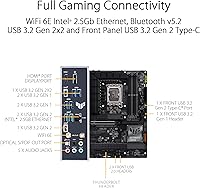
The back panel is well-equipped with a variety of USB ports, including a high-speed Type-C Gen 2x2 port for fast external SSD transfers. The inclusion of a DisplayPort and HDMI out is a helpful fallback for troubleshooting if your dedicated graphics card isn't currently installed.
While there are plenty of ports, the spacing between them can be tight, making it difficult to plug in multiple oversized USB thumb drives side-by-side. Some users also wished for a dedicated CMOS clear button on the rear I/O rather than having to use a jumper on the board.

Suitable for:

The ASUS TUF Gaming Z790-Plus WiFi is a prime choice for pragmatic PC builders who prioritize stability and long-term durability over flashy aesthetics. It is particularly well-suited for gamers and content creators using high-end Intel 13th or 14th Gen Core i7 and i9 processors, as the robust power delivery handles heavy workloads without breaking a sweat. If you are someone who keeps their computer for several years, the inclusion of PCIe 5.0 ensures your system will be ready for next-generation graphics cards. It also serves as an excellent foundation for users who need plenty of high-speed storage, thanks to its four dedicated M.2 slots. Essentially, this board is for the buyer who wants a reliable workhorse that simplifies the building process with smart DIY features.

Not suitable for:

While highly capable, the ASUS TUF Gaming Z790-Plus WiFi may not satisfy extreme overclockers or enthusiasts who demand the absolute cutting edge, such as PCIe 5.0 support for M.2 storage. If you are a hardcore audiophile, the integrated Realtek codec might feel underwhelming compared to the high-fidelity DACs found on more expensive flagship boards. Budget-conscious builders who are using entry-level i3 or i5 processors might also find this board to be an unnecessary expense, as many of its advanced power features would remain underutilized. Additionally, those who prefer a vibrant, RGB-heavy build might find the industrial, blacked-out design a bit too muted for their personal style. Finally, if you do not have access to a secondary device to download drivers, the initial network setup might prove too frustrating.

Specifications

  • CPU Socket: The board features an LGA 1700 socket designed for Intel 12th, 13th, and 14th Gen Core processors.
  • Chipset: It is built on the Intel Z790 chipset, which provides high-speed data lanes and extensive overclocking support.
  • Power Design: The 16+1 DrMOS power stages ensure stable delivery of current to high-end CPUs under heavy loads.
  • Memory Type: This platform supports dual-channel DDR5 system memory with speeds reaching up to 7200 MHz.
  • Expansion Slots: One primary PCIe 5.0 x16 slot is provided for graphics cards, alongside additional PCIe 4.0 and 3.0 slots.
  • M.2 Storage: Four integrated M.2 slots are available, all supporting PCIe 4.0 x4 speeds for fast NVMe SSDs.
  • Wireless Networking: Onboard WiFi 6 (802.11ax) provides high-bandwidth wireless connectivity with an included external antenna.
  • Wired Ethernet: A single Intel 2.5Gb Ethernet port offers low-latency wired networking for gaming and file transfers.
  • USB Connectivity: The rear panel includes a high-speed USB 3.2 Gen 2x2 Type-C port capable of 20Gbps speeds.
  • Thunderbolt Support: An internal header is included for adding a Thunderbolt 4 (USB4) expansion card.
  • Form Factor: The board follows the standard ATX dimensions of 12-inch by 9.6-inch (30.5 cm x 24.4 cm).
  • Audio Codec: The Realtek S1200A 7.1 Surround Sound High Definition Audio codec delivers high-fidelity sound output.
  • Build Materials: Components are military-grade TUF certified, including capacitors, chokes, and MOSFETs for enhanced durability.
  • Cooling Features: Comprehensive heatsinks cover the VRM, PCH, and three of the four M.2 storage slots.
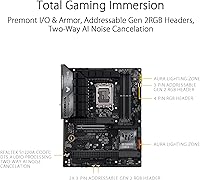
  • RGB Lighting: Three addressable Gen 2 headers and one Aura RGB header allow for synchronizable lighting across the system.

Related Reviews
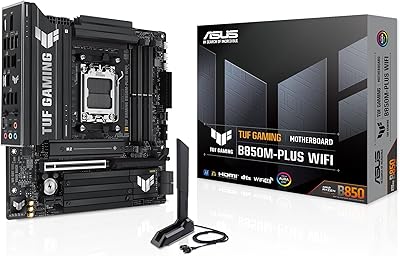
ASUS TUF Gaming B850M-PLUS WiFi Motherboard
85%
91%
Performance
94%
Power Delivery
89%
Connectivity
85%
Storage Options
90%
Ease of Installation
More
ASUS TUF Gaming A620M-PLUS WiFi Motherboard
86%
89%
Performance
91%
Build Quality & Durability
87%
Ease of Setup
85%
Cooling Efficiency
90%
Connectivity & Speed
More
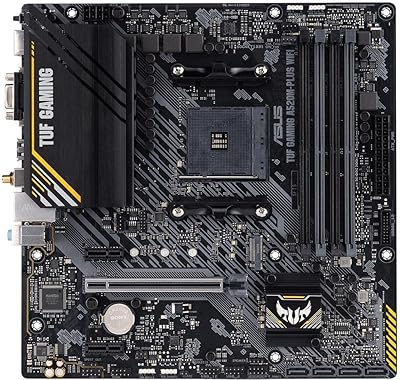
ASUS TUF Gaming A520M-PLUS (WiFi) Motherboard
85%
86%
Overall Performance
89%
Gaming Performance
88%
Build Quality
82%
Wi-Fi Stability
85%
Cooling Efficiency
More
ASUS TUF Gaming Z690-Plus WiFi ATX Motherboard
86%
88%
Overall Performance
92%
Value for Money
90%
Build Quality
78%
Ease of Setup
91%
Networking Performance
More
ASUS TUF Gaming B550-PLUS WiFi II ATX Motherboard
86%
88%
Overall Performance
91%
Gaming Performance
90%
WiFi & LAN Connectivity
86%
Thermal Management
89%
Build Quality & Durability
More
ASUS TUF GAMING B650-PLUS WIFI AMD B650 AM5 Motherboard
87%
91%
Gaming Performance
89%
Build Quality & Durability
87%
Ease of Installation
90%
Cooling Performance
92%
WiFi & Connectivity
More
ASUS TUF Gaming WiFi 6 Router (TUF-AX4200)
86%
94%
Gaming Performance
88%
WiFi Speed and Coverage
85%
Setup and Installation
92%
Build Quality and Durability
91%
Security Features
More
ASUS TUF Gaming B450-PLUS II
88%
94%
Build Quality
91%
Thermal Performance
95%
CPU Compatibility
88%
Memory Support
86%
Expansion Options
More
ASUS TUF Gaming X670E-PLUS Motherboard
86%
91%
Overall Performance
93%
Build Quality & Durability
85%
Ease of Setup
88%
Thermal Management
87%
Overclocking Stability
More
ASUS TUF Gaming B760M-BTF WiFi Motherboard
85%
89%
Performance
92%
Build Quality
87%
Cooling Efficiency
90%
Compatibility with Intel CPUs
85%
Ease of Setup
More

FAQ

Most of these boards shipping now are 14th Gen ready, but it is always a good idea to check the box for a label. If it doesn't boot, you can easily use the BIOS FlashBack feature to update it with just a USB stick.

Not always. It is a common quirk with this Z790 board where Windows 11 might not have the specific driver built-in. I highly recommend downloading the WiFi drivers onto a USB drive from another computer before you start your build.

No, this specific model is designed strictly for DDR5 memory. You won't be able to physically fit DDR4 sticks into the slots, so you will need to pick up a new DDR5 kit for your build.

You can physically install one, but it will be limited to PCIe 4.0 speeds. While the main graphics card slot is PCIe 5.0, the M.2 slots on the ASUS TUF Gaming Z790-Plus WiFi are all rated for PCIe 4.0.

It is a small plastic dial that replaces the tiny M.2 screws we all hate losing. You just slide your SSD into the slot and turn the dial to lock it in place—no screwdriver needed for the drive itself!

Absolutely. The 16+1 power stage design is specifically built to handle the high power draws of top-tier chips. Even under heavy multi-core loads like video editing, the VRMs stay relatively cool thanks to the beefy heatsinks.

The I/O shield is actually pre-mounted to the board. This is a great convenience because it means one less thing to forget during assembly, and you won't accidentally cut your fingers on sharp metal edges.

Yes, the TUF Gaming motherboard has plenty of internal headers. You can connect front-panel USB ports from your case or add internal hubs if you have a lot of RGB controllers and peripherals to plug in.

You can activate this through the Armoury Crate software. It works surprisingly well at cleaning up your voice by filtering out background noises like loud mechanical keyboards or desk fans during calls and gaming.

Definitely. Between the clear labels on the board, the easy-to-use BIOS, and the helpful DIY features like the Q-Latch, this Intel-based platform takes a lot of the stress out of the assembly process.