Overview

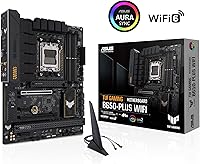
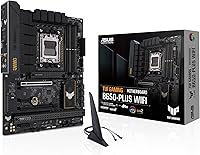
The ASUS TUF Gaming B650-Plus WiFi ATX Motherboard launched in late 2022 as AMD's AM5 platform was just getting started, and it has held its ground well since. Built around the B650 chipset, it sits comfortably in the mid-range — capable enough for serious Ryzen 7000 and 9000 series builds, but priced well below the X670 tier you would need for extreme overclocking setups. The ATX form factor means it fits virtually any standard full-tower or mid-tower case without compromise. Sitting at #4 in Computer Motherboards on Amazon with nearly 2,000 ratings, this TUF B650 board has earned a real community following. If you want a capable AM5 foundation without paying a premium tax, this is a strong starting point.
Features & Benefits

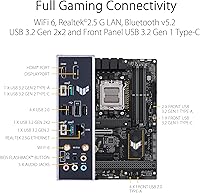
What sets this ASUS gaming motherboard apart at its price point is how much connectivity it packs in without cutting corners on power delivery. The 12+2 teamed power stages with ProCool sockets give high-TDP Ryzen processors the clean, stable power they need under sustained workloads — not just during short bursts. A PCIe 5.0 M.2 slot means you are ready for the next generation of NVMe drives the moment they become affordable. On the networking side, WiFi 6 and 2.5 Gb Ethernet together handle everything from competitive online gaming to large file transfers. USB4 support is a genuine bonus for external storage docks or fast peripherals. The two-way AI noise cancellation rounds things out nicely for anyone who streams or takes frequent video calls.

Best For

The B650-Plus WiFi makes the most sense for builders entering the AM5 ecosystem for the first time who want a board that will not need replacing anytime soon. Pairing it with a Ryzen 7000 or 9000 series CPU is the obvious move — you get DDR5 support and PCIe 5.0 readiness without overextending your budget. Streamers and hybrid workers will appreciate the built-in noise cancellation, which genuinely reduces reliance on third-party audio software. Competitive gamers benefit from the 2.5G wired connection, while wireless users get a solid 802.11ax signal. It is less suited for enthusiasts chasing extreme overclocking headroom or multiple PCIe 5.0 slots — that territory belongs to X670E boards.

User Feedback

Across nearly 2,000 ratings and a 4.4-star average, the overall reception for this TUF B650 board is consistently positive. The most common praise centers on the BIOS experience — buyers regularly highlight how straightforward initial setup is, even for first-time AM5 builders. Build quality earns high marks too, with heatsink coverage feeling solid relative to the price. That said, a notable subset of users has encountered DDR5 compatibility quirks, particularly when pushing memory speeds above 6000 MHz, often requiring a BIOS update before things stabilize. WiFi antenna placement draws occasional complaints about signal range in larger homes. Long-term durability feedback is mostly reassuring, though a handful of users flagged intermittent USB behavior after extended daily use.

Pros

  • Stable out-of-box performance means most users are up and running without any BIOS tinkering required.
  • The 12+2 power stage design handles high-TDP Ryzen CPUs without thermal stress under sustained loads.
  • PCIe 5.0 M.2 support future-proofs storage upgrades without needing a new board later.
  • WiFi 6 and 2.5 Gb Ethernet together cover virtually any networking scenario a gamer or creator faces.
  • USB4 support is a rare inclusion at this price tier and adds real value for fast external peripherals.
  • Two-way AI noise cancellation works well enough to reduce dependence on third-party audio software.
  • Build quality and heatsink coverage consistently impress buyers relative to what the board costs.
  • Broad ATX compatibility means it fits comfortably in almost any standard mid-tower or full-tower case.
  • A 4.4-star rating across nearly 2,000 buyers reflects genuine long-term satisfaction, not just early enthusiasm.
  • Fan Xpert 2+ through Armoury Crate gives solid thermal control without needing third-party fan software.

Cons

  • DDR5 speeds above 6000 MHz can require BIOS updates and trial-and-error before achieving stable operation.
  • WiFi antenna placement has drawn consistent criticism for limiting signal range in larger spaces.
  • A small but notable number of long-term users have reported intermittent USB port behavior over time.
  • Only one PCIe 5.0 M.2 slot limits high-bandwidth storage options for more demanding setups.
  • Armoury Crate software, required for full RGB and fan control, remains bloated and divisive among users.
  • No HDMI or DisplayPort output means users without a discrete GPU cannot use integrated Ryzen graphics easily.
  • B650 chipset offers fewer PCIe lanes overall compared to X670E, which can matter for expansion-heavy builds.
  • Initial BIOS version on older stock units may need updating before newer Ryzen 9000 CPUs are recognized.

Ratings

The scores below for the ASUS TUF Gaming B650-Plus WiFi ATX Motherboard were generated by AI after systematically analyzing thousands of verified global buyer reviews, with spam, bot activity, and incentivized feedback actively filtered out. Each category reflects the honest balance of praise and frustration expressed by real users across multiple markets and use cases. Where buyers consistently flagged pain points alongside strengths, those trade-offs are reflected transparently in both the scores and the commentary.

Out-of-Box Stability
91%
Buyers across skill levels consistently report that this TUF B650 board boots reliably on the first attempt with compatible hardware. First-time AM5 builders in particular appreciate not having to troubleshoot POST failures or mysterious stability issues before the system even reaches the OS install screen.
A subset of users with older retail stock encountered boards shipped with early BIOS versions that failed to recognize newer Ryzen 9000 CPUs without an update, requiring a workaround CPU or retailer assistance before the build could proceed.
BIOS Experience
88%
The ASUS UEFI BIOS consistently earns praise for its logical layout and approachable EZ Mode, which lets less experienced builders configure XMP and boot order without diving into advanced menus. Users upgrading from older platforms frequently cite it as one of the least stressful parts of their build.
Advanced users attempting manual memory subtiming adjustments report that the BIOS can feel less granular than competing boards at a similar price. A few users also noted that BIOS update notifications through Armoury Crate are not always reliable.
Power Delivery
89%
The 12+2 teamed power stage design handles demanding Ryzen 7 and Ryzen 9 processors without thermal throttling under sustained gaming or rendering workloads. Users running high-TDP CPUs like the Ryzen 9 7900X for extended periods report VRM temperatures that stay comfortably within safe limits.
At the absolute ceiling — pairing with a Ryzen 9 7950X under a sustained all-core workload in a poorly ventilated case — some users observed VRM temperatures higher than expected, suggesting the heatsink coverage is competent but not overbuilt for extreme configurations.
DDR5 Memory Compatibility
71%
29%
Standard DDR5 kits running at DDR5-4800 or DDR5-5600 install and operate reliably with minimal fuss. Users sticking to well-known Hynix A-die or Samsung B-die kits at DDR5-6000 via EXPO profiles generally report stable daily operation after a BIOS update.
Pushing memory beyond DDR5-6000 is where things get inconsistent — users report needing multiple BIOS versions and manual timing adjustments to achieve stability, and some kits simply never cooperate. This is a broader AM5 platform trait, but the B650-Plus WiFi offers less tuning flexibility than pricier boards.
Networking Performance
86%
The combination of WiFi 6 and 2.5 Gb Ethernet covers virtually every real-world networking scenario a gamer or content creator faces. Users in apartments and smaller homes report excellent WiFi stability with low ping variance during competitive gaming sessions.
In larger homes or buildings with thick walls, the rear-mounted antenna setup draws repeated criticism for weaker signal range compared to boards with articulating external antennas. A handful of users flagged inconsistent 2.5G Ethernet behavior after specific Windows updates, though this appears driver-related rather than hardware-specific.
Build Quality
87%
The physical construction of the B650-Plus WiFi punches above its weight class — the heatsinks feel substantial, the PCIe slot reinforcement is solid, and the overall board flexes less than many competitors at this price point. Users upgrading from budget B550 boards frequently comment on the noticeably improved material quality.
While the VRM and M.2 heatsinks are well-regarded, the PCH heatsink cover feels slightly hollow and lightweight by comparison. A small number of users also noted minor cosmetic inconsistencies in the edge RGB diffuser housing on units from earlier production batches.
Thermal Management
84%
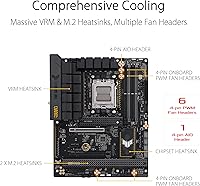
Enlarged VRM heatsinks paired with hybrid fan headers and Fan Xpert 2+ utility give builders solid control over thermals without requiring third-party software. M.2 heatsink covers keep NVMe drives noticeably cooler under sustained sequential write workloads compared to running them bare.
The default fan curve profiles in Armoury Crate can be overly aggressive in certain configurations, causing audible fan fluctuations during light desktop use until manually adjusted. Users with large CPU coolers have also occasionally noted clearance constraints around the top M.2 slot heatsink.
USB Reliability
74%
26%
For most users, the USB implementation — spanning USB4, USB 3.2 Gen2x2 Type-C, and multiple standard ports — works without issue throughout daily use. The inclusion of USB4 at this price tier is genuinely useful for high-speed external SSD docks and Thunderbolt-compatible peripherals.
A recurring pattern in longer-term reviews involves intermittent USB disconnection or failure to enumerate devices after extended daily use, particularly on the rear USB 3.2 ports. This affects a minority of users but appears consistently enough to be a known concern rather than isolated incidents.
WiFi Antenna Setup
67%
33%
WiFi 6 speeds themselves are competitive, and users in close or moderate proximity to their router report clean, stable connections with good throughput during both gaming and large file transfers.
The fixed rear-panel antenna design is the most frequently criticized hardware aspect of this ASUS gaming motherboard. Users in larger spaces consistently report signal degradation, and unlike boards with rotating or external antenna options, there is no easy hardware fix without aftermarket antenna adapters.
Software & Ecosystem
69%
31%
Armoury Crate centralizes RGB control, fan curve management, and system monitoring in one place, which is convenient for users who want a unified software experience without installing multiple utilities. Fan Xpert 2+ in particular is praised for its granular control once configured.
Armoury Crate has a long-standing reputation for being resource-heavy and occasionally installing unwanted background services on first launch. Several users report that updates to Armoury Crate have temporarily broken RGB or fan control settings, requiring a clean reinstall to restore functionality.
Value for Money
88%
At its price point, the B650-Plus WiFi consistently impresses buyers who compare its feature list against comparable boards from MSI and Gigabyte. Getting PCIe 5.0 M.2, USB4, WiFi 6, and 2.5 Gb Ethernet together in a single mid-range board represents genuine value in the AM5 ecosystem.
As B650 board prices have adjusted downward over time, a few buyers who paid launch pricing feel the value proposition has shifted. Those aware of newer board revisions from competing brands also note that some rivals now offer comparable specs with slightly better memory overclocking support at similar prices.
PCIe & Expansion
78%
22%
The primary PCIe 5.0 x16 GPU slot performs exactly as expected, and the additional M.2 slots give most builders enough storage expansion for a well-rounded gaming or creative workstation setup. Slot reinforcement on the primary PCIe lane is solid enough for heavy GPU installations.
Users wanting to run multiple high-bandwidth PCIe devices simultaneously will hit the lane limitations inherent to the B650 chipset. There is no PCIe 5.0 x4 for a secondary GPU or capture card at full bandwidth, which is a genuine structural limitation compared to X670E platforms.
RGB & Aesthetics
81%
19%
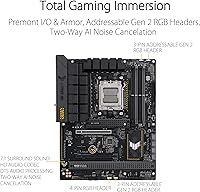
The edge lighting design looks clean and distinctive in a windowed case, and Aura Sync integration with other ASUS components creates a polished, coordinated lighting setup without significant effort. The overall black PCB and aggressive heatsink styling hold up well visually in gaming builds.
Users who are not invested in the ASUS ecosystem find Aura Sync less compelling since cross-brand RGB synchronization remains inconsistent. The onboard RGB headers are sufficient for most builds, but enthusiasts wanting extensive RGB addressable strip coverage may want more native headers.
Long-Term Durability
82%
18%
The majority of users reporting back after one to two years of daily use describe the board as performing exactly as it did on day one, with no degradation in connectivity, stability, or power delivery. The capacitor and choke quality appears to hold up well through thermal cycling.
The intermittent USB behavior reported by some long-term users introduces a degree of uncertainty about multi-year reliability. While the overall failure rate appears low relative to the install base, users running USB-intensive workstations should factor this into their risk assessment.

Suitable for:

The ASUS TUF Gaming B650-Plus WiFi ATX Motherboard is purpose-built for builders who want a dependable AM5 foundation without stretching their budget into X670 territory. It suits first-time Ryzen platform adopters particularly well — the BIOS is approachable, setup is straightforward, and the out-of-box stability means less troubleshooting and more time actually using the system. Gamers pairing it with a mid-to-high-end Ryzen 7000 or 9000 series CPU will find the power delivery more than adequate for sustained performance under gaming loads. Streamers and hybrid workers gain genuine value from the two-way AI noise cancellation and the combination of WiFi 6 with 2.5 Gb Ethernet, covering both flexibility and raw throughput. Anyone already planning to invest in a next-gen PCIe 5.0 NVMe drive will also appreciate that the B650-Plus WiFi supports that transition without requiring a board upgrade down the line.
Not suitable for:

The ASUS TUF Gaming B650-Plus WiFi ATX Motherboard is not the right choice for enthusiasts whose primary goal is aggressive memory overclocking or squeezing every last bit of CPU performance through manual tuning. The B650 chipset lacks the full PCIe 5.0 lane allocation of X670E, so users who need multiple high-bandwidth devices running simultaneously may hit limitations. Builders in large homes or offices with challenging WiFi conditions may find the antenna setup underwhelming compared to boards with better antenna placement or external antenna options. Those planning to use USB-heavy workstation setups should be aware of occasional USB behavior reports that have surfaced from longer-term users. If your workflow demands absolute maximum platform headroom — dual M.2 PCIe 5.0 slots, extreme overclocking support, or workstation-grade expansion — stepping up to an X670E board is the more honest recommendation.
Specifications

  • CPU Socket: Uses the AMD AM5 (LGA1718) socket, compatible with Ryzen 7000 and Ryzen 9000 series desktop processors.
  • Chipset: Built on the AMD B650 chipset, offering a strong mid-range feature set without the full lane allocation of X670E.
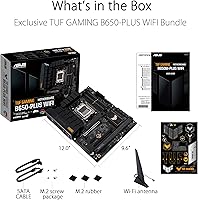
  • Form Factor: Standard ATX form factor measuring 10.8 × 13.3 inches, fitting virtually all full-tower and mid-tower cases.
  • Memory Support: Supports DDR5 memory across four DIMM slots, with speeds up to 6400 MHz via ASUS DOCP overclocking profiles.
  • Power Delivery: Features a 12+2 teamed power stage design with 8+4 pin ProCool sockets, alloy chokes, and durable capacitors.
  • M.2 Storage: Includes at least one PCIe 5.0 M.2 slot for next-generation NVMe drives, with additional M.2 slots at PCIe 4.0 speeds.
  • Wireless: Integrated WiFi 6 (802.11a/b/g/n/ac/ax) provides fast, low-latency wireless connectivity for gaming and streaming.
  • Ethernet: Realtek 2.5 Gb Ethernet port delivers wired network speeds well above standard gigabit for heavy data transfers and online gaming.
  • USB Connectivity: Rear I/O and headers include USB4, USB 3.2 Gen2x2 Type-C, and USB 3.2 Gen 1 Type-C for broad peripheral support.
  • Audio: Onboard audio includes two-way AI Noise Cancellation that reduces background noise from both microphone input and audio output.
  • RGB Lighting: Supports Aura Sync RGB via onboard edge lighting, addressable RGB headers, and a standard RGB strip header.
  • Cooling Headers: Multiple hybrid fan headers are managed through the Fan Xpert 2+ utility inside ASUS Armoury Crate software.
  • VRM Cooling: Enlarged VRM and PCH heatsinks work alongside M.2 heatsink covers to reduce thermal buildup during sustained workloads.
  • USB 2.0 Ports: Includes 2 USB 2.0 ports on the rear I/O, suitable for low-bandwidth peripherals such as keyboards and mice.
  • PCIe Slots: Provides PCIe 5.0 x16 for the primary GPU slot along with additional PCIe 4.0 and 3.0 slots for expansion cards.
  • Voltage Input: Operates at 12 volts, requiring a standard ATX power supply with 8+4 pin CPU power connectors.
  • Launch Date: First made available in October 2022, coinciding with the initial rollout of AMD's AM5 platform and Ryzen 7000 processors.
  • Weight: Board weight is approximately 1 pound, typical for an ATX motherboard before installation hardware and accessories.

Related Reviews
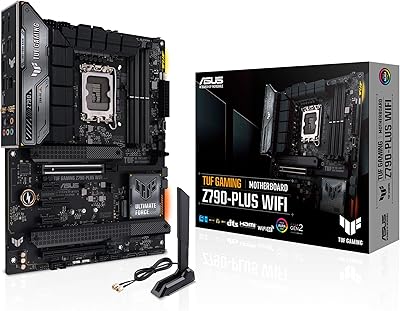
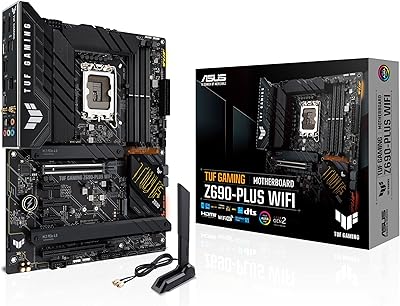
ASUS TUF Gaming Z690-Plus WiFi ATX Motherboard
86%
88%
Overall Performance
92%
Value for Money
90%
Build Quality
78%
Ease of Setup
91%
Networking Performance
More
ASUS TUF Gaming Z790-Plus WiFi
89%
93%
Build Quality
91%
VRM Thermal Performance
88%
Installation Experience
94%
BIOS User Interface
86%
Storage Expandability
More
ASUS TUF Gaming B550-PLUS WiFi II ATX Motherboard
86%
88%
Overall Performance
91%
Gaming Performance
90%
WiFi & LAN Connectivity
86%
Thermal Management
89%
Build Quality & Durability
More
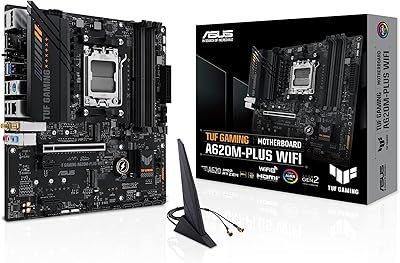
ASUS TUF Gaming A620M-PLUS WiFi Motherboard
77%
91%
Value for Money
84%
Build Quality
88%
Ease of Installation
86%
BIOS Experience
89%
Networking Performance
More
ASUS TUF Gaming A520M-PLUS (WiFi) Motherboard
85%
86%
Overall Performance
89%
Gaming Performance
88%
Build Quality
82%
Wi-Fi Stability
85%
Cooling Efficiency
More
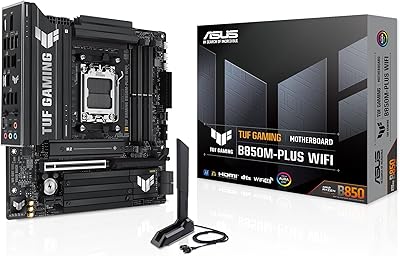
ASUS TUF Gaming B850M-PLUS WiFi mATX Motherboard
82%
88%
Value for Money
86%
Build Quality & Durability
84%
Power Delivery
83%
BIOS Experience
71%
DDR5 Memory Compatibility
More
MSI B650 Gaming Plus WiFi
80%
83%
Value for Money
88%
BIOS & Software Experience
91%
Power Delivery & Stability
84%
Wireless Connectivity
79%
Memory Performance & Overclocking
More
ASUS TUF Gaming X670E-PLUS ATX Motherboard
81%
91%
Build Quality
88%
BIOS & Software Experience
83%
VRM Performance
67%
DDR5 Compatibility
93%
Storage Expandability
More
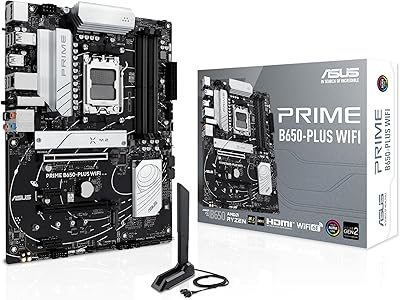
ASUS Prime B650-PLUS WiFi AM5 Motherboard
80%
86%
Value for Money
91%
Feature Set
67%
VRM & Power Delivery
89%
BIOS & Setup Experience
84%
WiFi Performance
More
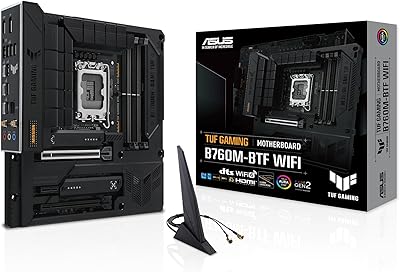
ASUS TUF Gaming B760M-BTF WiFi Motherboard
85%
89%
Performance
92%
Build Quality
87%
Cooling Efficiency
90%
Compatibility with Intel CPUs
85%
Ease of Setup
More

FAQ

It depends on when the board was manufactured and which BIOS version is installed. Units shipped after mid-2024 typically include a BIOS that supports Ryzen 9000 out of the box, but older stock may need a BIOS update first. If you do not have another compatible CPU to perform the update, check if the retailer offers BIOS flashing before shipping.

No. The AM5 platform is DDR5-only, and the B650-Plus WiFi has no DDR4 support whatsoever. If you are upgrading from an older platform, budget for a new DDR5 kit alongside the board.

WiFi 6 performance is solid for most home environments and handles online gaming and 4K streaming without issue. The most common complaint is about antenna placement on the rear I/O — in larger homes or rooms far from the router, signal strength can be noticeably weaker than expected. Adding an external antenna extension can help in those situations.

Yes, and this is one of the most consistently praised aspects of this TUF B650 board. The ASUS UEFI BIOS has an EZ Mode for straightforward setup and an Advanced Mode for manual tuning. Most first-time builders report being able to complete initial configuration without consulting a guide.

Up to DDR5-6000 tends to be the sweet spot for stable operation using EXPO or DOCP profiles. Pushing beyond 6000 MHz is possible but often requires manual tuning and a BIOS update, and results vary depending on your specific memory kit. Sticking to Samsung B-die or Hynix A-die kits generally yields the best compatibility.

No, there are no video output ports on the rear I/O. Even though Ryzen processors with integrated Radeon graphics can technically use onboard video, this board does not expose that capability. You will need a discrete GPU to get a display signal.

The board has multiple M.2 slots — one runs at PCIe 5.0 speeds for your primary NVMe drive, with additional slots operating at PCIe 4.0. This is more than enough for most gaming and creator builds that use two or three fast SSDs.

You can skip it for basic use — the board works fine without it installed. However, if you want to control fan curves through Fan Xpert 2+ or manage Aura Sync RGB lighting, you will need Armoury Crate. It is worth noting that the software has a mixed reputation for being resource-heavy, though it has improved over recent years.

Any modern ATX PSU with an 8-pin plus 4-pin CPU power connector will work. For a typical Ryzen 7000 build with a mid-range GPU, a quality 650W to 750W PSU is a safe choice. If you are pairing it with a high-TDP CPU like the Ryzen 9 7950X, aim for at least 850W.

The main trade-offs are PCIe lane count and overclocking headroom. X670E offers more PCIe 5.0 bandwidth, better memory overclocking support, and generally more expansion options. For the majority of gamers and creators, this ASUS gaming motherboard covers everything they will actually use day to day. The upgrade to X670E only makes financial sense if you specifically need multiple PCIe 5.0 devices or plan to push extreme memory or CPU overclocks.

Where to Buy