Overview

The ASUS TUF Gaming B450-PLUS II ATX Motherboard arrived at a smart moment — when Ryzen 5000 demand was high but X570 boards were expensive and hard to find. ASUS essentially refreshed the proven B450 platform to give budget builders a practical path to Zen 3 without overspending. The ATX form factor means you get a full-size board with genuine expansion room: multiple PCIe slots, four memory slots, and space to grow. BIOS Flashback stands out as a particularly thoughtful inclusion — you can update firmware without a CPU installed, which matters when dropping in a brand-new Ryzen 5000 chip. Just don't expect this to be an extreme overclocking platform; it's built for reliability, not pushing limits.
Features & Benefits

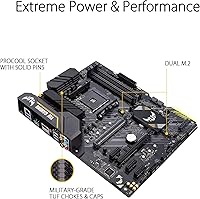
The power delivery on this TUF B450 board is genuinely solid for its class. DrMOS power stages pair with quality alloy chokes and capacitors to keep voltage stable when the CPU is under sustained load — important if you're running a high-core-count Ryzen 7. Storage is well-covered too: dual M.2 NVMe slots let you run a fast boot drive and a secondary drive simultaneously without sacrificing PCIe bandwidth. Front panel USB 3.2 Gen 2 Type-C is a practical addition you won't find everywhere at this price point. Ryzen APU users get HDMI 2.0b and DisplayPort 1.2 for 4K output. Fan Xpert 2 rounds things out, giving you real thermal control without needing separate software.

Best For

This ASUS gaming motherboard makes the most sense for builders pairing it with a Ryzen 5 5600X or Ryzen 7 5800X on a tight budget — you get genuine Ryzen 5000 performance without paying X570 prices. It's also a natural fit for AM4 system owners looking to upgrade their CPU without replacing everything else. If you're running integrated Ryzen graphics for a home office setup or light gaming, the onboard video outputs handle the job cleanly. First-time builders will appreciate the forgiving BIOS and the BIOS Flashback feature, which removes a lot of the guesswork. Streamers and remote workers who care about mic quality will find the AI noise-cancelling support a genuinely useful bonus.

User Feedback

With over 760 ratings averaging 4.6 stars, the B450-PLUS II has earned genuine goodwill from real builders. The most consistent praise centers on build quality and layout — connectors are sensibly placed, the board feels solid, and the UEFI is approachable even for newcomers. That said, the single most common complaint is predictable: buyers who install a Ryzen 5000 CPU without first updating the BIOS end up with a board that won't POST. This is entirely avoidable, but it catches people off guard. A smaller group notes the VRM heatsink runs warm under extended heavy workloads, though temperatures stay within safe operating ranges. Overall, frustrations are mostly self-inflicted, and satisfaction among careful builders is high.

Pros

  • Solid DrMOS power delivery keeps Ryzen 5000 CPUs stable during everyday workloads and moderate gaming sessions.
  • BIOS Flashback makes firmware updates possible without a compatible CPU installed — a genuine lifesaver for new builders.
  • Dual NVMe M.2 slots let you run a fast boot drive and a secondary storage drive without touching your PCIe slots.
  • Front panel USB 3.2 Gen 2 Type-C is a modern convenience that many competing boards skip at this price point.
  • HDMI 2.0b output supports 4K at 60Hz for Ryzen APU users who don't need a dedicated graphics card.
  • Fan Xpert 2 gives you real, granular fan control straight out of the box — no third-party software needed.
  • The B450-PLUS II supports Ryzen 1st through 5000 series CPUs, making it flexible for upgrades over time.
  • Build quality feels sturdy and well-finished, with sensibly placed connectors that make cable management straightforward.
  • The UEFI BIOS interface is clean and approachable, earning consistent praise from first-time builders.
  • A 4.6-star average across hundreds of verified buyers reflects a reliably positive real-world ownership experience.

Cons

  • B450 is limited to PCIe 3.0, so the latest high-speed NVMe drives and GPUs won't run at their full potential bandwidth.
  • Installing a Ryzen 5000 CPU without updating the BIOS first will result in a system that won't boot — this step cannot be skipped.
  • The BIOS Flashback process, while useful, has confused enough users that it requires careful reading of the documentation before attempting.
  • VRM heatsink temperatures climb noticeably under sustained heavy CPU loads, which may concern builders running demanding workloads long-term.
  • Only one RGB header onboard limits lighting customization compared to boards in the same category from competing brands.
  • No PCIe 4.0 support means this board is a dead end if you plan to upgrade to next-generation storage or GPU technology.
  • Overclocking headroom is modest — enthusiasts chasing maximum memory or CPU performance will hit the chipset ceiling relatively quickly.
  • The board's ATX size means it's incompatible with compact or small form factor cases, narrowing build options significantly.

Ratings

The scores below for the ASUS TUF Gaming B450-PLUS II ATX Motherboard were generated by our AI review engine after analyzing hundreds of verified global buyer reviews, with spam, bot activity, and incentivized feedback actively filtered out. The result is an honest, balanced snapshot of what real builders consistently experienced — covering both the standout strengths and the friction points that came up repeatedly. Nothing is glossed over.
Value for Money
88%
For builders who wanted Ryzen 5000 support without stretching to B550 or X570 pricing, the B450-PLUS II landed at a sweet spot. Most buyers felt they got more than expected — solid power delivery, dual M.2 slots, and front-panel USB-C at a price tier where those features are usually stripped out.
A small but vocal group pointed out that B550 boards occasionally go on sale close to this price range, making the value case feel less clear-cut. Buyers who later wanted PCIe 4.0 felt they should have spent a bit more upfront.
Build Quality
91%
The board feels genuinely solid in hand — heatsinks are chunky, the PCB is stiff, and connectors are snug without being difficult to seat. Multiple builders noted that the overall finish and component layout felt well above average for the price bracket.
A few users observed the VRM heatsink gets noticeably warm during extended high-CPU-load sessions, which raised questions about long-term component endurance even if temperatures stayed within safe margins.
BIOS & Firmware
84%
The UEFI BIOS is clean and logically organized — first-time builders consistently praised how approachable it felt compared to competitors. BIOS Flashback, which allows firmware updates without a CPU installed, was singled out as a standout feature for Ryzen 5000 installs.
The mandatory BIOS update before using Ryzen 5000 CPUs tripped up a meaningful number of buyers who weren't warned in advance. A subset of users also found the BIOS Flashback process confusing without step-by-step guidance, leading to failed flash attempts.
CPU Compatibility
86%
Support spanning Ryzen 1st through 5000 series makes this board genuinely flexible for existing AM4 system owners upgrading their CPU. Once the BIOS is updated correctly, Ryzen 5 and Ryzen 7 5000-series chips run without any issues.
The Ryzen 5000 BIOS update requirement remains the single most common complaint across all reviews. Buyers who received units with outdated firmware and no compatible older CPU on hand faced a frustrating first experience.
Power Delivery
79%
21%
DrMOS power stages with quality chokes and capacitors deliver stable, consistent voltage to mid-range Ryzen CPUs under normal gaming and productivity workloads. For Ryzen 5 5600X and similar chips, the power delivery is more than adequate.
Under sustained heavy loads — such as long Blender renders or CPU stress tests — the VRM heatsink runs warm enough that several users expressed concern. Builders pairing this board with Ryzen 9 processors should consider case airflow carefully.
Storage Options
93%
Two M.2 NVMe slots is a generous offering at this price point, letting builders run a fast primary drive and a secondary storage drive simultaneously. Neither slot requires disabling a PCIe lane to operate, which is a practical design decision that competitors don't always replicate.
There is no PCIe 4.0 support, meaning newer high-bandwidth NVMe drives are capped at PCIe 3.0 speeds. For most users this is barely noticeable, but anyone buying a top-tier Gen 4 SSD won't get its full performance potential.
Connectivity & Ports
87%
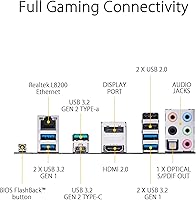
Front-panel USB 3.2 Gen 2 Type-C is a standout inclusion that many competing boards omit at this tier. Combined with rear Type-A Gen 2 and four USB 2.0 ports, the overall port selection covers the needs of most everyday and gaming builds comfortably.
The absence of onboard Wi-Fi is a real limitation for builders in setups where running an Ethernet cable isn't practical. Adding a PCIe Wi-Fi card solves the problem but adds cost and uses an expansion slot.
Onboard Audio
82%
18%
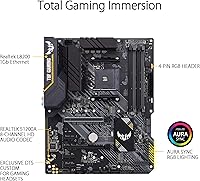
The combination of DTS Sound Unbound and ASUS AI Noise Cancelling Mic technology delivers noticeably cleaner audio than bare-bones onboard solutions. Streamers and remote workers reported a tangible improvement in microphone clarity without needing an external audio interface.
Audiophiles and professional content creators will still outgrow onboard audio relatively quickly. The noise-cancelling is software-driven, so it requires ASUS drivers to be installed and functioning, which adds a dependency some users found inconvenient.
Thermal Management
76%
24%
Fan Xpert 2 gives builders granular control over fan curves across multiple headers without needing any third-party software. Hybrid headers supporting both PWM and DC fans mean compatibility with a wide range of coolers and case fans out of the box.
The fanless VRM heatsink design, while quiet, showed thermal stress under prolonged high-load workloads according to multiple users. Builders running demanding workloads in tight cases with poor airflow reported the warmest temperatures.
Overclocking Headroom
63%
37%
Light memory overclocking up to 3600 MHz is achievable without much effort, and the board handles mild CPU boost behavior from Ryzen 5000 chips without instability. For most mainstream users, stock performance is more than sufficient.
Enthusiasts looking to push memory beyond 3800 MHz or aggressively tune CPU voltage will hit B450 chipset limitations faster than they would on B550 or X570. The platform simply was not designed as an overclocking tool, and the ceiling reflects that honestly.
Ease of Installation
89%
Connector placement is logical and builder-friendly — the 24-pin power connector, front panel headers, and M.2 slots are positioned to minimize cable clutter in standard mid-tower cases. Most first-time builders completed their install without consulting any forums.
The mandatory pre-installation BIOS update creates an extra step that isn't always clear from packaging or basic documentation. Buyers who skipped this step and installed a Ryzen 5000 CPU without a working BIOS version reported a system that simply would not POST.
RGB & Aesthetics
58%
42%
The TUF Gaming aesthetic is clean and restrained — it doesn't look cheap, and builders who prefer an understated look appreciated the lack of excessive RGB plastered across every surface. The single onboard RGB header covers basic accent lighting needs.
One RGB header is minimal by current standards, and builders planning a full RGB ecosystem will find this board lacking native support points. Competitors at similar prices often include two or three addressable headers plus onboard lighting zones.
Software & Utilities
77%
23%
Armoury Crate and Fan Xpert 2 cover the core utility needs — lighting control, fan management, and system monitoring — without requiring multiple separate apps. Most users found the software functional and relatively stable after initial setup.
Armoury Crate has a reputation for bloat and occasional update issues, and that reputation surfaced in user feedback here too. A handful of reviewers preferred to skip it entirely and manage fan curves through the BIOS instead.
Long-Term Reliability
85%
The TUF lineup has a track record for durability, and the B450-PLUS II upholds that reputation among buyers who have run it for extended periods. Quality capacitors and alloy chokes suggest the board is built to last beyond a typical upgrade cycle.
The VRM thermal performance under sustained heavy loads remains the one area where long-term reliability questions linger, particularly for builders who regularly push the board hard. It stays safe, but the margin feels tighter than ideal for demanding workloads.

Suitable for:

The ASUS TUF Gaming B450-PLUS II ATX Motherboard is the right call for budget-focused PC builders who want genuine Ryzen 5000 series support without paying a premium for B550 or X570. If you're pairing it with a Ryzen 5 5600X or Ryzen 7 5800X and want a stable, well-built platform that won't fight you during the build process, this board delivers. It's particularly well-suited to first-time builders thanks to BIOS Flashback, which lets you update firmware without needing a CPU in the socket — a real stress-reducer when working with newer Ryzen chips. Ryzen APU users running integrated graphics for home office tasks or light gaming will also appreciate the HDMI 2.0b and DisplayPort outputs that handle 4K without a discrete GPU. Streamers and remote workers who rely on clear voice communication will find the AI noise-cancelling mic support a practical, software-driven bonus that most boards at this level skip entirely.
Not suitable for:

The ASUS TUF Gaming B450-PLUS II ATX Motherboard is not the right fit for enthusiasts who want to push their CPU hard through aggressive overclocking — the B450 chipset has real ceiling limitations compared to X570, and the VRM thermals under sustained heavy loads are something to keep in mind. If you're building a workstation around a Ryzen 9 5900X or 5950X and plan to run it at full tilt for hours at a time, the power delivery here may not give you the headroom you want. Builders who need PCIe 4.0 support for the latest NVMe drives or a high-bandwidth GPU connection will need to look at a B550 or X570 board instead, since B450 is capped at PCIe 3.0. Those who frequently swap CPUs or experiment with cutting-edge hardware may also find the BIOS update requirement before installing Ryzen 5000 chips more of an ongoing friction point than a one-time hurdle. Finally, anyone planning a small form factor build should note this is a full ATX board — it simply won't fit a Micro-ATX or Mini-ITX case.
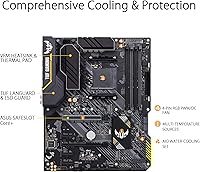
Specifications

  • Chipset: This board uses the AMD B450 chipset, providing a stable and proven platform for AM4 processors including Ryzen 5000 series.
  • CPU Socket: The AM4 socket supports AMD Ryzen 1st, 2nd, 3rd Gen, and 5000 series processors, offering broad CPU compatibility across multiple generations.
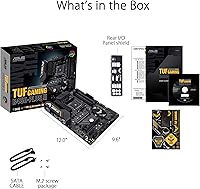
  • Form Factor: Standard ATX form factor measures 12 x 9.6 x 2 inches, fitting full-size mid-tower and full-tower cases without issue.
  • Memory Support: Four DDR4 DIMM slots support up to 128 GB of RAM with speeds up to 4400 MHz under overclocked conditions.
  • M.2 Storage: Two M.2 slots with NVMe support allow installation of two high-speed solid-state drives simultaneously without consuming PCIe expansion slots.
  • PCIe Standard: The board operates on PCIe 3.0, which is compatible with current GPUs and NVMe drives but does not support PCIe 4.0 bandwidth.
  • Video Output: Onboard video outputs include HDMI 2.0b and DisplayPort 1.2, supporting up to 4K resolution at 60Hz for Ryzen APU configurations.
  • USB Connectivity: Rear and front panel USB includes USB 3.2 Gen 2 Type-A and Type-C ports, plus four USB 2.0 ports for legacy peripherals.
  • Audio: Onboard audio features DTS Sound Unbound integration and ASUS AI Noise Cancelling Mic technology for clearer voice communication without external hardware.
  • Fan Headers: Multiple hybrid fan headers support both PWM and DC fans, managed through the Fan Xpert 2 utility for precise thermal control.
  • RGB Support: One onboard RGB header is included, controllable via the ASUS Armoury Crate software for basic lighting customization.
  • BIOS: The board ships with a UEFI BIOS featuring a 256Mb Flash ROM and supports BIOS Flashback for updating firmware without a CPU installed.
  • Power Delivery: DrMOS power stages paired with alloy chokes and durable capacitors provide stable voltage regulation under sustained CPU workloads.
  • Board Weight: The board weighs 3.2 pounds, which is typical for a full ATX motherboard and compatible with standard case mounting hardware.
  • Networking: The board includes a Realtek-based Gigabit Ethernet port for wired network connectivity; no onboard Wi-Fi is included.
  • Operating System: The board is officially supported on Windows 10, with driver and utility compatibility confirmed for that platform at launch.

Related Reviews
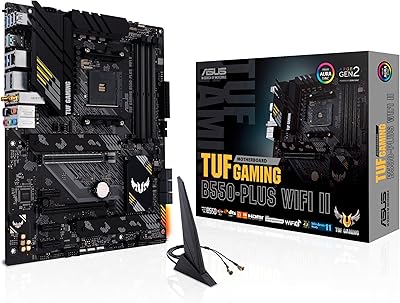
ASUS TUF Gaming B550-PLUS WiFi II ATX Motherboard
86%
88%
Overall Performance
91%
Gaming Performance
90%
WiFi & LAN Connectivity
86%
Thermal Management
89%
Build Quality & Durability
More
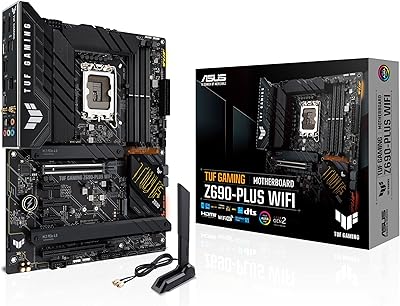
ASUS TUF Gaming Z690-Plus WiFi Motherboard
79%
88%
Build Quality
84%
BIOS & Firmware
67%
DDR5 Memory Compatibility
79%
Power Delivery & VRM
91%
Networking & Connectivity
More
ASUS TUF Gaming Z790-Plus WiFi
89%
93%
Build Quality
91%
VRM Thermal Performance
88%
Installation Experience
94%
BIOS User Interface
86%
Storage Expandability
More
ASUS TUF Gaming X670E-PLUS ATX Motherboard
81%
91%
Build Quality
88%
BIOS & Software Experience
83%
VRM Performance
67%
DDR5 Compatibility
93%
Storage Expandability
More
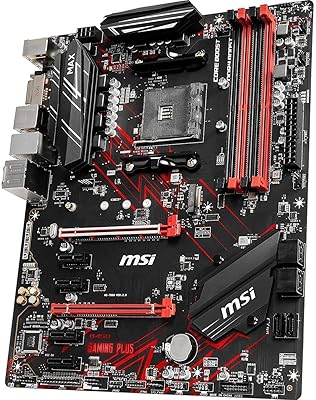
MSI B450 Gaming Plus Max ATX Motherboard
83%
88%
Performance
91%
Value for Money
80%
Compatibility with Ryzen CPUs
85%
Ease of Installation
86%
Overclocking Support
More
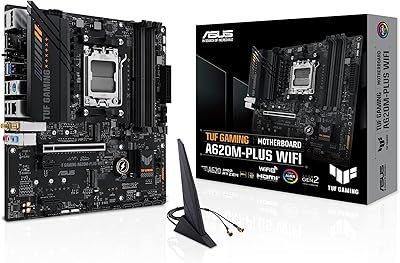
ASUS TUF Gaming A620M-PLUS WiFi Motherboard
77%
91%
Value for Money
84%
Build Quality
88%
Ease of Installation
86%
BIOS Experience
89%
Networking Performance
More
ASUS TUF Gaming A520M-PLUS WiFi Motherboard
77%
88%
Value for Money
83%
Build Quality
91%
CPU Compatibility
76%
Wireless Connectivity
89%
BIOS & Setup Experience
More
ASUS TUF Gaming B850M-PLUS WiFi mATX Motherboard
82%
88%
Value for Money
86%
Build Quality & Durability
84%
Power Delivery
83%
BIOS Experience
71%
DDR5 Memory Compatibility
More
ASUS TUF Gaming B650-Plus WiFi ATX Motherboard

81%
91%
Out-of-Box Stability
88%
BIOS Experience
89%
Power Delivery
71%
DDR5 Memory Compatibility
86%
Networking Performance
More
ASUS Prime X299-A II ATX Motherboard
78%
92%
Power Delivery
88%
Thermal Management
91%
Build Quality
83%
BIOS Experience
78%
CPU Compatibility
More

FAQ

Yes, and this is the most important thing to know before you build. The B450-PLUS II shipped before Ryzen 5000 existed, so older BIOS versions won't recognize those CPUs. You'll need to either update using BIOS Flashback (which lets you flash without any CPU installed) or temporarily use an older compatible Ryzen chip to get into the BIOS first. Check the ASUS support page for your specific board model to download the correct BIOS file.

BIOS Flashback lets you update the firmware using just a USB drive and the board's power connection — no CPU, RAM, or display required. You download the BIOS file from ASUS, rename it as specified in the manual, put it on a FAT32-formatted USB drive, plug it into the designated USB port on the rear panel, and hold the Flashback button until it flashes. It takes a few minutes and is genuinely straightforward once you follow the steps carefully.

Yes, both are excellent pairings. The power delivery on this TUF B450 board handles those CPUs comfortably for gaming and everyday workloads. You won't have the same overclocking ceiling as a B550 or X570 board, but for stock or lightly boosted operation, the platform is stable and well-matched to mid-range Ryzen 5000 chips.

Yes. The board has two M.2 slots that both support NVMe drives, so you can run a primary boot drive and a secondary storage drive simultaneously. Neither slot requires you to disable a PCIe slot to operate, which is a practical advantage over some competing B450 boards.

No, this board does not include built-in Wi-Fi. You'll need a wired Ethernet connection using the onboard Gigabit port, or you can add a PCIe Wi-Fi card or USB Wi-Fi adapter separately if wireless is a requirement for your setup.

Under sustained heavy workloads — think long rendering sessions or CPU-intensive tasks running for extended periods — the VRM heatsink does get noticeably warm. Multiple users have flagged this, but temperatures generally stay within safe operating limits for typical gaming and productivity use. If you're planning to run a Ryzen 9 processor at full tilt for hours on end, a board with more robust VRM cooling would be a smarter choice.

No, the B450 chipset does not officially support ECC (error-correcting code) memory. This board is designed for standard DDR4 consumer RAM. If ECC support is a requirement for your use case — typically workstation or server scenarios — you'd need a different platform entirely.

This is a standard ATX board, so it fits full-size mid-tower and full-tower cases designed for ATX motherboards. It will not fit Micro-ATX or Mini-ITX cases. Always check your case's listed motherboard compatibility before purchasing.

Absolutely, and it's actually a solid setup for that use case. If you're using a Ryzen CPU with integrated Radeon graphics — like the Ryzen 5 5600G — the onboard HDMI 2.0b and DisplayPort 1.2 outputs can drive a 4K monitor at 60Hz without any dedicated GPU. The AI noise-cancelling mic support is also a nice bonus for video calls.

It's minimal. There's one RGB header onboard, controlled through ASUS Armoury Crate software, which is enough to connect a small RGB strip or compatible accessory. If RGB lighting is a major priority for your build, this board isn't going to blow you away — but for builders who just want a subtle accent light without a full RGB ecosystem, it gets the job done.

Where to Buy