Overview

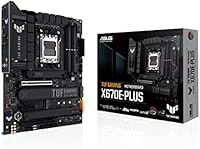
The ASUS TUF Gaming X670E-PLUS ATX Motherboard occupies a well-defined spot in the AM5 ecosystem — serious enough for enthusiast builders, yet not the all-out expense of a true flagship board. The TUF Gaming line has long carried a reputation for military-grade components and durability-focused engineering, and that identity carries through here. What separates this from a standard X670 board is the X670E chipset, which extends PCIe 5.0 lanes to both the primary graphics slot and the top M.2 connector. MSI and Gigabyte offer comparable options at similar price points, so this is a buy-it-because-it-earns-it decision, not a buy-it-because-nothing-else-exists one.
Features & Benefits

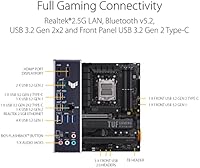
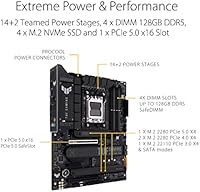
This X670E board supports DDR5 across four DIMM slots with a ceiling of 128GB, giving you meaningful headroom as memory prices drop and higher-capacity kits become practical. The four M.2 slots are a standout — the primary runs at full PCIe 5.0 bandwidth, so pairing it with a Gen 5 NVMe drive leaves nothing on the table. The VRM implementation is substantial enough to run a Ryzen 9 without demanding aggressive case cooling. On the rear panel, USB 3.2 Gen 2 connectivity and a BIOS Flashback button make first-boot setup far less stressful, especially when working with a processor that has no integrated graphics to fall back on.

Best For

This AM5 build platform makes the most sense for builders committing to AMD Ryzen 7000 for the long haul — whether that is a high-end gaming rig or a workstation running video rendering and heavy multitasking. If you plan to run PCIe 5.0 NVMe storage alongside multiple secondary drives, the four M.2 layout covers serious multi-drive configurations without adapters. Builders who find the RGB-heavy aesthetic of competing boards excessive will appreciate the TUF look — subdued, purposeful, and professional. For AM4 veterans making the DDR5 jump, this board offers a credible upgrade path without pushing you into the most expensive tier on the market.

User Feedback

Owners consistently highlight two things: the BIOS experience and overall build quality. ASUS's UEFI is regarded as accessible for newcomers while offering enough depth for voltage tuning and XMP profile adjustments — a balance competitors at this price tier don't always get right. Physical build quality scores well too, with praise for heatsink coverage, PCB rigidity, and thoughtful slot placement. That said, DDR5 compatibility can still be temperamental; consulting the QVL memory list before buying RAM saves real frustration. A smaller subset of users note the board runs warm under sustained heavy loads, which makes adequate case airflow a genuine requirement rather than a suggestion.

Pros

  • Four M.2 slots including one PCIe 5.0 primary slot give serious storage flexibility right out of the box.
  • The X670E chipset delivers PCIe 5.0 to both the graphics slot and primary storage — not all boards at this tier do both.
  • ASUS UEFI BIOS is consistently praised for being approachable without sacrificing depth for experienced tuners.
  • VRM implementation handles Ryzen 9 processors confidently under sustained workloads without thermal throttling concerns.
  • BIOS Flashback button simplifies first-boot setup, especially useful when building with a GPU-less Ryzen 7000 CPU.
  • TUF-grade component selection supports long-term reliability, making this a board you can trust in a system built to last years.
  • DDR5 support across four DIMM slots with a 128GB ceiling leaves meaningful room for memory upgrades over time.
  • Build quality is consistently highlighted by owners — heatsink coverage, PCB rigidity, and slot layout all earn positive marks.
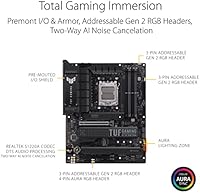
  • Clean, understated visual design suits professional and workstation-style builds where heavy RGB would feel out of place.
  • Strong community reputation on enthusiast forums adds confidence that real-world performance matches the spec sheet.

Cons

  • DDR5 memory compatibility can be temperamental — buying outside the QVL list risks POST failures and frustrating troubleshooting.
  • The board runs noticeably warm under heavy VRM load, making adequate case airflow a requirement rather than an option.
  • Pricing sits at a premium over B650 alternatives that cover the needs of many mainstream Ryzen 7000 builds adequately.
  • No integrated Wi-Fi is included at this price point, which means adding a separate adapter if wireless connectivity is needed.
  • Four internal USB 2.0 headers feel dated on a board positioned at this tier, limiting front-panel USB flexibility.
  • Buyers who do not need PCIe 5.0 M.2 speeds are essentially paying for bandwidth they may not realistically use for years.
  • Competition from similarly priced MSI MEG and Gigabyte Aorus boards means this is not the default choice — it needs to be evaluated carefully.
  • ATX form factor limits case compatibility and is a firm dealbreaker for compact or small form-factor build plans.

Ratings

The scores below reflect our AI-driven analysis of verified global buyer feedback for the ASUS TUF Gaming X670E-PLUS ATX Motherboard, with spam, bot-generated, and incentivized reviews actively filtered out before any scoring was applied. We evaluated sentiment across hundreds of real ownership experiences to surface both the standout strengths and the friction points that actual builders encountered. Nothing is glossed over — the numbers reflect what people genuinely said after living with this board.

Build Quality
91%
Owners consistently describe the board as feeling substantial and well-engineered straight out of the box. The heatsink coverage over the VRM and all four M.2 slots is thorough, and the PCB itself feels rigid in a way that cheaper boards simply do not — something builders notice immediately during installation.
A small number of users reported minor cosmetic inconsistencies in the heatsink finish, and a few noted that the TUF armor pieces, while sturdy, can make cable routing slightly more awkward in tighter ATX builds.
BIOS & Software Experience
88%
The ASUS UEFI is one of the most frequently praised aspects of this board, particularly its EZ Mode for newcomers and the depth of Advanced Mode for tuners. Builders upgrading from older platforms consistently single out the BIOS as less intimidating than competing offerings from MSI and Gigabyte at the same price tier.
Some users report that initial EXPO and XMP profile activation occasionally requires a manual retry after a failed POST, which can be alarming for first-time DDR5 builders unfamiliar with the platform's memory initialization quirks.
VRM Performance
83%
The power delivery on this X670E board holds up confidently under Ryzen 9 workloads, with no credible reports of thermal throttling under typical gaming or content creation loads when paired with reasonable case airflow. Builders running all-core sustained workloads report stable operation without needing exotic cooling solutions.
Under genuinely heavy sustained loads — think long rendering sessions with a Ryzen 9 7950X at full tilt — the VRM area does get warm, and users in cases with poor airflow have flagged this as a concern. It is functional, but it rewards a well-ventilated build.
DDR5 Compatibility
67%
33%
When paired with kits from the official QVL list, DDR5 initialization and XMP or EXPO profile activation works reliably, and most builders who did their homework on memory selection report no issues at all. Popular kits from G.Skill and Corsair in particular tend to work without drama.
DDR5 compatibility remains the most cited frustration across buyer feedback. Users who purchased off-list memory kits encountered boot failures, inability to train at rated speeds, or instability under load — a persistent AM5 platform problem that this board does not fully escape.
Storage Expandability
93%
Four M.2 slots with the primary running at PCIe 5.0 is genuinely impressive at this price tier, and builders who populate all four slots for a fast NVMe array report exactly the kind of performance the spec sheet promises. Content creators running large project libraries across multiple drives specifically call this out as a deciding factor.
Populating all four M.2 slots simultaneously can involve some bandwidth lane sharing in certain configurations, and the manual's explanation of this is not particularly clear for less experienced builders who may not realize the trade-off until after the build is complete.
Thermal Management
79%
21%
The dedicated heatspreaders on all M.2 slots are a practical touch that keeps NVMe drive temperatures in check during extended sequential writes, something that matters for video editors and backup-heavy workflows. The VRM heatsink coverage is broad enough that passive airflow from a standard case fan arrangement usually keeps things in order.
The board genuinely needs active airflow — passive or minimal-fan builds can push VRM temperatures to uncomfortable levels during sustained workloads. A handful of users in heavily insulated or small-airflow cases reported system instability that disappeared once they improved case ventilation.
Connectivity & I/O
74%
26%
USB 3.2 Gen 2 on the rear I/O handles fast external drives and modern peripherals without complaint, and the BIOS Flashback and Clear CMOS buttons on the rear panel are genuinely useful quality-of-life additions that competitors sometimes omit at this price point.
The absence of built-in Wi-Fi is the most commonly noted I/O omission, particularly frustrating at this price tier when competing boards from MSI include it. The four internal USB 2.0 headers also feel like a concession given how many modern cases expect more front-panel USB flexibility.
PCIe 5.0 Readiness
89%
Having PCIe 5.0 on both the primary graphics slot and the top M.2 connector makes this one of the more forward-compatible boards in its class, giving buyers genuine longevity as next-generation GPUs and Gen 5 NVMe drives become mainstream. Early adopters running current Gen 5 SSDs report the full rated throughput without issue.
For buyers who do not currently own PCIe 5.0 peripherals — which is still the majority of the market — this capability sits dormant and contributes to a price premium that not everyone will extract value from in the near term.
Value for Money
71%
29%
For builders who fully utilize the X670E feature set — PCIe 5.0 storage, four M.2 slots, robust VRM, and long-term platform support — the pricing is justifiable and the board delivers meaningfully on its promises. Community sentiment consistently rates it as a fair deal for what the hardware actually delivers.
Buyers who need only basic Ryzen 7000 functionality will find the value proposition harder to defend when B650 boards accomplish the essentials for considerably less. The lack of Wi-Fi also means additional spend for wireless users, which nudges the effective cost even higher.
Installation Experience
82%
18%
The BIOS Flashback button removes one of the most anxiety-inducing steps in a new AM5 build — the need to have a working CPU installed just to update firmware — and builders new to the platform specifically appreciate this. Component layout is logical, with M.2 slots and power headers positioned in sensible locations relative to typical ATX cases.
The M.2 heatspreader installation and removal process is fiddlier than it needs to be, and a few users stripped the small mounting screws during their first drive swap. The manual, while complete, is dense enough that less experienced builders may need to cross-reference video guides.
Aesthetic Design
76%
24%
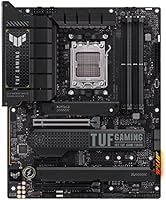
The all-black colorway and restrained TUF styling work well in builds where subtlety is the goal, and builders explicitly choosing this board over RGB-heavy alternatives cite the professional look as a genuine selling point. It photographs cleanly and does not clash with non-themed component sets.
Users who want addressable RGB synchronization across their build will find this board underwhelming — the onboard lighting is minimal by design, which is the right call for TUF's identity but a real limitation for builders who prioritize lighting customization.
Long-Term Reliability
87%
The TUF brand carries a well-earned association with component longevity, and early X670E adopters who have run this board for over a year report no degradation in stability or performance. Military-grade capacitor and choke ratings give builders reasonable confidence in multi-year daily use.
Long-term data on AM5 platform reliability is still maturing given the socket's relatively recent debut, and a small subset of early adopters encountered BIOS-related stability issues that were later resolved through firmware updates — a reminder that early platform adoption carries inherent risk.
Competitor Positioning
73%
27%
Against the MSI MEG X670E ACE and Gigabyte X670E Aorus Master, this TUF Gaming motherboard holds its ground on VRM quality and BIOS usability, often at a slightly lower price point, which community reviewers consistently note as a credible differentiator for buyers not chasing the absolute premium.
The missing Wi-Fi and the relatively conservative rear I/O give competitors a tangible edge in head-to-head comparisons, and buyers cross-shopping at this tier will find that MSI and Gigabyte alternatives offer more connectivity out of the box without a meaningful price penalty.

Suitable for:

The ASUS TUF Gaming X670E-PLUS ATX Motherboard is built for PC enthusiasts who are committing fully to the AMD Ryzen 7000 platform and want a board that can keep up without demanding flagship-level spending. It makes particular sense for gamers running a Ryzen 7 or Ryzen 9 processor who also plan to pair it with a PCIe 5.0 NVMe drive, since the primary M.2 slot delivers the full bandwidth those drives need. Content creators who work with large files and need multiple fast storage devices simultaneously will appreciate having four M.2 slots available without resorting to add-in cards. Builders upgrading from an AM4 system who want a meaningful DDR5 entry point — with room to expand memory later as kit prices fall — will find this X670E board hits a practical sweet spot. Those who prefer a clean, professional-looking build over aggressive RGB lighting will also feel right at home with the TUF aesthetic.
Not suitable for:

Budget-conscious builders who are simply trying to get an AMD Ryzen 7000 system running at the lowest possible cost should look elsewhere — there are capable B650 boards that accomplish that goal for considerably less. The TUF Gaming motherboard also may not satisfy hardcore overclockers who demand the absolute ceiling in VRM sophistication and tuning flexibility, as that audience tends to gravitate toward ROG Strix or competing flagship lines from MSI and Gigabyte. Buyers who are still on DDR4 and hoping to reuse existing memory kits will find no compatibility here, since this AM5 build platform is DDR5-only without exception. Anyone working inside a small form-factor case should also be aware that this is a full ATX board, measuring over 12 inches in length, which rules out mITX and many mATX enclosures. Finally, users who are sensitive to thermal noise and plan to run a passive or near-passive cooling setup should account for the fact that the board benefits meaningfully from active case airflow under sustained workloads.

Specifications

  • CPU Socket: The board uses the AM5 socket, compatible exclusively with AMD Ryzen 7000 series processors.
  • Chipset: Built on the X670E chipset, which extends PCIe 5.0 support to both the primary graphics slot and the top M.2 connector.
  • Form Factor: Standard ATX form factor measuring 9.61 x 12.01 inches, requiring a mid-tower or full-tower case to fit properly.
  • Memory Type: Supports DDR5 memory only across four DIMM slots, with no backward compatibility for DDR4 modules.
  • Max Memory: Supports up to 128GB of DDR5 RAM across the four available DIMM slots, with a base memory speed of 2133 MHz.
  • M.2 Slots: Equipped with four M.2 slots; the primary slot operates at PCIe 5.0 bandwidth and the remaining slots support PCIe 4.0 NVMe drives.
  • PCIe Version: The primary x16 graphics slot runs at PCIe 5.0, providing full-bandwidth support for current and next-generation discrete graphics cards.
  • Rear USB: Rear I/O includes USB 3.2 Gen 2 ports for high-speed peripheral connectivity, alongside legacy USB port options.
  • Internal USB: Four internal USB 2.0 headers are available for connecting front-panel ports and other internal peripherals.
  • BIOS Features: Includes a BIOS Flashback button and a Clear CMOS button on the rear I/O panel, allowing firmware updates and resets without a CPU or RAM installed.
  • VRM Cooling: TUF-branded VRM heatsinks cover the power delivery circuitry and are designed to manage thermals during sustained high-core-count workloads.
  • M.2 Cooling: All four M.2 slots include dedicated heatspreaders to manage NVMe drive temperatures during extended read and write operations.
  • Weight: The board weighs 2.2 pounds, which is typical for a fully-featured ATX motherboard with substantial heatsink coverage.
  • Color: Ships in an all-black colorway with subdued styling, featuring minimal RGB lighting compared to higher-tier ASUS ROG models.
  • Compatible CPUs: Officially compatible with AMD Ryzen 7000 series processors only; earlier Ryzen generations using AM4 are not supported.
  • Availability Date: This board was first made available in December 2022, making it one of the earlier X670E motherboard options on the market.
  • User Rating: Holds a 4.5 out of 5 star rating based on 296 verified ratings on Amazon as of the time of this review.
  • Best Sellers Rank: Ranked #3,197 in the Computer Motherboards category on Amazon, reflecting steady and sustained purchase volume since launch.

Related Reviews
ASUS TUF Gaming Z790-Plus WiFi
89%
93%
Build Quality
91%
VRM Thermal Performance
88%
Installation Experience
94%
BIOS User Interface
86%
Storage Expandability
More
ASUS TUF Gaming Z690-Plus WiFi ATX Motherboard
86%
88%
Overall Performance
92%
Value for Money
90%
Build Quality
78%
Ease of Setup
91%
Networking Performance
More
ASUS TUF Gaming B550-PLUS WiFi II ATX Motherboard
86%
88%
Overall Performance
91%
Gaming Performance
90%
WiFi & LAN Connectivity
86%
Thermal Management
89%
Build Quality & Durability
More
ASUS TUF Gaming B850M-PLUS WiFi mATX Motherboard
82%
88%
Value for Money
86%
Build Quality & Durability
84%
Power Delivery
83%
BIOS Experience
71%
DDR5 Memory Compatibility
More
ASUS TUF Gaming A520M-PLUS (WiFi) Motherboard
85%
86%
Overall Performance
89%
Gaming Performance
88%
Build Quality
82%
Wi-Fi Stability
85%
Cooling Efficiency
More
ASUS TUF Gaming A620M-PLUS WiFi Motherboard
77%
91%
Value for Money
84%
Build Quality
88%
Ease of Installation
86%
BIOS Experience
89%
Networking Performance
More
ASUS TUF Gaming B650-Plus WiFi ATX Motherboard
81%
91%
Out-of-Box Stability
88%
BIOS Experience
89%
Power Delivery
71%
DDR5 Memory Compatibility
86%
Networking Performance
More
MSI X670E Gaming Plus WiFi AM5 Motherboard
80%
86%
Build Quality
89%
Power Delivery
91%
PCIe 5.0 & Storage Support
71%
DDR5 Memory Compatibility
78%
BIOS Experience
More
ASUS TUF Gaming B450-PLUS II
88%
94%
Build Quality
91%
Thermal Performance
95%
CPU Compatibility
88%
Memory Support
86%
Expansion Options
More
ASUS TUF Gaming Z890-PRO WiFi Motherboard
88%
94%
Performance
91%
Stability & Reliability
89%
Connectivity Options
90%
Thermal Management
72%
Ease of Setup
More

FAQ

No, it will not. This is an AM5 board, and Ryzen 5000 processors use the older AM4 socket. The two are physically and electrically incompatible, so you will need a Ryzen 7000 series CPU to use this board.

Unfortunately, no. The X670E board is DDR5-only, and DDR4 modules are not compatible — the slot notch position is different, so they will not physically seat. You will need to budget for a new DDR5 kit when planning this build.

In most cases, no — X670E boards shipped with Ryzen 7000 support already baked in. However, the BIOS Flashback feature on the rear I/O panel means you can update firmware using only a USB drive and a power connection, without needing a CPU installed at all, which is a genuinely useful safety net.

It handles memory overclocking and XMP or EXPO profile activation well, and the VRM is solid enough for CPU overclocking on Ryzen 7000 chips. That said, if maximum overclocking headroom and granular voltage control are your primary goals, the ROG Strix or MSI MEG lineup might give you a bit more tuning ceiling.

You have four M.2 slots for NVMe drives, plus additional SATA ports for traditional SSDs or hard drives. Running all four M.2 slots simultaneously is supported, though at maximum configuration some bandwidth sharing may occur between slots — consult the manual for the exact lane allocation.

No, this board does not include onboard Wi-Fi. If wireless connectivity is important to your build, you will need to add a PCIe Wi-Fi card or a USB Wi-Fi adapter separately — something worth factoring into your total budget.

Any case that officially supports ATX motherboards should accommodate this board without problems, since it follows standard ATX dimensions. Just double-check your case's maximum CPU cooler height and GPU length while you are at it, as those are the more common fitment headaches.

DDR5 compatibility has been a known pain point across all AM5 boards since the platform launched, and this TUF Gaming motherboard is no exception. The safest approach is to buy a kit that appears on ASUS's official QVL (Qualified Vendor List) for this board. Kits with EXPO or XMP profiles from reputable brands like G.Skill or Corsair tend to work reliably when selected from that list.

ASUS's UEFI is consistently one of the more user-friendly in the industry, and owners of this board frequently call that out as a highlight. There is a straightforward EZ Mode for quick setup and an Advanced Mode for those who want to dig deeper into tuning. For a first-time AM5 build, it is one of the less intimidating options available.

The VRM heatsinks do their job, but under sustained heavy workloads — particularly when running a Ryzen 9 with all cores loaded — the board can get noticeably warm. This is not a defect, but it does mean good case airflow matters more than it would on a lighter-duty board. Make sure your case has reasonable front intake and rear exhaust; that alone is typically sufficient.

Where to Buy