
Overview

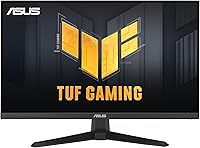
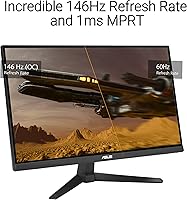
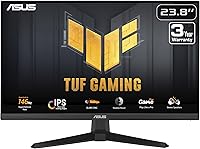
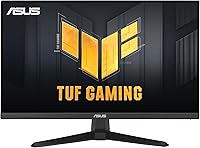
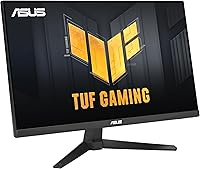
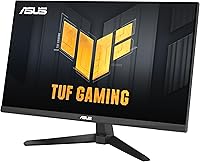
The ASUS VG249QE5A 24-inch Gaming Monitor arrived in May 2025 and has quietly become one of the better-value displays in its category, climbing to a top-50 rank in Computer Monitors with a 4.6-star average from nearly 3,000 buyers. The core pitch is straightforward: a 144Hz IPS panel at a price most budget gaming displays charge for slower, less accurate TN screens. The design is slim and unpretentious — no aggressive angles or RGB theatrics, just a compact footprint that fits comfortably on tighter desks. The 146Hz overclock is real, though the practical difference over 144Hz is negligible. What genuinely matters is the leap from 60Hz.

Features & Benefits

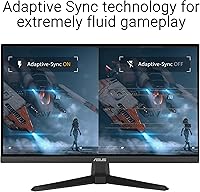
What makes the VG249QE5A stand out in its price tier starts with the panel itself. IPS gives you wide viewing angles and noticeably more accurate color reproduction than the TN panels common here — useful whether you are gaming or doing any color-sensitive work on the side. ELMB Sync is the headline trick: it lets motion blur reduction and adaptive sync run simultaneously, something cheaper monitors typically force you to choose between. Shadow Boost handles dark scenes well, lifting shadow detail without washing out brighter areas. The DisplayWidget Center software lets you adjust settings from your desktop instead of fumbling through on-screen menus, which is a small but genuinely appreciated convenience.

Best For

This ASUS gaming monitor makes the most sense for a few specific buyer profiles. If you are coming from a 60Hz display — a laptop screen, an aging office monitor — the jump to 144Hz refresh will feel immediately obvious in everyday use, not just in games. Competitive FPS players benefit most, since high frame rates and low motion blur matter more than pixel density in fast-paced titles. Students and work-from-home users who also game casually will find the 24-inch matte panel practical for both purposes. Anyone working with a smaller desk will appreciate the compact dimensions. It is not the right fit for those chasing 1440p or ultrawide formats.

User Feedback

Buyers are largely satisfied, with the most consistent praise directed at out-of-box image quality — people switching from older TN panels frequently note how much better colors look immediately. The 3-year warranty is also cited often as a deciding factor against cheaper rivals. On the critical side, the stand is a recurring complaint: it tilts, and that is genuinely all it does. No height adjustment, no pivot. Anyone needing ergonomic flexibility should budget for a VESA arm. The built-in speakers are functional in the loosest sense — fine for a system alert, not for anything you would actually sit and listen to. Panel defect reports are rare, which signals solid build consistency.

Pros

  • IPS panel delivers noticeably better color and viewing angles than TN alternatives at a comparable price.
  • The jump to 144Hz is immediately obvious coming from a 60Hz screen, especially in fast-paced games.
  • ELMB Sync lets adaptive sync and motion blur reduction run at the same time — a rare capability here.
  • Shadow Boost makes dark in-game environments more readable without washing out well-lit areas.
  • DisplayWidget Center software means you can tweak monitor settings from your desktop, no menu-diving required.
  • Matte anti-glare coating keeps the screen usable in brighter rooms without heavy reflections.
  • A 3-year ASUS warranty provides meaningful peace of mind compared to cheaper rivals with shorter coverage.
  • Compact dimensions make this 24-inch IPS display a practical fit for smaller or shared desk setups.
  • Out-of-box image quality earns consistent praise from buyers, with very few reports of panel defects.
  • The included HDMI cable means you can plug in and get started without hunting for accessories.

Cons

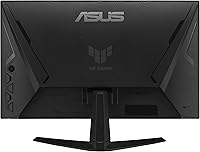
  • The stand only tilts — no height adjustment or pivot, which limits ergonomic flexibility considerably.
  • Built-in speakers are barely adequate; anyone who cares about audio will need an external solution.
  • The 146Hz overclock is real but offers no meaningful advantage over the native 144Hz in practice.
  • 1080p resolution starts to show its limits on a GPU capable of driving higher-res panels.
  • No DisplayPort cable is included, only HDMI, which may matter depending on your graphics card outputs.
  • Tilt-only stand means buyers who want a comfortable viewing position will likely need to purchase a VESA arm separately.
  • Not suitable for color-critical work; the panel lacks factory calibration for professional creative tasks.
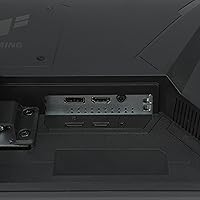
  • Connectivity options are limited, which could be a drawback for users with multiple input sources to switch between.

Ratings

The ASUS VG249QE5A 24-inch Gaming Monitor earns its strong reputation through consistent real-world performance, and the scores below were generated by our AI system after analyzing thousands of verified global buyer reviews — actively filtering out incentivized, duplicate, and bot-generated feedback. Strengths like image quality and refresh rate responsiveness are reflected honestly alongside friction points like stand ergonomics and audio limitations, so you get a complete picture before committing.

Image Quality
88%
For a budget IPS panel, the out-of-box color accuracy consistently surprises first-time buyers. Colors look rich and natural without heavy manual calibration, and the wide viewing angles mean the image holds up even when you are not sitting perfectly centered — useful for shared setups or couch-adjacent desk arrangements.
While strong for the price tier, this 24-inch IPS display does not match the color volume or contrast depth of premium alternatives. Dark scenes can appear slightly washed out since IPS panels inherently lack the deep blacks that VA panels produce, which some users notice during cinematic single-player games.
Refresh Rate Performance
91%
The 144Hz refresh rate is where this monitor genuinely delivers, and buyers upgrading from 60Hz screens consistently describe the difference as immediately and dramatically noticeable. Fast-paced FPS games like Valorant or CS2 feel more responsive and fluid, and even desktop scrolling takes on a smoothness that is hard to go back from.
The 146Hz overclock option generates curiosity but delivers essentially no perceivable benefit over 144Hz in practice. A small number of buyers felt misled by the marketing emphasis on overclocking, expecting a more meaningful performance jump than two additional frames per second can realistically provide.
Motion Clarity
86%
ELMB Sync running alongside adaptive refresh is a meaningful advantage for competitive players, and buyers in FPS-heavy communities specifically call out how clean fast movements look compared to their previous monitors. The 1ms MPRT response time keeps trailing and ghosting minimal even during hectic multi-target scenes.
Some users note that enabling ELMB in its most aggressive mode introduces a slight brightness reduction, which requires compensating through manual brightness adjustments. This is a known trade-off with strobe-based blur reduction and is not unique to this monitor, but it catches some buyers off guard.
Value for Money
93%
Across the entire review pool, value is the single most frequently praised attribute. Buyers repeatedly express surprise at getting an IPS panel with 144Hz, ELMB Sync, and a 3-year warranty at this price point — a combination that would have cost significantly more even two years ago. The included Adobe Creative Cloud trial adds marginal but appreciated bonus value.
The strong value score is context-dependent — it holds up only when compared directly to other monitors in the same price bracket. Buyers who stretch their expectations toward mid-range monitor performance will find the gaps in stand quality, audio, and resolution become harder to overlook for the total cost of ownership.
Ergonomics & Stand
47%
53%
The stand keeps the monitor stable on the desk without wobble during typing or accidental bumps, which is a basic but necessary function it fulfills reliably. Assembly is straightforward and tool-free, taking most users under five minutes to set up out of the box.
Tilt-only adjustment is a genuine pain point that surfaces in a disproportionate share of critical reviews. Without height or swivel control, buyers who need to raise the screen, angle it for a standing desk, or share it between users of different heights are forced to buy a VESA monitor arm — an additional cost and effort that many feel should not be necessary at any price.
Build Quality
74%
26%
The overall construction feels solid for its category — there is minimal flex in the panel itself, and the bezel is slim enough to look reasonably modern. Most buyers report no dead pixels or backlight bleed issues, and ASUS's panel quality control appears consistent based on the low rate of defect complaints across the review pool.
The plastic finish on the stand and rear housing feels noticeably budget in hand, and the matte surface picks up fingerprints during handling. A few buyers note creaking around the stand joint over time, though this appears to be a cosmetic and tactile concern rather than a structural one affecting monitor performance.
Audio
38%
62%
Having any built-in audio at all saves desk space for buyers who only need background noise or system alerts and do not want to manage a separate speaker setup. For a secondary monitor in a multi-display configuration, the speakers serve a functional if unimpressive role.
The built-in speakers are consistently described as thin and low-volume, with almost no bass presence and limited clarity at higher volumes. Buyers who attempted to use them as their primary audio source for gaming or media consumption almost universally switched to external speakers or headphones within days of setup.
Software & Controls
79%
21%
DisplayWidget Center genuinely improves the daily experience of owning this monitor. Being able to adjust brightness, overdrive settings, or switch color modes from a mouse click rather than pressing physical buttons on the back of the panel is a quality-of-life feature that buyers who have used OSD-only monitors learn to appreciate quickly.
The software requires an initial download and occasional updates, and a handful of users report compatibility hiccups on certain Windows configurations. The physical OSD buttons remain functional as a fallback but are small and awkwardly positioned, reinforcing dependence on the software rather than offering a great standalone experience.
Gaming Performance
89%
In the game types this monitor is designed for — competitive shooters, MOBAs, and fast-action games — the VG249QE5A performs above expectations for its class. Shadow Boost adds genuine utility in titles with dark stealth or horror elements, helping players spot enemies or environmental details that would otherwise blend into shadows.
Buyers who primarily play slow, visually rich RPGs or open-world titles sometimes feel the 1080p resolution and contrast limitations leave something to be desired compared to pricier alternatives. The monitor excels at speed and clarity rather than visual immersion, which is a meaningful distinction depending on your preferred game genres.
Setup & Connectivity
76%
24%
Plug-and-play setup is fast and uncomplicated — the included HDMI cable means you can go from box to gaming in under ten minutes. The monitor is recognized immediately by Windows without driver installation, and DisplayWidget Center setup is optional rather than required.
The absence of a DisplayPort cable in the box is a minor but recurring gripe, particularly for buyers with graphics cards that lack HDMI outputs. The monitor's connectivity options are also relatively limited for users who want to switch between multiple input sources regularly.
Warranty & Support
84%
The 3-year manufacturer warranty is one of the more frequently cited reasons buyers chose this monitor over cheaper alternatives with 1-year coverage. ASUS's support reputation lends confidence, and a longer warranty window matters especially for a display that buyers plan to use daily for several years.
Warranty claim experiences can vary by region, and some international buyers report longer turnaround times or more complicated RMA processes than domestic customers. The warranty covers manufacturing defects but standard exclusions apply, so physical damage from drops or mishandling falls outside its protection.
Eye Comfort
72%
28%
The matte anti-glare coating meaningfully reduces reflections in well-lit rooms, and many buyers who game near windows or under overhead lighting note it helps them avoid repositioning the monitor to manage glare. Flicker-free backlight technology reduces eye strain during extended sessions.
The monitor lacks advanced low-blue-light certification that some competing displays offer, and a segment of buyers who log long daily hours report mild eye fatigue during extended use. While not unusual for this product class, buyers with particular sensitivity to blue light may want to apply a software filter or check for alternatives with hardware-level low-blue-light modes.
Shadow Boost Utility
71%
29%
Shadow Boost solves a real problem for players of darker games — lifting detail in shadowy environments without turning the whole image flat and overexposed. Buyers who play horror games, tactical stealth titles, or any game with punishing dark zones find it a useful toggle to keep enabled by default.
The feature is divisive among buyers who prefer more neutral image processing. Some users feel it introduces an artificial look in games that are designed to use darkness intentionally for atmosphere, and it is not universally applicable across all game types without creating visual artifacts in extreme cases.
Desk Footprint
82%
18%
The 24-inch form factor and relatively shallow stand depth make this monitor a practical fit for compact desks, dorm rooms, and dual-monitor configurations where every inch of horizontal space matters. The light 7.3-pound weight also makes repositioning easy without help.
Buyers who later wish they had purchased a larger display sometimes feel constrained by the 24-inch size, particularly in applications like video editing, spreadsheet work, or immersive gaming where more screen real estate would have been appreciated. The size is a deliberate trade-off, not a defect, but some buyers underestimate how quickly they will want more space.

Suitable for:

The ASUS VG249QE5A 24-inch Gaming Monitor is a strong fit for anyone making their first real step into high-refresh-rate gaming without committing to a premium-tier budget. If you are currently gaming on a 60Hz panel — whether a laptop display or an older desktop monitor — the move to 144Hz will feel immediately impactful in fast-paced titles like shooters or MOBAs where motion clarity directly affects performance. Students who split their time between productivity tasks and gaming sessions will find the 24-inch matte IPS panel handles both reasonably well, with color accuracy that holds up for general creative or document work. Esports-focused players on a tight budget will appreciate the combination of low motion blur and adaptive sync running together, since that pairing is genuinely uncommon at this price point. The compact 24-inch footprint also makes it a practical choice for dorm rooms, small home office setups, or any desk where space is a real constraint.

Not suitable for:

The ASUS VG249QE5A 24-inch Gaming Monitor is not the right choice for buyers whose priorities lie beyond what a 1080p IPS panel at this tier can realistically deliver. If you are after a sharper, more detailed image for immersive single-player games or content creation, the 1920x1080 resolution will feel limiting, and stepping up to a 1440p display would serve you better. Anyone who needs ergonomic flexibility from their monitor stand will run into frustration quickly — the included stand only tilts, with no height adjustment or pivot, meaning a VESA arm is effectively a required accessory for comfort-focused setups. Content creators who rely on color-critical workflows should also look elsewhere, as this 24-inch IPS display, while accurate by budget gaming standards, is not factory calibrated for professional color work. Finally, buyers hoping for a larger or more immersive viewing experience, such as ultrawide or 27-inch formats, will find the screen size simply does not satisfy that need.

Specifications

  • Panel Type: The display uses an IPS (In-Plane Switching) panel, which provides wide viewing angles and more consistent color reproduction than TN alternatives.
  • Screen Size: The viewable screen area measures 23.8 inches diagonally, commonly marketed as a 24-inch display.
  • Resolution: Native resolution is 1920x1080 pixels (Full HD), delivering a sharp image suitable for gaming and general productivity at this screen size.
  • Refresh Rate: The panel runs at 144Hz natively and can be overclocked to 146Hz via monitor settings, though the practical difference is minimal.
  • Response Time: Rated at 1ms MPRT (Moving Picture Response Time), which reduces visible motion blur and trailing during fast-paced gameplay.
  • Adaptive Sync: Supports ELMB Sync technology, which enables both Extreme Low Motion Blur and variable refresh rate (FreeSync-compatible) to operate simultaneously.
  • Aspect Ratio: Standard 16:9 widescreen aspect ratio, compatible with the vast majority of gaming resolutions and video content.
  • Surface Finish: Matte anti-glare coating reduces reflections in ambient light, making the screen usable in brighter environments.
  • Connectivity: Includes at least one HDMI port with an HDMI cable provided in the box; additional port configurations should be verified against official ASUS product specifications.
  • Built-in Audio: The monitor includes integrated speakers suitable for casual system audio, though they are not intended as a primary listening solution.
  • Stand Adjustment: The included stand supports tilt adjustment only; height, swivel, and pivot adjustments are not available without a third-party VESA mount.
  • VESA Compatibility: The monitor is VESA mount compatible, allowing users to attach a third-party arm or wall mount for improved ergonomic positioning.
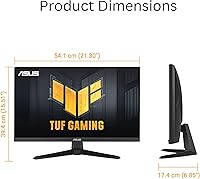
  • Dimensions: With the stand attached, the monitor measures approximately 21.3 inches wide, 15.5 inches tall, and 6.9 inches deep.
  • Weight: The unit weighs approximately 7.3 pounds with the stand, making it easy to reposition or transport if needed.
  • Software: DisplayWidget Center software allows users to adjust monitor settings such as brightness, color mode, and overdrive directly from their PC using a mouse.
  • Shadow Boost: Shadow Boost is an image enhancement feature that lifts detail in dark areas of the screen without overexposing brighter regions.
  • Warranty: ASUS covers this monitor with a 3-year manufacturer warranty, which is longer than the 1–2 year coverage typical of competing budget monitors.
  • Extras Included: Purchase includes a 3-month Adobe Creative Cloud subscription valid until August 31, 2026, a quick start guide, and a warranty card.
  • Release Date: The monitor was first made available in May 2025 and quickly reached a top-50 ranking in the Computer Monitors category on Amazon.
  • Ratings: The product holds a 4.6-star average rating based on nearly 3,000 verified reviews, reflecting broadly positive buyer satisfaction.

Related Reviews

ASUS ROG Strix XG259QNS 24.5-inch Gaming Monitor
80%
93%
Motion Clarity
91%
Input Responsiveness
78%
Refresh Rate Value
67%
Image Quality
88%
Build Quality
More
ASUS ROG Strix XG259CMS 24.5-inch 310Hz Gaming Monitor
87%
94%
Gaming Performance
98%
Refresh Rate
91%
Color Accuracy
86%
Build Quality
85%
Ergonomics
More
ASUS VA24DQSB 24-inch IPS Monitor
78%
93%
Ergonomic Adjustability
88%
IPS Panel Color Accuracy
61%
Brightness & Glare Handling
91%
Eye Comfort & Fatigue
84%
Build Quality & Stability
More
ASUS VG248QG 24″ Gaming Monitor
85%
92%
Performance
89%
Display Quality
95%
Response Time
88%
Value for Money
91%
Eye Care Features
More
Raywego Q24B16 24-inch Curved Gaming Monitor
73%
88%
Refresh Rate Performance
84%
Contrast & Black Levels
91%
Value for Money
76%
Image Sharpness
47%
HDR Quality
More
STGAubron 24-Inch Gaming Monitor LCD2401
83%
92%
Value for Money
89%
Display Quality
85%
Ergonomics/Comfort
91%
Color Accuracy
88%
Connectivity Options
More
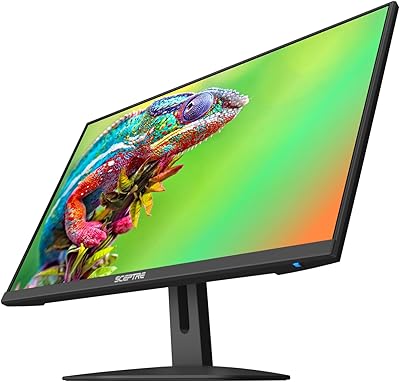
Sceptre E248W-FW100T 24-inch Gaming Monitor
76%
91%
Value for Money
74%
Image Quality
78%
Gaming Performance
82%
Refresh Rate & Sync
67%
Response Time & Motion
More
DJiEX Z24B12 24-inch Gaming Monitor

84%
92%
Value for Money
87%
Display Quality
85%
Ergonomics and Comfort
89%
Color Accuracy
80%
Connectivity Options
More
Sealan 24-Inch Curved Gaming Monitor
86%
92%
Gaming Performance
88%
Visual Quality
91%
Refresh Rate Smoothness
85%
Design & Build
87%
Eye Care Features
More
ViewSonic XG2431 24-Inch Gaming Monitor
86%
92%
Gaming Performance
88%
Display Quality
93%
Response Time
85%
Ergonomics and Comfort
89%
Visual Clarity
More

FAQ

Yes, the adaptive sync implementation is FreeSync compatible, which works natively with AMD GPUs. NVIDIA cards also support FreeSync monitors through their G-Sync Compatible mode, so you should be fine on either platform. Just make sure to enable variable refresh rate in your GPU control panel.

At 24 inches, 1080p still looks sharp — pixel density at that screen size is high enough that most people won't notice the difference in day-to-day use or in fast-paced games. Where 1440p starts to pull ahead is in slower, visually rich games or if you do any image editing work. If your GPU comfortably runs 1080p at high frame rates, sticking with 1080p lets you take full advantage of the 144Hz refresh rate without needing a more powerful system.

Yes, the VG249QE5A is VESA mount compatible, so you can remove the included stand and attach a third-party monitor arm or wall mount. This is actually a popular upgrade given that the built-in stand only tilts — a good arm will give you full height, swivel, and tilt control.

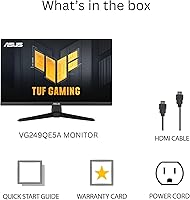
An HDMI cable and a power cord are included in the box, along with a quick start guide and warranty card. There is no DisplayPort cable included, so if your graphics card only has DisplayPort outputs, you will need to pick one up separately.

Genuinely, not noticeable in real use. The 146Hz overclock is something you can enable in the monitor settings, but the two-frame difference over 144Hz is not something human eyes or most games will register. Stick with 144Hz as your baseline and treat the overclock as a footnote rather than a feature.

They work for basic system audio and won't leave you completely without sound, but they are not something you would want as your main audio setup. Most buyers who care about sound quality connect external speakers or use headphones. Think of the built-in speakers as a convenience fallback, not a feature to factor into your buying decision.

No, the monitor works as a standard plug-and-play display without any software installed. The DisplayWidget Center app is optional — it just makes it easier to adjust settings like brightness or color mode from your desktop instead of using the physical buttons on the monitor. You can download it from the ASUS website if you want it later.

Shadow Boost adjusts the gamma in darker parts of the image to reveal more detail in shadowy areas — think hiding spots in tactical shooters or dark corridors in survival games. It does this without blowing out the brighter parts of the screen. Whether it helps depends on your game and personal preference, but it is worth experimenting with if you play games where dark environments give opponents an advantage.

The stand is reasonably solid for everyday use and holds the monitor steady during normal gameplay. It is not the most premium feel, but it does its job. The bigger limitation is ergonomics — you only get tilt, so if you need to raise or lower the screen height, you will need a monitor arm or a riser.

ASUS handles warranty claims directly through their support channels. In most regions, the process involves contacting ASUS support, describing the issue, and either sending the unit in for repair or receiving a replacement depending on the fault type. Three years of coverage is notably better than the one-year warranties common on competing budget monitors, which gives buyers more protection if a panel issue develops down the line.

Where to Buy