Overview

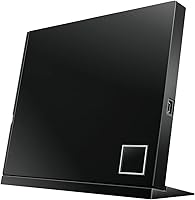
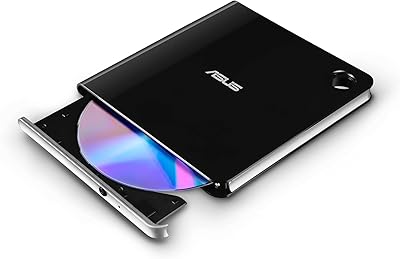
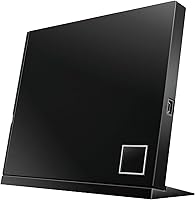
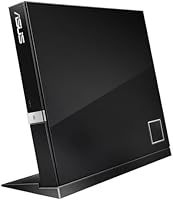
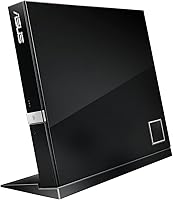
The ASUS SBC-06D2X-U External Blu-Ray Combo Drive has been on the market since 2012, which is worth keeping in mind — USB 2.0 was the standard of its era, not a shortcoming unique to this unit. It connects via a single USB cable, reads Blu-ray discs including the BDXL format, and handles DVD and CD writing as well. You can stand it upright or lay it flat, which helps when desk space is tight. With a 3.7 out of 5 rating across 118 reviews, it sits in mixed-but-useful territory — not universally loved, but clearly serving a real purpose for a specific set of buyers.
Features & Benefits

One of the more compelling things about this external Blu-ray drive is its support for BDXL discs — reading media that stores over 100GB is genuinely uncommon in this category. It also upscales standard DVDs to 1080p, so your existing disc library looks noticeably sharper on a modern display. Blu-ray 3D playback is included, though that appeals to a narrow audience at this point. The drive sits flat or stands on its side, and since it draws power directly through USB, there is no external adapter to manage. OS support spans Windows XP through Windows 10 and Mac OS X 10.6, covering a wide range of legacy systems.

Best For

This ASUS optical drive makes the most sense for people who need occasional Blu-ray access but do not want a permanent internal drive — laptop users, compact PC owners, and anyone who keeps their machine drive-free by design. It is also a practical choice for archiving disc collections, since it writes to both DVD and CD formats. The broad OS compatibility makes it useful on older machines that would struggle with newer peripherals. If you specifically need BDXL compatibility without spending heavily, options in this space are limited, and the SBC-06D2X-U covers that niche reasonably well without asking much from your setup.

User Feedback

Buyers who rate this drive highly tend to appreciate its plug-and-play reliability — it connects, the computer recognizes it, and discs load without fuss, which counts for a lot when optical access is only needed occasionally. Critical reviews, on the other hand, cite inconsistent disc recognition and underwhelming write speeds under real-world conditions. Mac users have flagged compatibility headaches worth noting before purchasing. One thing the drive does not include is Blu-ray playback software — you will need a third-party application to actually watch movies, which catches buyers off guard. A few reviewers also raised durability concerns, suggesting the hardware may not hold up well under frequent daily use.

Pros

  • Reads BDXL discs up to 100GB, a capability that is genuinely hard to find at this price point.
  • No external power adapter needed — the USB connection handles everything, keeping your desk cleaner.
  • Upscales standard DVDs to 1080p, giving your existing disc collection a noticeable quality boost.
  • Flexible placement means it fits comfortably in both tower setups and flat media center arrangements.
  • Compatible with a wide range of operating systems, including legacy versions many newer drives ignore.
  • Plug-and-play setup is straightforward on most systems, with no complex driver installation required.
  • Supports Blu-ray 3D playback for home theater users who still use that format.
  • Compact and light enough at just over 10 ounces to slip into a bag for travel use.
  • Handles Blu-ray reading, DVD writing, and CD burning in a single unit without needing multiple devices.

Cons

  • USB 2.0 interface limits transfer speeds compared to more current external drives on the market.
  • No Blu-ray playback software included — buying or finding a compatible player app is an extra step buyers often miss.
  • Some users report inconsistent disc recognition, where certain discs require multiple attempts before the drive reads them.
  • Mac compatibility has proven unreliable for a portion of users, with connectivity issues that are not always easy to resolve.
  • Write speeds under real-world conditions have disappointed buyers expecting the rated maximum performance.
  • The design dates back to 2012, and durability over extended daily use is a genuine concern based on user feedback.
  • A 3.7 average rating signals a meaningful number of unsatisfied buyers, worth factoring into purchase confidence.
  • No USB 3.0 option exists for this model, so there is no upgrade path for faster performance on newer machines.

Ratings

The scores below reflect an AI-assisted analysis of verified global buyer reviews for the ASUS SBC-06D2X-U External Blu-Ray Combo Drive, with spam, bot-generated, and incentivized feedback actively filtered out before scoring. Each category is rated independently, drawing from patterns in real user experiences across Windows and Mac setups alike. Both the standout strengths and the recurring frustrations are reflected transparently — nothing is smoothed over.

Ease of Setup
78%
22%
On Windows systems, most buyers report a genuinely hassle-free first experience — plug it in, wait a few seconds, and the drive appears ready to use with no manual driver hunting required. For occasional users who just need something that works without IT knowledge, that simplicity is appreciated.
Mac users tell a different story, with a notable share reporting that getting the drive recognized required extra steps or troubleshooting. The setup experience is not consistently reliable across platforms, which pulls the overall score down from what would otherwise be a stronger result.
Disc Read Reliability
67%
33%
When the drive is working well, buyers describe it as dependably steady for standard Blu-ray and DVD playback — discs load, content reads, and the experience is uninterrupted. For users pulling out physical media a few times a month, that baseline reliability is enough to satisfy.
A recurring complaint across reviews involves inconsistent recognition, where certain discs — especially older or lightly worn ones — require multiple removal and reinsertion attempts before the drive acknowledges them. This is not an isolated report, and it is one of the clearer factors behind the mixed overall rating.
DVD & CD Write Performance
59%
41%
The drive does cover DVD and CD writing as part of its combo functionality, which is genuinely useful for users who burn discs occasionally — archiving files, creating backups, or copying home video projects to physical media without needing a separate device.
Real-world write speeds have disappointed a meaningful portion of buyers who expected performance closer to the rated 10x maximum. The USB 2.0 interface creates a hard ceiling on throughput, and under typical conditions many users find burns take noticeably longer than anticipated, which becomes frustrating during batch jobs.
BDXL Compatibility
82%
18%
Support for BDXL format — high-capacity Blu-ray discs exceeding 100GB — is a genuinely uncommon feature at this price point, and buyers who specifically need it tend to rate the drive favorably on this front. For archivists and professionals working with large disc-based data, this capability is the primary reason to choose this unit.
BDXL discs remain a niche format and most everyday buyers will never use this feature. Those who do rely on it have not widely reported problems, but the lack of user volume in that sub-group makes it harder to draw firm conclusions about long-term BDXL read consistency.
Mac Compatibility
44%
56%
The drive is officially listed as compatible with Mac OS X 10.6, and some Mac users have reported using it without incident, particularly on older Intel-based machines running earlier macOS versions where USB optical drives are well-supported.
Mac compatibility is arguably the most consistent pain point in the review pool. A significant share of Mac buyers describe recognition failures, unreliable mounting behavior, or performance issues that do not appear on the same hardware with other drives. For Mac users, this represents a real purchasing risk that the official compatibility listing does not adequately convey.
Build Quality
61%
39%
The physical construction feels adequate for a peripheral in this category — the chassis is solid enough for desk use and does not feel fragile when inserting or ejecting discs. For buyers who use it occasionally rather than daily, the build holds up reasonably well over a normal use period.
Longer-term durability has been flagged by a portion of reviewers, with some reporting mechanical or read failures earlier than expected given the price paid. The 2012-era design origin is relevant context here — the underlying hardware platform is mature, and that shows in how some units age under sustained use.
DVD Upscaling Quality
73%
27%
The 1080p DVD upscaling is a practical benefit for users with large physical DVD libraries who want their content to look better on modern displays. Buyers who regularly revisit older DVD collections report a noticeable improvement in visual clarity compared to native standard-definition output.
Upscaling quality depends heavily on the display, the source disc, and the playback software being used — the drive itself contributes the signal, but the end result varies. Users expecting a dramatic transformation from DVD to near-Blu-ray quality will find the reality more modest than the feature description implies.
Software Inclusion
31%
69%
The hardware itself is functional the moment it is connected, and buyers who already own a Blu-ray-capable media player application have no friction getting started. For experienced users, the lack of bundled software is a non-issue since they know exactly what to install.
The absence of any bundled playback software is the single most common surprise complaint in buyer reviews. A large number of buyers — particularly those newer to Blu-ray hardware — assume the drive is sufficient to watch movies and only discover after purchase that a separate, often paid, software application is required. This is an industry-wide gap, but it catches people off guard repeatedly.
Portability
76%
24%
At just over 10 ounces and with a single USB cable carrying both data and power, this external Blu-ray drive is practical enough to move between workstations or slip into a bag alongside a laptop. For users who need occasional optical access at different locations, the size and cable simplicity work in its favor.
It is not pocketable and the 7.5-inch footprint means it takes up a real slice of bag space. Compared to some newer, slimmer external optical drives that have emerged since this model launched, the physical profile feels less optimized for frequent travel.
Windows Compatibility
83%
Across Windows versions from 7 through 10, the drive performs consistently well for the majority of users, with plug-and-play recognition being the norm rather than the exception. Windows users reviewing this drive rarely cite OS-level compatibility as a concern, which speaks to reliable native driver support.
A smaller share of Windows users have reported device manager issues or drives that stop being recognized after a system update, requiring a manual driver refresh. These cases are a minority, but they are not entirely isolated, suggesting the experience is not completely friction-free for every Windows configuration.
Value for Money
56%
44%
For a buyer who specifically needs BDXL support and Blu-ray reading in a single external unit, the feature set relative to price has a defensible logic — alternatives with the same capabilities tend to cost more. The combo functionality covering Blu-ray, DVD, and CD also means fewer devices to purchase.
At its price point, the mixed reliability record and aging USB 2.0 interface make the value proposition harder to defend for general buyers. Several reviewers explicitly note feeling that the drive underdelivered for what they paid, particularly when disc recognition problems surfaced or Mac compatibility proved troublesome.
Placement Flexibility
79%
21%
The ability to orient the drive either horizontally or vertically is a practical design feature that gets quiet appreciation from buyers fitting it into media centers, small form-factor desks, or shelving units where space is dictated by the surrounding setup rather than the device.
There is no locking mechanism or stand included for vertical placement — the drive simply balances upright rather than being secured. For setups where vibration or accidental contact is possible, this means the drive could tip, which a few buyers have flagged as a minor but real annoyance.
Noise & Vibration
68%
32%
During standard Blu-ray playback and light DVD reading, most buyers describe the drive as acceptably quiet — not silent, but unobtrusive enough that it does not become distracting during movie watching or casual disc access in a home setting.
At higher write speeds or during extended read sessions on certain discs, some buyers report audible vibration and mechanical noise that is louder than expected for a peripheral of this size. It is not a universal complaint, but enough reviewers mention it to suggest certain unit batches or disc types bring it out consistently.

Suitable for:

The ASUS SBC-06D2X-U External Blu-Ray Combo Drive is a strong fit for anyone who needs reliable optical media access without committing to an internal drive installation. Laptop users are the obvious primary audience — if your machine has no optical bay, a single USB cable is all it takes to start reading Blu-ray discs or burning DVDs. It also works well for home users who maintain a physical disc library and want to revisit or digitize those collections on a modern system. The broad OS support, stretching back to Windows XP and Mac OS X 10.6, makes it genuinely useful on older machines that might reject newer peripherals entirely. Anyone specifically hunting for BDXL compatibility on a modest budget will find very few alternatives that check that box without a significant price jump.
Not suitable for:

Buyers who need fast, high-throughput disc burning for regular professional or production use will likely find this ASUS optical drive underwhelming — USB 2.0 imposes a ceiling on transfer speeds that simply cannot match newer USB 3.0 drives. The ASUS SBC-06D2X-U External Blu-Ray Combo Drive is also not the right call for anyone expecting a complete out-of-the-box Blu-ray movie-watching experience, since no playback software is included and you will need to source a compatible third-party application separately. Mac users should approach with caution, as compatibility issues have been reported and the experience may require additional troubleshooting. Those who plan to use an external drive daily and heavily may want to consider longevity — hardware from a 2012 design cycle carrying a mixed satisfaction rating is a reasonable durability concern for power users. Finally, if your system already has a USB 3.0 or USB-C port and faster data transfer matters to you, there are more current options worth considering first.

Specifications

  • Brand: Manufactured by ASUS, a well-established Taiwanese electronics company known for computer hardware and peripherals.
  • Model: The specific model designation is SBC-06D2X-U, part of ASUS's external optical drive lineup.
  • Interface: Connects to a host computer via a single USB 2.0 port, requiring no external power supply in most configurations.
  • Optical Type: Combo unit capable of reading Blu-ray discs and writing to both DVD and CD formats from one device.
  • Blu-ray Read Speed: Reads Blu-ray discs at up to 6x speed, suitable for standard home playback and data access.
  • DVD Write Speed: Writes to DVD media at up to 10x speed under rated conditions.
  • BDXL Support: Supports BDXL disc format, enabling reading of high-capacity Blu-ray discs exceeding 100GB.
  • Blu-ray 3D: Capable of reading Blu-ray 3D disc formats for compatible home theater playback setups.
  • DVD Upscaling: Upscales standard-definition DVD content to 1080p HD resolution for display on modern screens.
  • Placement: Designed for both vertical and horizontal placement, offering flexibility in tight or unconventional desktop configurations.
  • Dimensions: The unit measures 7.5 x 7.3 x 2.9 inches, making it a moderately compact external peripheral.
  • Weight: Weighs 10.2 ounces, light enough to move between workstations or carry in a laptop bag when needed.
  • Color: Available in black, with a plain matte-style finish suited to most desktop and media center environments.
  • USB Ports: Features one USB 2.0 port for host connection; no additional ports or pass-through connectivity are provided.
  • Compatible OS: Officially supports Windows XP, Vista, 7, 8, and 10, as well as Mac OS X 10.6, covering a broad legacy range.
  • Hardware Platform: Designed for use with standard PC hardware platforms; Mac compatibility is listed but has shown variability in user experience.
  • First Available: This model was first listed for sale in February 2012, reflecting a mature product design rather than recent hardware.
  • Discontinued Status: As of available product data, ASUS has not officially discontinued this model, and it remains listed as active.

Related Reviews

ASUS SBW-06D5H-U External Blu-ray Burner
84%
92%
Write Speed
88%
Portability
85%
Compatibility
80%
Build Quality
90%
Ease of Use
More
NOLYTH Portable External Blu-ray Drive
71%
91%
Portability & Form Factor
88%
Plug-and-Play Setup
44%
Blu-ray Playback Software Experience
71%
Disc Read & Write Performance
67%
Build Quality & Materials
More
Wintale Portable External Blu-ray Drive
72%
91%
Ease of Setup
72%
Read Performance
69%
Write & Burn Reliability
44%
Software & Out-of-Box Readiness
61%
Build Quality
More
Yaeonku 50GB External Blu-ray Drive
70%
86%
Plug-and-Play Setup
78%
Blu-ray Read & Burn Performance
89%
Dual-Interface Connectivity
41%
Software & Playback Experience
83%
Compatibility Across Operating Systems
More
VSVABEFV External USB Blu-Ray Drive
82%
93%
Ease of Use
90%
Portability
65%
Write Speed
78%
Software Compatibility
88%
Compatibility with Operating Systems
More
Alphami USB-C External Blu-ray Drive
65%
78%
Ease of Setup
67%
Blu-ray Playback Quality
59%
Compatibility
54%
Portability
56%
Build Quality
More
NVOPERANG BD015 External Blu-ray Drive
72%
78%
Plug-and-Play Ease
61%
Blu-ray Playback Experience
84%
CD & DVD Performance
67%
Build Quality & Durability
81%
Connectivity & Compatibility
More
LG WP50NB40 External Blu-ray Writer
78%
93%
Portability & Form Factor
91%
Bus-Powered Convenience
89%
Plug-and-Play Setup
86%
Burn Quality & Reliability
78%
Blu-ray Playback Performance
More
Cloudtale Portable Slim External Blu-ray Drive
71%
91%
Ease of Setup
61%
Mac Compatibility
78%
Build Quality
74%
Read Performance
88%
Portability
More
Wbacon 7-in-1 External Blu-ray Drive
71%
67%
Disc Read Reliability
61%
Blu-ray Write Performance
84%
Connectivity & Port Variety
71%
Card Reader Utility
81%
Setup & Plug-and-Play Experience
More

FAQ

In most cases, no. Windows 10 includes native drivers for USB optical drives, so plugging it in should be enough to get it recognized. A small number of users have reported needing to manually trigger a driver update through Device Manager if the drive does not appear automatically.

No, it does not. This is actually true of nearly all external Blu-ray drives on the market — the hardware reads the disc, but playback requires a separate software application. You will need a compatible Blu-ray player program such as PowerDVD or a free alternative before you can watch movies.

It is listed as compatible with Mac OS X 10.6, but real-world Mac compatibility has been inconsistent according to user reports. Some buyers have used it without issues, while others encountered recognition problems. If you are on a Mac, it is worth having a contingency plan or checking for recent user feedback specific to your macOS version.

No external power adapter is required in most cases — the drive draws power directly through the USB connection. On some older computers or USB hubs with low power output, you might need a USB Y-cable to pull power from two ports, but that situation is uncommon.

Yes, the ASUS SBC-06D2X-U External Blu-Ray Combo Drive handles both standard Blu-ray discs and BDXL format discs, which store over 100GB of data. BDXL support is genuinely uncommon at this price tier, so it is one of the more practical reasons to consider this particular model.
No. Despite the name, this is a combo drive that reads Blu-ray but only writes to DVD and CD. If you need to burn Blu-ray discs, you would need to look at a dedicated Blu-ray writer instead.

The rated write speed is 10x for DVD, but real-world speeds often fall short of the maximum rating depending on the disc brand, your USB connection, and system performance. Some buyers have found write speeds slower than expected, so if fast DVD burning is a priority, that is worth keeping in mind.

It is a functional, mid-range peripheral rather than a rugged device built for heavy daily use. For occasional access — a few times a week or less — it holds up reasonably well. If you plan to use it intensively every day, a few reviewers have raised durability concerns worth factoring in before purchasing.

You can do either. This external Blu-ray drive is designed to work in both horizontal and vertical orientations, which is handy if you need to tuck it alongside a flat media player or lay it flat on a shelf.

Results vary. Many buyers report that it reads discs without any fuss on the first try, which is what most people experience day to day. However, a portion of reviewers have noted that certain discs — particularly older or lightly scratched ones — sometimes require multiple insertion attempts before the drive recognizes them consistently.

Where to Buy