Overview

The ASUS ROG Strix XG49VQ 49-inch Ultrawide Gaming Monitor arrived in 2019 as a serious answer to anyone tired of managing two separate displays — one massive, curved panel in place of a cluttered dual-monitor setup. Its 32:9 aspect ratio and tight 1800R curve wrap your field of view in a way that standard widescreens simply can't replicate. Worth flagging early: at 46 inches wide, this ultrawide ROG monitor demands a substantial desk. The ROG Strix branding carries genuine weight among gamers — it signals high refresh rates, thoughtful competitive features, and a build quality that justifies sitting at the premium end of the market.
Features & Benefits

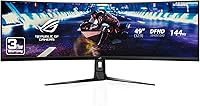
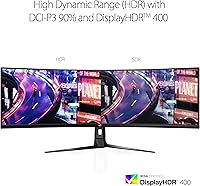
The XG49VQ runs at 144Hz with FreeSync 2, which keeps motion crisp and tearing essentially absent during fast-paced gameplay. Its 3840x1080 Dual Full HD resolution spreads across all 49 inches — pixel density isn't the highlight here, but color is. The 90% DCI-P3 coverage gives games and video a genuine richness that cheaper panels can't offer. DisplayHDR 400 is present, though it's worth being upfront: this is entry-level HDR, noticeable in the right content but not transformative. The stand handles swivel, tilt, and height with no fuss, and the built-in USB hub keeps cables tidy. ASUS also includes GamePlus and GameVisual overlays so you can set crosshairs or color modes without third-party software.

Best For

Sim racing and flight simulation players will get the most from this 49-inch curved panel — the wraparound view genuinely changes how those games feel, placing cockpit edges and mirrors where they belong. Productivity users who want a single workspace without a bezel cutting through it will find this setup equally appealing. Content creators who need solid color accuracy without jumping to a much higher price point will appreciate the DCI-P3 coverage. That said, if 4K sharpness matters for photo work or close-up desktop use, this XG49VQ won't cut it. And if your desk is under 50 inches wide, measure carefully — at 46 inches across, there is very little breathing room.

User Feedback

Owners consistently highlight the curved field of view as the standout strength — once you go this wide for gaming, returning to a standard screen feels like a step backward. Build quality draws frequent praise, with the stand feeling solid and out-of-box colors described as respectable without needing immediate calibration. The recurring complaints are equally predictable: the 1080p vertical resolution frustrates users who sit close or rely on the display for text-heavy desktop work. Backlight uniformity issues surface in a handful of reviews, and a number of buyers feel the HDR performance falls short of what the certification implies. Value perception is genuinely split — those who prioritize width and refresh rate feel well served; those wanting near-4K clarity often feel the trade-off tilts the wrong way.

Pros

  • The wraparound 32:9 curve creates a level of gaming immersion that dual-monitor setups genuinely cannot replicate.
  • At 144Hz with FreeSync 2, motion in fast-paced games stays crisp and essentially free of tearing or stuttering.
  • 90% DCI-P3 color coverage gives this ultrawide ROG monitor richer, more saturated visuals than most panels in its class.
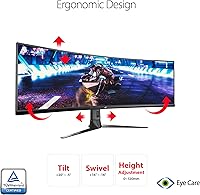
  • The ergonomic stand — with swivel, tilt, and height adjustment — holds up well for long sessions without forcing awkward posture.
  • Built-in GamePlus overlays like crosshairs and timers remove the need for third-party tools during competitive play.
  • Out-of-box color accuracy earns consistent praise from owners, reducing the need for immediate calibration.
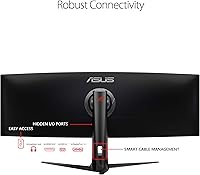
  • The integrated USB hub keeps peripheral cables managed cleanly without adding a separate dock to your desk.
  • Sim racing and flight sim players specifically report a dramatic improvement in spatial awareness and cockpit immersion.
  • The matte panel surface handles ambient light well, reducing glare in typical room lighting conditions.

Cons

  • Vertical resolution of 1080p across 49 inches produces noticeably soft text for close-up desktop and document work.
  • DisplayHDR 400 certification delivers only a modest HDR uplift — do not expect dramatic highlights or deep contrast from it.
  • Backlight uniformity issues appear in a recurring minority of owner reports, with some clouding visible on dark backgrounds.
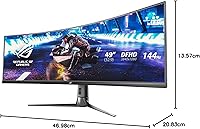
  • At 46 inches wide, this panel will physically not fit on smaller or standard-depth desks — measure before you buy.
  • The 32:9 format has limited native game support; some titles display black bars or require manual configuration to fill the screen.
  • Weighing over 21 pounds, repositioning or mounting this panel solo is awkward and risks cable or stand damage.
  • Buyers upgrading from a 1440p or 4K monitor may find the pixel density drop difficult to accept for everyday use.
  • The entry-level HDR tier means buyers expecting a meaningful HDR gaming experience will likely come away disappointed.

Ratings

Our AI rating system analyzed thousands of verified global purchases of the ASUS ROG Strix XG49VQ 49-inch Ultrawide Gaming Monitor, actively filtering out incentivized, duplicate, and bot-generated submissions to surface what real buyers actually experience. The scores below reflect a balanced synthesis of both enthusiastic praise and recurring frustrations — nothing has been softened or inflated. Where this ultrawide ROG monitor genuinely excels and where it genuinely disappoints, you will find both reflected honestly here.

Gaming Immersion
93%
Sim racing and flight simulation players consistently describe this as the single biggest upgrade they have ever made to their setup. The 1800R curve and 32:9 field of view place cockpit edges and environmental detail exactly where peripheral vision expects them, creating a physical sense of being inside the game rather than watching it.
A handful of multiplayer-focused players note that the extreme width can feel disorienting in fast arena shooters where targets appear far into the corners of the screen. The immersion advantage that works brilliantly in simulation genres becomes a minor liability in certain competitive contexts.
Refresh Rate & Smoothness
89%
At 144Hz with FreeSync 2 active, motion during high-speed gameplay stays remarkably clean — users upgrading from 60Hz panels describe the difference as immediately obvious, even in less demanding titles. Racing lines, fast camera pans, and combat animations all benefit noticeably from the higher refresh cadence.
Reaching a stable 144 frames per second at 3840x1080 demands a reasonably powerful GPU, and users with mid-range graphics cards often find themselves running below the panel's maximum refresh rate in demanding titles, partially negating the advantage they purchased the panel for.
Display Immersion & Curve
91%
The 1800R curvature draws consistent praise for feeling natural at typical desk distances — unlike shallower curves that look bent from the sides, this one maintains visual coherence across the full width. Users switching from flat ultrawide panels report that returning to a flat screen afterward feels noticeably less engaging.
A small but vocal group of users find the curve creates mild distortion when the monitor is used for graphic design or any work requiring perfectly straight horizontal lines. It is a minor nuisance for creative professionals but worth acknowledging for anyone planning mixed-use scenarios.
Color Accuracy & Gamut
78%
22%
The 90% DCI-P3 coverage gives the XG49VQ noticeably richer, more saturated colors than standard sRGB monitors in the same price range, and out-of-box accuracy earns genuine praise from users who have not recalibrated it. For gaming and streaming media, the color output feels vibrant and well-balanced without looking artificially oversaturated.
Professional photographers and video editors looking for sRGB-accurate output for delivery will need to calibrate and profile the panel, as the wide gamut pushes colors beyond standard web and print targets by default. The gamut coverage is strong for the price, but it is not a substitute for a purpose-built content creation display.
Resolution & Pixel Density
58%
42%
Horizontally, the 3840-pixel span gives plenty of room for multi-window workflows and wide game environments that benefit from the extended view. Users who sit at a comfortable distance of three feet or more and primarily game find the image quality acceptable and rarely distracting during active play.
This is the most debated weakness of this 49-inch curved panel, and the criticism is fair. Vertical 1080p resolution across a 49-inch diagonal translates to a pixel density that makes text look soft and detailed desktop work genuinely uncomfortable for extended periods, particularly for users coming from sharper 1440p or 4K displays.
HDR Performance
52%
48%
DisplayHDR 400 certification does produce a visible brightness boost in HDR-enabled content compared to standard SDR output, and users who have never owned an HDR monitor before often describe the initial experience positively. The wider color gamut enhances the overall perception of HDR content even when peak brightness headroom is limited.
Buyers who have experienced OLED or high-tier mini-LED HDR will find DisplayHDR 400 underwhelming — peak brightness caps well below what transforms dark scenes or sunlit highlights into genuinely cinematic moments. Several reviewers explicitly warn against purchasing this monitor on the strength of its HDR credentials alone.
Build Quality
83%
The monitor chassis and stand feel premium for the price — there is no obvious flex in the panel housing, and the stand base stays planted even on desks that absorb minor vibrations. Users who have owned the monitor for two or more years report no degradation in structural integrity or button responsiveness.
A subset of users note that the rear cable management routing is tighter than expected for a monitor of this footprint, making it awkward to run thicker DisplayPort cables cleanly. The OSD joystick, while functional, feels slightly undersized relative to the overall scale of the product.
Stand & Ergonomics
81%
19%
Swivel, tilt, and height adjustability cover the realistic range of positions most desk setups require, and the stand locks into position firmly without creeping over time. Users with height-adjustable desks appreciate the range of movement, which accommodates both seated and standing positions without needing an aftermarket arm.
Some taller users find the maximum height adjustment still leaves the panel lower than their ideal eye level, particularly when used with a standing desk at full height. The stand also occupies considerable depth on the desk surface, which is a real constraint in shallower desk configurations.
Software & OSD Features
77%
23%
The built-in GamePlus overlays — including crosshairs, frame counters, and timers — remove the need for third-party overlays in competitive titles, and the GameVisual color presets are genuinely useful switching between racing, RTS, and cinematic content. Users appreciate having these tools baked into firmware rather than relying on software that can conflict with anti-cheat systems.
The OSD navigation feels a step behind competitors who have adopted more intuitive joystick or touch controls, and reaching the right submenu for display calibration takes more button presses than it should on a monitor at this price point. A few users also report that GameVisual presets shift colors more aggressively than expected, requiring manual fine-tuning.
Backlight Uniformity
61%
39%
Under normal gaming and media use with bright or mid-tone content, backlight uniformity is rarely an issue — colors and brightness appear consistent across the wide panel during the vast majority of real-world usage scenarios. Most users running the monitor for gaming exclusively report no visible problems during typical sessions.
On dark or near-black backgrounds — visible during cinematic cutscenes, space games, or dark UI environments — a meaningful number of users report clouding or uneven brightness patches toward the edges of the panel. This is a known limitation of VA panels at this size and affects a noticeable proportion of the XG49VQ owner base.
Connectivity
79%
21%
Having both DisplayPort and dual HDMI inputs covers the most common connection scenarios — a PC on DisplayPort and a console or secondary device on HDMI without swapping cables. The integrated USB hub adds practical value, letting users connect a keyboard, mouse, or USB drive directly to the monitor rather than reaching around to their PC tower.
The absence of USB-C input is a meaningful gap for users who want to connect a modern laptop with a single cable, which is an increasingly standard expectation at this monitor tier. The USB hub also maxes out at USB 3.0 speeds rather than the faster standards now common on competing displays.
Value for Money
69%
31%
For buyers whose primary use case is simulation gaming or ultrawide multitasking, the XG49VQ delivers a genuinely compelling combination of size, refresh rate, and color performance that would cost significantly more to replicate with two separate quality monitors. Users in that target scenario frequently describe it as money well spent.
For buyers who discover after purchase that the 1080p vertical resolution or entry-level HDR performance does not meet their expectations, the value calculation collapses quickly — there are sharper alternatives in the ultrawide market that have closed the price gap since this panel launched in 2019. It is a strong value for the right buyer and a poor one for the wrong buyer.
Eye Comfort & Fatigue
82%
18%
Flicker-free backlighting earns consistent praise from users who run extended gaming or work sessions — those who previously experienced headaches or eye strain on flicker-prone panels specifically call out the difference after switching. The blue light filter adds a further layer of comfort for evening use without requiring third-party software.
The large panel size itself contributes to mild fatigue for some users if their viewing distance is too short, as the eyes must work harder to scan across the full width during text-heavy tasks. This is not a defect but an ergonomic reality of the format that new ultrawide owners occasionally underestimate.

Suitable for:

The ASUS ROG Strix XG49VQ 49-inch Ultrawide Gaming Monitor is built for a specific kind of user, and those users will love it. Sim racing and flight simulation enthusiasts are the clearest winners here — the 1800R curve and 32:9 field of view put peripheral scenery exactly where your eyes expect it, creating a sense of physical presence that no standard widescreen can match. Multitasking professionals who have long run dual-monitor setups will also find this ultrawide ROG monitor a compelling consolidation: one continuous canvas, no bezel interruption, and enough horizontal space to keep reference windows, communication tools, and primary work side by side without overlap. The 144Hz refresh rate and FreeSync 2 make it equally well-suited to competitive gaming in fast-paced titles where motion clarity matters. If your desk can accommodate the 46-inch footprint and you prioritize screen width and smoothness above raw pixel sharpness, this 49-inch curved panel is genuinely hard to argue against.

Not suitable for:

The ASUS ROG Strix XG49VQ 49-inch Ultrawide Gaming Monitor carries real compromises that make it the wrong choice for a meaningful segment of buyers. The 3840x1080 resolution sounds impressive as a number, but spread across 49 inches it delivers a vertical pixel density that many users find visibly soft — especially for reading text, editing documents, or doing detailed photo work at close range. Anyone coming from a 1440p or 4K display may find the step down in sharpness jarring and hard to overlook. The DisplayHDR 400 certification, while a checkbox feature, should not be mistaken for the punchy, high-contrast HDR experience you get on OLED or higher-tier HDR monitors — expectations need to be set accordingly. Compact desk owners are also simply out of luck: at 46 inches wide and over 21 pounds, the XG49VQ is a physically demanding piece of hardware that needs the right environment to work. Budget-conscious buyers and those prioritizing color-critical professional work will almost certainly find better-matched alternatives at this price tier.
Specifications

  • Screen Size: The panel measures 49 inches diagonally, providing an expansive viewing area equivalent to two 27-inch displays placed side by side.
  • Resolution: Native resolution is 3840x1080 (Dual Full HD), delivering a wide horizontal canvas at standard 1080p vertical height.
  • Aspect Ratio: The 32:9 super ultrawide aspect ratio spans nearly twice the horizontal width of a conventional 16:9 widescreen monitor.
  • Panel Curve: The display uses a 1800R curvature, meaning the panel curves to match a circle with a 1800mm radius for a wraparound viewing effect.
  • Refresh Rate: The panel runs at a native maximum of 144Hz, enabling noticeably smoother motion in fast-paced games compared to 60Hz or 75Hz alternatives.
  • Adaptive Sync: FreeSync 2 HDR support eliminates screen tearing and reduces stutter when paired with a compatible AMD GPU.
  • HDR Certification: DisplayHDR 400 certification indicates a peak brightness of at least 400 nits with basic local dimming support, representing entry-level HDR performance.
  • Color Gamut: The panel covers 90% of the DCI-P3 color space, offering richer saturation than standard sRGB monitors for both gaming and media content.
  • Connectivity: Input options include one DisplayPort and two HDMI ports, supporting connections from modern PCs and consoles simultaneously.
  • USB Hub: An integrated USB hub provides one USB 2.0 port and two USB 3.0 ports for connecting peripherals directly to the monitor.
  • Ergonomics: The included stand supports swivel, tilt, and height adjustment, allowing flexible positioning for varied desk environments and seating heights.
  • VESA Compatibility: The monitor is VESA mount compatible, enabling users to replace the stock stand with third-party arms or wall mounts.
  • Eye Care: ASUS Eye Care technology combines flicker-free backlighting with a blue light filter to reduce visual fatigue during extended use.
  • Panel Surface: The screen features a matte anti-glare surface coating that diffuses ambient light and reduces reflections in typical room lighting.
  • Dimensions: With the stand attached, the monitor measures approximately 46 inches wide, 20 inches deep, and 13 inches tall.
  • Weight: The complete unit with stand weighs 21.4 pounds, requiring a sturdy desk surface capable of supporting the load comfortably.
  • Software Features: GamePlus and GameVisual overlays are built into the monitor firmware, offering crosshair overlays, timers, and tuned color presets without external software.
  • Voltage: The monitor supports a universal input voltage range of 100–240 volts, making it compatible with power outlets in most countries.

Related Reviews
ASUS ROG Strix XG27ACS 27-inch Gaming Monitor

79%
91%
Image Clarity & Sharpness
89%
Motion Performance & Refresh Rate
86%
Color Accuracy & Vibrancy
47%
HDR Performance
88%
Adaptive Sync & G-Sync Compatibility
More
ASUS ROG Strix XG259QNS 24.5-inch Gaming Monitor
80%
93%
Motion Clarity
91%
Input Responsiveness
78%
Refresh Rate Value
67%
Image Quality
88%
Build Quality
More
ASUS ROG Strix XG259CMS 24.5-inch Gaming Monitor
78%
93%
Motion Clarity
91%
Response Time
84%
Refresh Rate Value
83%
Build Quality
61%
Ergonomics & Stand
More
ASUS ROG Strix XG27UCG-W 27-inch Gaming Monitor
79%
91%
Display Clarity
88%
Dual Mode Versatility
89%
Response Time & Motion
87%
Color Accuracy
61%
HDR Performance
More
ASUS ROG Strix XG27AQMR 27” Gaming Monitor
87%
94%
Gaming Performance
91%
Visual Quality
88%
Build Quality
96%
Refresh Rate & Response Time
87%
Color Accuracy
More
ASUS ROG Strix XG249CM 24-inch Gaming Monitor
78%
93%
Motion Clarity
91%
Refresh Rate Performance
78%
Panel Color Quality
47%
HDR Experience
89%
Response Time & Input Lag
More
ASUS ROG Swift PG38UQ 38-inch Gaming Monitor
80%
93%
Image Quality
81%
HDR Performance
94%
Console Compatibility
88%
Motion Clarity
91%
Color Accuracy
More
Deco Gear VIEW490 49-inch Curved Ultrawide Monitor
74%
91%
Immersion & Display Experience
83%
Gaming Performance
88%
Contrast & Black Levels
89%
Connectivity & Hub Features
86%
Value for Money
More
ASUS ROG Strix XG17AHP 17.3″ Portable Monitor
77%
93%
Display Smoothness
91%
Portability
89%
Included Accessories
58%
Battery Life
82%
Connectivity
More
ASUS ROG Swift PG279QM 27-inch 1440p Gaming Monitor
86%
93%
Display Quality
95%
Performance for Gaming
89%
Build Quality
91%
Color Accuracy
72%
Ease of Setup
More

FAQ

The XG49VQ uses FreeSync 2, which is natively designed for AMD GPUs. That said, many NVIDIA cards from the RTX 20 series onward support G-Sync Compatible mode, which works with certified FreeSync displays. You may need to enable it manually in the NVIDIA Control Panel, but most users report it functions well.

It depends on the game. Many modern titles — especially open-world, racing, and simulation games — support ultra-wide resolutions natively and will fill the entire panel. However, some older games and certain competitive titles either display black bars or require community patches and third-party tools like Flawless Widescreen to fill the screen properly. It is worth checking your specific game library before committing.

This is the most debated aspect of the XG49VQ. Horizontally, the resolution is generous, but vertical pixel density across 49 inches is lower than what you get on a 27-inch 1080p screen. For fast-moving game content viewed from a normal seating distance, it looks fine. For reading text, spreadsheets, or detailed desktop work, many users find it noticeably soft. If crisp text clarity matters to you, this is a real trade-off to consider carefully.

Honestly, manage your expectations here. DisplayHDR 400 is the entry tier of HDR certification, and the XG49VQ reflects that. You will notice some improvement in brightness and color pop in HDR-enabled content compared to SDR, but it is not the deep-contrast, inky-black HDR experience you get from OLED or premium mini-LED monitors. Use it as a bonus feature rather than a primary selling point.

The panel itself is just under 46 inches wide, so your desk surface needs to be at least that wide — and realistically wider if you want any space on the sides for speakers, a lamp, or other items. A 55-inch or wider desk is a comfortable fit. Also factor in depth: with the stand, the footprint extends about 13 inches from front to back, which can push a monitor arm or peripheral setup further than expected.

Yes, and many users do exactly that. The continuous 32:9 canvas works well for keeping multiple applications open side by side — a browser, document editor, communication tool, and reference window can all coexist without overlap. Just be aware that the lower vertical resolution means you see less content top-to-bottom per application than you would on a taller 16:9 or 16:10 panel.

The stand is generally well-regarded. It handles the width and weight without wobbling under normal conditions, and the height, tilt, and swivel adjustments work smoothly. A few users have noted that very gentle desk vibrations — from typing firmly or nearby foot traffic — can cause a slight ripple given the sheer panel width, but this is common across most ultra-wide stands and is not a defect.

Yes, via HDMI. Both PlayStation 4 and Xbox One generation consoles connect without issue, though console support for 32:9 resolutions varies by game — most will run at a standard 16:9 ratio with side bars filling the rest of the screen. The PS5 and Xbox Series X also connect over HDMI, but again, 32:9 native console game support is limited. This panel shines most as a PC gaming monitor.

Activating the blue light filter does shift the color temperature of the display toward warmer tones, which can make colors appear less accurate compared to the panel's calibrated state. For gaming and casual use during evening hours it works well, but if you are doing any color-sensitive work, it is best to turn it off and rely on the panel's standard output with proper ambient lighting instead.

Most users find a distance of roughly 3 to 4 feet from eye to screen comfortable for this ultrawide ROG monitor. The 1800R curve is specifically designed to place the screen edges at a similar focal distance as the center, which reduces the need to turn your head sharply. Sitting too close exaggerates the curve and makes edge content feel peripheral; too far and you lose the immersive effect the curve is meant to create.

Where to Buy