Overview

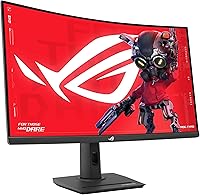
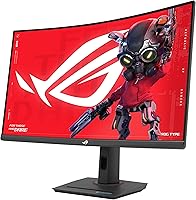
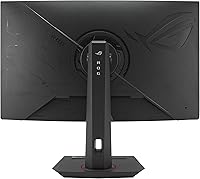
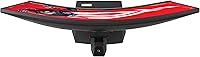
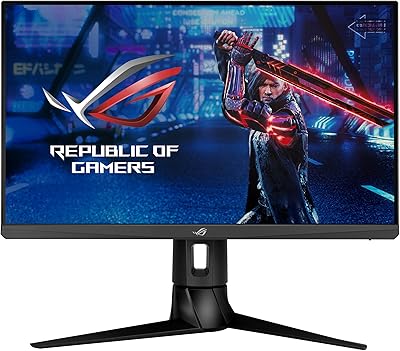
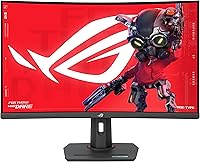
The ASUS ROG Strix XG32WCS 32″ Gaming Monitor arrived in mid-2024 targeting the enthusiast crowd who want a serious upgrade from 1080p without spending flagship money. This 32-inch QHD panel delivers noticeably sharper detail than a standard 1080p screen, yet it doesn't demand a top-shelf GPU to run well. The curved Fast VA panel is an interesting choice — VA typically punches above its weight on contrast, and pairing that with a competitive refresh rate is something you don't see as often at this price point. The USB-C input and a built-in tripod socket suggest ASUS had more than one type of user in mind when designing the XG32WCS.
Features & Benefits

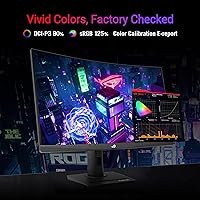
The headline specs here are genuinely competitive. Running at up to 180Hz with a 1ms GTG response, the XG32WCS handles fast-paced shooters and action games without the motion mush that plagues slower panels. ELMB Sync is one of the more useful features — it runs motion blur reduction and variable refresh rate simultaneously, so you're not forced to pick one or the other. Color coverage reaches about 90% of the DCI-P3 space, which is respectable for hobby-level photo editing, though it falls short of what a professional colorist would need. DisplayWidget Center makes adjusting monitor settings feel far less tedious than hunting through on-screen display menus. USB-C single-cable support is a practical bonus for laptop users.

Best For

This ROG Strix curved monitor makes the most sense for PC gamers who want a large, high-refresh display at a reasonable price — particularly those playing competitive shooters or MOBAs where motion clarity genuinely matters. If you're coming from a 1080p panel, the jump to QHD at this size is one of the more noticeable upgrades you can make. Laptop users who want to consolidate their setup will appreciate the USB-C option, as a single cable handles both video and power. It also works reasonably well for hobbyist creators who mix photo editing with gaming throughout the day. Dedicated streamers looking for a do-it-all display will find the screen size and color coverage a comfortable fit.

User Feedback

With a 4.5-star average across well over a thousand ratings, the XG32WCS has earned genuine goodwill from buyers. Most praise centers on image depth and contrast — the VA panel's natural strength — along with how comfortable the curve feels during long sessions and how good the colors look straight out of the box. That said, a fair number of users flag the stand as lacking in adjustability compared to what rivals offer at this tier. VA panel backlight bleed is mentioned periodically, which is common for the technology and not unique to this model. A handful of buyers noted minor friction with DisplayWidget software stability. On reliability, the three-year warranty appears to reassure buyers, and defect-related returns seem relatively infrequent based on review patterns.

Pros

  • QHD resolution at 32 inches delivers a sharp, immersive picture that 1080p screens simply cannot match.
  • Deep contrast from the VA panel makes games and movies look punchy and rich straight out of the box.
  • High refresh rate paired with effective motion blur reduction gives competitive gamers a genuine edge in fast titles.
  • ELMB Sync lets you run adaptive sync and motion blur reduction at the same time — no compromise required.
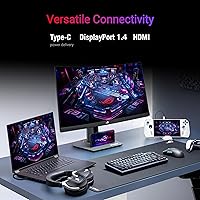
  • USB-C connectivity simplifies desk setups for laptop users with a single cable handling video and power.
  • Color coverage is strong enough for casual photo editing and content creation alongside daily gaming.
  • A three-year warranty provides meaningful long-term peace of mind at this price point.
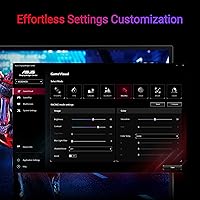
  • DisplayWidget Center software saves real time by letting you adjust monitor settings without touching the OSD buttons.
  • The XG32WCS earns strong value marks for bundling this feature set at a mid-range price.
  • A tripod socket adds flexibility for non-traditional mounting and streaming setups.

Cons

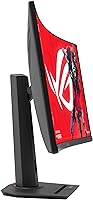
  • Stand adjustability is limited compared to rivals — expect tilt only, with restricted height movement.
  • Black smear in fast dark scenes is a known VA panel trade-off that affects certain game genres noticeably.
  • HDR performance is underwhelming relative to monitors with proper local dimming hardware.
  • DisplayWidget software occasionally loses its connection to the display after Windows updates, requiring reinstallation.
  • Some USB-C setups require specific cables to achieve full power delivery and video output simultaneously.
  • NVIDIA users get G-Sync compatibility mode rather than full certification, which may cause edge-case issues.
  • The panel does not cover the full DCI-P3 space, limiting its usefulness for precision color work.
  • At 20-plus pounds, repositioning or transporting the monitor is less convenient than lighter alternatives.
  • Backlight bleed is reported by a subset of buyers, though severity varies unit to unit.

Ratings

The ASUS ROG Strix XG32WCS 32″ Gaming Monitor earns a strong overall standing in its category, and these scores reflect what our AI systems found after processing thousands of verified global purchases — actively filtering out incentivized reviews, duplicate submissions, and bot activity. Across categories ranging from motion performance to build quality, both the genuine strengths and the honest frustrations of real buyers are represented here.
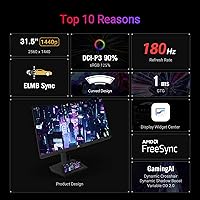
Image Quality
88%
Users consistently describe the picture as punchy and immersive right out of the box, with the VA panel delivering deep blacks that make dark game environments look far more atmospheric than typical IPS alternatives at this price. The QHD resolution at 32 inches hits a sweet spot where sharpness is noticeable without requiring a pixel-count obsession.
Some buyers who came from premium IPS panels note that viewing angles are narrower, with slight color shift when looking from off-center positions. A small number reported minor backlight bleed in dark scenes, which is a known characteristic of VA technology rather than a defect unique to this model.
Motion Performance
91%
This is arguably where the XG32WCS earns its strongest praise. Gamers playing fast-paced shooters and battle royale titles report that the high refresh rate combined with low response time creates genuinely fluid motion that makes a visible difference when tracking fast-moving targets or whipping the camera quickly.
A subset of users — particularly those gaming in very dark scenes — mention subtle black smear, a classic VA panel limitation where dark objects moving against dark backgrounds can look slightly smudged. It is not universal but worth knowing before purchase if dark-environment gameplay is your primary use case.
Color Accuracy
76%
24%
For hobbyist photo editing and general content consumption, the color coverage here is solid. Users who do casual Lightroom work or watch HDR video alongside gaming report that the panel handles skin tones and gradients well enough for non-critical creative tasks.
Anyone expecting professional-grade color fidelity will find this display falls short of that bar. It covers a good portion of the DCI-P3 space but does not fully reach it, and out-of-box calibration, while decent, is not a substitute for a properly profiled display in a production workflow.
Refresh Rate & Responsiveness
93%
Buyers upgrading from 144Hz monitors frequently describe the step up as more noticeable than they expected — interface animations feel snappier and competitive games feel more reactive. The combination of high refresh rate with simultaneous adaptive sync and motion blur reduction is something users appreciate not having to choose between.
A handful of users noted that pushing native frame rates high enough to consistently use the top end of the refresh range requires a reasonably capable graphics card. Those running mid-range older GPUs may spend more time in the lower portion of the refresh window than the headline spec implies.
Stand & Ergonomics
58%
42%
The stand does the job for most standard desktop setups, and the overall footprint is manageable given the screen size. Users who set it up and leave it alone tend not to complain about it.
This is one of the more commonly flagged weaknesses in verified reviews. The stand offers limited adjustability compared to competing monitors in the same price range, with tilt being the primary option and height adjustment being restricted. Users who hot-desk or share a workspace find this frustrating, and several recommend budgeting for a VESA arm.
Build Quality
82%
18%
The chassis feels premium relative to the price point, with a mostly plastic construction that avoids feeling cheap or flimsy. The ROG aesthetic is present but restrained enough that it fits into non-gaming environments without looking out of place.
A few buyers noted minor flex in the panel surround when applying pressure, and the cable management on the stand is functional but not elegant. Nothing here suggests durability concerns, but it is clearly not the structural focus of the design.
USB-C Connectivity
84%
Laptop users in particular highlight the USB-C port as a meaningful convenience feature. Being able to connect a modern laptop or Steam Deck with a single cable while keeping the desk tidy is something buyers mention appreciating well after initial setup.
A small number of users reported compatibility quirks with specific laptops where full power delivery or display output did not behave as expected without specific cable types. It is not a widespread issue but is worth testing early if USB-C is a primary reason for purchase.
Software Experience
67%
33%
DisplayWidget Center is genuinely more convenient than traditional on-screen display navigation, and users who engage with it appreciate being able to adjust brightness, input switching, and picture modes from the desktop without touching the monitor.
Reliability is an occasional sticking point — some users report the software losing connection to the display after system restarts or Windows updates, requiring reinstallation. It works well when stable but does not feel as polished as the hardware it controls.
HDR Performance
63%
37%
For a monitor in this price tier, HDR support adds visible punch to compatible content, and users watching HDR movies or playing HDR-enabled titles notice improved highlights and shadow detail compared to standard dynamic range output.
The HDR implementation here does not match what dedicated HDR monitors with full-array local dimming deliver. Peak brightness limitations mean that HDR-labeled content looks better than SDR but does not approach the dramatic impact buyers may expect based on the HDR marketing language.
Value for Money
89%
At its price point, buyers consistently describe the XG32WCS as punching above its weight. Getting a large curved QHD panel with a fast refresh rate, USB-C, and a three-year warranty in this bracket is considered a strong deal by the majority of reviewers who compared it against alternatives before buying.
A few users feel that the stand limitations and HDR constraints are concessions that keep the price down in ways they would have preferred addressed. Those who did deeper comparisons found alternatives with better ergonomics or IPS panels at similar prices, making this a strong but not unchallenged value proposition.
Setup & Out-of-Box Experience
79%
21%
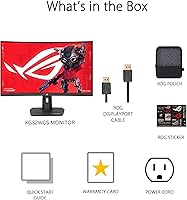
Most buyers report a straightforward assembly and a display that looks good the moment it is switched on, without requiring extensive calibration. The included accessories cover the basics, and the physical setup process draws few complaints.
The DisplayWidget software installation adds a step that not all users want, and a few noted that the monitor's on-screen display menus are not intuitive as a fallback. The included cable selection is functional but not generous.
Gaming-Specific Features
86%
The combination of adaptive sync, simultaneous motion blur reduction, and the fast VA panel gives the XG32WCS a genuinely competitive feature set for the gaming use case. FreeSync Premium support works reliably across the tested frame rate range in verified buyer reports.
NVIDIA GPU owners note that G-Sync compatibility works but is not officially certified, meaning occasional minor issues in edge cases. Users looking for the full G-Sync ecosystem experience may find this a minor but real limitation depending on their setup.
Long-Term Reliability
81%
19%
The three-year warranty provides meaningful reassurance, and buyer feedback patterns suggest that defects and early failures are relatively uncommon. Users who have owned the panel for six-plus months report sustained performance without degradation.
The sample of long-term reviews is still growing given the mid-2024 release date, so durability conclusions are based on a shorter ownership window than more established models. Backlight uniformity over years of heavy use remains an open question.
Creative Work Usability
71%
29%
Hobbyist creatives who primarily game but occasionally touch up photos or edit casual video find the color reproduction more than adequate for their needs. The screen real estate at this size also helps when working with multi-panel editing software.
The XG32WCS is not a substitute for a purpose-built creative monitor. Users who need accurate color for client deliverables or print work will find the color space coverage and calibration ceiling limiting. The panel is capable for casual creative use, not professional production.

Suitable for:

The ASUS ROG Strix XG32WCS 32″ Gaming Monitor is a well-matched pick for PC gamers who want a meaningful display upgrade without stepping into flagship pricing territory. If you spend most of your time in competitive shooters, MOBAs, or fast-paced action games, the combination of a high refresh rate and strong motion handling delivers exactly the kind of responsiveness that makes a real difference during play. The curved QHD panel is also a natural fit for anyone upgrading from a 1080p screen who wants noticeably sharper detail without needing an extremely powerful GPU to drive it. Laptop users and handheld gamers who want a capable desktop display on their desk will find the USB-C single-cable setup particularly practical — it keeps things clean and takes seconds to connect. Hobbyist creatives who split their time between gaming and casual photo or video editing will also find the color coverage more than adequate for non-critical work, and the complimentary Adobe Creative Cloud access adds a little extra value for that crowd.
Not suitable for:

Buyers who prioritize ergonomic flexibility may want to pause before committing to this ROG Strix curved monitor, as the stand offers limited height and tilt adjustment compared to what competing models provide at a similar price point — a VESA arm adds cost and setup time that not everyone wants to deal with. Professional designers, photographers, or video editors who need reliable, calibrated color accuracy for client-facing work will find that this 32-inch QHD panel falls short of the standards a purpose-built creative display provides. If you game almost exclusively in dark, atmospheric environments — horror titles, noir-style RPGs, anything with heavy shadow work — the VA panel's tendency toward black smear in fast dark scenes is a real consideration worth factoring in. NVIDIA users who want a fully certified G-Sync experience rather than compatibility mode may find the trade-off uncomfortable depending on their setup. Finally, anyone expecting a cinematic HDR experience similar to dedicated HDR displays will likely find the results here more modest than the marketing language implies.

Specifications

  • Panel Type: The display uses a Fast VA (Vertical Alignment) panel, which delivers deeper blacks and higher native contrast than IPS alternatives at a comparable price.
  • Screen Size: The visible screen area measures 31.5 inches diagonally, presented in a curved format for a more enveloping desktop experience.
  • Resolution: Native resolution is 2560x1440 (QHD), offering noticeably sharper detail than 1080p without the GPU demands of a 4K panel.
  • Refresh Rate: The panel supports a maximum refresh rate of 180Hz, enabling smoother motion in fast-paced games compared to standard 144Hz displays.
  • Response Time: Rated at 1ms GTG (gray-to-gray), the panel transitions between pixel states quickly enough to reduce trailing artifacts during rapid movement.
  • Color Gamut: Covers approximately 90% of the DCI-P3 color space, making it suitable for hobbyist creative work though not calibrated professional production.
  • Adaptive Sync: Supports AMD FreeSync Premium, which dynamically matches the monitor refresh rate to GPU output to reduce screen tearing; G-Sync compatibility mode is also available for NVIDIA users.
  • Motion Technology: ELMB Sync (Extreme Low Motion Blur Sync) allows simultaneous operation of motion blur reduction and variable refresh rate, a combination not universally offered at this price tier.
  • HDR Support: The monitor carries HDR support, though it lacks full-array local dimming, so HDR performance is enhanced compared to SDR but falls short of dedicated HDR displays.
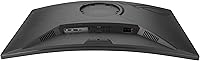
  • Connectivity: Input options include USB-C (with power delivery support), along with standard display inputs to accommodate a range of desktop and laptop configurations.
  • USB-C Power: The USB-C port supports single-cable laptop connectivity, handling both video signal and power delivery simultaneously to reduce desk cable clutter.
  • Software: DisplayWidget Center is ASUS-developed companion software that allows users to adjust picture settings, input selection, and presets directly from their desktop mouse interface.
  • Tripod Socket: A built-in tripod socket on the monitor body provides an unconventional but useful mounting option for streamers or users requiring non-standard placement.
  • Aspect Ratio: The panel uses a 16:9 widescreen aspect ratio, which is the standard for gaming, streaming, and general productivity on PC.
  • Screen Surface: The display uses a matte screen coating that reduces glare and reflections in bright room environments compared to glossy alternatives.
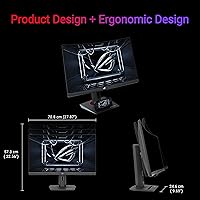
  • Dimensions: The full unit with stand measures approximately 27.9 inches wide, 22.6 inches tall, and 9.7 inches deep, requiring a desk with adequate front-to-back clearance.
  • Weight: The complete assembly including stand weighs approximately 20.7 pounds, which is typical for a 32-inch curved monitor but worth noting for desk surface or arm load ratings.
  • VESA Compatibility: The monitor supports VESA mounting, allowing users to replace the included stand with a third-party monitor arm for improved ergonomic positioning.
  • Warranty: ASUS covers this monitor with a three-year manufacturer warranty, which is above average for the category and provides meaningful long-term purchase confidence.
  • Adobe Bundle: Purchase includes a complimentary three-month Adobe Creative Cloud subscription, valid through mid-2026, offering trial access to Adobe software for creative users.

Related Reviews
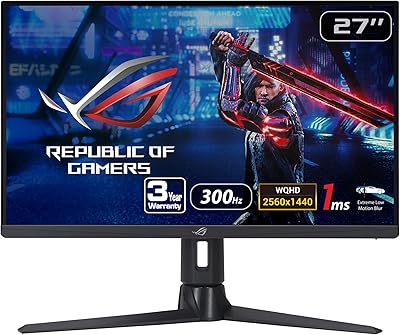
ASUS ROG Strix XG27AQMR 27” Gaming Monitor
87%
94%
Gaming Performance
91%
Visual Quality
88%
Build Quality
96%
Refresh Rate & Response Time
87%
Color Accuracy
More
ASUS ROG Strix XG249CM 24” 1080P Gaming Monitor
86%
96%
Refresh Rate & Response Time
90%
Visual Quality & Clarity
88%
Build Quality & Durability
85%
Ergonomics & Adjustability
91%
Color Accuracy
More
Asus ROG Strix XG49VQ 49″ Curved Gaming Monitor
85%
88%
Performance
91%
Display Quality
89%
Ergonomics & Adjustability
85%
Value for Money
93%
Color Accuracy
More
ASUS ROG Strix XG259QNS 24.5-inch Gaming Monitor
80%
93%
Motion Clarity
91%
Input Responsiveness
78%
Refresh Rate Value
67%
Image Quality
88%
Build Quality
More
ASUS ROG Strix XG27ACS 27-inch Gaming Monitor

79%
91%
Image Clarity & Sharpness
89%
Motion Performance & Refresh Rate
86%
Color Accuracy & Vibrancy
47%
HDR Performance
88%
Adaptive Sync & G-Sync Compatibility
More
ASUS ROG Strix XG17AHP 17.3″ Portable Gaming Monitor
87%
92%
Performance
90%
Portability
88%
Display Quality
73%
Battery Life
85%
Ease of Setup
More
ASUS ROG Strix XG259CMS 24.5-inch 310Hz Gaming Monitor
87%
94%
Gaming Performance
98%
Refresh Rate
91%
Color Accuracy
86%
Build Quality
85%
Ergonomics
More
ASUS ROG Swift PG32UCDM 32-inch OLED Monitor
82%
96%
Image Quality
93%
Motion Performance
94%
Color Accuracy
78%
HDR Performance
74%
Burn-In Risk & Longevity
More
ASUS ROG Swift PG32UQ 32-inch 4K HDR Gaming Monitor
89%
93%
Display Quality
90%
Gaming Performance
88%
Build Quality
92%
Color Accuracy
86%
Ease of Use/Ergonomics
More
ASUS ROG Strix XG27ACDNG 26.5-inch QD-OLED Gaming Monitor
82%
96%
Motion Clarity
94%
Color & Vibrancy
78%
Burn-in Protection
93%
Refresh Rate & Smoothness
88%
Anti-Flicker Performance
More

FAQ

Yes, it works with current-generation consoles via HDMI. Keep in mind that consoles typically cap output at 120Hz at 1440p depending on the title, so you may not always reach the monitor's maximum refresh rate — but it will still look and feel noticeably better than a standard 60Hz television.

It does support power delivery over USB-C, but the wattage may not match the full charging speed of a dedicated laptop charger. For lighter laptops and handheld devices like the Steam Deck it works very well; for larger power-hungry laptops you may want to keep the original charger nearby for extended sessions.

That is a fair concern worth taking seriously. VA panels can show a subtle dark trailing effect when fast-moving objects cross dark backgrounds, which is most visible in exactly the kind of dark game environments you are describing. It is not severe on this panel compared to older VA technology, but if pristine motion clarity in dark scenes is your top priority, an IPS panel might suit your use case better.

Honestly, the jump from 144Hz to 180Hz is subtler than going from 60Hz to 144Hz. Most buyers say everyday desktop use feels virtually identical, but in competitive gaming the extra headroom can feel slightly smoother during very fast camera movements. If you are currently at 144Hz, you will likely appreciate it without being blown away by it.

For hobby-level creative work it is genuinely capable — the color coverage is solid and the picture quality is pleasing for editing personal photos or casual video projects. What it is not is a substitute for a purpose-calibrated display used in professional production work, so if client-facing color accuracy is critical, you would want something more specialized.

The included stand is one of the most commonly flagged limitations of this monitor. It offers tilt adjustment but restricted height movement, which frustrates users who need to fine-tune their ergonomic setup. The practical solution is a VESA-compatible monitor arm, which gives you full height, tilt, and swivel freedom — it is a worthwhile extra investment if ergonomics matter to you.

It does not have to run at startup if you prefer to disable it, and most settings you configure are saved to the monitor itself. Stability is generally fine, but a small number of users report it needing reinstallation after major Windows updates. It is a convenience tool rather than a requirement, so if it gives you trouble you can always fall back to the physical on-screen display buttons.

The XG32WCS supports G-Sync compatibility mode, which works reliably with NVIDIA cards in the vast majority of setups. It is not a fully certified G-Sync monitor, meaning you will not get the official NVIDIA stamp, but day-to-day adaptive sync performance is smooth for most users. Edge-case scenarios — like very low frame rates at the bottom of the refresh range — can occasionally behave differently than on a certified display.

Most buyers are happy with how it looks straight away, which is a reasonable expectation for a monitor at this tier. The default color preset is well-balanced for gaming. If you want to squeeze more out of it for creative tasks, spending a few minutes adjusting the color temperature and brightness in DisplayWidget Center is worthwhile, though it is not mandatory for gaming use.

The curvature is present but not extreme — it is designed to feel immersive at typical desk distances without looking distorted when you are using productivity apps or browsing. Most users who were initially skeptical about curved monitors report that the curve becomes invisible in daily use and occasionally missed when they switch to a flat screen.

Where to Buy