Overview

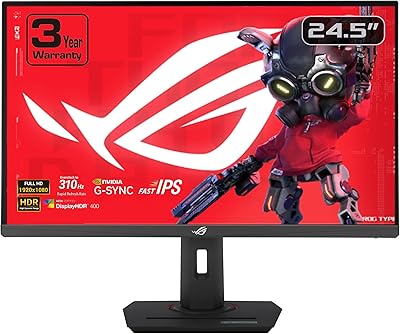
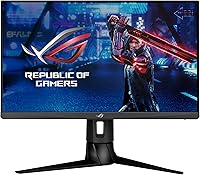
The ASUS ROG Strix XG249CM 24-inch Gaming Monitor sits squarely in the competitive gaming sweet spot — a 1080p panel built around raw speed rather than resolution bragging rights. At 24 inches, the screen size is a deliberate call: pixel density stays sharp at 1080p, and the compact footprint suits most gaming desks without dominating them. Compared to 1440p alternatives at higher price points, this ROG Strix monitor makes an honest trade — you give up pixel count and get a display engineered for maximum frame rate performance in return. Within the ROG lineup, it occupies the focused, no-nonsense end rather than the flagship tier.
Features & Benefits

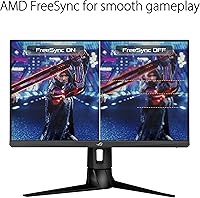
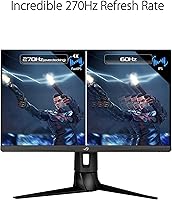
The headline spec is the 270Hz refresh rate, achieved through overclocking — and in fast-paced titles like CS2 or Valorant, the difference over 240Hz is subtle but perceptible when your rig can push the frames to match. The Fast IPS panel delivers solid color accuracy and wide viewing angles without the ghosting older IPS panels were known for. ELMB Sync lets motion blur reduction and adaptive sync run simultaneously, which actually matters in practice. FreeSync Premium and G-SYNC compatibility cover the major GPU camps. On HDR: support is present, but at this panel tier the impact is modest — do not expect OLED-level contrast. USB-C rounds things out for laptop users wanting a single-cable connection.

Best For

This 270Hz IPS display suits players who live and die by their frame rate — competitive FPS and battle royale enthusiasts who would rather have buttery motion than extra pixels. If your GPU comfortably drives 1080p at high frame rates but would struggle with 1440p at comparable speeds, the XG249CM is a genuinely practical fit rather than a compromise. The 24-inch size suits closer viewing distances and smaller desks well. USB-C connectivity makes it a solid pick for anyone switching between a desktop and a laptop regularly. Upgrading from 144Hz and not ready to go ultrawide? This is a meaningful step up.

User Feedback

Owners of this ROG Strix monitor consistently highlight how smooth fast-paced games feel — the kind of fluidity that is hard to go back from. That said, a recurring frustration surfaces around 1080p sharpness: users coming from 1440p panels sometimes find the pixel density underwhelming for desktop work or slower-paced titles. The stand earns praise for its height adjustability, though some note the OSD menu takes a few sessions to navigate confidently. A subtler complaint involves USB-C power delivery — a handful of buyers expected more charging wattage for larger laptops than the port actually provides. Overall sentiment leans positive, but knowing these trade-offs upfront sets realistic expectations.

Pros

  • 270Hz refresh rate makes fast-paced competitive titles visibly smoother compared to 144Hz or 240Hz panels.
  • Fast IPS technology gives better color accuracy and viewing angles than older TN panels at similar speeds.
  • ELMB Sync eliminates ghosting and tearing simultaneously, which is a practical advantage in high-action scenes.
  • Compatible with both AMD FreeSync Premium and NVIDIA G-SYNC setups, so GPU choice is not a limiting factor.
  • USB-C input is a convenient single-cable option for laptop users who switch between devices regularly.
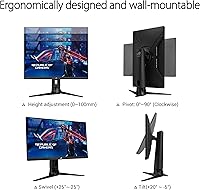
  • Height-adjustable stand makes ergonomic setup straightforward without needing a third-party arm.
  • 105% sRGB coverage produces punchy, accurate colors for a monitor focused on speed over color science.
  • Compact 24-inch footprint fits most desk configurations without requiring a large dedicated space.
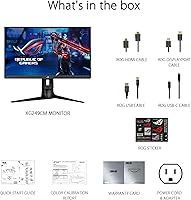
  • Comes well-equipped in the box with HDMI, DisplayPort, and USB-C cables included out of the gate.

Cons

  • 1080p resolution can feel underwhelming for productivity or slower-paced games, especially coming from 1440p.
  • HDR support exists on paper, but real-world contrast improvement is minimal at this panel tier.
  • USB-C power delivery wattage is insufficient for charging larger or more power-hungry laptops.
  • The OSD menu interface has a learning curve that frustrates first-time ROG monitor users during initial setup.
  • 270Hz is only achievable via overclocking, meaning the panel runs at a lower native refresh rate by default.
  • At this size and resolution, pixel density does not leave much headroom for future-proofing as display standards rise.
  • The monitor is relatively heavy at 19.4 pounds, which can make repositioning or mounting less convenient.
  • No built-in speakers, which may require additional peripherals for users without a dedicated audio setup.

Ratings

Our AI rating system analyzed verified global user reviews for the ASUS ROG Strix XG249CM 24-inch Gaming Monitor, actively filtering out incentivized, bot-generated, and spam submissions to surface what real buyers actually experienced. The scores below reflect a balanced synthesis of widespread praise and recurring frustrations — nothing is glossed over. Where this display excels for competitive gamers and where it genuinely falls short are both represented transparently in each category.

Motion Clarity
93%
In fast-paced shooters and battle royale titles, the combination of 270Hz refresh and ELMB Sync produces some of the cleanest motion handling buyers reported at this price tier. Tracking moving targets mid-firefight feels noticeably tighter compared to 144Hz or even 240Hz panels, and ghosting is largely absent during normal gameplay sessions.
The 270Hz rate requires manual overclocking through the OSD, which trips up first-time buyers who assume it activates automatically. A small number of users also reported that ELMB Sync introduced subtle flicker discomfort during extended sessions, particularly in dimmer gaming environments.
Refresh Rate Performance
91%
Players who upgraded from 144Hz panels consistently described the jump to this 270Hz IPS display as immediately perceptible in competitive titles — not a marginal or placebo improvement. The high ceiling gives mid-range GPUs that comfortably push 1080p frame rates genuine room to flex their performance output.
The gap between 240Hz and 270Hz is narrower than the gap between 144Hz and 240Hz, and buyers upgrading specifically from a 240Hz panel reported a less dramatic difference. The overclocked nature of the top refresh rate also means it technically runs above the panel's native specification.
Panel Color Quality
78%
22%
For a speed-focused gaming monitor, color output is genuinely solid. The 105% sRGB coverage gives games a punchy, saturated look that goes beyond what typical TN panels offer, and the Fast IPS technology delivers consistent color accuracy even when viewed from off-center seating positions.
This is not a monitor that creative professionals or color-critical users should rely on. Out-of-box calibration has some variance between units, and while a calibration report is included, a small portion of buyers noted minor color uniformity issues toward the edges of the panel.
HDR Experience
47%
53%
The monitor accepts an HDR signal and technically broadens the color presentation compared to SDR in some titles, which a portion of buyers found mildly pleasing for atmospheric games with strong lighting design.
HDR performance is a consistent disappointment relative to expectations. Peak brightness is insufficient to create the contrast punch that makes HDR meaningful, and most experienced buyers recommended leaving HDR disabled entirely for a cleaner, more accurate image in both games and desktop use.
Response Time & Input Lag
89%
The 1ms GTG rating translates into a genuinely responsive feel in practice — inputs register crisply and there is very little perceivable lag between mouse movement and on-screen reaction, which matters significantly in millisecond-sensitive competitive play. Buyers with high-polling-rate mice noticed the difference.
Response time performance is tied to the overdrive setting selected in the OSD, and the highest overdrive mode introduces visible pixel overshoot on some content. Finding the right overdrive balance takes some experimentation, and the default out-of-box setting is not always optimal.
Adaptive Sync Coverage
88%
Broad GPU compatibility is a practical strength — AMD users get FreeSync Premium and NVIDIA users can enable G-SYNC Compatible mode without any additional hardware cost or module. Buyers on both platforms reported stable, tear-free performance across the supported frame rate range.
G-SYNC Compatible certification does not guarantee the same consistency as a native G-SYNC module at all frame rate ranges. A handful of NVIDIA users reported occasional sync instability at frame rates near the bottom of the VRR window, though this was not a widespread complaint.
USB-C Connectivity
72%
28%
The USB-C input is a meaningful convenience feature for laptop users — single-cable connection for video and limited charging works well for ultrabooks and lighter laptops. Buyers who regularly switch between a desktop and a laptop appreciated having this option without needing a separate dock.
Power delivery wattage is the most consistently flagged issue with USB-C. Users with larger gaming laptops or high-wattage machines found that the port could not keep pace with power draw during demanding tasks, resulting in battery drain even while plugged in.
Build Quality
82%
18%
The chassis and stand construction feel premium relative to the monitor's price tier — buyers noted minimal flex in the panel housing and a base that holds position firmly without creeping or shifting during active gaming sessions. The matte finish on the back panel also avoids looking cheap on a desk.
The weight of 19.4 pounds makes the monitor notably heavier than competitors of the same screen size, which complicates mounting on lighter VESA arms or frequent repositioning. A small number of buyers also noted that the stand base occupies more desk depth than they expected.
Stand Ergonomics
76%
24%
Height adjustment works smoothly and covers enough range to accommodate most seated postures comfortably. Buyers who wanted to dial in monitor positioning without buying a separate arm found the included stand adequate for everyday ergonomic needs.
The stand lacks a pivot or portrait rotation option, which limits flexibility compared to some competing monitors in the same category. Tilt range is functional but not exceptional, and buyers with more specific ergonomic needs may still end up investing in a third-party arm.
OSD & Setup Experience
63%
37%
The five-way joystick control is a more intuitive navigation method than button arrays found on older ASUS monitors, and buyers who took time to explore the OSD appreciated the depth of configuration options available for refresh rate, overdrive, and adaptive sync settings.
First-time ROG monitor owners frequently described the OSD menu hierarchy as unnecessarily layered for what should be simple adjustments. Setting up 270Hz mode, selecting the right overdrive level, and configuring ELMB Sync each require navigating multiple sub-menus, which frustrates users during initial setup.
Value for Money
74%
26%
At its price point, the XG249CM offers a combination of Fast IPS quality, 270Hz headroom, and USB-C connectivity that is difficult to match in a single competing monitor. For competitive gamers whose priority is frame rate over resolution, the feature set is well-aligned with what they are actually paying for.
Buyers who discovered the HDR limitations and modest USB-C power delivery after purchase felt the value proposition was less clear-cut than it appeared on paper. Those who prioritize image quality for mixed gaming and productivity use may find 1440p alternatives at slightly higher prices deliver more daily-use satisfaction.
Port Selection
84%
The combination of DisplayPort, HDMI, and USB-C inputs covers virtually every connection scenario buyers encountered, and the integrated USB hub with five total ports adds genuine utility for desk setups where cable management and peripheral access matter.
Only a single HDMI port is available, which can be limiting for buyers who want to connect multiple devices simultaneously. The USB-C port being the only modern alternate input means buyers with Thunderbolt-only devices have limited fallback options.
Out-of-Box Calibration
71%
29%
A color calibration report is included in the box, and most buyers found the out-of-box image quality acceptable for gaming without any manual adjustment. Colors are vibrant and contrast is punchy enough that casual users are unlikely to feel compelled to reach for calibration software.
Unit-to-unit consistency is not perfect, and some buyers received panels with noticeable color temperature variation or slight backlight bleed toward corners. Those with calibration tools found that a manual color profile delivered meaningfully better results than the factory defaults.
Noise & Heat
86%
The monitor runs quietly under sustained gaming loads — no audible coil whine or fan noise was reported, which matters for users in quiet environments. Heat output during extended sessions remains manageable and the chassis does not become uncomfortably warm to the touch.
A small subset of buyers reported intermittent high-pitched noise from the power supply area during certain screen brightness levels, which proved difficult to reproduce consistently. This was not a widespread issue but it did affect a segment of buyers enough to mention in reviews.

Suitable for:

The ASUS ROG Strix XG249CM 24-inch Gaming Monitor is built for one kind of buyer: someone who takes competitive gaming seriously and wants every frame advantage they can get. If you play fast-paced titles like CS2, Valorant, Apex Legends, or Warzone at high frame rates, the 270Hz refresh rate and 1ms IPS panel will feel noticeably sharper than what most players are running. It also makes practical sense for gamers whose mid-range GPU can comfortably max out 1080p but would struggle to hit comparable frame rates at 1440p. The 24-inch size is a natural fit for standard desk distances, and the USB-C input is a genuine quality-of-life feature if you regularly switch between a desktop and a laptop. Players upgrading from a 144Hz monitor who want a real performance jump without committing to a larger ultrawide will find this ROG Strix monitor a well-targeted step up.
Not suitable for:

If resolution matters as much to you as refresh rate, the XG249CM is likely to leave you wanting more. Content creators, graphic designers, or anyone spending significant time on productivity work will feel the limitations of a 1080p panel at this size — text rendering and fine detail are noticeably softer compared to 1440p or 4K alternatives. The HDR implementation, while present, does not deliver the kind of contrast depth that makes it meaningful for cinematic gaming or media consumption. Users expecting strong USB-C power delivery for larger laptops should verify wattage compatibility before buying, as real-world charging output has disappointed some buyers. And if you are primarily a single-player or story-driven gamer who values image fidelity over frame rate, the trade-offs this monitor makes will feel less justified.

Specifications

  • Panel Type: The display uses a Fast IPS panel, offering wide viewing angles and accurate colors while maintaining the rapid pixel response competitive gaming demands.
  • Screen Size: The screen measures 24 inches diagonally, a size well-suited to standard desk viewing distances and typical gaming setups.
  • Resolution: Native resolution is 1920x1080 (Full HD), delivering sharp visuals at this panel size without placing heavy demands on mid-range graphics cards.
  • Refresh Rate: The panel operates at up to 270Hz when overclocked, with a lower native rate underneath — requiring the overclock to be enabled manually in the OSD.
  • Response Time: Gray-to-gray response time is rated at 1ms, minimizing trailing artifacts during fast movement in competitive titles.
  • Adaptive Sync: Supports AMD FreeSync Premium natively and is certified G-SYNC Compatible, covering both major GPU ecosystems without requiring a dedicated G-SYNC module.
  • Motion Blur: ELMB Sync technology allows backlight strobing and adaptive sync to operate simultaneously, reducing perceived motion blur without sacrificing tear-free performance.
  • HDR Support: The monitor carries HDR certification, though peak brightness and contrast depth are typical of entry-level HDR rather than premium HDR implementations.
  • Color Gamut: Color coverage reaches 105% of the sRGB color space, producing vivid, punchy colors suitable for gaming and casual content consumption.
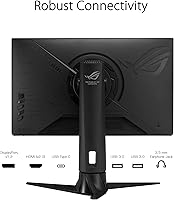
  • Connectivity: Inputs include one DisplayPort, one HDMI, and one USB-C port, providing flexibility for desktop and laptop users alike.
  • USB Hub: An integrated USB hub provides two USB 3.0 downstream ports and three USB 2.0 ports for connecting peripherals directly to the monitor.
  • USB-C Power: The USB-C port supports video input and limited power delivery, though maximum wattage output is modest and may not fully charge larger laptops.
  • Aspect Ratio: The panel uses a standard 16:9 widescreen aspect ratio, compatible with virtually all gaming resolutions and content formats.
  • Stand Adjustments: The included stand supports height adjustment along with tilt and swivel, allowing for reasonable ergonomic customization without a monitor arm.
  • Dimensions: With the stand attached, the monitor measures approximately 9.3 x 21.26 x 15.2 inches (D x W x H), fitting comfortably on most standard desks.
  • Weight: Total weight with stand is 19.4 pounds, which is on the heavier side for a 24-inch display and worth noting if wall-mounting or frequent repositioning is planned.
  • Screen Surface: The panel features a matte anti-glare coating that reduces reflections in brightly lit environments without noticeably softening image clarity.
  • In The Box: The package includes power cord and adapter, HDMI cable, DisplayPort cable, USB cable, USB-C cable, a color calibration report, ROG sticker, warranty card, and a quick start guide.

Related Reviews

ASUS ROG Strix XG259QNS 24.5-inch Gaming Monitor
80%
93%
Motion Clarity
91%
Input Responsiveness
78%
Refresh Rate Value
67%
Image Quality
88%
Build Quality
More
ASUS ROG Strix XG259CMS 24.5-inch Gaming Monitor
78%
93%
Motion Clarity
91%
Response Time
84%
Refresh Rate Value
83%
Build Quality
61%
Ergonomics & Stand
More
ASUS ROG Strix XG27ACS 27-inch Gaming Monitor
79%
91%
Image Clarity & Sharpness
89%
Motion Performance & Refresh Rate
86%
Color Accuracy & Vibrancy
47%
HDR Performance
88%
Adaptive Sync & G-Sync Compatibility
More
ASUS ROG Strix XG27UCG-W 27-inch Gaming Monitor
79%
91%
Display Clarity
88%
Dual Mode Versatility
89%
Response Time & Motion
87%
Color Accuracy
61%
HDR Performance
More
ASUS ROG Strix XG27AQMR 27” Gaming Monitor
87%
94%
Gaming Performance
91%
Visual Quality
88%
Build Quality
96%
Refresh Rate & Response Time
87%
Color Accuracy
More
ASUS ROG Strix XG49VQ 49-inch Ultrawide Gaming Monitor
76%
93%
Gaming Immersion
89%
Refresh Rate & Smoothness
91%
Display Immersion & Curve
78%
Color Accuracy & Gamut
58%
Resolution & Pixel Density
More
ASUS VG249QE5A 24-inch Gaming Monitor
76%
88%
Image Quality
91%
Refresh Rate Performance
86%
Motion Clarity
93%
Value for Money
47%
Ergonomics & Stand
More
ASUS ROG Swift PG279QM 27-inch 1440p Gaming Monitor
86%
93%
Display Quality
95%
Performance for Gaming
89%
Build Quality
91%
Color Accuracy
72%
Ease of Setup
More
ASUS ROG Swift PG38UQ 38-inch Gaming Monitor
80%
93%
Image Quality
81%
HDR Performance
94%
Console Compatibility
88%
Motion Clarity
91%
Color Accuracy
More
ASUS ROG Strix XG32WCS 32″ Gaming Monitor
79%
88%
Image Quality
91%
Motion Performance
76%
Color Accuracy
93%
Refresh Rate & Responsiveness
58%
Stand & Ergonomics
More

FAQ

You do need to enable it manually. The XG249CM ships running at its native refresh rate, and you have to go into the OSD menu and then set 270Hz in your operating system display settings as well. It takes about two minutes once you know where to look, but it is not automatic on first boot.

Yes, it will. This 270Hz IPS display carries G-SYNC Compatible certification, which means NVIDIA GeForce cards from the GTX 10 series onward can use adaptive sync with it. You do not need a dedicated G-SYNC module — just enable G-SYNC in the NVIDIA control panel and FreeSync in the monitor OSD.

Honestly, not really for most people. The HDR support is present and the monitor can accept an HDR signal, but the peak brightness and local dimming capabilities are not on the level that makes HDR visually impactful. It will not hurt to leave it on, but do not expect a dramatic transformation compared to a proper HDR display.

Yes, and it works well for video signal and basic charging. The caveat is that USB-C power delivery wattage is limited, so larger gaming laptops or power-hungry machines may charge slowly or only maintain battery level rather than actively charging. For lighter laptops it tends to work fine.

It depends on the game and your sensitivity to motion. In fast-paced shooters like CS2 or Valorant, the difference is perceptible — tracking moving targets feels smoother and the image holds together better during fast camera movement. For slower-paced games or players coming from 240Hz, the jump is subtler. If your GPU can push high frame rates at 1080p, the upgrade is worth it for competitive play.

At 24 inches, 1080p sits at a pixel density that looks sharp from a normal desk viewing distance — roughly two to three feet away. It is not as crisp as 1440p at the same size, but it is far from pixelated. Where it starts to feel limited is for fine text in productivity work or detailed textures in slower games where you have time to notice image quality.

ELMB Sync stands for Extreme Low Motion Blur Sync, and it lets the monitor strobe the backlight to reduce motion blur while adaptive sync is still active — normally these two technologies conflict. You do not need to use it, but in very fast games it can make moving objects look crisper. Some people find the strobing slightly uncomfortable over long sessions, so it is worth testing both modes personally.

The stand is generally well-regarded for its build quality — it does not wobble or shift during use. Height adjustment range is reasonable for most seated setups, and you also get tilt and swivel. It is not as adjustable as a premium monitor arm, but for most people the included stand is perfectly adequate.

The ASUS ROG Strix XG249CM 24-inch Gaming Monitor uses a five-way joystick for OSD navigation, which is the most intuitive control method ASUS offers. That said, the menu structure has several layers and first-time ROG monitor users often need a few sessions to find settings like refresh rate override, ELMB, and overdrive response quickly. It is not complicated — just slightly unfamiliar at the start.
The box includes HDMI, DisplayPort, USB, and USB-C cables, so you are covered for the main connection types out of the gate. You should not need to buy additional cables for a standard setup. The only addition some users make is a separate audio solution, since there are no built-in speakers.

Where to Buy