Overview

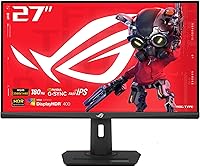
The ASUS ROG Strix XG27ACS 27-inch Gaming Monitor sits squarely in the mid-range competitive gaming space, targeting players who want a meaningful upgrade without spending flagship money. Its core appeal is the pairing of QHD 1440p resolution with a 180Hz refresh rate — a combination that still feels like a sweet spot for most gaming PCs. Unlike TN panels, the Fast IPS technology here delivers wide viewing angles and accurate colors without sacrificing speed. USB-C connectivity is a genuine bonus at this price. It is not trying to be everything; it is a focused, well-rounded display that delivers more than its price suggests.
Features & Benefits

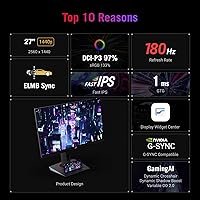
At 27 inches, QHD resolution means noticeably crisper textures and UI elements compared to a 1080p panel of the same size — the difference is immediately obvious in open-world games. The 180Hz Fast IPS panel keeps motion tight, and ELMB Sync is a rare feature that lets you run both motion blur reduction and variable refresh rate simultaneously, which most competing panels force you to choose between. Nvidia users benefit from G-Sync Compatible certification for tear-free gameplay. The USB-C port handles video and data over a single cable, keeping desks tidier for laptop users, though it is not a high-wattage charging port. 133% sRGB coverage also makes it credible for light photo or video editing work.

Best For

This 27-inch QHD display is a natural fit for competitive Nvidia gamers who want sharper visuals without dropping below triple-digit frame rates. It also genuinely works well for laptop users — one USB-C cable replacing a tangle of adapters is a real quality-of-life improvement at a desk. Anyone coming from a 1080p or 60Hz monitor will notice an immediate and satisfying upgrade in both clarity and fluidity. The 133% sRGB coverage makes it pull double duty for creators who occasionally edit photos or color-grade footage. And for buyers who care about long-term reliability, ASUS's 3-year warranty provides solid reassurance that competitors at similar prices do not always match.

User Feedback

Across more than 1,100 ratings, the XG27ACS holds a strong 4.3-star average, and the recurring praise centers on how good the panel looks straight out of the box — colors are vivid and motion handling draws consistent compliments. Build quality also gets regular positive mentions. That said, honest buyers flag a few recurring issues: HDR400 is underwhelming in practice, functioning more as a checkbox feature than a true high dynamic range experience. Some users report minor backlight bleed, and a few find the stand's adjustment range limiting. The USB-C hub works well but draws occasional notes about its modest power output. Most buyers still feel the value-to-performance ratio holds up well against competitors.

Pros

  • QHD resolution at 27 inches produces a sharpness jump that is immediately obvious coming from 1080p.
  • 180Hz refresh rate keeps competitive gameplay fluid without requiring an ultra-high-end GPU to sustain.
  • ELMB Sync runs simultaneously with variable refresh rate, a rare feature at this price tier.
  • G-Sync Compatible certification means Nvidia users get tear-free gaming without paying for a G-Sync module display.
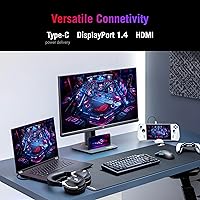
  • USB-C single-cable desk setup is a genuine convenience win for laptop users.
  • Out-of-the-box color accuracy is strong enough for most users to skip manual calibration entirely.
  • Fast IPS panel delivers wide viewing angles and accurate colors without the slow response typical of standard IPS.
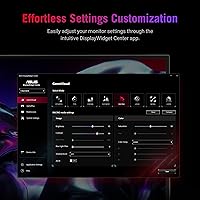
  • DisplayWidget Center makes adjusting display settings from the desktop far more convenient than navigating OSD buttons.
  • Three-year warranty provides a level of long-term coverage that competing monitors at this price do not always offer.
  • Matte anti-glare coating handles ambient light well, reducing reflections in brighter room environments.

Cons

  • HDR400 is largely a checkbox feature — real-world HDR impact is minimal and many users disable it after one try.
  • USB-C port does not deliver meaningful laptop charging, which surprises buyers who assume it functions as a full power delivery port.
  • Backlight bleed affects a notable minority of units, particularly visible in dark room gaming scenarios.
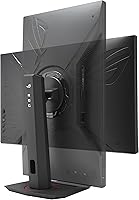
  • Stand height and swivel range feel limited for users with non-standard desk heights or multi-monitor setups.
  • IPS glow is present and noticeable during dark cinematic content, which is a panel technology limitation rather than a quality control issue.
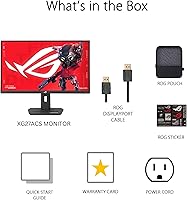
  • The included cable kit is basic — sourcing your own USB-C cable is often necessary to use that feature on day one.
  • Competing panels from LG and Samsung at a similar price have narrowed the value gap since the XG27ACS launched.
  • Highest overdrive settings can introduce inverse ghosting artifacts that require manual tuning to dial out.
  • Warranty service turnaround times vary significantly by region, with some international buyers reporting slower resolution.
  • Portrait mode pivot is not supported, limiting usefulness for productivity-focused users who rotate their display.

Ratings

The scores below for the ASUS ROG Strix XG27ACS 27-inch Gaming Monitor were generated by our AI system after analyzing thousands of verified global buyer reviews, with spam, incentivized, and bot-flagged submissions actively filtered out. Each category reflects the honest distribution of real user sentiment — strengths are credited where earned, and recurring frustrations are not softened or buried. The result is a balanced scorecard that mirrors what actual owners experience day to day.
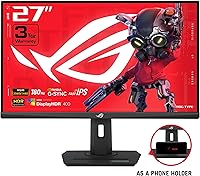
Image Clarity & Sharpness
91%
Owners consistently describe the jump from 1080p as immediately striking — fine textures in games like open-world RPGs and tactical shooters look noticeably crisper at 27 inches. The QHD resolution at this screen size hits a density sweet spot that most users find hard to go back from.
A small number of users coming from 4K panels feel the pixel density is a step down, particularly when reading small text in desktop use. It is not a criticism of the panel itself, but a reminder that 1440p is not the ceiling for everyone.
Motion Performance & Refresh Rate
89%
The 180Hz refresh rate paired with the 1ms GTG response draws strong praise from competitive players, who report noticeably smoother tracking in fast-paced games compared to their previous 144Hz or 165Hz displays. ELMB Sync running simultaneously with adaptive refresh is a combination users single out as genuinely useful rather than a marketing feature.
A handful of users note that the real-world difference between 165Hz and 180Hz is subtle enough to be imperceptible without direct comparison. Those pushing the limits with high frame rate esports titles get the most benefit; casual players may not feel the full advantage.
Color Accuracy & Vibrancy
86%
Out-of-the-box color performance gets consistent compliments, with buyers noting that skin tones, foliage, and environmental lighting in games look natural and vivid without requiring manual calibration. The 133% sRGB coverage also earns appreciation from users who do light photo editing alongside gaming.
Buyers with calibration tools sometimes note that the default gamma and white balance settings lean slightly warm, requiring minor adjustments for precision color work. It is not a dealbreaker, but those expecting print-accurate output from factory settings may be mildly disappointed.
HDR Performance
47%
53%
HDR mode does produce a modest boost in contrast and highlights in compatible games, and some users appreciate having the option enabled in HDR-supported titles on console or PC. For casual use where HDR is just toggled on and left, it provides a marginally richer look over SDR.
HDR400 is widely criticized in user reviews as a functional checkbox rather than a genuine visual upgrade. The lack of local dimming means blacks do not deepen meaningfully, and bright highlights do not pop the way they do on OLED or Mini LED displays. Many users simply leave HDR disabled after trying it once.
Adaptive Sync & G-Sync Compatibility
88%
Nvidia GPU owners report smooth, tear-free gameplay across a wide frame rate range without needing to purchase a dedicated G-Sync module display. FreeSync compatibility also means AMD users are not left out, making this a genuinely versatile panel for mixed-GPU households.
A small subset of users report occasional flicker or sync dropout at very low frame rates, typically below 48Hz. This is an edge case for most gaming scenarios, but users who also use the display for video playback at mismatched refresh rates occasionally notice brief instability.
USB-C Connectivity & Hub Functionality
74%
26%
Laptop users consistently praise the single-cable desk setup — video, keyboard, and mouse all routed through one USB-C connection significantly reduces cable clutter. The convenience factor for MacBook and thin-and-light laptop owners is a recurring highlight in reviews.
The USB-C port does not deliver meaningful power delivery for charging power-hungry laptops, which catches some buyers off guard. Several users note it functions primarily as a signal and hub port rather than a charging solution, and those expecting to power a 15-inch laptop through it will be disappointed.
Build Quality & Construction
83%
The monitor chassis feels solid and premium for its price range, with minimal flex in the panel and a sturdy base that does not wobble during desk use. The matte finish on the bezel resists fingerprints well, and the overall ROG aesthetic is appreciated without being overly aggressive.
Some users find the plastics at the rear of the monitor feel noticeably lighter and less premium compared to the front panel quality. A minority of reviewers also flag that the stand base takes up a wider footprint than expected on smaller desks.
Stand & Ergonomics
67%
33%
Height adjustment is available and covers a functional range for most seated desk setups. The inclusion of a tripod socket is a niche but appreciated touch for users who want to mount the display on a third-party arm without needing an adapter plate.
The stand's tilt and swivel range is reported as limited by users who prefer more aggressive ergonomic positioning. Several reviewers note that the lack of portrait mode pivot is a drawback for productivity users who occasionally want to rotate the panel, and the height range feels narrow for taller setups.
Backlight Uniformity
69%
31%
The majority of units in user hands display acceptably uniform backlight distribution across the panel, with most buyers not reporting visible issues during normal gaming or desktop use. Bright, uniformly lit content like white web pages generally looks clean without obvious hot spots.
Backlight bleed is a recurring complaint in a notable minority of reviews, particularly in dark room gaming scenarios where screen corners show faint glow. IPS glow — a characteristic of the panel technology itself — is also mentioned by users watching dark cinematic content, which is largely unavoidable at this price tier.
OSD & Software Experience
79%
21%
DisplayWidget Center receives genuine praise for eliminating the need to navigate hardware buttons during setup. Adjusting brightness, refresh rate, and picture mode from the desktop is described as a quality-of-life improvement that users from monitors without software control especially appreciate.
Some users on non-Windows systems report limited DisplayWidget compatibility, reducing the software benefit for Mac users in particular. The physical OSD button placement on the monitor itself is described as awkward to locate without looking, which matters for users who prefer hardware control.
Panel Response & Ghosting Control
84%
Fast IPS technology is specifically called out by users as a noticeable improvement over standard IPS panels they had previously owned, with trailing on fast-moving objects reduced to a level most competitive players find acceptable. ELMB Sync running alongside VRR is a practical differentiator from similarly priced alternatives.
At the highest overdrive settings, a minority of users report inverse ghosting artifacts, particularly in slower-paced games where the effect is more visible than in fast-action titles. The default overdrive setting is generally the best balance, but finding it requires some manual experimentation.
Value for Money
87%
The consensus across reviews is that the XG27ACS delivers a feature set that would have commanded a significantly higher price even two years ago. USB-C, ELMB Sync, G-Sync compatibility, and QHD at 180Hz in a single mid-range package is described by many buyers as hard to match at this price point.
A smaller but consistent group of reviewers notes that similarly priced alternatives from LG and Samsung now compete closely on panel performance, making the value case less clear-cut than it was at launch. Buyers who have compared multiple panels side by side describe the decision as closer than ASUS marketing implies.
Setup & Out-of-Box Experience
82%
18%
Assembly is quick and straightforward, with the stand clicking into place without tools and the cable routing channel keeping things tidy from day one. Most users report being up and running within minutes, with the out-of-box picture mode requiring minimal adjustment for gaming use.
The included cable selection is noted as basic, with some users having to source their own USB-C cable to take advantage of that feature. Documentation is minimal, and buyers who want guidance on optimal display settings for specific game types must rely on third-party resources.
Warranty & Long-Term Reliability
85%
The 3-year ASUS warranty is a genuine confidence factor for buyers, and reviews referencing warranty service describe the process as reasonably straightforward compared to some competitors. Long-term owners across 12 to 18 months of use report no significant panel degradation or dead pixel issues.
A small number of users report early unit defects — primarily backlight bleed or minor dead pixels — and describe the replacement process as slower than expected. Warranty service experience appears to vary by region, with some international buyers noting longer turnaround times than domestic US customers.

Suitable for:

The ASUS ROG Strix XG27ACS 27-inch Gaming Monitor is a strong match for PC gamers who have outgrown 1080p or 60Hz displays and want a meaningful, noticeable upgrade without committing to a premium price. Competitive players on Nvidia GPUs will particularly appreciate the G-Sync Compatible support and the ability to run ELMB Sync alongside adaptive refresh — a pairing that keeps gameplay sharp even during frame rate fluctuations. Laptop users who want a cleaner desk setup will find the USB-C connection genuinely useful for consolidating video and peripheral cables into a single run, though they should not expect it to charge a power-hungry laptop. The 133% sRGB coverage also makes this a reasonable choice for users who occasionally do photo editing or color-sensitive creative work alongside gaming. Anyone who values long-term brand reliability and a three-year warranty as part of their purchase decision will find the ASUS backing reassuring.
Not suitable for:

Buyers expecting a true HDR experience should look elsewhere — the ASUS ROG Strix XG27ACS 27-inch Gaming Monitor carries an HDR400 certification that, in practice, delivers only a marginal improvement over standard dynamic range content and lacks the local dimming required for genuine contrast impact. Sim racers, flight sim enthusiasts, or ultrawide fans who rely on a wider field of view will find the standard 16:9 aspect ratio limiting compared to 21:9 alternatives. If your primary GPU is AMD and adaptive sync performance is a top priority, there are panels at a similar price point with native FreeSync Premium Pro certification that may perform more consistently at the low end of the frame rate range. Users who need extensive ergonomic adjustment — particularly portrait mode rotation for productivity or coding workflows — will find the stand restrictive. And anyone coming from a 4K display who values pixel density above all else will likely find 1440p at 27 inches a step backward rather than forward.

Specifications

  • Screen Size: The panel measures 27 inches diagonally, a size that pairs well with QHD resolution for a balanced pixel density suited to both gaming and desktop productivity.
  • Resolution: Native resolution is 2560x1440 (QHD), delivering noticeably sharper image detail compared to 1080p at this screen size.
  • Panel Type: Uses Fast IPS technology, which combines the wide viewing angles and color accuracy of standard IPS with a significantly reduced pixel response time.
  • Refresh Rate: Maximum refresh rate is 180Hz, allowing fluid motion rendering in fast-paced games when paired with a capable GPU.
  • Response Time: Rated at 1ms GTG (gray-to-gray), reducing motion blur and trailing on fast-moving objects during high frame rate gameplay.
  • HDR Support: Certified to DisplayHDR 400 standard, which provides a peak brightness of 400 nits but does not include local dimming for deep contrast performance.
  • Color Gamut: Covers 133% of the sRGB color space, providing vivid color output suitable for gaming and light creative work such as photo editing.
  • Adaptive Sync: G-Sync Compatible certified and FreeSync Premium supported, enabling variable refresh rate for tear-free gameplay on both Nvidia and AMD GPUs.
  • ELMB Sync: ASUS Extreme Low Motion Blur Sync allows motion blur reduction and variable refresh rate to operate simultaneously, a feature not commonly found at this price tier.
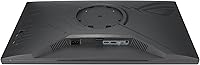
  • Connectivity: Includes a USB-C port carrying DisplayPort signal and USB hub functionality, plus standard DisplayPort and HDMI inputs for broader device compatibility.
  • USB-C Function: The USB-C port supports video transmission via DisplayPort signal and acts as a USB hub for peripherals, but is not designed as a high-wattage power delivery charging port.
  • Panel Surface: Matte anti-glare coating reduces reflections from ambient light sources, making the display more comfortable in brighter room environments.
  • Aspect Ratio: Standard 16:9 widescreen aspect ratio, compatible with all common gaming resolutions and media formats without letterboxing.
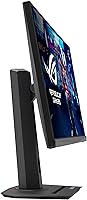
  • Dimensions: Physical dimensions with stand are 8.6 x 25.3 x 15.5 inches (depth x width x height), requiring moderate desk depth for stable placement.
  • Weight: The monitor with stand weighs 14.6 pounds, which is typical for a 27-inch panel and contributes to a stable, non-wobbling base.
  • Software: Compatible with DisplayWidget Center, ASUS software that allows OSD settings adjustments — including brightness, picture mode, and refresh rate — directly from the desktop.
  • Warranty: Covered by a 3-year ASUS limited warranty, providing repair or replacement support for panel defects and hardware failures over an extended ownership period.
  • Tripod Socket: Includes a standard tripod mounting socket, allowing the display to be attached to compatible third-party monitor arms or tripod stands without a separate adapter.
  • Operating System: Compatible with all major PC operating systems, though DisplayWidget Center software has full feature support primarily on Windows platforms.
  • Bundle Inclusion: Includes a 3-month Adobe Creative Cloud access code valid through mid-2026, offering trial access to Adobe's creative software suite for new buyers.

Related Reviews
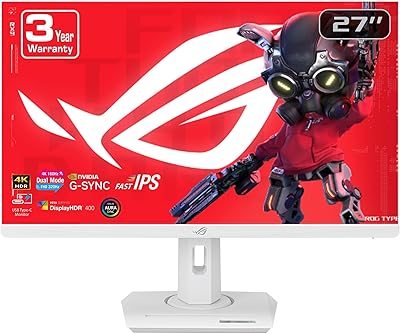
ASUS ROG Strix XG27UCG-W 27-inch Gaming Monitor
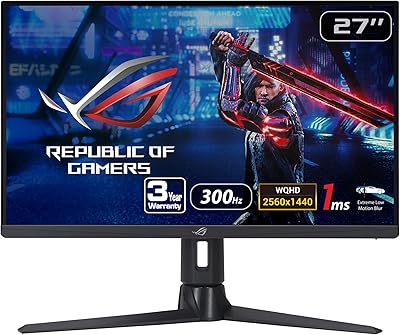
79%
91%
Display Clarity
88%
Dual Mode Versatility
89%
Response Time & Motion
87%
Color Accuracy
61%
HDR Performance
More
ASUS ROG Strix XG27AQMR 27” Gaming Monitor

87%
94%
Gaming Performance
91%
Visual Quality
88%
Build Quality
96%
Refresh Rate & Response Time
87%
Color Accuracy
More
ASUS ROG Swift PG279QM 27-inch 1440p Gaming Monitor
86%
93%
Display Quality
95%
Performance for Gaming
89%
Build Quality
91%
Color Accuracy
72%
Ease of Setup
More
ASUS ROG Strix XG259QNS 24.5-inch Gaming Monitor
80%
93%
Motion Clarity
91%
Input Responsiveness
78%
Refresh Rate Value
67%
Image Quality
88%
Build Quality
More
ASUS ROG Strix XG259CMS 24.5-inch 310Hz Gaming Monitor
87%
94%
Gaming Performance
98%
Refresh Rate
91%
Color Accuracy
86%
Build Quality
85%
Ergonomics
More
ASUS ROG Swift PG27AQDM-R 27-inch OLED Gaming Monitor

88%
94%
Display Quality
92%
Color Accuracy
91%
Refresh Rate and Response Time
88%
Build Quality
89%
Ease of Setup
More
ASUS ROG Swift PG27UCDM 27-inch Gaming Monitor

82%
96%
Image Quality
97%
Black Levels & Contrast
93%
Gaming Performance
91%
Color Accuracy
88%
Text Clarity
More
ASUS VZ279QG1R 27-inch 1080P Gaming Monitor
83%
88%
Gaming Performance
91%
Smooth Visuals (Motion Blur Reduction)
93%
Value for Money
80%
Build Quality
85%
Display Quality (Color Accuracy, Brightness)
More
ASUS ROG Swift PG278Q 27″ 1440P Gaming Monitor
86%
93%
Display Quality
91%
Gaming Performance (Refresh Rate & Response Time)
88%
Ergonomics (Adjustable Stand)
90%
G-SYNC Functionality
77%
Color Accuracy
More
ASUS VG27VH1B 27-inch Curved Gaming Monitor
78%
93%
Refresh Rate Performance
88%
Motion Clarity & Response Time
91%
Adaptive Sync & Tear-Free Output
67%
Image Sharpness & Resolution
62%
Color Accuracy & Calibration
More

FAQ

Not in any meaningful way for most laptops. The USB-C port on the XG27ACS handles video signal and USB hub duties, but it is not a full power delivery port. If your laptop requires 45W or more to charge, you will still need to plug in your normal charger alongside it.

Honestly, for most users, no. The HDR400 certification means the panel can hit 400 nits peak brightness, but without local dimming, dark areas of the screen do not actually get darker when HDR is active. The result is a mildly brighter image rather than the punchy contrast you see on OLED or Mini LED displays. Most owners end up leaving HDR off after experimenting with it.

For gaming, most users find the default settings perfectly usable without any calibration. Colors are vivid and reasonably accurate right away. If you are doing color-sensitive photo or video editing work, a minor gamma and white balance adjustment will get you closer to target, but it is not a time-consuming process.

Yes, via HDMI. Both consoles can output 1440p at up to 120Hz on compatible displays, so you will get a solid experience. Just keep in mind that G-Sync Compatible only applies to PC use — console adaptive sync support depends on the console's own VRR implementation.

It varies by unit. The majority of owners report no significant issues during normal gaming and desktop use. However, a noticeable minority of reviews mention bleed in the corners during dark scenes in a dimly lit room. IPS glow — a faint haze near the panel edges in dark content — is also present, which is a characteristic of IPS technology generally rather than a defect specific to this display.

Yes, it supports FreeSync Premium in addition to G-Sync compatibility, so AMD GPU owners get adaptive sync support without any issues. The G-Sync Compatible label simply confirms it has also been validated to work cleanly with Nvidia cards.

Yes, and that is one of the more practical selling points of this panel. ELMB Sync is specifically designed to combine motion blur reduction with variable refresh rate simultaneously, which most monitors force you to choose between. In practice, it keeps fast motion sharp even when your frame rate is varying.

Height and tilt adjustment are both available, but the range is more limited than some users expect. It works well for a standard seated desk setup at average height, but if you have a very tall desk or prefer an aggressive tilt angle, you may find it restrictive. A VESA-compatible monitor arm is an easy fix if the stand does not suit your setup.

DisplayWidget Center has limited functionality outside of Windows. Mac users connected via USB-C can still use the display without issues, but adjusting OSD settings will largely require using the physical buttons on the monitor rather than the software interface. This is worth factoring in if your primary machine is a Mac.

The XG27ACS competes closely with options like the LG 27GP850-B and Samsung Odyssey G5 at similar price points. The ASUS advantage tends to be ELMB Sync, the USB-C hub, and the 3-year warranty. LG panels are often praised for slightly better out-of-box accuracy and ergonomics, while Samsung VA options offer deeper blacks at the cost of slower response times. None of them is a clear winner across every category — it comes down to which specific features matter most to your setup.

Where to Buy