Overview

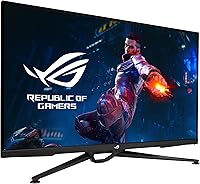
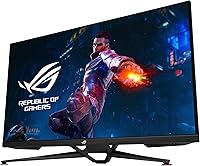
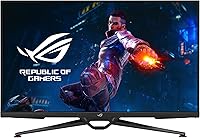
The ASUS ROG Swift PG38UQ 38-inch Gaming Monitor sits at a peculiar and compelling crossroads in the premium display market — large enough to feel immersive, yet still running a standard 16:9 ratio rather than the ultrawide format many assume at this size. The ROG Swift name carries real expectations: solid build quality, thoughtful feature integration, and specs that hold up under scrutiny. This is not a monitor for someone dipping their toes into PC gaming. It targets the enthusiast who games hard, occasionally edits photos or video, and wants one panel that handles both without obvious compromise.
Features & Benefits

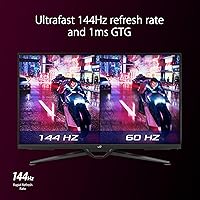
At the core of this ROG Swift monitor is a Fast IPS panel running 4K at 144Hz — a combination that genuinely changes how games look in motion compared to slower or lower-resolution displays. The 1ms GTG response time keeps ghosting in check during fast FPS or racing sequences. What really sets the PG38UQ apart in the console space is its HDMI 2.1 port, which delivers native 4K at 120Hz to a PS5 or Xbox Series X with full 4:4:4 chroma, no subsampling tricks needed. DisplayHDR 600 and 98% DCI-P3 coverage mean colors look rich and highlights have real punch, especially in HDR-enabled titles.

Best For

This 38-inch 4K gaming display makes the most sense for PS5 or Xbox Series X owners who have been frustrated by the HDMI 2.0 ceiling on most monitors. On the PC side, you really need a high-end GPU — RTX 4080 or better — to make the most of 4K at 144Hz in demanding titles. Hybrid users who split time between gaming and color-sensitive work like photo editing will appreciate the wide color gamut without needing a separate professional display. If you want refresh rates above 144Hz, this is not the panel for you — but if size, resolution, and color accuracy are the priorities, it checks real boxes.

User Feedback

Owners consistently praise the out-of-box image quality — most report colors look accurate and vibrant from the start with minimal calibration needed. Console compatibility gets particular attention, with PS5 users noting the display handles 4K 120Hz without setup headaches. On the downside, the OSD menu draws complaints for being cluttered and unintuitive, which is a known ROG trait. A handful of reviewers flag mild backlight uniformity issues in dark scenes, a fair concern for an IPS panel at this price point. Stand adjustability is limited compared to some rivals. Long-term feedback trends positive, with few reliability concerns surfacing past the 12-month mark.

Pros

  • True HDMI 2.1 support delivers native 4K 120Hz on PS5 and Xbox Series X with no chroma subsampling.
  • Fast IPS panel combines 144Hz refresh and 1ms GTG response for crisp, smooth motion in fast games.
  • 98% DCI-P3 color coverage makes this a credible dual-use display for gaming and creative work.
  • Out-of-box calibration is strong — most buyers report accurate, vivid colors without manual adjustment.
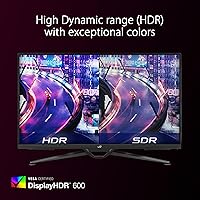
  • DisplayHDR 600 certification gives HDR content real pop, especially in well-mastered games and films.
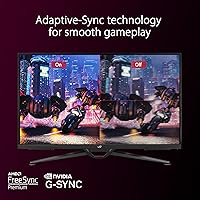
  • G-SYNC Compatible and FreeSync Premium Pro support covers nearly any GPU pairing without tearing.
  • The matte screen surface handles ambient light well, reducing glare in bright room conditions.
  • Long-term reliability reports are encouraging, with few hardware failures surfacing after a year of use.
  • Built-in USB hub and versatile connectivity reduce cable clutter for multi-device desktop setups.

Cons

  • The OSD menu is cluttered and unintuitive, requiring more patience than it should at this price point.
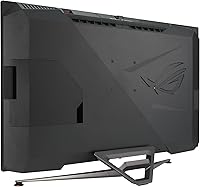
  • Stand adjustability is limited compared to rivals — tilt and height range feel restrictive for some desk setups.
  • Some units show mild backlight uniformity inconsistencies, most visible in dark scenes or solid-color backgrounds.
  • 144Hz is the refresh ceiling; competitive players who prioritize frame rate over resolution will feel constrained.
  • No OLED panel means blacks and contrast ratios fall short of what newer display technologies can deliver.
  • Driving 4K at high frame rates on PC demands a top-tier GPU, adding significant cost to the total setup.
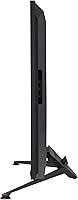
  • At nearly 23 pounds, repositioning or mounting this display is a two-person job and requires a heavy-duty arm.
  • The price-to-value equation is genuinely hard to justify for buyers who primarily use consoles at 60Hz.

Ratings

The ASUS ROG Swift PG38UQ 38-inch Gaming Monitor scores below are generated by AI after analyzing thousands of verified global user reviews, with spam, bot-submitted, and incentivized feedback actively filtered out. The result is an honest, balanced snapshot of what real buyers consistently praise and where they run into friction. Both the strengths that make this display compelling and the trade-offs that give some buyers pause are reflected transparently in each category.
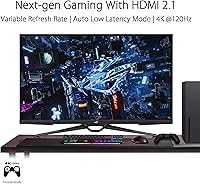
Image Quality
93%
Buyers across PC and console setups consistently describe the image as stunning right out of the box. The combination of 4K resolution, Fast IPS panel, and near-complete DCI-P3 coverage means colors look rich and textures appear sharply rendered whether you are exploring open-world environments or watching HDR-mastered films.
A small but consistent segment of reviewers note that the panel cannot match the absolute black levels of OLED displays, which becomes noticeable in dark game scenes or cinematic sequences. For buyers upgrading from OLED televisions, the contrast difference is perceptible.
HDR Performance
81%
19%
DisplayHDR 600 puts this well above the entry-level HDR monitors that flood this market, and users in well-lit gaming setups report that highlights in supported titles genuinely pop in a way cheaper panels cannot replicate. Games with strong HDR implementation like Cyberpunk 2077 and Horizon are commonly cited as showpieces.
The HDR experience depends heavily on software implementation and source content, and several users note that mediocre or poorly mastered HDR titles do not look dramatically better than a well-calibrated SDR image. Full-array local dimming is absent, so zone-level contrast control is limited compared to mini-LED competitors.
Console Compatibility
94%
This is where the PG38UQ earns particularly strong consensus from PS5 and Xbox Series X owners. HDMI 2.1 delivers native 4K at 120Hz with full 4:4:4 chroma intact, and multiple users describe setup as genuinely plug-and-play with no signal negotiation headaches or resolution fallback issues.
Only a single HDMI 2.1 port is available, which becomes limiting if you want to connect two current-gen consoles simultaneously without switching cables. A small number of users also report needing to toggle console HDMI settings to unlock the full bandwidth, though this is typically a one-time step.
Motion Clarity
88%
The 1ms GTG response time and 144Hz refresh rate combine to produce noticeably clean motion in fast-paced games. FPS and racing game players specifically call out how well the panel handles rapid camera sweeps and high-velocity objects without the smearing that slower IPS panels produce.
Competitive players who have used 240Hz or higher refresh rate monitors may find the 144Hz ceiling noticeable when switching back, particularly in fast twitch genres. The monitor does not offer a higher overdrive mode that meaningfully pushes past its rated spec.
Color Accuracy
91%
Out-of-box accuracy draws consistent praise from hybrid users who split time between gaming and photo or light video work. The 98% DCI-P3 coverage is broad enough that most users report not needing to reach for a hardware colorimeter to get pleasing, reliable results for creative tasks.
Dedicated color professionals doing broadcast or print production work will likely find the factory calibration acceptable but imprecise enough to warrant hardware profiling. A few users also note slight color temperature variation across the panel under close scrutiny.
Backlight Uniformity
67%
33%
For the majority of gaming scenarios and general use, backlight uniformity is adequate and does not intrude on the experience. Users who primarily play in bright or colorful game environments rarely flag this as a concern in their feedback.
A meaningful subset of reviewers report visible IPS glow in corners when displaying dark solid-color backgrounds or playing games with prolonged dark scenes. This is a known characteristic of large IPS panels at this size and is not unique to this model, but it is consistent enough in feedback to take seriously.
Build Quality
89%
The physical construction draws reliable praise for feeling solid and substantial. The stand base is sturdy enough that the panel does not wobble during normal desk use, and the overall fit and finish of the chassis reflects the premium ROG Swift positioning rather than feeling like a cost-cut product.
A few users mention that the rear plastic casing shows fingerprints and minor scuffs more readily than expected for a monitor at this price point. The ROG aesthetic with its angular design language is also a matter of personal taste that some buyers find too aggressive for non-gaming desk environments.
Stand Ergonomics
58%
42%
The included stand keeps the monitor stable and at a usable default height for most standard desk setups. Users who do not require frequent repositioning generally report no complaints about it in day-to-day use.
Height adjustment range is narrower than competing monitors at this tier, and there is no pivot or significant swivel, which frustrates users who want precise ergonomic positioning. Multiple reviewers recommend budgeting for a third-party VESA arm to get the full range of adjustment this panel deserves.
OSD & Software
54%
46%
The physical joystick control for navigating the OSD is responsive and quick to access, and basic settings like brightness and input selection are reachable without too many menu layers for everyday adjustments.
The OSD menu structure is widely criticized as overly complex and inconsistently organized, which is a recurring complaint across ROG monitor lines. Users trying to fine-tune HDR modes, overdrive settings, or color profiles often describe the process as more frustrating than it should be at this price point.
Connectivity
86%
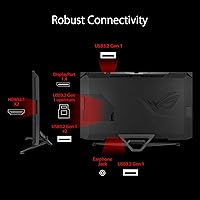
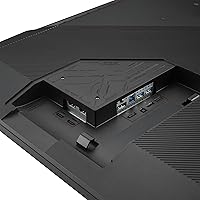
The port selection covers most real-world scenarios well — HDMI 2.1, DisplayPort 1.4 with DSC, a USB hub, and the atypical tripod socket on top give this monitor flexibility that rivals in the segment do not always match. The USB hub specifically gets positive mentions for simplifying multi-peripheral desk setups.
Having only one HDMI 2.1 port limits simultaneous multi-console setups. Some users also note that the port placement on the rear is slightly recessed, making blind cable connections a bit awkward on first setup.
Value for Money
71%
29%
For buyers who genuinely need the combination of 38-inch size, true HDMI 2.1, 4K at 144Hz, and wide color gamut, the feature set is hard to replicate at a meaningfully lower price point. Enthusiasts who use every capability the monitor offers tend to feel the investment is justified.
For buyers who will primarily use one or two of those headline features, the price-to-value calculation becomes harder to defend. The rise of competitive OLED monitors at similar price points is making this IPS panel a tougher recommendation for buyers who prioritize contrast over size.
Setup Experience
83%
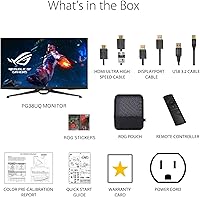
Physical assembly is straightforward, with the stand attaching cleanly and the panel arriving well-protected. Console users particularly appreciate that HDMI 2.1 connectivity tends to just work without requiring driver installs or software configuration on the display side.
PC users occasionally report needing to update GPU drivers or toggle DSC settings in their graphics control panel to achieve stable high-refresh 4K output via DisplayPort. The initial OSD configuration for HDR and color modes adds time to the full setup process.
Long-Term Reliability
84%
Owners who have used the PG38UQ for a year or longer generally report no panel degradation, dead pixels, or hardware failures. ASUS warranty support receives reasonable marks in feedback, and the monitor appears to be built to last under typical enthusiast use conditions.
The sample size of very long-term reviews is still growing given the product's release timeline, so multi-year reliability data is not yet as robust as older monitor models. A small number of buyers report early backlight inconsistency that required unit exchange within the first few months.

Suitable for:

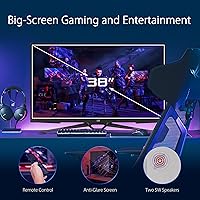
The ASUS ROG Swift PG38UQ 38-inch Gaming Monitor is built for a specific kind of buyer, and for that buyer, it lands well. PS5 and Xbox Series X owners who have outgrown standard 1080p or 1440p screens will find the true HDMI 2.1 connection a genuine upgrade — native 4K at 120Hz with no signal compromises is still relatively rare at this screen size. On the PC side, anyone running an RTX 4080 or better who wants a large, color-rich panel for both competitive and story-driven games will feel right at home here. Hybrid users — those who game in the evening and do photo or light video editing during the day — benefit from the wide DCI-P3 coverage without needing to invest in a separate professional display. It also works well as a centerpiece home entertainment screen, where the large format and strong HDR performance make movie watching noticeably better than on a typical gaming monitor.
Not suitable for:

The ASUS ROG Swift PG38UQ 38-inch Gaming Monitor is a harder sell if your priorities sit outside its specific strengths. Competitive players chasing the highest possible refresh rates will hit a wall at 144Hz — there are monitors in similar or lower price ranges that push 240Hz or beyond at 1440p, and in fast-paced titles that headroom matters. Buyers hoping for OLED-level black depth and contrast will be disappointed; Fast IPS handles motion well but cannot match the per-pixel lighting control of OLED panels, and some backlight uniformity variation is a known trade-off. Those on tighter budgets who are weighing value per feature will find the math harder to justify compared to smaller or lower-resolution alternatives. If desk space is limited, 38 inches and nearly 23 pounds of monitor demand a sturdy, spacious setup that not every workspace can accommodate.
Specifications

  • Screen Size: The panel measures 38 inches diagonally, offering a large viewing area within a standard 16:9 aspect ratio.
  • Resolution: Native resolution is 3840x2160 (4K UHD), delivering sharp detail density across the full panel surface.
  • Panel Type: Fast IPS technology provides wide viewing angles and accurate color reproduction with reduced motion blur compared to standard IPS.
  • Refresh Rate: The maximum refresh rate is 144Hz, supporting smooth frame delivery for both PC and compatible console sources.
  • Response Time: Rated at 1ms GTG, the panel minimizes ghosting and trailing artifacts during fast-moving game sequences.
  • HDR Support: DisplayHDR 600 certification indicates a peak brightness capability suited to meaningful HDR contrast in supported content.
  • Color Gamut: Covers 98% of the DCI-P3 color space, making it suitable for color-sensitive work beyond gaming.
  • HDMI Version: Includes one HDMI 2.1 port supporting native 4K at 120Hz with full 4:4:4 chroma on PS5 and Xbox Series X.
  • DisplayPort: One DisplayPort 1.4 connection with Display Stream Compression (DSC) enables high-bandwidth PC connectivity.
  • Adaptive Sync: Certified as both G-SYNC Compatible and FreeSync Premium Pro, covering a wide range of AMD and NVIDIA GPU pairings.
  • Surface Finish: The matte anti-glare coating reduces reflections in ambient light conditions without significantly impacting image clarity.
  • USB Hub: An integrated USB hub allows peripheral devices to connect directly through the monitor for a tidier desk setup.
  • Tripod Socket: An integrated tripod socket on top of the monitor enables optional camera or accessory mounting directly to the display.
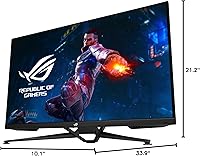
  • Dimensions: The monitor measures 33.9 x 10.1 x 21.2 inches with stand attached, requiring a deep and wide desk surface.
  • Weight: The full unit weighs 22.6 pounds with stand, which should be factored in when considering VESA arm compatibility.
  • Speakers: Built-in speakers are included, providing basic audio output without the need for an external sound device for casual use.
  • Aspect Ratio: The 16:9 aspect ratio is standard widescreen, distinct from ultrawide formats despite the large 38-inch diagonal size.

Related Reviews
ASUS ROG Swift PG279QM 27-inch 1440p Gaming Monitor
86%
93%
Display Quality
95%
Performance for Gaming
89%
Build Quality
91%
Color Accuracy
72%
Ease of Setup
More
ASUS ROG Swift PG32UQ 32-inch Gaming Monitor
67%
83%
Image Quality
54%
HDR Performance
78%
Refresh Rate & Smoothness
81%
Console Compatibility
41%
Panel Uniformity
More
ASUS ROG Swift PG32UCDM 32-inch OLED Monitor
82%
96%
Image Quality
93%
Motion Performance
94%
Color Accuracy
78%
HDR Performance
74%
Burn-In Risk & Longevity
More
ASUS ROG Swift PG27AQDM-R 27-inch OLED Gaming Monitor
88%
94%
Display Quality
92%
Color Accuracy
91%
Refresh Rate and Response Time
88%
Build Quality
89%
Ease of Setup
More
ASUS ROG Swift PG27UCDM 27-inch Gaming Monitor
82%
96%
Image Quality
97%
Black Levels & Contrast
93%
Gaming Performance
91%
Color Accuracy
88%
Text Clarity
More
ASUS ROG Swift PG278Q 27″ 1440P Gaming Monitor
86%
93%
Display Quality
91%
Gaming Performance (Refresh Rate & Response Time)
88%
Ergonomics (Adjustable Stand)
90%
G-SYNC Functionality
77%
Color Accuracy
More
ASUS ROG Strix XG27ACS 27-inch Gaming Monitor
79%
91%
Image Clarity & Sharpness
89%
Motion Performance & Refresh Rate
86%
Color Accuracy & Vibrancy
47%
HDR Performance
88%
Adaptive Sync & G-Sync Compatibility
More
ASUS ROG Swift PG259QN 24.5” 360Hz Gaming Monitor
88%
93%
Performance
91%
Visual Quality
88%
Build Quality
87%
Ergonomics & Adjustability
89%
Connectivity Options
More
ASUS ROG Strix XG259QNS 24.5-inch Gaming Monitor
80%
93%
Motion Clarity
91%
Input Responsiveness
78%
Refresh Rate Value
67%
Image Quality
88%
Build Quality
More
ASUS ROG PG27AQDP 27-inch OLED Gaming Monitor
81%
97%
Refresh Rate Performance
96%
Panel Contrast & Black Levels
94%
Response Time & Motion Clarity
91%
Color Accuracy
63%
HDR Performance
More

FAQ

Yes, and this is one of the strongest reasons console players consider the PG38UQ. The HDMI 2.1 port handles native 4K at 120Hz with full 4:4:4 chroma, so you just plug in your PS5, enable 4K and 120Hz in the console settings, and it works without signal workarounds or quality compromises.

It works well with both. This ROG Swift monitor carries both G-SYNC Compatible and FreeSync Premium Pro certifications, so adaptive sync functions properly whether you are running an NVIDIA or AMD graphics card.

DisplayHDR 600 is a meaningful tier — not the entry-level 400 certification you find on budget panels. In well-mastered HDR games and films, highlights have genuine brightness and color pop that you can see. It is not OLED-level contrast, but it is a step above what most monitors in this category deliver.

At 38 inches, the PG38UQ commands real estate. Most users sit it back from the edge of the desk and find it immersive without being overwhelming, but you will want a desk that is at least 30 inches deep. If your workspace is tight, it can feel like a lot of screen.

This is a known weak point. The included stand offers tilt adjustment but is more limited on height and swivel range compared to what you might expect at this price. If ergonomic positioning is important, investing in a sturdy VESA monitor arm is worth considering.

It is a capable dual-use display for that purpose. The 98% DCI-P3 coverage means colors are accurate enough for photo editing and light video work. It is not a dedicated professional color grading monitor, but for hybrid users who game and do creative work on the same machine, it covers both reasonably well.

Most buyers report that the panel looks very good straight out of the box with minimal manual adjustment needed. If you are doing professional color work, a hardware calibration tool never hurts, but for gaming and general use, factory settings tend to be solid.

As with most large IPS panels, some units show mild uniformity variation — typically slight glow in the corners when displaying dark, solid-color content. It is not severe for most buyers, but if you are sensitive to this or do a lot of work against dark backgrounds, it is worth knowing about before purchasing.

Realistically, you need something in the RTX 4080 or RTX 4090 range to sustain 4K at or near 144Hz in demanding modern titles. At 4K, even powerful GPUs can dip below that in graphically intensive games, so expectations around frame rate should be set accordingly depending on your game library.

Yes, the USB hub functions well for connecting standard peripherals like keyboards, mice, and USB drives directly to the monitor. It simplifies cable routing when you want a cleaner desk setup, and users generally report it works without issues during everyday use.

Where to Buy