Overview

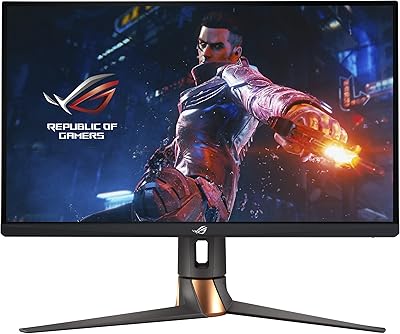
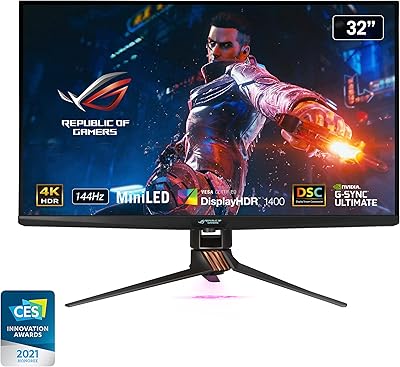
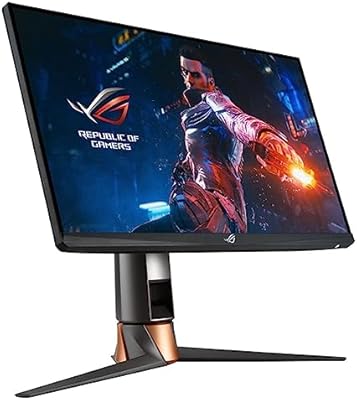
The ASUS ROG Swift PG32UQ 32-inch Gaming Monitor arrived in late 2021 as one of the more ambitious entries in the premium 4K gaming space, pairing a fast IPS panel with a 144Hz refresh rate at a time when that combination was genuinely rare. Physically, it carries the familiar ROG aesthetic — angular stand, subtle red accents — and feels solidly constructed for its tier. It targets PC enthusiasts running high-end GPUs and console players hoping to extract every bit of next-gen performance from a PS5 or Xbox Series X. That said, a 2.8-star average from over 200 buyers is hard to ignore, and this review won't pretend otherwise.
Features & Benefits

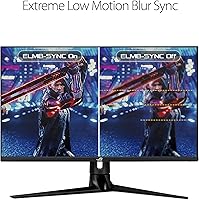
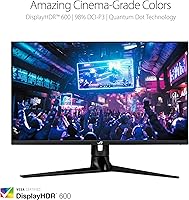
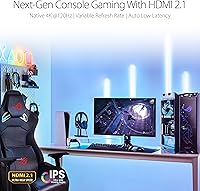
The PG32UQ runs a 4K IPS panel that covers the DCI-P3 color gamut, which makes a real difference whether you're gaming or doing photo work alongside it. The 144Hz refresh rate is made possible at full 4K resolution through Display Stream Compression (DSC) — a form of near-lossless compression that keeps signal bandwidth manageable without visibly degrading image quality for most users. HDMI 2.1 is a genuine asset here, enabling PS5 and Xbox Series X owners to hit 4K at 120Hz without compromise. ELMB SYNC pairs motion blur reduction with variable refresh rate simultaneously, which most monitors still can't do. The DisplayHDR 600 certification sounds impressive, but with 450 nits typical brightness, HDR impact is noticeably limited compared to OLED or mini-LED alternatives.

Best For

This 32-inch 4K gaming display makes the most sense for PC gamers with a high-end GPU — think RTX 4080 territory — who want one screen for both competitive gaming and detail-rich single-player titles. Console players with a PS5 or Xbox Series X will genuinely benefit from the HDMI 2.1 connection. It also suits content creators who need reliable color coverage alongside their gaming use, since DCI-P3 holds up for casual photo and video work. Where it fits less comfortably: buyers chasing true HDR punch or those who need a brightness-heavy setup. If ultrawide immersion is the goal, look elsewhere — the standard 16:9 aspect ratio is a deliberate choice, not the right fit for everyone.

User Feedback

Across verified buyer reviews, the picture that emerges is uneven. Positive experiences tend to center on image quality and color accuracy — buyers who land a good unit often praise how the panel handles fine detail and texture. But the 2.8-star average points to something more systemic. Recurring complaints include panel uniformity issues, backlight bleed, and compatibility frustrations — particularly around HDR behavior and firmware quirks. Some negative reviews appear tied to specific setups, but the volume is too consistent to dismiss. Third-party professional reviews paint a more favorable picture, suggesting quality control inconsistency may be a contributing factor. This ROG monitor has genuine strengths, but the purchase carries more risk than its price tier should typically involve.

Pros

  • The IPS panel delivers accurate, consistent colors across wide viewing angles — a genuine advantage for both gaming and creative work.
  • HDMI 2.1 support enables PS5 and Xbox Series X users to run 4K at 120Hz without any signal compromise.
  • 144Hz at full 4K resolution is a rare and capable combination that holds up well for high-end PC gaming.
  • ELMB SYNC technology allows motion blur reduction and variable refresh rate to run simultaneously, which many competing monitors still cannot do.
  • DCI-P3 color gamut coverage makes this 32-inch 4K gaming display a credible dual-purpose screen for content creators.
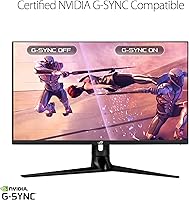
  • G-SYNC Compatible certification means smooth, tear-free gameplay works reliably with both NVIDIA and AMD graphics cards.
  • The ROG build quality is solid — buyers who receive a good unit consistently praise the physical construction and stand stability.
  • At 32 inches with a 16:9 aspect ratio, the screen size hits a comfortable sweet spot for immersive gaming without requiring an ultrawide setup.
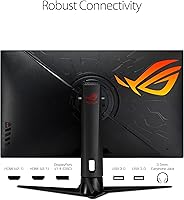
  • DisplayPort connectivity alongside HDMI 2.1 gives PC users flexible, high-bandwidth connection options for different GPU configurations.

Cons

  • Quality control inconsistency is a documented concern — a meaningful number of buyers report panel uniformity issues or backlight bleed on arrival.
  • The 2.8-star average rating across 218 reviews is unusually low for a premium-tier ROG product and warrants serious consideration before purchasing.
  • DisplayHDR 600 certification sounds impressive, but 450 nits typical brightness produces only a modest HDR effect compared to OLED or mini-LED alternatives.
  • Display Stream Compression (DSC) is required to hit 144Hz at 4K, and while generally transparent, it is a technical trade-off some users find objectionable.
  • Firmware and compatibility issues have appeared in multiple negative reviews, particularly around HDR behavior and variable refresh rate performance.
  • Launched in late 2021, the PG32UQ now faces stronger competition from newer monitors offering comparable specs with better reliability reputations.
  • At over 21 pounds, the monitor is heavier than many competitors, which can complicate desk mounting or repositioning.
  • The price positioning relative to current market alternatives makes the quality control risk harder to justify when comparable options exist.

Ratings

The scores below reflect an AI-driven analysis of verified global buyer reviews for the ASUS ROG Swift PG32UQ 32-inch Gaming Monitor, with spam, bot-submitted, and incentivized feedback actively filtered out to surface genuine user sentiment. Both the standout strengths and the recurring pain points that frustrated real buyers are transparently reflected in each category score — nothing has been smoothed over to flatter the product.

Image Quality
83%
Buyers who received well-calibrated units consistently praised the sharpness and color richness of the 4K IPS panel during both gaming sessions and everyday desktop use. The DCI-P3 color gamut coverage made textures and foliage pop in open-world titles in a way that impressed even experienced monitor users.
A subset of buyers noted that out-of-box calibration varied noticeably between units, meaning some users had to invest time in manual calibration to get the most from the panel. Color fringing near high-contrast edges was occasionally flagged in detailed scenes.
HDR Performance
54%
46%
In SDR-to-HDR comparisons, most users acknowledged a visible improvement in highlight detail and shadow depth when HDR was active, particularly in darker game environments with torchlight or neon elements. For buyers coming from non-HDR monitors, the step up felt meaningful.
DisplayHDR 600 with only 450 nits typical brightness simply cannot deliver the punchy, high-contrast HDR experience many buyers expected at this price tier. Multiple reviewers noted that HDR mode felt underwhelming compared to OLED or mini-LED panels, and some preferred keeping HDR disabled entirely for a more consistent picture.
Refresh Rate & Smoothness
78%
22%
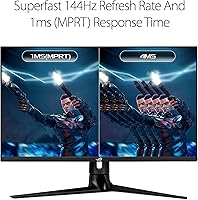
At 144Hz, fast-paced games like shooters and racing titles felt noticeably smoother than on 60Hz panels, and ELMB SYNC adding motion blur reduction on top of variable refresh rate was appreciated by competitive players who noticed sharper enemy movement during quick flicks.
Reaching 144Hz at full 4K resolution requires DSC, which some technically informed buyers objected to on principle even when they could not see a visible difference. A few users also reported difficulty getting the monitor to sustain the peak refresh rate consistently with certain GPU and driver combinations.
Console Compatibility
81%
19%
HDMI 2.1 support was one of the clearest wins highlighted across positive reviews, with PS5 and Xbox Series X owners confirming genuine 4K at 120Hz operation without needing adapters or workarounds. The upgrade from a 60Hz display felt immediately obvious to console users making the switch.
Some buyers encountered frustrating handshake or signal issues when switching between console and PC inputs, requiring power cycling or input resets to restore the signal. HDR behavior on consoles was inconsistent for a portion of users, with the monitor occasionally misidentifying the HDR format.
Panel Uniformity
41%
59%
Buyers who received a sample with consistent backlighting across the panel reported a clean, even image across the entire 32-inch surface, which is important for desktop productivity and gaming alike. Professional reviewers who tested individual production units often found uniformity to be acceptable.
This category represents the most concentrated source of buyer frustration. Backlight bleed in corners and uneven brightness gradients across the panel were among the most common complaints in negative reviews, and the inconsistency between units suggests a quality control problem rather than a design-level flaw.
Build Quality
74%
26%
The physical construction earned mostly positive remarks — the ROG stand feels solid, the display housing has minimal flex, and the overall aesthetic matched the premium pricing expectations of most buyers. Cable management on the stand was a small but appreciated detail.
A handful of buyers reported cosmetic defects on arrival including scratched bezels or loosely fitting stand connections, which reinforced the broader quality control narrative. At this weight and price point, some felt the plastics used in certain parts of the chassis did not match the premium branding.
Connectivity
79%
21%
Having both HDMI 2.1 and DisplayPort alongside two USB 3.0 downstream ports made this ROG monitor genuinely versatile for multi-device setups. PC gamers appreciated being able to run a keyboard and mouse hub directly off the monitor without adding a separate USB hub to the desk.
The USB-C port that many buyers expected from a monitor at this tier is absent, which frustrated users wanting a single-cable docking solution for laptops. Only one HDMI 2.1 port limits simultaneous next-gen console connectivity for households running both a PS5 and Xbox.
G-SYNC & VRR Behavior
69%
31%
For the majority of users, G-SYNC Compatible operation worked reliably out of the box with both NVIDIA and AMD graphics cards, delivering smooth tear-free gameplay across a broad frame rate range without requiring manual configuration. Most buyers did not need to dig into settings to make it work.
A recurring complaint was that VRR and HDR interacted poorly under certain scenarios, with some buyers reporting flickering or black screens when both were active simultaneously. These issues appeared more frequently in specific game engines and required driver or firmware workarounds that should not have been necessary.
Value for Money
47%
53%
For buyers who received a defect-free unit and needed the specific combination of 4K, 144Hz, HDMI 2.1, and DCI-P3 in one display, the PG32UQ offered a feature set that was difficult to match at launch and remains competitive for the right use case.
The combination of a low average star rating, documented quality control inconsistencies, and newer competitors offering similar specifications with better reliability makes the value proposition difficult to justify today. Several buyers explicitly stated in reviews that they would not repurchase given the risk involved.
Setup & Ease of Use
71%
29%
The physical assembly process was straightforward for most buyers, with the stand clicking into the monitor body without tools. OSD navigation was rated as functional and reasonably intuitive by users coming from other ASUS monitors familiar with the ROG interface.
Some users found the OSD menu sluggish compared to competing monitors, particularly when trying to switch between input modes or toggle HDR settings mid-session. Initial firmware setup instructions were described by a few buyers as unclear, leading to suboptimal default configurations that required research to fix.
Motion Clarity
76%
24%
ELMB SYNC genuinely impressed competitive gamers who tested it in fast first-person shooters, with crosshair and moving target sharpness noticeably improving compared to standard IPS motion handling. Buyers who gamed primarily in high-refresh-rate titles saw the clearest benefit.
At lower frame rates — particularly during open-world exploration where GPU-heavy scenes can dip — motion clarity advantages became less pronounced and the panel behaved more like a standard IPS display. Some users felt the feature added visible brightness reduction as a trade-off.
Color Accuracy
77%
23%
Out-of-box color performance drew praise from content creators and designers who used the PG32UQ as a dual-purpose display. The DCI-P3 coverage made it one of the more color-capable gaming monitors available when it launched, and buyers doing casual photo editing were generally satisfied.
Factory calibration consistency varied between samples, and buyers who measured their panels with a colorimeter found some variance in white point and grayscale tracking that required correction. For professionals needing absolute color fidelity, this inconsistency was a dealbreaker without additional hardware calibration.
Ergonomics
66%
34%
The stand offers tilt adjustment and VESA compatibility gives buyers the option to move to a third-party arm for full height, swivel, and pivot control. Users who upgraded to an aftermarket arm reported the ergonomic flexibility they expected from a premium display.
The stock stand lacks height and swivel adjustment, which drew frustration from buyers expecting full ergonomic flexibility at this price level. The 21-plus-pound weight also made repositioning during setup more cumbersome than expected, particularly for single-person desk installations.
Firmware & Software Stability
43%
57%
On stable firmware versions, the PG32UQ operated without intervention for buyers using standard PC setups with compatible GPU drivers. Users on consistent single-source setups — one PC, one input — rarely encountered software-related disruptions during normal use.
Firmware issues were among the most cited sources of frustration in negative reviews, with buyers reporting HDR misdetection, VRR conflicts, and occasional signal drop behavior that required multiple resets to resolve. The lack of timely firmware updates to address known issues was explicitly called out by several buyers as a customer support failure.

Suitable for:

The ASUS ROG Swift PG32UQ 32-inch Gaming Monitor is a strong fit for PC gamers running high-end NVIDIA or AMD GPUs who want a single screen that handles both fast-paced competitive titles and visually rich single-player experiences at 4K. Console players with a PS5 or Xbox Series X will find the HDMI 2.1 port particularly valuable, since it unlocks genuine 4K at 120Hz without any workarounds or compromises. Content creators who split their time between gaming and color-sensitive work — photo editing, video grading, light design tasks — will appreciate the DCI-P3 color gamut coverage that most gaming monitors in this category skip entirely. If you prioritize image sharpness and color fidelity over raw brightness or HDR spectacle, this ROG monitor delivers where it counts. Buyers who have the desk real estate for a 32-inch panel and want an immersive flat-screen experience without committing to ultrawide will also find the size and aspect ratio a practical, comfortable choice.
Not suitable for:

The ASUS ROG Swift PG32UQ 32-inch Gaming Monitor is harder to recommend without reservation to buyers who expect consistent out-of-box quality, given the unusually low average rating that points toward real quality control variability across units. Anyone chasing a true high-brightness HDR experience should look elsewhere — 450 nits typical brightness means HDR scenes look improved over SDR, but they will not deliver the punchy, high-contrast impact you get from OLED or mini-LED panels. Budget-conscious buyers will find better value-per-feature ratios among competing 4K monitors that have launched since 2021 with stronger reliability track records. Competitive gamers who prioritize the absolute lowest response times and fastest motion handling above all else may find that newer alternatives have closed the gap or surpassed the PG32UQ. Finally, anyone with a tight desk setup or limited space will likely find the 32-inch footprint and 21-plus-pound weight more cumbersome than expected.
Specifications

  • Panel Type: The display uses an IPS (In-Plane Switching) panel, which provides consistent color accuracy and wide viewing angles compared to VA or TN alternatives.
  • Resolution: Native resolution is 3840x2160 (4K UHD), delivering sharp detail across the full 32-inch screen surface.
  • Screen Size: The viewable screen diagonal measures 32 inches, with a 16:9 aspect ratio and glossy surface finish.
  • Refresh Rate: Maximum refresh rate is 144Hz, achieved at full 4K resolution using Display Stream Compression (DSC) technology.
  • Response Time: Rated at 1ms response time, helping to minimize trailing or ghosting artifacts during fast-motion gameplay.
  • HDR Certification: Carries VESA DisplayHDR 600 certification, indicating a minimum peak brightness capability of 600 nits under HDR conditions.
  • Brightness: Typical brightness is rated at 450 cd/m², which is adequate for most indoor environments but limits HDR contrast impact.
  • Color Gamut: Covers the DCI-P3 professional color gamut, making it suitable for color-sensitive work such as photo editing alongside gaming use.
  • Viewing Angles: Horizontal and vertical viewing angles are both rated at 178 degrees (CR≥10), consistent with IPS panel characteristics.
  • Connectivity: Ports include one HDMI 2.1, one DisplayPort, and two USB 3.0 downstream ports for peripherals.
  • Variable Refresh: G-SYNC Compatible certified, enabling variable refresh rate (VRR) by default for supported NVIDIA and AMD GPUs.
  • Motion Blur Tech: ASUS ELMB SYNC technology allows Extreme Low Motion Blur and variable refresh rate to operate simultaneously, which is uncommon at this panel tier.
  • Dimensions: The monitor measures 28.67 x 17.79 x 11.52 inches (W x H x D) with the stand attached.
  • Weight: Total weight with stand is 21.4 pounds, which is heavier than many competing 32-inch panels in this category.
  • Voltage: The unit is rated at 240 volts; buyers in regions with different standard voltages should verify compatibility before purchase.
  • VESA Mount: Compatible with the ROG desk mount kit and standard VESA mounting solutions for wall or arm installation.
  • Release Date: The monitor was first made available in September 2021, placing it among the early HDMI 2.1 gaming monitors on the consumer market.
  • Model Number: The official model designation is PG32UQ, part of ASUS's ROG Swift performance monitor lineup.

Related Reviews

ASUS ROG Swift PG32UCDM 32-inch OLED Monitor
82%
96%
Image Quality
93%
Motion Performance
94%
Color Accuracy
78%
HDR Performance
74%
Burn-In Risk & Longevity
More
ASUS ROG Swift PG38UQ 38-inch Gaming Monitor
80%
93%
Image Quality
81%
HDR Performance
94%
Console Compatibility
88%
Motion Clarity
91%
Color Accuracy
More
ASUS ROG Swift PG279QM 27-inch 1440p Gaming Monitor
86%
93%
Display Quality
95%
Performance for Gaming
89%
Build Quality
91%
Color Accuracy
72%
Ease of Setup
More
ASUS ROG Swift PG27AQDM-R 27-inch OLED Gaming Monitor
88%
94%
Display Quality
92%
Color Accuracy
91%
Refresh Rate and Response Time
88%
Build Quality
89%
Ease of Setup
More
ASUS ROG Swift PG32UQX 32″ Gaming Monitor
79%
93%
HDR Performance
91%
Peak Brightness
89%
Color Accuracy
88%
Build Quality
84%
Local Dimming & Contrast
More
ASUS ROG Swift PG27UCDM 27-inch Gaming Monitor
82%
96%
Image Quality
97%
Black Levels & Contrast
93%
Gaming Performance
91%
Color Accuracy
88%
Text Clarity
More
ASUS TUF Gaming VG32UQA1A 32-inch Gaming Monitor
74%
88%
Image Clarity
83%
Refresh Rate Performance
91%
Console Compatibility
54%
HDR Quality
84%
Motion Handling
More
ASUS ROG Swift PG278Q 27″ 1440P Gaming Monitor
86%
93%
Display Quality
91%
Gaming Performance (Refresh Rate & Response Time)
88%
Ergonomics (Adjustable Stand)
90%
G-SYNC Functionality
77%
Color Accuracy
More
ASUS ROG PG27AQDP 27-inch OLED Gaming Monitor
81%
97%
Refresh Rate Performance
96%
Panel Contrast & Black Levels
94%
Response Time & Motion Clarity
91%
Color Accuracy
63%
HDR Performance
More
ASUS ROG Strix XG259QNS 24.5-inch Gaming Monitor
80%
93%
Motion Clarity
91%
Input Responsiveness
78%
Refresh Rate Value
67%
Image Quality
88%
Build Quality
More

FAQ

You can, but it requires Display Stream Compression (DSC) to get there. DSC is a near-lossless compression standard built into the DisplayPort connection that reduces the raw bandwidth needed to push 4K at 144Hz. In practice, most users cannot visually distinguish compressed from uncompressed output at this resolution, but it is worth knowing the full picture before you buy.

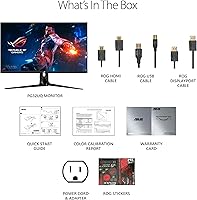
Yes, and this is one of the genuinely strong use cases for the PG32UQ. The HDMI 2.1 port supports the full bandwidth needed for 4K at 120Hz, which is exactly what next-gen consoles output at their best. Just make sure you are using a certified HDMI 2.1 cable — the one included in the box should work, but cable quality can matter here.

Honestly, it is mid-tier at best. DisplayHDR 600 sounds like a meaningful certification, and it is a step above the DisplayHDR 400 you find on budget monitors, but typical brightness sits at 450 nits. That is not enough to produce the deep contrast and highlight punch you get from OLED or mini-LED panels. HDR will look noticeably better than SDR, but do not go in expecting a cinema-grade experience.

It is a legitimate concern. The ASUS ROG Swift PG32UQ 32-inch Gaming Monitor carries a 2.8-star average across more than 200 buyer reviews, which is notably low for a premium ROG product. Recurring complaints include backlight bleed, panel uniformity inconsistencies, and firmware-related issues. Not every unit is affected, and professional reviewers who tested individual samples generally found strong results — but the volume of negative reports suggests a higher-than-normal risk of receiving a problematic unit.
G-SYNC Compatible means the monitor has been tested and certified by NVIDIA to support variable refresh rate reliably, but it does not include the dedicated G-SYNC hardware module found in full G-SYNC monitors. For most gaming scenarios, the difference is minimal — you get tear-free, smooth gameplay either way. The main practical advantage of full G-SYNC hardware is slightly better low-framerate compensation, which most users will never notice in regular play.

At 4K resolution, 32 inches actually works very well because the pixel density remains high enough to avoid the softness or screen-door effect you can get at 4K on smaller panels. Sitting at a typical desk distance of 60 to 90 cm, 32 inches feels immersive without requiring you to move your head to track the screen. That said, if your desk is shallow or your seating position is very close, it can feel overwhelming.

You will want something in the RTX 4080 or RX 7900 XTX class to hit 144Hz at 4K in demanding titles with settings turned up. More realistically, a mid-high tier card like an RTX 4070 Ti will get you close in many games, particularly if you use upscaling technologies like DLSS or FSR. Running the panel at 4K and 60Hz is perfectly achievable with a much wider range of hardware if high refresh rate is not a priority for every game.

The DCI-P3 color gamut coverage makes this 32-inch 4K gaming display a reasonable choice for casual to semi-professional creative work. If you are editing photos for social media or doing general video work, the color accuracy is good enough to be useful. For professional color grading where absolute accuracy and calibration stability matter, a dedicated professional display with factory calibration data would be a more reliable choice.

The stand does support tilt adjustment, and the monitor is compatible with VESA mounting solutions as well as the ASUS ROG desk mount kit, which gives you flexibility if you prefer an arm setup. Mounting it on an arm also helps with the 21-plus-pound weight if your desk surface has limited clearance or you want to reclaim desk space.

ELMB SYNC is ASUS's way of running backlight strobing (which reduces motion blur by flickering the backlight in sync with each frame) at the same time as variable refresh rate. Most monitors make you choose one or the other. Whether you notice the improvement depends on how sensitive you are to motion blur — in fast competitive games like shooters or racing titles, sharper motion clarity is genuinely appreciable. In slower games or productivity use, you likely will not switch it on.

Where to Buy