Overview

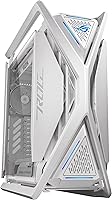
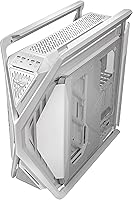
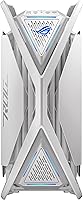
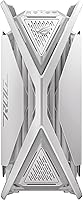
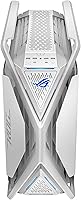
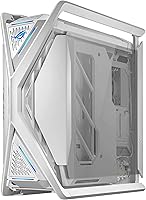
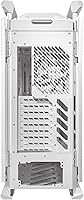
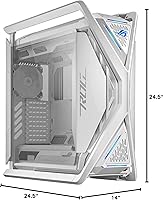
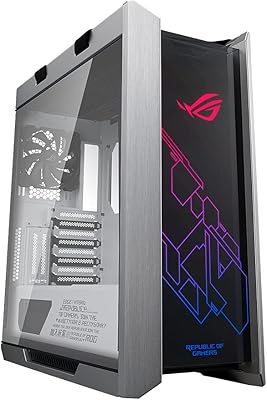
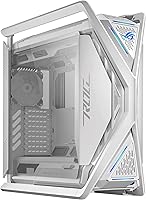
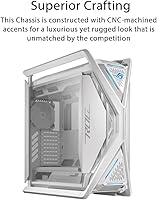
The ASUS ROG Hyperion GR701 Full-Tower Case arrives as a genuine statement piece in a market full of cautious, box-shaped chassis — and it does not pretend otherwise. Built around a diecast aluminum-alloy frame with a semi-open structure, it trades the sealed aesthetic of traditional towers for something more architectural and air-friendly. The white colorway is a deliberate contrast to the sea of black enclosures competing at this tier. That said, buyers should go in clear-eyed: at 55.6 pounds and stretching nearly 24.5 inches in every direction, this case commands serious desk real estate before a single component is installed.
Features & Benefits

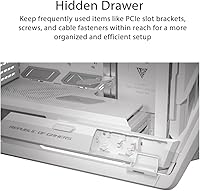
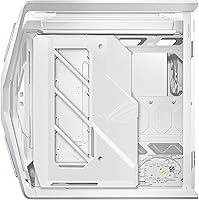
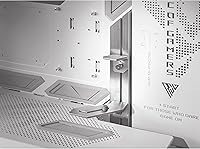
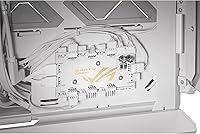
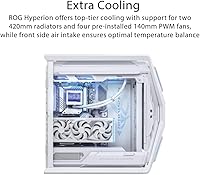
What separates the ROG Hyperion GR701 from most competitors is its dual 420mm radiator support — a spec almost unheard of at any price. Whether you are running a single massive AIO or planning a custom dual-loop build, the thermal headroom here is exceptional. The hinged, tool-free side panels make opening and closing the case feel natural rather than tedious, and a built-in storage drawer is a small but genuinely useful touch during long builds. The integrated GPU holder handles both vertical and horizontal orientations without adapters, and the internal hub — covering six PWM fan headers and eight ARGB channels — eliminates a significant chunk of the cable chaos that plagues large builds.

Best For

This full-tower chassis is purpose-built for builders who are not compromising on cooling. If your next build involves a 360mm or larger AIO, a custom water loop, or high-TDP components that need sustained airflow, the ROG Hyperion GR701 is one of the few cases genuinely sized for the job. It also suits ROG ecosystem users who want cohesive ARGB integration across their setup without third-party workarounds. Conversely, if you are working with a compact desk, planning a mid-range build, or moving your rig regularly, this case will frustrate more than it impresses. Size and purpose need to align before committing.

User Feedback

Across more than 200 ratings, this case holds a strong 4.6-star average, and the praise is consistent: buyers highlight exceptional build quality, the flexibility of the cooling layout, and how much the tool-free panels simplify working inside. Where opinions diverge is on practicality. Several owners note that 55.6 pounds is genuinely awkward to move, and those with smaller workspaces found the footprint more imposing than expected. A handful of reviewers also feel the premium pricing is only easy to justify when paired with equally high-end components — dropping a mid-range build inside feels like a mismatch. ARGB performance is generally praised, though software consistency draws occasional complaints.

Pros

  • Dual 420mm radiator support is one of the rarest and most capable cooling specs available in any full-tower case.
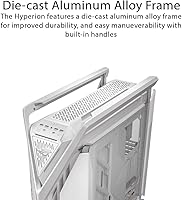
  • The diecast aluminum-alloy frame feels genuinely premium — rigid, creak-free, and built to outlast multiple builds.
  • Hinged tool-free side panels make routine maintenance and component swaps feel effortless rather than tedious.
  • The integrated GPU holder handles heavy flagship cards in both vertical and horizontal orientations without adapters.
  • Eight onboard ARGB headers and six PWM fan headers centralize lighting and fan control, cutting cable clutter dramatically.
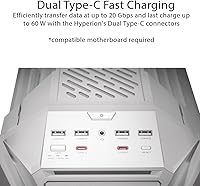
  • Front-panel USB-C ports with 60W fast charging add real daily convenience beyond just aesthetics.
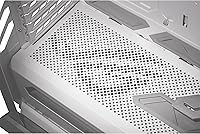
  • The semi-open structure improves passive airflow meaningfully, reducing the need to run fans at maximum speed.
  • A built-in storage drawer keeps screws and small parts organized during longer, more complex builds.
  • The white colorway is a genuinely distinctive option in a market still dominated by all-black enclosures.
  • Verified buyers consistently rate build quality near the top of the category, with very few reports of structural defects.

Cons

  • At 55.6 pounds empty, moving this case without a second person is impractical and physically uncomfortable.
  • The large footprint will dominate — or simply not fit — standard-width gaming desks and compact workspaces.
  • The semi-open frame accumulates dust faster than filtered closed-tower designs, adding regular maintenance to ownership.
  • Full ARGB and fan hub functionality is best unlocked through ASUS Armoury Crate, which has a history of software instability after updates.
  • The white exterior finish shows fingerprints and dust more visibly than darker alternatives, requiring frequent wiping.
  • Cable routing behind the motherboard tray can become cramped with thick custom sleeved cables, frustrating meticulous builders.
  • Vertical GPU mounting may still require a separate riser cable depending on card and board configuration — not always obvious upfront.
  • Mid-range builds feel financially mismatched inside this chassis; the case demands component parity to justify its cost.
  • The internal hub placement can be awkward to access once components are fully installed, complicating post-build adjustments.
  • Non-ASUS builders get limited value from the ARGB ecosystem integrations, which are tightly optimized for the ROG hardware lineup.

Ratings

The ASUS ROG Hyperion GR701 Full-Tower Case earns its place among the most discussed enthusiast chassis on the market, and our AI-generated scores reflect a thorough analysis of verified buyer reviews from across the globe, with spam, bot activity, and incentivized feedback actively filtered out. What emerges is a clear picture of a case that genuinely delivers on its core promises — exceptional cooling flexibility and premium construction — while carrying real-world trade-offs that matter depending on your setup. Both the standout strengths and the recurring frustrations are represented honestly in every score below.
Build Quality & Materials
93%
The diecast aluminum-alloy frame is one of the most frequently praised aspects across verified purchases. Builders consistently note that the chassis feels rigid and intentional — no flex, no creaking panels, no plastic-heavy shortcuts that undercut the premium feel you are paying for.
A small number of buyers reported minor surface finish inconsistencies on the white colorway, particularly around edges and corners. Nothing structural, but at this price point, cosmetic imperfections understandably frustrate detail-oriented builders.
Cooling & Thermal Performance
96%
Support for two simultaneous 420mm radiators is the headline feature here, and buyers running dual-loop custom cooling rigs confirm it lives up to the spec sheet. The semi-open frame structure also contributes meaningfully to passive airflow, reducing reliance on maximum fan speeds to keep temperatures controlled.
The open structure means dust accumulation is a more active concern compared to filtered closed-tower designs. Builders in dustier environments report needing to clean the internals more frequently than they expected, which adds minor long-term maintenance overhead.
Interior Layout & Build Experience
88%
Builders praise how much thought went into the interior organization. The built-in storage drawer keeps small components and screws accessible without hunting across the desk, and the integrated GPU holder removes the stress of supporting heavy flagship graphics cards during installation.
A handful of reviewers noted that cable routing behind the motherboard tray can become tight when using thick custom sleeved cables. The case rewards patience and planning; rushing a build in this chassis tends to expose its complexity rather than its convenience.
Tool-Free Panel Access
91%
The hinged side panels are one of the most genuinely appreciated quality-of-life features among buyers. Repeatedly opening and closing the case for component swaps or maintenance does not feel like a chore, and the hinge mechanism holds up well over time according to long-term owners.
Some users find the panel latching mechanism requires a firmer push than expected to secure properly, and a few reported that the fit felt slightly loose after extended use. It is a minor issue but worth noting for buyers who are particular about panel rigidity.
GPU Support & Flexibility
89%
The built-in GPU holder supporting both vertical and horizontal orientations is one of the more practical inclusions in this class. Owners running heavy flagship cards — the kind that sag noticeably in standard mounts — specifically call out how much confidence this adds during and after installation.
Vertical GPU mounting, while supported natively, may still require a riser cable for optimal display output depending on the specific card and motherboard combination. A small portion of buyers were caught off-guard by this additional requirement and wished the documentation made it clearer upfront.
Front Panel Connectivity
84%
Two front-panel USB-C ports with 60W fast charging is a genuinely useful daily-use feature that goes beyond aesthetics. Charging a phone or laptop directly from the front of the case without hunting for a wall adapter is a small convenience that buyers mention more often than expected.
The absence of a USB4 or Thunderbolt-capable port is a mild disappointment at this price tier. Power users who regularly transfer large files to external drives via the front panel will hit the bandwidth ceiling of the current USB-C implementation sooner than they might like.
ARGB Lighting & Ecosystem Integration
78%
22%
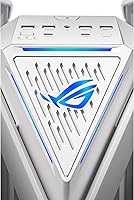
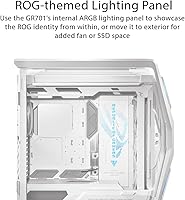
The ROG-themed front plate with embedded ARGB lighting looks striking in person, particularly in a dark room, and the internal hub with eight ARGB headers means most builders can connect their entire lighting setup without a separate controller. ROG Armoury Crate users generally report solid synchronization across compatible peripherals.
Non-ROG builders find the ARGB integration less compelling since full lighting control depends on ASUS software. A few reviewers also noted occasional sync inconsistencies after system updates, requiring Armoury Crate reinstallation to restore proper lighting behavior — a known frustration in the broader ASUS ecosystem.
Fan & Thermal Hub Usability
86%
Having six PWM fan headers and eight ARGB headers centralized on an internal hub is a cable management gift for anyone building a fan-heavy configuration. Buyers running six or more fans consistently highlight how much cleaner their builds look compared to routing every fan header directly to the motherboard.
The hub's placement inside the case can be tricky to access after components are installed. A small number of builders wished the hub were repositioned for easier reach during post-build adjustments, especially when swapping fans or reconfiguring ARGB zones mid-ownership.
Size & Footprint Practicality
61%
39%
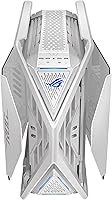
For builders with large dedicated workstations or open floor setups, the footprint is simply not an issue — the case performs exactly as advertised and the dimensions feel proportional to its internal capacity. The top bars doubling as carry handles are a considered detail for moving the chassis short distances.
At 24.5 x 14 x 24.5 inches, this is a genuinely desk-dominating chassis that surprises buyers who underestimate the physical presence in person. Those using standard-width desks or gaming setups in tighter rooms frequently report that the case occupies more usable space than anticipated.
Weight & Portability
47%
53%
The weight is entirely a byproduct of the premium aluminum construction, and buyers who never move their rigs simply do not care. For a permanently stationed workstation build, the solidity the weight provides is a net positive — the case does not shift or vibrate on a hard surface.
At 55.6 pounds empty, transporting this case — to a LAN event, a new apartment, or even across a room — is a two-person job. Multiple reviewers flagged this as a genuine deterrent, and those who did not account for the weight before purchasing expressed clear regret in their feedback.
Value for Money
72%
28%
Buyers pairing this case with high-end EATX platforms, custom water-cooling loops, and flagship GPUs consistently feel the pricing is defensible. The feature set — particularly the dual 420mm radiator support and premium materials — is genuinely difficult to match in competing full-tower options at similar or lower price points.
Builders running mid-range or budget components inside frequently feel the case outclasses everything installed in it, creating an uncomfortable value mismatch. Several reviewers explicitly stated they would not recommend this chassis unless the internal component budget is proportionally substantial.
Cable Management
81%
19%
The combination of the integrated fan and ARGB hub, multiple cable routing cutouts, and the sheer internal volume gives builders real flexibility in keeping cables organized and out of sight. Experienced builders consistently achieve clean results that would be much harder to replicate in smaller or more constrained enclosures.
The internal volume can actually work against less experienced builders who feel overwhelmed by the number of routing options available. Without a clear plan going in, the space behind the motherboard tray can become cluttered quickly, partially undoing the organizational advantages the case offers.
Motherboard & Component Compatibility
92%
Full EATX support combined with the generous internal dimensions means compatibility concerns are almost nonexistent for standard consumer hardware. Builders with large EATX motherboards, extended GPU lengths, and tall CPU coolers all report fitting their components without clearance issues.
The case is clearly optimized for large EATX and ATX builds, which means smaller ITX or mATX builds will look and feel undersized inside. There is no meaningful benefit to using this chassis with compact form factor motherboards, and a few buyers discovered this mismatch only after purchase.
Aesthetics & External Design
87%
The white colorway and semi-open structure make this case visually distinctive in a way that most full-tower competitors simply are not. Buyers regularly mention getting compliments on the setup from visitors, and the architectural profile photographs exceptionally well for those who share their builds online.
The semi-open design and bold ROG aesthetic is polarizing — buyers who prefer understated or minimalist builds will find the visual language too aggressive for their taste. The white finish also shows fingerprints and dust more readily than darker alternatives, requiring more frequent exterior cleaning to maintain its appearance.

Suitable for:

The ASUS ROG Hyperion GR701 Full-Tower Case is built for a specific kind of builder, and for that person, it is hard to beat. If your next build centers on a custom water-cooling loop, a 360mm or 420mm AIO, or high-TDP components that push sustained thermal loads — think overclocked flagship CPUs paired with top-tier GPUs — this case was designed with you in mind. It also makes sense for ROG ecosystem users who want unified ARGB control across their entire setup without cobbling together third-party solutions. Creators and gamers who treat their rig as a long-term investment, rather than something they will replace in two years, will find the durable aluminum frame and exceptional internal capacity hold up well across multiple component generations. If you have the desk space and the budget to pair it with appropriately high-end internals, the ROG Hyperion GR701 rewards that commitment.
Not suitable for:

The ASUS ROG Hyperion GR701 Full-Tower Case is genuinely the wrong choice for a meaningful portion of the PC-building audience, and being clear about that matters. At 55.6 pounds empty and measuring nearly 24.5 inches in multiple directions, this chassis will physically overwhelm a standard desk and requires serious, permanent real estate to live comfortably. Anyone who moves their system regularly — to LAN events, between apartments, or even across rooms — will find the weight alone a recurring problem. Budget-conscious builders or those pairing this case with mid-range components will likely feel the mismatch immediately; the case outclasses modest hardware both physically and financially, making the investment hard to justify. Builders who prefer a minimalist or understated aesthetic will also find the bold ROG styling and semi-open structure too visually aggressive for their taste. And if you are running a compact mATX or ITX motherboard, the internal volume becomes wasted space with no practical upside.
Specifications

  • Form Factor: Full Tower design with Extended ATX (EATX) motherboard support, accommodating the largest consumer and prosumer platforms available.
  • Dimensions: The chassis measures 24.5 x 14 x 24.5 inches (L x W x H), making it one of the larger consumer full-tower enclosures on the market.
  • Weight: The empty case weighs 55.6 pounds, a direct result of its diecast aluminum-alloy frame construction.
  • Frame Material: The primary structure is built from diecast aluminum alloy, providing exceptional rigidity without the flex common in steel-dominant chassis designs.
  • Radiator Support: Supports up to two 420mm radiators simultaneously, enabling single large AIO installations or full dual-loop custom water-cooling configurations.
  • Side Panels: Both side panels are hinged and tool-free, allowing quick access to the interior without a screwdriver for routine maintenance or component changes.
  • GPU Holder: An integrated graphics card holder is included, supporting both vertical and horizontal GPU orientations to accommodate heavy flagship graphics cards securely.
  • Front Panel USB: The front I/O includes two USB-C ports with 60W fast charging support and two USB 3.0 Type-A ports for peripheral connectivity.
  • Fan Headers: An internal hub provides six PWM fan headers, allowing centralized fan speed control without consuming motherboard headers.
  • ARGB Headers: The same internal hub includes eight ARGB headers, supporting extensive addressable RGB lighting configurations from a single control point.
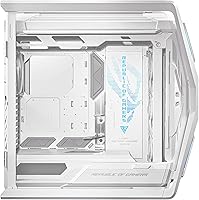
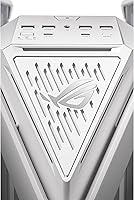
  • Front Lighting: The front plate features a ROG-themed design with embedded ARGB lighting, controllable via ASUS Armoury Crate software on compatible systems.
  • PSU Mount: The power supply unit mounts at the bottom of the chassis, keeping weight distribution low and isolating PSU heat from the main component area.
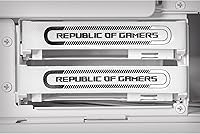
  • Storage Drawer: A built-in storage drawer is integrated into the chassis to hold small components, screws, and tools during and after the build process.
  • Cooling Method: The case is designed as a radiator-ready air-cooled enclosure, with the semi-open structure supporting natural convection alongside active fan and liquid cooling setups.
  • Motherboard Support: Compatible with Extended ATX, ATX, and smaller motherboard form factors, though the chassis volume is clearly optimized for larger EATX boards.
  • Carry Handles: The top bars of the chassis double as structural carry handles rated to support up to 80kg, intended for short-distance transport of the assembled system.
  • Color Option: This listing covers the White Edition variant, which features a white exterior finish across the aluminum frame and panels.
  • Amazon Ranking: The case holds a position of #144 in the Computer Cases category on Amazon, with a 4.6-star average across over 200 verified ratings.

Related Reviews

ASUS ROG Strix Helios GX601 Mid-Tower Case
81%
93%
Build Quality & Materials
91%
Tempered Glass Panels
88%
Cooling Capability
89%
Cable Management
84%
GPU Mounting Flexibility
More
Thermaltake View 600 TG Full Tower Case
87%
92%
Cooling Performance
89%
Build Quality
85%
Ease of Installation
93%
Aesthetics
88%
Cable Management
More
Corsair 7000D Airflow Full-Tower PC Case
80%
93%
Build Quality
91%
Airflow Performance
94%
Interior Space & Layout
89%
Cable Management
96%
Cooling Potential
More
Cooler Master Cosmos C700M Full-Tower Case
81%
93%
Build Quality
88%
Cooling Performance
91%
Design & Aesthetics
89%
Interior Layout & Flexibility
71%
Value for Money
More
Antec C8 White Full-Tower PC Case
85%
89%
Cooling Performance
91%
Build Quality
88%
Ease of Assembly
93%
Design and Aesthetics
87%
Value for Money
More
Antec Performance 1 FT Full Tower Gaming Case
84%
91%
Cooling Performance
88%
Build Quality
85%
Ease of Assembly
93%
Design & Aesthetics
87%
Cable Management
More
Antec Flux Pro White Full-Tower E-ATX Case
83%
91%
Build Quality
89%
Airflow Performance
93%
Cooling Headroom & Radiator Support
88%
Fan Inclusion & Value
92%
Design & Aesthetics
More
darkFlash DY470 Full-Tower ATX PC Case
80%
93%
Cable Management
78%
Build Quality & Materials
84%
Cooling Potential
91%
Aesthetics & Visual Design
89%
GPU Compatibility & Mounting
More
Thermaltake CTE T500 Full Tower PC Case
81%
93%
Airflow & Thermal Performance
89%
Build Quality
91%
Aesthetics & Design
74%
Cable Management
92%
Cooling Compatibility
More
Antec C8 ARGB Full-Tower PC Case
80%
83%
Build Quality
88%
Thermal Performance
93%
Cooling Flexibility
91%
Aesthetics & Visual Design
74%
Cable Management
More

FAQ

Honestly, it depends on your desk. At 24.5 inches long and 14 inches wide, this full-tower chassis is substantially larger than most mid-tower cases people are used to. If your desk is under 55 inches wide, you may find it consumes an uncomfortable amount of surface area. Measure your available space carefully before ordering — this is not a case you want to return because of a size surprise.

Yes, and it is one of the few cases at any price point that genuinely supports it. The ROG Hyperion GR701 accommodates two 420mm radiators simultaneously, which gives you the physical space for a proper dual-loop setup covering both CPU and GPU. You will still need to plan your reservoir and pump placement carefully, but the case does not artificially limit your options the way most competitors do.

In most configurations, yes. While the built-in GPU holder supports vertical orientation, you will typically need a PCIe riser cable to connect a vertically mounted GPU to your motherboard. This is a common requirement for vertical GPU setups regardless of case brand. The riser cable is not always included, so factor that into your build budget if vertical mounting is important to you.

Partially. The embedded ARGB front plate and internal hub headers will function and produce lighting without Armoury Crate installed, but full per-zone customization and sync with other ROG peripherals requires the software. If you are running a non-ASUS motherboard or prefer not to install Armoury Crate, you will have limited control over the lighting behavior. It is worth considering if ARGB customization is a priority for your build.

The short answer is that the size works in your favor if you plan ahead. The internal hub consolidates fan and ARGB cables significantly, and there are plenty of routing cutouts throughout. Where builders run into trouble is going in without a plan — the sheer volume of space can lead to loose, sprawling cable runs if you are not intentional from the start. Experienced builders consistently report clean results; first-time builders should take their time.

For a permanently stationed desktop that never moves, the weight is essentially irrelevant. But if you ever need to move it — to a LAN event, a new home, or even just across the room — you will feel every pound. It is genuinely a two-person lift once components are installed. If mobility matters even occasionally, this case will frustrate you more than once.

It supports standard ATX and smaller form factors, not just EATX. That said, fitting a standard ATX board inside this chassis will leave a lot of unused internal space, and the case will look disproportionate visually. The design is clearly optimized for EATX — you get the most out of it when the motherboard actually fills the interior.

More than a black case would, yes. The white exterior is striking, but it does require more regular wiping down to keep it looking sharp. Fingerprints from handling during builds are visible, and dust settling on the exterior shows up more readily against the light surface. A microfiber cloth nearby during builds is a good habit with this color option.

Most buyers report the hinged panels holding up well over extended ownership. A smaller portion of users noted the latch mechanism feels slightly looser after repeated opening and closing, but this appears to be the minority experience rather than a widespread defect. The hinge design is a genuine quality-of-life improvement over screwed panels — the tradeoff in panel rigidity is minor for most builders.

The front USB-C ports support 60W charging, which is genuinely useful for daily device charging. However, for high-speed external SSD transfers, the port speed may not satisfy users expecting Thunderbolt or USB4 bandwidth. If rapid file transfers to external drives via the front panel are part of your regular workflow, this is worth checking against your specific external storage device requirements before committing.

Where to Buy