Overview

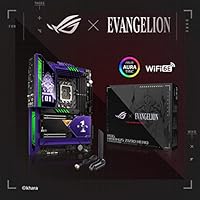
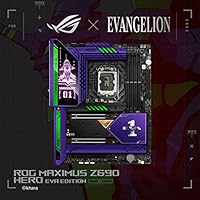
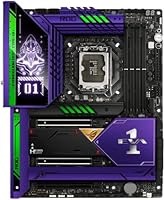
The ASUS ROG MAXIMUS Z690 HERO EVA Motherboard occupies a genuinely unusual space in the enthusiast market — it's a fully-loaded Z690 flagship that also happens to be a licensed Evangelion collectible. The EVA-01 artwork runs across the PCB, heatsinks, nameplate, and even the packaging, and it doesn't feel slapped on. This is an ATX board built around Intel's 12th Gen LGA1700 platform with DDR5 memory support, so the technical credentials are real. You're paying a notable premium over the standard HERO variant, though, so going in clear-eyed matters. If you're not drawn to the theming, there are cheaper ways to get the same chipset.

Features & Benefits

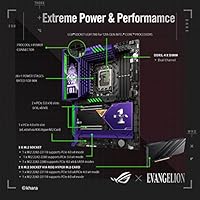
The power delivery on this co-branded Z690 board is serious hardware: a 20+1 teamed VRM setup rated at 90A per stage gives you genuine headroom for pushing a Core i9-12900K well beyond its stock limits. The ProCool II connectors help keep things stable under sustained load. Five M.2 slots — including Gen 5 support through the bundled ROG Hyper M.2 card — mean you won't be hunting for adapters as fast storage options evolve. Dual Thunderbolt 4 ports and a USB 3.2 Gen 2x2 front-panel connector round out a connectivity suite that content creators will appreciate. Wi-Fi 6E and Intel 2.5Gb Ethernet handle networking, and ASUS's AI tuning tools make initial overclocking less intimidating if you're new to it.

Best For

The ROG MAXIMUS Z690 HERO EVA is built for a pretty specific buyer. If you're a longtime Evangelion fan who also builds high-end PCs, this board was essentially made for you — the EVA-01 theming is executed at a level that feels genuinely premium, not like a sticker job. Beyond the aesthetics, it suits Intel 12th Gen users who plan to push DDR5 hard or run sustained all-core workloads that demand beefy VRM headroom. Video editors and photographers working with fast external storage will benefit from the Thunderbolt 4 ports. What it isn't: a sensible pick if the Evangelion angle does nothing for you. In that case, the standard HERO delivers nearly identical performance at a lower price.

User Feedback

With around 109 ratings, the sample here is small enough that patterns should be read as signals rather than verdicts. That said, the directional picture is fairly consistent. Buyers tend to praise the build quality and note that VRM temperatures stay respectable under extended heavy loads — a point that matters if you're planning long overclocking sessions. The EVA-01 visual design reads as premium in person, and owners who are fans of the source material clearly find value in it. On the downside, the price gap versus the standard HERO is a repeated sticking point in critical reviews. A handful of users also encountered DDR5 kit compatibility friction during initial setup, which was a broader platform issue at Z690's launch and worth checking before buying.

Pros

  • Flagship 20+1 VRM rated at 90A per stage handles sustained overclocking workloads without flinching.
  • Five M.2 slots, including Gen 5 support via the bundled ROG Hyper M.2 card, offer outstanding storage scalability.
  • Dual Thunderbolt 4 ports make this co-branded Z690 board a legitimate option for professional content creators.
  • Wi-Fi 6E and Intel 2.5Gb Ethernet provide fast, reliable wired and wireless networking without add-in cards.
  • EVA-01 artwork on the PCB, heatsinks, and nameplate is premium quality — not a surface-level licensing job.
  • Bundled one-year AIDA64 Extreme license and UEFI-integrated MemTest86 add real diagnostic value out of the box.
  • PCIe 5.0 primary slot and DDR5 platform provide a solid foundation as next-generation hardware becomes available.
  • USB 3.2 Gen 2x2 front-panel connector with Quick Charge 4+ support is a thoughtful touch for daily usability.
  • ASUS AI Overclocking and AI Cooling tools reduce manual tuning friction for builders new to high-end platforms.
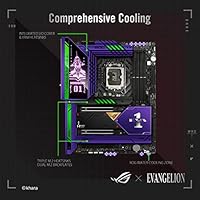
  • Triple M.2 heatsinks and a dedicated VRM cooling solution keep temperatures controlled during demanding all-core loads.

Cons

  • The price premium over the standard HERO variant is steep and difficult to justify on pure performance grounds.
  • DDR5 kit compatibility was inconsistent at Z690 launch, and less common modules can still trigger setup problems.
  • Roughly 109 ratings is a small sample for a board at this price — long-term reliability data remains limited.
  • Buyers indifferent to Evangelion pay a licensing premium they receive zero practical benefit from.
  • BIOS initial configuration carries a noticeable learning curve, especially for first-time ROG platform owners.
  • The ROG Hyper M.2 card required for Gen 5 storage consumes a PCIe slot, slightly reducing overall expansion options.
  • AI overclocking tools can produce conservative automatic results; squeezing peak performance still demands manual tuning.
  • ATX form factor means no compatibility with small-form-factor or mini-ITX cases — build flexibility is limited by design.

Ratings

The ASUS ROG MAXIMUS Z690 HERO EVA Motherboard sits at a fascinating intersection of serious enthusiast hardware and licensed anime collectible, and buyer sentiment reflects exactly that duality — strong scores where the engineering shines, and real friction where the price premium meets practical expectations. These scores were generated by AI after analyzing verified buyer reviews from global sources, with spam, bot activity, and incentivized feedback actively filtered out before scoring. Both the aspects enthusiasts consistently praise and the pain points that give cautious buyers pause are transparently reflected in the results below.

Build Quality
93%
Builders consistently note that the PCB feels dense and premium in hand — a rare quality in a market where even expensive boards can feel hollow. The heatsink covers, reinforced M.2 slots, and ProCool II connectors all show tangible attention to material quality that justifies the flagship positioning.
At this price point, build quality is expected to be exceptional, and while it largely meets that bar, a few users noted that the Evangelion-branded cosmetic covers — particularly the nameplate — felt slightly less robust than the core hardware around them. For a board where presentation is central to the appeal, that matters.
VRM Performance
91%
The 20+1 teamed power stages at 90A each give builders genuine room to push a Core i9-12900K hard without the board becoming the bottleneck. Users running sustained all-core stress tests reported that VRM temperatures stayed comfortably controlled even in mid-tower cases with modest airflow, which is a meaningful real-world win.
The AI Overclocking tools tend to leave some performance on the table compared to what a skilled enthusiast can achieve through manual tuning, meaning dedicated overclockers will still need to invest real time in the BIOS. Pushing DDR5 overclocks simultaneously with a heavy CPU overclock can also introduce instability that requires iterative voltage management.
Value for Money
52%
48%
The hardware specification is genuinely comprehensive — five M.2 slots, dual Thunderbolt 4, Wi-Fi 6E, and a bundled ROG Hyper M.2 card mean serious connectivity without needing expansion cards. For buyers specifically drawn to the Evangelion collaboration, the premium feels more defensible as both a hardware and collector purchase.
The Evangelion licensing adds a cost that delivers no performance benefit, and users who compared this board directly to the standard HERO variant found the price gap difficult to justify on hardware grounds alone. For builders indifferent to the theming, capable Z690 alternatives are available at a significantly lower price without sacrificing real-world performance.
DDR5 Compatibility
61%
39%
When paired with a DDR5 kit from ASUS's QVL — particularly from established brands like G.Skill or Corsair — the board boots cleanly and XMP profiles load without incident. Buyers who cross-checked compatibility before purchasing generally reported a smooth first-boot experience with no memory-related troubleshooting required.
DDR5 compatibility friction was a documented issue across the Z690 platform at launch, and this board was not immune — buyers using less common modules reported boot loops, failed XMP profiles, and instability that required BIOS updates and manual memory configuration to resolve. Cross-referencing your specific DDR5 kit against the QVL before buying is not optional; it is essential.
Overclocking Capability
89%
The combination of a robust 20+1 VRM, deep BIOS manual controls, and ASUS AI Overclocking makes this a well-rounded overclocking platform for Intel 12th Gen. Experienced overclockers praised the granularity of the manual voltage and frequency controls, while newcomers found the AI-assisted profiles delivered a meaningful uplift with minimal effort.
The AI Overclocking profiles, while useful as a baseline, consistently produce conservative results compared to careful manual configuration — a gap that competitive overclockers will feel. Some users also noted that aggressive DDR5 subtiming adjustments occasionally triggered instability that demanded methodical BIOS rollback and retuning sessions before achieving a stable profile.
Connectivity Options
88%
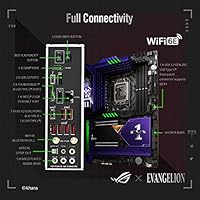
Dual Thunderbolt 4 ports stand out for creators who move large video files to external NVMe drives or run high-resolution displays over a single cable. The USB 3.2 Gen 2x2 front-panel header with Quick Charge 4+ means fast charging and high-speed data transfer are available at the front of the case without adapters.
The rear USB-A port count may feel lean for power users running multiple legacy peripherals simultaneously, and some users wished for an additional full-speed USB-A port alongside the Thunderbolt Type-C options. In a dense workstation setup with keyboards, audio interfaces, and storage hubs, a USB switch or hub quickly becomes a practical necessity.
Thermal Management
87%
Triple M.2 heatsinks and a well-designed VRM heatsink keep component temperatures in check during demanding workloads, and builders running custom water loops appreciated the onboard flow and temperature sensor headers for real-time loop monitoring without third-party tools. Sustained NVMe workloads across multiple drives rarely produced throttling under normal case airflow conditions.
The M.2 heatsink closest to the primary PCIe slot can make drive installation or swapping awkward in a fully built system, particularly once a graphics card is seated. Builders using smaller mid-tower cases with limited airflow reported higher M.2 temperatures than expected, suggesting at least one case fan directed toward the board helps meaningfully.
BIOS & Software
74%
26%
The ASUS ROG UEFI ranks among the more polished interfaces in the enthusiast board space, offering a quick-access dashboard for everyday adjustments and a deep advanced mode for precise voltage, subtiming, and fan curve control. The integrated MemTest86 removes the need to boot into a separate validation utility, which experienced builders genuinely appreciate.
Early firmware versions had documented issues with DDR5 XMP profiles failing to load consistently on the first boot — a frustrating experience for buyers expecting a smooth out-of-box setup at this price. Updating to the latest BIOS before first use is strongly advisable and resolves most issues, but it should not be a prerequisite.
Storage Flexibility
86%
Five M.2 slots, including Gen 5 support via the bundled ROG Hyper M.2 card, give this co-branded Z690 board one of the more capable internal storage configurations of its platform generation. Builders managing high-speed boot drives alongside large secondary NVMe arrays have the slot count to run both without reaching for additional PCIe expansion cards.
Using the ROG Hyper M.2 card for Gen 5 storage consumes the secondary PCIe slot, which limits expansion options in builds that also need a capture card or additional GPU. Some SATA ports are also disabled when specific M.2 slots are populated, requiring careful storage layout planning before finalizing the hardware list.
Aesthetics & Theme
92%
Evangelion fans consistently describe the EVA-01 co-branding as one of the most thoughtfully executed themed hardware designs they have encountered — the artwork integrates into the PCB layers and heatsink covers rather than sitting as a surface print. In a windowed build it reads as a genuine collector-grade centerpiece, not a licensed novelty.
For builders without a personal connection to Evangelion, the distinctive purple-and-green color palette can clash with builds going for a red, white, or all-black aesthetic. A small number of buyers also noted that while the PCB artwork is excellent, some Evangelion-branded accessories included in the packaging felt underwhelming relative to the board's overall quality.
Networking Performance
83%
The combination of Wi-Fi 6E and Intel 2.5Gb Ethernet covers high-speed networking for both wired and wireless setups without needing add-in cards. Users in apartment buildings with Wi-Fi 6E routers reported noticeably cleaner connections and reduced interference compared to their previous 5 GHz setups — a real improvement for online gaming and video calls.
The 2.5Gb Ethernet ceiling is a limitation for builders running 10GbE network-attached storage or professional media environments where large file transfers routinely saturate gigabit connections. Wi-Fi 6E performance also depends entirely on router support for the 6 GHz band — users on older Wi-Fi 5 or 6 infrastructure will see no meaningful improvement.
Setup Experience
67%
33%
For builders familiar with ASUS ROG platforms, the initial setup process is reasonably smooth — the UEFI dashboard is intuitive, AI Overclocking provides a workable starting point, and the pre-attached I/O shield removes a common installation frustration. The dual-mode BIOS layout means less experienced users are not immediately thrown into advanced settings menus.
First-time ROG board owners and users new to DDR5 reported a steeper-than-expected setup curve, particularly around getting XMP profiles to load reliably on early BIOS versions. Sourcing a verified DDR5 kit and flashing the latest BIOS before first boot are effectively prerequisites — steps that should not be required on a board at this price.
Future-Proofing
84%
PCIe 5.0 on the primary x16 slot and Gen 5 M.2 support via the included expansion card keep this Evangelion-edition motherboard ahead of where mainstream GPU and storage markets currently sit. DDR5 as the platform memory standard also means compatibility with faster kits will continue improving as the ecosystem matures and module prices normalize.
The Z690 chipset is Intel 12th Gen-native, and while the LGA1700 socket is physically compatible with 13th Gen, ASUS did not guarantee full Z690 support for Raptor Lake processors. Builders who anticipate a CPU upgrade beyond 12th Gen will find their path more constrained compared to what a Z790 platform board would offer.

Suitable for:

The ASUS ROG MAXIMUS Z690 HERO EVA Motherboard is purpose-built for a very specific crossover buyer: someone who wants a genuine flagship-grade Intel 12th Gen platform and also cares deeply about the Evangelion franchise. If you're planning an aggressive DDR5 overclocking build around a Core i9-12900K or similar high-core-count processor, the 20+1 VRM design gives you the headroom to push hard without babying the board under sustained load. Content creators who move large files regularly — editors pulling footage from fast NVMe arrays, photographers tethering to high-resolution external displays — will find the dual Thunderbolt 4 ports earn their keep quickly. Builders investing in a windowed or open-frame showcase case will also get genuine visual payoff here, since the EVA-01 artwork across the PCB, heatsinks, and nameplate is detailed and clearly designed with display builds in mind. Rounding it out, the five M.2 slots and onboard Wi-Fi 6E mean fewer expansion cards cluttering your build from day one.

Not suitable for:

The ASUS ROG MAXIMUS Z690 HERO EVA Motherboard is a poor fit for anyone who has no connection to the Evangelion franchise, because the co-branding is baked directly into the pricing and cannot be separated out. If you just need a rock-solid Z690 board for gaming or productivity, the standard ROG MAXIMUS Z690 HERO delivers nearly identical real-world performance at a noticeably lower cost — the Evangelion premium buys aesthetics, not extra frames or faster renders. Budget-conscious builders should look elsewhere entirely; there are competent Z690 options that handle everyday enthusiast needs without the flagship price tag. Buyers sourcing DDR5 memory should also tread carefully — compatibility friction was a real issue during the Z690 platform's launch window, and less mainstream DDR5 kits can still cause headaches during initial setup. Finally, anyone planning a compact or small-form-factor build will hit a hard wall immediately, since the ATX form factor locks you into mid-tower or full-tower cases with no exceptions.

Specifications

  • CPU Socket: LGA1700 socket supports Intel 12th Gen Core, Pentium Gold, and Celeron processors.
  • Chipset: Intel Z690 chipset enables full CPU overclocking support with unlocked multiplier control for compatible processors.
  • Form Factor: Standard ATX layout measures 12 x 9.6 inches, fitting mid-tower and full-tower cases.
  • Memory Support: Four DDR5 DIMM slots support speeds up to 4400 MHz, with XMP profile headroom beyond that for compatible kits.
  • PCIe Slots: The primary x16 slot operates at PCIe 5.0, with additional PCIe 4.0 and 3.0 slots available for expansion cards.
  • M.2 Slots: Five M.2 slots are provided: two onboard Gen 4 slots plus Gen 5 support via the bundled ROG Hyper M.2 expansion card.
  • Thunderbolt Ports: Two rear-panel Thunderbolt 4 USB Type-C ports each deliver up to 40 Gbps bandwidth for fast storage and display connectivity.
  • Front Panel USB: A USB 3.2 Gen 2x2 front-panel header supports 20 Gbps transfers and includes Quick Charge 4+ for fast device charging.
  • Wireless Network: Onboard Wi-Fi 6E (802.11ax) supports the 6 GHz band for lower congestion and higher throughput in dense wireless environments.
  • Wired Network: Intel 2.5Gb Ethernet with ASUS LANGuard surge protection provides a high-speed, shielded wired network connection.
  • VRM Design: A 20+1 teamed power stage configuration is rated at 90A per stage, delivering substantial headroom for sustained CPU overclocking.
  • Power Connectors: ProCool II reinforced 8+8-pin CPU power connectors are designed to maintain stable delivery under prolonged heavy loads.
  • Thermal Solution: Triple M.2 heatsinks, a VRM heatsink with integrated aluminum I/O cover, and a ROG Water-Cooling Zone support both air and custom liquid cooling configurations.
  • Bundled Software: A one-year AIDA64 Extreme subscription and UEFI-integrated MemTest86 are included for benchmarking and memory stability validation.
  • AI Tuning Tools: ASUS AI Overclocking, AI Cooling, AI Networking, and Two-Way AI Noise-Cancelation are built into the platform software suite for automated system optimization.
  • SATA Ports: Six SATA 6Gb/s ports support traditional hard drives and SATA SSDs, though some ports may share bandwidth depending on active M.2 slots.
  • Board Theme: EVA-01 Evangelion co-branded artwork is applied to the PCB layers, heatsink covers, rear I/O nameplate, and retail packaging as part of an official licensing collaboration.

Related Reviews
ASUS ROG Maximus Z890 Hero ATX Motherboard
83%
93%
Build Quality
96%
VRM & Power Delivery
88%
BIOS Experience
79%
AI Overclocking
91%
Storage Versatility
More
ASUS ROG Maximus Z690 Formula ATX Motherboard
79%
93%
Build Quality
91%
VRM Performance
89%
Cooling Integration
88%
Overclocking Capability
67%
BIOS Experience
More
ASUS ROG Maximus Z790 Hero
87%
94%
Overclocking Performance
89%
Cooling Effectiveness
91%
Build Quality
86%
Networking Capabilities
93%
Power Delivery & Stability
More
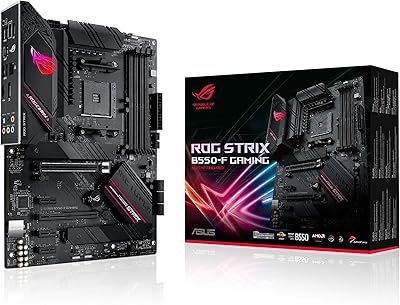
ASUS ROG Strix Z690-E Gaming WiFi Motherboard
84%
93%
Build Quality
88%
BIOS Experience
94%
Power Delivery
71%
DDR5 Compatibility
89%
Wireless Networking
More
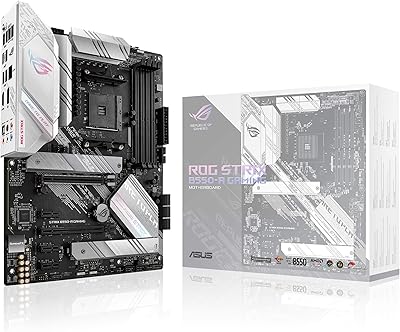
ASUS ROG Strix B550-F AMD AM4 Motherboard
81%
91%
VRM & Power Delivery
88%
Build Quality
89%
BIOS Usability
84%
Ryzen Compatibility
86%
PCIe 4.0 & M.2 Performance
More
ASUS ROG Strix Z390-E Gaming Motherboard
81%
93%
Build Quality
91%
BIOS Maturity
87%
Overclocking Performance
88%
Connectivity & I/O
82%
Wi-Fi Reliability
More
ASUS ROG Strix B850-I Mini-ITX Motherboard
82%
91%
Build Quality
88%
BIOS Usability
93%
Power Delivery
74%
Thermal Management
89%
Connectivity & I/O
More
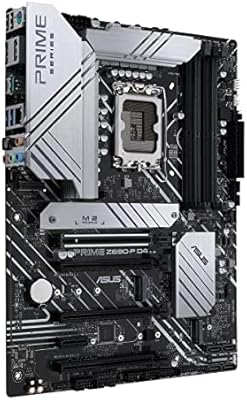
ASUS ROG Strix B550-A Gaming ATX Motherboard
82%
91%
Build Quality
93%
Power Delivery & Stability
88%
BIOS Experience
89%
PCIe 4.0 & NVMe Performance
86%
Onboard Audio Quality
More
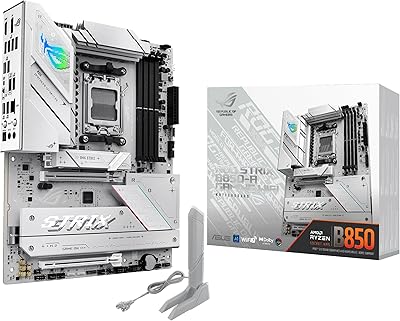
ASUS Prime Z690-P D4 ATX Motherboard
76%
78%
Value for Money
83%
Power Delivery & VRM
81%
BIOS Experience
74%
Memory Compatibility
87%
Storage Expansion
More
ASUS ROG Strix B850-A ATX Motherboard

83%
93%
Power Delivery
88%
BIOS Experience
86%
Storage Throughput
91%
Wireless Connectivity
89%
Build & Aesthetics
More

FAQ

Officially, the Z690 chipset is certified for Intel 12th Gen (Alder Lake) CPUs. While 13th Gen (Raptor Lake) chips share the LGA1700 socket physically, ASUS did not broadly guarantee Z690 support for those processors, and BIOS compatibility updates were never universal. If your build is centered on a 13th Gen CPU, a Z790 platform board is the safer and more reliable choice.

This board is DDR5-only — DDR4 is not compatible. The Z690 platform launched in both DDR4 and DDR5 variants, and ASUS positioned this board squarely on the DDR5 side. Make sure any memory kit you purchase is explicitly DDR5 and, ideally, listed on ASUS's qualified vendor list for this board to avoid compatibility friction.

Honestly, it is more restrained than you might expect. The EVA-01 color palette runs mostly black and purple-green, which can work well in a dark or RGB build even without the franchise context. The artwork is integrated into the PCB layers and heatsink covers rather than being a surface print, so it reads as premium up close. That said, you are still paying a licensing premium whether the theme resonates with you or not, which is the real sticking point if Evangelion means nothing to you.

DDR5 compatibility on early Z690 boards was a genuine issue at platform launch, and this board was not immune to that. Kits from established brands like G.Skill, Corsair, or Kingston that are explicitly listed on ASUS's QVL tend to work without incident. Less common or off-brand DDR5 modules are where builders historically ran into boot failures or instability. Cross-check your specific kit model against the QVL before committing.

There are six SATA 6Gb/s ports onboard. However, as is common with dense Z690 layouts, certain M.2 slots share bandwidth with specific SATA ports — meaning populating some M.2 slots will disable one or two corresponding SATA connections. Check the manual's bandwidth-sharing table before planning your full storage layout to avoid any surprises.

It is genuinely well-suited for custom loops. There is a dedicated ROG Water-Cooling Zone with onboard flow rate and coolant temperature sensor headers, so you can monitor your loop health directly from the UEFI or ASUS software without third-party adapters. The VRM heatsink design also accounts for reduced airflow in loop-heavy builds. Standard AIO coolers work fine too, though LGA1700 may require an updated mounting bracket from your cooler manufacturer.

The package includes the bundled ROG Hyper M.2 expansion card for Gen 5 storage support, SATA cables, a Wi-Fi antenna, ROG-branded cable labels, and Evangelion-themed packaging materials and extras befitting the collaboration. The AIDA64 Extreme license arrives as a digital redemption code. The I/O shield is pre-attached to the board itself, so you will not need to install it separately.

For current gaming titles, the honest answer is no — even the fastest modern GPUs do not come close to saturating PCIe 4.0 x16 bandwidth. Where PCIe 5.0 becomes relevant is forward compatibility: next-generation discrete GPUs and a growing range of NVMe storage devices are beginning to leverage it. Having it available means this co-branded Z690 board will not become a bottleneck as you upgrade components over the coming years.

Yes — the USB 3.2 Gen 2x2 front-panel header supports Quick Charge 4+, which enables significantly faster charging on compatible devices compared to standard USB power delivery. Most current Android smartphones and select USB-C laptops will benefit from it. It is one of those secondary features that ends up being genuinely appreciated during daily use once your case front panel is wired up.

The ASUS ROG UEFI offers a dual-mode layout — a cleaner dashboard view for quick changes and a full advanced mode for granular manual control. The AI Overclocking feature can generate an automated overclock profile based on your specific chip, which is a reasonable starting point for beginners. That said, early BIOS versions had some reported quirks with DDR5 XMP profile loading; updating to the latest BIOS version before your first boot is strongly recommended and resolves most of those initial setup issues.

Where to Buy