Overview

The ASUS ProArt PA278QV 27-inch QHD Monitor sits in a sweet spot that not many displays manage to hit — genuinely color-accurate performance without the price tag that usually comes with it. Released in 2020, this ProArt display has quietly built a strong reputation, holding a top-200 ranking in computer monitors across thousands of consistent ratings. The 27-inch IPS panel at 2560 x 1440 gives you real working space, and the factory Calman verification separates it from the generic office displays that dominate this price range. An ergonomic stand and a solid port selection round out a package that feels thoughtfully designed for people who actually work in front of a screen all day.

Features & Benefits

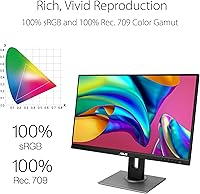
What makes the PA278QV genuinely useful for creative work is the combination of sRGB and Rec. 709 coverage with a factory-measured Delta E below 2. In plain terms, the colors you see on screen are very close to what the color standard actually specifies — which matters a lot when editing photos or grading footage. The Calman verification means you can trust the display out of the box without immediately reaching for a calibration device, though serious print professionals may still want a hardware calibration pass. The IPS panel holds color consistency at wide viewing angles, and ASUS's ProArt Palette software lets you fine-tune parameters without third-party tools. The port situation is also genuinely comprehensive.

Best For

This ASUS creative monitor is a strong fit for graphic designers, photo editors, and video professionals working in Rec. 709 — the color space used for broadcast and most online video delivery. It is also a realistic option for design students who need a calibrated display without stretching their budget to breaking point. If you run a dual-monitor setup, this makes an excellent primary creative display paired with a faster screen for general use or gaming. Home office workers upgrading from a basic 1080p monitor will notice a real difference in both screen real estate and color fidelity. Just be clear-eyed: 60Hz refresh only, so if gaming is part of your daily routine, this is not the right screen.

User Feedback

With over 3,000 ratings and a 4.4-star average, this ProArt display has earned its standing through sustained, consistent feedback rather than a burst of early reviews. Most owners highlight the out-of-box color accuracy as the standout quality, along with the solid stand construction and the generous port selection. The 60Hz refresh rate is the most cited drawback — buyers who expected to double it up for gaming often come away disappointed, and that criticism is fair. Some also note the matte coating softens perceived sharpness slightly versus glossy panels. On the upside, long-term owners consistently report stable panel performance over time, and a number of reviewers say it outperforms monitors sold at considerably higher price points.

Pros

  • Factory Calman calibration delivers reliable color accuracy straight out of the box, no extra tools needed.
  • Full 100% sRGB and Rec. 709 coverage makes the PA278QV a dependable choice for photo and video work.
  • Four USB 3.0 ports mean tablets, drives, and peripherals connect directly without a separate hub.
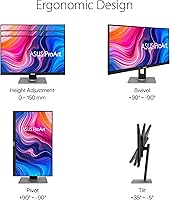
  • The fully adjustable stand handles tilt, pivot, swivel, and height — practical for long daily sessions.
  • Over 3,000 verified ratings averaging 4.4 stars signals consistent real-world satisfaction across diverse users.
  • Long-term owners report stable panel performance with no significant color drift or backlight issues over time.
  • The 27-inch QHD panel offers a meaningful resolution upgrade over 1080p without demanding heavy GPU resources.
  • ProArt Palette software allows fine color adjustments without installing third-party calibration applications.
  • Multiple video inputs including DisplayPort, HDMI, and Mini DP accommodate a wide range of source devices.
  • A number of users report it outperforms monitors sold at considerably higher price points.

Cons

  • 60Hz refresh rate makes this ASUS creative monitor a poor fit for anyone who also games regularly.
  • No USB-C or Thunderbolt port limits compatibility with modern thin-and-light laptops without an adapter.
  • The matte anti-glare coating softens perceived image sharpness compared to glossy IPS panels.
  • OSD navigation relies on physical buttons rather than a joystick, which takes time to learn.
  • Not suited for HDR workflows — brightness headroom and panel spec do not support meaningful HDR delivery.
  • Print-focused professionals may still need a hardware colorimeter for accurate CMYK color matching.
  • The plastic build feels functional but not premium, especially noticeable next to higher-end studio monitors.
  • DVI-D port inclusion feels outdated and takes up space that could have gone to a more modern connection.
  • Some units have shown minor corner glow on dark backgrounds, a known characteristic of IPS panels at this tier.
  • No ambient light sensor or automatic brightness adjustment for users working in changing lighting conditions.

Ratings

The ASUS ProArt PA278QV 27-inch QHD Monitor has been put through its paces by a broad global audience, and the scores below were generated by AI after analyzing thousands of verified buyer reviews, actively filtering out incentivized, duplicate, and bot-driven submissions. The results reflect an honest cross-section of real creative professionals, students, and home office users — strengths and genuine frustrations included. Where this ProArt display earns high marks, it really earns them; where it falls short, those trade-offs are called out plainly.
Color Accuracy
92%
For day-to-day photo editing and video grading in Rec. 709, the color reproduction is consistently praised as reliable straight out of the box. Designers working on client deliverables report that what they see on screen holds up well when viewed on other calibrated devices, which reduces back-and-forth correction time significantly.
A handful of users working in demanding print production environments note that the factory calibration alone is not a substitute for a proper hardware colorimeter pass. Delta E below 2 is excellent for screen work but does not fully bridge the gap for precise CMYK print matching.
Factory Calibration
89%
The Calman verification gives buyers genuine confidence that the panel has been individually checked — not just a batch sample. Most users report they used the PA278QV productively without any manual calibration adjustments, which saves both time and the cost of external calibration tools.
A small number of users received units where calibration felt slightly off on warmer color temperatures, suggesting some variation in the calibration process does exist at scale. It is not a widespread issue, but it is worth checking your unit during the return window.
Panel & Viewing Angles
88%
The IPS panel delivers color that stays consistent whether you are sitting squarely in front or viewing from a wider angle — useful in collaborative settings where a colleague leans over to check your work. Colors do not shift or wash out noticeably, which is a practical advantage over VA panels in the same price bracket.
The matte anti-glare coating, while effective in bright rooms, softens the image slightly compared to glossy IPS panels. A handful of users who came from glossy displays noticed this immediately and found the perceived sharpness reduction mildly frustrating during detailed retouching work.
Refresh Rate & Gaming Suitability
41%
59%
For its intended audience — creative professionals focused on still images and video — 60Hz is entirely adequate. Motion in video playback and general desktop use is smooth and poses no issues for the workflows this monitor was designed around.
This is the PA278QV's most consistently cited limitation. Users who expected to use it as a dual-purpose creative and gaming display were routinely disappointed. At 60Hz there is no adaptive sync support worth leveraging, and the experience in fast-paced titles feels noticeably dated compared to even modest gaming monitors.
Connectivity & Port Selection
91%
Four USB 3.0 ports, DisplayPort, HDMI, DVI-D, Mini DisplayPort, and audio I/O make this one of the more generously connected monitors in its class. Creative professionals who run drawing tablets, external drives, and audio interfaces alongside their main machine appreciate not needing a separate hub on their desk.
The inclusion of DVI-D feels like a legacy obligation at this point rather than a practical addition for most buyers. A USB-C or Thunderbolt port would have made the connectivity story much stronger for users of modern laptops, and its absence is a genuine gap.
Ergonomics & Stand Quality
87%
The stand supports full tilt, pivot, swivel, and height adjustment, and users consistently describe it as sturdy rather than flimsy — a meaningful distinction at this price. Portrait mode rotation is smooth enough to be genuinely practical for developers and writers who prefer a vertical layout.
The stand is not removable without the standard 100x100mm VESA mount pattern, so users who want to go straight to an arm mount need to account for that. A few users also noted that the swivel range could be slightly wider for corner desk configurations.
Build Quality & Durability
84%
The frameless design and matte black finish give the PA278QV a professional appearance that holds up well in studio and office environments. Long-term owners — some using this display for three or more years — report no structural degradation, loose hinge wobble, or finish wear under normal use.
The plastic construction, while consistent with the price tier, does not convey the premium feel of higher-end creative monitors. A few users noticed minor chassis flex when adjusting the stand aggressively, though this did not translate into functional problems.
Image Sharpness & Clarity
79%
21%
At 2560 x 1440 across 27 inches, the pixel density hits a practical sweet spot — text is crisp for long writing sessions, and detailed design work benefits from the extra resolution over 1080p without demanding as much GPU headroom as 4K.
The matte coating is the recurring qualifier here. While it handles reflections well in naturally lit rooms, some users feel it slightly softens fine details in a way that a glossy panel at the same resolution would not. It is a deliberate trade-off, not a defect, but worth knowing upfront.
Backlight Uniformity
81%
19%
For a monitor at this price point, backlight uniformity is notably consistent based on long-term owner reports. Photographers doing large-format editing across the full canvas report no obvious hotspots or corners dimming significantly under normal working conditions.
Some units do show minor glow in the corners when displaying dark backgrounds — a characteristic common to IPS panels broadly. It is rarely severe enough to affect typical creative work, but users doing a lot of dark-room color grading may find it worth testing carefully.
Software & Color Management Tools
74%
26%
ProArt Palette gives users accessible control over color temperature, gamma, and preset modes without needing to install third-party calibration software. For users who want to tweak the display to match a specific color profile or workspace lighting, the toolset is more capable than what most competing monitors offer at this tier.
The software interface feels dated and is not particularly intuitive for first-time users. Some buyers reported confusion navigating between hardware on-screen display controls and the software panel, and the OSD button layout takes time to learn compared to joystick-based controls found on newer monitors.
Brightness & HDR Performance
63%
37%
For standard office lighting and moderately lit creative studios, the brightness level is adequate and consistent. The anti-glare surface helps manage reflections in lieu of the raw brightness headroom that glossy panels rely on.
This is not an HDR monitor in any meaningful sense — the spec sheet does not claim it, and the brightness ceiling confirms it. Users who have since upgraded their workflows to HDR-aware pipelines will find the PA278QV limiting. It is a fair limitation given the price, but creative professionals planning for HDR delivery should factor this in.
Value for Money
88%
The combination of Calman-verified color accuracy, a full-featured ergonomic stand, and comprehensive connectivity at this price tier is difficult to beat. Reviewers who compared it against monitors costing significantly more frequently concluded that the PA278QV delivered 80 to 90 percent of the experience at a fraction of the cost.
The price-to-performance ratio is strong, but it does require accepting that certain modern features — USB-C connectivity, HDR, high refresh rate — are simply not in this package. Buyers who later need those capabilities will face an upgrade rather than being able to grow into the display.
Setup & Out-of-Box Experience
83%
Assembly is straightforward and most users report getting from box to productive work in under 15 minutes. The factory calibration means there is no mandatory calibration ritual before the display is actually useful, which is a genuine convenience compared to uncalibrated alternatives.
The manual is minimal, and the OSD navigation using physical buttons on the bezel is less intuitive than joystick-based controls found on newer monitors. Some users needed a short adjustment period before navigating settings felt natural.
Long-Term Reliability
86%
A five-plus year market presence with sustained high ratings is a meaningful reliability signal. Buyers who have owned this ASUS creative monitor for two or three years consistently report stable performance with no significant panel degradation, color drift, or mechanical failure in the stand.
As with any display at this price point, quality control is not perfect. A small proportion of users reported dead pixels or backlight issues on delivery, though these appear to be within normal statistical ranges and ASUS warranty support is generally described as functional if not exceptional.

Suitable for:

The ASUS ProArt PA278QV 27-inch QHD Monitor is built for creative professionals who need trustworthy color without spending on a high-end studio display. Graphic designers, photo editors, and video producers working in Rec. 709 color space will find the factory-calibrated accuracy genuinely useful from day one — no extra investment in calibration hardware required for most workflows. Design students on a realistic budget get a display that punches well above its price tier, giving them a proper tool rather than a compromise. It also works well as the anchor display in a dual-monitor setup, pairing naturally with a faster gaming or general-use screen alongside it. Home office workers who spend long hours at a desk will appreciate the fully adjustable stand, which makes finding a comfortable position straightforward rather than a daily negotiation. The broad port selection — including four USB 3.0 ports — means most creative setups can connect everything they need directly to the display without a separate hub cluttering the desk.
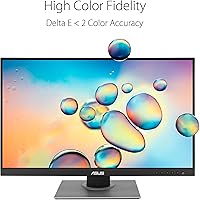
Not suitable for:

The ASUS ProArt PA278QV 27-inch QHD Monitor is a poor fit for anyone who wants one display to handle both serious creative work and gaming. The 60Hz refresh rate is a hard ceiling, and there is no adaptive sync feature that changes the equation — fast-paced games feel noticeably sluggish compared to even a mid-range gaming monitor. Users whose workflows are shifting toward HDR content creation or HDR delivery pipelines will also find this ProArt display limiting; it was not designed for HDR and the brightness headroom confirms it. Professionals doing high-stakes print production work should know that Calman-verified accuracy is excellent for screen-based work but may still require a dedicated hardware calibration pass for precise CMYK color matching. Buyers expecting USB-C or Thunderbolt connectivity — common on modern laptops and tablets — will need to plan around an adapter, as neither port is available. Finally, anyone who prioritizes the crisp, punchy look of a glossy panel will need to make peace with the matte coating, which trades perceived sharpness for glare resistance.

Specifications

  • Screen Size: The display measures 27 inches diagonally, providing substantial working space for multi-window creative workflows without requiring an ultrawide footprint.
  • Resolution: Native resolution is 2560 x 1440 pixels (QHD), delivering noticeably sharper detail than 1080p at this screen size without the GPU demands of 4K.
  • Panel Type: An IPS panel is used, offering wide viewing angles of approximately 178 degrees horizontally and vertically with consistent color reproduction across the screen surface.
  • Color Gamut: The display covers 100% of the sRGB color space and 100% of the Rec. 709 standard, making it well-suited for screen-based photo editing and video color work.
  • Color Accuracy: Factory-measured Delta E is below 2, and each unit is Calman Verified, meaning color deviation from reference standards is kept within a threshold most professional screen workflows consider acceptable.
  • Refresh Rate: The panel operates at a fixed 60Hz refresh rate with no adaptive sync support, which is adequate for creative work but a firm limitation for gaming use cases.
  • Surface Finish: The screen uses a matte anti-glare coating that controls reflections effectively in ambient light environments, though it introduces a slight softening effect compared to glossy panel surfaces.
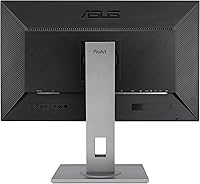
  • Connectivity: Video inputs include one DisplayPort 1.2, one HDMI 1.4, one DVI-D Dual Link, and one Mini DisplayPort, covering a broad range of source devices and configurations.
  • USB Ports: Four USB 3.0 Type-A ports are built into the monitor, allowing peripherals such as tablets, drives, and input devices to connect directly without a separate hub.
  • Audio I/O: The monitor includes a 3.5mm audio input and a 3.5mm earphone output jack, enabling connection of external speakers or headphones without routing cables to the computer.
  • Ergonomics: The stand supports tilt (from -5 to 20 degrees), swivel (60 degrees), pivot (90-degree portrait rotation), and height adjustment (up to 150mm of travel).
  • VESA Compatibility: The stand is removable and the monitor is compatible with standard 100 x 100mm VESA wall or arm mounts for users who prefer a cleaner desk setup.
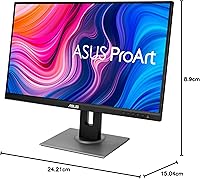
  • Dimensions: With the stand attached, the monitor measures approximately 15.04 inches deep, 24.21 inches wide, and 8.9 inches tall, and weighs 17 pounds fully assembled.
  • Aspect Ratio: The display uses a 16:9 widescreen aspect ratio, which aligns with standard HD and QHD content formats used in video production and digital design.
  • Voltage: The monitor is rated for 110 Volts and is intended for use in North American standard electrical configurations without a voltage converter.
  • Release Date: The PA278QV was first made available in May 2020 and as of the time of this review remains an active, non-discontinued product in the ASUS ProArt lineup.
  • Software: ASUS ProArt Palette software is included and provides access to color temperature adjustments, gamma curves, and preset management directly from the operating system.
  • Warranty: ASUS typically covers the PA278QV with a three-year limited warranty covering panel defects and manufacturing faults, though buyers should confirm current terms at point of purchase.

Related Reviews
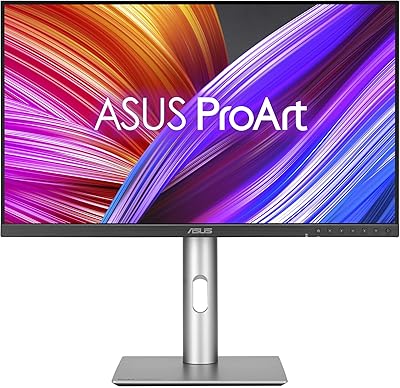
ASUS ProArt Display PA24ACRV 24-inch QHD Monitor
86%
94%
Color Accuracy
89%
Ergonomics & Adjustability
90%
Connectivity (USB-C & Ports)
88%
Build Quality
75%
HDR Performance
More
ASUS ROG Strix XG27ACS 27-inch Gaming Monitor
79%
91%
Image Clarity & Sharpness
89%
Motion Performance & Refresh Rate
86%
Color Accuracy & Vibrancy
47%
HDR Performance
88%
Adaptive Sync & G-Sync Compatibility
More
ASUS VA27EQSB 27-inch Monitor
85%
85%
Overall Performance
90%
Display Quality
88%
Ergonomics & Comfort
83%
Connectivity Options
75%
Gaming Experience
More
KTC H27T13 27-inch QHD IPS Monitor
75%
88%
Image Clarity & Sharpness
83%
Color Accuracy & Vibrancy
91%
Value for Money
79%
Eye Comfort & Anti-Blue Light
74%
Refresh Rate & Smoothness
More
Dell S2725DS 27-inch QHD Monitor

81%
91%
Image Clarity & Resolution
88%
Eye Comfort & Low Fatigue
89%
Ergonomics & Stand Flexibility
79%
Refresh Rate & Motion Smoothness
74%
Contrast & Black Levels
More
memzuoix 27-inch QHD 165Hz Gaming Monitor
70%
88%
Image Clarity
84%
Refresh Rate Performance
91%
Value for Money
82%
Adaptive Sync (FreeSync/G-Sync)
77%
Color Accuracy
More
ASUS VA27DQ 27-inch Full HD Monitor
86%
91%
Display Quality
89%
Value for Money
88%
Color Accuracy
94%
Eye Comfort Features
85%
Connectivity Options
More
ASUS VA279HAE 27-inch Full HD Monitor
87%
91%
Display Quality
94%
Eye Care Technology
85%
Design and Build Quality
89%
Viewing Angles
92%
Value for Money
More
ViewSonic VS2725-2K 27-inch QHD Monitor
80%
91%
Image Sharpness
93%
Value for Money
82%
Refresh Rate & Smoothness
78%
Variable Refresh Rate
86%
Eye Comfort
More
FYHXele 27-inch 300Hz QHD Gaming Monitor
88%
94%
Performance for Gaming
91%
Display Quality
88%
Ergonomics and Adjustability
75%
Setup and Installation
85%
Build Quality and Durability
More

FAQ

For most photo editing workflows, no — the PA278QV ships with factory Calman verification and a measured Delta E below 2, which is considered accurate for screen-based color work. You can typically start editing right out of the box with reliable results. If you are doing high-stakes print production where precise CMYK matching is required, a hardware calibration pass with a colorimeter would still be worth considering.

Technically yes, but you will feel the 60Hz ceiling quickly in any fast-paced game. There is no adaptive sync support, so screen tearing in demanding titles is a real possibility. If gaming is a meaningful part of your daily use, this ProArt display is not the right primary screen for that — it was designed around color accuracy, not motion performance.

Yes, it connects easily via the HDMI or DisplayPort inputs using the appropriate adapter for your MacBook model. Most modern MacBooks with USB-C or Thunderbolt ports work with a USB-C to DisplayPort or USB-C to HDMI cable. Note that there is no native USB-C port on the monitor itself, so an adapter is necessary.

It is noticeable if you are used to a glossy panel, particularly during detailed retouching or work with fine text. The anti-glare coating adds a slight haze that reduces perceived sharpness at close inspection. That said, most users adapt quickly, and the practical benefit of not dealing with reflections in a normally lit room is significant.

ASUS includes a factory calibration report in the box confirming the Delta E measurement for your specific unit. It is a useful reference document if you want to verify what the panel was measured at before it left the factory.

The stand is one of the consistently praised aspects of this monitor. It feels solid and holds its adjusted position without noticeable wobble during normal use. The height, tilt, swivel, and pivot all adjust with appropriate resistance. Long-term owners rarely report the stand loosening over time.

Yes — with DisplayPort, HDMI, DVI-D, and Mini DisplayPort all available, you can have several sources connected simultaneously and switch between them using the on-screen display menu. The OSD uses physical buttons on the bezel rather than a joystick, which takes a little getting used to but works reliably once you are familiar with the layout.

Minor IPS glow in the corners is present on some units, particularly visible against dark backgrounds. It is a characteristic of IPS panel technology broadly rather than a specific defect of this model. In practice, it rarely interferes with daytime creative work — it is most noticeable during full-dark scenes in video playback or when working with dark-themed interfaces in a dim room.

The USB hub functionality requires a separate USB upstream cable connection from the monitor to your computer, regardless of which video cable you use. Most setups have this covered with the included USB cable, but if you are connecting via HDMI and want the USB ports to work, make sure the upstream USB connection is in place.

The PA278QV sits in a range where you get the core color accuracy features — IPS, sRGB coverage, factory calibration — without paying for extras like wide-gamut DCI-P3 coverage, higher refresh rates, or HDR support. If your work is primarily web, digital design, or Rec. 709 video, the more expensive options provide diminishing returns for most users. Where pricier monitors pull ahead is in DCI-P3 gamut for cinema work, true hardware calibration support, or USB-C connectivity — things the PA278QV simply does not offer.

Where to Buy