Overview

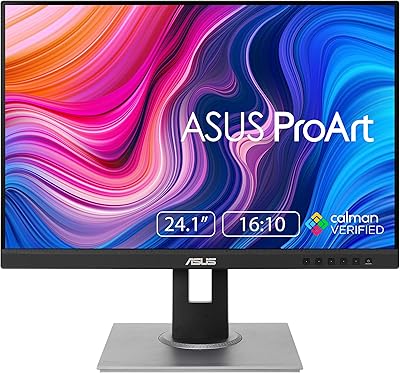
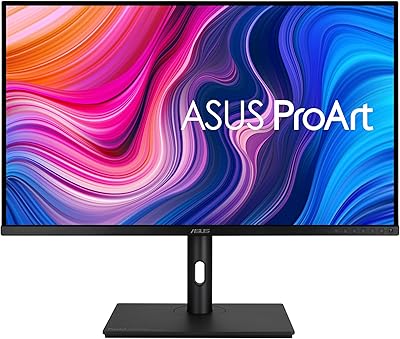
The ASUS ProArt PA24ACRV 24-inch QHD Monitor sits in a practical middle ground — professional enough for color-critical work, priced well below the studio-tier displays that photographers and designers often assume they need. What sets it apart from a typical office panel is its factory calibration, backed by Calman Verified certification, meaning color accuracy is validated before the box is even opened. The 24-inch form factor hits a comfortable desk footprint without sacrificing the pixel density that makes text and fine detail look genuinely sharp at QHD resolution. ASUS has built real credibility with its ProArt line, and USB-C Power Delivery support adds a modern connectivity angle that feels increasingly essential for laptop-based workflows.
Features & Benefits

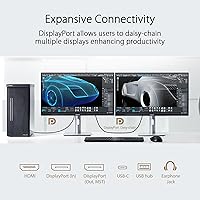
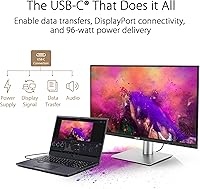
Color accuracy is where the PA24ACRV makes its strongest argument. Covering nearly the full DCI-P3 color space and the entire sRGB gamut, it handles the kind of work where an uncalibrated display will quietly ruin your output — wrong skin tones, shifted gradients, prints that don't match the screen. The Delta E below 2 calibration is factory-verified, not a marketing estimate, which means you can trust what you're seeing right away. Plugging in a laptop via a single USB-C cable that simultaneously transfers video, data, and charges the machine at full speed makes for a genuinely clean desk setup. Daisy-chaining monitors via dual DisplayPort 1.4 is a bonus for multi-screen users. The ambient light sensor quietly adjusts brightness as room conditions change — easy to overlook, hard to go without once you're used to it.

Best For

This 24-inch QHD monitor is a natural fit for photographers and photo retouchers who need a panel they can actually trust without spending on outside calibration services. Graphic designers switching between sRGB assets and DCI-P3 deliverables will appreciate that the display handles both color spaces competently. Laptop users — MacBook owners and similar — will find the single-cable USB-C setup genuinely useful for keeping a tidy desk. It also works well for home office professionals stepping up from a 1080p screen; the jump in sharpness is noticeable and text becomes meaningfully crisper. Content creators checking HDR-aware video exports get basic HDR400 support, though this is entry-level HDR, not the deep blacks of OLED-based panels.

User Feedback

Buyers consistently highlight out-of-box accuracy as the standout experience — many report that colors matched their calibrated references closely right from the first power-on. The stand earns frequent praise for feeling solid and offering genuine flexibility in positioning. On the downside, the 75Hz refresh rate draws complaints from anyone who doubles this display up for gaming; it simply isn't built for that, and the spec sheet doesn't pretend otherwise. A handful of users have noticed mild IPS glow in very dark scenes, which is typical of the panel type rather than a manufacturing flaw. The USB hub ports are appreciated for desk cable management. Compared to Dell UltraSharp or BenQ alternatives at higher prices, most buyers feel the value proposition holds up well.

Pros

  • Factory calibration is verified by a third party, so color accuracy is trustworthy straight out of the box.
  • Covers nearly the full DCI-P3 color space, making it genuinely useful for video and print-focused creative work.
  • Single USB-C cable handles video, peripherals, and full-speed laptop charging — a real desk organizer.
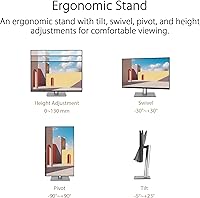
  • The stand is sturdy and offers a wide range of adjustments, including full pivot for portrait orientation.
  • Dual DisplayPort 1.4 outputs allow daisy-chaining a second monitor without an extra dock or splitter.
  • Built-in ambient light sensor adjusts brightness automatically, reducing eye strain during long sessions.
  • The matte screen surface handles reflections well in bright office or studio environments.
  • USB hub ports on the monitor reduce cable clutter and keep peripherals within easy reach.
  • QHD resolution at 24 inches delivers noticeably sharper text than a 1080p panel at the same size.
  • Three-year warranty from ASUS provides meaningful long-term peace of mind for a professional tool.

Cons

  • 75Hz refresh rate is a hard ceiling — not suitable for anyone who also uses their monitor for gaming.
  • Entry-level HDR400 support delivers limited real-world HDR impact compared to premium HDR displays.
  • IPS glow can appear at screen corners in dark scenes, which bothers users doing darkroom-style photo editing.
  • At roughly 12 pounds with the stand, it is not particularly easy to reposition or travel with.
  • HDMI port is version 2.0, which may limit flexibility for users connecting newer high-bandwidth source devices.
  • No built-in speakers, so external audio is required for any multimedia or video review work.
  • Backlight uniformity can vary unit to unit, and some buyers have received panels with brighter edges.
  • The ambient light sensor, while useful, cannot be easily disabled from the front controls on all firmware versions.

Ratings

The scores below reflect an AI-driven analysis of verified global buyer reviews for the ASUS ProArt PA24ACRV 24-inch QHD Monitor, with spam, incentivized, and bot-generated feedback actively filtered out before scoring. Each category is weighted against real-world usage patterns reported by photographers, designers, and home office professionals who purchased and used this display over extended periods. Both the strengths that keep buyers satisfied and the friction points that prompted complaints are transparently factored into every score.

Color Accuracy
93%
Out-of-box color accuracy is the single most praised aspect of this display across buyer communities. Photographers and retouchers consistently report that skin tones, gradients, and neutral tones match their calibrated references closely without any manual adjustments, which is a meaningful time saver in professional workflows.
A small number of buyers received units with slightly inconsistent calibration results compared to the included report, suggesting minor unit-to-unit variation exists. This is uncommon but worth noting for buyers whose work demands absolute precision at the Delta E level.
Color Gamut Coverage
89%
The wide color gamut earns strong marks from users working across both sRGB and DCI-P3 color spaces. Designers producing assets for both web and print, as well as video editors reviewing color grades, find that the display handles both environments competently without requiring separate hardware for different jobs.
At 95% DCI-P3, the display does not reach the full DCI-P3 coverage that higher-tier professional monitors offer, which matters for the most color-critical cinema production workflows. Users coming from displays with higher gamut coverage may notice a ceiling at the extreme ends of saturated hues.
Build Quality
88%
The physical construction draws consistent praise from buyers who note it feels closer to a professional tool than a consumer display. The stand base is stable under everyday desk use, and the plastic housing resists flex and creaking even when adjusting the monitor position during long sessions.
A few buyers have noted that the matte finish on the chassis shows fingerprints more readily than expected, particularly around the OSD buttons at the bottom bezel. The buttons themselves feel functional but are not premium — they require deliberate presses and lack tactile feedback.
Ergonomics & Stand
91%
The stand is one of the most appreciated physical features, offering genuine flexibility that many monitors in this category omit. Height adjustment, swivel, tilt, and a full 90-degree pivot for portrait mode are all present and smooth, making it straightforward to dial in a comfortable position for long editing sessions.
The height adjustment range, while adequate, sits at the lower end of what taller users working at standing desks ideally need. A few buyers noted they still needed an arm to achieve their preferred viewing height, which somewhat undermines the otherwise well-equipped stand.
Connectivity
87%
The port selection is considered excellent for this price tier, particularly the USB-C implementation that delivers enough wattage to charge a professional laptop at full speed while passing video and data simultaneously. Buyers using MacBooks or similar thin-and-light machines frequently describe the single-cable experience as transformative for their desk organization.
The HDMI port is version 2.0 rather than 2.1, which limits bandwidth for users connecting newer consoles or desktop machines that benefit from higher throughput. Some buyers also noted they wished the USB hub ports were positioned on the side rather than the rear for easier access.
USB Hub Utility
82%
18%
The built-in USB hub earns practical appreciation from users who keep keyboards, mice, and drives plugged into the monitor rather than their laptop. The ability to disconnect a single USB-C cable and take the laptop without unplugging every peripheral is a genuinely useful workflow feature for people who move between desk and mobile setups.
The downstream USB ports are located at the rear of the display, which some users find inconvenient for plugging in USB drives or cameras throughout the day. A front-facing USB port would have improved the real-world convenience of the hub significantly.
Refresh Rate & Motion
61%
39%
For its intended audience — designers, photographers, and office professionals — 75Hz is entirely adequate, and Adaptive Sync support keeps video playback and general UI interactions smooth. Users who bought this display specifically for creative work rarely mention the refresh rate as a concern because it simply does not affect their use case.
Buyers who also game or who are coming from higher-refresh displays frequently flag the 75Hz ceiling as a frustration, even if they knew the spec in advance. Motion clarity during fast-paced content is noticeably softer compared to 144Hz or higher panels, and this is a real dealbreaker for dual-purpose users.
HDR Performance
58%
42%
The display can accept HDR signals and render HDR-flagged content, which makes it useful for content creators who need to check whether HDR exports are functioning correctly in broad terms. For that specific checking purpose, it serves its role adequately.
HDR400 is the minimum tier of HDR certification, and the perceptual difference from SDR content is subtle at best on this panel. Users expecting the rich contrast and highlight separation of higher-tier HDR displays will find this implementation underwhelming — it is a checkbox feature rather than a meaningful visual upgrade.
Backlight Uniformity
72%
28%
The majority of buyers report no distracting uniformity issues under normal working conditions, and solid-color fills such as gray desktop backgrounds or document whites look consistent across most of the panel surface in everyday use.
A noticeable subset of buyers has reported brighter corners or subtle clouding, particularly visible on mid-gray tones. IPS glow at the screen edges in dark scenes is consistent with the panel technology but worth acknowledging for users who do a lot of dark-environment image review.
Value for Money
84%
Buyers who compare the PA24ACRV against BenQ and Dell UltraSharp alternatives at higher price points consistently conclude that the color accuracy and calibration on offer here would cost meaningfully more elsewhere. For creative professionals who need reliable color without a studio budget, the overall package is seen as genuinely competitive.
Buyers who are not primarily concerned with color accuracy and professional features may find they are paying for capabilities they will never use. For general office work or media consumption, less expensive options would deliver equivalent everyday performance without the premium.
Display Sharpness
86%
QHD resolution at just under 24 inches produces a pixel density that makes text noticeably crisper than a 1080p display at the same size. Designers and retouchers working with fine detail in typography or high-resolution images appreciate the additional clarity, and long reading sessions feel less fatiguing.
At 24 inches, some users who previously worked on 27-inch panels at the same resolution find the smaller physical canvas limiting for multi-window workflows. The display does not reach the pixel density of a 4K panel, which a minority of buyers considered before purchasing.
Ambient Light Sensor
79%
21%
Users who work in naturally lit studios or home offices with changing daylight find the ambient sensor reduces the need to manually adjust brightness throughout the day. The automatic transitions are gradual enough that most users describe them as comfortable rather than distracting.
The sensor adjustments are not always perfectly predictable, and some users report the display occasionally dimming more aggressively than desired under certain lighting conditions. There is limited fine-grained control over the sensor sensitivity through the OSD menu.
OSD & Menu Usability
67%
33%
The OSD provides access to color mode switching, input selection, and calibration presets, which is useful for quickly toggling between sRGB and DCI-P3 profiles depending on the project at hand. The options available are thorough for a professional display.
Navigation using the physical buttons at the bottom of the bezel is frequently described as fiddly, with no joystick control making multi-level menu navigation slower than it should be. First-time setup in particular requires patience, and the menu hierarchy is not always intuitive.
Setup & Out-of-Box Experience
88%
Assembly is quick and tool-free, with the stand clicking into the panel without needing to consult a manual. Buyers consistently note that the display is ready to use for color-accurate work within minutes of unboxing, which matters for professionals who do not want to spend time configuring a new monitor before getting to work.
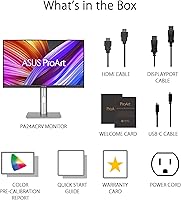
The included cable selection is limited, and some connectivity configurations require cables that are not in the box. A few buyers were surprised to find that achieving their preferred multi-monitor setup required purchasing additional cables separately.
Warranty & Support
83%
The three-year manufacturer warranty is above average for the monitor category and provides meaningful long-term reassurance for a professional tool that is expected to anchor a creative workstation for years. ASUS ProArt support channels are generally rated as responsive by buyers who have needed to use them.
Some buyers have noted that warranty claims involving subtle defects like mild backlight uniformity issues can be difficult to get resolved, as those conditions sometimes fall below the threshold ASUS considers a serviceable defect. Documentation of the issue before claiming is advisable.

Suitable for:

The ASUS ProArt PA24ACRV 24-inch QHD Monitor is built for creatives who need dependable color accuracy in their daily workflow without investing in a full studio-grade setup. Photographers and photo retouchers will benefit most — the factory-calibrated panel means you can trust what you see on screen from day one, which is genuinely rare at this price tier. Graphic designers juggling both sRGB web assets and DCI-P3 print or video deliverables will find the wide color gamut coverage handles both without manual profile switching headaches. Laptop users, particularly those on MacBooks or similar USB-C-equipped machines, will appreciate how a single cable handles video, data, and charging simultaneously, keeping desk clutter to a minimum. Home office professionals upgrading from a 1080p display will notice an immediate improvement in text sharpness and overall screen real estate, making long document or spreadsheet sessions noticeably more comfortable.

Not suitable for:

The ASUS ProArt PA24ACRV 24-inch QHD Monitor is a poor fit for anyone whose primary use case involves fast-paced gaming. The 75Hz refresh rate is firmly aimed at professional and productivity tasks, and buyers accustomed to 144Hz or higher panels will find the motion handling underwhelming by comparison. It is also not the right choice for those seeking deep black levels or true high-dynamic-range performance — the HDR400 certification represents the entry level of HDR support, and it cannot replicate the contrast depth of OLED or mini-LED displays. Buyers who work primarily in very dark environments may notice IPS glow at screen edges, a characteristic of the panel technology rather than a defect but worth knowing beforehand. Finally, users who need a screen larger than 24 inches for detailed work across wide canvases or multi-window layouts should look at the larger panels in the ProArt lineup instead.
Specifications

  • Screen Size: The viewable display area measures 23.8 inches diagonally, housed in a standard 24-inch form factor chassis.
  • Resolution: Native resolution is 2560 x 1440 pixels (QHD), delivering noticeably sharper detail than a standard 1080p panel at the same screen size.
  • Panel Type: Uses an IPS (In-Plane Switching) panel, providing wide 178-degree viewing angles both horizontally and vertically with consistent color reproduction.
  • Color Gamut: Covers 95% of the DCI-P3 color space and 100% of the sRGB gamut, supporting both web-focused and cinema-grade color workflows.
  • Color Accuracy: Factory calibrated to a Delta E below 2, verified by Calman software, ensuring reliable color accuracy without requiring the user to perform manual calibration.
  • HDR Support: Certified for HDR400, meaning the panel can accept and display HDR signals, though peak brightness is at the entry level of the HDR specification range.
  • Refresh Rate: Maximum refresh rate is 75Hz, which is appropriate for professional creative and productivity tasks but not suited for competitive or fast-paced gaming.
  • Adaptive Sync: Supports Adaptive Sync technology to reduce screen tearing during video playback and light graphical workloads.
  • Connectivity: Port selection includes two DisplayPort 1.4 outputs with daisy-chain support, one HDMI 2.0, one USB-C with Power Delivery, three USB-A 3.2 Gen 2, and one USB-C 3.2 Gen 2 downstream.
  • USB-C Power Delivery: The USB-C port delivers up to 96W of power to a connected laptop, sufficient to charge most modern thin-and-light and professional laptops at full speed.
  • Ergonomics: The included stand supports tilt, swivel, pivot (full 90-degree rotation), and height adjustment across a 130mm range for flexible positioning.
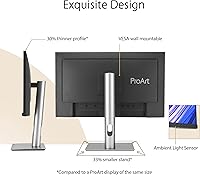
  • Ambient Light Sensor: A built-in ambient light sensor monitors room brightness and color temperature, automatically adjusting display settings to maintain comfortable viewing conditions.
  • Screen Surface: The display uses a matte anti-glare coating that reduces reflections from windows and overhead lighting in typical office or studio environments.
  • VESA Compatibility: Supports standard 100 x 100mm VESA wall and arm mounting, compatible with the vast majority of third-party monitor arms and wall brackets.
  • Aspect Ratio: Displays content in the standard 16:9 widescreen aspect ratio, appropriate for most professional photography, design, and video editing applications.
  • Weight: The complete unit with stand weighs approximately 12.3 pounds (roughly 5.6kg), which is typical for a monitor of this size and build quality.
  • Warranty: ASUS includes a three-year manufacturer warranty covering defects in materials and workmanship, which is above average for displays in this category.
  • Packaging: Ships in paper-based packaging as part of ASUS green sustainability initiatives, reducing plastic waste compared to conventional monitor packaging.

Related Reviews

ASUS VA24DQSB 24-inch IPS Monitor
78%
93%
Ergonomic Adjustability
88%
IPS Panel Color Accuracy
61%
Brightness & Glare Handling
91%
Eye Comfort & Fatigue
84%
Build Quality & Stability
More
Samsung S60A 24-inch QHD Monitor
74%
88%
Image Clarity
83%
Color Accuracy
86%
Ergonomics & Stand
84%
Eye Comfort
79%
Build Quality
More
ASUS ProArt PA24US 24-inch 4K Professional Monitor
81%
96%
Color Accuracy
93%
Out-of-Box Readiness
91%
Built-in Colorimeter
94%
Color Gamut Coverage
89%
12G-SDI Connectivity
More
ASUS BE24ECSBT 24-inch Touch Monitor
76%
83%
Touch Accuracy
91%
USB-C Connectivity
67%
Display Quality
88%
Build & Ergonomics
72%
Value for Money
More
KTC H24T27 24-inch QHD Gaming Monitor
68%
88%
Image Clarity
84%
Color Accuracy
74%
Gaming Performance
41%
HDR Quality
46%
Ergonomics & Adjustability
More
ASUS ProArt PA328CGV 32-inch Monitor
75%
91%
Color Accuracy
88%
Color Gamut Coverage
83%
Panel & Image Quality
71%
Build Quality
74%
Ergonomics & Stand
More
ASUS ProArt PA248QV 24.1-inch Monitor
80%
93%
Color Accuracy
86%
Panel & Image Quality
74%
Resolution & Sharpness
88%
Aspect Ratio & Screen Real Estate
91%
Ergonomics & Stand
More
ASUS VZ24EHF 24-inch Eye Care Monitor
86%
91%
Value for Money
88%
Display Quality
93%
Eye Care Technology
86%
Refresh Rate & Performance
85%
Build Quality
More
ASUS ProArt PA247CV 23.8-inch Monitor
80%
93%
Color Accuracy
88%
Value for Money
86%
Out-of-Box Setup
91%
USB-C Connectivity
84%
Build Quality
More
ViewSonic VG2455-2K 24-inch QHD IPS Monitor
82%
88%
Display Sharpness
67%
Color Accuracy
93%
USB-C Connectivity
91%
Ergonomics & Adjustability
86%
Build Quality
More

FAQ

Yes, and this is genuinely one of its strongest practical features. Connecting a MacBook via USB-C will carry the video signal, pass data through to the built-in USB hub, and charge your laptop at the same time. You get a clean, single-cable desk setup without needing a separate dock.

The PA24ACRV ships with a factory calibration report and carries Calman Verified certification, which means color accuracy has been independently validated before leaving the factory. For most photographers and designers, the out-of-box accuracy is close enough to work with immediately. If your workflow demands absolute precision — print production, for example — a hardware calibration tool will always be the gold standard, but this panel gives you a much better starting point than an uncalibrated office monitor.

Yes. The dual DisplayPort 1.4 outputs support MST (Multi-Stream Transport) daisy chaining, so you can connect a second compatible monitor directly to this display rather than running a second cable back to your computer. Just make sure your graphics card and the second monitor both support MST as well.

Honestly, if gaming is a meaningful part of how you use your monitor, 75Hz will likely feel limiting — especially if you are coming from a 144Hz or 165Hz panel. The PA24ACRV is designed around color accuracy and professional workflow, not motion performance. It has Adaptive Sync support, which helps reduce tearing, but the refresh ceiling is what it is.

IPS glow is a characteristic of the panel technology itself rather than a defect, and this display is not unusually bad in that regard. In normal working conditions with typical room lighting, you are unlikely to notice it. It becomes more visible when displaying very dark or black content in a completely darkened room, which is not the typical use case for a color-accurate creative monitor.

Yes, it uses a standard 100 x 100mm VESA pattern on the back, which is compatible with the vast majority of monitor arms and wall mounts on the market. Simply remove the included stand and attach your arm using the four standard mounting holes.

It does, though it works subtly rather than making dramatic shifts. The sensor gradually adjusts brightness and color temperature as your room conditions change throughout the day, which reduces the jarring effect of a screen that feels too bright in the evening or too dim in a bright studio. It is the kind of feature you stop noticing because your eyes stay comfortable — which is the point.

The matte coating diffuses reflections from windows, overhead lights, and lamps, which means you spend less time repositioning yourself or your monitor to avoid glare. For color work specifically, this matters because a bright reflection on part of the screen can make colors look inconsistent across the panel surface. The trade-off is a very slight reduction in perceived sharpness compared to a glossy display, but most professional monitors use matte for exactly this reason.

Both are serious contenders for creative professionals at this price tier. The ASUS ProArt PA24ACRV 24-inch QHD Monitor competes directly on color accuracy and calibration, and some users find it has an edge in gamut coverage for DCI-P3 workflows. Dell UltraSharp panels are also well-regarded for uniformity and build quality. The choice often comes down to ecosystem preference, connectivity needs — the USB-C Power Delivery here is very competitive — and which brand's color management tools you prefer working with.
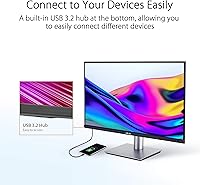
There is a built-in USB hub with three full-speed USB-A ports and one USB-C downstream port. In practice, many users find it genuinely useful for keeping a keyboard, mouse receiver, and an external drive plugged into the monitor rather than the laptop itself. When you disconnect your laptop at the end of the day, everything stays connected to the display and is ready when you plug back in the next morning.

Where to Buy