Overview

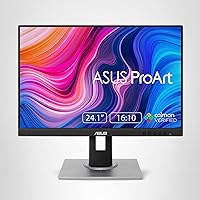
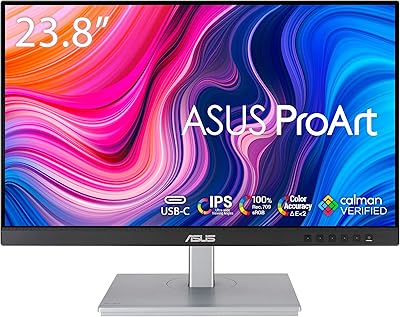
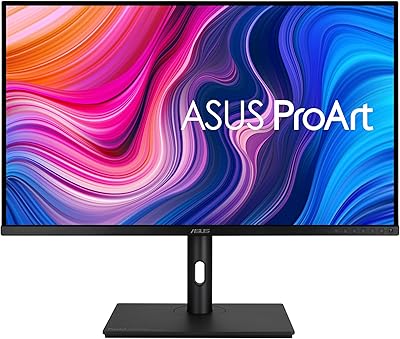
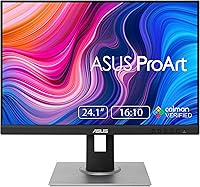
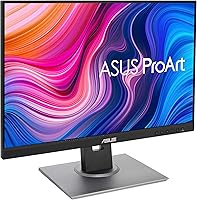
The ASUS ProArt PA248QV 24.1-inch Monitor sits in a practical sweet spot for working creatives who need reliable color without spending a fortune. Where most monitors at this tier stick to the standard 16:9 format, the PA248QV offers a taller 16:10 aspect ratio — that extra vertical real estate means more of a Lightroom catalog visible at once, fewer scroll interruptions mid-edit, and a noticeably more comfortable layout for long documents. The WUXGA resolution is sharp enough for detailed work without demanding heavy GPU resources. Calman verification backs up the color claims with third-party credibility. The fully adjustable stand is a genuine bonus you do not always get at this price.
Features & Benefits

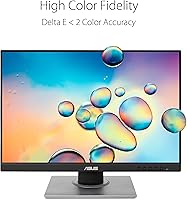
The color performance is where this ProArt display earns its reputation. Covering 100% sRGB and Rec.709 with a DeltaE under 2, it means the reds you see on screen are the reds that print or broadcast — no guesswork involved. The IPS panel keeps colors consistent whether you are sitting squarely in front or viewing from a slight angle, which is useful when a client needs to lean over and review your work. Connectivity is solid: DisplayPort, HDMI, and D-Sub cover most setups, and four USB-A ports turn the monitor into a practical desk hub. The anti-glare matte coating handles mixed office lighting without washing out the image. New buyers also get three months of Adobe Creative Cloud access bundled in.

Best For

The PA248QV fits a specific type of buyer well. Photographers and retouchers get a display accurate enough to trust straight out of the box, skipping the cost of a colorimeter for everyday work. Graphic designers benefit from that taller canvas — working on a tall infographic or a multi-layer Photoshop file just feels less cramped. Video editors producing content for broadcast will appreciate the native Rec.709 coverage. For home studios or dedicated editing desks, the full ergonomic range means you can dial in the exact position your neck and eyes prefer. This ASUS creative monitor also makes a strong case for anyone upgrading from a consumer-grade panel and finally noticing color accuracy problems firsthand.

User Feedback

With a 4.5-star average across close to 2,000 ratings, the PA248QV has a strong track record. Buyers consistently highlight the out-of-box color accuracy, the solid stand build, and the matte finish that avoids annoying reflections. On the critical side, the absence of USB-C is a real sticking point for anyone with a modern laptop — it simply is not available here, and that is worth knowing before you buy. The 60Hz refresh rate also gets called out by users hoping to use this as a light gaming display; for pure creative work it is a non-issue, but for mixed use it is a genuine limitation. Long-term owners generally report consistent performance over time, with few complaints about color drift or build quality.

Pros

  • Calman-verified color accuracy means what you see on screen genuinely reflects your final output.
  • The 16:10 aspect ratio gives graphic designers and photographers measurably more vertical workspace.
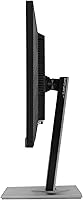
  • Full tilt, swivel, pivot, and height adjustment on the stand is rare and genuinely useful at this price point.
  • Four USB-A ports effectively turn the PA248QV into a desktop hub, reducing cable clutter significantly.
  • The matte anti-glare surface handles mixed office and studio lighting without washing out colors.
  • Rec.709 coverage makes this ProArt display a practical tool for broadcast-ready video color work.
  • Long-term owners consistently report stable, reliable color reproduction over years of daily use.
  • Out-of-box accuracy means most buyers can start working immediately without manual calibration.
  • The bundled Adobe Creative Cloud trial adds tangible value for users new to the creative software ecosystem.
  • A 4.5-star average across nearly 2,000 verified ratings signals a consistently satisfying ownership experience.

Cons

  • No USB-C port is a significant gap for modern laptop users who depend on it for video output.
  • The 60Hz refresh rate makes this ASUS creative monitor a poor fit for anyone who also games seriously.
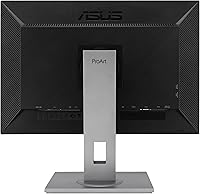
  • The OSD button placement on the rear edge is awkward and takes time to navigate confidently.
  • Resolution is beginning to show its age as QHD monitors enter the same competitive price bracket.
  • IPS glow becomes distracting during dark-scene editing in dim or low-light room conditions.
  • Peak brightness is insufficient for working near bright windows or in direct sunlight environments.
  • Factory calibration consistency varies slightly across units, which can matter for precision prepress work.
  • The stand base has a wide footprint that can crowd smaller or shared desk setups noticeably.
  • Some users report minor backlight uniformity issues appearing along panel edges after extended long-term use.
  • Rotating to portrait mode requires manual display rotation settings in the OS, with no auto-detect feature.

Ratings

The ASUS ProArt PA248QV 24.1-inch Monitor has been evaluated by our AI system after analyzing thousands of verified global user reviews, with spam, bot activity, and incentivized feedback actively filtered out. The scores below reflect a candid picture of where this ProArt display genuinely excels and where real buyers have run into friction. Both the strengths that keep creatives coming back and the limitations that push some shoppers toward alternatives are transparently represented.
Color Accuracy
93%
Photographers and retouchers consistently report that skin tones, gradients, and saturated hues look faithful straight out of the box — no third-party calibration required for most workflows. The Calman verification backing gives professionals genuine confidence when sending files to print or broadcast.
A small number of users noted minor variance between individual units, suggesting factory calibration is not perfectly uniform across the production run. Those chasing absolute precision for print prepress may still want to run a hardware calibration pass.
Panel & Image Quality
86%
The IPS panel delivers consistent, accurate colors whether viewed head-on or at an angle, which matters when a client is leaning over to review work beside you. Contrast and black depth are respectable for an IPS display used in a well-lit studio environment.
IPS glow is noticeable in dark scenes or when using the monitor in a dim room, which bothers some users doing dark-room photo editing. The panel is not designed for HDR content, so dynamic range feels limited compared to newer display technologies.
Resolution & Sharpness
74%
26%
The 1920x1200 resolution hits a practical sweet spot — text is crisp, UI elements are comfortable at standard scaling, and it does not require a powerful GPU to drive smoothly. For web design, photo culling, and document-heavy workflows, the pixel density feels right.
Users coming from 4K or high-DPI displays will notice the step down, particularly when scrutinizing fine detail in high-resolution photos. It is a workable resolution, but it is increasingly showing its age as more monitors at this price tier begin offering QHD panels.
Aspect Ratio & Screen Real Estate
88%
The 16:10 format is a genuine workflow advantage — graphic designers report seeing more artboard, photographers see more of the filmstrip without scrolling, and writers appreciate the extra document rows on screen at once. It is a small but daily-felt improvement over standard widescreen panels.
A handful of users found that some video content and games have letterboxing due to the non-standard ratio. It is a minor trade-off, but worth knowing if you plan to split screen time between creative work and entertainment.
Ergonomics & Stand
91%
The stand offers full tilt, swivel, pivot, and height adjustment, which users in home studios and hot-desking office setups praised heavily. Being able to rotate the display into portrait mode for vertical coding or long-form document review is a feature many buyers said they did not expect at this price point.
The stand mechanism, while functional, has been described by some users as slightly stiff when first adjusting height — it loosens with use but can feel clunky out of the box. The overall footprint of the base is also fairly wide, which can crowd smaller desks.
Connectivity
69%
31%
Having DisplayPort, HDMI, and D-Sub covered in a single monitor makes it versatile across different desktop setups and older hardware. The four USB-A ports effectively turn the PA248QV into a desk hub, reducing cable clutter for users with keyboards, mice, and external drives.
The absence of USB-C is the single most-cited frustration among recent buyers, especially those using modern MacBooks or thin-and-light laptops that rely on USB-C for video output. It is a real gap that forces users to carry extra adapters or rethink their setup.
Refresh Rate & Motion Handling
52%
48%
For its core creative audience, 60Hz is entirely sufficient — photo editing, graphic design, and video color grading do not benefit from higher refresh rates. Users focused purely on professional work reported no issues whatsoever with the display's responsiveness.
Anyone hoping to use this ASUS creative monitor as a dual-purpose gaming and work display will be disappointed. The 60Hz ceiling is a hard limitation, and response time is not optimized for fast motion, making competitive gaming visibly less smooth compared to dedicated gaming displays.
Anti-Glare Coating
83%
Users working near windows or in mixed-lighting studio environments praised the matte surface for keeping the image readable without repositioning the monitor constantly. It handles overhead office lighting particularly well without introducing the grainy texture some aggressive anti-glare coatings produce.
In very bright direct sunlight, the coating provides limited protection and the image can still wash out noticeably. A few users also noted that the matte finish slightly softens perceived sharpness compared to glossy panels, which is a common trade-off rather than a defect.
Build Quality & Finish
84%
The monitor feels solidly constructed for its class — the bezel is thin, the plastics feel appropriately premium, and the matte black finish resists fingerprints and dust better than glossy alternatives. Long-term owners frequently mention that the build holds up well after years of daily use.
It is not a metal-chassis display, so the overall feel does not match higher-end professional monitors. Some users noted minor flex in the panel housing when adjusting the stand, though none reported structural failures.
OSD & Setup Experience
71%
29%
Initial setup is straightforward for most users — out-of-box calibration means you rarely need to dig into the on-screen menu for color adjustments. The ProArt preset modes for sRGB and Rec.709 are easy to locate and switch between.
The OSD button layout received consistent criticism for being unintuitive, with several users describing a frustrating first-hour experience before getting comfortable with navigation. The menu itself is functional but the physical button placement on the rear edge feels awkward, especially when swapping input sources regularly.
Value for Money
87%
Buyers repeatedly note that getting Calman-verified color accuracy, a fully articulating stand, and a 16:10 IPS panel at this price tier is difficult to match from competing brands. The bundled Adobe Creative Cloud access adds practical value for users new to the creative software ecosystem.
As newer QHD monitors with USB-C enter the same price bracket, the PA248QV is under growing competitive pressure. Users who prioritize future-proofing their setup may feel the port selection and resolution make it a less compelling buy today compared to when it launched.
Long-Term Reliability
89%
Owners who have used the PA248QV for two or more years consistently report stable color reproduction and no significant panel degradation. ASUS brand reliability scores well in this segment, and few users report hardware failures within a reasonable ownership period.
A small percentage of reviews mention backlight uniformity issues developing over time, particularly along the bottom edge. This is not a widespread problem, but it is worth monitoring if color consistency is critical to your workflow.
Brightness & Uniformity
76%
24%
The brightness level is adequate for typical indoor studio and office use, and uniformity across the panel is better than expected for the price. Most users working in controlled lighting conditions reported no visible hot spots during normal editing tasks.
Peak brightness is not high enough for HDR workflows or use near very bright windows. Some users also flagged slight uniformity variation in the corners under solid-color backgrounds, which is more noticeable during dark editing sessions.
Pivot & Portrait Mode Usability
81%
19%
The ability to rotate the display into portrait orientation is frequently highlighted by developers, writers, and social media content creators who work in vertical formats. The pivot action is smooth enough for users who switch orientations regularly throughout the day.
Windows display rotation requires a manual settings change each time, which a few users found tedious without third-party auto-rotation software. The stand also needs to be near its maximum height before rotating to avoid the panel clipping the base.

Suitable for:

The ASUS ProArt PA248QV 24.1-inch Monitor is built for working creatives who need trustworthy color reproduction without spending a premium to get it. Photographers culling and retouching portraits will appreciate that skin tones and subtle gradients render accurately straight out of the box — no expensive colorimeter required for everyday editing. Graphic designers and illustrators gain a real productivity advantage from the taller 16:10 screen format, which lets you see more of a tall artboard or design canvas before needing to scroll. Video editors producing content for broadcast delivery will find the native Rec.709 color coverage genuinely useful, not just a spec-sheet claim. The fully articulating stand makes it an excellent fit for ergonomics-conscious home studios where you might need to switch between landscape and portrait orientation throughout the day. Anyone stepping up from a budget consumer panel for the first time will notice an immediate and meaningful improvement in how their work actually looks on screen.
Not suitable for:

The ASUS ProArt PA248QV 24.1-inch Monitor is not the right choice for buyers who need a single display that handles both professional creative work and serious gaming. The 60Hz refresh rate is a hard ceiling — fast-paced games will feel noticeably less fluid compared to dedicated gaming monitors, and there is no getting around that limitation. Users with modern thin-and-light laptops that rely on USB-C for video output will hit an immediate compatibility wall, since this display offers no USB-C port and will require an adapter or dock. Those chasing absolute pixel density for high-resolution photo review or 4K video editing should also look elsewhere, as the resolution, while sharp enough for most tasks, does not match what newer QHD or 4K panels in a similar price bracket now offer. Content creators who watch a lot of HDR video on their work monitor, or who regularly present to clients in bright windowed environments, may find the peak brightness and HDR limitations frustrating. Finally, buyers who frequently switch inputs or fine-tune display settings should be aware that the OSD button layout has a steep learning curve.
Specifications

  • Screen Size: The display measures 24.1 inches diagonally, providing ample working space without dominating a standard desk setup.
  • Resolution: Native resolution is 1920x1200 (WUXGA), delivering a pixel density suitable for detailed creative work and comfortable everyday use.
  • Aspect Ratio: The 16:10 aspect ratio provides more vertical screen space than a standard widescreen panel, benefiting document, photo, and design workflows.
  • Panel Type: An IPS (In-Plane Switching) panel ensures consistent color reproduction and wide viewing angles of up to 178 degrees horizontally and vertically.
  • Color Space: The display covers 100% of both the sRGB and Rec.709 color spaces, making it suitable for web, print, and broadcast-standard color work.
  • Color Accuracy: Factory-calibrated to a DeltaE value of under 2, meaning color deviation is below the threshold perceptible to the human eye in normal viewing conditions.
  • Certification: The panel is Calman Verified, confirmed by Portrait Displays' independent testing to meet strict color accuracy standards before leaving the factory.
  • Refresh Rate: The panel operates at a standard 60Hz refresh rate, appropriate for creative and professional use but not optimized for fast-motion gaming.
  • Video Inputs: Connectivity includes one DisplayPort, one HDMI, and one D-Sub (VGA) port, covering modern and legacy source devices in a single monitor.
  • USB Hub: Four USB-A ports are built into the monitor body, functioning as a desktop hub for peripherals such as keyboards, mice, and external storage.
  • Ergonomics: The stand supports tilt, swivel, pivot (portrait rotation), and height adjustment, allowing precise positioning for long editing sessions or shared workstations.
  • Surface Coating: A matte anti-glare coating is applied to the panel surface to reduce reflections from ambient light sources in office and studio environments.
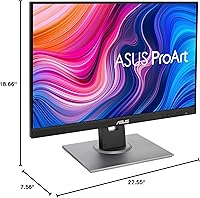
  • Dimensions: The monitor measures 18.66 x 22.55 x 7.56 inches (length x width x height) with the stand fully assembled.
  • Weight: The fully assembled unit weighs 13.45 pounds, which is typical for a 24-inch monitor with a full-adjustment stand included.
  • Power Supply: The built-in power supply accepts 100–240V input, making the PA248QV compatible with wall outlets worldwide without an external adapter.
  • Bundled Software: Each unit includes a voucher for three months of Adobe Creative Cloud access, valid for new subscribers through August 2026.
  • Manufacturer: Designed and produced by ASUS, a Taiwan-based electronics manufacturer with an established line of professional-grade ProArt displays.
  • Availability: The monitor has been actively available since its launch in May 2020 and is confirmed as not discontinued by the manufacturer as of the latest listing update.

Related Reviews

ASUS ProArt PA24ACRV 24-inch QHD Monitor
81%
93%
Color Accuracy
89%
Color Gamut Coverage
88%
Build Quality
91%
Ergonomics & Stand
87%
Connectivity
More
ASUS VA24DQSB 24-inch IPS Monitor
78%
93%
Ergonomic Adjustability
88%
IPS Panel Color Accuracy
61%
Brightness & Glare Handling
91%
Eye Comfort & Fatigue
84%
Build Quality & Stability
More
ASUS BE24ECSBT 24-inch Touch Monitor
76%
83%
Touch Accuracy
91%
USB-C Connectivity
67%
Display Quality
88%
Build & Ergonomics
72%
Value for Money
More
ASUS ProArt PA24US 24-inch 4K Professional Monitor
81%
96%
Color Accuracy
93%
Out-of-Box Readiness
91%
Built-in Colorimeter
94%
Color Gamut Coverage
89%
12G-SDI Connectivity
More
ASUS VZ24EHF 24-inch Eye Care Monitor
86%
91%
Value for Money
88%
Display Quality
93%
Eye Care Technology
86%
Refresh Rate & Performance
85%
Build Quality
More
ASUS ProArt PA328CGV 32-inch Monitor
75%
91%
Color Accuracy
88%
Color Gamut Coverage
83%
Panel & Image Quality
71%
Build Quality
74%
Ergonomics & Stand
More
ASUS VG249QE5A 24-inch Gaming Monitor
76%
88%
Image Quality
91%
Refresh Rate Performance
86%
Motion Clarity
93%
Value for Money
47%
Ergonomics & Stand
More
ASUS ProArt PA329CV 32-inch 4K Monitor
81%
94%
Color Accuracy
91%
Out-of-Box Calibration
89%
Connectivity & USB-C
76%
Panel Uniformity
58%
HDR Performance
More
ASUS ProArt Display PA247CV 23.8-inch Monitor
86%
94%
Color Accuracy
89%
Display Quality
91%
Ergonomics and Comfort
87%
Connectivity Options
63%
Brightness in Well-Lit Environments
More
ASUS ROG Strix XG259QNS 24.5-inch Gaming Monitor
80%
93%
Motion Clarity
91%
Input Responsiveness
78%
Refresh Rate Value
67%
Image Quality
88%
Build Quality
More

FAQ

The ASUS ProArt PA248QV 24.1-inch Monitor ships with Calman-verified factory calibration, so for most photographers, designers, and video editors it is ready to use immediately. You do not need a colorimeter for general creative work. That said, if you are doing precision prepress work where every fraction of a DeltaE point matters, running a hardware calibration pass with your own probe is still a good habit.
Not directly — the PA248QV does not include a USB-C video input. You will need either a USB-C to DisplayPort cable or a USB-C hub or dock that outputs to HDMI or DisplayPort. It is a real limitation worth planning around if your laptop relies on USB-C for video output.

It means the screen is taller than a standard 16:9 widescreen monitor of similar size. In practice, you will see more rows in a spreadsheet, more of a long document without scrolling, and more vertical canvas in design tools like Photoshop or Illustrator. For most creative workflows it is a noticeable and welcome difference.

Honestly, not really. The PA248QV is built for color accuracy, not speed. The 60Hz refresh rate means fast-paced games will feel less fluid compared to a dedicated gaming display. If you want one monitor that handles both serious creative work and competitive gaming equally well, you will need to look at a different panel.

The matte coating does a solid job reducing reflections from overhead lighting and indirect window light. It is noticeably better than glossy panels in those conditions. In direct sunlight or very bright windowed rooms, you will still see some washout, but for typical indoor work setups it performs well.

Yes, the stand supports full 90-degree pivot rotation. It works well for tasks like coding, reading long documents, or viewing portrait-format photos. Just make sure to raise the stand to near its maximum height before rotating so the panel clears the base, and then manually change the display orientation in your operating system settings.

This ProArt display has DisplayPort, HDMI, and D-Sub (VGA) inputs, so you can technically connect three separate sources simultaneously and switch between them using the OSD menu. Many users take advantage of this to run a desktop and a laptop into the same monitor without swapping cables.

Long-term owners have generally been positive about durability. The plastics feel solid for the price tier, the stand mechanism stays functional, and color performance tends to remain stable over time without significant drift. It is not a premium metal-chassis display, but build quality is appropriate for a professional work monitor at this price.

This is one of the PA248QV's weaker points. The physical buttons are located on the rear edge of the panel, which makes them hard to find by feel, especially at first. The menu itself is logically organized once you learn it, but the initial learning curve is steeper than it should be. Most users who stick to a preset color profile rarely need to touch it after setup.

ASUS typically includes a DisplayPort cable and a power cable in the box with the PA248QV, though the exact bundle can vary slightly by region and retailer. It is worth checking the included accessories before your first use so you are not caught short, particularly if your setup relies on HDMI rather than DisplayPort.

Where to Buy