Overview

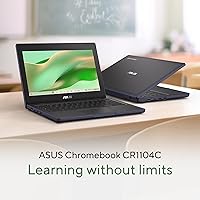
The ASUS Chromebook CR11 11.6-inch Ruggedized Laptop enters the education market as a practical, no-nonsense device built to survive the everyday chaos of school life. Released in March 2025, it is still fresh on the market, which means long-term reliability data is limited — a fair caveat for early buyers. The hardware sits firmly at the entry level: Chrome OS keeps performance snappy for browsing and Google Workspace, but do not expect Windows software compatibility or heavy local computing. For the right buyer, that is a reasonable trade-off. For everyone else, it is a potential dealbreaker worth understanding before purchase.
Features & Benefits

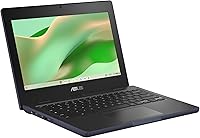
The physical build of this ruggedized Chromebook is where it genuinely earns its place. Rubber bumper edges wrap the chassis to absorb drops, and the spill-resistant keyboard adds a layer of protection that parents and teachers will appreciate — because accidents happen constantly with kids. The Intel N100 processor paired with 4GB of LPDDR5 RAM handles Google Docs, video calls, and multiple browser tabs without breaking a sweat, though pushing it much further than that starts to show. Storage is 64GB eMMC, modest on paper but less of a concern when most work lives in the cloud. Wi-Fi 6E keeps connections fast and stable even in crowded school networks.

Best For

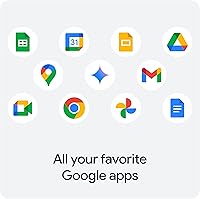
This classroom laptop makes the most sense for K-12 students, parents buying a first device for a young child, or schools equipping shared cart programs where budget and durability are top priorities. If your household or district runs on Google Workspace — Docs, Sheets, Drive, Classroom — the CR11 slots in naturally without much setup friction. It is also a solid pick for budget-conscious buyers who would rather have a tough, reliable machine than a thinner device with slightly better specs that will not survive a backpack. Where it falls short is for anyone needing Windows-only software, serious local storage, or a display larger than 11.6 inches.

User Feedback

Since the CR11 only launched in March 2025, the review pool is still building — early impressions should be weighed accordingly. Buyers who have posted so far generally appreciate the confidence that comes from owning a genuinely tough machine, particularly parents who have watched other laptops fail within a school year. On the critical side, battery life under active use is a recurring complaint, with some reporting it falls short of a full school day. A handful of users also find the display brightness underwhelming indoors, which is a fair concern. Occasional lag during video calls has been noted too, pointing to the practical ceiling of modest RAM and storage.

Pros

  • Ruggedized chassis with rubber bumper edges provides genuine drop protection for daily school use.
  • Spill-resistant keyboard adds meaningful peace of mind for parents and teachers alike.
  • Wi-Fi 6E keeps connectivity fast and stable even in dense, crowded school network environments.
  • Chrome OS means near-zero virus risk and very low maintenance overhead for families and IT staff.
  • The anti-glare display noticeably reduces reflections in brightly lit classrooms and common areas.
  • Intel N100 processor handles Google Workspace, video calls, and browsing without frustrating lag.
  • At under three pounds, the CR11 is light enough for younger students to carry all day.
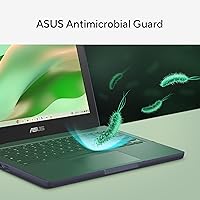
  • Antimicrobial surface treatment is a practical bonus for shared-device environments and hygiene-conscious households.
  • Bundled Gemini Advanced trial gives new users a taste of AI-assisted tools right out of the box.
  • Wi-Fi 6E and Bluetooth 5.3 are notably modern specs for a device at this price tier.

Cons

  • Battery life under active classroom use may not reliably last a full school day for all users.
  • Display brightness has been flagged as underwhelming by some early buyers in indoor settings.
  • 4GB of RAM creates a noticeable performance ceiling during video calls or heavier multitasking.
  • 64GB of local storage fills up faster than expected if users store offline files or Android apps.
  • No Windows software compatibility is a genuine dealbreaker for users outside the Google ecosystem.
  • The 1366x768 resolution looks noticeably soft compared to modern full-HD displays at similar prices.
  • The product launched in March 2025, leaving very little long-term durability data available yet.
  • Thermal management under sustained load can cause occasional slowdowns on processor-intensive tasks.

Ratings

The scores below for the ASUS Chromebook CR11 11.6-inch Ruggedized Laptop were generated by AI after analyzing verified buyer reviews from multiple global markets, with spam, bot-submitted, and incentivized feedback actively filtered out. The ratings reflect the honest consensus of real users — students, parents, and educators — and transparently capture both what this classroom laptop does well and where it falls short of expectations.
Build Quality
88%
The rubberized edges and reinforced chassis are frequently praised by parents and teachers who have seen other budget laptops crack or warp within months. Users report that the CR11 holds up noticeably better than expected after backpack drops and desk slides, which builds real confidence for school environments.
A handful of users note that while the outer shell feels solid, some hinge and lid flex is detectable under deliberate pressure. It is tougher than average for the price tier, but it is not quite on par with dedicated enterprise ruggedized devices.
Durability & Drop Resistance
86%
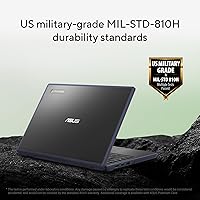
Military-grade durability standards carry genuine weight here, and early buyers confirm the rubber bumpers absorb impact in ways a bare plastic chassis simply cannot. For shared classroom carts and younger students who are rough on their belongings, this protection level is a meaningful real-world advantage.
No independent long-term stress test data is publicly available yet given the March 2025 launch date. Some users are cautiously optimistic but note it is too early to confirm how the chassis holds up after a full academic year of daily use.
Performance
67%
33%
For the core tasks this device targets — Google Docs, Sheets, Meet, and basic web browsing — the Intel N100 processor keeps things moving without frustrating hesitation. Students using it for assignments, note-taking, and research generally find the day-to-day experience smooth enough.
Push it beyond its intended use case — heavy multitasking, many open tabs, or intensive video calls — and the 4GB RAM ceiling becomes apparent quickly. Some users report noticeable lag and occasional slowdowns when running several apps or browser sessions simultaneously.
Battery Life
61%
39%
Under light use — offline reading, typing documents, and occasional video playback — many users report the battery holds up reasonably well through a standard school morning. For students with shorter device-intensive sessions, it manages acceptable endurance without needing a midday charge.
Active users who stream video, run continuous video calls, or work through a full day without breaks report the battery struggles to last reliably. Several early reviewers specifically flag this as a concern for all-day classroom deployments without access to charging stations.
Display Quality
63%
37%
The anti-glare coating earns consistent praise for cutting reflections in bright, fluorescent-lit classrooms where glossy screens become nearly unusable. Students seated near windows particularly appreciate not having to tilt the screen constantly to find a usable viewing angle.
Brightness levels draw the most complaints — the anti-glare treatment appears to reduce overall luminance, leaving the panel looking dim in darker settings. The 1366x768 resolution also looks noticeably soft to anyone accustomed to a full-HD display, which is a fair criticism at this price point.
Keyboard & Typing Experience
72%
28%
The spill-resistant keyboard is appreciated by parents who have experienced liquid damage on previous devices, and early buyers report the key travel feels adequate for a device in this size and price category. Younger students transitioning from tablets find the physical keyboard a comfortable step up.
Feedback on key feel is mixed — some users find the keys slightly mushy and lacking tactile definition compared to more expensive Chromebooks. The compact 11.6-inch layout also means the keyboard is on the smaller side, which can be an adjustment for older students with larger hands.
Connectivity
84%
Wi-Fi 6E is a genuinely modern inclusion at this price point and makes a practical difference in crowded school network environments where older Wi-Fi standards struggle with congestion. Bluetooth 5.3 pairing with headphones and accessories is consistently reported as fast and reliable.
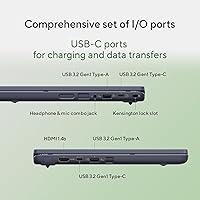
The port selection is limited to two USB 3.0 ports, which can feel restrictive when users need to connect a mouse, USB drive, and headphone adapter simultaneously. No USB-C charging port is confirmed in early hands-on reports, which limits flexibility for users with newer charging setups.
Storage Capacity
54%
46%
For a Chrome OS device used primarily through a browser and Google Drive, 64GB of eMMC storage is workable day-to-day. Students who keep files in the cloud and avoid heavy local app installs will rarely run into immediate storage pressure during normal schoolwork.
Users who install Android apps, save media files locally, or use the device for anything beyond basic cloud tasks report hitting the storage ceiling faster than expected. Compared to similarly priced Windows laptops offering 128GB or more, the 64GB limit is a tangible disadvantage.
Value for Money
79%
21%
For a ruggedized Chromebook with Wi-Fi 6E, spill resistance, and an antimicrobial chassis at its price point, the CR11 offers a combination of features that is hard to replicate from competing brands without spending noticeably more. Parents and school buyers focused on durability per dollar rate it positively.
Users who compare it against standard consumer laptops at a similar price point — where you can get more RAM, more storage, and a full HD display — feel the spec trade-offs are significant. The value equation depends almost entirely on whether durability and Chrome OS are priorities for the buyer.
Portability
83%
At under three pounds and with a footprint compact enough to fit into most school backpacks without strain, younger students and teachers moving between rooms throughout the day find it easy to carry. The slim profile also means it fits comfortably on small student desks.
The 11.6-inch screen size, while great for portability, can feel cramped for extended work sessions or when splitting the screen between two apps. Older students who have used larger laptops often wish for an additional inch or two of display real estate.
Software & OS Experience
71%
29%
Chrome OS is fast, stable, and virtually maintenance-free — no virus scans, no update interruptions mid-class, and near-instant boot times. For Google Workspace-heavy schools and households, the integration feels natural and the learning curve is minimal for most students.
The hard ceiling of Chrome OS is its inability to run Windows software, and for some families this only becomes obvious after purchase. Users who need specific educational software, coding environments, or creative tools built for Windows or macOS will find Chrome OS a genuine limitation.
Setup & Ease of Use
87%
Signing in with a Google account and being ready to work in under two minutes is one of Chrome OS's most practical advantages, and users consistently highlight how little technical knowledge is needed to get started. School IT departments managing multiple units also appreciate how streamlined deployment is.
Users unfamiliar with the Google ecosystem occasionally feel disoriented by the absence of a traditional desktop or file manager experience. Those coming from Windows sometimes spend time looking for features that simply work differently — or do not exist — in Chrome OS.
Display Comfort
68%
32%
The anti-glare finish makes extended reading and writing sessions more comfortable in variable classroom lighting, and students report less eye fatigue during long homework sessions compared to glossy panels. The screen size is appropriate for the focused, single-task workflow Chrome OS encourages.
Color reproduction is average at best, and users doing anything visually detailed — photo editing, design work, or even detailed map reading — notice the display's limitations quickly. Viewing angles are acceptable within a narrow range but degrade noticeably when the screen is tilted or viewed from the side.

Suitable for:

The ASUS Chromebook CR11 11.6-inch Ruggedized Laptop is purpose-built for students, parents, and educators who need a device that can absorb real-world punishment without a hefty repair bill. K-12 students are the most natural fit — this is a machine designed around the realities of backpacks, cafeteria tables, and the occasional drop onto a hard floor. Schools and districts managing shared device programs will appreciate the military-grade chassis and antimicrobial surface treatment, both of which reduce wear and maintenance overhead across a fleet. Families already using Google Workspace at home or school will find Chrome OS intuitive and essentially friction-free, since the entire experience is built around the same apps students use daily. Parents who want a first laptop for a younger child — one that can survive spills and bumps without becoming an expensive mistake — will find the CR11 a genuinely sensible choice at its price point.
Not suitable for:

Buyers expecting a general-purpose Windows laptop will run into a hard wall with the CR11, since Chrome OS does not run native Windows applications, and no amount of workarounds fully replaces that compatibility for users who need it. The 4GB of RAM and 64GB eMMC storage are honest entry-level specs — capable for light cloud-based tasks, but anyone who edits video, runs local software, or keeps twenty browser tabs open simultaneously will feel the ceiling quickly. The 11.6-inch, 1366x768 display is functional but falls short for users who spend long hours reading detailed content or who need color accuracy for creative work. Professionals needing a secondary work device, high school or college students in technical programs, and anyone who regularly works offline will likely find this classroom laptop too constrained for their needs. The product is also too new to have a proven long-term reliability record, so risk-averse institutional buyers may prefer a model with a more established track history.

Specifications

  • Display: 11.6-inch anti-glare HD panel with a resolution of 1366 x 768 pixels, designed to reduce reflections in brightly lit environments.
  • Processor: Intel N100 processor with 4 cores, clocking up to 3.4 GHz, built on Intel's efficient architecture for everyday computing tasks.
  • RAM: 4GB LPDDR5 memory provides enough headroom for web browsing, Google Workspace applications, and light multitasking.
  • Storage: 64GB eMMC internal storage offers fast read speeds for a flash-based drive, though the capacity is modest by modern standards.
  • Operating System: Ships with Chrome OS, Google's cloud-first operating system, which does not support native Windows applications.
  • Wireless: Wi-Fi 6E (802.11ax) support enables fast, low-latency connections in congested network environments such as school campuses.
  • Bluetooth: Bluetooth 5.3 provides stable, energy-efficient pairing with peripherals including headphones, mice, and keyboards.
  • USB Ports: Two USB 3.0 ports are included for connecting external drives, peripherals, and accessories.
  • Graphics: Intel integrated graphics are built into the N100 processor, suitable for video playback and standard display output.
  • Dimensions: The chassis measures 11.69 x 8.39 x 0.80 inches, keeping the footprint compact enough for small desks and backpacks.
  • Weight: At 2.91 pounds, the device is light enough for younger students to carry between classrooms without strain.
  • Durability: The body meets US military-grade durability standards, with rubber bumper edges protecting against drops and rough handling.
  • Keyboard: The spill-resistant keyboard is designed to withstand accidental water drops and minor liquid splashes without immediate damage.
  • Antimicrobial: An antimicrobial surface treatment is applied to the chassis to reduce the spread of bacteria, a practical feature for shared-device environments.
  • Color: Available in Mineral Grey, a neutral tone suited for both educational and professional settings.
  • Availability: The product was first made available in March 2025, making it a relatively recent release with a still-developing user review base.

Related Reviews

Samsung Chromebook 2 XE500C12-K01US 11.6-inch Laptop
81%
89%
Value for Money
85%
Battery Life
93%
Portability & Weight
80%
Build Quality
78%
Display Quality
More
HP Chromebook 11a 11.6-inch Laptop
73%
91%
Battery Life
83%
Value for Money
62%
Performance
49%
Storage Capacity
67%
Display Quality
More
ASUS Vivobook Go 12 L210 11.6-inch Laptop, Intel Celeron N4020, 4GB RAM, 64GB eMMC
81%
91%
Value for Money
94%
Portability
89%
Battery Life
81%
Performance for Basic Tasks
60%
Storage Capacity
More
ASUS Chromebook CM14 (CM1402CM2A-DS44)
72%
83%
Value for Money
88%
Build Quality & Durability
74%
Performance & Speed
58%
Display Quality
84%
Battery Life
More
Azeyou CG11Q6-US 11.6-inch Laptop
80%
90%
Value for Money
92%
Portability
86%
Battery Life
78%
Build Quality
64%
Display Quality
More
Samsung Chromebook 3 11.6″ Laptop
67%
83%
Value for Money
67%
Performance
72%
Build Quality
78%
Battery Life
58%
Display Quality
More
ASUS VivoBook 15.6-inch i5-1135G7 Laptop, 20GB RAM, 1TB SSD
83%
91%
Performance
87%
Value for Money
78%
Display Quality
92%
Multitasking Capability
75%
Battery Life
More
HP Stream 11 11.6-Inch Laptop
66%
83%
Value for Money
91%
Portability
88%
Battery Life
79%
Display Quality
58%
Performance
More
ASUS Vivobook Go L210KA 11.6″
73%
88%
Value for Money
93%
Portability
84%
Battery Life
58%
Performance
61%
Display Quality
More
Acer Chromebook R11 11.6-inch Touchscreen Chromebook
71%
84%
Battery Life
76%
Value for Money
67%
Display Quality
78%
Touchscreen Responsiveness
58%
Performance & Speed
More

FAQ

Not natively, no. Chrome OS does not support Windows software. That said, the CR11 works well with Google Docs and Sheets, and you can open, edit, and export Microsoft Office file formats through those apps. For most school assignments, the difference is barely noticeable, but if you rely on specific Word or Excel features, it is worth keeping in mind.

The rubber bumper edges and reinforced chassis are genuine physical additions, not just a label. The device meets US military-grade drop and durability standards, which involve real testing protocols. It is not indestructible, but it is meaningfully tougher than a standard budget laptop of similar size.

It depends on how the device is used. Chrome OS is designed to keep most files in Google Drive rather than on the device itself, so 64GB goes further here than it would on Windows. If your child downloads a lot of Android apps or saves video files locally, space will shrink faster. For typical schoolwork, 64GB is workable.

No, spill-resistant is not the same as waterproof. The keyboard is designed to handle accidental drops of liquid and minor splashes without immediate damage, but submerging the device or pouring significant amounts of liquid on it would likely cause problems. Think of it as a safety net for small accidents, not full water protection.

Early user reports suggest battery life is adequate but not exceptional under continuous active use. Streaming video or running multiple tabs all day may push it close to its limits. For lighter use — reading, typing, and occasional video calls — most users should get through a standard school day. Keeping a charger in the bag is still a smart habit.

Yes, for standard school video calls it handles Google Meet well enough. Some early users have noted occasional lag when calls are combined with other open tabs, which reflects the 4GB RAM ceiling. Closing unnecessary tabs before a call helps keep things running smoothly.

Light Android games from the Google Play Store work fine, since Chrome OS supports Android apps. Demanding PC games are not an option, and even heavier Android titles may stutter given the integrated graphics and modest RAM. For casual games and educational apps, it is perfectly adequate.

New buyers receive three months of Google One AI Premium at no cost, which includes access to Gemini Advanced and 2TB of Google cloud storage. It is a useful bonus, but it is time-limited — after three months, continuing the plan requires a paid subscription. Do not factor it in as a permanent feature when making your purchase decision.

The anti-glare coating does a solid job of cutting down on reflections, which makes a real difference in classrooms with overhead fluorescent lighting or near windows. The trade-off is that some users find the overall brightness a bit lower than they would like. It is not a dim screen, but it is not a high-brightness panel either.

It checks several important boxes for fleet deployments: durable build, antimicrobial surfaces, Chrome OS for easy centralized management, and modern wireless connectivity. Since the device only launched in early 2025, long-term reliability data is still limited, which is worth factoring into procurement decisions alongside the competitive price point.