

Overview

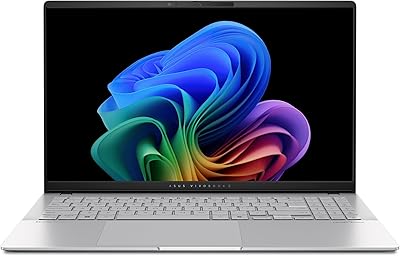
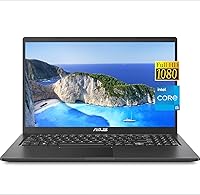
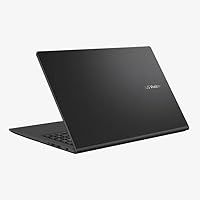
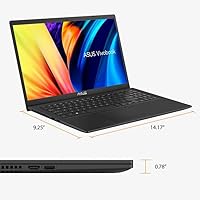
The ASUS VivoBook 15.6-inch Laptop is a solid mid-range option for students and business users who want capable everyday performance without stretching into premium territory. Powering it is Intel's 11th Gen Core i5-1135G7, which handles office workloads, video calls, and light multitasking without complaint. At 0.78 inches thin and 5.4 pounds, this ASUS laptop is portable enough for commuting — though don't expect the featherweight feel of a true ultrabook. It ships with Windows 11 Home pre-installed, and ASUS's VivoBook line has a well-earned reputation for dependable everyday use. Just set expectations accordingly: this is a productivity-focused machine, not a workstation replacement.

Features & Benefits

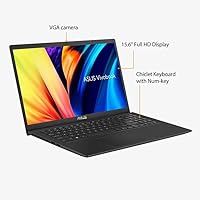
Where this VivoBook stands out most is its memory and storage configuration. Most laptops at this price ship with 8GB or 16GB of RAM — getting 20GB DDR4 is genuinely unusual and makes a real difference when you're juggling a dozen browser tabs, a Zoom call, and a spreadsheet simultaneously. The 1TB PCIe NVMe SSD keeps boot times snappy and gives you room for large project files without reaching for an external drive. The 15.6-inch IPS display is sharp enough for everyday work, with decent color reproduction, though peak brightness is modest. Intel Iris Xe graphics outperforms older Intel UHD chips for light photo editing and casual gaming, and the full port lineup — USB-C, HDMI, and a numeric keypad — rounds things out practically.

Best For

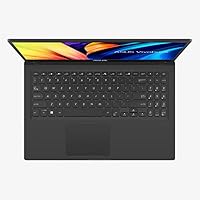
The VivoBook 15 hits a sweet spot for college students and remote workers who need a dependable daily driver without overpaying. If your workday revolves around Microsoft 365, Google Docs, video conferencing, or light data work, this machine handles all of it without breaking a sweat. The numeric keypad makes it especially practical for accounting, data entry, or heavy spreadsheet use — a feature often sacrificed on slimmer notebooks. Home office users will appreciate the HDMI output for connecting a second monitor, along with the versatile port selection for peripherals. It also makes a strong upgrade for anyone coming off a machine that is five or more years old and craving noticeably faster response times day to day.

User Feedback

Buyers consistently highlight the RAM and storage combination as standout value — it is the spec pairing most owners mention first when recommending this ASUS laptop. On the downside, battery life draws the most criticism; real-world endurance tends to disappoint users expecting all-day unplugged use, and no battery capacity figure is published for this configuration, which is worth knowing before you commit. Display brightness comes up as a limitation in well-lit rooms. Keyboard comfort earns generally positive marks for this price range, though the trackpad is described as functional rather than refined. Build quality falls in line with expectations for the category — sturdy enough for daily use, but the plastic chassis will not feel premium alongside aluminum-bodied competitors.

Pros

  • 20GB DDR4 RAM is unusually generous at this price point, handling multitasking without hesitation.
  • The 1TB NVMe SSD means fast boot times and plenty of storage without buying extras.
  • Intel Iris Xe graphics outperforms older Intel UHD chips for light photo work and casual gaming.
  • A full numeric keypad is a practical inclusion that many similarly priced laptops skip.
  • The port lineup covers USB-C, USB-A, and HDMI, making desk setups and monitor connections straightforward.
  • The 15.6-inch Full HD IPS display offers a sharp, comfortable viewing experience for everyday productivity.
  • Windows 11 Home is pre-installed, so setup is immediate with no extra OS purchase required.
  • At under an inch thin, this VivoBook slides easily into a backpack without bulk.
  • ASUS VivoBook has a long track record of reliable build quality for everyday consumer use.
  • The price-to-spec ratio, especially for RAM and storage, is hard to beat in this category.

Cons

  • Battery life is a known weak point and no official capacity figure is published for this configuration.
  • The i5-1135G7 is an 11th Gen chip — not current silicon, which limits long-term future-proofing.
  • Display brightness is modest and can feel washed out in well-lit rooms or near windows.
  • The plastic chassis feels noticeably less premium compared to metal-bodied rivals at similar prices.
  • No discrete GPU means this VivoBook cannot handle demanding creative software or modern gaming titles.
  • The trackpad is reported as functional but uninspiring — heavy typists may find it lacks precision.
  • Wi-Fi tops out at 802.11ac (Wi-Fi 5), missing the faster Wi-Fi 6 standard now common at this tier.
  • At 5.4 pounds, it is on the heavier side for a student laptop meant for daily commuting.
  • Color accuracy on the display is limited, making it a poor fit for color-critical design work.

Ratings

The scores below for the ASUS VivoBook 15.6-inch Laptop were generated by our AI engine after analyzing thousands of verified buyer reviews from global markets, with spam, bot-submitted, and incentivized feedback actively filtered out. Each category reflects the honest consensus of real users — including the pain points many manufacturers would prefer you overlook. Where buyers consistently disagreed, scores land in the middle to reflect that split experience fairly.

Value for Money
88%
Most buyers feel this VivoBook punches above its price class, largely because 20GB of RAM and a 1TB NVMe SSD are unusual at this tier. Users upgrading from older machines frequently describe the performance-per-dollar ratio as one of the best they have found after weeks of comparison shopping.
A handful of buyers note that the i5-1135G7 is a previous-generation chip, which slightly undercuts the long-term value argument. For those planning to keep a laptop for five or more years, the processor age is a genuine consideration that tempers the otherwise strong spec-to-price story.
Performance
76%
24%
For everyday workloads — office suites, video conferencing, browser-heavy research sessions — this ASUS laptop handles things without hesitation. The generous RAM means users rarely encounter the slowdowns that typically hit cheaper machines when too many apps are running simultaneously.
The 11th Gen Core i5 shows its age when tasks get more demanding, and longer sustained workloads like video exports or large file compressions expose clear thermal throttling. Users expecting this machine to perform like a current-generation chip will find it noticeably behind modern mid-range competitors.
RAM & Multitasking
91%
This is consistently the most praised aspect across buyer reviews — 20GB DDR4 is simply not what people expect at this price, and it shows in daily use. Students running Zoom, a browser with 20 tabs, and a document editor simultaneously report zero lag, which is a real-world win.
A minority of technically inclined buyers note that one RAM module appears to be soldered on many VivoBook configurations, limiting future upgrade flexibility. If you eventually want to push beyond 20GB, you may find the path more complicated than expected.
Storage Speed
87%
Boot times are fast and application launches feel snappy, which buyers upgrading from older HDD-based machines find especially satisfying. The 1TB capacity is large enough that most users have not needed an external drive even after a year of heavy use.
Sequential read/write speeds are competitive but not class-leading — users doing frequent large file transfers or working with massive media libraries will notice the difference compared to premium NVMe options. The drive performs well for the price, just not spectacularly.
Display Quality
67%
33%
The 1080p IPS panel looks crisp and clear for document work, streaming, and casual browsing, and the narrow bezels give it a more modern appearance than older budget laptops. Colors are reasonably accurate for everyday tasks and the 15.6-inch size hits a practical sweet spot for most users.
Peak brightness is a recurring complaint — working near a window or in a well-lit cafe makes the screen look noticeably washed out. Color accuracy also falls short of what creative professionals expect, and several buyers specifically mention the display as the weakest component relative to the rest of the machine.
Battery Life
53%
47%
For short, light sessions — a couple of hours of document work or casual browsing — the battery holds up adequately. Users who primarily work near a power outlet report this is a non-issue for their daily routine.
Battery endurance is the most frequently cited frustration in user reviews, with many reporting four to six hours under moderate use — well below what a 15-inch laptop at this price should deliver. The lack of a published battery capacity makes it hard to set expectations before purchasing, and remote workers relying on this VivoBook away from outlets often carry the charger everywhere.
Build Quality
63%
37%
The chassis feels sturdy enough for daily bag-and-commute use, and most buyers report no creaking, flexing, or assembly issues after several months of ownership. ASUS has built a reliable reputation in this segment and the VivoBook 15 lives up to a reasonable durability baseline.
The all-plastic construction is an obvious trade-off that divides opinion — buyers coming from or comparing against aluminum-chassis competitors find it noticeably less premium in hand. A few users also mention that the lid picks up scratches and fingerprints more readily than expected over time.
Keyboard & Typing
74%
26%
Daily typing comfort earns generally positive marks, with most buyers finding the key travel and layout comfortable for extended document work or homework sessions. The inclusion of a numeric keypad is a practical bonus that finance and data entry users specifically call out as worth having.
The keyboard does not stand out as exceptional — feedback is described as soft and somewhat mushy by users accustomed to ThinkPad-style or premium keyboard mechanisms. Backlighting is not confirmed for this configuration, which is a noticeable absence for anyone typing in dim environments.
Trackpad
61%
39%
The trackpad is accurate enough for everyday navigation and gesture support works without major issues under Windows 11. Casual users who do not rely heavily on the trackpad for precise work report it as perfectly adequate.
Heavy users and those coming from MacBooks or premium Windows laptops consistently describe the trackpad surface and click mechanism as underwhelming. Precision during fine movements — like selecting small text or editing images — draws frequent criticism, and the surface texture feels plasticky compared to glass-topped alternatives.
Graphics & Visuals
58%
42%
Intel Iris Xe holds its own for casual photo browsing, light editing in apps like Canva or Lightroom at low settings, and older or indie games at reduced resolutions. It is a meaningful step up from the Intel UHD 620 era and handles 4K video playback without dropping frames.
There is no discrete GPU, and that ceiling becomes obvious quickly in any GPU-accelerated workflow — video exports, 3D rendering, or modern games above low settings all expose the integrated chip's limits. Users who underestimate this constraint often feel the machine underdelivers on its visual performance potential.
Port Selection
82%
18%
The port lineup is genuinely practical — HDMI, a USB-C 3.2, a USB-A 3.2, and two USB-A 2.0 ports cover most desk setup needs without requiring a hub. Home office users who connect external monitors, mice, keyboards, and USB drives simultaneously find the selection more than adequate.
The two USB-A 2.0 ports feel like a dated inclusion in a 2023 machine — data transfers through those ports are noticeably slower. There is also no SD card reader, which photographers or content creators who regularly offload camera media will immediately miss.
Portability
69%
31%
At 0.78 inches thin, the VivoBook 15 slides into most laptop sleeves and backpack compartments without issues. Students who carry it between classes or between home and a coffee shop find the size-to-screen ratio a reasonable trade-off for a 15.6-inch display.
At 5.4 pounds, it sits on the heavier end of the 15-inch class — commuters who carry their bag all day notice the weight by afternoon. Those looking for a genuinely light travel companion will find better options among 14-inch or ultrabook-category alternatives.
Webcam Quality
55%
45%
The built-in webcam gets the job done for standard video calls on Zoom, Teams, or Google Meet in decent lighting conditions. Remote workers who only need it for occasional check-ins report it as passable without any additional setup.
Low-light performance is noticeably poor — the image becomes grainy and washed out in anything less than bright indoor lighting. The camera resolution and quality also fall short of what dedicated webcam users or frequent streamers expect from a business-class laptop.
Software & Setup
78%
22%
Windows 11 Home arrives pre-installed and the out-of-box setup experience is clean and relatively quick thanks to the fast SSD. Most buyers are up and running within minutes, with no major driver issues reported across the majority of reviews.
Some bloatware is pre-loaded, which is standard for ASUS consumer laptops — a handful of users mention spending time uninstalling trial software and ASUS-branded utilities they did not want. Nothing unusual for the segment, but worth knowing if you prefer a clean Windows environment from day one.

Suitable for:

The ASUS VivoBook 15.6-inch Laptop is well-matched for college students, remote workers, and home office users who spend most of their day in productivity apps, video calls, and browser-heavy workflows. The combination of 20GB RAM and a 1TB NVMe SSD is genuinely above average for the price tier, meaning users who frequently multitask or store large project files will feel well-served without needing upgrades out of the box. The included numeric keypad makes this VivoBook a particularly strong fit for anyone in accounting, finance, data entry, or any role requiring frequent number input. The HDMI port and solid port selection mean it connects easily to an external monitor or projector, which home office users will appreciate. Anyone upgrading from a five-year-old or older machine is likely to notice a meaningful improvement in day-to-day responsiveness.

Not suitable for:

The ASUS VivoBook 15.6-inch Laptop is not the right call for buyers who need sustained graphics muscle — there is no discrete GPU here, so video editors, 3D designers, and PC gamers should look elsewhere. The i5-1135G7 processor, while capable for everyday tasks, is an 11th Gen chip that is a generation or two behind current offerings, which matters if you plan to keep this machine for five or more years and need long-term performance headroom. Users who work primarily on the go and rely on all-day battery life should approach this VivoBook with caution, as battery capacity is not publicly disclosed for this configuration and real-world endurance has drawn criticism from buyers. The plastic build will also feel underwhelming to anyone coming from a premium aluminum chassis, and the display brightness is not well-suited for outdoor or brightly-lit environments. If you need a lightweight travel companion under four pounds, this ASUS laptop at 5.4 pounds does not quite fit that brief.

Specifications

  • Processor: Intel Core i5-1135G7 (11th Gen) with a 2.4 GHz base frequency and Turbo Boost up to 4.2 GHz across 4 cores.
  • RAM: 20GB DDR4 SDRAM, which is above average for this price tier and supports smooth multitasking across multiple applications.
  • Storage: 1TB PCIe NVMe M.2 Solid State Drive offering fast read/write speeds and ample space for files, software, and media.
  • Display: 15.6-inch Full HD IPS panel with a 1920x1080 resolution, 16:9 aspect ratio, narrow bezels, and an 83% screen-to-body ratio.
  • Graphics: Intel Iris Xe integrated graphics, sharing system memory and capable of handling light creative tasks and casual gaming.
  • Operating System: Windows 11 Home comes pre-installed, ready to use out of the box with no additional OS purchase required.
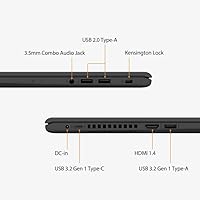
  • Ports: Connectivity includes one USB-C 3.2 Gen 1, one USB-A 3.2 Gen 1, two USB-A 2.0, one HDMI, and one 3.5mm headphone/microphone combo jack.
  • Wireless: Wi-Fi 802.11a/b/g/n/ac (Wi-Fi 5) with integrated Bluetooth for wireless peripherals and accessories.
  • Webcam: Built-in webcam suitable for video calls and conferencing; specific resolution is not disclosed in the product listing.
  • Keyboard: Full-size keyboard layout that includes a dedicated numeric keypad, useful for data entry and spreadsheet-heavy workflows.
  • Battery: Single Lithium-Ion battery pack; exact capacity in watt-hours is not published for this configuration, which is worth verifying before purchase.
  • Weight: 5.4 pounds, making it portable enough for daily commutes but heavier than most ultrabooks or thin-and-light alternatives.
  • Dimensions: Measures 14.17 x 9.25 x 0.78 inches, offering a slim profile that fits comfortably in most standard laptop sleeves and backpacks.
  • Chassis Material: Plastic body construction finished in black, which keeps weight manageable but does not match the premium feel of aluminum-bodied competitors.
  • Audio: 3.5mm combo headphone and microphone jack supports both headsets and separate audio devices from a single port.
  • Optical Drive: No optical drive is included, consistent with modern thin-profile laptop design; external USB drives can be used if needed.
  • Color: Available in black; no additional color variants are listed for this specific configuration.

Related Reviews
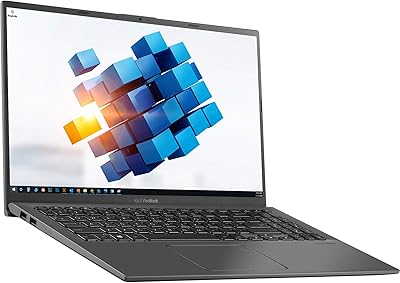
ASUS Vivobook Go 15 E1504FA
72%
88%
Value for Money
83%
Build Quality
74%
Performance
61%
Display Quality
69%
Battery Life
More
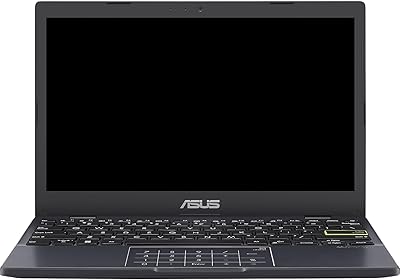
ASUS VivoBook 15.6″ Touchscreen Laptop
70%
74%
Everyday Performance
66%
Display Quality
82%
Touchscreen Responsiveness
88%
SSD Boot and Load Speed
47%
Battery Life
More
ASUS Vivobook L210 11.6-inch Laptop

70%
91%
Portability & Weight
87%
Battery Life
48%
Performance
73%
Value for Money
56%
Display Quality
More
HP 15.6-inch Laptop 15-ef0021nr, Ryzen 3 3200U, 8GB RAM, 256GB SSD

82%
92%
Value for Money
85%
Performance
83%
Build Quality
89%
Portability
81%
Battery Life
More
Dell Inspiron 3593 15.6-inch Laptop
68%
74%
Everyday Performance
81%
SSD Speed & Storage
52%
Display Quality
63%
Battery Life
57%
Build Quality
More
ASUS Vivobook S 15 Laptop
82%
93%
Display Quality
88%
Performance
91%
Portability
75%
Battery Life
85%
Build Quality
More
Liokesa 15.6-Inch Laptop Backpack
86%
89%
Value for Money
87%
Comfort and Ergonomics
84%
Durability and Build Quality
92%
Storage and Organization
90%
Water Resistance
More
Bluboon 15.6 Inch Laptop Backpack
84%
89%
Organization & Storage
84%
Comfort & Ergonomics
90%
Portability & Weight
78%
USB Charging Port Convenience
85%
Laptop Protection
More
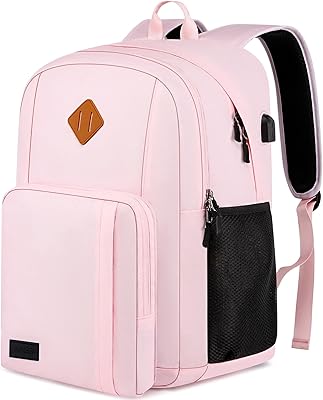
Vonxury 16L Water-Resistant Laptop Backpack
79%
93%
Value for Money
91%
Organization Layout
88%
Laptop Protection
89%
Weight & Portability
74%
Water Resistance
More
Laptop Backpack 15.6 Inch Beige Khaki
85%
91%
Value for Money
88%
Comfort & Ergonomics
85%
Durability
80%
Design & Aesthetics
84%
Anti-Theft Features
More

FAQ

For most college workloads — documents, spreadsheets, research, video calls, and streaming — this VivoBook handles things well. The 20GB of RAM means you can have a lot of tabs and apps open at once without slowdowns. The one thing to plan around is battery life, which has been a concern for some users, so having access to an outlet during longer study sessions is a good idea.

Casual and older games run reasonably well thanks to the Intel Iris Xe graphics, which is noticeably better than older Intel UHD integrated chips. That said, do not expect to run modern AAA titles at decent settings — there is no discrete GPU here. Games like Minecraft, older indie titles, or low-demand strategy games should be fine.

This is genuinely one of the unknowns with this machine — the battery capacity in watt-hours is not published for this configuration. Based on buyer feedback, real-world endurance tends to be on the shorter side for a laptop this size, with many users getting through half a workday before needing a charge. If all-day unplugged use is a priority, it is worth factoring that in.

No, Microsoft Office is not included. The laptop ships with Windows 11 Home, but Office requires a separate purchase or a Microsoft 365 subscription. You can also use the free web-based version of Office through a browser if you want to avoid the subscription cost.

Yes, the HDMI port makes this straightforward. You can connect to any HDMI-compatible monitor or TV and use it as a second screen or mirror the display. It is a full-size HDMI port, so no adapter is needed for standard cables.

ASUS VivoBook models vary in upgradeability, and this specific configuration does not provide official documentation on accessible slots. In many VivoBook 15 units, one RAM slot is soldered and one is accessible, but opening the chassis typically voids the warranty. If expandability matters to you, it is worth confirming with ASUS support before purchasing.

For indoor use in a reasonably lit room, the 1080p IPS panel looks clean and sharp — text is crisp and colors are decent for the price. The main limitation is brightness; in a sunny room or near a window, the screen can look a bit washed out. It is comfortable for office work and media, but not ideal for outdoor use.

Keyboard backlighting is not confirmed in the official product listing for this configuration. Some VivoBook variants include it and others do not, so if a backlit keyboard is important to you, verify directly with the seller or ASUS before ordering.

Light editing work — trimming clips, basic color correction, simple design layouts — is manageable. The 20GB of RAM helps keep editing software from choking, but the lack of a discrete GPU will slow down any rendering or export work significantly. For serious video or design workflows, a laptop with a dedicated graphics card would be a much better fit.

The listing notes a GM accessory bundle is included alongside the laptop, though the exact contents of that bundle are not fully detailed. You can typically expect a power adapter and basic documentation. It is worth checking the seller listing or contacting support to confirm exactly what accessories ship with your order.