Overview

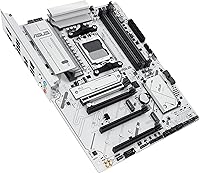
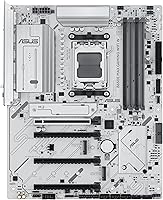
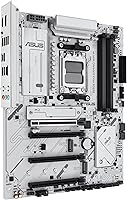
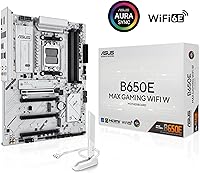
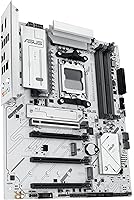
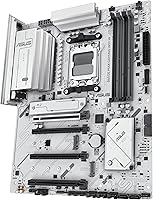
The ASUS B650E MAX Gaming WiFi W is ASUS's answer to a question a lot of mid-range AMD builders have been asking: can you get a genuinely good-looking white motherboard without compromising on connectivity or paying X670E prices? Launched in early 2025, it sits in ASUS's MAX lineup — a family designed to offer strong feature density at a more approachable price point. The white PCB is a deliberate choice, not an afterthought. It's clean, consistent, and pairs naturally with white cases and coolers. As an AM5 board, it supports Ryzen 7000, 8000, and 9000 series processors, giving it reasonable longevity in a platform AMD has committed to for several years.
Features & Benefits

What this white B650E board gets right is that the spec list actually translates to real-world convenience. The PCIe 5.0 x16 slot means current high-end GPUs run without a bottleneck, and one of the three M.2 slots is also Gen 5 — useful if you want top-tier SSD speeds down the line. Wi-Fi 6E handles wireless at speeds most routers are just beginning to support, and the 2.5Gb Ethernet gives wired users a real bump over standard gigabit. There are three ARGB headers for lighting control, and BIOS FlashBack lets you update firmware before ever installing a CPU — a genuinely useful feature for anyone building from scratch.

Best For

The B650E MAX is a natural fit for anyone assembling a white-themed build — the consistent PCB and ARGB headers make lighting coordination far less painful than it is with most dark-colored boards. Ryzen users who want a capable AM5 platform without stepping up to X670E pricing should take a close look; the performance ceiling is more than enough for gaming, content creation, and general productivity. First-time builders especially benefit from the pre-mounted I/O shield and Q-LED diagnostic lights, which can save real time during a troublesome POST. If you've been avoiding wireless due to adapter hassles, the onboard Wi-Fi 6E removes that friction entirely.

User Feedback

Across its 864 ratings, this ASUS MAX motherboard holds a 4.2-star average — solid, but with a spread that reflects some legitimate frustrations alongside genuine enthusiasm. Most praise clusters around aesthetics: buyers consistently describe the white PCB quality as better than expected, holding its own next to premium components without looking cheap. The more critical feedback points to occasional BIOS quirks, with some users needing a couple of firmware updates before RAM runs at rated speeds, plus a handful of packaging complaints. Compared to competing white boards from MSI and Gigabyte, reviewers generally favor this board's feature set, though a few note it doesn't lead the pack in VRM thermals under sustained heavy loads.

Pros

  • The white PCB is genuinely clean and consistent, not an afterthought coating.
  • PCIe 5.0 on both the x16 slot and one M.2 slot provides meaningful future-proofing.
  • Wi-Fi 6E is built-in, eliminating the need for a separate wireless adapter.
  • BIOS FlashBack lets you update firmware before installing any CPU or RAM.
  • Pre-mounted I/O shield and Q-LED diagnostics make first builds significantly less stressful.
  • 2.5Gb Ethernet offers a real upgrade over standard gigabit for NAS users and heavy file transfers.
  • Three ARGB Gen 2 headers give plenty of flexibility for complex lighting setups.
  • Rear 10Gbps Type-C and front USB-C header cover both legacy and modern peripheral needs.
  • The B650E MAX holds competitive feature density at a price well below X670E alternatives.
  • Supports the full current AMD Ryzen AM5 stack, including the latest 9000 series.

Cons

  • VRM thermals climb quickly under sustained Ryzen 9 all-core loads in restricted airflow cases.
  • DDR5 kits above 6400 MHz frequently require manual timing adjustments to stabilize.
  • Aura Sync and AI Suite software are widely criticized for being bloated and resource-heavy.
  • Memory XMP profiles sometimes need a BIOS update to run at advertised speeds out of the box.
  • No Thunderbolt support limits connectivity for professional peripheral users.
  • A subset of buyers reported minor cosmetic damage or bent capacitors on arrival.
  • The second M.2 slot runs noticeably hotter than the primary under simultaneous workloads.
  • BIOS submenus for AI tuning features are not intuitive without prior ASUS experience.
  • Rear USB-A port count feels lean when connecting multiple peripherals without a hub.
  • The white aesthetic carries a price premium that does not add functional value for all buyers.

Ratings

Our AI-generated scores for the ASUS B650E MAX Gaming WiFi W were produced by systematically analyzing verified global buyer reviews, actively filtering out incentivized, duplicate, and bot-driven submissions to reflect genuine owner experience. The result is a transparent picture of where this board genuinely delivers and where real frustrations surfaced. Both the strengths and the recurring pain points are weighted fairly in every category below.
Aesthetic Design & PCB Quality
91%
The white PCB is consistently praised as one of the cleanest-looking boards in this price range, with buyers noting it holds its color well even next to premium white components like white GPU shrouds and bright coolers. The surface finish looks intentional rather than painted-over, which matters when you have a windowed case.
A small number of buyers noted minor inconsistencies in white tone between the PCB and the installed heatsink covers, which can look slightly off under certain RGB lighting angles. It is a minor gripe, but noticeable in a build where color matching is the whole point.
Connectivity & I/O
88%
Buyers who upgraded from older boards were notably impressed by the rear panel, particularly the 10Gbps Type-C port and the front-panel USB-C header, which made connecting newer peripherals and cases straightforward without adapters. The 2.5Gb Ethernet also got real praise from users who transferred large files or ran local NAS setups.
A recurring complaint is the absence of Thunderbolt support, which a segment of creative professionals found limiting. Some users also wished for more rear USB-A ports, especially when connecting multiple peripherals without a hub.
Wi-Fi Performance
84%
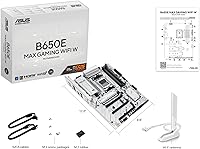
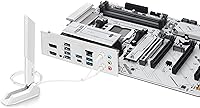
Wi-Fi 6E connectivity performed reliably for the majority of buyers, with several noting stable 5 GHz and 6 GHz connections during long gaming sessions and video calls. The included Q-Antenna made setup straightforward without needing to route cables awkwardly inside a case.
A handful of users in dense apartment environments reported occasional signal drops, though this appeared linked to router firmware rather than the board itself. Wi-Fi range at the fringes of a larger home was described as average rather than standout.
BIOS Experience & FlashBack
76%
24%
BIOS FlashBack received genuine appreciation from builders who updated firmware before installing any CPU, removing a common frustration for first-time AM5 adopters. The BIOS interface itself was described as clean and well-organized compared to previous ASUS generations.
Multiple buyers reported needing at least one or two BIOS updates before DDR5 memory ran at rated XMP speeds, which adds friction to an otherwise smooth build process. A few users found the AI-tuning features buried in submenus and not particularly intuitive without prior ASUS BIOS experience.
VRM & Power Delivery
73%
27%
For mainstream gaming workloads with Ryzen 7000 and 8000 series CPUs, the 8+2+1 phase power design kept things stable without any reported throttling under normal conditions. Casual overclockers running mild PBO adjustments reported consistent results.
Users pushing high-core-count Ryzen 9 chips with aggressive all-core loads noted that VRM temperatures climbed faster than expected, particularly in cases with limited airflow. This board sits firmly in mid-range territory on power delivery and is not ideal for enthusiast-level sustained workloads.
DDR5 Memory Compatibility
71%
29%
Most buyers running standard 6000 MHz DDR5 kits from established brands achieved stable operation after a BIOS update, and the board handled dual-channel configurations without issues during everyday use.
Higher-speed DDR5 kits above 6400 MHz caused instability for a notable portion of users, requiring manual timings or a downgrade in XMP profile. Compatibility with lesser-known memory brands was described as hit-or-miss without consulting the QVL.
PCIe 5.0 Readiness
86%
Having both a PCIe 5.0 x16 slot and a Gen 5 M.2 slot puts this board ahead of most B650 non-E alternatives, and buyers appreciated that they are not artificially limited if they upgrade to a faster GPU or SSD down the line. It is one of the genuine differentiators of the E-variant chipset at this price.
In practical day-to-day use with current hardware, the Gen 5 slot offers no immediate benefit over Gen 4, so some buyers questioned whether the premium over a standard B650 board was justified for their current needs.
Thermal Management
78%
22%
The M.2 heatsinks kept NVMe drives cool during sustained read and write operations, and several buyers doing video editing workflows reported no thermal throttling from storage. The VRM heatsink coverage is reasonable for the target use case.
The PCH heatsink runs noticeably warm in smaller cases, and one recurring thread among reviewers involved M.2 slot 2 running hotter than the primary slot under simultaneous load. Adding a case fan or improving airflow near the board helped, but should not be necessary.
Build & Installation Experience
89%
The pre-mounted I/O shield alone drew repeated positive comments from first-time builders and veterans alike — it is a small detail that removes a surprisingly common frustration. Q-LED diagnostic lights helped multiple buyers quickly identify RAM seating or CPU power connector issues during POST.
The manual was described as adequate but not thorough enough for complete beginners, particularly around fan header configuration and ARGB setup. A couple of buyers also found the M.2 retention screws fiddly during installation.
ARGB & Aura Sync Integration
82%
18%
Three ARGB Gen 2 headers give builders real flexibility for lighting ecosystems, and Aura Sync integration worked reliably for buyers already within the ASUS peripheral family. The onboard lighting effects were described as vibrant and consistent.
Buyers using non-ASUS ARGB components reported occasional sync hiccups through Aura Sync software, which has a long-standing reputation for being bloated. A cleaner or lighter software solution would improve the experience meaningfully.
Value for Money
83%
At its price point, the combination of PCIe 5.0, Wi-Fi 6E, 2.5Gb LAN, and a premium white aesthetic is difficult to match from competing brands. Buyers coming from B550 platforms specifically commented that the feature jump felt substantial.
When compared directly to some dark-colored B650E alternatives, buyers who do not care about the white aesthetic found they could get slightly better VRM configurations for the same or less money. The aesthetic premium is real, and not everyone feels it is worth it.
Software & Utilities
62%
38%
AI Suite and Fan Xpert 2+ gave users a reasonable starting point for fan curve tuning, and most found the fan header layout accommodating for both PWM and DC fans without issues.
Aura Sync and AI Suite together attracted consistent criticism for being sluggish, occasionally conflicting, and adding unnecessary background processes. Several users recommended disabling or uninstalling most ASUS software and managing settings directly through BIOS instead.
Packaging & Out-of-Box Condition
74%
26%
The majority of buyers received their boards in good condition with all accessories accounted for, and the box presentation matched the premium feel of the product inside.
A recurring cluster of complaints described boards arriving with minor cosmetic scuffs or bent capacitors near the edges, suggesting the inner packaging could be more protective during transit. These appear to be a minority of shipments but are mentioned frequently enough to flag.

Suitable for:

The ASUS B650E MAX Gaming WiFi W is purpose-built for builders who want a cohesive white or monochrome aesthetic without sacrificing real-world functionality. If you are assembling a Ryzen 7000, 8000, or 9000 series system inside a white case and want the motherboard to actually match — not just approximate — this board delivers that consistency better than most alternatives at the price. It also suits AMD users who want a foot in the PCIe 5.0 door without committing to X670E-tier spending, particularly if a Gen 5 SSD upgrade is somewhere in the future roadmap. First-time builders will appreciate the pre-mounted I/O shield and Q-LED diagnostics, both of which reduce the guesswork during initial POST troubleshooting. Gamers and hybrid creator-gamer setups benefit from the Wi-Fi 6E, 2.5Gb Ethernet, and solid USB layout working in concert, removing the need for aftermarket add-in cards. Anyone already invested in the ASUS peripheral ecosystem — keyboards, mice, coolers — will find Aura Sync integration straightforward and visually rewarding.
Not suitable for:

The ASUS B650E MAX Gaming WiFi W is not the right pick for everyone, and it is worth being clear about where it falls short. Builders running high-core-count Ryzen 9 processors under sustained all-core workloads — rendering, heavy compilation, or similar — will likely find the VRM power delivery underpowered compared to premium B650E or X670E boards, particularly in cases with limited airflow. Enthusiasts chasing extreme DDR5 overclocks above 6400 MHz should expect compatibility friction and potentially manual tuning, as the board does not always play nicely with aggressive kits out of the box. If the white aesthetic is irrelevant to you, there are darker-colored B650E alternatives that offer better VRM configurations for comparable or lower pricing. Buyers who depend on Thunderbolt connectivity for professional peripherals or high-bandwidth docks will find that gap a genuine obstacle. Anyone allergic to ASUS's software ecosystem — particularly Aura Sync and AI Suite — should know that the out-of-box experience leans on these utilities, and removing them requires some deliberate effort.
Specifications

  • Chipset: Built on the AMD B650E chipset, which enables PCIe 5.0 on both the primary x16 slot and the top M.2 slot.
  • CPU Socket: Uses AMD Socket AM5, compatible with Ryzen 7000, 8000, and 9000 series desktop processors.
  • Form Factor: Standard ATX form factor measuring 14.02 x 10.79 inches, fitting full-size and mid-tower ATX cases.
  • Memory Support: Supports DDR5 RAM across four DIMM slots with a base speed of 4000 MHz and XMP profile support for higher-speed kits.
  • PCIe Slots: Includes one PCIe 5.0 x16 slot for the primary GPU, two PCIe 4.0 x1 slots, and one PCIe 4.0 x16 slot running at x4 bandwidth.
  • M.2 Storage: Provides three M.2 slots: one PCIe 5.0 x4, one PCIe 4.0 x4, and one PCIe 4.0 x4, all supporting 2280 form factor drives.
  • Wireless: Integrated Wi-Fi 6E (802.11ax) supports the 2.4 GHz, 5 GHz, and 6 GHz bands with Bluetooth 5.3 included.
  • Ethernet: Realtek 2.5 Gigabit LAN provides wired network speeds up to 2.5 Gbps for low-latency, high-bandwidth connections.
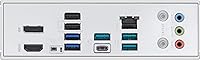
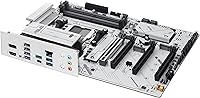
  • Rear USB: Rear I/O includes USB 10Gbps Type-A and Type-C ports alongside USB 2.0 and USB 5Gbps Type-A ports for broad peripheral compatibility.
  • Front USB: Onboard front-panel headers include one USB 5Gbps Type-C connector and two USB 3.2 Gen 1 headers.
  • Power Design: Features an 8+2+1 phase power delivery system using alloy chokes and durable capacitors for stable CPU voltage under load.
  • PCB Color: White PCB with matching white heatsink covers designed specifically for white or monochrome themed PC builds.
  • ARGB Headers: Includes three Addressable RGB Gen 2 headers compatible with ASUS Aura Sync for synchronized lighting across supported components.
  • Display Output: Offers one DisplayPort 1.4 and one HDMI 2.1 port on the rear I/O for use with integrated graphics on supported Ryzen APUs.
  • BIOS FlashBack: Dedicated BIOS FlashBack button allows firmware updates using only a USB drive and power connection, without a CPU or RAM installed.
  • Fan Headers: Provides multiple hybrid fan headers configurable for both PWM and DC fans, managed through the Fan Xpert 2+ utility or BIOS.
  • Audio: Onboard audio is powered by a Realtek codec delivering multi-channel output with dedicated front-panel audio header support.
  • Weight: The board weighs 3.61 pounds, typical for a fully featured ATX motherboard with heatsink coverage across VRM, M.2, and PCH zones.

Related Reviews

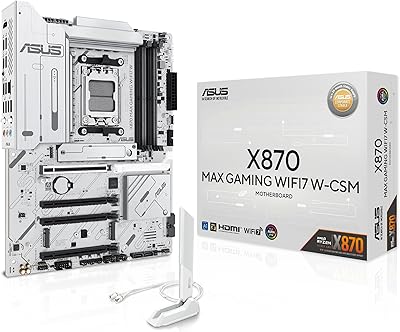
ASUS X870 MAX GAMING WIFI7 W Motherboard
88%
93%
Performance Under Load
95%
Power Delivery and Stability
91%
Cooling Efficiency
88%
Future-Proofing (PCIe 5.0, Wi-Fi 7)
87%
Setup and Installation
More
ASUS ROG Strix B650E-I Gaming WiFi Motherboard
87%
93%
Performance
88%
Cooling Efficiency
90%
Installation Ease
91%
Connectivity (WiFi 6E, LAN)
85%
Build Quality
More
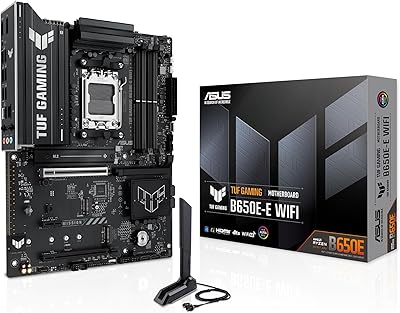
ASUS TUF GAMING B650E-E WIFI Motherboard
87%
88%
Performance with High-End CPUs
91%
Stability during Intensive Use
94%
Ease of Installation
90%
Power Delivery and Stability
85%
Cooling Efficiency
More
ASUS ROG Strix B650E-F Gaming WiFi Motherboard
85%
88%
Performance Under Load
91%
Ease of Setup
92%
WiFi and Networking
85%
Power Delivery Stability
78%
Cooling Requirements
More
ASUS ROG STRIX Z890-A GAMING WIFI
91%
96%
Performance Stability
94%
Overclocking Capability
92%
Thermal Management
90%
Build Quality
88%
Ease of Installation
More
ASUS TUF Gaming A520M-PLUS (WiFi) Motherboard
85%
86%
Overall Performance
89%
Gaming Performance
88%
Build Quality
82%
Wi-Fi Stability
85%
Cooling Efficiency
More
ASUS ROG Strix Z890-E Gaming WiFi
87%
92%
Performance
88%
Build Quality
84%
Ease of Installation
91%
Cooling Efficiency
89%
Connectivity Options
More
ASUS ROG Strix B850-I Gaming WiFi Motherboard
87%
94%
Performance Under Load
88%
WiFi 7 Reliability
91%
Build Quality
93%
Power Delivery System
85%
Setup & Installation Ease
More
ASUS ROG Strix B850-A Gaming WiFi Motherboard
88%
94%
Performance
88%
WiFi Connectivity
91%
Thermal Efficiency
89%
Build Quality
92%
Power Delivery
More
ASUS TUF Gaming B850M-PLUS WiFi Motherboard
85%
91%
Performance
94%
Power Delivery
89%
Connectivity
85%
Storage Options
90%
Ease of Installation
More

FAQ

It depends on when the board was manufactured. Many units ship with a BIOS version that already supports 7000 series CPUs, but if you get an older stock unit, you may need to use BIOS FlashBack to update firmware before the system will POST. Grab the latest BIOS from ASUS's support page, put it on a USB drive, and the FlashBack button on the rear I/O handles the rest without needing a CPU installed.

Most popular 6000 MHz DDR5 kits from brands like G.Skill, Corsair, and Kingston will run at rated speed via XMP after a BIOS update. It is worth checking the QVL list on ASUS's product page for your specific kit before purchasing. Kits from lesser-known brands or those rated above 6400 MHz can be more finicky and may require manual timing adjustments.

The PCB and heatsink covers are a cohesive white, and most builders find the match very close. Under neutral or white lighting, the board looks clean and well-coordinated. Under heavily colored RGB, there can be subtle tone differences between the PCB surface and the plastic heatsink pieces, but nothing that stands out dramatically in a finished build.

Technically yes, the ASUS B650E MAX Gaming WiFi W supports 9000 series processors including the 9950X. That said, the 8+2+1 phase power design is on the lighter side for sustained all-core loads from a 16-core chip. For occasional editing bursts it will handle it fine, but if you are running prolonged rendering jobs regularly, a board with heavier VRM coverage would serve that workload better long-term.
There are three Addressable RGB Gen 2 headers onboard, so you can run up to three independent ARGB devices — fans, strips, or coolers — directly from the board. You can expand further using an ARGB hub connected to a single header if your build requires more channels.

Wi-Fi is built in. The board includes Wi-Fi 6E with a Q-Antenna connector on the rear I/O, so you just attach the included antenna and you are connected. No PCIe Wi-Fi card needed.

Any case that supports a standard ATX motherboard will fit this board. That includes most mid-tower and full-tower cases. Just confirm your case has ATX support listed in its specs — micro-ATX or Mini-ITX cases will not accommodate it.

It is genuinely straightforward. Download the latest BIOS file from ASUS, rename it as instructed in the manual, copy it to a USB drive, plug it into the designated FlashBack USB port on the rear I/O, hold the button for three seconds, and wait for the LED to stop blinking. Most builders complete it in under ten minutes with no prior experience.

Yes, the top two M.2 slots are both full PCIe 4.0 x4 or better and operate independently, so two SSDs running simultaneously will not throttle each other. The third slot shares bandwidth with other PCIe lanes in certain configurations, so if maximum simultaneous throughput matters, stick to the top two slots for your primary drives.

You can manage fan curves entirely through the BIOS under the Fan Xpert section, which many users prefer over the desktop software. RGB lighting effects can also be set to a static color or pattern through BIOS so they persist without any software running. If you want dynamic sync across multiple ASUS peripherals, Aura Sync software is needed, but it is entirely optional.