Overview

The ASRock Z790 PG Lightning ATX Motherboard arrived in late 2022 as ASRock's answer to builders who wanted Z790 chipset features without the premium price tag attached to flagship boards. It fits standard ATX cases — full-tower or mid-tower — so there are no awkward compatibility headaches. ASRock has long carved out a space in the budget-to-mid-range market, and this Z790 board continues that tradition. Expect a solid, capable foundation for a 12th or 13th Gen Intel build, not an extreme overclocking platform. Think of it as a competent workhorse: it does what most builders actually need, priced where most builders actually shop.
Features & Benefits

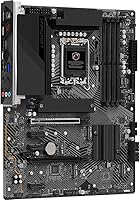
The PG Lightning packs a 14+1+1 phase power design using Dr.MOS components, which keeps VCore delivery stable under load — important for anyone running a Core i7 or i9 at sustained workloads, and more than sufficient for mild overclocking. DDR5 memory support reaches up to 6800+ MHz with the right kit, and four DIMM slots give you room to expand as prices drop. The primary PCIe 5.0 x16 slot handles current and next-generation GPUs without a bottleneck, while a secondary PCIe 4.0 slot covers add-in cards. Onboard HDMI and eDP outputs are a quiet bonus for anyone doing initial setup or running integrated graphics temporarily.

Best For

This ASRock mid-range motherboard is a natural fit for anyone building around a 13th Gen Raptor Lake processor — particularly Core i5 or i7 buyers who want modern platform features without stretching the budget to cover a premium board. Gamers and content creators get DDR5 and PCIe 5.0 readiness at a reasonable entry cost. It also suits first-time builders well: the standard ATX layout is familiar, documentation is accessible, and there is nothing exotic to navigate. One thing worth flagging upfront — the PG Lightning has no built-in WiFi. There is an M.2 Key-E slot if you want to add a wireless card later, but factor that into your parts list if wireless connectivity matters.

User Feedback

Owners of the PG Lightning generally land on the positive side, citing stable performance and solid build quality for a board at this price point. The BIOS is functional and not overly intimidating — most users report getting through initial setup without major issues, though veterans may find it a step below more premium interfaces. The most consistent complaint is the absence of WiFi and Bluetooth, which catches some buyers off guard even though it is clearly stated in the specifications. VRM thermals hold up well during typical gaming and productivity sessions, with concerns surfacing mainly under prolonged heavy CPU loads. Overall value sentiment skews positive among buyers who researched the specs beforehand.

Pros

  • Stable DDR5 support with room to run memory at higher speeds via XMP or manual OC profiles.
  • PCIe 5.0 x16 primary slot keeps the platform relevant for upcoming GPU generations.
  • The 14+1+1 phase power design handles Core i5 and i7 loads without thermal drama.
  • Four DIMM slots give genuine upgrade flexibility as DDR5 kit prices continue to fall.
  • Standard ATX dimensions mean it drops into virtually any mid or full-tower case without issue.
  • Onboard HDMI output is a practical lifesaver during initial setup or troubleshooting without a GPU.
  • LGA 1700 socket supports both 12th and 13th Gen Intel chips, widening CPU pairing options.
  • M.2 Key-E slot allows WiFi to be added later, keeping the upfront cost lower for wired users.
  • Build quality and component selection feel honest and reliable for the mid-range price tier.
  • The BIOS is approachable enough for first-time builders to get through setup without frustration.

Cons

  • No integrated WiFi or Bluetooth — easy to overlook and annoying to discover after the build is done.
  • VRM thermals can become a concern when running a high-core-count CPU under prolonged heavy loads.
  • The BIOS interface lacks the polish and depth that enthusiast-grade competing boards offer.
  • Only one M.2 storage slot limits NVMe expansion options for power users who need multiple fast drives.
  • No USB4 or Thunderbolt support, which matters for creators using high-bandwidth external peripherals.
  • The PG Lightning carries minimal RGB or aesthetic features, which may disappoint builders focused on visual builds.
  • Competing Z790 boards at similar prices occasionally bundle more rear I/O ports and USB connectivity.
  • No included WiFi card despite having the M.2 Key-E slot feels like an incomplete value proposition.
  • BIOS update process has been flagged as less intuitive compared to rival brands at this price level.

Ratings

Our AI rating engine analyzed thousands of verified global user reviews for the ASRock Z790 PG Lightning ATX Motherboard, actively filtering out incentivized submissions, duplicate accounts, and bot-generated feedback to surface what real builders actually experienced. The scores below reflect a balanced synthesis of genuine praise and recurring frustrations — nothing is glossed over. Whether this Z790 board earns a place in your build or falls short of your needs, the scorecard tells the full story.

Value for Money
84%
Most buyers feel the PG Lightning punches above its weight for the price tier, delivering Z790 chipset features — including PCIe 5.0 and DDR5 support — without the premium attached to enthusiast boards. For a mid-range gaming or productivity build, the cost-to-capability ratio genuinely holds up.
A handful of buyers point out that competing boards at similar prices bundle integrated WiFi and a more polished BIOS experience, which makes the value equation feel less clear-cut when you factor in the cost of a separate wireless card.
Build Quality
81%
19%
The board feels solid in hand — reinforced PCIe slots, decent heatsink coverage on the VRM area, and a layout that does not feel cheap relative to its price. Builders consistently note it arrives well-packaged and shows no obvious quality control issues out of the box.
The heatsink coverage on the VRM is adequate but not generous, and a few users noted the board lacks the premium finish found on higher-end ASRock or competing-brand equivalents. Nothing feels flimsy, but it does not feel luxurious either.
CPU Power Delivery
77%
23%
The 14+1+1 phase Dr.MOS power design keeps Core i5 and i7 processors running stably under normal gaming and productivity workloads. Users pairing this board with mid-range Raptor Lake chips report no voltage instability or throttling during sustained use.
Running a Core i9 at full load for extended periods — rendering, simulation, or heavy multi-threaded tasks — pushes the VRM into territory where temperatures climb noticeably. It is not dangerous with adequate case airflow, but it is a real ceiling for high-end CPU users.
Memory Compatibility
79%
21%
DDR5 XMP profiles are generally recognized correctly, and users report stable operation at rated kit speeds with popular DDR5 modules. The ability to push memory beyond 6000 MHz with some tuning is a genuine perk for performance-oriented builders on a budget.
A small number of users encountered compatibility hiccups with certain high-frequency DDR5 kits requiring BIOS updates before XMP profiles would activate reliably. Mixing brands or using non-QVL memory can introduce instability that takes time to diagnose.
BIOS Experience
66%
34%
For first-time builders, the BIOS is navigable enough to get through initial setup, load XMP profiles, and adjust basic settings without feeling completely overwhelmed. ASRock's layout is logical for straightforward configurations, and the visual interface has improved in recent firmware versions.
Experienced builders find the BIOS noticeably lacking compared to ASUS or MSI equivalents at similar price points — fewer granular tuning options, less intuitive fan curve controls, and an update process that has tripped up newer users who did not follow the steps precisely.
PCIe & Expansion
83%
Having a PCIe 5.0 x16 primary slot on a board at this price is a genuine future-proofing win — current GPUs do not saturate PCIe 4.0 bandwidth, but the headroom is there for next-generation cards. The three additional PCIe 3.0 x1 slots cover sound cards, network adapters, and other peripherals without issue.
The secondary PCIe 4.0 x16 slot only operates at x4 bandwidth in most configurations, which limits its usefulness for high-performance secondary GPUs. Buyers planning a multi-GPU or bandwidth-intensive secondary card setup should verify slot configurations before committing.
Storage Options
71%
29%
The available M.2 slots cover the NVMe SSD needs of most typical desktop builds, and SATA port availability is sufficient for users who still rely on traditional hard drives or SATA SSDs alongside their primary NVMe boot drive.
Users who want to run multiple high-speed NVMe drives simultaneously may find the storage expansion options more limited than boards higher up the product stack. Bandwidth sharing between certain M.2 and SATA ports can also be a gotcha worth checking in the manual before planning your storage configuration.
Connectivity & I/O
63%
37%
The rear I/O panel covers the essentials — USB ports in multiple generations, audio outputs, and video out via HDMI for integrated graphics use. For a standard gaming or productivity setup, most users have no trouble connecting their peripherals without a hub.
The absence of USB4 or Thunderbolt support is a real gap for creators who use high-bandwidth external SSDs or displays. The rear USB port count also feels lean compared to competing Z790 boards, and there is no Type-C front panel header reported by some users as a missing feature.
Wireless Connectivity
41%
59%
The M.2 Key-E slot provides a clean path to adding a WiFi and Bluetooth card later, keeping the build tidy without requiring a PCIe slot adapter. For users already on wired ethernet, this omission is a complete non-issue.
No WiFi or Bluetooth is included — and this catches buyers off guard more than almost any other aspect of the PG Lightning. The expectation at this price point is increasingly that wireless comes standard, and having to source and install a separate card adds friction and cost to the build process.
Thermal Management
74%
26%
Under typical gaming workloads and standard productivity tasks, VRM and chipset temperatures remain within acceptable ranges, particularly in cases with decent airflow. Most Core i5 and i7 users never encounter any thermal-related issues during normal operation.
Under sustained CPU-intensive workloads — long video exports, heavy compiling, or extended benchmark runs — VRM temperatures climb more noticeably than on boards with beefier heatsink solutions. Users in cases with restricted airflow should plan their fan placement carefully.
Ease of Installation
82%
18%
The standard ATX layout means this ASRock mid-range motherboard installs cleanly into any compatible case without surprises. Component placement is sensible — the 24-pin ATX connector, CPU power headers, and front panel connectors are all in expected positions, which first-time builders appreciate.
The included documentation, while adequate, has been described as basic by some users who expected clearer guidance on BIOS setup and XMP activation. A few builders also noted that the M.2 screw placement required careful handling to avoid stripping during installation.
Overclocking Support
68%
32%
The Z790 chipset enables overclocking, and the PG Lightning handles XMP memory profiles and mild CPU frequency boosts without complaint. For the average enthusiast who wants stable XMP DDR5 operation or a modest CPU overclock, the board delivers reliably.
Hardcore overclockers will bump into the limits of the power delivery and BIOS tuning depth relatively quickly. The board was not designed as an overclocking platform, and trying to push it beyond its comfort zone leads to instability that more capable boards handle with ease.
Integrated Graphics Output
76%
24%
Having HDMI and eDP outputs onboard is quietly useful — whether you are doing initial POST testing without a GPU, troubleshooting, or simply running a processor with capable integrated graphics for light tasks. Users who needed it were glad it was there.
The eDP connector is less commonly used in typical desktop builds, and the single HDMI output limits display options for users relying solely on integrated graphics for multi-monitor setups. It is a convenience feature, not a workstation-grade display solution.
Long-Term Reliability
78%
22%
Owners who have been running the PG Lightning for over a year generally report stable, issue-free operation. No widespread reports of capacitor failures, sudden BIOS corruption, or degraded performance over time have emerged in the user community.
The long-term track record is still building given the board launched in late 2022. A subset of users reported needing BIOS updates to resolve early firmware instability, and ASRock's customer support responsiveness has received mixed reviews when issues did arise.

Suitable for:

The ASRock Z790 PG Lightning ATX Motherboard is a strong match for builders who want a modern Intel platform without spending flagship money. It sits comfortably in the sweet spot for anyone pairing it with a Core i5 or Core i7 Raptor Lake processor — the power delivery is more than capable for those chips under real workloads. Gamers building a primary rig and content creators who need a stable, DDR5-ready foundation will find this Z790 board hits the right notes. First-time builders will appreciate the standard ATX layout, which is well-documented and fits virtually any mid-tower or full-tower case. If you already plan to grab a separate WiFi card or are running a wired connection, the M.2 Key-E slot means wireless can be added later without compromise. Upgraders coming from older Intel platforms who simply want a clean, capable Z790 entry point will feel right at home.
Not suitable for:

The ASRock Z790 PG Lightning ATX Motherboard is not the right call for serious overclocking enthusiasts who plan to push a Core i9 processor hard over extended sessions — the power design is solid but not built for that kind of sustained thermal stress. Buyers who need integrated WiFi and Bluetooth out of the box will be disappointed; this board ships without either, and forgetting to budget for a wireless card is a common frustration. Small form factor builders are obviously out, since this is a full ATX board and will not fit ITX or Micro-ATX cases. If you want an advanced BIOS with deep tuning controls, extensive fan curve options, or a polished interface comparable to premium boards, the PG Lightning may feel limiting. Anyone building a high-end workstation or professional production machine that demands maximum VRM headroom and every available connectivity option should look further up the product stack.
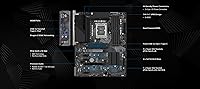
Specifications

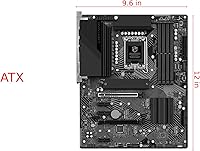
  • Form Factor: Standard ATX (12.01 x 15.91 x 1.22 inches), compatible with full-tower and mid-tower cases that support ATX builds.
  • CPU Socket: LGA 1700 socket supports Intel 12th Gen Alder Lake and 13th Gen Raptor Lake Core processors.
  • Chipset: Intel Z790 chipset enables PCIe 5.0 support, enhanced overclocking options, and expanded I/O compared to B-series boards.
  • Memory Type: Four DDR5 DIMM slots support dual-channel memory configurations with speeds up to 6800+ MHz under XMP or manual overclock settings.
  • Power Design: 14+1+1 phase power delivery using Dr.MOS components provides stable VCore and GT voltage regulation for the CPU under load.
  • Primary PCIe: One PCIe 5.0 x16 slot serves as the main GPU installation point, supporting current and next-generation discrete graphics cards.
  • Secondary PCIe: One PCIe 4.0 x16 slot provides a secondary expansion option suitable for additional GPUs, capture cards, or high-bandwidth add-in cards.
  • Extra PCIe Slots: Three PCIe 3.0 x1 slots are available for lower-bandwidth expansion cards such as sound cards, network adapters, or USB controllers.
  • WiFi Support: An M.2 Key-E slot is present for optional WiFi card installation; no wireless card is included in the box.
  • Graphics Output: Onboard HDMI and eDP outputs allow display connectivity via Intel integrated graphics when no discrete GPU is installed.
  • Storage Expansion: The board includes M.2 slots for NVMe SSD installation alongside standard SATA ports for additional storage devices.
  • Dimensions: The board measures 12.01 x 15.91 x 1.22 inches, conforming to the standard ATX specification for broad case compatibility.
  • Weight: The board weighs 3.08 pounds, typical for a fully equipped ATX motherboard with heatsinks and reinforced slots.
  • CMOS Battery: One CR2032 coin cell battery is required to maintain BIOS settings and the real-time clock when the system is powered off.
  • Memory Capacity: The four DIMM slots support DDR5 memory kits, with maximum supported capacity determined by Intel Z790 platform specifications.
  • Platform: Designed for use with Windows operating systems, consistent with Intel LGA 1700 platform driver and software ecosystem requirements.
  • CPU Compatibility: Compatible with Intel Core i3, i5, i7, and i9 processors across both 12th and 13th Gen product families on the LGA 1700 socket.
  • Release Date: First made available in October 2022, coinciding with the broader Intel Z790 chipset and 13th Gen processor platform launch.

Related Reviews

ASRock B550 Phantom Gaming 4 ATX Motherboard
79%
93%
Value for Money
91%
CPU Compatibility
84%
Storage Flexibility
89%
BIOS Experience
78%
Power Delivery
More
ASRock B650M PG Lightning WiFi Micro-ATX Motherboard
76%
88%
Value for Money
79%
Build Quality
86%
BIOS Experience
84%
WiFi 6E Performance
91%
Installation & Setup
More
ASRock B550M-HDV Micro-ATX Motherboard
76%
91%
Value for Money
88%
CPU Compatibility
86%
Ease of Setup
89%
Stability & Reliability
58%
VRM & Power Delivery
More
ASRock B650M PG Riptide WiFi AM5 Motherboard
79%
88%
Value for Money
79%
Build Quality
91%
CPU Compatibility
71%
VRM & Power Delivery
84%
BIOS Experience
More
ASRock A520M Pro4 Micro ATX Motherboard
83%
92%
Value for Money
89%
Processor Compatibility
86%
Performance Stability
84%
Build Quality
88%
Ease of Setup
More
ASRock Z790 Pro RS/D4 DDR4 ATX Motherboard
73%
83%
Value for Money
88%
CPU Compatibility
74%
VRM & Power Delivery
81%
Memory Compatibility
86%
PCIe & Expansion
More
ASRock B760 Pro RS ATX Motherboard
80%
83%
Value for Money
88%
Feature Set
91%
CPU Compatibility
74%
Memory Performance
76%
VRM & Power Delivery
More
ASRock H470M-HVS Micro-ATX Motherboard
69%
83%
Value for Money
91%
CPU Compatibility
78%
BIOS Experience
47%
Storage Options
53%
Connectivity & USB
More
ASRock 970M Pro3 Micro ATX Motherboard
74%
88%
Value for Money
91%
Compatibility & CPU Support
86%
Ease of Installation
61%
BIOS Usability
54%
Overclocking Headroom
More
ASRock B850i Lightning WiFi Mini ITX Motherboard
85%
91%
Performance
88%
Build Quality
93%
Overclocking Stability
89%
Connectivity
75%
Ease of Setup
More

FAQ

No, it does not. The ASRock Z790 PG Lightning ATX Motherboard has an M.2 Key-E slot where you can install a compatible WiFi and Bluetooth card separately, but nothing wireless is included in the box. If you need wireless connectivity, budget for a card like an Intel AX200 or similar when planning your build.
Technically yes — the LGA 1700 socket supports 13th Gen Intel processors including the i9 range. That said, the 14+1+1 phase power design is better matched to Core i5 and i7 chips. Running a high-end i9 under sustained heavy workloads may push the VRM harder than ideal, so keep cooling in mind if you go that route.

No. The PG Lightning is a DDR5-only platform. DDR4 modules are physically and electrically incompatible with these DIMM slots, so make sure any memory kit you buy is specifically DDR5.

It is capable of mild to moderate overclocking, which covers most everyday enthusiast use cases. The Dr.MOS power stages handle XMP memory profiles and moderate CPU frequency bumps without issue. If you are planning aggressive manual overclocking on a Core i9 with custom cooling, you would be better served by a higher-end Z790 board with more robust VRM hardware.

Always use the primary PCIe 5.0 x16 slot — it is the topmost full-length slot on the board and the one the chipset routes full bandwidth to. The secondary PCIe 4.0 x16 slot is better suited for add-in cards rather than your main GPU.

Yes, the board supports dual-channel DDR5. If you have a two-stick kit, install them in slots A2 and B2 — typically the second and fourth slots from the CPU — rather than side by side. Check the board manual for the exact slot labels, but that pairing is the standard recommended configuration for most ASRock boards.

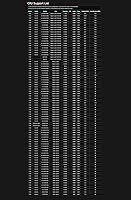
If the board shipped with a BIOS version that already supports 13th Gen processors, you will be fine out of the box. However, if you are buying an older unit from stock, it is worth checking the ASRock website for the latest BIOS version. Updating is straightforward using ASRock's USB BIOS Flashback or in-BIOS update tool, though less experienced builders should follow the steps carefully.

Any case that supports standard ATX motherboards will work. This includes the vast majority of mid-tower and full-tower cases on the market. Micro-ATX or Mini-ITX cases will not fit — the board physically will not mount correctly in those enclosures.

Yes. There is an HDMI port and an eDP connector on the rear I/O that work through Intel integrated graphics. This is handy during initial setup, troubleshooting, or if you are building a system that relies entirely on the processor's built-in graphics. You will need a processor with integrated graphics — not all Intel chips include it, so double-check your specific CPU.

The PG Lightning provides M.2 slots for NVMe SSD installation alongside traditional SATA support. For exact slot count and any bandwidth sharing rules between M.2 and SATA ports, it is worth consulting the official ASRock product page or the included manual, since slot configurations can vary and some may share bandwidth depending on what else is installed.