Overview

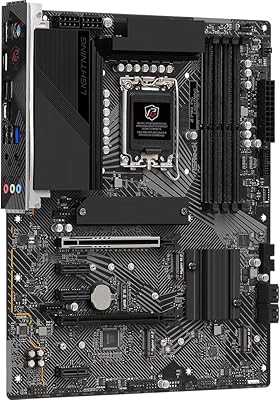
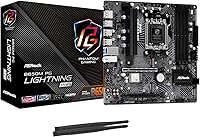
The ASRock B650M PG Lightning WiFi Micro-ATX Motherboard lands in a competitive spot where most builders are trying to get onto the AM5 platform without spending a fortune. The B650 chipset sits in a practical middle ground — you get modern connectivity and DDR5 support without paying the premium that X670 boards command. ASRock has quietly built a reputation for delivering reliable hardware at value-oriented prices, and this board fits that pattern. The Micro-ATX form factor keeps things compact while still leaving room for meaningful expansion, and the fact that WiFi 6E is included at this price point is genuinely worth noting — it is not a given on boards in this range.
Features & Benefits

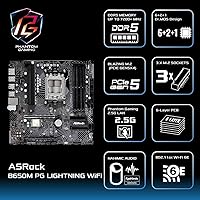
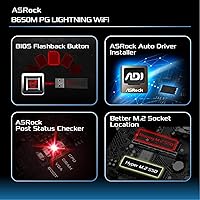
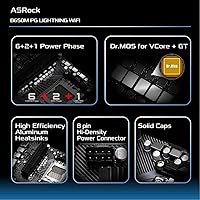
The PG Lightning WiFi packs a solid amount of practical value into its feature set. The PCIe Gen5 M.2 slot means your next high-speed NVMe drive will not be held back by the board — a real consideration if you plan to upgrade storage down the line. Four DDR5 slots with support up to 7200+ MHz gives you room to grow, though hitting those upper speeds requires compatible kits and some BIOS tuning. BIOS Flashback is a quietly useful addition: you can update firmware without a CPU installed, which takes real stress out of first-time AM5 builds. The 6+2+1 Dr.MOS power phases handle mid-range Ryzen chips comfortably under normal workloads.

Best For

This B650M board makes the most sense for builders stepping onto AM5 for the first time who want solid fundamentals without paying for features they will never use. If you are pairing a Ryzen 7000 or 9000 series chip with a mid-range GPU and need wireless out of the box, this delivers cleanly. Home office setups and compact gaming rigs both fit well here. That said, it is not the right pick for everyone — if you are planning serious CPU overclocking, you will want something with beefier VRM headroom. Anyone needing dual full-speed PCIe x16 slots for multi-GPU or high-bandwidth expansion cards will also hit the board's natural limits fairly quickly.

User Feedback

Owners of this ASRock micro-ATX build platform generally come away satisfied, particularly around the BIOS setup experience — most describe it as clean and approachable, even for first-time builders. The WiFi 6E connection gets consistent praise for real-world reliability. On the other side, some users report that RAM compatibility can be finicky, especially when pushing EXPO profiles on higher-speed kits, so checking the QVL list before buying is a sensible precaution. A smaller number of owners flag that the VRM runs warm under extended heavy CPU loads, worth monitoring in cases with limited airflow. Compared to similarly priced ASUS and MSI B650 options, most buyers feel the overall value trade-off lands in this board's favor.

Pros

  • Built-in WiFi 6E saves money and effort compared to buying a separate wireless adapter.
  • The PCIe Gen5 M.2 slot future-proofs your NVMe storage for upcoming high-speed drives.
  • BIOS Flashback makes firmware updates painless, even before a compatible CPU is installed.
  • Four DDR5 DIMM slots with support up to 256GB gives meaningful room for future memory upgrades.
  • The Micro-ATX form factor fits compact cases without sacrificing connectivity or expansion slots.
  • Dual display outputs (HDMI and DisplayPort) support integrated graphics and basic multi-monitor setups.
  • Dr.MOS power phases deliver stable, clean power delivery for mid-range Ryzen processors at stock speeds.
  • The BIOS interface is well-regarded among first-time builders for being approachable and clearly organized.
  • Three M.2 slots plus four SATA ports give serious flexibility for mixed storage configurations.
  • Nahimic audio processing adds real value for users who rely on onboard sound rather than a dedicated card.

Cons

  • VRM thermals can climb noticeably under sustained all-core CPU loads, especially in cases with poor airflow.
  • RAM compatibility with higher-speed EXPO profiles is inconsistent — checking the QVL list is not optional.
  • The second PCIe x16 slot runs at reduced bandwidth, limiting its usefulness for performance expansion cards.
  • RGB software integration has drawn mixed reactions, with some users reporting limited control options.
  • No Thunderbolt support may frustrate users connecting high-speed external storage or pro peripherals.
  • The rear USB port count is modest, and power users may find themselves reaching for a hub quickly.
  • Overclocking headroom is limited compared to X670 boards, making it a poor choice for enthusiast tuners.
  • Some users report occasional instability when pushing DDR5 kits beyond 6000 MHz without manual tuning.

Ratings

Our AI rating system analyzed verified global user reviews for the ASRock B650M PG Lightning WiFi Micro-ATX Motherboard, actively filtering out incentivized, bot-generated, and low-credibility feedback to surface what real builders actually experienced. The scores below reflect a transparent synthesis of both genuine praise and recurring frustrations — nothing is smoothed over to make the product look better than it is.

Value for Money
88%
For builders trying to get onto the AM5 platform without a painful outlay, this board consistently earns praise for what it delivers at its price point. WiFi 6E, a PCIe Gen5 M.2 slot, and four DDR5 slots on a single purchase feel like a strong deal compared to competing B650 options in the same range.
A handful of buyers who did extensive comparison shopping feel that certain MSI B650M alternatives occasionally go on sale at similar prices with marginally better VRM specs, which slightly undercuts the value argument for power users who do their homework.
Build Quality
79%
21%
The physical construction feels solid in hand — PCIe slots have decent retention, and the M.2 screw standoffs are pre-installed, which is a small but appreciated detail that saves frustration during a build. Most users reported no flex or component issues after months of use.
The heatsink coverage over the VRM area feels thin relative to what enthusiast-tier boards offer, and a few users noted that the overall component layout feels dense in ways that make cable routing slightly awkward in tighter Micro-ATX cases.
BIOS Experience
86%
First-time builders repeatedly call out the BIOS as one of the more approachable interfaces they have used, with a clean easy mode that handles the basics without confusion. Enabling EXPO memory profiles and setting fan curves takes just a few minutes even for someone who has never opened a BIOS before.
The advanced mode, while functional, lacks the polish of ASUS or Gigabyte equivalents — some options are buried in non-obvious menus, and the fan control interface feels dated compared to what competitors offer at a similar price.
WiFi 6E Performance
84%
Real-world wireless performance lands well above what most users expected from an integrated solution — streaming, gaming, and large file transfers over a WiFi 6E router show notably lower latency and more stable throughput than older WiFi 5 boards they had used previously.
Performance depends heavily on having a compatible WiFi 6E router, and users still on older networking hardware will not see any practical benefit. A small number of users also reported that the included antenna is short and positioning it for optimal signal in desktop tower setups can be awkward.
Installation & Setup
91%
The overall installation experience draws consistent praise — standoffs come pre-installed, the manual is clear, and BIOS Flashback removes the anxiety of needing a compatible CPU on hand for a day-one firmware update. Builders describe it as one of the smoother first-build experiences they have had.
A few users encountered confusion around the M.2 screw sizes for specific drive form factors, and the RGB header labeling on the board itself is small enough that a flashlight is practically required during a low-light build inside a case.
VRM & Power Delivery
63%
37%
For Ryzen 5 and mainstream Ryzen 7 processors running at stock settings or light overclocks, the Dr.MOS power phases keep things stable and temperatures reasonable. Day-to-day desktop use and moderate gaming workloads present no issues for the target audience this board is built around.
Under sustained all-core loads with higher-TDP processors, VRM temperatures climb enough to raise concern in cases without strong airflow, and several users with Ryzen 9 chips reported thermal throttling behavior they did not experience on boards with heavier power delivery solutions. This is the board's most significant real-world limitation.
Memory Compatibility
67%
33%
Standard DDR5-4800 and DDR5-5600 kits slot in and run reliably at rated speeds with EXPO enabled, covering the needs of most budget and mid-range builds without any manual intervention. The four-slot layout also gives genuine flexibility for future capacity upgrades.
Pushing kits above DDR5-6400 introduces instability for a meaningful number of users, and EXPO profiles on certain third-party brands require manual voltage and timing adjustments to stick. Checking ASRock's QVL list is genuinely necessary here, not just a precaution.
Storage Connectivity
89%
Three M.2 slots covering Gen5, Gen4, and Gen4 x2 alongside four SATA3 ports gives this board a storage layout that outpunches its price class. The Gen5 slot in particular gives builders confidence that their NVMe investment will not be bottlenecked by the board for years.
The third M.2 slot running at PCIe Gen4 x2 rather than x4 limits its appeal for high-performance secondary drives, and some users note that populating all three M.2 slots simultaneously with certain drive combinations can trigger bandwidth sharing that affects SATA port availability.
USB Connectivity
61%
39%
The rear panel Gen2 Type-C port is a welcome inclusion for connecting modern peripherals and fast external drives without an adapter, and the front panel USB-C header adds practical convenience for cases with modern front-panel layouts.
Four rear USB ports total is lean for a desktop motherboard in 2024 — users with a full peripheral setup will hit the limit quickly and need a hub. The absence of USB 3.2 Gen2x2 or any Thunderbolt option also ages the connectivity spec somewhat relative to expectations at this platform tier.
Audio Quality
72%
28%
The Realtek ALC897 chip with Nahimic processing handles gaming headsets and casual listening competently enough that most users see no reason to add a discrete sound card. Nahimic's spatial audio mode gets positive mentions for FPS gaming in particular.
Audiophiles and content creators find the onboard audio noticeably limited — background noise floor is detectable with sensitive headphones, and the software suite is not as refined or as feature-rich as what dedicated audio cards or even some competing boards offer.
RGB & Aesthetics
71%
29%
The onboard RGB lighting adds visual appeal to windowed builds, and the inclusion of addressable RGB headers means most popular lighting ecosystems can sync into the setup without issue. The board looks clean and purposeful rather than overdone.
ASRock's Polychrome RGB software draws persistent criticism for being clunky and occasionally unreliable on the latest Windows builds, with some users reporting that lighting settings do not persist correctly after a system restart. Competing platforms have a more polished software lighting experience.
Thermal Management
68%
32%
For mid-range builds with a decent case fan setup, the chipset and M.2 heatsink keep storage and platform temperatures reasonable during everyday use and gaming sessions without requiring active intervention or custom fan curves.
The VRM heatsink is minimal, and in cases with restricted airflow — particularly smaller Micro-ATX enclosures — users report that high-TDP workloads push component temperatures into ranges that warrant concern. Adding a direct airflow path from a case fan toward the VRM area is a common recommendation in user discussions.
Driver & Software Support
74%
26%
Core driver support is straightforward and well-documented, with ASRock providing consistent BIOS updates since launch that have addressed early compatibility issues with Ryzen 9000 series chips. Most users find the board fully functional within an hour of completing the build.
Beyond drivers, ASRock's supplementary software stack — particularly the RGB utility and the A-Tuning performance app — is seen as a weak point compared to ASUS Armoury Crate or MSI Center, with stability complaints appearing regularly in user forum discussions.

Suitable for:

The ASRock B650M PG Lightning WiFi Micro-ATX Motherboard is a strong fit for anyone building their first AM5 system on a reasonable budget, particularly those pairing it with a Ryzen 7000 or 9000 series processor for a home PC, gaming rig, or compact workstation. If you are working in a space where running a long ethernet cable is impractical, the built-in WiFi 6E connection removes an expense and a hassle in one move. Upgraders coming from AM4 or older Intel platforms who want DDR5 and a PCIe Gen5 M.2 slot without committing to a high-end board will find this B650M board hits a practical sweet spot. The Micro-ATX size also appeals to builders who want a smaller footprint without giving up four memory slots and multiple storage options. BIOS Flashback support makes it especially forgiving for first-timers who want to update firmware before dropping in a brand-new CPU.
Not suitable for:

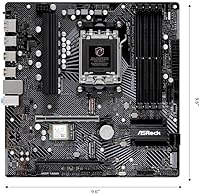
The ASRock B650M PG Lightning WiFi Micro-ATX Motherboard has clear boundaries, and knowing them upfront saves frustration. If your plan involves pushing a Ryzen 9 processor hard through sustained all-core workloads or aggressive manual overclocking, the 6+2+1 VRM configuration will likely become a limiting factor under prolonged stress — this board is tuned for mid-range chips running at stock or modest settings, not for wringing every last megahertz out of a flagship CPU. Builders who need two full-bandwidth PCIe x16 slots for multi-GPU setups or high-throughput expansion cards will hit the board's ceiling quickly, as the second slot runs at PCIe 3.0 x16 electrically limited to fewer lanes. Content creators or professionals running memory-intensive applications who want to push DDR5 kits at the upper speed ranges should verify RAM compatibility carefully beforehand, since EXPO profile behavior has proven inconsistent with certain kits. If you are after a fully unlocked, no-compromise platform, stepping up to an X670 board is the more honest recommendation.
Specifications

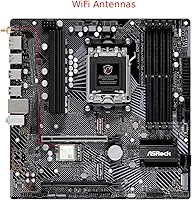
  • Socket: Uses the AMD AM5 socket, compatible with Ryzen 7000, 8000, and 9000 series processors.
  • Chipset: Built on the AMD B650 chipset, offering a balance of modern features and accessible pricing within the AM5 platform.
  • Form Factor: Micro-ATX layout measuring 12.2 x 8.27 inches, fitting standard mid-tower and compact Micro-ATX cases.
  • Memory Slots: Four DDR5 DIMM slots supporting dual-channel configurations with a maximum capacity of 256GB.
  • Memory Speed: Supports DDR5 memory at speeds up to 7200+ MHz under overclock (OC) settings with compatible kits.
  • M.2 Storage: Three M.2 slots: one PCIe Gen5 x4 (Blazing M.2), one PCIe Gen4 x4 (Hyper M.2), and one PCIe Gen4 x2.
  • SATA Ports: Four SATA3 6.0 Gb/s ports for connecting traditional hard drives or 2.5-inch SATA SSDs.
  • PCIe Slots: One PCIe 4.0 x16 slot for the primary graphics card and one PCIe 3.0 x16 slot for secondary expansion cards.
  • Wireless: WiFi 6E connectivity via an M.2 Key-E slot, delivering faster wireless speeds and lower latency on compatible networks.
  • Audio: Realtek ALC897 7.1-channel HD audio codec with Nahimic audio software for enhanced onboard sound processing.
  • Display Output: Rear panel includes one HDMI port and one DisplayPort output for use with integrated graphics.
  • Rear USB: Rear I/O provides one USB 3.2 Gen2 Type-A, one USB 3.2 Gen2 Type-C, and two USB 3.2 Gen1 Type-A ports.
  • Front USB: Front panel headers support one USB 3.2 Gen1 Type-C and four USB 3.2 Gen1 Type-A connections.
  • Power Phases: 6+2+1 power phase design using Dr.MOS components for stable voltage delivery to mid-range AMD processors.
  • BIOS Flashback: BIOS Flashback functionality allows firmware updates via USB without a CPU or memory installed in the board.
  • RGB Lighting: Onboard RGB LED lighting with headers for connecting compatible addressable RGB strips and accessories.
  • Weight: The board weighs 2.16 pounds, typical for a fully-featured Micro-ATX motherboard with integrated wireless hardware.
  • Availability: First made available in November 2023, positioning it as a current-generation AM5 platform option.

Related Reviews

ASRock B650M PG Riptide WiFi AM5 Motherboard
79%
88%
Value for Money
79%
Build Quality
91%
CPU Compatibility
71%
VRM & Power Delivery
84%
BIOS Experience
More
ASRock Z790 PG Lightning ATX Motherboard
73%
84%
Value for Money
81%
Build Quality
77%
CPU Power Delivery
79%
Memory Compatibility
66%
BIOS Experience
More
ASRock A520M Pro4 Micro ATX Motherboard
83%
92%
Value for Money
89%
Processor Compatibility
86%
Performance Stability
84%
Build Quality
88%
Ease of Setup
More
ASRock B550 Phantom Gaming 4 ATX Motherboard
79%
93%
Value for Money
91%
CPU Compatibility
84%
Storage Flexibility
89%
BIOS Experience
78%
Power Delivery
More
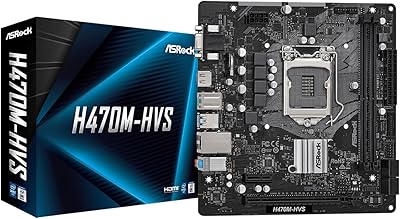
ASRock H470M-HVS Micro-ATX Motherboard
69%
83%
Value for Money
91%
CPU Compatibility
78%
BIOS Experience
47%
Storage Options
53%
Connectivity & USB
More
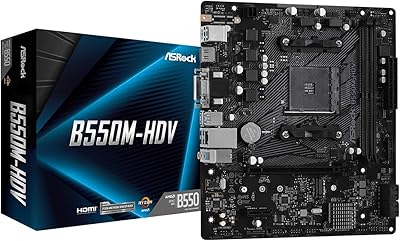
ASRock B550M-HDV Micro-ATX Motherboard
76%
91%
Value for Money
88%
CPU Compatibility
86%
Ease of Setup
89%
Stability & Reliability
58%
VRM & Power Delivery
More
ASRock 970M Pro3 Micro ATX Motherboard
74%
88%
Value for Money
91%
Compatibility & CPU Support
86%
Ease of Installation
61%
BIOS Usability
54%
Overclocking Headroom
More
MSI Pro B650M-B Micro ATX Motherboard
75%
88%
Value for Money
83%
Build Quality
91%
Ease of Setup
54%
Storage Expansion
86%
Memory Performance
More
ASRock B850i Lightning WiFi Mini ITX Motherboard
85%
91%
Performance
88%
Build Quality
93%
Overclocking Stability
89%
Connectivity
75%
Ease of Setup
More
ASRock B450M PRO4 R2.0 Micro ATX Motherboard
74%
88%
Value for Money
79%
CPU Compatibility
86%
Ease of Installation
74%
BIOS & Software
83%
Long-term Reliability
More

FAQ

It depends on when the board was manufactured and what BIOS version it shipped with. Newer stock often comes ready for Ryzen 9000 series processors, but if yours has an older firmware version, you may need to update first. The good news is that BIOS Flashback lets you do that update without needing a compatible CPU already installed, which makes the whole process much less stressful.

No — the AM5 platform is DDR5 only, and this board is no exception. If you are upgrading from an older system with DDR4 sticks, you will need to budget for new DDR5 memory as part of your build.

ASRock includes a WiFi antenna with the board, so you should not need to source one separately. It attaches to the rear I/O panel connectors and gets you up and running without any extra purchases.

The top M.2 slot (labeled Blazing M.2) runs at PCIe Gen5 x4, which means it can handle the latest and fastest consumer NVMe drives available right now. The second slot runs at PCIe Gen4 x4, which is still very quick for most workloads, and the third slot operates at PCIe Gen4 x2 — fine for secondary or cache drives.

Honestly, this is not the ideal board for top-tier 170W processors under sustained all-core loads. The ASRock B650M PG Lightning WiFi Micro-ATX Motherboard is designed around mid-range Ryzen chips running at normal power settings, and the VRM can run warm with very high-TDP CPUs in cases with limited airflow. For a Ryzen 5 or Ryzen 7 processor, it handles things cleanly — but if you are building around a flagship 16-core chip and pushing it hard, a board with a heavier VRM design would serve you better.

Not in any practical sense. There is a second PCIe slot, but it runs at reduced bandwidth and is really intended for expansion cards like capture cards or network adapters, not a second GPU. This board is designed for a single-GPU setup.

Most DDR5-6000 kits will require you to manually enable the EXPO or XMP profile in the BIOS to hit their rated speeds. The board supports it, but it does not always happen automatically on first boot. Some higher-speed kits above 6000 MHz have shown inconsistent behavior, so it is worth checking ASRock's memory compatibility list before buying an expensive kit.

The rear panel gives you four USB 3.2 ports total — a mix of Type-A and Type-C — which is functional but not generous. If you use a keyboard, mouse, headset, and external drive all at once, you may find yourself reaching for a USB hub. The front panel headers add more options if your case supports them.

For most users, the Realtek ALC897 with Nahimic software is more than adequate for gaming headsets and everyday listening. It is not a professional-grade audio setup, but paired with decent headphones or a gaming headset, it performs well enough that most people will not feel the urge to add a dedicated sound card.

ASRock's UEFI BIOS on this board is generally considered approachable, and that tracks with what most builders report. There is an easy mode for basic configuration and an advanced mode for those who want more control. Enabling an EXPO memory profile, adjusting fan curves, and checking boot order are all straightforward — it is not the most polished BIOS interface in the industry, but it does not require a tutorial to get through.

Where to Buy