Overview

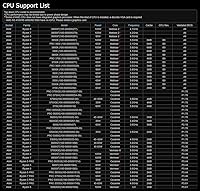
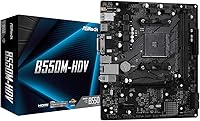
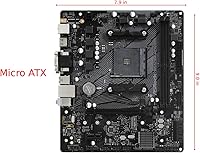
The ASRock B550M-HDV Micro-ATX Motherboard has been quietly doing its job since 2020, and it remains one of the more sensible picks if you want a capable AMD system without spending heavily. At 9.0 by 7.9 inches, the Micro-ATX form factor fits comfortably in most compact cases without feeling like a compromise. It covers the full AM4 socket lineup from Ryzen 3000 through 5000 series, giving builders real flexibility when choosing or upgrading a CPU. Just be clear on what this board is: a reliable, no-fuss foundation for everyday computing — not a platform built for enthusiast overclocking or extreme performance demands.
Features & Benefits

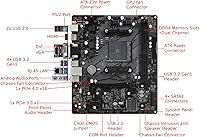
The PCIe 4.0 x16 slot means you can drop in a current-generation GPU without the board becoming a bottleneck. Paired with the Hyper M.2 slot — which handles both PCIe Gen4 NVMe drives and SATA SSDs — storage speed is genuinely competitive for this price tier. Three display outputs (HDMI, DVI-D, and VGA) are a practical touch for anyone running integrated graphics or needing a basic dual-monitor setup. DDR4 memory can be pushed well past 4000 MHz with the right kit, though the 6 Power Phase design is better suited to stock-speed operation than serious overclocking sessions. Four SATA ports round out storage flexibility nicely.

Best For

This budget AM4 board hits a sweet spot for builders who want a modern B550 platform without the markup that comes with feature-heavy alternatives. It pairs particularly well with a Ryzen 5 or Ryzen 7 processor for home office work, light content creation, or casual gaming — nothing that pushes the power delivery hard. If you have older DDR4 sticks sitting around, it is a cost-effective way to bring them into a current-gen build. Upgraders moving from an older AM4 board who want Ryzen 5000 support will find it a practical step up, and the compact footprint makes it a natural choice for Micro-ATX case builds where space is a real constraint.

User Feedback

With a 4.4-star average across over 1,800 ratings, this ASRock micro-ATX board has earned a solid reputation among value-focused builders. Most buyers point to straightforward BIOS navigation, consistent boot behavior, and dependable long-term stability as the real wins. The most common frustration is the limited rear USB count — just two USB 2.0 ports — which feels thin even by budget standards. Experienced builders also flag the modest VRM as a reason to keep CPU settings at stock. One detail worth knowing upfront: pairing this board with a Ryzen 5000 processor will likely require a BIOS flash before it will POST, so plan accordingly. Most critical reviews trace back to expectation gaps rather than actual hardware defects.

Pros

  • Broad CPU support across Ryzen 3000, 4000 G-Series, and 5000 Series gives you real flexibility at build time.
  • The PCIe 4.0 x16 slot keeps this budget AM4 board compatible with modern graphics cards without any bandwidth compromise.
  • Hyper M.2 slot supports fast PCIe Gen4 NVMe drives, which is genuinely uncommon at this price tier.
  • Three display outputs (HDMI, DVI-D, and VGA) make it easy to drive a monitor using integrated graphics without adapters.
  • The Micro-ATX footprint fits neatly into compact cases without sacrificing access to the core features you actually need.
  • BIOS navigation is clean and beginner-friendly — most first-time builders get through setup without needing a tutorial.
  • Four SATA3 ports give you room to connect a mix of drives, useful if you are repurposing older HDDs alongside an NVMe SSD.
  • Stable daily performance is a consistent theme in buyer feedback, with very few reports of random crashes or instability.
  • DDR4 memory can be pushed well past stock speeds if you want a modest performance boost without buying new hardware.
  • Competitive value for a B550 chipset board that supports Windows 11 and current-gen storage standards.

Cons

  • Only two rear USB 2.0 ports is a real inconvenience if you connect more than a couple of peripherals.
  • Ryzen 5000 CPUs will not POST out of the box on older stock — a BIOS flash with a compatible older CPU is required first.
  • The 6-phase VRM limits safe headroom for sustained all-core workloads on higher-end Ryzen processors.
  • Just two DIMM slots means no memory expansion path; what you install at build time is your ceiling.
  • No USB 3.2 Gen 2 rear ports is a notable omission if you transfer large files to external drives regularly.
  • Onboard audio is functional but unremarkable — anyone sensitive to audio quality will want a dedicated sound card or DAC.
  • The board ships without Wi-Fi or Bluetooth, so wireless connectivity requires a separate adapter or PCIe card.
  • Limited overclocking toolset in the BIOS; enthusiasts will find the tuning options noticeably restricted compared to pricier boards.
  • Some buyers report tight clearance around the M.2 slot depending on cooler size, so check compatibility before purchasing.

Ratings

The ASRock B550M-HDV Micro-ATX Motherboard earns a well-deserved 4.4-star consensus across thousands of verified global buyers, and the scores below reflect exactly that — an AI-driven analysis that filtered out spam, incentivized reviews, and bot activity to surface what real builders actually experience. This board punches above its weight in several categories while showing predictable limitations in others, and both sides are represented here without sugarcoating.
Value for Money
91%
Among budget B550 boards, this one consistently ranks as one of the more defensible purchases — buyers repeatedly note that the combination of PCIe 4.0 support, an M.2 Gen4 slot, and broad Ryzen compatibility at this price tier is genuinely hard to beat. First-time builders especially feel they got more platform than they paid for.
A small but vocal group of buyers feel the limited rear I/O and two-DIMM ceiling undercut the value proposition once they realize what they gave up. For users who later needed more USB ports or memory slots, the savings felt less significant in hindsight.
CPU Compatibility
88%
The AM4 socket coverage is a real strength — supporting Ryzen 3000 through 5000 series means buyers have genuine flexibility at purchase time and credible upgrade options down the line. Builders who started with a Ryzen 5 3600 and later moved to a Ryzen 7 5700X found the transition completely painless.
Ryzen 5000 support requires a BIOS update that cannot be performed without a compatible older CPU already on hand, which catches a meaningful number of first-time builders off guard. Several reviewers specifically flagged this as an unexpected hurdle that delayed their build by days.
Ease of Setup
86%
The BIOS is clean, logically organized, and rarely requires any prior motherboard experience to navigate — a consistent highlight among first-time builders who expected something more intimidating. Boot behavior is reliable from the first POST, which matters a lot when you are assembling a PC for the first time.
The BIOS flash requirement for Ryzen 5000 chips adds a layer of complexity that beginners may not anticipate, and ASRock's documentation does not always make this step obvious. A handful of buyers also noted that XMP or EXPO memory profiles occasionally needed manual enabling after a BIOS update reset their settings.
Stability & Reliability
89%
Long-term daily reliability is where this budget AM4 board quietly earns its strongest praise — users running it continuously for home office work, media playback, and light creative tasks report consistently stable operation over months and years. Random crashes and BSOD events are notably rare in verified feedback.
A small percentage of users encountered instability when pushing RAM speeds aggressively or running high-core-count CPUs at sustained all-core loads, pointing to the VRM as the limiting factor. These issues are edge cases for the intended use case, but they do surface with more demanding configurations.
VRM & Power Delivery
58%
42%
For stock-speed Ryzen 5 and Ryzen 7 builds — which represents the overwhelming majority of its buyer base — the 6-phase power design handles the workload without issue. Day-to-day tasks like office applications, browser-based workflows, and moderate multitasking show no signs of power-related throttling.
Experienced builders are quick to identify the VRM as the board's most significant hardware limitation, and that assessment is fair. Sustained all-core workloads on a Ryzen 7 5800X or higher push the power delivery into uncomfortable territory, and overclocking headroom is minimal — this is simply not a platform designed for that use case.
Storage Options
83%
The combination of one Gen4 M.2 slot and four SATA3 ports gives builders a practical mix of fast primary storage and room to connect existing drives. Users migrating from older builds appreciated being able to bring along their HDDs and SATA SSDs without needing an adapter or expansion card.
There is only one M.2 slot, so builders who want multiple NVMe drives will need an add-in card or settle for a hybrid setup using the SATA ports. Heavy content creators who rely on multiple fast drives will feel this limitation quickly.
Display Output Flexibility
79%
21%
Three integrated display outputs — HDMI, DVI-D, and VGA — cover an unusually wide range of monitor types for a board in this tier. Home office users running G-Series Ryzen chips praised the ability to connect two monitors without any discrete GPU, keeping build costs down significantly.
HDMI is limited to version 1.4, which caps output at 4K 30Hz — not ideal for anyone with a 4K display and expectations of smooth video. The VGA port, while appreciated for legacy monitor compatibility, is an aging standard that limits image quality at higher resolutions.
Connectivity & I/O
47%
53%
The Gigabit Ethernet port is reliable and performs as expected for wired home network and office use. The rear audio jacks cover basic headphone and microphone needs without requiring a separate sound card for typical everyday use.
Two rear USB 2.0 ports is the single most criticized aspect of this board across buyer feedback — it is genuinely sparse and creates real inconvenience for users with multiple peripherals. The complete absence of USB 3.x on the rear panel and no onboard Wi-Fi or Bluetooth further limits its appeal for connectivity-conscious buyers.
Memory Performance
76%
24%
The board handles DDR4 at speeds well above its base 2400 MHz spec when XMP profiles are enabled, and buyers using faster kits noticed a tangible improvement in responsiveness during multitasking. Two-stick dual-channel configurations run stable with a wide variety of DDR4 modules from major brands.
Two DIMM slots is a hard ceiling — there is no path to adding more RAM sticks later, which limits long-term expandability. Some users also reported that certain high-speed kits required manual BIOS tuning to run at advertised speeds, adding friction for beginners.
Gaming Suitability
72%
28%
For casual and moderate gaming paired with a discrete GPU, this ASRock micro-ATX board holds up well — the PCIe 4.0 slot ensures the graphics card is not the bottleneck, and overall system latency in everyday gaming sessions is competitive. Titles that rely more on GPU than CPU see no meaningful penalty from the board itself.
This is not a platform for competitive or enthusiast gaming builds where every frame matters. The VRM limitation discourages CPU overclocking, and the sparse I/O becomes frustrating once you factor in gaming peripherals, headsets, and external audio gear all competing for two USB ports.
Form Factor & Build Fit
84%
The compact 9.0 x 7.9-inch footprint is a genuine advantage for builders working with smaller Micro-ATX enclosures, and the board's layout is tidy enough to allow reasonable airflow even in tighter cases. Builders who deliberately chose a compact form factor found it fit their cases cleanly with no unexpected clearance issues.
Some buyers noted that the M.2 slot positioning, combined with larger coolers, created awkward installation sequences — the drive had to go in before the cooler in certain configurations. Component density also limits cable management options slightly compared to full ATX boards with more routing space.
BIOS Quality
78%
22%
ASRock's BIOS interface is sensibly laid out and generally beginner-accessible, with clear labeling and a logical menu structure that first-time builders found far less intimidating than expected. Regular firmware updates have also kept the board current with Ryzen 5000 and Windows 11 compatibility requirements.
The BIOS toolset for memory and CPU tuning is noticeably limited compared to more feature-rich B550 boards, which will frustrate any builder hoping to fine-tune performance beyond basic XMP. A few users also reported that BIOS updates occasionally reset custom configurations, requiring them to re-enter their settings from scratch.
Thermal Management
74%
26%
Under typical everyday workloads — web browsing, office software, media streaming — the board runs cool and quiet without any active cooling on the VRM. The passive heatsink design is adequate for the power delivery requirements of non-overclocked mid-range Ryzen processors.
Under sustained heavy workloads, particularly with Ryzen 7 processors running at full all-core utilization for extended periods, the VRM heatsink can run noticeably warm. Builders in poorly ventilated cases reported occasional throttling under these conditions, which reinforces the recommendation to use good case airflow with this board.
Onboard Audio
63%
37%
The integrated Realtek audio solution handles everyday needs — video calls, music streaming, and standard stereo headphone use — without requiring any additional hardware. Budget-focused buyers who were not audiophiles found it more than sufficient for typical home and office scenarios.
Audiophiles and gamers who prioritize audio quality will notice the limitations quickly — channel separation is mediocre and background hiss is detectable on sensitive headphones. The absence of any optical audio output also rules out direct connection to external DACs or certain home theater receivers.

Suitable for:

The ASRock B550M-HDV Micro-ATX Motherboard is a strong fit for anyone building a capable everyday PC without stretching their budget further than necessary. First-time builders who want a stable, modern AMD platform will appreciate how straightforward the BIOS is and how few surprises the board throws at you during setup. It is particularly well-matched to a Ryzen 5 or Ryzen 7 processor running at stock speeds — that pairing delivers genuinely solid performance for home office tasks, light creative work, and casual gaming. If you are working with a compact Micro-ATX case, the board's smaller footprint removes a lot of planning headaches. Upgraders on older AM4 platforms who want to step into Ryzen 5000 territory without buying an expensive X570 board will also find this budget AM4 board hits a practical middle ground, provided they are prepared to handle a BIOS update before installing a 5000-series CPU.
Not suitable for:

The ASRock B550M-HDV Micro-ATX Motherboard is not the right foundation if your build priorities include serious overclocking, high-end gaming, or future-proofing with a dense array of ports and expansion slots. The 6-phase power delivery is adequate for stock operation but runs out of headroom quickly when you push a Ryzen 7 or higher CPU hard — enthusiasts chasing all-core boost performance will want a board with a beefier VRM. The rear I/O is genuinely sparse: two USB 2.0 ports is a frustrating limitation if you regularly connect multiple peripherals directly to the back panel. With only two DIMM slots, you are capped at two memory sticks and have no room to add more later, which matters if you plan to expand RAM over time. Content creators, streamers, or anyone running a demanding multi-threaded workload for extended periods should budget for something with more robust power delivery and connectivity to avoid becoming frustrated with this ASRock micro-ATX board's intentional compromises.
Specifications

  • Form Factor: Micro-ATX layout measuring 9.0 x 7.9 inches (23.0 x 20.1 cm), compatible with most standard Micro-ATX and ATX cases.
  • Chipset: Built on the AMD B550 chipset, offering a solid mid-range feature set including PCIe 4.0 support from the CPU lanes.
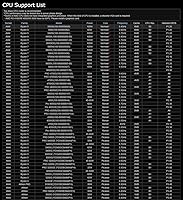
  • CPU Socket: Uses the AM4 socket, supporting AMD Ryzen 3000, 4000 G-Series, 5000, and 5000 G-Series desktop processors.
  • Memory Slots: Two DDR4 DIMM slots supporting dual-channel memory configurations with overclocked speeds up to 4733+ MHz.
  • Max Memory: Supports up to 64 GB of DDR4 RAM across two slots, depending on module capacity and compatibility.
  • PCIe Slot: One PCIe 4.0 x16 slot for discrete graphics cards, delivering full CPU-direct bandwidth for modern GPUs.
  • M.2 Storage: One Hyper M.2 slot supporting both PCIe Gen4 x4 NVMe drives and SATA-based M.2 SSDs.
  • SATA Ports: Four SATA3 (6 Gb/s) ports for connecting traditional hard drives, SATA SSDs, or optical drives.
  • Display Outputs: Three integrated display outputs: HDMI, DVI-D, and D-Sub (VGA), supporting multi-monitor use with integrated graphics.
  • Rear USB: Two USB 2.0 Type-A ports on the rear I/O panel; additional headers on-board support front-panel USB expansion.
  • Networking: Integrated Gigabit Ethernet LAN port for wired network connectivity; no onboard Wi-Fi or Bluetooth.
  • Audio: Onboard Realtek audio with standard 3.5 mm analog jacks on the rear I/O for basic audio input and output.
  • Power Design: 6-phase power delivery design providing stable VRM operation suited for Ryzen processors running at stock speeds.
  • Power Connectors: Standard 24-pin ATX main power connector and one 8-pin CPU power connector for processor power delivery.
  • BIOS Battery: Requires one CR2032 coin cell battery (included) to retain BIOS settings when the system is unpowered.
  • OS Support: Officially compatible with Microsoft Windows 10 64-bit and Windows 11 64-bit operating systems.
  • Board Weight: The board itself weighs approximately 1.54 lbs (0.70 kg), typical for a Micro-ATX form factor motherboard.
  • Date Released: First made available in June 2020 and remains in active production with no discontinuation announced by ASRock.

Related Reviews
ASRock 970M Pro3 Micro ATX Motherboard
74%
88%
Value for Money
91%
Compatibility & CPU Support
86%
Ease of Installation
61%
BIOS Usability
54%
Overclocking Headroom
More
ASRock A520M Pro4 Micro ATX Motherboard
83%
92%
Value for Money
89%
Processor Compatibility
86%
Performance Stability
84%
Build Quality
88%
Ease of Setup
More
ASRock H470M-HVS Micro-ATX Motherboard
69%
83%
Value for Money
91%
CPU Compatibility
78%
BIOS Experience
47%
Storage Options
53%
Connectivity & USB
More
ASRock B450M PRO4 R2.0 Micro ATX Motherboard
74%
88%
Value for Money
79%
CPU Compatibility
86%
Ease of Installation
74%
BIOS & Software
83%
Long-term Reliability
More
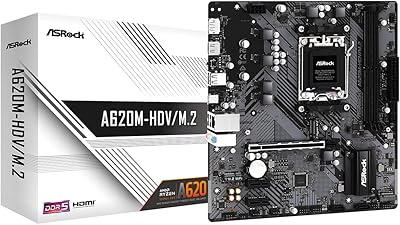
ASRock A620M-HDVM.2 Micro-ATX AM5 Motherboard
85%
89%
Value for Money
93%
Performance with Ryzen 7000 CPUs
85%
Ease of Setup and BIOS
88%
Build Quality and Durability
90%
Compatibility with DDR5
More
ASRock B850M-X R2.0 Micro-ATX Motherboard
86%
88%
Overall Performance
91%
Value for Money
90%
Ease of Installation
92%
Stability
89%
Compatibility with Ryzen 7000 Series
More
ASUS Prime B550M-K AMD AM4 Micro-ATX Motherboard
84%
92%
Value for Money
88%
Performance
89%
Ease of Setup
84%
Cooling Efficiency
75%
BIOS Compatibility
More
ASRock B660M-HDV MicroATX Motherboard
85%
91%
Value for Money
88%
Performance
84%
Build Quality
93%
Ease of Installation
90%
Compatibility with Intel 12th Gen CPUs
More
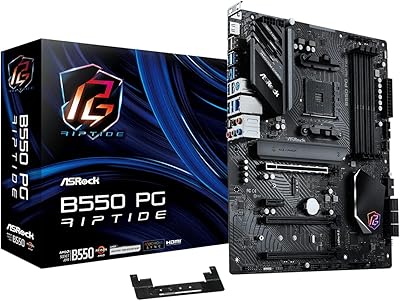
ASRock B550 Phantom Gaming 4 ATX Motherboard
79%
93%
Value for Money
91%
CPU Compatibility
84%
Storage Flexibility
89%
BIOS Experience
78%
Power Delivery
More
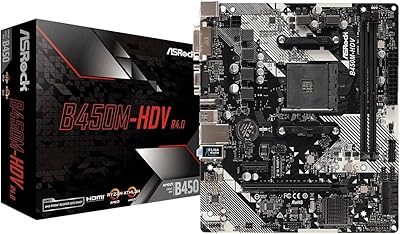
ASRock B450M-HDV R4.0 Motherboard
83%
91%
Value for Money
87%
Performance
89%
Ease of Installation
65%
RAM Compatibility and Overclocking
84%
Build Quality
More

FAQ

Not always. This budget AM4 board may ship with an older BIOS version that does not yet support Ryzen 5000 processors, which means the system will not POST with that CPU installed. You will need a compatible Ryzen 3000 or 4000 G-Series processor on hand to boot up, update the BIOS to the latest version, and then swap in your 5000-series chip. It is a manageable process, but definitely plan for it before your build day.

There are two DIMM slots, so you can install either one or two DDR4 modules. The board supports up to 64 GB total in a dual-channel configuration, assuming you use two 32 GB sticks. If you want to add more RAM later, keep in mind there is no room to expand beyond two modules.

Yes, as long as you are using a Ryzen G-Series processor that includes integrated Radeon graphics — the Ryzen 4000 G-Series or 5000 G-Series, for example. This ASRock micro-ATX board has HDMI, DVI-D, and VGA outputs ready to go for exactly that purpose. Note that a standard Ryzen 5000 non-G chip does not include integrated graphics, so those display outputs would not function without a discrete GPU.

It handles light to moderate gaming just fine, particularly paired with a mid-range Ryzen processor and a modern dedicated GPU. The PCIe 4.0 slot means your graphics card is not being held back by the board itself. That said, it is not built for enthusiast-level gaming rigs — the power delivery is modest, and you will not find much room for aggressive overclocking if that is part of your plan.

Yes, there is one M.2 slot that supports PCIe Gen4 x4 NVMe drives, which are among the fastest consumer SSDs available. It also accepts slower SATA-based M.2 drives if that is what you already own. For most everyday builds, a Gen4 NVMe paired with this board will feel very responsive.

It fits any case that supports Micro-ATX boards, and most standard ATX mid-towers will also accommodate it without issue. At 9.0 x 7.9 inches, it is a compact board that works particularly well in smaller enclosures where a full ATX would be too large.

The rear I/O does only have two USB 2.0 ports, which is genuinely limited and one of the most common complaints from buyers. However, the board does include front-panel USB headers, so a case with front USB ports will give you additional connections. A USB hub is also a practical workaround if you need more ports at the back.

RAM overclocking is supported and the board can handle DDR4 speeds beyond 4000 MHz with a compatible kit, so there is some flexibility there. CPU overclocking is more constrained — the 6-phase VRM is adequate for stock operation but not designed for sustained heavy overclocking, especially on higher-core-count Ryzen 7 or Ryzen 9 processors. Pushing those chips hard for extended periods could cause thermal throttling at the VRM level.

No, there is no built-in wireless networking on this board. You get a standard Gigabit Ethernet port for wired connections, but if you need Wi-Fi or Bluetooth, you will have to add a PCIe wireless card or a USB adapter separately.

Yes, it officially supports both Windows 10 64-bit and Windows 11 64-bit. As long as your paired CPU meets Microsoft's TPM and security requirements for Windows 11 — which most Ryzen 5000 and select Ryzen 3000 processors do — you should have no issues running the latest version of Windows.

Where to Buy