Overview

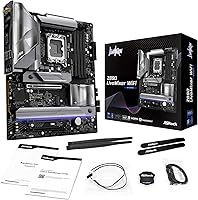
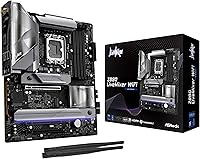
The ASRock Z890 LiveMixer WiFi ATX Motherboard arrived in October 2024, riding Intel's Arrow Lake wave and landing squarely in mid-to-upper territory within ASRock's Z890 range. Built around the LGA1851 socket, it supports Intel Core Ultra Series 2 processors and fits comfortably into any standard mid-tower or full-tower build thanks to its ATX footprint. The value proposition here is connectivity density rather than extreme overclocking headroom — the VRM is competent and stable, but anyone chasing CPU frequency records should look higher up the stack. For everyone else, this Z890 board makes a reasonable case for itself as a well-equipped modern foundation.
Features & Benefits

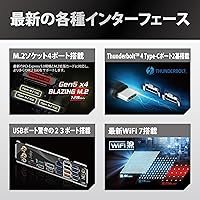
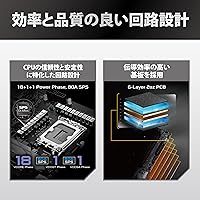
The power delivery foundation — an 18+1+1+1+1 VRM with 80A smart power stages — keeps the CPU stable under sustained workloads like rendering or video encoding without throttling concerns. On the memory side, DDR5 support extends to 9066 MHz, but that is an overclocked ceiling; with a standard XMP profile, real-world speeds will be lower, though still meaningfully faster than DDR4. What actually sets the LiveMixer WiFi apart is connectivity: dual Thunderbolt 4 Type-C ports at this price point is unusual, and paired with WiFi 7 and up to 23 USB ports, it is built for multi-device workstations and creators who always have something plugged in.

Best For

This Z890 board hits its stride with builders making their first move onto Intel's Arrow Lake platform — specifically those who want flagship-adjacent connectivity without paying for a top-tier board. Content creators and streamers who need those Thunderbolt 4 ports for fast external drives or a capture card setup will find genuine utility here. Home office users will appreciate the WiFi 7 upgrade in real-world latency and throughput. One group this is not for: builders who plan to push CPU overclocks hard. The VRM handles daily loads without issue, but it is not the board you want if aggressive frequency tuning is the goal.

User Feedback

With 78 ratings averaging 3.9 out of 5, the community verdict is mixed enough to read carefully. Buyers who praise ASRock's mid-range Z890 offering tend to focus on the I/O variety and reliable wireless performance straight out of the box. The BIOS, however, draws consistent criticism — it carries a steeper learning curve than competing boards at this tier, and some users encountered software quirks that required firmware updates before things ran smoothly. Negative reviews split fairly evenly between setup frustrations and isolated hardware concerns, which makes diagnosing the root cause tricky. With only 78 ratings, treat this as an early read, not a settled conclusion.

Pros

  • Dual Thunderbolt 4 Type-C ports are rare at this price point and a genuine win for creative professionals.
  • WiFi 7 delivers noticeably better wireless throughput and lower latency than the previous WiFi 6E generation.
  • Up to 23 USB ports across front and rear panels handles even the most peripheral-heavy workstation setups.
  • PCIe 5.0 support keeps the platform relevant for next-gen GPUs and high-speed NVMe storage.
  • The 18+1+1+1+1 VRM with 80A smart power stages holds steady under heavy sustained workloads without throttling.
  • Four DDR5 DIMM slots with OC headroom up to 9066 MHz gives memory enthusiasts real room to tune.
  • Standard ATX footprint means broad case compatibility without any size-related compromises.
  • Built on the Intel Z890 chipset with LGA1851 socket support for the full Intel Core Ultra Series 2 lineup.
  • M.2 slots alongside SATA3 6.0 Gb/s give flexible storage configuration options for mixed drive setups.

Cons

  • The BIOS carries a steeper learning curve than competing boards at this tier, frustrating less experienced builders.
  • Some early buyers needed firmware updates to resolve stability and software quirks straight out of the box.
  • A 3.9-star average rating across 78 reviews is below what you typically see from well-regarded motherboard launches.
  • The 9066 MHz DDR5 speed is an overclocked figure; standard out-of-box memory performance will be significantly lower.
  • Not suited for aggressive CPU overclocking despite a competent VRM — the ceiling is lower than flagship alternatives.
  • The sample size of 78 ratings is still too small to draw firm conclusions about long-term reliability.
  • No onboard display output limits pairing options for builders who may occasionally need integrated graphics access.
  • Thunderbolt 4 benefits are wasted cost for users who have no high-bandwidth peripherals or external displays to connect.

Ratings

Our editorial team used AI-assisted analysis to process verified buyer reviews for the ASRock Z890 LiveMixer WiFi ATX Motherboard from global sources, actively filtering out incentivized, repeated, and bot-flagged submissions to surface what real builders actually experienced. The scores below reflect both the genuine strengths and the recurring frustrations reported by users across different use cases and skill levels. Nothing has been glossed over — where the board underdelivers, the ratings say so plainly.
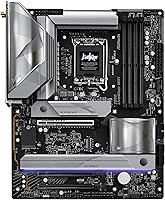
Connectivity & I/O
91%
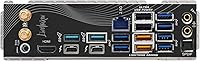
Buyers consistently highlighted the sheer density of ports as one of the standout real-world advantages of this Z890 board. Having dual Thunderbolt 4 Type-C ports alongside up to 23 USB connections meant that content creators and multi-device workstation users rarely needed a hub — everything just plugged in directly.
A small number of users reported that certain rear USB ports did not always wake from sleep reliably without a BIOS update applied first. The port labeling on the rear I/O shield was also called out as difficult to read in low-light environments during initial builds.
WiFi 7 Performance
88%
Users who paired the LiveMixer WiFi with a compatible WiFi 7 router reported a clear step up in wireless responsiveness, particularly for low-latency tasks like online gaming and video calls. The antenna placement and onboard module performed well at range in typical home setups, with minimal dropouts.
The WiFi 7 advantages are only accessible with a WiFi 7 router, which not all buyers had at the time of purchase — a few felt the benefit was overstated for their current network setup. Driver installation on fresh Windows 11 installs occasionally required manual intervention rather than automatic detection.
BIOS Experience
54%
46%
Once familiar with the layout, experienced builders found the BIOS feature set thorough — XMP profile activation, fan curve controls, and memory tuning options were all present and functional. Those who invested time in learning the interface appreciated the depth of control on offer.
This is where ASRock's mid-range Z890 offering drew the most consistent criticism. First-time or intermediate builders found the BIOS navigation unintuitive compared to competing boards, and several early units shipped with firmware that introduced minor instability until an update was applied. The learning curve here is real and should not be underestimated.
CPU Power Delivery
83%
The 18+1+1+1+1 VRM configuration with 80A smart power stages handled sustained workloads — including long video renders, multi-threaded compilation, and extended gaming sessions — without any reported thermal throttling under normal cooling conditions. Builders running mid-to-high-end Core Ultra CPUs found it more than adequate.
For users intent on pushing CPU overclocks aggressively, the VRM ceiling became apparent under extreme stress testing. This is not a board engineered for record-chasing frequency tuning, and a handful of overclock-focused buyers felt the power delivery headroom fell short of expectations at this price tier.
DDR5 Memory Support
78%
22%
The four DIMM slots with support for dual-channel DDR5 and advertised OC headroom up to 9066 MHz gave memory enthusiasts a meaningful platform to work with. Buyers running 6000–7200 MHz kits with XMP enabled reported stable, consistent performance without significant tuning required.
The 9066 MHz ceiling is a marketing-forward figure — reaching it demands premium memory kits, BIOS time, and some patience with instability at the margins. Out of the box, memory runs at JEDEC defaults until XMP is manually enabled, which caught a few less experienced builders off guard.
PCIe 5.0 Readiness
81%
19%
Having PCIe 5.0 on both the primary GPU slot and at least one M.2 slot means this Z890 board is positioned well for the next hardware generation. Builders planning multi-year systems appreciated knowing their platform would not bottleneck next-gen GPUs or Gen 5 NVMe drives when they eventually upgrade.
At the current time of most reviews, PCIe 5.0 storage and graphics cards remained expensive and relatively niche, so most buyers were not yet leveraging the full potential of this feature. For buyers on tighter budgets, this future-proofing argument carries limited immediate practical weight.
Build & Board Quality
76%
24%
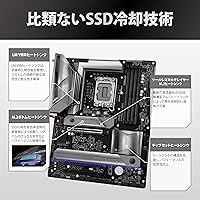
The physical construction of the LiveMixer WiFi drew generally positive comments — reinforced M.2 slots, solid PCIe retention, and a well-organized PCB layout that made cable routing manageable in mid-tower builds. The board felt appropriately sturdy for its market tier.
Some buyers noted that the heatsink coverage over the VRM area felt less substantial than competing boards, raising mild concerns about long-term thermal performance in poorly ventilated cases. The board also lacks some of the premium visual touches found on higher-tier Z890 options.
Software & Drivers
58%
42%
ASRock's bundled utility suite covers the basics — fan control, RGB management, and system monitoring — and users who stuck with it found the core functions worked reliably after the initial setup. Driver availability through Windows Update covered most components without needing manual downloads.
The software experience was a persistent source of complaints: ASRock's companion apps were described as clunky and dated compared to rivals, and a few users encountered conflicts between bundled software and third-party monitoring tools. Several issues resolved after firmware updates, but the out-of-box experience felt unpolished.
Thunderbolt 4 Utility
86%
For the users who needed Thunderbolt 4 — video editors connecting high-speed external RAID arrays, photographers daisy-chaining displays, or audio producers using Thunderbolt interfaces — having two ports onboard was a standout benefit that saved them from buying a separate add-in card.
Thunderbolt device compatibility required attention to firmware versions, and a few users experienced initial handshake issues with certain older Thunderbolt 3 peripherals that needed driver updates to resolve. Builders without Thunderbolt peripherals are paying for a feature they may never use.
Value for Money
72%
28%
The combination of WiFi 7, dual Thunderbolt 4, PCIe 5.0, and a high USB port count in a single mid-range package represents a genuinely strong feature-per-dollar argument for the right buyer. For content creators or power users who would use most of these features, the value equation tips favorably.
For builders who only need basic connectivity and solid CPU support, there are competing Z890 boards at similar price points with more polished BIOS interfaces and better early-adopter stability records. The modest 3.9-star average reflects buyer experiences that do not always feel commensurate with the price paid.
Thermal Management
74%
26%
Under typical workloads — gaming, office productivity, moderate content creation — the board's VRM and chipset temperatures stayed within comfortable ranges. Users building in well-ventilated mid-tower cases reported no thermal-related issues during normal daily operation.
In compact cases with restricted airflow, or under sustained heavy compute workloads, a few users observed higher-than-expected VRM temperatures. The chipset heatsink also runs warm to the touch during extended sessions, which is not alarming but worth noting for small-form-factor adjacent ATX builds.
Setup & Installation
67%
33%
Experienced PC builders found the physical installation process standard and unremarkable in a positive way — M.2 slot accessibility was reasonable, and the CPU socket area offered adequate clearance for most large coolers. The included manual covered the basics adequately for those who read it.
The initial software and BIOS setup experience added friction that more beginner-oriented boards avoid. Several users had to update the BIOS before the system would post cleanly with certain memory kits, and the documentation for advanced features like memory overclocking was considered sparse.
Long-Term Reliability
63%
37%
Users who got past the early setup friction and applied available firmware updates generally reported stable daily operation over the months following purchase. No widespread reports of catastrophic hardware failure emerged from the review pool, which is a reasonable baseline reassurance.
With only 78 ratings to draw from — many from the first few months post-launch — it is genuinely too early to make confident claims about long-term durability. The below-average aggregate score introduces enough uncertainty that buyers with low risk tolerance may prefer a board with a longer reliability track record.

Suitable for:

The ASRock Z890 LiveMixer WiFi ATX Motherboard is a strong fit for builders making their first move onto Intel's Arrow Lake platform who want a well-equipped foundation without stretching into flagship board territory. Content creators and streamers stand to benefit the most — dual Thunderbolt 4 ports at this price tier are genuinely uncommon, and anyone regularly shuttling large files to an external SSD or connecting a high-bandwidth display will feel that difference immediately. Home office power users with crowded desks full of peripherals will also appreciate the unusually generous USB port count, which eliminates the need for a separate hub in most setups. WiFi 7 support means wireless performance is future-ready, with real improvements in latency and throughput over WiFi 6E for those who cannot or prefer not to run ethernet. Enthusiasts who want DDR5 headroom for memory tuning — but are not planning to chase aggressive CPU frequency records — will find the VRM more than capable for sustained workloads like encoding, 3D rendering, or long gaming sessions.
Not suitable for:

Builders whose primary goal is pushing CPU overclocks to the limit should look elsewhere — the ASRock Z890 LiveMixer WiFi ATX Motherboard has a capable VRM, but it is not engineered for sustained extreme frequency tuning the way dedicated overclocking boards are. If you are expecting 9066 MHz memory performance out of the box, temper that expectation; that figure is an overclocked ceiling, and standard XMP profiles will land considerably lower. The modest 3.9-star average from a still-small pool of reviewers is also a yellow flag for buyers who prioritize a polished day-one BIOS experience — early adopters have noted a learning curve and some software friction that required firmware updates to resolve. Budget builders should also weigh whether all the connectivity on offer is actually relevant to their use case, since paying for Thunderbolt 4 ports you will never use does not make financial sense. Finally, anyone planning a compact ITX or mATX build is out of luck — this is a full ATX board and will not fit smaller enclosures.

Specifications

  • CPU Socket: Uses the LGA1851 socket, compatible exclusively with Intel Core Ultra Series 2 (Arrow Lake) processors.
  • Chipset: Built on the Intel Z890 chipset, enabling full overclocking support and high-bandwidth connectivity options.
  • Form Factor: Standard ATX form factor measuring 7.87 x 5.91 inches, compatible with most mid-tower and full-tower cases.
  • Memory Slots: Four DDR5 DIMM slots supporting dual-channel configuration with a maximum capacity of 256 GB.
  • Memory Speed: Supports DDR5 speeds up to 9066 MHz under overclocked conditions; standard XMP profile speeds will be lower.
  • Power Delivery: 18+1+1+1+1 power phase design using 80A smart power stages for stable VCore, GT, and SA power delivery.
  • Thunderbolt: Equipped with two Thunderbolt 4 Type-C ports, supporting up to 40 Gbps data transfer and external display output.
  • Wireless: Onboard WiFi 7 provides faster throughput and lower latency compared to WiFi 6E, with backward compatibility.
  • PCIe Standard: Supports PCIe 5.0 for both GPU and primary NVMe storage slots, enabling compatibility with next-generation components.
  • Storage Ports: Includes multiple M.2 slots and SATA3 ports rated at 6.0 Gb/s for flexible mixed storage configurations.
  • USB Ports: Provides up to 23 USB ports in total across front-panel headers and rear I/O, covering multiple USB generations.
  • Dimensions: Board dimensions are 7.87 x 5.91 inches with a package depth of approximately 1.18 inches.
  • Weight: The board weighs 4.4 pounds, which is typical for a fully equipped ATX motherboard with onboard wireless hardware.
  • CMOS Battery: Requires one CR2032 coin cell battery for BIOS/CMOS retention, which is included at the time of purchase.
  • OS Support: Officially supported on Windows 11, consistent with Intel's Arrow Lake platform requirements.
  • Release Date: First made available in October 2024, positioning it as a current-generation platform at the time of this review.
  • User Rating: Holds an average rating of 3.9 out of 5 stars based on 78 user ratings, a modest score for this product category.

Related Reviews

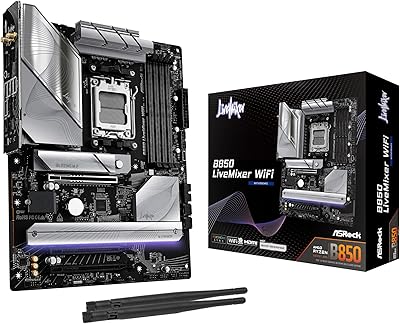
ASRock B850 LiveMixer WiFi Motherboard
79%
88%
VRM & Power Delivery
86%
Memory Compatibility
91%
PCIe 5.0 & M.2 Storage
84%
BIOS Experience
79%
WiFi 7 Performance
More
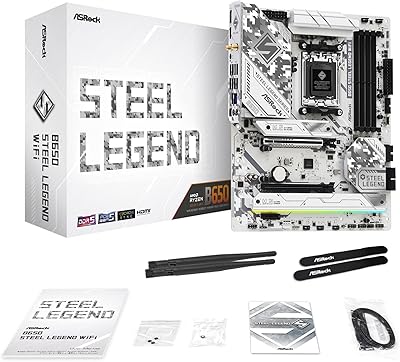
ASRock B650 Steel Legend WiFi 6E ATX Motherboard
87%
91%
Performance
89%
Stability
88%
Overclocking Capability
92%
WiFi 6E Connectivity
85%
Ease of Installation
More
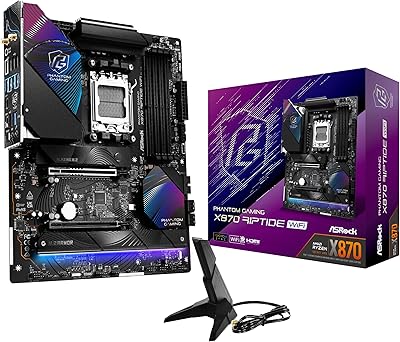
ASRock X870 Riptide WiFi ATX Motherboard
78%
91%
Value for Money
76%
Build Quality
68%
Power Delivery
83%
BIOS Usability
67%
Memory Compatibility
More
ASRock Z890 Taichi OCF ATX Motherboard
83%
94%
Overclocking Capability
91%
VRM Thermal Performance
78%
DDR5 Compatibility
74%
Thunderbolt 4 Functionality
86%
BIOS Usability
More
ASRock H470M-HVS Micro-ATX Motherboard
69%
83%
Value for Money
91%
CPU Compatibility
78%
BIOS Experience
47%
Storage Options
53%
Connectivity & USB
More
ASRock B650 LiveMixer AM5 Motherboard
74%
78%
Value for Money
83%
Build Quality
81%
DDR5 Compatibility
86%
Storage Expandability
74%
Onboard Audio
More
ASRock B650M PG Riptide WiFi AM5 Motherboard
79%
88%
Value for Money
79%
Build Quality
91%
CPU Compatibility
71%
VRM & Power Delivery
84%
BIOS Experience
More
NZXT N9 Z890 ATX Motherboard
79%
88%
Build Quality
91%
VRM & Power Delivery
84%
Thermal Management
67%
BIOS Experience
72%
Memory Compatibility
More
ASRock X870 Pro RS WiFi Motherboard
84%
91%
Performance
95%
Connectivity Options
88%
Stability and Overclocking
70%
Ease of Setup
94%
DDR5 Compatibility
More
ASRock A520M Pro4 Micro ATX Motherboard
83%
92%
Value for Money
89%
Processor Compatibility
86%
Performance Stability
84%
Build Quality
88%
Ease of Setup
More

FAQ

This is strictly an LGA1851 board, which means it only works with Intel Core Ultra Series 2 (Arrow Lake) processors. Older CPUs from previous generations like Raptor Lake or Alder Lake use different sockets and are not compatible here.

Not right away, no. That 9066 MHz figure is the overclocked ceiling, not the default operating speed. Out of the box, your RAM will run at its rated XMP or EXPO profile speed, which for most kits is somewhere between 5600 MHz and 7200 MHz. You would need to manually enable XMP in the BIOS and potentially tune further to push toward higher speeds.

Honestly, this is one of the more commonly raised concerns among buyers of the LiveMixer WiFi. The BIOS works fine once you get familiar with it, but the layout and terminology can feel unintuitive compared to some competitor boards at this tier. If you are new to PC building, budget some extra time for the initial setup, and check for the latest BIOS firmware update before making any adjustments — several early users reported that a firmware update resolved some initial quirks.

Quite a lot, depending on your workflow. Each Thunderbolt 4 port supports up to 40 Gbps of bandwidth, which means you can connect ultra-fast external NVMe drives, Thunderbolt docks, or even external displays. For video editors or photographers shuttling large files to and from high-speed storage, this is a genuinely useful feature — and having two of them at this price tier is not something you see often.

Yes, it is noticeable if you have a compatible WiFi 7 router. The biggest practical gains are in reduced latency and better performance in congested environments with many devices connected simultaneously. Raw throughput also improves, particularly on the 6 GHz band. If you are still on a WiFi 6 or older router, the board is fully backward compatible, but you would not see the WiFi 7 benefits until you upgrade the router as well.

It is capable of moderate CPU overclocking thanks to the 18+1+1+1+1 VRM and 80A smart power stages, which provide stable power delivery under sustained loads. That said, this is not engineered as a dedicated overclocking board. If pushing CPU frequencies as far as they will go is your main goal, a higher-tier Z890 board with a beefier power delivery system would be a better match.

Yes, standard mid-tower and full-tower cases that support ATX motherboards will work fine. The ASRock Z890 LiveMixer WiFi ATX Motherboard measures 7.87 x 5.91 inches, which is a standard ATX footprint. Just confirm your case lists ATX support in its specifications before buying.
Yes, this Z890 board covers both M.2 NVMe and traditional SATA3 storage, so you can run a fast primary NVMe drive alongside additional SATA SSDs or hard drives without any adapters. The exact number of M.2 slots is worth confirming against ASRock's official product page, as slot count can vary and some slots may share bandwidth with SATA ports depending on configuration.

It is worth taking seriously, but also with some context. A 3.9 out of 5 is below average for a motherboard, and the recurring feedback points to BIOS complexity and early firmware issues rather than widespread hardware failures. The sample size of 78 ratings is also relatively small, so it reflects early adopter experience more than a long-term reliability picture. Checking for firmware updates before first boot is a practical step that has helped several buyers avoid the reported software friction.

No, the onboard WiFi 7 module on this board comes with the necessary antenna connections built into the rear I/O bracket. Most retail-boxed versions include the antenna in the box, but it is worth confirming in the box contents listed by your retailer, since accessory packaging can occasionally vary between regional markets.