

Overview

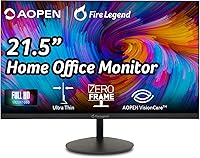
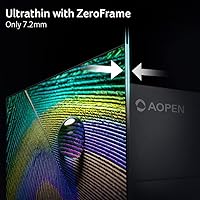
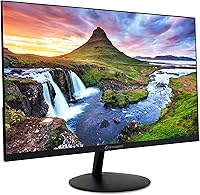
The AOPEN 22SA2Q 21.5″ Full HD Monitor is Acer's budget-minded answer for anyone who needs a dependable everyday display without stretching their wallet. Sitting under the AOPEN sub-brand, it targets home office workers and casual gamers who want something more polished than a bargain-bin screen. The zero-frame design is a genuine visual upgrade over chunky-bezeled alternatives at this price point — it simply looks tidier on a desk. An HDMI cable ships in the box, which is a small but practical touch. Launched in mid-2023, this budget office display enters a crowded market, but its combination of modern aesthetics and capable specs gives it a reasonable foothold.

Features & Benefits

The 22SA2Q runs a VA panel, which is worth noting because VA technology generally produces better contrast and deeper blacks than the TN panels you often find at this price range — though viewing angles aren't quite as wide as IPS. Via HDMI, it pushes a 100Hz refresh rate, a meaningful jump over 60Hz that makes scrolling and light gaming feel noticeably smoother. The 1ms response time is rated using TVR methodology, not the more commonly cited GtG measurement, so manage expectations accordingly — it's good, not exceptional. AMD FreeSync helps keep tearing in check, and the built-in low blue light filter is handy for long work sessions.

Best For

This AOPEN monitor is a natural fit for students and remote workers who need a clean, functional display without a premium price tag. If you're building a first workstation or adding a second screen to a home office setup, the compact 21.5-inch footprint keeps things tidy without sacrificing usable screen real estate. Casual gamers who play at 1080p will appreciate the 100Hz ceiling and FreeSync support — just don't expect it to replace a dedicated gaming display. It also suits anyone upgrading from an older VGA-only monitor, since the dual-port setup gives some backward compatibility alongside modern connectivity. VESA compatibility is a bonus for those who prefer a monitor arm.

User Feedback

With a 4.5-star average across roughly 105 ratings, buyer sentiment toward the 22SA2Q is largely positive — though that sample size is modest enough that outlier experiences haven't fully surfaced yet. Users frequently highlight the image clarity and the clean, borderless look as standout qualities at this price level. The zero-frame aesthetic gets specific praise from those running dual-monitor setups. On the downside, the stand only tilts — no height adjustment or swivel — which is a real limitation for ergonomics-conscious buyers. A practical note: use HDMI, not VGA, to access the full 100Hz refresh rate. Stand flexibility and long-term reliability are areas worth watching as the review base grows.

Pros

  • VA panel produces noticeably better contrast and deeper blacks than TN monitors at a similar price.
  • 100Hz refresh rate via HDMI makes everyday scrolling and casual gaming feel smoother than typical office displays.
  • AMD FreeSync effectively reduces screen tearing without requiring a high-end graphics card.
  • Zero-frame design looks clean and modern, especially in a dual-monitor setup.
  • Low blue light filter is a practical comfort feature for long work sessions.
  • VESA 75x75mm compatibility gives you the option to use a monitor arm or wall mount.
  • An HDMI cable is included in the box, saving you a small but annoying extra purchase.
  • Compact footprint works well for smaller desks or tight home office spaces.
  • Backed by Acer's supply chain and support infrastructure under the AOPEN sub-brand.
  • 4.5-star average rating suggests most buyers are satisfied given the price point.

Cons

  • Stand only tilts — no height adjustment or swivel makes ergonomic positioning difficult for many users.
  • TVR response time rating is more optimistic than GtG, so real-world motion clarity may disappoint fast-paced gamers.
  • VGA port is capped at 75Hz, meaning buyers must use HDMI to access the full refresh rate.
  • VA panel viewing angles are noticeably narrower than IPS alternatives, which can be an issue in shared viewing situations.
  • Only 105 ratings at time of review — not enough data to reliably assess long-term durability or edge-case issues.
  • No USB hub ports, which limits desk connectivity for users with multiple peripherals.
  • No built-in speakers, requiring separate audio hardware even for basic sound needs.
  • 1080p resolution at 21.5 inches leaves limited room for multitasking with multiple windows open simultaneously.
  • Color accuracy is not suited for professional creative work like photo or video editing.
  • Single HDMI 1.4 port means no support for daisy-chaining or higher-bandwidth display connections.

Ratings

The AOPEN 22SA2Q 21.5″ Full HD Monitor has been evaluated by our AI rating system after analyzing verified buyer reviews from multiple global sources, with spam, incentivized, and bot-generated feedback actively filtered out. The scores below reflect an honest composite of real-world experiences — including both what buyers genuinely appreciated and the friction points that came up repeatedly. Strengths and shortcomings are weighted equally so you can make a fully informed decision.

Value for Money
88%
For buyers on a strict budget, the 22SA2Q punches well above its price class. Getting a 100Hz VA panel with AMD FreeSync and a zero-frame design at this price point is genuinely difficult to match, and most buyers feel they received more than they paid for.
While the value is strong, a few buyers noted that spending a small amount more opens up IPS options with better viewing angles and ergonomic stands — making the value case slightly less clear-cut if your budget has any flexibility.
Image Quality
83%
The VA panel's contrast performance is a clear highlight — dark scenes in movies and games show noticeably richer shadow detail than TN-based competitors at similar prices. Buyers working on documents and spreadsheets all day also report the matte 1080p image is sharp and easy on the eyes.
Color accuracy and viewing angles are the obvious trade-offs. Sitting off-axis — even modestly — causes visible color and brightness shift, which becomes a real nuisance in side-by-side setups or when a colleague leans over to look at your screen.
Refresh Rate Performance
84%
The jump from 60Hz to 100Hz is something most buyers notice almost immediately, whether they are scrolling through long web pages or playing casual titles. Combined with AMD FreeSync, the experience feels meaningfully smoother without requiring any special configuration.
The 100Hz ceiling is only accessible via HDMI — connect through VGA and you are capped at 75Hz, which is easy to overlook during setup. A small but frustrating gotcha for buyers who assumed both ports performed equally.
Response Time
67%
33%
For everyday office tasks and non-competitive gaming, the motion clarity is adequate and most users will not actively notice ghosting during normal use. The low blue light filter pairs well with the panel for long workday comfort.
The 1ms TVR rating is measured using a more lenient methodology than GtG, and real-world pixel transitions are slower than that figure implies. Buyers who tested it with fast-paced competitive games reported noticeable ghosting that the spec sheet did not prepare them for.
Design & Aesthetics
86%
The zero-frame front bezel is the design standout — it looks considerably more premium than the price suggests, and buyers running dual-monitor setups specifically call it out as making the combined display look clean and cohesive. The matte black finish is understated and professional.
Beyond the bezel, the build feels utilitarian. The plastic chassis has a lightweight feel that some buyers associate with fragility, and the overall construction does not inspire long-term confidence the way a slightly pricier monitor might.
Ergonomics & Stand
48%
52%
The stand keeps the monitor stable on a flat surface and the tilt function works smoothly with enough resistance to hold its position. For users who plan to place it flat on a desk and never adjust it again, the stand is functional enough.
Tilt-only adjustment is a genuine limitation that buyers flag consistently. Without height or swivel control, finding an ergonomically correct eye-level position is nearly impossible without third-party accessories — a real concern for anyone spending full workdays in front of this screen.
Connectivity
73%
27%
Having both HDMI and VGA ports available is genuinely useful for buyers upgrading from older hardware, and the HDMI cable included in the box removes one small setup frustration. Most modern devices connect via HDMI without any issues.
A single HDMI 1.4 port is the only modern connection option, with no DisplayPort, USB-C, or hub functionality. For users who need to switch between a laptop and a desktop quickly, the lack of multiple HDMI inputs or a KVM-style solution is a real inconvenience.
Eye Comfort
79%
21%
The combination of a matte screen surface and a built-in low blue light filter makes extended work sessions noticeably more comfortable than glossy alternatives. Remote workers logging six to eight hours daily have mentioned reduced eye fatigue as a specific positive.
The low blue light implementation is software-level rather than hardware-certified, and it does add a slight warm color cast to the display. Users who need accurate color representation for their work may find themselves toggling it off frequently.
Gaming Suitability
69%
31%
For casual gaming — think indie games, older titles, and slower-paced RPGs — the 22SA2Q is a reasonable companion. AMD FreeSync keeps tearing under control and 100Hz gives gameplay a fluid feel that 60Hz simply cannot match at any price.
Competitive or reflex-heavy gaming exposes the panel's limitations quickly. The TVR response time inflates expectations, and the absence of a higher refresh rate ceiling or a faster GtG rating means serious gamers will feel the gap compared to purpose-built gaming monitors.
Setup & Installation
87%
Assembly is straightforward — the stand attaches without tools and the included HDMI cable means most buyers are up and running within minutes of opening the box. The monitor is recognized automatically by Windows and Mac without driver installation.
The manual is minimal, and the port labeling on the rear is small and poorly lit, which makes initial cable routing slightly awkward in a dim space. Nothing deal-breaking, but a small polish issue at this price tier.
Brightness & Glare Handling
74%
26%
The matte coating handles ambient light well enough for most indoor environments — offices with overhead lighting and home setups near windows are both manageable without excessive washing out of the image.
Peak brightness is modest, and in brighter rooms or near windows with direct sunlight, the display can look dim. HDR content is not supported, so buyers hoping for a richer, more dynamic image range will need to look elsewhere.
VESA & Mounting Flexibility
81%
19%
VESA 75x75mm compatibility is a meaningful inclusion at this price, and buyers who have paired the 22SA2Q with an affordable monitor arm report the combination transforms the ergonomic limitations of the stock stand entirely.
The 75x75mm VESA pattern is less common than the more standard 100x100mm, so buyers need to confirm arm or bracket compatibility before purchasing — not all affordable arms support the smaller pattern.
Durability & Build Confidence
66%
34%
In the short term, buyers report no significant issues with screen uniformity, backlight bleed, or dead pixels out of the box. The monitor holds its physical shape and image quality consistently through regular daily use.
The modest review count of around 105 ratings means long-term reliability data is still limited. The lightweight plastic construction raises mild questions about durability beyond the first year, particularly around hinge wear from repeated tilt adjustments.

Suitable for:

The AOPEN 22SA2Q 21.5″ Full HD Monitor is a strong pick for anyone who needs a capable everyday display without spending a lot — particularly students, first-time buyers, and remote workers setting up a home office on a tight budget. The 21.5-inch screen size is compact enough for smaller desks without feeling cramped for productivity tasks like document editing, web browsing, or video calls. Casual gamers who stick to 1080p titles will also find it worthwhile — the 100Hz refresh rate via HDMI and AMD FreeSync support deliver a noticeably smoother experience than the 60Hz panels that dominate this price bracket. If you're running a dual-monitor setup, the zero-frame design makes the pairing look much cleaner than you'd expect at this price. VESA compatibility is a genuine bonus for anyone who prefers a monitor arm over the included stand.

Not suitable for:

The AOPEN 22SA2Q 21.5″ Full HD Monitor is not a good fit for buyers with serious ergonomic requirements — the stand only tilts, offering no height adjustment or swivel, which can be a real problem for anyone who spends long hours at a desk and needs precise positioning. Creative professionals working in photo or video editing should also look elsewhere, since the VA panel's color accuracy and viewing angle limitations fall short of what IPS displays offer at a comparable price. Competitive gamers who rely on fast, precise motion will likely find the 1ms TVR response time figure misleading — TVR is a more favorable measurement than GtG, and real-world pixel transitions can be slower than that number implies. At 21.5 inches and 1080p, there's also limited screen real estate for multitasking or running multiple windows side by side. Buyers who need USB hub functionality or built-in speakers will need to look at other options, as this monitor skips both.

Specifications

  • Screen Size: The display measures 21.5 inches diagonally, offering a compact footprint suitable for most standard desks.
  • Panel Type: Uses a VA (Vertical Alignment) panel, which provides stronger contrast ratios and deeper blacks than TN panels, though viewing angles are narrower than IPS displays.
  • Resolution: Native resolution is 1920x1080 Full HD, delivering sharp and clear visuals for everyday productivity and casual gaming at this screen size.
  • Refresh Rate: Supports up to 100Hz when connected via HDMI, and 75Hz when using the VGA port.
  • Response Time: Rated at 1ms using TVR (Total Video Response) methodology, which measures differently from the more commonly cited GtG (Gray-to-Gray) standard.
  • Aspect Ratio: Standard 16:9 widescreen aspect ratio, compatible with virtually all modern content formats and operating systems.
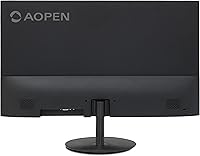
  • Ports: Includes one HDMI 1.4 port and one VGA port, with an HDMI cable included in the box.
  • Sync Technology: AMD FreeSync is supported, reducing screen tearing and stuttering during gaming without requiring specific GPU hardware beyond AMD compatibility.
  • VESA Mount: VESA 75x75mm mounting pattern is supported, allowing use with most standard monitor arms or wall-mount brackets.
  • Blue Light Filter: Built-in low blue light filter is available to reduce eye strain during extended viewing sessions.
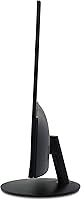
  • Stand Adjustment: The included stand supports tilt adjustment only; height, swivel, and pivot adjustments are not available without a third-party arm.
  • Screen Surface: Matte screen coating minimizes glare and reflections, making it easier to use in rooms with ambient light sources.
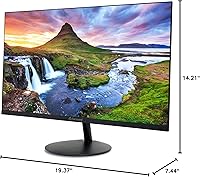
  • Dimensions: The monitor measures 19.37 x 14.21 x 7.44 inches (width x height x depth) with the stand attached.
  • Weight: Total unit weight is 6.93 pounds, making it easy to reposition or carry during initial setup.
  • Color: Available in black, with a zero-frame (borderless) front bezel design for a cleaner, modern aesthetic.
  • Brand: Sold under the AOPEN sub-brand, which is Acer's value-tier product line focused on affordable displays and monitors.
  • Model Number: Official model number is UM.WS2AA.H01, also marketed under the series name AOPEN 22SA2Q Hbi.
  • Availability: First made available on Amazon in June 2023, making it a relatively recent entry in the budget monitor segment.

Related Reviews
Acer SB220Q 21.5-inch IPS Monitor
72%
84%
Image & Color Quality
88%
Value for Money
83%
Viewing Angles
74%
Refresh Rate & Smoothness
67%
Response Time
More
Lenovo L22e-40 21.5-inch Monitor
74%
88%
Value for Money
84%
Image Quality
61%
Brightness & Visibility
86%
Eye Comfort
47%
Stand & Ergonomics
More
LG 22MK430H 22-inch FHD IPS Monitor
73%
83%
Image Quality
81%
Viewing Angles
54%
Screen Glare & Surface
69%
Build Quality
46%
Stand & Ergonomics
More
AOPEN 16PG7QT 15.6-inch Portable Touch Monitor
71%
91%
Portability
84%
Display Quality
88%
Refresh Rate Performance
78%
Touchscreen Responsiveness
71%
Connectivity & Compatibility
More
Acer EZ321Q wi 31.5″ IPS Monitor
75%
93%
Screen Size Value
81%
Image & Color Accuracy
61%
Pixel Sharpness & Clarity
54%
Ergonomics & Stand Adjustability
88%
Design & Aesthetics
More
AOPEN 24SA2Y bi 23.8-inch Full HD VA Monitor
85%
92%
Value for Money
89%
Display Quality
80%
Build Quality
88%
Ease of Setup
85%
Response Time (Gaming)
More
FEELWORLD F570 5.7-Inch Full HD DSLR On-Camera Monitor
87%
88%
Display Quality
94%
Portability & Size
90%
Build Quality
85%
Brightness & Outdoor Use
91%
Ease of Use
More
HP 22uh 21.5″ Monitor
84%
88%
Display Clarity
85%
Color Accuracy
79%
Build Quality
92%
Ease of Setup
87%
Connectivity Options
More
KEEPTIME 21.5″ Portable Monitor
85%
89%
Display Quality
91%
Portability & Design
88%
Gaming Performance
78%
Connectivity & Compatibility
84%
Setup & Installation
More
ArcticPro AD22ZFA 22-inch FHD Monitor
72%
91%
Value for Money
86%
Picture Quality
78%
Refresh Rate & Motion Smoothness
74%
Build Quality & Design
61%
Ergonomics & Adjustability
More

FAQ

No, an HDMI cable is included in the box, which is a convenient touch that saves you a small extra purchase during setup.

Unfortunately, no. The VGA port on the 22SA2Q maxes out at 75Hz. To take advantage of the full 100Hz refresh rate, you need to connect via the HDMI port.

It handles casual gaming reasonably well — the 100Hz refresh rate and AMD FreeSync make a real difference over a standard 60Hz screen. That said, it is not built for competitive gaming. If you play fast-paced titles where every millisecond matters, a dedicated gaming monitor with a verified GtG response time would serve you better.

Not quite. TVR (Total Video Response) and GtG (Gray-to-Gray) are different ways of measuring response time, and TVR tends to produce more favorable numbers. In practice, this monitor's actual pixel transition speed may be slower than the 1ms figure suggests, though it still performs adequately for everyday use and light gaming.

Yes. The AOPEN 22SA2Q 21.5″ Full HD Monitor supports the VESA 75x75mm mounting standard, so it is compatible with most standard monitor arms and wall mounts available on the market.

No, the included stand only tilts — there is no height adjustment, swivel, or pivot. If ergonomics are important to you, a VESA-compatible monitor arm is a straightforward way to get more flexibility.

Yes, this AOPEN monitor connects via standard HDMI or VGA ports, so it works with virtually any computer — Windows, Mac, or even a gaming console — as long as you have a compatible output on your device.

No, the 22SA2Q does not include built-in speakers. You will need external speakers or headphones for audio.

VA panels generally produce better contrast and deeper blacks, which can make movies and darker content look richer. The trade-off is that viewing angles are somewhat narrower — colors and brightness can shift if you are looking at the screen from a steep angle. For straight-on use at a desk, most people will not notice a significant issue. If you share your screen frequently with others sitting beside you, an IPS panel would handle that better.

It works quite well for that purpose. The zero-frame bezel design minimizes the gap between screens when placed side by side, which is something buyers have specifically called out as a positive. Just make sure your GPU or laptop has enough output ports to drive both displays simultaneously.