Overview

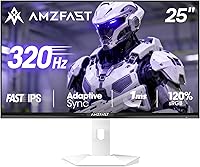
The Amzfast AMZG25F6F 25-inch 320Hz Gaming Monitor enters a crowded budget esports market with an ambitious spec sheet for its price point. Amzfast isn't a household name — it's a Chinese manufacturer you won't find at your local Best Buy — but that's increasingly common in the monitor space, and it doesn't automatically mean poor quality. The Fast IPS panel is a meaningful choice here; compared to TN alternatives, you get noticeably better colors and viewing angles without sacrificing much in response time. One thing to flag upfront: no built-in speakers. That's not a dealbreaker for most gamers, but worth knowing before unboxing. The 2-year zero-bright-dot warranty is a genuine standout — most budget monitors don't offer that level of coverage.
Features & Benefits

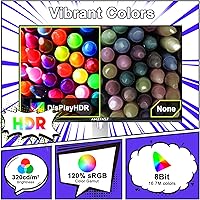
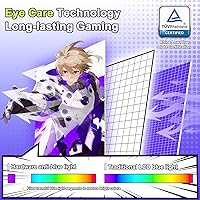
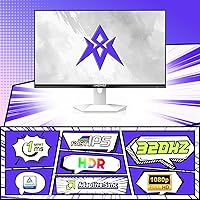
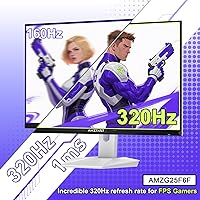
The headline spec is 320Hz, but there's a catch worth understanding before you buy: you only reach peak refresh through DisplayPort 1.4. Plug in via HDMI and you're capped at 240Hz — still fast, but not the advertised maximum. The 1ms MPRT response time translates to clean motion in fast-paced shooters; ghosting stays minimal during rapid tracking. Color performance punches above its class, with 130% sRGB and HDR10 delivering richer visuals than typical budget esports panels. The AI crosshair overlay and Night Vision mode are genuinely useful without requiring extra software. TÜV Rheinland certification for low blue light and anti-flicker adds real credibility to the eye comfort claims, and VESA 100x100mm support keeps mounting options open.

Best For

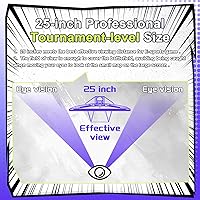
This budget esports display was built with one type of gamer squarely in mind: the competitive FPS player who wants triple-digit refresh rates without spending flagship money. If you're grinding ranked matches in Valorant, CS2, or Apex and your GPU can push high frame rates at 1080p, this 320Hz monitor makes a strong case. The 25-inch form factor hits the sweet spot for tournament-style play, where a slightly tighter screen genuinely helps peripheral awareness. It also suits secondary setups where speed matters more than premium build quality. Budget upgraders moving from 144Hz panels will feel an immediate difference — not because the screen is fancy, but because high refresh rates change how snappy fast gameplay actually feels.

User Feedback

Buyer sentiment around the Amzfast 25-inch panel tends to split along familiar lines. Most users are impressed by how smooth the high refresh rate feels day-to-day and report that warranty claims are honored without excessive friction. Color output earns decent marks straight from the box, though a handful of buyers recommend a quick manual calibration to fully unlock the wide color coverage. Where reactions turn more critical is stand stability — a recurring complaint at this price tier — alongside occasional reports of minor backlight inconsistency. Support response times vary, which is worth keeping in mind given the brand's limited market history. On balance, buyers largely feel they received fair value with expected trade-offs for the price paid.

Pros

  • 320Hz refresh rate delivers genuinely smooth, responsive motion that makes a noticeable difference in fast-paced shooters.
  • Fast IPS panel offers better color and viewing angles than TN alternatives at a comparable price point.
  • Built-in AI crosshair overlay and Night Vision mode add useful in-game tools without extra software.
  • TÜV Rheinland certification for low blue light and anti-flicker gives the eye comfort claims real credibility.
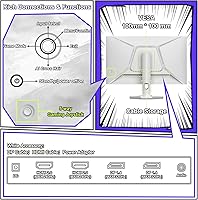
  • Dual DisplayPort 1.4 and dual HDMI 2.0 ports offer flexible connectivity for multi-device setups.
  • VESA 100x100mm compatibility makes it easy to pair with an aftermarket arm if the stock stand disappoints.
  • The 2-year zero-bright-dot warranty is an unusually strong coverage commitment for a monitor at this price.
  • 130% sRGB color gamut punches above what most budget esports panels deliver out of the box.
  • Adaptive sync support helps eliminate screen tearing even on mid-range GPUs that fall short of peak frame rates.
  • Both a DisplayPort and HDMI cable are included, so you can get up and running immediately.

Cons

  • No built-in speakers, which is a genuine inconvenience if your setup relies on monitor audio.
  • Peak 320Hz is only available via DisplayPort; HDMI users are capped at 240Hz, which the marketing underplays.
  • Brightness tops out at 320 nits, making the display look flat or washed out in bright ambient lighting.
  • Stand stability has drawn consistent criticism — wobble is noticeable during desk movement or typing.
  • Amzfast is a relatively unknown brand with limited long-term reliability data and inconsistent support response times.
  • Some units show minor backlight bleed or panel uniformity issues, a known risk with budget IPS production.
  • Color accuracy straight out of the box varies between units; manual calibration may be needed to get the best results.
  • At 11 pounds, the monitor feels on the heavier side for its size, which can affect stand balance further.
  • HDR10 support is present on paper but practically ineffective given the panel brightness limitations.
  • Buyers outside major markets may face slower warranty service turnaround due to the brand having limited regional infrastructure.

Ratings

Our AI rating system analyzed verified global buyer reviews for the Amzfast AMZG25F6F 25-inch 320Hz Gaming Monitor, actively filtering out incentivized, bot-generated, and spam feedback to surface what real users actually experience day to day. The scores below reflect a balanced synthesis of genuine strengths and recurring frustrations across thousands of real-world use cases. Where this budget esports display overdelivers, the scores say so — and where it falls short of expectations, that is reflected just as clearly.

Refresh Rate Performance
88%
Competitive FPS players consistently report that the jump to 320Hz from 144Hz feels immediately noticeable — tracking fast-moving targets in games like Valorant or CS2 becomes sharper and more responsive. For the price, getting genuine high-refresh performance without frame-time instability is a win most buyers did not expect.
Reaching the full 320Hz requires DisplayPort and a manual refresh rate change in Windows display settings, which catches a surprising number of buyers off guard. Some users on HDMI-only setups never realize they are running at 240Hz rather than the advertised maximum.
Panel Clarity & Motion
83%
The Fast IPS panel handles fast motion cleanly for its class, with minimal ghosting during rapid panning in shooters. Most users transitioning from older TN panels note a clear upgrade in both motion handling and overall image sharpness during gameplay.
At very high refresh rates, some users notice mild inverse ghosting artifacts typical of overdrive on Fast IPS panels. It is not severe enough to ruin gameplay, but users sensitive to this kind of visual artifact may find it mildly distracting in specific scenarios.
Color Accuracy
77%
23%
The 130% sRGB coverage is genuinely impressive for a budget esports display, producing colors that look richer and more saturated than typical panels in this price tier. Buyers using it for casual creative work alongside gaming were pleasantly surprised by how presentable the image looked without any calibration.
Color accuracy out of the box varies noticeably between units, and some buyers report a slightly cool or oversaturated default profile that benefits from a quick manual adjustment. Without calibration, the wide color gamut can occasionally make skin tones look unnatural in cinematic content.
Value for Money
91%
For buyers whose primary goal is maximizing refresh rate on a tight budget, this 320Hz monitor delivers a spec sheet that would have cost significantly more just two years ago. The included cables, zero-bright-dot warranty, and practical gaming features add genuine value that is difficult to match at this price point.
The value calculation changes if you factor in potential unit-to-unit inconsistency or the added cost of upgrading the stand with an aftermarket arm. Buyers who end up needing warranty service may also experience delays due to the brand's limited regional support infrastructure.
Build Quality
61%
39%
The overall construction feels acceptable for its category, and the bezels are slim enough to make the display look clean on a desk. Most buyers who are not comparing it directly to premium monitors tend to find the build satisfactory for everyday gaming use.
Stand wobble is the most commonly cited complaint — the base has a noticeable flex that becomes irritating during typing or desk activity. The plastics feel lightweight and cost-conscious, which is expected at this price but is a gap that users upgrading from mid-range monitors will feel immediately.
Brightness & Visibility
62%
38%
In a controlled or dim gaming environment, 320 nits is workable and the matte anti-glare coating does a decent job of reducing reflections. Users who game in dedicated setups with controlled lighting rarely report any significant issues with screen readability.
In naturally lit rooms or beside a window, the display can look noticeably dim and washed out. The HDR10 label on the spec sheet creates expectations the 320 nit brightness ceiling simply cannot meet, which frustrates buyers who expected a meaningful HDR experience.
Eye Comfort
79%
21%
The TÜV Rheinland certification for low blue light and anti-flicker is not just a marketing badge — buyers who game for extended sessions report less eye fatigue compared to uncertified budget panels they have used previously. The hardware-level implementation means it works regardless of software settings.
The low blue light mode can shift the color temperature toward a warm yellow tone that some users find distracting for competitive gaming. A few buyers noted they preferred disabling it during gaming sessions and only activating it during late-night casual browsing.
Connectivity & Ports
84%
Having two HDMI and two DisplayPort inputs is genuinely useful for buyers running multiple PCs or switching between a desktop and a laptop regularly. The included DisplayPort and HDMI cables mean you can connect two devices right out of the box without an extra purchase.
HDMI 2.0 is the limiting factor here — it cannot carry 320Hz at 1080p, which forces DisplayPort as the only path to peak performance. Buyers with older GPUs that only have HDMI outputs will need to invest in a DisplayPort-capable graphics card to access the full refresh rate.
Gaming Features
78%
22%
The AI crosshair overlay works reliably and saves competitive players from needing third-party software solutions that can cause compatibility headaches. Night Vision mode for lifting shadow detail is a practical touch that FPS players in particular find genuinely useful during dark map sections.
The on-screen display menu for accessing these features feels clunky and slow to navigate compared to monitors from more established brands. Some users report that the game-mode presets shift color and contrast aggressively in ways that require manual fine-tuning to look natural.
Setup & Ease of Use
74%
26%
Physical assembly is straightforward and takes under ten minutes for most users, with a simple stand-click-in design. The included dual cables mean most buyers can plug in and start gaming immediately without any extra accessories.
Getting to 320Hz requires manually selecting the refresh rate in Windows display settings, which the packaging and documentation do not guide buyers through clearly enough. A meaningful number of users initially assume the monitor is running at full speed when it is still defaulting to 60Hz.
HDR Experience
44%
56%
HDR10 support does provide a slightly expanded dynamic range in compatible titles compared to standard SDR output, and some buyers appreciate having the option enabled even in a limited form. For casual gaming use, the subtle improvement in highlight detail is noticeable in bright outdoor game environments.
With a 320 nit brightness ceiling, the HDR implementation here is far too limited to deliver anything approaching a true HDR experience. Buyers expecting the vivid contrast and brightness punch they have seen on OLED or mini-LED HDR displays will be genuinely disappointed by how little HDR adds here.
Warranty & Support
69%
31%
The 2-year zero-bright-dot warranty stands out as one of the most buyer-friendly coverage policies in the budget monitor segment, giving buyers meaningful protection against one of the most frustrating panel defects. Buyers who have had clean warranty exchanges report that the process was handled reasonably without excessive bureaucracy.
Support response times are inconsistent depending on region, and buyers outside major markets have reported longer resolution windows than the warranty terms imply. As a relatively new brand without an established global service network, the warranty is only as reassuring as the follow-through, which is not yet uniformly proven.
Stand Ergonomics
53%
47%
The stand covers basic functionality — it holds the monitor upright and allows for straightforward tilt adjustment that suits most seated gaming postures. For buyers who plan to use a VESA arm regardless, the stand quality is largely irrelevant since the 100x100mm mount pattern is supported.
There is no height adjustment or pivot support, which limits ergonomic flexibility for taller users or those with non-standard desk setups. The wobble under light desk impact is a recurring complaint and genuinely lowers the premium feel of an otherwise capable display.
Audio
31%
69%
The absence of built-in speakers is a non-issue for buyers who already own a headset or external speakers, and many competitive gamers prefer dedicated audio anyway. There is no risk of low-quality integrated audio degrading the overall product perception for users who come prepared.
For buyers who expected monitor audio or did not read the specs carefully, discovering there are no speakers at all is a frustrating unboxing surprise. Without even a headphone jack on the monitor itself, there is no onboard audio path whatsoever, which limits flexibility in basic setups.

Suitable for:

The Amzfast AMZG25F6F 25-inch 320Hz Gaming Monitor is built for competitive PC gamers who want the highest possible refresh rate at 1080p without stretching their budget to cover a brand-name premium. If your GPU can consistently push triple-digit frame rates in titles like Valorant, CS2, or Apex Legends, this display will let you feel every bit of that performance advantage. The 25-inch form factor is a deliberate fit for esports-style play, where a tighter screen helps with focus and target tracking rather than panoramic immersion. It also makes a strong case as a secondary monitor in a multi-display setup, where raw speed matters far more than build refinement. Budget upgraders stepping up from 144Hz panels will notice an immediate, tangible difference in how fluid gameplay feels at 320Hz.
Not suitable for:

The Amzfast AMZG25F6F 25-inch 320Hz Gaming Monitor is a poor match for buyers who prioritize content creation, color-critical work, or cinematic gaming experiences. At 320 nits of brightness, the panel can look underwhelming in well-lit rooms or beside brighter displays, and the HDR10 support is nominal rather than truly impactful at this brightness ceiling. Anyone expecting the refinement of an established monitor brand — in terms of build materials, stand ergonomics, or consistent panel quality across units — may be disappointed. The lack of speakers is a real inconvenience if you game in a space where desk clutter or cable management limits your audio options. Buyers who game primarily via console over HDMI should also note that peak 320Hz is only achievable through DisplayPort, meaning HDMI users are limited to 240Hz regardless of what the headline spec suggests.
Specifications

  • Screen Size: The panel measures 25 inches diagonally, a standard size for competitive esports play.
  • Panel Type: Uses a Fast IPS panel, which balances color accuracy and wide viewing angles with a low response time.
  • Resolution: Native resolution is 1920x1080 (Full HD), optimized for high frame rate output rather than pixel density.
  • Refresh Rate: Supports up to 320Hz via DisplayPort 1.4 and up to 240Hz via HDMI 2.0.
  • Response Time: Rated at 1ms MPRT, which helps reduce perceived motion blur during fast-paced gameplay.
  • Brightness: Peak brightness is 320 cd/m², which is adequate for moderately lit rooms but may struggle in very bright environments.
  • Contrast Ratio: Specified contrast ratio is 1000:1, typical for IPS-class panels at this price tier.
  • Color Gamut: Covers 130% of the sRGB color space, offering wider color reproduction than most entry-level esports monitors.
  • Color Depth: Supports 8-bit color, rendering up to 16.7 million colors for smooth gradients and natural-looking images.
  • HDR Support: HDR10 is supported, though practical HDR impact is limited by the panel's 320 nit brightness ceiling.
  • Connectivity: Equipped with two HDMI 2.0 ports and two DisplayPort 1.4 ports for flexible multi-device connectivity.
  • Included Cables: Package includes one DisplayPort cable and one HDMI cable, allowing immediate setup without additional purchases.
  • Adaptive Sync: Supports Adaptive Sync technology to reduce screen tearing and stuttering across compatible GPUs.
  • VESA Mount: Compatible with standard 100x100mm VESA mounting patterns, supporting most third-party monitor arms and wall mounts.
  • Aspect Ratio: Standard 16:9 widescreen aspect ratio, consistent with the vast majority of modern games and content.
  • Eye Care: TÜV Rheinland certified for hardware-level low blue light reduction and anti-flicker technology to reduce eye fatigue.
  • Speakers: No built-in speakers are included; external audio output is required for sound.
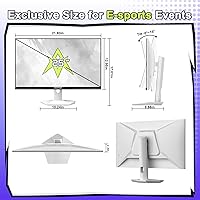
  • Dimensions: Assembled monitor measures 21.93 x 8.66 x 17.01 inches including the stand.
  • Weight: Total unit weight with stand is 11.08 pounds.
  • Warranty: Covered by a 2-year zero-bright-dot warranty, with free replacement or reshipment for qualifying major defects.

Related Reviews

Amzfast AMZG49C7U 49-inch Curved Ultrawide Gaming Monitor
76%
88%
Image Clarity
81%
Refresh Rate Performance
84%
Color Accuracy
53%
HDR Quality
91%
Curvature & Immersion
More
Amzfast AMZG27F6Q 27-inch 1440P Gaming Monitor
75%
88%
Value for Money
84%
Gaming Performance
86%
Image Clarity
79%
Color Accuracy
53%
HDR Quality
More
Sceptre E255B 25-inch 240Hz Gaming Monitor
69%
91%
Refresh Rate Performance
88%
Response Time & Motion Clarity
54%
Image Quality & Color Accuracy
89%
Value for Money
63%
Build Quality & Design
More
KOORUI G2511XC 25-inch Curved Gaming Monitor
74%
93%
Refresh Rate Performance
89%
Value for Money
91%
Motion Clarity
78%
Color Quality
54%
HDR Experience
More
Sceptre C255B-FWT240 25-inch Curved Gaming Monitor
76%
93%
Motion Clarity & Refresh Performance
88%
Response Time & Ghosting Control
91%
Value for Money
86%
Adaptive Sync & Tear-Free Performance
82%
Panel Curvature & Immersion
More
Pixio PX259 Prime 24.5-inch Gaming Monitor
73%
91%
Gaming Performance
88%
Motion Clarity
74%
Color Quality
69%
Build Quality
47%
Ergonomics
More
ASUS VG259Q3A 25-inch FHD Gaming Monitor
75%
93%
Motion Performance
84%
Panel Color Quality
81%
Adaptive Sync
41%
Ergonomics & Stand
88%
Value for Money
More
Sceptre E255B-1658A 25-inch 1080p 165Hz Gaming Monitor
82%
91%
Value for Money
87%
Display Performance
89%
Refresh Rate & Response Time
82%
Build Quality
58%
Sound Quality
More
Skytech Gaming Moonshadow 27-inch Curved Gaming Monitor
83%
88%
Image Quality
91%
Refresh Rate Performance
86%
Adaptive-Sync
83%
VA Panel Contrast
84%
Stand & Ergonomics
More
Raywego Z270B13 27-inch Gaming Monitor
70%
88%
Value for Money
83%
Picture Quality
84%
Refresh Rate Performance
62%
Build Quality
81%
Eye Comfort
More

FAQ

You do need DisplayPort to hit 320Hz. HDMI 2.0 on this monitor caps out at 240Hz, which is still very fast, but if 320Hz is your target you will need to use one of the DisplayPort 1.4 inputs. The good news is a DisplayPort cable is already included in the box.

Yes, the Amzfast AMZG25F6F 25-inch 320Hz Gaming Monitor supports Adaptive Sync, which works with both AMD FreeSync-compatible and most NVIDIA G-Sync Compatible graphics cards. Just check that your GPU supports Adaptive Sync output and you should be good to go.
You can connect a console via HDMI, but you will be limited to 240Hz at 1080p through that connection. Current-gen consoles also typically cap at 120fps for most titles, so the high refresh rate advantage is less relevant for console gaming anyway.

Fast IPS gives you noticeably better color reproduction and wider viewing angles than TN, without a significant real-world disadvantage in response speed. TN panels can technically achieve lower gray-to-gray response times on paper, but for most competitive gamers the 1ms MPRT rating here is more than sufficient.

The AI crosshair is an on-screen overlay that places a custom crosshair at the center of the screen, independent of whatever game you are playing. It works at the monitor level so it is not affected by in-game settings, and it does not require any software installation. Usefulness varies by game, but many FPS players find it helpful.

The stand offers basic tilt adjustment, which is standard at this price point. It does not include height adjustment or pivot rotation, so if you need ergonomic flexibility you would likely want to pair it with a VESA-compatible monitor arm, which this display does support.

Budget IPS panels carry an inherent risk of backlight inconsistency, and some buyers have reported minor bleed, particularly in dark corners during full-black screens. It is not universal, but if you are sensitive to this issue or plan to use the display heavily for dark cinematic content, it is a reasonable concern to keep in mind.

The Night Vision mode is a monitor-level function, not a game-specific feature, so it applies to anything displayed on screen including movies or desktop use. It boosts shadow detail in dark scenes, which can be useful for any content that has a lot of dark areas, not just games.

Amzfast advertises a 2-year zero-bright-dot warranty, meaning they will replace the unit if a bright stuck pixel appears, which is more generous than many competitors at this price. Response times for warranty claims can vary since the brand has limited regional service infrastructure in some markets, so documenting your issue with photos early is a good idea.

No dedicated driver is required, but you do need to manually set the refresh rate in your operating system display settings after connecting via DisplayPort. Windows will often default to 60Hz on first connection, so head into Display Settings, then Advanced Display Settings, and select 320Hz from the refresh rate dropdown to unlock the full performance.