Overview

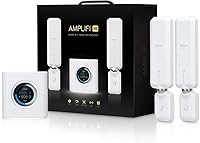
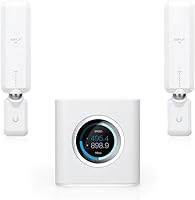
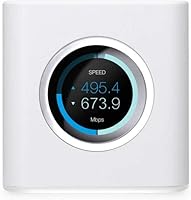
The AmpliFi HD Mesh WiFi System comes from Ubiquiti, a company that has spent years building networking hardware for offices, campuses, and commercial deployments — so there is genuine engineering pedigree behind this kit. The package includes a compact cube-shaped router with an LCD touchscreen display and two satellite MeshPoints designed to push coverage into the corners of a mid-to-large home. Think of it as the brand's attempt to bring that commercial-grade reliability into the living room, without forcing you to read a manual or log into a web interface. It sits a step above mass-market options like Eero or Orbi in terms of build quality and brand heritage.
Features & Benefits

The dual-band 802.11ac radio handles self-organization automatically, so the mesh topology adjusts without you touching a setting. Each MeshPoint has an adjustable antenna and a ring of LEDs that tell you whether signal strength at that location is actually good enough — a small touch that saves a lot of trial and error during placement. The router's touchscreen shows live network stats at a glance, which no comparable rival at this tier offers. On the wired side, four Gigabit LAN ports give you solid options for connecting a desktop, NAS, or TV directly. Setup through the mobile app typically takes around five minutes, and the app also handles guest networks, parental controls, and remote access cleanly.

Best For

This mesh system makes the most sense for homeowners dealing with dead zones in larger spaces — think multi-floor houses, thick concrete walls, or layouts where a single router simply cannot reach the garage or back bedroom. It also appeals to buyers who care about how hardware looks sitting on a shelf; the white cube design is understated and clean rather than the aggressive, antenna-bristling aesthetic common in gaming routers. Light gamers, 4K households, and people running a mix of smart home devices, laptops, and phones will all find the coverage consistent enough. It is less ideal for power users who need tri-band backhaul or WiFi 6 throughput.

User Feedback

Across roughly 2,250 ratings, the AmpliFi HD kit holds a 4.3-star average, and the praise clusters around two things: how painless the initial setup is and how well the app holds up over time. The signal LEDs on the MeshPoints get specific compliments for taking the guesswork out of placement. Criticism, when it appears, tends to focus on the absence of WiFi 6 and the lack of a dedicated wireless backhaul channel — both legitimate concerns given the hardware launched in 2016. A smaller group of reviewers, particularly those familiar with Ubiquiti's UniFi line, find the feature set a bit thin. Performance in very large homes can also plateau beyond the two included MeshPoints.

Pros

  • App-guided setup takes around five minutes and requires no technical background whatsoever.
  • The LCD touchscreen on the router base shows live network stats at a glance, no phone needed.
  • MeshPoint signal LEDs take the guesswork out of placement, showing you in real time if the spot is any good.
  • Four Gigabit LAN ports give you flexible wired options for desktops, NAS drives, or smart TVs.
  • The AmpliFi HD Mesh WiFi System covers most mid-size homes reliably with the two included nodes.
  • Hardware design is clean and minimal — it sits on a shelf without looking out of place.
  • Guest network creation takes under a minute directly from the mobile app.
  • Ubiquiti's commercial networking background translates to stable, consistent daily performance.
  • Parental controls and remote access are built in without requiring a separate subscription.

Cons

  • No WiFi 6 support puts this hardware behind most current mesh competitors at a similar price.
  • Dual-band only means device traffic and inter-node communication share the same spectrum under load.
  • MeshPoints have no Ethernet port, so wired backhaul between nodes is not an option.
  • Two nodes are rarely enough for homes above 4,500 sq. ft. or with challenging wall materials.
  • Firmware updates have occasionally introduced temporary connectivity issues for some users.
  • No content-category filtering makes the parental controls too basic for families with older children.
  • Advanced users will find missing features like VLAN support and granular radio controls frustrating.
  • Guest network access does not auto-expire, requiring manual shutdown after visitors leave.
  • Long-term firmware support is uncertain given the product's age and Ubiquiti's enterprise-first focus.

Ratings

The AmpliFi HD Mesh WiFi System earns a strong overall standing based on AI-synthesized analysis of thousands of verified global user reviews, with spam, bot-driven, and incentivized feedback actively filtered out before scoring. Ratings span everything from day-to-day performance and hardware design to app reliability and long-term value, giving you a transparent picture of where this mesh kit genuinely delivers and where it falls short.
Ease of Setup
93%
Users consistently single out the mobile app as one of the fastest and most intuitive onboarding experiences in its category. Most households report having the network live, MeshPoints placed, and devices connected in under ten minutes — with no router web interface required.
A small number of users encountered hiccups when the app failed to detect the router during initial pairing, requiring a power cycle or app reinstall. iOS users occasionally reported slightly smoother experiences than those on Android.
WiFi Coverage & Range
74%
26%
For typical suburban homes between 2,000 and 4,500 sq. ft., the two included MeshPoints handle most layouts confidently, pushing reliable signal into back bedrooms and through standard drywall construction without much fuss.
The advertised 10,000 sq. ft. ceiling is a best-case figure that does not hold up in homes with thick masonry walls, complex multi-floor plans, or long rectangular layouts. Buyers in larger homes routinely find two MeshPoints insufficient and need to purchase extras.
Network Performance & Speed
78%
22%
Day-to-day throughput for streaming 4K content, video calls, and casual gaming holds up well across multiple simultaneous users. The self-organizing mesh keeps connections stable when devices move between the router and MeshPoints.
The dual-band 802.11ac radio has no dedicated wireless backhaul channel, meaning the same spectrum handles both device traffic and inter-node communication. Under heavy loads, this creates a measurable throughput penalty compared to tri-band rivals.
Hardware Design & Build
91%
The compact cube form factor and all-white finish allow the router to sit on a shelf or countertop without looking out of place. The LCD touchscreen is a genuinely useful touch — glancing at live network stats without opening an app is something users appreciate daily.
The MeshPoints plug directly into a wall outlet, which can be awkward in locations where outlets are low, behind furniture, or already occupied. A couple of users noted the plastic housing feels slightly light relative to the price tier.
Mobile App Quality
86%
The companion app covers a solid range of controls: guest network creation, parental scheduling, per-device prioritization, and remote access all function reliably. Users returning after months away find the interface intuitive without relearning anything.
Occasional firmware update notifications have caused temporary connectivity drops for some users, and a subset of reviewers note that advanced configuration options available in competing apps are absent here. The app has improved over the years but still lags behind more developer-active platforms.
Value for Money
67%
33%
For buyers coming from a traditional single router plus one or two range extenders, the consolidated hardware and noticeably better coverage feel like a fair trade at this price point. The build quality and Ubiquiti pedigree add perceived longevity.
The lack of WiFi 6 support is a real sticking point when comparing against newer mesh systems available at similar or lower prices. Buyers researching in 2024 and beyond will find this hardware increasingly difficult to justify against current-generation alternatives.
Signal Consistency
79%
21%
The LED rings on each MeshPoint provide immediate placement feedback, helping users find the actual optimal spot rather than guessing. This translates to fewer dead zones and more predictable signal strength across rooms.
In homes with interference from neighboring networks or dense smart home device clusters, some users report occasional signal dips that require a router reboot to resolve. The mesh does not self-heal as aggressively as some rivals under sustained interference.
Wired Connectivity
88%
Four Gigabit LAN ports on the router base is a genuinely useful count for households that want to hardwire a desktop, NAS, smart TV, and a network switch simultaneously. Wired performance to connected devices is consistently fast and stable.
The MeshPoints themselves offer no wired backhaul or Ethernet port, which limits placement flexibility for users who want a wired connection at a satellite node. This is a notable gap compared to mesh systems that support Ethernet backhaul at the satellite level.
Parental Controls
71%
29%
The app-based parental controls let parents schedule internet access by device or profile, which is practical enough for most family use cases. Toggling access on and off remotely is straightforward and does not require touching the router.
The controls lack the depth of dedicated parental platforms — there is no content filtering by category, no detailed usage reporting, and no per-app blocking. Families with older children who require more granular oversight will likely find these tools insufficient.
Guest Network Management
82%
18%
Creating a temporary guest network through the app takes under a minute, and the ability to share access via a simple code makes it practical for households that frequently host visitors. Guest traffic is properly isolated from the main network.
There is no time-limited or auto-expiring guest access option, meaning hosts need to manually disable the guest network after visits. A few users also noted that guest network speed caps are not configurable.
Router Display & Interface
84%
The LCD touchscreen is a differentiating feature that earns genuine appreciation from users who like a quick visual check of network status without reaching for a phone. It adds a polished, considered feel to the hardware.
The display is informational rather than interactive — you cannot change settings directly from it, which limits its utility beyond status glances. Some users feel the screen adds cost without adding meaningful control.
Firmware & Long-term Support
61%
39%
Ubiquiti has pushed firmware updates over the years that addressed early bugs and added features, showing some commitment to the platform beyond launch. Users who bought early benefited from a more polished experience over time.
Given the product launched in 2016, concerns about how much longer active development will continue are legitimate. Some reviewers report that recent firmware versions introduced regressions, and Ubiquiti's support response times for consumer products are slower than their enterprise channels.
Device Compatibility
83%
The mesh system handles a wide mix of client devices without issue — smartphones, smart speakers, security cameras, laptops, and gaming consoles all connect reliably. Dual-band operation keeps older 2.4GHz devices from clogging the 5GHz band.
Households with a very high device count — 40 or more active clients — occasionally report instability or slower association times. The system was designed for typical home use, not dense IoT deployments.
Advanced User Features
52%
48%
For most home users, the available controls — band steering, QoS basics, guest isolation, and remote management — cover the majority of practical needs without overwhelming anyone unfamiliar with networking.
Power users, particularly those who have experience with Ubiquiti's UniFi or EdgeRouter platforms, will find the feature set frustratingly thin. VLAN support, detailed traffic monitoring, and granular radio controls are either absent or heavily simplified.

Suitable for:

The AmpliFi HD Mesh WiFi System is a strong match for homeowners who have outgrown a single router and are tired of dealing with dead zones in back bedrooms, basements, or garages. If your home sits somewhere between 2,000 and 4,500 sq. ft. with standard drywall construction, the included router and two MeshPoints will cover most floor plans confidently. It works particularly well for households running a busy mix of devices — smart TVs streaming 4K, a few laptops, phones, smart home sensors, and the occasional gaming console — all at the same time without constant dropout complaints. Buyers who value clean, understated hardware design will also appreciate that this kit does not look like it belongs in a server closet. And if the idea of a five-minute app-guided setup appeals to you more than logging into a web admin panel, this mesh system is built precisely with that kind of user in mind.
Not suitable for:

The AmpliFi HD Mesh WiFi System is a harder sell for buyers doing a side-by-side comparison with current-generation hardware, primarily because it launched in 2016 and does not support WiFi 6 — a standard that newer devices increasingly take advantage of for faster, more efficient connections. If your home exceeds 5,000 sq. ft. or has particularly challenging architecture like thick concrete or brick walls, two MeshPoints are unlikely to be enough, and adding more nodes raises the total cost considerably. Power users who have spent time with Ubiquiti's own UniFi platform will find the consumer-facing feature set stripped down to the point of frustration — no VLAN support, limited traffic visibility, and minimal radio customization. Households with 40 or more constantly active devices may also start to notice instability under that kind of load. Finally, buyers who want a dedicated wireless backhaul channel to keep inter-node traffic from competing with client devices should look at tri-band systems instead.

Specifications

  • WiFi Standard: Supports 802.11a/g/n/ac dual-band wireless, covering both the 2.4GHz and 5GHz frequency bands.
  • Coverage Area: Rated for up to 10,000 sq. ft. under ideal open-plan conditions; real-world coverage in typical homes will vary based on layout and construction materials.
  • Included Hardware: Kit contains one base router, two MeshPoint satellite nodes, one power adapter, and one Ethernet cable.
  • LAN Ports: The base router provides four Gigabit Ethernet LAN ports for wired device connections.
  • WAN Port: One dedicated Gigabit WAN port connects the router to your modem or ISP gateway.
  • Router Display: An LCD touchscreen on the router base shows real-time network status and basic stats without requiring the app.
  • MeshPoint Antennas: Each MeshPoint features a manually adjustable antenna and an integrated LED ring that indicates signal strength at the installed location.
  • Router Dimensions: The base router measures 3.85 x 3.92 x 3.91 inches, making it compact enough for a shelf or countertop placement.
  • Router Weight: The base router unit weighs 14.5 ounces, excluding cables and power adapter.
  • Color & Finish: All hardware ships in a clean white finish with a minimalist industrial design aesthetic.
  • Mobile App: The companion app is available for both iOS and Android and supports setup, parental controls, guest network management, and remote access.
  • Setup Time: Ubiquiti estimates initial setup via the mobile app takes approximately five minutes under normal conditions.
  • Special Features: Includes WPS support for simplified device pairing with compatible hardware.
  • Connectivity Types: Supports both wireless (WiFi) and wired (Gigabit Ethernet) connectivity across the system.
  • Brand Lineage: Designed by Ubiquiti Labs, a division of Ubiquiti Networks, a company with extensive commercial-grade networking infrastructure experience.
  • Operating Voltage: The system operates at 220 Volts; verify local power compatibility before purchase if outside standard regions.
  • USB Ports: The router includes one USB 2.0 port, though its function is limited compared to NAS-sharing capable routers.
  • Launch Date: The AmpliFi HD kit was first made available in October 2016 and uses 802.11ac rather than the newer WiFi 6 standard.

Related Reviews
Google Nest Wifi Router 1-Pack
79%
93%
Setup & Onboarding
84%
Signal Consistency & Stability
88%
App & Network Management
79%
Parental Controls
74%
Wireless Performance (Speed)
More
Cudy M3600 WiFi 7 Mesh System
86%
88%
Wi-Fi Performance
91%
Ease of Setup
85%
Device Handling
87%
App Functionality
80%
VPN Compatibility
More
NETGEAR Nighthawk MK93S Mesh WiFi 6E System
79%
88%
Wireless Performance
91%
Coverage & Dead Zone Elimination
83%
Setup & Installation Experience
86%
Device Capacity & Network Management
74%
6GHz Band Utility
More
NETGEAR Orbi RBK853 WiFi 6 Mesh System
77%
83%
Signal Coverage
86%
Network Speed
88%
Device Handling
81%
Setup Experience
74%
App & Management
More
NETGEAR Nighthawk MK72 WiFi 6 Mesh System
77%
74%
Coverage & Range
78%
WiFi Speed & Performance
91%
Setup & Installation
61%
Network Management & App
83%
Multi-Device Handling
More
NETGEAR Orbi RBK663 WiFi 6 Mesh System
87%
93%
WiFi Performance
90%
Coverage Area
85%
Ease of Setup
88%
Security Features
82%
App Experience
More
Linksys Velop Mesh Home WiFi System WHW0101
85%
88%
Performance for Streaming & Gaming
94%
Ease of Setup
85%
WiFi Coverage (Up to 1,500 sq. ft.)
87%
Device Support (10+ Devices)
91%
App Experience & Management
More
NETGEAR Nighthawk MK62 Mesh WiFi 6 System
87%
94%
Setup & Installation
88%
Performance for Streaming & Gaming
83%
WiFi Coverage
90%
App Management Experience
92%
Security Features (NETGEAR Armor)
More
Tenda MX12 AX3000 Mesh WiFi 6 System
82%
88%
Performance
79%
Ease of Setup
93%
Coverage Area
85%
Speed & Reliability
82%
Multi-Device Support
More
NETGEAR Orbi RBK752P WiFi 6 Mesh System
80%
88%
Coverage & Range
79%
WiFi Speed & Throughput
91%
Ease of Setup
83%
Device Handling
85%
Wired Connectivity
More

FAQ

You still need a modem or ISP gateway — the router connects to it via the WAN port. What this mesh system replaces is your existing router and any range extenders you may have been using to patch coverage gaps.

You can expand the network by purchasing additional AmpliFi MeshPoints separately. The system supports multiple nodes, so larger homes can add more without starting from scratch. That said, factor in the additional cost when comparing against rival systems that include three nodes in their base kits.

No, it does not. The hardware is built on 802.11ac, which predates the WiFi 6 standard. For most current households this is not a daily limitation, but if you own newer WiFi 6 devices and want to take full advantage of their capabilities, a more recent mesh platform would serve you better.

Unfortunately, the MeshPoints do not have Ethernet ports, so a wired backhaul between nodes is not possible. All inter-node communication happens wirelessly over the same dual-band spectrum, which can reduce throughput under heavier loads.

The LED ring on each MeshPoint gives you real-time signal feedback — green typically means the placement is solid, while a weaker reading tells you to move it closer to the router. It is a genuinely useful feature that removes most of the guesswork during setup.

No subscription is required. The companion app and all its features — parental controls, guest access, remote management — are included at no extra cost after purchasing the hardware.

Yes, it works with any standard modem or ISP gateway that provides a regular Ethernet WAN connection. You simply plug your modem into the WAN port and let the app walk you through the rest.

Yes, the app supports remote access, so you can check on the network, adjust parental controls, or create a guest network from anywhere with a phone signal. It is one of the features users highlight positively in long-term ownership reviews.

Ubiquiti's home mesh router brings a more polished hardware design and a stronger engineering pedigree than most consumer rivals. Where it falls behind more recent Eero and Orbi models is in WiFi 6 support, dedicated backhaul channels on higher-tier Orbi units, and ongoing software feature development. It is a competitive option for buyers who do not need cutting-edge wireless standards.

For light-to-moderate gaming it holds up well — connection stability across rooms is reliable, and latency on a well-placed mesh node is generally consistent. Competitive players who are highly sensitive to jitter or need the absolute lowest possible latency may benefit from a wired connection directly to the router, which the four Gigabit LAN ports accommodate comfortably.

Where to Buy

Newegg.com
In stock $232.99
Rowe Wireless Networks
In stock $149.99