Overview

The Amcrest AWC195-B 1080P Webcam comes from a brand better known for security cameras and surveillance equipment, which gives it a practical, no-frills approach to video quality. Launched in 2020, it has quietly built a strong following — now sitting in the top 250 webcams on Amazon with thousands of verified ratings. What sets it apart at this price tier is the physical privacy cover, a feature many similarly priced cameras skip entirely. It connects via USB and works across Windows, macOS, Linux, and Android without any driver installation, making setup genuinely straightforward for the vast majority of users right out of the box.
Features & Benefits

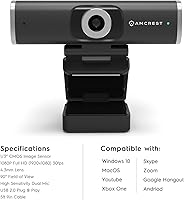
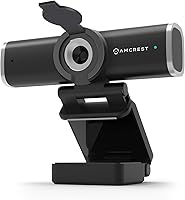
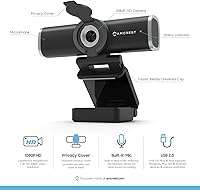
This webcam shoots full HD video at 1920x1080 and 30 frames per second — more than adequate for video calls and casual streaming, though not designed for high-motion or cinematic content. The 90-degree wide-angle lens is one of its strongest practical advantages, letting you capture a broader scene without repositioning the camera constantly. The sliding privacy cover physically blocks the lens between sessions, adding real peace of mind. Its built-in noise-reducing microphone handles typical office background sounds reasonably well for calls, though it is not a replacement for a dedicated microphone. The nearly 6-foot USB cable and combined monitor clip with tripod thread give flexible placement options most users will find genuinely useful.

Best For

This USB camera fits naturally into everyday remote work and study setups where consistent, reliable video matters more than premium image quality. Daily Zoom, Teams, or Google Meet users working from a home office will find it handles the job without extra configuration or fuss. Students tired of their laptop's built-in camera — typically grainy and awkwardly positioned — will notice a meaningful improvement. Privacy-conscious users benefit from having a physical lens cover they can slide shut rather than depending on software settings alone. It also addresses a real gap for Linux and Android users, who often find webcam compatibility unreliable with other brands competing at this same price level.

User Feedback

The wide field of view is consistently the first thing buyers highlight positively, especially those upgrading from narrow built-in cameras. Plug-and-play reliability also earns strong marks — most Windows and Mac users report it working immediately without hunting for drivers. Low-light performance, however, is a genuine weak spot; grain and softness appear in dimly lit rooms, so having decent desk lighting makes a noticeable difference. A portion of users flag the autofocus as occasionally slow to lock when lighting shifts. The microphone is passable for calls but not something to rely on for podcasting or dedicated recording work. Build quality is generally seen as acceptable for the price, though the monitor clip strikes some buyers as a bit flimsy.

Pros

  • Wide 90-degree field of view captures more of your space without constant repositioning.
  • Physical sliding privacy cover blocks the lens completely — no relying on software toggles.
  • Plug-and-play USB setup works immediately on Windows, macOS, Linux, and Android.
  • Linux and Android compatibility is confirmed and reliable, which is rare at this price level.
  • The nearly 6-foot cable gives genuine flexibility for desktop and non-standard desk setups.
  • Monitor clip and quarter-inch tripod thread allow placement on a wide variety of surfaces.
  • Built-in microphone handles typical home office background noise well enough for daily calls.
  • Strong seller ranking and thousands of verified reviews suggest consistent real-world reliability.
  • Dual mounting options make it easy to repurpose across different desk configurations.

Cons

  • Low-light image quality degrades quickly without a dedicated desk lamp or overhead lighting.
  • Autofocus can hunt visibly when room lighting shifts, which is distracting during live calls.
  • The monitor mounting clip feels flimsy and can slip on thicker or wider display bezels.
  • Microphone audio lacks depth and is not suitable for recording, podcasting, or content audio.
  • No companion software means image adjustments like brightness and contrast require third-party tools.
  • USB cable is not braided or reinforced, making it prone to tangling and potential wear over time.
  • White balance drifts in mixed-lighting environments with no manual override available.
  • 30fps output is fixed — not adjustable for users who want higher frame rates for specific use cases.

Ratings

The Amcrest AWC195-B 1080P Webcam scores below reflect AI-assisted analysis of verified global buyer reviews, with spam, bot-generated, and incentivized feedback actively filtered out before scoring. Ratings are calibrated to surface both what this webcam genuinely does well and where real users hit frustrating walls — no inflated numbers, no glossing over legitimate complaints.
Video Clarity
78%
22%
For daily video calls, the 1080p output looks noticeably sharper than most built-in laptop cameras, with decent color reproduction in well-lit environments. Remote workers regularly mention that colleagues compliment the clarity during Zoom and Teams calls without any special setup required.
At 30fps with a fixed-focus lens, the image lacks the crispness that more expensive webcams deliver, and fine details can soften slightly when the subject moves. It is not a camera you would choose for product demos or detailed visual presentations where precision matters.
Low-Light Performance
58%
42%
In a reasonably lit home office with a desk lamp or overhead lighting, the webcam produces a watchable, clean image that most users find acceptable for everyday calls. Some buyers in brighter climates or well-lit rooms report no complaints at all about the output.
In dim or mixed-lighting conditions, grain and muddiness appear fairly quickly — users working in the evening without dedicated desk lighting frequently flag this as a real problem. The sensor struggles to compensate, and the image can look noticeably degraded compared to similarly priced competitors with better low-light tuning.
Field of View
89%
The 90-degree wide-angle lens is one of the most praised aspects across buyer reviews. It captures significantly more of a room than standard webcams, which is genuinely useful for shared desks, standing setups, or anyone who does not want to be perfectly centered in front of the camera at all times.
The wider view does introduce slight edge distortion, which a small number of users find distracting in close-up or portrait-style calls. Those who prefer a tighter, more flattering field of view may find the wide angle unflattering when seated close to the screen.
Built-in Microphone
63%
37%
For routine video conferencing on Zoom, Meet, or Teams, the built-in noise-reducing microphone picks up voice clearly enough that most callers report no complaints about audio quality. It handles typical home office background noise — keyboard clicks, mild ambient sound — without producing harsh artifacts.
Push it beyond basic calls and its limitations show up fast. Buyers who attempted to use it for podcast recordings, tutorials, or any content where audio quality matters quickly found the microphone thin and lacking in depth. It is functional, not impressive, and should not be treated as a substitute for even an entry-level standalone mic.
Privacy Cover
91%
The sliding physical privacy cover is a genuine differentiator at this price level and earns consistent praise from privacy-conscious buyers. Unlike software-based camera disabling, there is real peace of mind in a tangible physical barrier — users who work in sensitive environments or simply want to be certain the lens is blocked appreciate this feature enormously.
The cover mechanism feels slightly stiff on some units out of the box, and a handful of buyers report it becoming loose over months of daily sliding. It is functional and well-intentioned but does not feel like a premium-grade component.
Plug-and-Play Setup
93%
Setup is about as frictionless as it gets — plug the USB cable in and the camera is recognized almost immediately on Windows, macOS, Linux, and Android without any driver hunting. Linux users in particular frequently highlight this webcam as one of the few affordable options that worked out of the box without manual configuration.
A small subset of users experienced recognition issues on older Windows 7 machines or specific USB hub configurations. These cases appear to be edge scenarios rather than widespread problems, but they do exist and can be frustrating to troubleshoot without driver support documentation.
Build Quality & Materials
67%
33%
The camera body itself feels reasonably solid for an entry-level device — it does not flex or creak when handled, and the plastic finish holds up well through daily mounting and removal from a monitor. Most users report no structural issues after several months of regular use.
The monitor mounting clip is the weakest point, described by a noticeable portion of buyers as flimsy or prone to slipping on thicker monitor bezels. It gets the job done on standard displays but feels underengineered compared to the rest of the unit.
Mounting Versatility
74%
26%
Having both a standard monitor clip and a quarter-inch tripod thread genuinely expands where and how this webcam can be used. Users who wanted to place it on a shelf, a standing desk arm, or an external tripod for a wider room angle found the dual-mount design useful and flexible.
The clip's grip range is limited, meaning it works well on thin to mid-thickness monitor bezels but struggles with thicker screens or unconventional surfaces. Users with ultra-wide monitors or non-standard setups occasionally needed additional accessories to get stable placement.
Cable Length & Management
77%
23%
The nearly 6-foot USB cable gives more desk routing flexibility than the shorter cables found on many competing webcams at this price. Users with desktop towers placed away from the monitor found the length genuinely convenient without needing a USB extension.
The cable is not braided or reinforced, so it tends to kink and tangle over time with regular repositioning. A few buyers noted fraying near the connector after extended use, which raises minor durability questions for heavy daily users.
Autofocus Performance
59%
41%
Under consistent, stable lighting conditions the autofocus locks on acceptably and holds steady through most typical call scenarios. Users who sit at a fixed distance from the camera in a well-lit room generally do not experience noticeable focus problems during normal video calls.
When lighting changes — someone opens a window, a lamp turns on — the autofocus can visibly hunt and take several seconds to settle. A subset of users found this distracting enough during live calls or recordings that it became a recurring annoyance rather than an occasional glitch.
App & Platform Compatibility
88%
The webcam works reliably across an impressively broad range of software — Zoom, Teams, Skype, Google Meet, OBS Studio, and YouTube Live all recognize it without configuration. For users who switch between multiple platforms throughout the workday, this broad compatibility removes a genuine friction point.
A small number of users reported inconsistent behavior specifically within OBS Studio when adjusting resolution or frame rate settings manually. This does not appear to affect basic plug-and-play use, but power users who want granular camera control within streaming software may hit occasional compatibility walls.
Value for Money
84%
At its price point, this webcam delivers a combination of features — wide-angle lens, physical privacy cover, cross-platform compatibility, flexible mounting — that would cost more to replicate individually or by choosing a more branded alternative. For buyers who simply need a reliable daily-use camera without a steep investment, it hits a practical sweet spot.
Buyers who stretch the use case toward content creation, low-light shooting, or professional streaming will likely find themselves outgrowing it within months and spending more to upgrade. The value proposition is strong for its target user but narrow — step outside that use case and the limitations become expensive to work around.
Daytime Image Color Accuracy
71%
29%
In natural or warm artificial light, colors come through with reasonable accuracy and saturation for a webcam at this tier. Skin tones in particular look natural enough during calls that most participants on the other end would not notice any obvious color shifting.
The white balance can drift in mixed lighting environments — combining window light with overhead fluorescents, for example, sometimes produces a cooler, slightly washed-out image. Manual white balance adjustment is not available, so users are dependent on the camera's automatic processing making the right call.
Packaging & Out-of-Box Experience
72%
28%
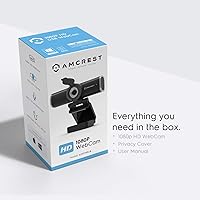
The box includes everything needed to get started — the webcam, USB cable, and basic documentation — without unnecessary packaging bulk. First impressions from buyers are generally positive, with the unit feeling like a proper retail product rather than a budget afterthought.
The included documentation is minimal, and there is no software disc or dedicated utility application provided. Users who want to adjust settings like brightness, contrast, or exposure have to rely on third-party software or their operating system's native camera tools, which can feel limiting.

Suitable for:

The Amcrest AWC195-B 1080P Webcam is a strong fit for anyone who spends a significant chunk of their day on video calls and needs a reliable, fuss-free upgrade from a built-in laptop camera without spending a lot. Remote workers juggling multiple Zoom or Teams meetings daily will appreciate the wide 90-degree field of view, which makes it easy to stay in frame without repositioning constantly. Students attending virtual classes benefit from the same — better framing and noticeably cleaner video than most laptop cameras provide, at a price that does not require much deliberation. Privacy-minded users who want a physical lens cover rather than trusting software settings will find this webcam particularly reassuring. It is also one of the better options for Linux and Android users, who frequently struggle to find budget webcams that actually work out of the box without driver headaches. Casual streamers or first-time content creators who just need something better than nothing to get started will find it covers the basics competently.

Not suitable for:

The Amcrest AWC195-B 1080P Webcam has clear boundaries, and buyers who push past its intended use case are likely to walk away disappointed. Anyone shooting content in low-light conditions regularly — evening streams, basement setups, rooms without dedicated lighting — will run into noticeable grain and image degradation that this camera simply cannot overcome. Content creators who need smooth, high-frame-rate footage for tutorials, product reviews, or anything visually demanding will find the 30fps fixed output limiting. The built-in microphone is workable for calls but falls short for podcasters, voiceover artists, or anyone where audio quality actually matters to an audience. Users who want precise manual control over image settings like white balance, exposure, or contrast will find the lack of dedicated software frustrating. If you are comparing this to premium webcams used by professional streamers or video producers, the gap in image quality and build precision is real and noticeable — this camera is not trying to compete in that space and should not be evaluated as if it were.
Specifications

  • Resolution: Records and streams at full HD 1920x1080 pixels, delivering clear, sharp video suitable for professional video calls and casual streaming.
  • Frame Rate: Captures video at a fixed 30 frames per second, which is standard for video conferencing but not adjustable for higher frame rate use cases.
  • Image Sensor: Uses a CMOS 1/3-inch sensor that performs well in well-lit environments but shows limitations in low-light or high-contrast scenes.
  • Field of View: Features a 90-degree wide-angle lens, capturing a noticeably broader scene than the narrower fields typical of most built-in laptop cameras.
  • Focal Length: Equipped with a 4.3mm fixed-focus lens that maintains a consistent focal distance without manual or motorized adjustment options.
  • Microphone: Includes a single built-in noise-reducing microphone designed to filter moderate ambient background noise during video calls.
  • Privacy Cover: Fitted with a physical sliding privacy cover that mechanically blocks the lens when pushed closed, independent of any software or OS settings.
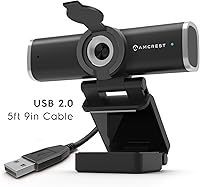
  • Cable Length: Ships with a fixed, non-detachable USB cable measuring 5 feet 9 inches, routed directly from the base of the unit.
  • Connectivity: Connects via USB 2.0 and is recognized as a standard UVC (USB Video Class) device, requiring no additional drivers on supported platforms.
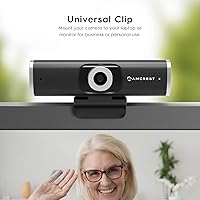
  • Mounting Options: Includes a monitor mounting clip for displays up to standard bezel thickness, plus a standard 1/4-inch thread on the base for tripod or arm attachment.
  • OS Compatibility: Confirmed compatible with Windows 11, 10, 8, and 7, macOS, Linux, and Android operating systems without requiring proprietary driver installation.
  • App Support: Works with Zoom, Microsoft Teams, Skype, Google Meet, OBS Studio, YouTube Live, and most other major video conferencing and streaming applications.
  • Item Weight: Weighs 5 ounces complete with cable, making it lightweight enough for frequent repositioning between desk setups without added bulk.
  • Package Dimensions: Retail packaging measures approximately 4.88 x 3.03 x 2.52 inches, compact enough to store in a desk drawer when not in active use.
  • Video Format: Outputs video in MP4 format and supports MP3 audio encoding for recordings captured through compatible software applications.
  • Color & Finish: Available in matte black only, with a plastic body finish that resists minor fingerprints and blends with standard monitor and desk setups.
  • Model Number: The exact manufacturer model identifier for this unit is AWC195-B, which should be referenced when contacting support or searching for compatible accessories.
  • Release Date: First made available for purchase on April 30, 2020, and has remained in active production and sale since its launch.

Related Reviews

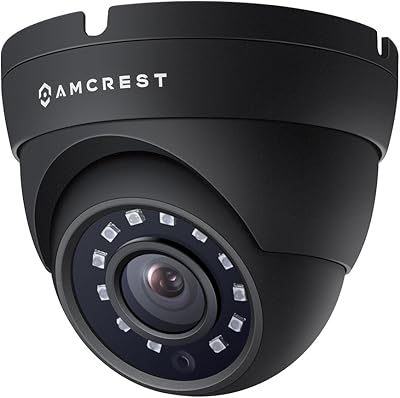
Amcrest AMC1080DM36-B 1080P Dome Outdoor Security Camera
84%
88%
Video Quality
91%
Night Vision Performance
84%
Installation Ease
89%
Build Quality
93%
Weatherproof Durability
More
HuddleCamHD HC-WEBCAM-94
77%
83%
Video Quality (Daylight)
51%
Low-Light Performance
91%
Field of View
94%
Ease of Setup
57%
Audio Quality
More
ZIQIAN 1080P Webcam
ZIQIAN 1080P Webcam
83%
88%
Video Quality
76%
Audio Performance
91%
Ease of Setup
85%
Wide-Angle Lens
78%
Microphone Quality
More
Akyta 1080P Webcam
Akyta 1080P Webcam
82%
88%
Video Quality
85%
Audio Quality
94%
Ease of Setup
82%
Field of View
80%
Noise Reduction
More
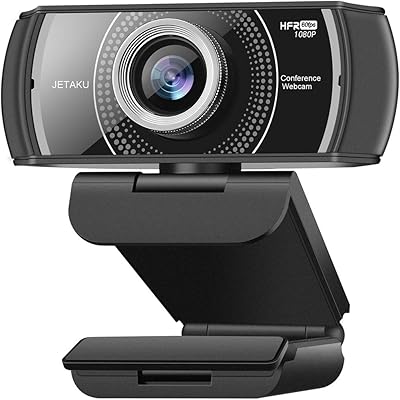
JETAKu XZC-920phro Webcam 1080P 60FPS
71%
83%
Video Smoothness at 60fps
71%
Image Clarity & Resolution
54%
Low-Light Performance
58%
Autofocus Reliability
66%
Microphone Quality
More
Angetube 962 1080P Webcam
85%
94%
Video Quality
88%
Audio Capture
90%
Autofocus Performance
86%
Low-Light Functionality
92%
Ease of Setup
More
Hrayzan 1080p Webcam with Microphone
81%
89%
Video Quality
84%
Microphone Performance
91%
Ease of Setup
60%
Wide-Angle Lens Distortion
77%
Build Quality
More
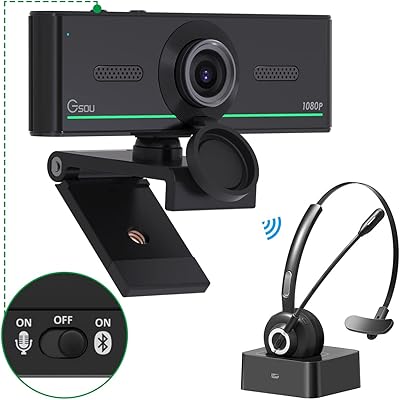
Gsou 1080P Webcam W20
86%
88%
Video Quality
91%
Bluetooth Connectivity
94%
Ease of Setup
85%
Privacy Features
72%
Manual Focus Adjustment
More
ISKOVI C28 1080P Webcam
79%
83%
Video Clarity
76%
Low-Light Performance
68%
Microphone Quality
94%
Ease of Setup
91%
Privacy Cover
More
NexiGo N680 1080P Webcam
83%
94%
Ease of Setup
88%
Video Quality
84%
Audio Performance
91%
Privacy Features
61%
Low-Light Performance
More

FAQ

No, you do not. The Amcrest AWC195-B 1080P Webcam uses standard USB Video Class drivers that are already built into Windows, macOS, Linux, and Android. You plug it in, your operating system recognizes it within a few seconds, and it shows up as an available camera in whatever app you are using. No disc, no download, no account required.
Yes, and this is actually one of the more frequently praised aspects of this camera among Linux users. Because it relies on standard UVC drivers that are natively included in most Linux distributions, it tends to be recognized immediately without any terminal commands or manual driver installation. It is one of the more reliably Linux-compatible budget webcams available.

It is decent for routine video calls — voices come through clearly and it handles typical home office background noise like a fan or keyboard without producing harsh distortion. That said, do not expect studio quality. If you are recording content for an audience, doing voiceovers, or podcasting, a dedicated external microphone will make a significant difference that the built-in mic simply cannot match.

It is a physical sliding cover that sits directly in front of the lens and blocks it entirely when closed. It is not a flap or a cap you remove — you slide it across the lens with your finger. This means even if an application is running in the background and has camera permissions, nothing gets through. It is a genuinely useful security feature, not just a cosmetic addition.

The lens covers 90 degrees, which is quite wide for a webcam at this price. In practice, it captures a good portion of what is behind and around you, which is useful if you share a desk or tend to move around during calls. If you sit very close to the camera, it may make your face appear slightly distorted at the edges, which is a normal trade-off with wide-angle lenses.

Yes. The base of the camera has a standard 1/4-inch tripod thread, so it attaches directly to any tripod, camera arm, or mounting rig that uses that thread — which is the vast majority of consumer tripods. This gives you a lot of flexibility if you want to position it off to the side, at a different height, or away from your monitor entirely.

Honestly, not great. The sensor handles well-lit environments fine, but in dim rooms — especially in the evening without a desk lamp — the image gets grainy and loses sharpness noticeably. If your workspace does not have good overhead lighting or a dedicated desk light, the video quality will suffer. Adding even a simple ring light or a lamp pointed toward your face makes a meaningful improvement.

The cable is 5 feet 9 inches, which covers most standard desk-to-floor tower configurations comfortably. If your tower is unusually far away or you have a large desk with the camera positioned far from the USB port, you might find it just barely reaches or falls a bit short. A USB extension cable resolves this if needed.

It works reliably on monitors with standard bezel thickness, but users with thick bezels, curved ultrawides, or unusually large displays have reported the clip fitting loosely or not holding the camera at the right angle. If you have a non-standard monitor, it is worth knowing the clip may need some adjustment, or you may prefer to use the tripod thread mount instead for a more stable result.

Under steady, consistent lighting the autofocus holds reasonably well and most users do not have issues during normal calls. Where it struggles is when the lighting in the room changes — someone opens a blind, a lamp switches on — and the camera briefly hunts for focus before settling. This happens occasionally rather than constantly, but it can be noticeable if it occurs during an important call.