Overview

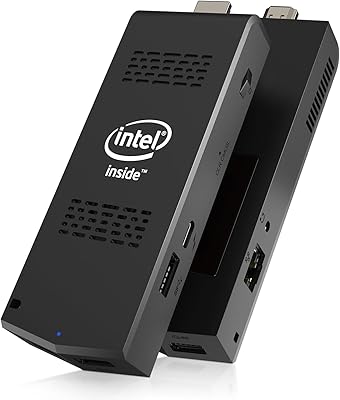
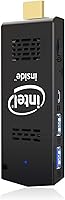
The AKLWY Mini PC Stick 4GB/128GB Computer is essentially a full Windows desktop compressed to the size of a USB drive. Plug it into any HDMI port, connect a keyboard and mouse, and you have a working PC — no tower, no desk space required. It runs on Intel's Atom Z8350 processor with 4GB of RAM and 128GB of eMMC storage, which sets realistic expectations right away: this is a budget-tier chip, not a powerhouse. What makes it interesting beyond portability is the auto power-on feature, configurable through BIOS, which separates it from media sticks like Fire Stick or Chromecast by offering a genuinely full Windows 10 Pro experience.

Features & Benefits

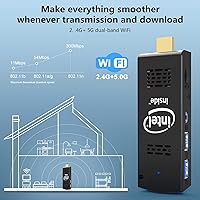
The most practical thing about this mini PC stick is how much connectivity it packs into something barely larger than your thumb. Dual-band Wi-Fi covering both 2.4GHz and 5GHz bands means you can dodge crowded networks, and Bluetooth 4.2 handles peripherals without eating up USB ports — of which there are only a couple. Intel HD Graphics 400 handles 4K video playback well enough for streaming, though don't expect it to push pixels in anything demanding. Storage is expandable via microSD card by up to 128GB, which is worth doing given Windows 10's appetite. The quiet cooling fan does its job without becoming a distraction, keeping temperatures manageable during normal use.

Best For

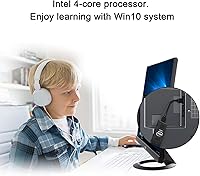
This pocket-sized Windows stick earns its keep in a handful of specific scenarios. Travelers who need a full-Windows fallback without packing a laptop will appreciate how it slips into a bag and runs on any hotel TV's HDMI port. Students on tight budgets get a capable machine for browsing, documents, and video calls — just don't push it toward heavy multitasking. The auto power-on capability makes it genuinely useful for digital signage setups or always-on displays where manual reboots aren't practical. Cord-cutters can stream Netflix or Hulu on a non-smart TV, and anyone trying to breathe new life into an old monitor will find it a cost-effective solution.

User Feedback

Across a few hundred owner reviews, the AKLWY stick computer lands somewhere in the middle — buyers who set appropriate expectations tend to like it, while those hoping for desktop-class performance do not. Portability and easy setup get consistent praise, and the auto power-on function has earned genuine appreciation from people using it in commercial display setups. On the flip side, many users flag that boot times drag and that Windows 10 Pro chews through the 4GB of RAM faster than you'd hope, leaving little headroom for background apps. A handful of buyers also report thermal throttling during longer sessions — worth knowing before committing.

Pros

  • Fits in a shirt pocket and turns virtually any HDMI screen into a working Windows PC instantly.
  • Full Windows 10 Pro license included — not a stripped-down Home edition.
  • Auto power-on via BIOS is a genuinely useful feature for kiosk and signage deployments.
  • Dual-band Wi-Fi means you can connect to a less congested 5GHz network when available.
  • 128GB of onboard storage is respectable for a device this size, with microSD expansion available.
  • Quiet cooling fan keeps the unit from becoming a nuisance in silent environments.
  • Bluetooth 4.2 lets you connect a wireless keyboard and mouse without sacrificing USB ports.
  • Setup is straightforward — plug in, power on, and Windows walks you through the rest.

Cons

  • Windows 10 Pro overhead leaves very little free RAM for running multiple apps simultaneously.
  • Boot times are noticeably slow compared to even entry-level modern laptops.
  • The Atom Z8350 throttles under sustained workloads, causing sluggishness during longer sessions.
  • Only a couple of USB ports available, which becomes a real constraint without a hub.
  • eMMC storage is significantly slower than even a budget SSD, affecting overall system responsiveness.
  • 4K support is limited to video playback — do not expect smooth 4K desktop or application rendering.
  • No Ethernet port means you are entirely dependent on Wi-Fi, which can be a liability in some setups.
  • Long-term Windows update support for Windows 10 Pro is a growing concern as end-of-life approaches.

Ratings

The scores below for the AKLWY Mini PC Stick 4GB/128GB Computer were generated by our AI engine after processing verified global buyer reviews, actively filtering out incentivized, duplicate, and bot-flagged submissions to surface honest signal. Each category reflects both what real users genuinely appreciated and the recurring frustrations that showed up consistently across different buyer profiles. Nothing has been smoothed over — the strengths and the shortcomings are weighted equally.

Portability
93%
Buyers consistently praised how effortlessly this pocket-sized Windows stick disappears into a jacket pocket or travel bag. Remote workers and frequent travelers specifically called out being able to set up a functional Windows desktop in a hotel room using nothing but the TV's HDMI port — a genuinely useful real-world advantage.
A few users noted that because the stick needs a separate power adapter, keyboard, and mouse, the total carry load adds up more than the device itself implies. Without a compact peripheral setup already in place, the portability benefit is partially offset.
Value for Money
78%
22%
For buyers who went in with realistic expectations, the price-to-capability ratio felt fair. Getting a genuine Windows 10 Pro license, 128GB of storage, and dual-band Wi-Fi in a stick form factor struck many light users and students as a reasonable deal for casual computing needs.
Users who expected laptop-class performance felt let down, which dragged sentiment down considerably. If you compare it to a budget Chromebook or a used laptop at a similar price point, the performance trade-off becomes harder to justify for anyone doing more than basic tasks.
Performance
47%
53%
For single-task scenarios — playing a YouTube video, writing a document, or browsing a handful of tabs — the Atom Z8350 gets the job done without crashing or freezing entirely. Buyers using it specifically for streaming media or light word processing reported acceptable day-to-day usability within those narrow boundaries.
Windows 10 Pro consumes a significant chunk of the 4GB RAM just at idle, leaving very little headroom the moment you open two or three applications simultaneously. Boot times drew consistent complaints, and thermal throttling under sustained use was flagged by multiple buyers who tried to push it beyond basic workloads.
Setup & Ease of Use
84%
Most buyers found the initial setup straightforward — plug into HDMI, connect power, pair a keyboard and mouse, and Windows guides the rest. The plug-and-play nature meant even less technically confident users got up and running without frustration in most cases.
Configuring the auto power-on feature requires navigating the BIOS manually, which tripped up some buyers who were not familiar with firmware interfaces. A clearer printed guide for that specific setup would have improved the experience for non-technical users.
Build Quality
71%
29%
The physical construction feels solid enough for a budget stick PC — it does not flex or creak when handled, and the casing holds up fine in a travel bag alongside other gear. Several buyers used it daily for months without reporting any physical deterioration.
The plastic shell does not inspire confidence in the same way a metal-bodied device would, and the HDMI connector area has limited strain relief. A handful of buyers expressed concern about long-term durability when the stick is left permanently plugged into a display at an awkward angle.
Thermal Management
58%
42%
The internal fan is notably quiet during light use — buyers running it for streaming or basic browsing in silent rooms rarely mentioned the fan as an annoyance. For a device this compact, the fact that it has active cooling at all is a genuine positive compared to entirely passive competitors.
Under sustained workloads, multiple buyers observed the processor throttling back its clock speed as temperatures climbed, causing noticeable performance dips. The small chassis limits how much heat can actually be dissipated, and extended use sessions in warm environments made the problem more pronounced.
Wi-Fi Reliability
76%
24%
Dual-band support gave buyers the flexibility to connect to 5GHz networks, which noticeably improved streaming stability in congested Wi-Fi environments like apartment buildings or offices. Several users commented that switching to 5GHz resolved buffering issues they initially attributed to the hardware.
A minority of buyers reported inconsistent Wi-Fi signal strength, particularly when the stick was positioned behind a large TV where the display itself partially obstructed the antenna. The lack of an Ethernet port means there is no fallback for wired connectivity when Wi-Fi proves unreliable.
Display Output Quality
81%
19%
Connecting to a 1080p or 4K display produced clean, sharp output with no reported flickering or compatibility issues across a wide range of TV and monitor brands. Buyers using it for streaming services found video playback smooth and visually satisfying on large screens.
While 4K output is technically supported, running the Windows desktop itself at 4K resolution on this hardware results in sluggish UI responsiveness that most users found impractical. The 4K capability is most meaningful for video playback specifically, not general desktop use at that resolution.
Storage Capacity
74%
26%
128GB of onboard eMMC is generous relative to competing stick PCs at this price tier, and buyers appreciated having enough space for Windows, their applications, and a reasonable library of local files without immediately hitting a wall. The microSD expansion slot added useful flexibility for media storage.
The eMMC storage technology itself is noticeably slower than even an entry-level SATA SSD, which contributes to sluggish boot times and longer application load times. Buyers accustomed to SSD-based machines will feel the difference immediately when the system reads or writes larger files.
Connectivity Options
67%
33%
Bluetooth 4.2 worked reliably for wireless keyboards and mice, which most buyers relied on to avoid consuming the limited USB ports. The dual USB setup handled a dongle receiver or a flash drive without any reported pairing or recognition issues.
Having only two USB ports is a real constraint in practice — plugging in a wired keyboard and mouse immediately exhausts them, forcing buyers to invest in a USB hub just to add a flash drive or any additional peripheral. The absence of a USB-C port also feels like a missed opportunity given current accessory ecosystems.
Auto Power-On Feature
88%
Buyers running this stick computer as part of a digital signage setup or an always-on information display specifically highlighted the BIOS auto power-on as a standout practical feature. After a one-time configuration, the device reliably restarts itself after any power interruption without any manual involvement.
The setup process requires entering BIOS and navigating a multi-step menu, which is not intuitive for general consumers. Some buyers did not discover the feature existed at all, suggesting the documentation could do a far better job of surfacing it as a selling point during initial setup.
Noise Level
86%
During everyday tasks like browsing and streaming, the cooling fan operates at a whisper that most buyers in quiet home environments described as essentially inaudible. This made it a comfortable choice for bedroom TV setups or library-style study environments where fan noise from a laptop would be intrusive.
Under heavier processing loads, the fan does spin up to an audible level, which a few buyers found surprising given marketing language around quiet operation. It remains quieter than most laptops under load, but the contrast with its near-silent idle behavior made the change more noticeable.
Software & OS Experience
62%
38%
Receiving a genuine Windows 10 Pro license — not a Home edition or a locked-down variant — was a consistent positive for buyers who wanted full access to features like Remote Desktop or domain joining. The installation arrived relatively clean without the heavy bloatware common on budget Windows devices.
Windows 10 Pro was simply not designed with hardware this constrained in mind, and the mismatch shows during updates, background processes, and multitasking. Several buyers expressed growing concern about Windows 10 reaching end-of-life, with no clear upgrade path to Windows 11 given the hardware's TPM and processor compatibility limitations.
Packaging & Accessories
69%
31%
The included accessories covered the basics — power adapter, HDMI extension cable, and a brief setup guide — which buyers appreciated as a complete-enough starter kit. The HDMI extender cable in particular was a practical touch, allowing the stick to hang freely rather than stress the TV's HDMI port.
The printed documentation is sparse, and the absence of any detailed guide for features like BIOS auto power-on left some buyers unaware of the device's most interesting capability. A microSD card is not included despite the slot being a notable feature, which felt like a missed value-add opportunity.

Suitable for:

The AKLWY Mini PC Stick 4GB/128GB Computer is a smart pick for anyone whose computing needs are light and whose priority is portability over raw power. Travelers who frequently work from hotel rooms or client sites will appreciate being able to plug into any available HDMI display and have a full Windows 10 Pro environment running within minutes. Students handling documents, spreadsheets, email, and video calls will find it more than capable for daily academic tasks without spending much. It also fits a genuine niche for small businesses or installers running digital signage or information kiosks, where the BIOS-level auto power-on feature means the display recovers automatically after any power interruption — no manual intervention needed. Cord-cutters who want to stream Netflix, Hulu, or Amazon Prime on a dumb TV without buying a new smart TV will get solid results here too.

Not suitable for:

The AKLWY Mini PC Stick 4GB/128GB Computer is not the right tool for anyone expecting a smooth, responsive Windows experience across multiple open applications. The Intel Atom Z8350 is a low-voltage processor designed for minimal power draw, not performance, and Windows 10 Pro alone consumes a significant portion of the 4GB RAM before you even open a browser. Anyone who regularly works with more than a few tabs open, edits photos or video, runs local databases, or uses productivity suites heavily will hit a wall quickly and likely find the experience frustrating rather than practical. Gamers should look elsewhere entirely — Intel HD Graphics 400 is not built for anything beyond basic 4K video decoding. If you need a dependable primary machine for daily professional work, this pocket-sized Windows stick will disappoint; its value only holds when used within its clearly defined limitations.

Specifications

  • Processor: Powered by an Intel Atom X5-Z8350 quad-core CPU running at a base frequency of 1.44GHz with burst capability up to 1.92GHz.
  • RAM: Includes 4GB of LPDDR3 system memory, which is shared with the integrated graphics and consumed significantly by the Windows 10 Pro operating system at idle.
  • Storage: Ships with 128GB of eMMC onboard flash storage, which is slower than a standard SSD but adequate for light workloads and media files.
  • Operating System: Comes pre-installed with Windows 10 Pro (64-bit), including full access to the Microsoft Store and Pro-tier features such as Remote Desktop.
  • Graphics: Intel HD Graphics 400 handles display output up to 4K resolution via HDMI, suitable for video playback but not for graphics-intensive applications or gaming.
  • Display Output: Connects to any screen via a standard HDMI port, supporting resolutions up to 4K for compatible displays.
  • Wi-Fi: Supports dual-band 802.11ac wireless networking on both 2.4GHz and 5GHz bands for flexible and reasonably stable connectivity.
  • Bluetooth: Equipped with Bluetooth 4.2, supporting wireless peripherals such as keyboards, mice, and headphones with faster response than older BT standards.
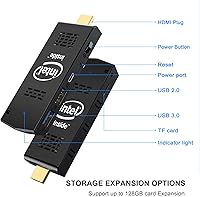
  • Storage Expansion: Accepts a microSD card (not included) for up to 128GB of additional storage, useful for media libraries or offloading user files.
  • USB Ports: Provides USB 2.0 and USB 3.0 ports for connecting peripherals, though the limited port count may require a USB hub for multi-device setups.
  • Dimensions: Measures 3.9 x 1.5 x 0.5 inches, making it genuinely pocket-sized and easy to pack in a bag or carry-on without any meaningful weight penalty.
  • Cooling: Uses an active internal fan to manage thermals during operation, running quietly enough that it is not noticeable in typical quiet environments.
  • Auto Power-On: Supports configurable auto power-on after power failure through the BIOS, requiring a one-time setup via the Chipset and SouthBridge settings menu.
  • Power Input: Draws power via a Micro USB connector at DC 5V 2A, which means a compatible USB power adapter or powered hub can serve as the power source.
  • Package Weight: The complete retail package weighs approximately 9.6 ounces, inclusive of accessories and packaging materials.
  • Package Dimensions: The retail box measures approximately 5.16 x 4.76 x 2.24 inches, compact enough to fit in a standard shipping envelope.
  • Wireless Standard: Supports IEEE 802.11a/b/g/n/ac wireless protocols across both available frequency bands.
  • Form Factor: Designed as a stick PC in the HDMI dongle form factor, requiring an external display, keyboard, and mouse to function as a complete workstation.

Related Reviews
MeLE PCG02 N100 Mini PC Stick
76%
94%
Silent Operation
93%
Power Efficiency
88%
Display Output
46%
RAM & Multitasking
76%
Value for Money
More
MeLE PCG02 Mini PC Stick, Celeron N100, 8GB RAM, 128GB Storage
82%
94%
Portability & Size
85%
Performance for Everyday Tasks
72%
Thermal Management
88%
Wi-Fi Connectivity
90%
Ease of Setup
More
AIOEXPC S7 J4125 8GB 128GB PC Stick
76%
72%
Everyday Performance
94%
Portability
88%
Setup Experience
91%
Connectivity
74%
Thermal Management
More
Fusion5 FMP4 Mini PC
70%
94%
Portability
78%
Value for Money
63%
Everyday Performance
47%
Storage Speed
88%
Connectivity
More
KODLIX N40 Mini PC
KODLIX N40 Mini PC
76%
81%
Value for Money
93%
Noise & Acoustics
58%
Performance
52%
Storage Adequacy
84%
Setup & Out-of-Box Experience
More
HP All-in-One 21 20.7″ Desktop PC
69%
74%
Value for Money
81%
Display Quality
67%
Everyday Performance
51%
Storage Capacity
55%
RAM & Multitasking
More
Beelink Mini S12 Pro (N100, 16GB, 500GB)

83%
83%
Everyday Performance
91%
Value for Money
76%
Build Quality & Design
84%
Thermal Management & Noise
88%
Connectivity & Ports
More
Beelink Mini S12 Mini PC
78%
88%
Value for Money
82%
Performance for Daily Tasks
79%
Build Quality & Design
91%
Dual Monitor Support
84%
Thermal Management & Noise
More
ACEMAGICIAN Kron Mini K1 Mini PC
73%
83%
Everyday Performance
54%
Gaming Capability
61%
Thermal Management
89%
Display & Connectivity
78%
Value for Money
More
Beelink ME Mini PC
Beelink ME Mini PC
87%
88%
Performance
91%
Connectivity
85%
Storage Expansion
95%
Power Efficiency
90%
Noise Levels
More

FAQ

It runs a genuine, full installation of Windows 10 Pro (64-bit) — not a stripped-down or S Mode version. You get access to the desktop, file system, Microsoft Store, and all standard Pro features including Remote Desktop. The only caveat is that the hardware is modest, so some tasks will feel slow compared to a regular PC.

Yes, that works well. Plug this mini PC stick into your TV's HDMI port, connect a Bluetooth keyboard and mouse or a small wireless combo, and you can browse, stream Netflix, YouTube, or Hulu just like on a regular computer. The Intel HD Graphics 400 handles 4K video playback without much trouble on a supported display.

It's a BIOS setting that tells the stick to power itself back on automatically after any loss of electricity. You enable it once by entering BIOS at startup, navigating to the Chipset and SouthBridge settings, and switching the Auto Power On option from Off to On. It's most useful for digital signage screens, information kiosks, or any always-on display setup where you cannot be there to manually restart the device after an outage.

Honestly, it is tight. Windows 10 Pro at idle can consume 1.5 to 2GB of RAM on its own, which leaves limited room for open applications. For basic tasks like a browser with a few tabs, a document editor, or a video call, it manages. If you try to run several things at once, you will likely notice slowdowns. Adding a microSD card will not help with RAM, so managing what you have open is important.

No — both the RAM and eMMC storage are soldered directly to the board and cannot be upgraded. The only expansion available is via the microSD card slot, which adds up to 128GB of additional storage for files and media, but does not improve system speed.

At minimum you will need a display with an HDMI input, a USB keyboard, and a USB mouse — none of those are included. A USB hub is also strongly recommended since the stick only has a couple of ports. If you prefer wireless peripherals, a Bluetooth keyboard and mouse combo will work with the built-in Bluetooth 4.2.

Under light to moderate use — browsing, streaming, documents — the internal fan keeps temperatures reasonable and runs quietly. Some buyers have reported that sustained heavier workloads can cause thermal throttling, where the processor slows itself down to cool off. For its intended use cases, overheating is not typically a persistent problem, but pushing it hard for extended periods is not what it is designed for.

Yes, it outputs over HDMI at up to 4K resolution, so it will connect to a 4K monitor without any issues. Keep in mind that 4K desktop rendering at that resolution can feel sluggish given the processor, so many users are happy running it at 1080p for day-to-day work and reserving 4K output for video playback.

That is one of its strongest use cases. It fits in a pocket, runs full Windows, and all you need at your destination is an HDMI display — which most hotel rooms and conference spaces have. Pair it with a compact Bluetooth keyboard and mouse and you have a working Windows environment without carrying a laptop.

It ships with Windows 10 Pro pre-installed, and beyond that it is essentially a clean Windows setup. There is no significant bloatware reported by users, which is a plus. You will want to run Windows Update after first boot, and then install whatever applications you need just as you would on any new PC.