Overview

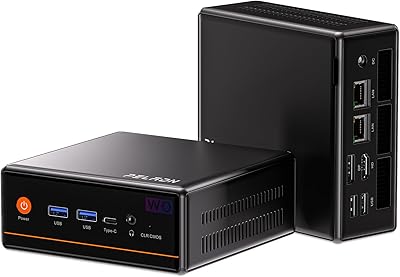
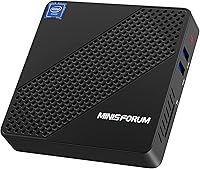
The KODLIX N40 Mini PC is a stripped-down, no-fuss desktop that holds its own for everyday computing at its price tier. Built around Intel's Celeron N4020 processor, it handles browsing, documents, video calls, and light spreadsheet work without complaint. The whole unit measures roughly 4.7 by 4.7 by 1 inch, so it disappears behind a monitor or tucks onto a shelf with ease. Windows 10 comes pre-installed, meaning there is no setup headache straight out of the box. For anyone who needs a capable, silent desktop presence without spending heavily, this mini PC makes a reasonable case for itself.

Features & Benefits

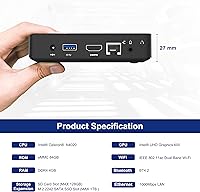
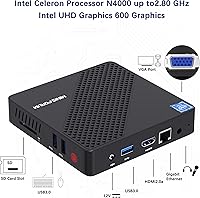
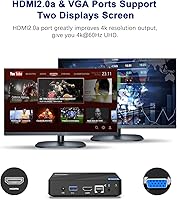
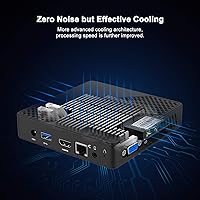
The fanless passive cooling is the design choice that shapes the whole experience — there is simply no fan noise at any point, which matters in quiet rooms or shared spaces. Connectivity is more generous than you might expect: dual-band Wi-Fi, Gigabit Ethernet, Bluetooth 4.2, HDMI 2.0a for 4K output at 60Hz, and a legacy VGA port for a second display. Storage expansion is genuinely practical, with an M.2 NGFF 2242 slot accepting SSDs up to 1TB, plus SD card and USB 3.0 options alongside. A VESA mount bracket ships in the box, which is a thoughtful inclusion that clears desk clutter entirely.

Best For

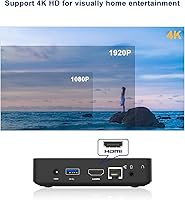
This compact machine fits a specific kind of buyer, and being upfront about that is fair to everyone. If your daily workload revolves around browsing, email, word processing, or basic media playback, this mini PC handles those tasks comfortably. It suits a quiet home office setup well, doubles as an affordable student machine, and works reliably as a dedicated display unit for digital signage or kiosk use where 24/7 fanless operation is a genuine advantage. Streaming 4K content from YouTube or a local drive is something it manages without issue. It also makes a sensible secondary machine when you need a spare Windows desktop without a tower footprint.

User Feedback

Buyers tend to be quietly satisfied with the N40 desktop, particularly those who set realistic expectations going in. The zero-noise operation draws consistent praise, and most users find the out-of-box Windows activation painless. Boot times are acceptable for light tasks, though nobody is calling it snappy. The recurring concern is the 4GB RAM ceiling — with Windows 10 consuming a fair share at idle, users juggling multiple browser tabs and office apps simultaneously will feel the pinch. A handful of buyers mention noticeable chassis warmth under extended load, though serious overheating is rarely reported. Storage expansion via SSD is doable but requires a 2242-format drive, which catches some buyers off guard.

Pros

  • Completely silent operation makes it ideal for bedrooms, libraries, or any noise-sensitive environment.
  • VESA mount bracket is included, so it can attach directly to the back of a monitor out of the box.
  • Dual-band Wi-Fi and Gigabit Ethernet cover both wireless flexibility and rock-solid wired connections.
  • 4K@60Hz output via HDMI 2.0a is a genuine capability, not a marketing stretch.
  • The VGA port adds legacy display compatibility that many modern mini PCs have quietly dropped.
  • M.2 NGFF SSD slot allows meaningful storage upgrades without replacing the unit entirely.
  • Windows 10 comes pre-activated and ready, cutting out the typical setup friction.
  • The compact footprint and light weight make it easy to relocate, wall-mount, or repurpose.
  • Universal power adapter works across 100–240V, making it travel-friendly for international use.
  • Bluetooth 4.2 allows wireless keyboards, mice, and headsets without extra USB dongles.

Cons

  • 4GB RAM is the single biggest limitation and becomes noticeable fast with typical multitasking workloads.
  • Base 64GB eMMC storage fills up quickly once Windows updates and a few applications are installed.
  • The M.2 slot only accepts 2242-format SSDs, which are less common and can catch buyers off guard.
  • Chassis can run noticeably warm under sustained loads, which may concern users in poorly ventilated spaces.
  • No RAM upgrade path exists — the memory is soldered and cannot be expanded post-purchase.
  • Performance in CPU-bound tasks, like batch file processing or fast browser rendering, feels sluggish compared to newer low-power chips.
  • Celeron N4020 is a dated processor by current standards, limiting its useful lifespan for evolving software demands.
  • USB port count is limited, which can force reliance on a hub for users with multiple peripherals.

Ratings

Our AI-generated scores for the KODLIX N40 Mini PC are built by analyzing thousands of verified global user reviews, with spam, bot activity, and incentivized feedback actively filtered out before any scoring takes place. The result is an honest, balanced picture that surfaces both what this compact machine does well and where real buyers have run into frustration. Nothing is glossed over — the numbers reflect what actual owners experienced day to day.

Value for Money
81%
19%
For buyers who need a functional Windows desktop without a significant outlay, this mini PC consistently over-delivers on its promise. Users repeatedly note that the combination of pre-installed Windows 10, dual-band Wi-Fi, and 4K output at its price tier feels genuinely generous compared to competing units stripped of useful ports.
A portion of buyers feel the value calculation shifts once they factor in the near-mandatory SSD upgrade to make the 64GB base storage livable. That additional spend changes the effective cost of entry more than the base listing price suggests.
Noise & Acoustics
93%
The fanless design earns some of the most enthusiastic feedback across all categories. Users working in bedrooms, libraries, and shared offices consistently single out the total absence of fan noise as the single feature they appreciate most in daily use.
A small number of users note that under prolonged high-CPU tasks, the chassis becomes warm enough to be noticeable, and a few found this mildly concerning even though it is an expected byproduct of passive thermal design. It is a tradeoff, not a defect.
Performance
58%
42%
For its intended workload — browsing, email, video calls, document editing, and 4K media playback — the N40 desktop handles things without embarrassing itself. Users running a single focused task at a time generally report a smooth enough experience for basic productivity.
The 4GB RAM ceiling is the most frequently cited frustration in performance-related feedback. Opening more than a handful of browser tabs alongside an office application causes noticeable slowdown, and users who assumed the machine could handle moderate multitasking were regularly disappointed.
Storage Adequacy
52%
48%
The 64GB eMMC gives the machine enough headroom to run Windows 10 and a small collection of applications at launch. Users who immediately added an M.2 SSD and treated the eMMC as a system-only drive reported a much more comfortable experience overall.
Without the SSD expansion, the base storage fills up fast — Windows updates alone can consume a significant chunk, leaving little room for applications or personal files. Several buyers describe the 64GB figure as effectively non-functional for real-world use without an upgrade.
Setup & Out-of-Box Experience
84%
The pre-activated Windows 10 installation means most buyers are up and running within minutes of opening the box. Users appreciated not having to navigate license keys or activation headaches, and the included VESA mount bracket meant physical installation was equally painless for monitor-mounted setups.
A minority of buyers encountered minor Windows configuration prompts or driver installation steps that required some comfort with PC setup. For first-time PC users, the initial configuration process can feel unfamiliar even if the hardware itself is ready to go.
Build Quality
71%
29%
The aluminum-and-plastic shell feels solid for its weight class, and users are generally pleasantly surprised by how sturdy the chassis feels given the price tier. The compact footprint does not feel flimsy when handled, and the overall fit and finish is considered acceptable by most buyers.
The all-black plastic panels do show fingerprints and attract dust visibly over time, and a handful of users felt the overall construction felt closer to functional than premium. It is a workhorse build rather than a design statement.
Connectivity
88%
The port and wireless combination is one of the N40 desktop's genuine strengths. Having dual-band Wi-Fi, Gigabit Ethernet, Bluetooth 4.2, HDMI, VGA, and USB 3.0 on a machine this small means buyers rarely need additional adapters or hubs for standard home or office setups.
The total number of physical USB ports is limited, and users with multiple peripherals — keyboard, mouse, external drive, USB hub — find themselves reaching for a USB hub fairly quickly. For power users with dense peripheral setups, the port count becomes a real constraint.
Display Output
86%
The HDMI 2.0a port genuinely delivers 4K at 60Hz, and users connecting to large 4K monitors or TVs for media consumption and document work were consistently satisfied with the output quality. Having the legacy VGA port for a second display is an increasingly rare inclusion that earns real appreciation from users with older monitors.
Dual-display functionality works, but the VGA port limits the second screen to lower resolutions and lacks the crispness of a second digital connection. Users hoping for two sharp 4K displays simultaneously will need to look at more capable hardware.
Thermal Management
67%
33%
Under light to moderate use — which covers the majority of this machine's target workload — the chassis stays at a comfortable temperature. The passive cooling approach works reliably for the processor's thermal output during normal productivity and media tasks.
Extended heavy loads push surface temperatures to a level that some users found surprising or mildly concerning, even if no thermal throttling or failure was reported. Users in warm ambient environments or enclosed spaces noticed the warmth more acutely than others.
Wi-Fi Performance
79%
21%
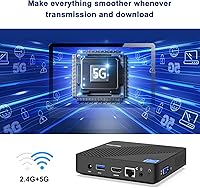
The 5GHz 802.11ac support gives this compact machine a meaningful wireless performance upgrade over older single-band budget PCs. Users in homes or offices with modern routers reported stable, fast connections suitable for video calls, streaming, and cloud-based work.
In environments with thick walls or longer distances from the router, the Wi-Fi range was occasionally flagged as weaker than expected. A small number of users found the Gigabit Ethernet port a more reliable fallback in challenging wireless environments.
Storage Expandability
74%
26%
The combination of an M.2 NGFF 2242 SSD slot, SD card reader, and USB 3.0 ports gives this mini PC a flexible expansion story. Users who invested in a compatible SSD found the upgrade process straightforward and reported a noticeably improved experience afterward.
The 2242 M.2 form factor is less common than the standard 2280 size, which means buyers need to specifically shop for the right drive. Several users made purchasing errors by ordering the wrong SSD format, creating unnecessary returns and delays.
Portability
89%
At 1.37 pounds and smaller than most hardcover books, this compact machine is genuinely easy to pack, relocate, or repurpose. Users who move between workspaces or wanted a PC for travel, guest rooms, or seasonal setups appreciated how little effort relocation requires.
The proprietary DC power adapter is a dependency that limits true plug-and-go portability, and users traveling internationally occasionally flagged the cable bulk as a minor nuisance even with the universal voltage compatibility of the adapter itself.
Software & OS
76%
24%
Pre-installed, activated Windows 10 is a genuine convenience that buyers appreciate at this price level. The OS runs acceptably on the hardware for light tasks, and users who primarily use browser-based tools found that Windows stayed out of their way during normal use.
With 4GB of RAM, Windows 10 background processes consume a disproportionate share of available memory, leaving less headroom for active applications than users expect. Some buyers explored lightweight Linux alternatives specifically to reclaim performance the stock Windows installation was quietly consuming.
Long-term Reliability
69%
31%
Users running this mini PC as a dedicated single-purpose machine — digital signage, a kiosk terminal, or a fixed media player — reported consistent uptime over months of continuous operation. The absence of a fan removes one of the most common mechanical failure points in low-cost desktops.
Over a longer ownership horizon, the aging Celeron N4020 platform will increasingly struggle to keep pace with software updates and browser demands. Buyers treating this as a multi-year primary PC may find its useful lifespan shorter than they hoped.

Suitable for:

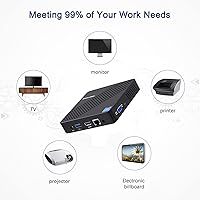
The KODLIX N40 Mini PC is genuinely well-matched for anyone whose daily computing life revolves around the basics — browsing, email, video calls, documents, and the occasional spreadsheet. It is a natural fit for home office workers who want a silent machine tucked behind a monitor without a tower consuming desk space. Students and educators on tight budgets will find it covers classroom and productivity needs without fuss. The fanless design also makes it an unusually practical choice for continuous-use environments like digital signage, kiosks, or small retail point-of-sale stations where noise and heat from spinning fans would be a real operational problem. Anyone shopping for a dependable spare or secondary Windows desktop — a machine for a guest room, a kitchen counter, or a child's homework setup — will find this compact machine hits a sensible price-to-utility balance.

Not suitable for:

The KODLIX N40 Mini PC is the wrong tool if your workload pushes beyond light productivity into anything compute-intensive. Buyers who regularly run multiple applications simultaneously, keep dozens of browser tabs open, or work with large files in photo or video editing software will hit the 4GB RAM ceiling quickly and find the experience frustrating rather than freeing. Gamers should look elsewhere entirely — the integrated Intel UHD Graphics 600 is adequate for 4K video playback but nowhere near capable of running modern games. Remote workers who depend on heavy virtual machine use, coding environments, or demanding conferencing with screen sharing at scale will likely outgrow this compact machine within weeks. The 64GB eMMC base storage also fills up faster than expected once Windows updates and a handful of applications are installed, meaning the SSD expansion slot is less of a bonus and more of a practical necessity for most users.

Specifications

  • Processor: Intel Celeron N4020 dual-core processor with a base clock of 1.1GHz and a burst frequency up to 2.8GHz.
  • RAM: 4GB DDR4 system memory, soldered to the board and not user-upgradeable.
  • Storage: 64GB eMMC internal storage serves as the primary system drive for the operating system and applications.
  • Graphics: Intel UHD Graphics 600 integrated GPU handles everyday visuals and 4K video playback at up to 60Hz.
  • Display Output: One HDMI 2.0a port supports 4K output at 60Hz, and one VGA port enables a secondary legacy display connection.
  • Wi-Fi: Dual-band 802.11ac Wi-Fi supports both 2.4GHz and 5.8GHz bands for flexible wireless connectivity.
  • Ethernet: A single Gigabit Ethernet (1000Mbps) port provides fast, stable wired network access.
  • Bluetooth: Bluetooth 4.2 is built in, supporting wireless keyboards, mice, headsets, and other peripherals.
  • SSD Expansion: One M.2 NGFF 2242 slot accepts SATA SSDs up to 1TB for additional internal storage.
  • SD Card Slot: An integrated SD card slot supports cards up to 128GB for removable or backup storage.
  • USB Ports: Multiple USB 3.0 ports provide fast data transfer and support for external hard drives up to 2TB.
  • Operating System: Windows 10 comes pre-installed and pre-activated, ready to use immediately after first boot.
  • Cooling System: Fully fanless passive cooling design produces zero noise during normal and sustained operation.
  • Dimensions: The unit measures 4.7 x 4.7 x 1 inches, making it one of the most compact desktop form factors available.
  • Weight: The device weighs 1.37 pounds, light enough to mount behind a monitor without structural concerns.
  • Power Supply: Includes a DC 12V 1.5A power adapter compatible with universal input voltage from 100 to 240V at 50/60Hz.
  • Mounting: A VESA monitor mount bracket is included in the box for direct attachment to the rear of compatible displays.
  • Power Management: Supports Auto Power On, S5 RTC Wake, Wake on LAN, and PXE Boot via BIOS configuration.
  • Wireless Standard: Wi-Fi connectivity follows the IEEE 802.11ac standard for reliable throughput on modern home and office networks.
  • Warranty: KODLIX provides a one-year after-sales service warranty alongside a 30-day return window and lifetime technical support.

Related Reviews

Beelink Mini S12 Pro (N100, 16GB, 500GB)

83%
83%
Everyday Performance
91%
Value for Money
76%
Build Quality & Design
84%
Thermal Management & Noise
88%
Connectivity & Ports
More
Beelink Mini S12 Mini PC
78%
88%
Value for Money
82%
Performance for Daily Tasks
79%
Build Quality & Design
91%
Dual Monitor Support
84%
Thermal Management & Noise
More
ACEMAGICIAN Kron Mini K1 Mini PC
73%
83%
Everyday Performance
54%
Gaming Capability
61%
Thermal Management
89%
Display & Connectivity
78%
Value for Money
More
Beelink ME Mini PC
Beelink ME Mini PC
87%
88%
Performance
91%
Connectivity
85%
Storage Expansion
95%
Power Efficiency
90%
Noise Levels
More
FUNYET STARSHIP N95 512GB Mini PC
74%
83%
Value for Money
72%
Performance
58%
Storage Speed
91%
Port Selection
88%
Display Output
More
Beelink EQi13 Pro (32GB/500GB)
83%
88%
Processing Performance
91%
Memory & Multitasking
86%
Storage Speed & Expandability
74%
Thermal Management & Noise
93%
Networking Capabilities
More
FIREBAT MN56 Mini Gaming PC
86%
92%
Performance
87%
Value for Money
90%
Build Quality
94%
Size and Portability
89%
Multitasking Capability
More
Intel NUC5CPYH Mini PC Barebone
74%
81%
Value for Money
53%
Performance
88%
Build Quality & Form Factor
91%
Assembly & Upgrade Ease
58%
Thermal Management
More
BOSGAME P2 Plus Mini PC
81%
91%
CPU Performance
67%
Thermal Management
88%
Memory & Storage
89%
Display & Multi-Monitor Support
93%
Connectivity & Networking
More
PELADN WO4 Mini PC (Ryzen 5 5600H, 16GB, 512GB)
74%
83%
CPU Performance
67%
Gaming Capability
58%
Thermal Management
91%
Connectivity & Networking
79%
Display Output
More

FAQ

Windows 10 comes pre-installed and activated straight from the factory, so you can power it on and start using it right away without hunting for a product key or paying for a separate license.

Unfortunately, no. The memory on this compact machine is soldered directly to the motherboard, which means there is no slot to swap in a larger module. If you anticipate needing more than 4GB regularly, it is worth factoring that into your buying decision before purchasing.

The KODLIX N40 Mini PC uses an M.2 NGFF 2242 slot, which is a specific form factor — shorter than the more common 2280 M.2 drives you will find at most retailers. Make sure you purchase a 2242-format SATA SSD, as NVMe drives are not compatible with this slot.

Yes. The unit has both an HDMI 2.0a port and a VGA port, so you can run dual displays simultaneously. The HDMI side handles 4K at 60Hz, while the VGA port works well for a secondary monitor at standard resolutions.

It is genuinely silent. The fanless passive cooling design means there are no moving parts at all, so there is no fan hum, no spin-up noise, nothing. Some users do note the chassis itself gets warm under heavy use, but that warmth is the normal byproduct of passive heat dissipation working as intended.

For 4K video streaming and local media playback, the N40 desktop handles the task well. The Intel UHD Graphics 600 is quite capable at hardware-accelerated video decoding, so 4K content plays back smoothly in typical streaming scenarios.

Only in a very light sense. Simple browser-based games or older low-demand titles from a decade or more ago may run acceptably, but anything modern is out of reach. The integrated graphics and Celeron processor simply do not have the horsepower for real gaming workloads.

Quite easy — a VESA-compatible mounting bracket is already included in the box. As long as your monitor has standard VESA mounting holes on the back, you can attach the unit directly without buying any additional hardware.

Yes, Bluetooth 4.2 is built in, so any Bluetooth keyboard, mouse, or headset will pair directly with this compact machine. If you prefer a USB wireless receiver instead, the USB 3.0 ports are available for that as well.

The unit includes a physical reset pinhole that triggers an automatic system restart if the OS becomes unresponsive. KODLIX also offers lifetime technical support, so if you hit a more serious issue you cannot resolve yourself, their team is reachable for guidance.