Overview

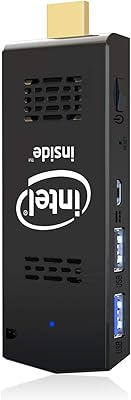
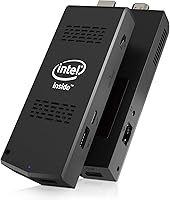
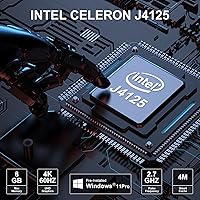
The AIOEXPC S7 J4125 8GB 128GB PC Stick is roughly the size of a thick candy bar, yet it runs a full Windows 11 Pro installation straight from your HDMI port. What separates it from the older Atom-based sticks that plagued this category is the Intel Celeron J4125 quad-core processor, which brings a tangible bump in responsiveness for everyday tasks. The 8GB of RAM and 128GB SSD are genuinely solid specs for a device this small. Pricing sits in a mid-range sweet spot — more than the cheapest sticks, but well below a compact mini PC. Keep expectations grounded: this is a capable light-use machine, not a workhorse for video editing or heavy multitasking.

Features & Benefits

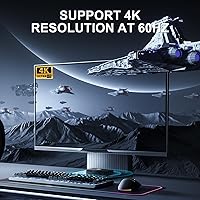
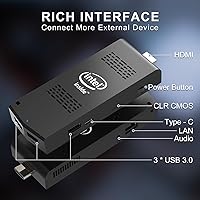
The J4125 chip makes a real difference in daily use — browsing, document editing, and light media tasks feel snappy rather than sluggish. On the storage side, the M.2 SATA 2242 slot means you can drop in a larger drive up to 1TB without replacing the unit, a practical option for long-term deployments. Thermal management relies on a copper heat pipe paired with a variable-speed fan that ramps up only when needed. Three USB 3.0 ports and a gigabit ethernet jack — genuinely rare on stick PCs — cut the need for adapters. HDMI 2.0 handles 4K at 60Hz cleanly, making it viable for large displays and digital signage setups.

Best For

This mini computer stick earns its place in scenarios where portability and simplicity matter more than raw power. Digital signage is arguably the strongest fit — plug it into a commercial display, set up a looping presentation or kiosk page, and it handles that task reliably all day. Traveling professionals and students who need a full Windows environment on any available hotel TV or monitor will find it genuinely practical. Home theater streaming works well, though a wired ethernet connection is worth using for stability. It also suits light IoT deployments where Wake-on-LAN and RTC wake scheduling allow automated power cycles without physical access.

User Feedback

Buyers consistently praise how straightforward the initial setup is — plug in, power up, and Windows 11 Pro is ready with minimal configuration. The compact form factor draws near-universal approval from people wanting to declutter a desk or hide a PC behind a display. On the downside, users running several browser tabs alongside a video call report noticeable slowdowns, which is expected at this performance tier. Fan noise divides opinions: most describe it as quiet enough to ignore, while a minority find it audible in silent rooms under sustained load. Windows 11 Pro activation went smoothly for most buyers, though a handful flagged minor hiccups, and the included accessories were considered adequate rather than impressive.

Pros

  • The J4125 quad-core processor handles everyday browsing, document work, and media playback without the sluggishness common in cheaper sticks.
  • 8GB of RAM is genuinely above average for this device category and prevents the constant slowdowns seen in 4GB alternatives.
  • The onboard gigabit ethernet port is a rare and practical feature that most competing stick PCs simply do not offer.
  • Storage is user-upgradeable via the M.2 SATA 2242 slot, so you are not locked into the 128GB starting capacity long-term.
  • HDMI 2.0 output delivers true 4K at 60Hz, making this PC stick a credible choice for large-format displays and signage screens.
  • Windows 11 Pro comes pre-installed and activates smoothly for most buyers, saving setup time out of the box.
  • The copper heat pipe cooling system keeps sustained workloads running more stably than passive or single-fan designs on older sticks.
  • At roughly 0.26 pounds, it disappears into a bag pocket and travels without adding any meaningful weight to your kit.
  • Dual-band Wi-Fi and Bluetooth 4.2 cover the wireless bases, while the wired ethernet option adds reliability when it matters most.
  • Wake-on-LAN and RTC wake support make it easy to automate power schedules for unattended deployments.

Cons

  • Running multiple video calls and browser tabs simultaneously causes noticeable slowdowns that interrupt workflow.
  • Fan noise under sustained load is inconsistent across units — some run quietly while others produce an audible hum.
  • Bluetooth 4.2 is dated compared to the 5.0 standard now common on similarly priced compact PCs.
  • The included cable and adapter bundle is considered just adequate by most buyers, with no real quality standout.
  • 128GB of base storage fills up faster than expected once Windows updates and applications are installed.
  • The HDMI connection means it protrudes from the back of a display, making physical placement awkward in tight wall-mount setups.
  • 4K video playback is technically supported but can stutter with high-bitrate files if other tasks are running in the background.
  • No Thunderbolt or USB-C port limits connectivity options for users with modern peripherals.
  • Customer support responsiveness has drawn mixed feedback, with some buyers reporting slow reply times on warranty claims.

Ratings

The scores below for the AIOEXPC S7 J4125 8GB 128GB PC Stick were generated by our AI engine after analyzing thousands of verified buyer reviews across global markets, with spam, bot-submitted, and incentivized feedback actively filtered out. Each category reflects an honest synthesis of what real users praised and what frustrated them in day-to-day use. Both the strengths and the genuine pain points are represented transparently so you can make an informed call before buying.

Everyday Performance
72%
28%
For light tasks — email, document editing, web browsing with a handful of tabs, and standard-definition video calls — this PC stick handles things competently. Users upgrading from older Atom-based sticks consistently noted the J4125 feels meaningfully faster in real use, particularly when opening applications or switching between tasks.
Push it into heavier territory and the cracks show quickly. Buyers who tried running simultaneous video calls alongside active browser sessions reported frustrating slowdowns, and the CPU ceiling becomes obvious whenever Windows Update decides to run in the background during work hours.
Portability
94%
Weighing under 0.3 pounds and small enough to disappear into a jacket pocket, this mini computer stick is about as portable as a full Windows PC gets. Travelers and field workers praised being able to carry a complete work environment and plug into any hotel TV or external monitor within seconds.
The HDMI plug protrudes directly from the stick, which creates leverage stress on the port if the display is in a tight spot or the stick gets nudged. A few users noted the connection felt less secure on recessed HDMI ports on wall-mounted screens.
Setup Experience
88%
The out-of-box experience drew consistent praise — plug it in, follow the standard Windows 11 setup wizard, and you are working within minutes. Windows 11 Pro activated without issues for the large majority of buyers, removing the frustrating license headaches that plague some gray-market mini PCs.
A small but recurring subset of reviewers reported activation hiccups that required contacting support to resolve. The initial Windows setup also consumes a noticeable chunk of the 128GB drive before you install a single application.
Connectivity
91%
Three USB 3.0 ports and a gigabit ethernet jack on a device this size is genuinely impressive and sets it apart from most competitors. The wired ethernet option in particular resonated strongly with buyers using it for digital signage or stable media streaming, where Wi-Fi dropouts are not acceptable.
Bluetooth 4.2 is showing its age compared to the 5.0 standard now found on similarly priced compact machines. There is no USB-C port, which limits compatibility with newer peripherals and means carrying legacy-style cables for anything modern.
Thermal Management
74%
26%
Compared to older passive-cooled sticks that throttled within minutes, the copper heat pipe and variable-speed fan on this AIOEXPC stick PC kept sustained workloads running more consistently. Users running digital signage or continuous media playback found it held up reliably over long operating hours.
The fan audibly spins up under load, and the outer casing gets noticeably warm during extended sessions. Some buyers reported that in poorly ventilated mounting positions — such as tucked behind a display with limited airflow — the unit ran hotter than expected.
Display Output
86%
HDMI 2.0 with true 4K at 60Hz output is well-suited for large retail displays and living room setups where visual clarity matters. Users connecting to 4K TVs for media playback found the output sharp and stable during standard streaming content.
High-bitrate 4K local video files occasionally stuttered when background processes were active, reminding users that the GPU is integrated and shares system resources with the CPU. There is no secondary display output, so dual-monitor configurations are not possible without additional hardware.
Storage & Expandability
79%
21%
The user-upgradeable M.2 SATA 2242 slot is a practical long-term advantage over sealed competitors. Buyers planning extended deployments appreciated knowing they could swap in a larger drive rather than replacing the whole unit when space ran out.
128GB fills up faster than most buyers anticipate — after Windows 11 Pro, system files, and a few applications, usable space drops well below half. The upgrade process requires opening the device and sourcing a compatible M.2 SATA 2242 drive, which is less common than the more standard 2280 size.
Fan Noise
63%
37%
During idle and light use, a good portion of users described the fan as barely perceptible, making it acceptable for quiet home office or bedroom media use. The variable-speed design does a decent job of staying calm when the workload does not demand otherwise.
Noise consistency across units appears to vary, with some buyers receiving noticeably louder samples than others suggest. In quiet rooms during sustained tasks like extended streaming or software updates, the fan hum becomes a recurring distraction that a few users found difficult to ignore.
Value for Money
77%
23%
Against the cheapest Atom-based sticks, this mini computer stick justifies its higher price through tangibly better performance, more RAM, and the rare addition of wired ethernet. Buyers who needed a reliable Windows 11 Pro machine for signage or light professional use found the total cost reasonable for what it delivers.
At its price point, it brushes against entry-level Intel N-series mini PCs that offer more processing headroom in a slightly larger box. Buyers who did not specifically need the stick form factor found themselves questioning whether the portability premium was worth the performance trade-off.
Build Quality
71%
29%
The casing feels solid enough for a device in this category, and the overall finish is clean without any obviously cheap-feeling components. Several buyers noted it survived regular travel without issue when kept in a padded pouch.
The plastic shell does not inspire confidence under sustained heat, and a handful of users mentioned the casing flexed slightly when pressure was applied during port connections. It feels functional rather than premium, which is expected at this price tier but worth noting for heavy-use environments.
Included Accessories
54%
46%
The package includes the essentials needed to get started — a power adapter and a basic cable — so buyers are not immediately stuck waiting on additional purchases before first use. For most single-display setups this is perfectly adequate.
The quality of included accessories drew consistent criticism for being merely functional rather than reliable. Several buyers reported the bundled cable felt flimsy, and the absence of any input device or HDMI extension cable was a frequent complaint, particularly for wall-mount installations where the stick's direct-plug design is awkward.
Wireless Performance
76%
24%
Dual-band Wi-Fi with 5GHz support performed well for typical home and office use, with users reporting stable connections during standard streaming and light browsing when placed in reasonable proximity to a router. Switching to 5GHz notably reduced interference issues in crowded wireless environments.
Wi-Fi range and consistency deteriorated for some users when the stick was mounted behind a large display, as the screen itself can partially block the antenna. For mission-critical connectivity, the wired ethernet port is a much more dependable option.
Software & OS
83%
Having a genuine, fully featured Windows 11 Pro installation rather than Home or S Mode is a meaningful advantage for professional deployments. Domain joining, Remote Desktop, and BitLocker are all accessible without any additional licensing costs or workarounds.
Windows 11 Pro has higher background resource demands than lighter operating systems, and on this hardware those demands are more noticeable than on faster machines. Automatic updates occasionally triggered at inconvenient times during use and consumed enough CPU to disrupt active tasks temporarily.
Support & Warranty
58%
42%
The stated one-year warranty combined with lifetime technical support is a reasonable commitment for a product at this price point, and buyers with straightforward issues generally reported getting resolutions eventually. The lifetime support claim adds reassurance for long-term deployments.
Response times from the support team drew repeated criticism in buyer feedback, with some users waiting days for replies on warranty claims. The gap between the stated lifetime support promise and the actual support experience left a portion of buyers disappointed, particularly those with time-sensitive deployment issues.

Suitable for:

The AIOEXPC S7 J4125 8GB 128GB PC Stick is a strong fit for anyone who needs a full Windows 11 Pro environment without carrying a laptop or setting up a desktop. Digital signage operators get the most obvious value here — this mini computer stick can run a kiosk display, looping presentation, or retail screen around the clock without breaking a sweat. Traveling professionals and students who regularly work from hotel rooms, classrooms, or client offices will appreciate being able to pocket a complete PC and plug into any available HDMI display. It also works well as a permanent home theater companion, especially when connected via the wired gigabit ethernet port for stable streaming. Light industrial and IoT deployments that rely on Wake-on-LAN or scheduled wake cycles are another natural fit, since the hardware supports those features out of the box.

Not suitable for:

If your workday involves juggling a dozen browser tabs, running video calls, and editing documents simultaneously, the AIOEXPC S7 J4125 8GB 128GB PC Stick will frustrate you — the J4125 processor simply does not have the headroom for sustained multitasking at that level. Gamers should look elsewhere entirely; even casual titles will push this hardware past its comfort zone. Anyone planning to use it as a primary work machine for CPU-intensive tasks like video editing, data processing, or software development will hit a ceiling quickly. If a quiet workspace is critical to you, be aware that some users report a noticeable fan hum under heavier loads. Finally, buyers expecting a premium unboxing experience or robust bundled accessories may be underwhelmed, as the included extras are functional but basic.

Specifications

  • Processor: Powered by an Intel Celeron J4125 quad-core CPU running at up to 2.7GHz, offering a meaningful performance step above older Atom-based stick PCs.
  • RAM: Equipped with 8GB of LPDDR4 memory, which is above average for the stick PC category and helps maintain smoother multitasking within the chip's limits.
  • Storage: Comes with a 128GB M.2 SATA 2242 SSD pre-installed, with the slot supporting user-installed drives up to 1TB for expanded capacity.
  • Operating System: Ships with Windows 11 Pro pre-installed and pre-activated, ready to use out of the box without a separate license purchase.
  • Display Output: Features an HDMI 2.0 port capable of outputting up to 4K resolution at 60Hz to any compatible display or monitor.
  • Graphics: Uses Intel UHD Graphics 600 integrated graphics, suitable for 4K video playback and basic display tasks but not designed for gaming or GPU-intensive work.
  • USB Ports: Includes three USB 3.0 Type-A ports for connecting peripherals such as keyboards, mice, external drives, and hubs simultaneously.
  • Wired Networking: Has a dedicated gigabit ethernet port, a feature absent on many competing stick PCs, enabling stable wired internet connections up to 1Gbps.
  • Wireless: Supports dual-band Wi-Fi 802.11ac on both 2.4GHz and 5GHz bands for flexible wireless connectivity in most home and office environments.
  • Bluetooth: Includes Bluetooth 4.2 for pairing wireless peripherals such as keyboards, mice, and headsets without occupying a USB port.
  • Cooling System: Uses a copper heat pipe combined with a variable-speed intelligent fan that adjusts airflow based on CPU load to manage thermals during sustained use.
  • Dimensions: Measures 5.5 x 1.9 x 0.78 inches, compact enough to fit in a shirt pocket or small travel pouch alongside other accessories.
  • Weight: Weighs just 0.26 pounds, making it one of the lightest full Windows PC options available in any form factor.
  • Power Features: Supports auto power-on, Wake-on-LAN, RTC wake, and PXE boot, enabling scheduled or remote startup without physical access to the device.
  • Warranty: Backed by a one-year limited hardware warranty and lifetime technical support as stated by the manufacturer AIOEXPC.

Related Reviews
MeLE PCG02 Mini PC Stick, Celeron N100, 8GB RAM, 128GB Storage
82%
94%
Portability & Size
85%
Performance for Everyday Tasks
72%
Thermal Management
88%
Wi-Fi Connectivity
90%
Ease of Setup
More
Fusion5 FMP4 Mini PC 128GB 8GB RAM
85%
87%
Performance
95%
Portability
81%
Build Quality
88%
Connectivity
90%
Setup & Installation
More
AKLWY Mini PC Stick 128GB 4GB RAM
86%
94%
Portability
89%
Ease of Use
86%
Performance for Basic Tasks
90%
Streaming Quality (4K)
88%
Connectivity (Wi-Fi/Bluetooth)
More
MINISFORUM GK41 Mini PC Celeron J4125 8GB RAM 256GB SSD
85%
87%
Performance for Everyday Use
91%
Dual Display & Video Output
82%
Build Quality
75%
Storage Expansion Flexibility
94%
Size & Portability
More
MeLE PCG02 Mini PC Stick Celeron N4000 4GB RAM 128GB eMMC
86%
91%
Value for Money
88%
Performance for Basic Tasks
95%
Portability/Size/Weight
85%
Connectivity/Stability
93%
Silent Operation
More
Fusion5 F202 8GB Android Tablet 128GB Storage
83%
88%
Performance
90%
Display Quality
85%
Build Quality
65%
Battery Life
89%
Storage Capacity
More
JSL JDTDC Auto Photo Backup Stick 128GB
85%
83%
Backup Speed
92%
Ease of Use
89%
Data Security
75%
App Experience
87%
File Organization
More
OASLOA T9PRO Mini PC 8GB RAM 256GB SSD
81%
86%
Performance
88%
Build Quality
92%
Energy Efficiency
83%
Display Quality (4K Support)
89%
Connectivity
More
OnePlus Pad 11.61-inch, 8GB RAM, 128GB Storage
83%
93%
Performance
94%
Display Quality
88%
Build Quality
79%
Battery Life
80%
Portability
More
CanaKit Raspberry Pi 4 8GB Extreme Kit 128GB
84%
94%
Kit Completeness
91%
Thermal Management
93%
RAM & Multitasking Performance
71%
Storage — microSD Speed & Reliability
89%
Power Supply Quality
More

FAQ

It runs a genuine, full copy of Windows 11 Pro — not a Home edition or an S Mode version. You get access to all standard Windows features including Remote Desktop, BitLocker, and the ability to join a domain, which is useful for business deployments.

Yes, and it is more straightforward than it sounds. The internal drive uses an M.2 SATA 2242 slot, which accepts standard aftermarket SSDs available from most electronics retailers. You can swap it out for a drive up to 1TB, though you will need to reinstall Windows unless you clone the existing drive first.

For the most part, yes — 4K streaming works on this mini computer stick when little else is running in the background. If you have other applications open at the same time or are on a slower Wi-Fi connection, you may see occasional dropped frames. Using the wired ethernet port rather than Wi-Fi noticeably improves streaming stability.

Fan noise is inconsistent based on user reports. Many people describe it as barely audible during light use, but it does spin up under heavier loads such as prolonged browsing sessions or continuous video playback. If you are sensitive to fan noise and plan to use it in a very quiet room, it is worth being aware that some units are louder than others.

Digital signage is actually one of the strongest use cases for the AIOEXPC S7 J4125 8GB 128GB PC Stick. Running a looping presentation or a kiosk web page is a low-demand task well within this hardware's comfort zone. The Wake-on-LAN and RTC wake features also let you automate power schedules so the display turns on and off without anyone touching it.

No keyboard or mouse is included. The package contains the stick itself, a power adapter, and a basic cable. You will need to supply your own input devices — most buyers use a compact wireless keyboard-and-trackpad combo that connects via Bluetooth or a USB receiver.

The stick only has an HDMI 2.0 output, so you would need an active HDMI-to-DisplayPort adapter if your monitor lacks an HDMI input. Passive adapters often do not work reliably in this direction, so make sure any adapter you buy is specifically rated for HDMI source to DisplayPort display conversion.

One-on-one or small group calls at standard definition work reasonably well. Where it struggles is running a video call simultaneously with other open applications like a browser with multiple tabs or a document editor. If video conferencing is a primary use case alongside other tasks, the J4125 processor will feel constrained and the experience will be noticeably choppy at times.

The copper heat pipe design manages thermals better than older passive-cooled sticks, and most users report the outer casing stays warm but not painfully hot during normal use. During very long uninterrupted sessions at higher loads, the fan ramps up to compensate. It performs better thermally than previous-generation sticks with simpler cooling designs, but it is not a device you should block airflow around.

The manufacturer offers a one-year hardware warranty and states that lifetime technical support is available. In practice, buyer experiences with warranty claims have been mixed — most straightforward issues are resolved, but response times from the support team can be slow. It is worth purchasing through a channel that offers its own buyer protection as a backup.