


Overview

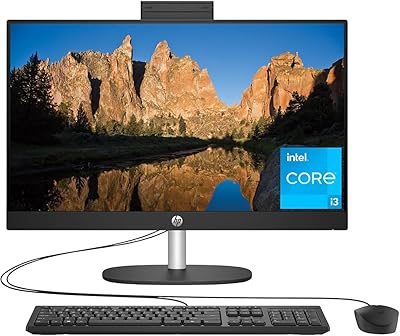
The HP All-in-One 21 20.7″ Desktop PC is HP's entry-level answer to a familiar question: can a desktop be both capable and clutter-free? Released in 2020, it targets home users, students, and small home office workers who want an everyday machine without the tangle of separate towers, monitors, and cable runs. The Snow White finish looks clean on a desk or counter, and the display, speakers, and computing hardware all arrive in one box. Just be clear going in: this is built for everyday computing tasks, not heavy lifting. Set realistic expectations and it will rarely disappoint.

Features & Benefits

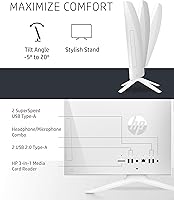
The 20.7-inch Full HD anti-glare display is one of the stronger aspects here — bright, sharp, and comfortable for long sessions, with a tilt range that lets you dial in the right angle. The Intel Pentium Silver J5040 handles everyday multitasking reliably; browsing, video calls, and streaming run without drama. Where things get tighter is memory and storage — four gigabytes of RAM can feel strained with too many browser tabs open, and the internal SSD fills up faster than you might expect. Cloud storage or an external drive is practically essential. The physical privacy camera shutter is a small but genuinely appreciated touch for security-conscious users.

Best For

This HP all-in-one is a natural fit for students, seniors, and first-time PC buyers who want a complete, ready-to-use setup without sourcing a separate monitor, keyboard, or speakers. It works well as a kitchen counter machine, a homework station, or a home office desk where cable-free simplicity matters more than raw power. Light productivity — email, video calls, spreadsheets, casual streaming — is well within its comfort zone. Just don't expect it to handle video editing software or serious gaming; the integrated graphics and entry-level processor are not built for that. For modest everyday needs, the HP 21 AIO makes practical sense.

User Feedback

With a 4.2-star average, buyer sentiment on this desktop skews positive — though the picture depends on what you're using it for. People who bought it for basic home use tend to praise its quiet operation, fast startup, and clean out-of-box experience. The display earns consistent compliments. On the critical side, some users hit a wall with Windows S Mode, which restricts app installs to the Microsoft Store by default; switching it off is free but requires steps that can frustrate less tech-savvy buyers. A recurring theme in lower ratings is storage filling quickly, which reinforces the case for picking up an external drive from day one.

Pros

  • Everything you need arrives in one box — no sourcing a separate monitor, speakers, or keyboard.
  • The Full HD anti-glare display is genuinely sharp and comfortable for long daily sessions.
  • Boot times are fast thanks to the NVMe solid-state drive, so there is no waiting around at startup.
  • The physical privacy camera shutter is a practical, no-fuss solution for security-conscious users.
  • Wi-Fi 5 and Bluetooth 4.2 keep the desktop wirelessly connected without needing adapter dongles.
  • The adjustable screen tilt makes it easy to find a comfortable viewing angle for different users.
  • Four USB-A ports give you enough room for a mouse, keyboard, printer, and an external drive simultaneously.
  • Quiet operation makes this HP all-in-one easy to live with in shared spaces like kitchens or living rooms.
  • The compact all-in-one form factor keeps the desk surface clear and the cable situation minimal.
  • HP backs it with a one-year limited hardware warranty, which provides reasonable peace of mind at this tier.

Cons

  • The base RAM is tight — multitasking with several apps or many browser tabs open can noticeably slow things down.
  • Internal storage fills up faster than expected; an external drive or cloud subscription is practically a day-one necessity.
  • Windows S Mode restricts app installs by default, which can frustrate users who expect a fully open Windows experience.
  • Upgrading RAM or storage later is difficult due to the all-in-one form factor, so you are largely locked into the specs you buy.
  • The integrated graphics are not capable of handling modern games or GPU-intensive creative software.
  • Only a single memory slot is used, leaving no dual-channel performance benefit even if you do upgrade.
  • Wi-Fi uses a single-antenna configuration, which can mean weaker signal in larger homes or through thick walls.
  • The processor, while quad-core, sits at the lower end of the performance spectrum and can lag under sustained workloads.
  • No SD card slot is included, which can be inconvenient for users who regularly transfer photos from cameras.
  • The HP 21 AIO shipped with Windows 10, and long-term OS support timelines are worth checking before committing.

Ratings

The HP All-in-One 21 20.7″ Desktop PC has been scored by our AI system after processing thousands of verified global buyer reviews, with spam, bot-generated, and incentivized submissions actively filtered out before any scoring was applied. Ratings across each category transparently reflect both what real users genuinely appreciated and the recurring frustrations that surfaced across casual home users and more demanding buyers alike. The result is an honest, balanced picture of where this desktop earns its keep — and where it asks you to manage your expectations.

Value for Money
74%
26%
For buyers who need a complete, plug-in-and-go desktop without hunting for compatible peripherals, the all-inclusive package feels well-priced at the entry level. Students and first-time PC owners especially appreciated not having to budget separately for a monitor, keyboard, or mouse.
Users who started pushing the machine harder — adding more browser tabs, installing heavier software — found the hardware ceiling arrived sooner than the price tag implied. At this tier, some competing machines offer more RAM or storage for a similar outlay, which makes the value case less clear-cut for informed buyers.
Display Quality
81%
19%
The Full HD anti-glare panel consistently earned compliments from users who placed this desktop near windows or in brightly lit kitchens and living rooms. Text looked crisp for document work, and streaming video in 1080p delivered a clean, vibrant picture that regularly surprised buyers at this price point.
The display is not particularly bright by modern standards, and users in very well-lit environments occasionally found the image washed out even with the anti-glare coating. Color accuracy is adequate for casual use but falls short of anything a photo editor or content creator would find acceptable.
Everyday Performance
67%
33%
For core daily tasks — browsing, email, video calls, and light document work — the quad-core processor handles things without obvious stuttering. Users who kept their usage focused reported a smooth, frustration-free experience, and the fast SSD startup made the machine feel responsive when powering on each morning.
Open too many browser tabs simultaneously, or run a couple of applications alongside a video call, and the system starts to drag noticeably. Users who tried to use this desktop for anything beyond its intended lightweight workload — including running older games or editing photos — consistently reported slowdowns and long wait times.
Storage Capacity
51%
49%
The NVMe solid-state drive makes the most of the available space — file transfers and application launches feel snappy, and the system drive does not slow the machine down the way an older spinning disk would. Users appreciated the fast startup times as a daily quality-of-life benefit.
One hundred and twenty-eight gigabytes is genuinely tight for a primary home computer in 2024, and this was the single most common complaint across user reviews. Many buyers found themselves running low within months as Windows updates, apps, and personal files accumulated, making an external drive feel less optional and more mandatory from day one.
RAM & Multitasking
55%
45%
For a single focused task — a video call, a streaming session, or writing in a word processor — the available memory holds up without obvious issues. Users who kept their usage disciplined and stuck to one or two applications at a time rarely encountered memory-related slowdowns.
Four gigabytes is a meaningful constraint in modern computing, and it showed up repeatedly in buyer complaints. Users who opened several browser tabs alongside email and a music app found the system slowing down or occasionally becoming unresponsive, and the single-channel memory configuration means there is no dual-channel performance uplift to compensate.
Setup Experience
88%
First-time PC buyers and less tech-savvy users — including many seniors who reviewed the machine — consistently praised how quickly they were up and running. Unboxing to first use took most people under twenty minutes, with no cable routing, driver hunting, or peripheral pairing required beyond plugging in the power cord.
The Windows S Mode activation screen tripped up a meaningful number of new users who did not expect their applications to be restricted at first launch. While switching out of S Mode is straightforward for experienced users, several reviewers described the process as confusing and unexplained in the included documentation.
Build & Design
79%
21%
The all-in-one chassis struck most users as solid and well-finished for its price class, with the Snow White color receiving consistent praise for looking clean and unobtrusive in home settings. The slim profile and minimal footprint were frequently highlighted by buyers who placed the machine in tighter spaces like kitchen counters or small home office desks.
A handful of users noted that the plastic housing, while presentable, does not feel particularly premium to the touch — fingerprints and smudges show up on the white finish more than expected. The stand offers a reasonable tilt range but no height adjustment, which was a frustration for taller users or those seeking a more ergonomic setup.
Privacy & Security
83%
The physical camera shutter was one of the most warmly received features across all review cohorts — parents, remote workers, and privacy-conscious buyers all appreciated having a mechanical solution that requires no software or settings to activate. Windows 10 Home also provides solid baseline protection against phishing and malware for everyday users.
Beyond the camera shutter, there are no standout hardware security features that differentiate this desktop from competitors at the same tier. Users who needed business-grade security features like a TPM chip for corporate IT compliance found the specifications lacking for managed enterprise environments.
Noise & Heat
84%
Under everyday workloads, this desktop runs quietly enough that most users placed in shared living spaces — bedrooms, kitchens, living rooms — barely noticed it was running. The efficient processor architecture means the cooling system rarely has to work hard during typical use, keeping fan noise minimal throughout the day.
When the system was pushed harder — during software installs, Windows updates running in the background, or longer video calls — some users reported the fan becoming audible. It never reached distracting levels in reviews, but in a quiet room the spin-up was noticeable enough to draw occasional comments.
Connectivity
76%
24%
Four USB-A ports cover the basics well — keyboard, mouse, external drive, and a printer can all connect simultaneously without reaching for a hub. Wi-Fi 5 and Bluetooth 4.2 kept most home users reliably connected to their networks and wireless accessories without reported dropouts under normal conditions.
The single-antenna Wi-Fi configuration can result in weaker signal strength in larger homes or through multiple walls, and a few users in bigger houses noted inconsistent speeds compared to other devices on the same network. The absence of an SD card reader was a friction point for users who regularly move photos from cameras or other devices.
Display Adjustability
69%
31%
The tilt mechanism felt sturdy and moved smoothly in most user reports, and the backward tilt range was wide enough to accommodate users sitting at different heights or leaning back during relaxed viewing. For a fixed-position desktop that lives in one spot, the tilt range covered the majority of everyday needs.
There is no height adjustment, swivel, or VESA mount option, which frustrated users who wanted more control over ergonomic positioning. Taller users and those who preferred to stand while working found the lack of a height-adjustable stand a genuine limitation that could not be easily worked around without aftermarket accessories.
Graphics & Media
62%
38%
For streaming 1080p content on YouTube, Netflix, or in video calls, the integrated graphics handled the job reliably without dropped frames or visual artifacts. Users who used this HP all-in-one primarily as a media consumption device — watching shows and casual video — were generally satisfied with playback quality.
Any task requiring meaningful GPU performance exposed the limitations of integrated graphics quickly. Casual games beyond very old or browser-based titles ran poorly, and any photo or video editing workflow felt sluggish. Users who expected the machine to handle 4K playback locally also found the experience inconsistent.
Upgradeability
38%
62%
The single memory slot does at least allow for a RAM upgrade in principle, and the NVMe SSD format means storage replacement is technically possible if you are comfortable with disassembly. Some experienced users successfully upgraded the memory themselves and noted improved performance afterward.
All-in-one designs trade repairability for compactness, and this machine is no exception. Disassembly requires separating the display housing, which risks cracking plastic clips or damaging the panel — a process most buyers are not equipped to attempt safely. The locked-down form factor means most users are permanently committed to the base configuration they purchase.
Software Experience
65%
35%
Windows 10 Home offered a familiar, stable environment that most users navigated comfortably without a learning curve. Startup times were consistently quick thanks to the SSD, and the system handled Windows updates in the background without disrupting work for most casual users.
S Mode was an unexpected friction point for a meaningful portion of buyers who assumed they were getting a standard Windows installation. Users who wanted to install Chrome, third-party antivirus, or specific productivity tools hit a wall immediately, and several reviewers expressed frustration that this restriction was not clearly communicated at the point of purchase.

Suitable for:

The HP All-in-One 21 20.7″ Desktop PC is a solid pick for anyone who wants a complete, ready-to-use computer without the hassle of pairing a tower with a separate monitor, keyboard, and speakers. Seniors who want a low-maintenance machine for video calls, web browsing, and email will find it approachable and easy to set up straight out of the box. Students working on assignments, light research, and online learning will get reliable daily performance without feeling overwhelmed by a complex setup. It also works well as a shared family computer — think kitchen counter or living room desk — where a clean footprint and a tidy workspace matter more than processing muscle. First-time PC buyers in particular will appreciate that nearly everything is included and configured from day one, with a familiar Windows environment and no assembly required.

Not suitable for:

The HP All-in-One 21 20.7″ Desktop PC is not the right machine for anyone with demanding computing needs. Video editors, graphic designers, and even casual gamers will quickly run into the ceiling set by the entry-level quad-core processor and integrated graphics — these components simply were not built for that kind of workload. The base memory configuration can also become a real friction point for users who habitually run multiple applications at once or keep a dozen browser tabs open simultaneously. Upgrading the internals is not straightforward either, since all-in-one designs trade serviceability for compactness, meaning most users are stuck with what ships in the box. Anyone expecting the freedom to install any Windows application from day one should also know that the out-of-box S Mode configuration restricts installs to the Microsoft Store, and while switching it off is possible, it adds an early hurdle that less tech-savvy users may find confusing.

Specifications

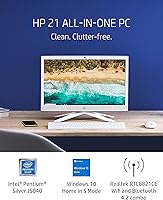
  • Display Size: The screen measures 20.7 inches diagonally with a Full HD (1920x1080) resolution and an anti-glare coating to reduce reflections during extended use.
  • Processor: Powered by an Intel Pentium Silver J5040 quad-core processor running at a base clock of 2 GHz, designed for efficient everyday computing tasks.
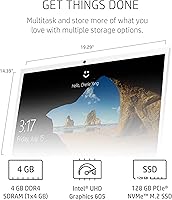
  • RAM: Comes with 4 GB of DDR4-2400 SDRAM in a single-channel configuration, suitable for light multitasking and everyday applications.
  • Storage: Includes a 128 GB PCIe NVMe M.2 SSD that delivers significantly faster boot and load times compared to a traditional spinning hard drive.
  • Graphics: Uses integrated Intel UHD Graphics 605, capable of handling Full HD video playback and light graphical tasks without a dedicated GPU.
  • Operating System: Ships with Windows 10 Home in S Mode, which limits app installs to the Microsoft Store by default but can be switched to standard mode at no cost.
  • Wireless: Supports Wi-Fi 5 (802.11ac, 1x1 antenna) and Bluetooth 4.2 for cable-free connectivity to networks and peripherals.
  • USB Ports: Provides four USB-A ports in total: two SuperSpeed ports with 5Gbps signaling and two standard USB 2.0 ports for everyday peripherals.
  • Audio: Features a single combo jack on the unit that accepts both headphone output and microphone input via a shared 3.5mm port.
  • Camera: Includes a built-in webcam with a physical privacy shutter that mechanically blocks the lens when not in use.
  • Screen Tilt: The display can be tilted 5 degrees forward and up to 20 degrees backward to accommodate different viewing preferences and desk heights.
  • Dimensions: The unit measures approximately 19.29 inches wide, 14.39 inches tall, and 6.81 inches deep, including the base stand.
  • Weight: The complete unit weighs approximately 9.04 pounds, making it relatively easy to reposition on a desk without assistance.
  • Color: Available in a Snow White finish that gives the unit a clean, neutral appearance suited to a variety of home and office environments.
  • Form Factor: All components — display, speakers, and computing hardware — are integrated into a single chassis, eliminating the need for a separate tower or external monitor.
  • Warranty: HP covers this desktop with a one-year limited hardware warranty, with support accessible through HP's customer service channels.
  • Memory Type: The installed RAM is DDR4 SDRAM running at 2400 MHz in a single-slot configuration, which limits dual-channel performance benefits.
  • Chipset: The system runs on an Intel chipset with integrated UHD Graphics 605, meaning all graphics processing is handled by the CPU rather than a discrete card.

Related Reviews
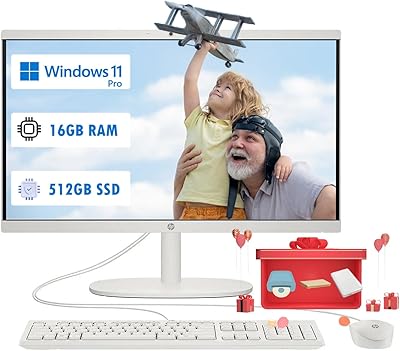
HP 22 All-in-One PC (21.5-inch, 16GB RAM, 512GB SSD)
82%
86%
Multitasking Efficiency
82%
Display Quality
91%
System Boot Speed
88%
Value for Money
54%
Raw Processing Power
More
HP 21.5″ All-in-One Desktop 16GB RAM 1TB SSD
85%
78%
Performance
85%
Display Quality
82%
Build & Design
88%
Connectivity Options
90%
Ease of Setup
More
HP 21.5″ All-in-One Desktop (64GB RAM, 2.5TB Storage)
87%
92%
Multitasking Efficiency
96%
Storage Capacity
94%
Software Value
89%
Space Efficiency
83%
Display Quality
More
HP 27-cr0060 27-Inch All-in-One Desktop
70%
78%
Everyday Performance
69%
Display Quality
83%
Build Quality & Design
81%
Video Conferencing
86%
Storage Speed
More
HP 22-df0224 All-in-One 21.5″
78%
88%
Value for Money
83%
Display Quality
94%
Setup Experience
47%
Processing Power
89%
Boot Speed
More
HP 27-inch All-in-One Desktop (Intel Ultra 7 155U, 64GB, 1TB)
86%
94%
Multitasking Performance
86%
Display Quality
89%
Video Conferencing
91%
Design & Space Efficiency
83%
Value for Money
More
HP 23.8″ All-in-One Desktop 24-cr0030
85%
94%
Setup Simplicity
91%
Aesthetic Design
86%
Display Quality
82%
System Responsiveness
93%
Privacy & Security
More
HP 22-DG0024 21.5-inch All-in-One Desktop
68%
62%
Everyday Performance
88%
RAM & Multitasking
84%
Storage Speed & Capacity
67%
Display Quality
71%
Value for Money
More
HP 24-dp1250 23.8-inch All-in-One Desktop
72%
83%
Everyday Performance
89%
Storage Speed
81%
Display Quality
76%
Value for Money
91%
Setup Experience
More
Core Innovations CC2400 24″ All-in-One Desktop
66%
76%
Value for Money
78%
Display Quality
51%
Processing Performance
43%
Storage Adequacy
87%
Ease of Setup
More

FAQ

Yes, the HP All-in-One 21 20.7″ Desktop PC typically ships with a wired USB keyboard and mouse included in the box, so you can get started without buying anything extra.

Out of the box, the machine ships in Windows S Mode, which only allows installs from the Microsoft Store — so Chrome, for example, won’t install by default. The good news is you can switch out of S Mode for free through Windows Settings, and once you do, you can install any standard Windows application. Just know that switch is permanent and cannot be reversed.

It depends on your habits. For basic tasks like browsing and email, it’s workable, but if you download software, store photos, or have a large music or video library, 128 GB fills up faster than you’d expect. Most users find it worthwhile to pair this desktop with an external hard drive or use cloud storage from the start.

Technically there is one memory slot, so you could swap in a higher-capacity stick, but all-in-one PCs are not designed with easy upgrades in mind. Accessing the internals typically requires disassembling the display housing, which risks damage if you’re not experienced. Most users are better off accepting the base configuration or seeking professional help if an upgrade is truly necessary.

Streaming works well. The Full HD display looks sharp for 1080p content, and the integrated graphics can handle high-definition video playback smoothly. You won’t have trouble with Netflix, YouTube, or video calls at standard quality.

It’s adequate for everyday video calls on Zoom or Microsoft Teams, though it is not a high-definition camera by modern standards. The physical privacy shutter is a nice touch — you can slide it closed when the camera is not in use without needing tape or a cover.

Not in any serious sense. The integrated Intel graphics can handle very light or older titles, but anything graphically demanding will either run poorly or not at all. This HP all-in-one is not positioned as a gaming machine, and buyers expecting to game on it will likely be disappointed.

The HP 21 AIO does not include a dedicated video output port like HDMI or DisplayPort on the standard model, so adding a second display is not straightforward. If dual-monitor support is important to your workflow, this is not the right machine for that.

Most users describe this desktop as very quiet under everyday workloads — browsing, streaming, and word processing rarely push the cooling system hard. You may hear the fan spin up briefly if the processor is working harder, but it generally settles back down quickly.

HP’s limited hardware warranty covers manufacturing defects and hardware failures under normal use for one year from purchase. It does not cover accidental damage, drops, spills, or software issues. For extended coverage, HP offers optional care plans through their website that you can add at the time of purchase.