ACOZYKITTEN KM468 Wireless Keyboard and Mouse Combo

Overview
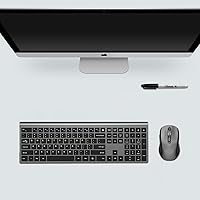
The ACOZYKITTEN KM468 Wireless Keyboard and Mouse Combo is a straightforward, no-frills wireless set from a newer brand that has quietly carved out space in the budget peripheral market. What stands out immediately is the full-size keyboard layout — numeric keypad included — which is genuinely rare at this price point where most competitors trim it down. Both devices share a single USB receiver, so you only sacrifice one port on your machine. The gray finish is understated enough to suit most desk setups without looking cheap. For everyday typing, browsing, or light spreadsheet work, this cordless desktop set covers the basics without asking much of your wallet.
Features & Benefits
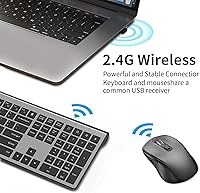
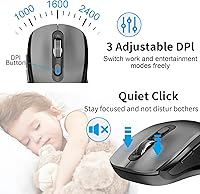
The 2.4GHz wireless connection holds up well within a normal room — no perceptible lag during typing or casual mouse movement. The mouse offers three DPI settings (1000, 1600, and 2400), where the lowest feels controlled for detail work and the highest suits quick desktop navigation. Silent mouse clicks are genuinely useful if you share a workspace or take calls with a microphone on. The keyboard packs 18 shortcut keys along with a dedicated calculator button and Fn Lock, which can speed up repetitive tasks nicely. One important heads-up: if your laptop only has USB-C ports, you will need a separate adapter since the wireless dongle is USB-A only. Batteries are not included, so have AAs ready before unboxing.
Best For
This wireless keyboard-mouse combo makes the most sense for remote workers, students, and home office users who want a tidy desk without a tangle of cables and without overpaying. The full numeric keypad is a real draw for anyone who crunches numbers regularly and finds compact keyboards frustrating. It also works well as a secondary setup or hooked up to a living-room PC where you control things from the couch. Chromebook and Windows users will get full functionality straight out of the box. Mac users can pair the hardware without problems, but should know upfront that the multimedia hotkeys are largely non-functional on macOS — a genuine limitation worth weighing before buying.
User Feedback
Buyers consistently mention how easy the KM468 set is to get running — plug in the dongle and you are typing within seconds. The mouse earns particular praise for its quiet click sound, especially from people working in open offices or on video calls. Key travel on the slim keyboard draws decent marks for a budget board, though some users note it feels lighter and less tactile than pricier alternatives. Wireless range rarely comes up as a complaint in typical room-sized setups. The most common frustrations are no included batteries — which catches many buyers off guard — and the absence of a USB-C dongle. Long-term reports are generally positive, though a few users mention key legends fading after heavy daily use.
Pros
- Full-size keyboard layout with numeric keypad is uncommon and genuinely useful at this price tier.
- Single USB dongle handles both devices, keeping your available ports free.
- Plug-and-play setup requires zero software — just insert the receiver and start working.
- Silent mouse clicks are noticeably quiet, making the KM468 set ideal for shared or open workspaces.
- Three adjustable DPI levels let you switch between comfortable browsing and slightly more precise cursor control.
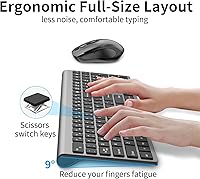
- Adjustable keyboard tilt angle helps reduce wrist strain during longer typing sessions.
- Auto-sleep mode and efficient power design mean batteries last for months of typical daily use.
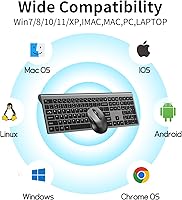
- Wide OS compatibility covers Windows, Linux, Chrome OS, and Android without any fuss.
- Understated gray design fits most desk aesthetics without looking out of place.
- 18-month warranty and 60-day money-back guarantee offer solid peace of mind for a budget purchase.
Cons
- No batteries included — you need three AA batteries ready before either device powers on.
- Mac multimedia hotkeys are largely non-functional, making it a poor fit for macOS power users.
- USB-A-only dongle means USB-C-exclusive laptop users must buy a separate adapter.
- Key legends on the keyboard may fade with heavy daily use over several months.
- Slim key travel feels light and shallow, which will disappoint anyone used to more tactile feedback.
- Mouse DPI tops out at 2400, which is insufficient for high-resolution displays or detailed creative work.
- No Bluetooth option means the wireless connection depends entirely on keeping track of the USB dongle.
- Build materials feel consistent with the price point — not fragile, but clearly not premium either.
- Mouse side buttons are mentioned in marketing but offer limited customization without dedicated software.
Ratings
The scores below reflect our AI-driven analysis of verified global buyer reviews for the ACOZYKITTEN KM468 Wireless Keyboard and Mouse Combo, with spam, bot-submitted, and incentivized feedback actively filtered out before any scoring was applied. Each category is rated on real-world performance patterns — not manufacturer claims — so both the genuine strengths and the recurring frustrations are represented honestly. Buyers from home office setups, student desks, and shared workspaces all contributed to this picture.
Ease of Setup
Value for Money
Mouse Click Noise
Keyboard Layout & Numpad
Wireless Reliability
Battery Life
Mouse DPI & Tracking
Build Quality & Materials
Key Feel & Typing Experience
macOS Compatibility
USB-C Compatibility
Shortcut Keys & Hotkeys
Ergonomics & Comfort
Warranty & After-Sales Support
Suitable for:
The ACOZYKITTEN KM468 Wireless Keyboard and Mouse Combo is a strong fit for everyday users who want a clutter-free desk without committing serious money to peripherals. Students setting up a dorm workstation, remote workers who need a reliable daily driver for typing and browsing, and home office users who share a space with others will all find genuine value here. The silent mouse clicks make it considerate for open-plan environments or video calls where background noise matters. Chromebook and Windows users get the fullest experience — every key and shortcut works as intended right out of the box. It also makes a practical choice as a secondary keyboard-mouse set for a living-room media PC or a spare workstation, where spending a lot on peripherals simply does not make sense.
Not suitable for:
Mac-centric users who rely heavily on multimedia shortcuts should think carefully before buying this cordless desktop set, as most of the hotkeys do not function correctly on macOS — it is a real day-to-day frustration, not a minor footnote. Anyone with a modern laptop that only has USB-C ports will need to source a USB-A to USB-C adapter separately before this set works at all, which adds inconvenience and cost. Power users, gamers, or anyone who needs precise, high-speed cursor control for creative or competitive tasks will find the 2400 DPI ceiling and basic optical sensor limiting. People who prefer a tactile, clicky typing feel will likely find the slim, soft-touch keys underwhelming compared to mechanical or higher-end membrane boards. Finally, buyers expecting a ready-to-go unboxing experience should know that no batteries are included — you will need three AA batteries on hand before anything powers on.
Specifications
- Wireless Technology: Both the keyboard and mouse connect via a single 2.4GHz USB-A dongle with a reliable range of up to 10 meters (33 feet).
- Keyboard Layout: Full-size layout with a numeric keypad, 18 dedicated shortcut keys, a calculator button, and Fn Lock functionality.
- Mouse DPI: The mouse offers three selectable DPI levels — 1000, 1600, and 2400 — switchable on the fly to suit different tasks.
- Click Noise: Mouse left and right click buttons use a low-noise silent mechanism designed to minimize audible click sounds in shared environments.
- Optical Sensor: The mouse uses an invisible-light optical sensor that emits no visible glow, avoiding eye discomfort and improving energy efficiency.
- Keyboard Power: The keyboard is powered by 2 x AA batteries (not included), which are installed in the underside battery compartment.
- Mouse Power: The mouse runs on a single AA battery (not included), housed in a compartment on the underside of the unit.
- Auto-Sleep: Both devices automatically enter a low-power sleep state after 10 minutes of inactivity and wake instantly with any keypress or mouse movement.
- Tilt Angle: The keyboard includes an adjustable tilt angle via fold-out feet to allow a more comfortable typing position.
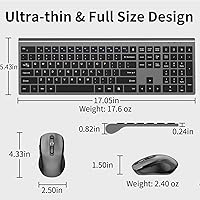
- Dimensions: The package measures 17.72 x 6.46 x 2.32 inches and the total combined weight of the set is 1.54 pounds.
- Color: Available in a neutral gray colorway, designated by the manufacturer as KM468-Grey.
- OS Compatibility: Compatible with Windows 7, 8, 10, 11, XP, and Vista, as well as Linux, Chrome OS, Android, and Mac OS, though multimedia hotkeys are not fully supported on macOS.
- Driver Requirement: No driver download or software installation is required; the set is plug-and-play upon inserting the USB receiver.
- USB Receiver: One shared USB-A nano-receiver handles both the keyboard and the mouse simultaneously, consuming only a single USB port.
- Connectivity Port: The USB dongle uses a standard USB-A connector; users with USB-C-only devices will require a separate USB-A to USB-C adapter.
- Warranty: The set is covered by an 18-month worry-free warranty and a 60-day money-back guarantee provided by ACOZYKITTEN.
- Package Contents: The box includes one wireless keyboard, one wireless mouse, one USB receiver, and one user manual; no batteries are included.
- Brand: Manufactured and sold by ACOZYKITTEN, with a product first listed in December 2024.
Related Reviews

Arteck HW192 Wireless Keyboard and Mouse Combo

SABLUTE Wireless Backlit Keyboard and Mouse Combo

TKVPJYYI Wireless Retro Typewriter Keyboard and Mouse Combo

UBOTIE Wireless Keyboard and Mouse Combo

CHESONA Multi-Device Wireless Keyboard and Mouse Combo

MPTOG S801AG Wireless Keyboard and Mouse Combo

QUASIO Wireless Keyboard and Mouse Combo

MOWUX Wireless Keyboard and Mouse Combo

Atelus Wireless Keyboard and Mouse Combo
