



Overview

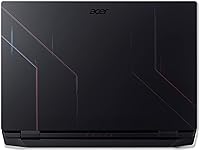
The Acer Nitro 5 AN515-58 Gaming Laptop arrived in 2022 as a straightforward answer to a common question: how much gaming can you actually get without spending a fortune? Pairing Intel's 12th Gen Core i5-12500H with an NVIDIA RTX 3060, this mid-range gaming laptop hits a sweet spot that genuinely works for everyday 1080p gaming. It's not trying to compete with thousand-dollar flagships, and it doesn't pretend to. The target audience is clear — college students, first-time buyers, and anyone stepping up from an older machine who wants real gaming performance without the sticker shock that comes with premium brands.

Features & Benefits

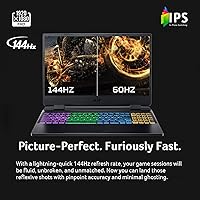
The RTX 3060 is the real headline here. With 6GB of dedicated GDDR6 VRAM and ray tracing support, it handles popular titles like Fortnite, Valorant, and even Cyberpunk 2077 at respectable frame rates on high settings. The 144Hz IPS display makes a noticeable difference in fast-paced multiplayer — motion looks crisp rather than smeared, which genuinely matters once you've played on a high-refresh screen. Sixteen gigabytes of RAM and a PCIe Gen 4 SSD keep things snappy, though the 512GB fills up faster than expected. One underrated feature is the MUX switch, which bypasses the integrated GPU and can meaningfully lift frame rates in demanding games without any hardware changes.

Best For

This Nitro 5 makes the most sense for students pulling double duty — gaming at night and running productivity apps or handling coursework during the day. Casual to mid-level gamers who stick mostly to 1080p titles will get solid value; those chasing ultra settings in the latest AAA releases may want to step up a tier. Upgradeability is a genuine strength: two RAM slots, two M.2 SSD slots, and a 2.5-inch drive bay let you expand the machine over time rather than replacing it outright. If you want thin and whisper-quiet, look elsewhere. But if you want a machine that covers both study and play without breaking the bank, Acer's budget gaming workhorse is hard to argue against.

User Feedback

Buyers consistently highlight value for money and display quality as the main positives — most agree the screen performs well above expectations at this price tier. The keyboard earns solid marks for its tactile feel, and the RGB lighting, while not flashy, adds enough personality to keep it interesting. On the downside, fan noise under load is the most common complaint; the fans get loud enough during gaming sessions to be distracting without headphones. Battery life lands around five hours in typical use, which works fine at a desk but falls short if you spend long stretches away from an outlet. Some owners also report minor flex near the keyboard area, though the overall build holds up well day-to-day.

Pros

  • The RTX 3060 handles most popular 1080p titles at high settings with comfortable, stable frame rates.
  • The 144Hz IPS display is a genuine highlight — smooth, color-accurate, and well above average for this price tier.
  • Sixteen gigabytes of RAM out of the box means you rarely feel the machine struggling during multitasking.
  • The MUX switch gives a meaningful, no-cost performance boost in games simply by disabling the integrated GPU.
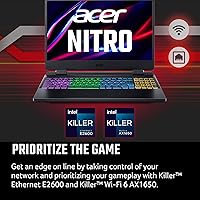
  • Killer Wi-Fi 6 with DoubleShot Pro lets you run Wi-Fi and Ethernet simultaneously for ultra-low-latency online play.
  • Upgradeability is exceptional — extra RAM slots, two M.2 bays, and a 2.5-inch drive bay keep future costs manageable.
  • The PCIe Gen 4 SSD delivers fast boot and load times that feel closer to premium laptops than budget ones.
  • The keyboard is comfortable for long gaming and typing sessions, with RGB lighting that adds personality without feeling cheap.

Cons

  • Fan noise under gaming load is genuinely loud — headphones are practically required for an enjoyable session.
  • Battery life averages around five hours, making it a poor choice for all-day untethered use.
  • The 512GB SSD fills up quickly once a few modern games are installed, requiring early storage expansion.
  • The chassis shows minor flex near the keyboard area, which can feel cheap during heavy travel or frequent handling.
  • Thermal management, while functional, can push surface temperatures to uncomfortable levels during extended gaming.
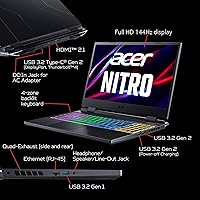
  • Port selection is adequate but dated — only USB 3.0 ports, with no USB-C Thunderbolt option for power users.
  • At 5.51 pounds, daily commuting with this budget gaming workhorse becomes tiring faster than lighter alternatives.
  • The i5-12500H, while capable, will bottleneck users who want to push into demanding simulation or video editing workloads.

Ratings

Our AI rating engine analyzed thousands of verified global purchases of the Acer Nitro 5 AN515-58 Gaming Laptop, actively filtering out incentivized, bot-generated, and duplicate reviews to surface what real buyers actually experienced. The scores below reflect an honest cross-section of user sentiment — covering everything from day-one impressions to long-term ownership realities. Both the genuine strengths and the recurring frustrations are represented without bias.

Gaming Performance
83%
For 1080p gaming, the RTX 3060 and i5-12500H pairing earns consistent praise from users who play titles like Valorant, Apex Legends, and even Elden Ring. Most report smooth, playable frame rates on high settings without needing to drop to medium, which feels like a genuine win at this price tier.
Users pushing into more demanding AAA titles at max settings, or anyone running heavily modded games, start to notice the CPU becoming a bottleneck. The performance gap versus RTX 3070 laptops becomes apparent quickly in CPU-bound scenarios.
Display Quality
81%
19%
The 144Hz IPS panel draws consistent compliments for its smoothness and color accuracy, especially from buyers upgrading from 60Hz screens. Fast-paced competitive games genuinely feel more responsive, and the anti-glare coating holds up reasonably well in well-lit dorm rooms and home offices.
Color coverage falls short of what creative users or content viewers ideally want — blacks are a touch washed out compared to OLED or higher-end IPS alternatives. Brightness also tops out at a level that can struggle in bright outdoor or sunlit environments.
Value for Money
86%
This is consistently the top reason buyers feel satisfied with their purchase. Getting an RTX 3060, 16GB RAM, a fast SSD, and a 144Hz display together in one machine at this price range is difficult to beat, and buyers repeatedly say it delivers more than they expected for the cost.
A handful of users feel the value equation weakens if you factor in the cost of accessories like a cooling pad, headphones to drown out fan noise, or extra storage — bringing the all-in cost closer to pricier competitors.
Thermal Management
61%
39%
During light to moderate tasks — browsing, streaming, document work — the dual-fan system stays quiet and temperatures remain comfortable. Users who keep their gaming sessions to under an hour generally report no significant heat-related discomfort.
Extended gaming sessions push surface temps noticeably high, particularly on the keyboard deck and the bottom panel near the vents. Users gaming on their laps consistently flag this as an issue, and some have noted thermal throttling during very long sessions in warm rooms.
Fan Noise
54%
46%
The fans stay mostly unobtrusive during non-gaming tasks, which is good news for students using this laptop in libraries or shared spaces during the day. Idle and light-load noise levels are genuinely acceptable.
Under gaming load, the fans become loud enough to compete with in-game audio without headphones — this is one of the most commonly raised complaints across buyer feedback. Users in quiet environments or shared rooms find it particularly disruptive during evening gaming sessions.
Battery Life
47%
53%
For strictly light tasks — note-taking, video streaming, or light browsing — some users manage to stretch the battery to around four to five hours, which is acceptable for short classroom sessions or coffee shop stints.
Battery life is the single most polarizing spec for buyers. Gaming drains the battery in under two hours reliably, and even productivity use rarely exceeds five hours. Users who commute heavily or attend back-to-back classes without outlets repeatedly describe it as a real-world limitation.
Build Quality
67%
33%
The overall chassis holds together well for daily desk use, and most buyers report no structural issues after months of ownership. The hinge feels sturdy, and the screen lid doesn't wobble excessively during typing.
Flex in the keyboard area is a common observation, and the all-plastic construction gives the laptop a feel that doesn't match its performance credentials. A few users have flagged minor creaking sounds after extended use, which can undermine confidence in long-term durability.
Keyboard & Typing Feel
77%
23%
Buyers who type heavily — students writing essays or developers coding between gaming sessions — generally find the keyboard comfortable enough for long stretches. Key travel feels satisfying, and the layout avoids the cramped feel common on smaller budget laptops.
The keyboard deck's flex slightly undermines the typing experience during hard presses, and some users wish the RGB customization software were more intuitive. A few buyers from regions with non-US layouts also report minor frustration with key placement.
Connectivity & Networking
79%
21%
The Killer Wi-Fi 6 setup draws praise from online gamers who notice a real reduction in latency spikes compared to their older machines. The ability to run Wi-Fi and Ethernet simultaneously via DoubleShot Pro is a practical feature that competitive players and streamers genuinely appreciate.
The USB port count feels just adequate — three USB-A 3.0 ports work fine for most, but the lack of a Thunderbolt or USB-C power delivery option is a notable omission that some buyers discover only after purchase.
Upgradeability
88%
Buyers who think long-term consistently highlight this as a standout feature. Two RAM slots, two M.2 bays, and a 2.5-inch drive bay give this mid-range gaming laptop a level of future-proofing that most similarly priced competitors simply don't offer.
The upgrade potential is strong on paper, but the internal layout requires a full bottom panel removal that intimidates less technical users. Acer's warranty terms around self-upgrades also cause some hesitation among first-time buyers unfamiliar with DIY hardware work.
Storage Speed & Capacity
74%
26%
The PCIe Gen 4 SSD delivers noticeably fast boot times and quick game load screens, which buyers coming from HDD-based laptops find immediately striking. Windows and common apps feel genuinely snappy day-to-day.
Five hundred twelve gigabytes disappears fast once modern games start piling up — a few titles alone can consume half the drive. Buyers who don't plan to add a second drive early often report running into storage pressure within the first few months.
Portability
58%
42%
At 15.6 inches, this laptop fits comfortably into most standard backpacks designed for that screen size, and buyers who primarily carry it between home and a desk-based classroom setting report no major complaints.
At 5.51 pounds plus a fairly bulky power adapter, carrying Acer's budget gaming workhorse across a large campus or during long travel days wears on users quickly. It is firmly a desk-first machine, and buyers expecting ultrabook-level portability are frequently disappointed.
Software & Bloatware
63%
37%
Windows 11 Home runs cleanly once initial setup is complete, and the Killer networking software provides a genuinely useful traffic prioritization dashboard for gamers who want fine-grained control over bandwidth allocation.
Out of the box, the laptop ships with a noticeable amount of pre-installed software that bogs down the first-run experience. Several buyers mention spending time in the first few hours uninstalling unwanted applications before the system feels clean and responsive.
Audio Quality
55%
45%
For casual video calls, YouTube, or background music during light work sessions, the built-in stereo speakers deliver adequate volume without obvious distortion at moderate levels.
Buyers who try to use the speakers for serious gaming or media consumption quickly find them thin and bass-light. The consensus is clear — headphones are essentially mandatory for any immersive gaming experience, which feels like a missed opportunity at this price point.

Suitable for:

The Acer Nitro 5 AN515-58 Gaming Laptop is built for buyers who want genuine gaming capability without the financial pain of a premium machine. College students are probably the ideal fit — this is a laptop you can write a paper on in the morning, play a few ranked matches in the evening, and not feel like you've compromised badly on either front. Casual and mid-level gamers who mainly play popular titles at 1080p will find the RTX 3060 and 144Hz display combo surprisingly capable for the money. It's also a strong choice for first-time gaming laptop buyers who are stepping up from an older or underpowered system and want an immediate, noticeable improvement. The generous expansion options — two RAM slots, two M.2 slots, and a 2.5-inch drive bay — mean budget-minded buyers can grow the machine incrementally rather than replacing it outright.

Not suitable for:

The Acer Nitro 5 AN515-58 Gaming Laptop has real limitations that certain buyers should weigh carefully before committing. If you regularly game away from a power outlet, the roughly five-hour battery life will become a daily frustration fast. Competitive or enthusiast-level gamers chasing ultra settings in demanding AAA titles like Cyberpunk 2077 or Alan Wake 2 will likely find the i5-12500H and RTX 3060 pairing falls short of their expectations at higher settings. Professionals or creative users who need a quiet machine for video calls, music production, or library work will be put off by how loud the fans get during any sustained workload. Anyone who values portability above all else should also look elsewhere — at 5.51 pounds and over an inch thick, this mid-range gaming laptop is a desk machine at heart, not a bag-friendly daily carry.

Specifications

  • Processor: Powered by the Intel Core i5-12500H (12th Gen), a 12-core chip with a boost clock up to 4.5GHz, suited for gaming and everyday multitasking.
  • Graphics: Features the NVIDIA GeForce RTX 3060 Laptop GPU with 6GB of dedicated GDDR6 VRAM, supporting ray tracing and DirectX 12 Ultimate.
  • Display: A 15.6″ Full HD IPS panel running at 1920x1080 resolution with a 144Hz refresh rate and anti-glare coating for reduced reflections.
  • Memory: Comes with 16GB of DDR4 RAM running at 3200MHz across two slots, with a maximum supported capacity of 32GB.
  • Storage: Includes a 512GB PCIe Gen 4 M.2 SSD as the primary drive, with one additional M.2 slot and one 2.5-inch drive bay available for expansion.
  • Operating System: Ships with Windows 11 Home pre-installed.
  • Wireless: Equipped with Killer Wi-Fi 6 (802.11ax) and Bluetooth for wireless connectivity, supporting speeds and latency improvements over previous Wi-Fi generations.
  • Networking: Includes a Killer Ethernet E2600 port with DoubleShot Pro technology, enabling simultaneous wired and wireless connections with traffic prioritization.
  • Cooling System: Uses a dual-fan setup with dual intake vents (top and bottom) and four exhaust ports to manage heat during sustained gaming sessions.
  • MUX Switch: Includes a hardware MUX switch that disables the integrated Intel GPU, routing frames directly through the RTX 3060 for improved gaming performance.
  • Battery Life: Rated at approximately 5 hours of average use, making it best suited for desk-based use near a power source rather than all-day mobile work.
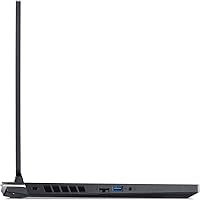
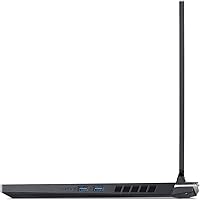
  • USB Ports: Provides three USB 3.0 Type-A ports for connecting peripherals, storage devices, and accessories.
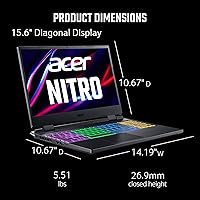
  • Weight: Weighs 5.51 pounds, which is typical for a 15.6″ gaming laptop but heavier than ultrabook alternatives.
  • Dimensions: Measures 14.19 x 10.67 x 1.06 inches, giving it a standard gaming laptop footprint that fits most backpacks designed for 15-inch machines.
  • RGB Keyboard: Features a backlit RGB keyboard, providing customizable lighting across key zones for personalization during gaming sessions.
  • Expansion Slots: Offers two DDR4 RAM slots, two PCIe M.2 SSD slots, and one 2.5-inch SATA drive bay for future hardware upgrades.
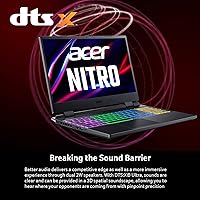
  • Audio: Includes integrated stereo speakers with DTS Audio processing, adequate for casual use but best paired with headphones for gaming.
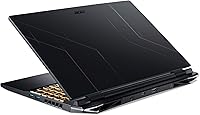
  • Color & Build: Available in black with a plastic chassis construction designed for durability at a budget-friendly price point rather than premium materials.

Related Reviews
Acer Nitro 5 AN515-58-525P Gaming Laptop
72%
78%
Gaming Performance
82%
Display Quality
84%
Processing Speed
71%
RAM & Upgradability
88%
Storage Performance
More
Acer Nitro 5 AN515-46-R0EQ Gaming Laptop
83%
91%
Performance
88%
Display Quality
85%
Cooling System
60%
Battery Life
89%
Value for Money
More
Acer Nitro 5 15.6-inch Gaming Laptop
70%
88%
Display Quality
74%
Gaming Performance
61%
Thermal Management
48%
Battery Life
63%
Build Quality
More
Acer Nitro KG251Q 24.5-inch Gaming Monitor
77%
93%
Refresh Rate Performance
91%
Value for Money
86%
Motion Clarity
82%
Image Contrast & Blacks
61%
Color Accuracy
More
Acer Nitro 16 RTX 4050 Gaming Laptop
71%
83%
Gaming Performance
86%
Display Quality
88%
Value for Money
54%
RAM & Memory
41%
Battery Life
More
Acer Nitro V RTX 4060 Gaming Laptop

75%
88%
Gaming Performance
84%
Display Quality
91%
MUX Switch Value
74%
Thermal Management
61%
Build Quality
More
Acer Nitro EDA320Q 31.5″ Curved Gaming Monitor
71%
91%
Value for Money
74%
Image Quality
78%
Gaming Performance
84%
Curvature & Immersion
43%
Ergonomics & Adjustability
More
Acer Nitro EDA323QU 31.5-inch Curved Gaming Monitor
74%
89%
Value for Money
87%
Image Sharpness
84%
Refresh Rate Performance
82%
AMD FreeSync
41%
Stand Ergonomics
More
Acer Nitro 16 RTX 4060 Gaming Laptop
70%
91%
Gaming Performance
86%
Value for Money
61%
Thermal Management
78%
Display Quality
63%
Build Quality
More
Acer Nitro V 15.6″ Gaming Laptop
74%
88%
Gaming Performance
91%
Processing Power
86%
RAM & Multitasking
89%
Storage
57%
Thermal Management
More

FAQ

You can absolutely upgrade it. This Nitro 5 has two DDR4 RAM slots, and the machine supports up to 32GB total. If you find 16GB limiting down the road — especially for heavier multitasking or future games — swapping in another 16GB stick is straightforward and relatively inexpensive.

Very well, honestly. The RTX 3060 is well-matched to the 144Hz display for these kinds of competitive titles. You can expect frame rates well above 100fps in most popular multiplayer games on high settings, which means you'll actually be using that high-refresh display to its potential.

By default, the laptop routes GPU output through the integrated Intel graphics, which adds a small but measurable delay in the rendering pipeline. Flipping the MUX switch disables the iGPU entirely and lets the RTX 3060 talk to the display directly. In practice, this can boost frame rates by 10 to 15 percent in demanding games, so yes — if you're gaming, it's worth enabling.

It's real. Under a gaming load, the fans spin up noticeably and stay loud. It's not unbearable, but it's the kind of noise that competes with in-game audio if you're not wearing headphones. For light tasks like browsing or document work, the fans stay quiet enough that you won't notice them.

Probably not a full day on a single charge. You can expect around four to five hours doing typical productivity tasks — note-taking, browsing, light coding. If your day runs longer than that away from an outlet, it's worth bringing the charger along. Gaming will drain the battery significantly faster, often in under two hours.

It handles light to moderate video editing reasonably well — basic cuts and exports in software like DaVinci Resolve or Premiere won't feel painfully slow. The RTX 3060 helps accelerate rendering via CUDA. That said, heavy 4K editing or complex effects work will push the i5-12500H harder than it was really designed for, so manage your expectations accordingly.

Yes. There is one additional M.2 slot available beyond the populated one, plus a 2.5-inch drive bay for a traditional SATA SSD or hard drive. This makes it easy to expand storage once your game library outgrows the stock 512GB drive, which for most people happens sooner than expected.

The 144Hz IPS panel is genuinely one of the stronger points of this mid-range gaming laptop. Colors are accurate enough for everyday use and casual media, and the anti-glare coating keeps reflections manageable in brighter rooms. It's not a color-critical display for professional photo editing, but for gaming and general use, it looks great.

It's decent for a budget gaming machine, but it does have some plastic flex in the chassis — particularly near the keyboard deck. It holds up fine in a padded laptop bag for regular commuting, but it's not the kind of rugged build you'd trust without a case. A sleeve or bag with padding is a good idea.

During heavy gaming, the bottom of the chassis and the area above the keyboard can get noticeably warm. Using it on a hard, flat surface is fine since the dual bottom intake stays clear. Using it on a bed or couch where the vents get blocked will cause temperatures to climb faster and throttle performance. A laptop cooling pad helps if you tend to game in those situations.