Overview

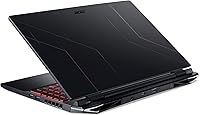
The Acer Nitro 5 AN515-58-525P Gaming Laptop has held a steady spot in the budget gaming market since its early 2023 launch, and it's not hard to see why it keeps selling. Built around Intel's 12th Gen Core i5-12500H, it represents a genuine generational step up from older Nitro models — not just a spec bump. The chassis is familiar: mostly plastic, unmistakably Nitro, functional rather than flashy. That's fine. This mid-range gaming machine isn't competing with premium builds; it's aimed squarely at students and casual gamers who want capable 1080p gaming without overspending. Set your expectations accordingly — capable, not unstoppable.
Features & Benefits

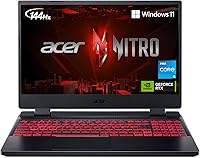
The RTX 3050 with 4GB GDDR6 handles most 1080p titles at medium-to-high settings with respectable frame rates — just don't expect ray tracing to run cleanly without noticeable trade-offs in performance. The 15.6-inch FHD IPS panel running at 144Hz is genuinely one of the stronger selling points; fast-paced games feel meaningfully smoother compared to 60Hz budget alternatives. Storage is a real highlight — the PCIe Gen 4 SSD loads games and apps faster than older Gen 3 drives common at this price. The dual-fan cooling manages sustained loads reasonably well, though fan noise becomes audible during longer sessions. Killer Wi-Fi 6 and onboard Ethernet add solid practical value for competitive online play.

Best For

Acer's budget gaming laptop makes the most sense for college students and casual gamers who need a machine that pulls double duty — capable enough for gaming after hours, reliable for coursework during the day. If you're making your first jump from console to PC, this mid-range gaming machine offers an accessible entry point without overwhelming cost or complexity. Esports players will particularly appreciate the 144Hz panel for titles like Valorant or CS2, where refresh rate directly impacts gameplay. That said, if you need a slim, travel-friendly build or a color-accurate display for creative work, look elsewhere. Also plan to upgrade the RAM early — 8GB feels constrained by today's standards.

User Feedback

Buyers consistently call out the fast SSD performance and the smooth 144Hz display as standout positives — areas where this Nitro 5 clearly punches above its price class. The RTX 3050 earns steady praise for handling popular online titles without fuss. On the downside, the stock 8GB RAM draws frequent complaints, with many owners flagging it as their first post-purchase upgrade. Battery life is another recurring concern — expect roughly three to four hours of light use, considerably less under gaming load. Fan noise under sustained stress divides users; some tolerate it, others find it disruptive. Build quality gets mixed reactions overall, with most agreeing it feels functional but unmistakably budget in hand.

Pros

  • The 144Hz IPS display makes fast-paced competitive games noticeably smoother compared to standard 60Hz budget laptops.
  • Intel's 12th Gen Core i5-12500H is a meaningful CPU upgrade that holds up well across both gaming and productivity tasks.
  • PCIe Gen 4 SSD loads games and applications considerably faster than the Gen 3 drives common on competing budget machines.
  • Killer Wi-Fi 6 combined with onboard Ethernet gives online multiplayer players a tangible connectivity edge.
  • Dual RAM slots and multiple storage expansion bays make this Nitro 5 easy to upgrade over time without replacing the whole machine.
  • The RTX 3050 handles popular esports and mid-tier titles at 1080p with solid, playable frame rates.
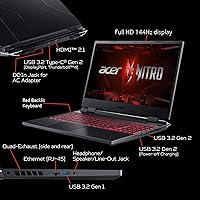
  • Port selection is genuinely generous — Thunderbolt 4, HDMI 2.1, and multiple USB-A ports cover most accessory setups.
  • Dual-fan quad-exhaust cooling keeps temperatures manageable during moderate gaming sessions.

Cons

  • Stock 8GB of RAM feels tight in 2024 — many users report needing to upgrade within months of purchase.
  • Fan noise under sustained gaming load is clearly audible and can be distracting in quiet environments.
  • Battery life is mediocre at best, rarely lasting more than three to four hours away from the charger.
  • The plastic-heavy chassis feels functional but noticeably budget when handled next to similarly priced metal-bodied competitors.
  • The RTX 3050 struggles with ray tracing enabled — turning it on typically demands significant visual quality compromises.
  • Thermal throttling can occur during very long, intensive gaming sessions, gradually reducing performance over time.
  • Display color accuracy is average; it is adequate for gaming but unsuitable for any color-sensitive creative work.
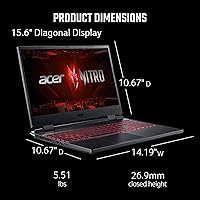
  • At 5.51 lbs, daily portability is a genuine inconvenience for students moving between classes or locations frequently.

Ratings

The scores below for the Acer Nitro 5 AN515-58-525P Gaming Laptop were generated by our AI engine after analyzing thousands of verified global user reviews, with spam, bot activity, and incentivized feedback actively filtered out. Every category reflects the honest distribution of real buyer experiences — the genuine strengths and the recurring frustrations alike — so you can make a well-informed decision without sifting through noise.

Gaming Performance
78%
22%
For esports-focused titles and mid-tier games at 1080p, this Nitro 5 consistently delivers smooth, playable frame rates that satisfy the majority of its target audience. Users running Valorant, CS2, and similar competitive games regularly report hitting well above 100fps on high settings, which pairs perfectly with the 144Hz panel.
Push into more demanding modern titles at higher settings and the RTX 3050 starts to show its ceiling — particularly with only 4GB of VRAM, which becomes a bottleneck in texture-heavy open-world games. Users expecting ultra-settings performance in games like Cyberpunk 2077 or Alan Wake 2 are regularly disappointed.
Display Quality
82%
18%
The 144Hz IPS panel is consistently highlighted as one of the standout features at this price tier — gameplay in fast-paced shooters feels noticeably more fluid compared to the 60Hz screens common on competing budget machines. Viewing angles are solid for a budget IPS, and colors look acceptable for casual media consumption and gaming alike.
Color accuracy falls short of anything a content creator or photo editor would tolerate, and peak brightness is average at best, making outdoor or bright-room use less comfortable. A few users also note that the display lacks full sRGB coverage, which limits its versatility beyond gaming.
Processing Speed
84%
The 12th Gen Core i5-12500H handles multitasking, game loading, and productivity workloads with genuine confidence — users switching between Discord, a browser with multiple tabs, and a running game rarely report sluggishness from the CPU itself. It is a clear and meaningful upgrade over the 11th Gen chips found in older Nitro models.
Under extended, sustained all-core loads — such as video encoding or prolonged AAA gaming sessions — thermal throttling can trim peak performance, particularly in a warm room without additional airflow. The CPU is not the bottleneck in most gaming scenarios, but thermal headroom is tighter than enthusiasts would prefer.
RAM & Upgradability
71%
29%
The upgrade potential here is genuinely one of the better value propositions in this price bracket — two accessible SO-DIMM slots, dual M.2 bays, and a 2.5″ HDD bay give buyers real flexibility to grow the machine over time. Users who upgraded to 16GB or added a second SSD consistently report a meaningful improvement in satisfaction.
Shipping with a single 8GB stick in 2024 is a genuine frustration for many buyers, and it shows up repeatedly in reviews as the very first complaint. Running in single-channel mode limits memory bandwidth, which subtly but measurably hurts gaming performance until the user invests in an upgrade.
Storage Performance
88%
The PCIe Gen 4 NVMe SSD delivers boot times and game load speeds that routinely impress users, especially those upgrading from HDD-based laptops or older Gen 3 systems. Several reviewers specifically called out how quickly open-world games with large asset loads — like Elden Ring — moved through loading screens.
512GB fills up faster than most gamers expect once a handful of modern titles are installed, and the base configuration offers no additional storage out of the box. The Gen 4 speed advantage is also partially gated by how well the rest of the system sustains performance under thermal load.
Thermal Management
67%
33%
Under moderate gaming conditions, the dual-fan quad-exhaust cooling system does a reasonable job of keeping temperatures in check — casual gaming sessions typically stay within acceptable thermal limits without aggressive throttling. The intake design on both the top and bottom of the chassis helps pull in cool air more effectively than single-intake competitors.
Long, intensive gaming sessions — particularly in warm environments or on soft surfaces that block the bottom intake — can lead to noticeable thermal throttling that gradually reduces frame rates. Fan noise escalates significantly under full load, which is the cooling system's most common complaint across user reviews.
Battery Life
44%
56%
For very light tasks like note-taking in class or reading documents, the battery can stretch to a reasonable session length before needing a top-up. Users who primarily use this mid-range gaming machine at a desk with the charger plugged in report no practical issue with the battery situation.
Real-world battery endurance is a consistent pain point — three to four hours under light use is the realistic ceiling, and gaming sessions cut that down considerably further. Students who forget their charger or commute long distances regularly flag this as one of the most frustrating aspects of daily ownership.
Build Quality
63%
37%
The chassis holds together reliably in everyday use, and the general structural integrity is sufficient for a student or casual gamer who treats their equipment reasonably well. Most long-term owners report no major physical failures or build-related issues over the course of standard ownership.
The plastic-heavy construction divides buyer opinion more than almost any other aspect — users coming from premium laptops or metal-bodied competitors consistently notice the cheaper feel, and lid flex is a frequently mentioned specific complaint. It is functional, but it does not inspire confidence when handled.
Connectivity & Ports
89%
Port selection on this Nitro 5 is genuinely impressive for a budget gaming laptop — Thunderbolt 4 via USB-C, HDMI 2.1, and multiple USB-A ports mean most users can connect monitors, peripherals, and storage without needing a hub. The Killer Wi-Fi 6 and dedicated Ethernet port are particularly valued by competitive online gamers who need reliable, low-latency connections.
There is no SD card reader, which some users — particularly those who also use the machine for light creative work — find inconvenient. The USB-C port does not support charging, so users cannot leave the bulkier AC adapter at home and rely on a compact USB-C charger.
Keyboard & Typing Experience
74%
26%
The backlit keyboard is comfortable enough for both extended typing sessions and gaming use, with key travel and spacing that most users find acceptable for a laptop in this price range. The backlighting is practical in dim environments, and the inclusion of a numpad is appreciated by users who also need it for spreadsheet or data entry work.
Key feedback is on the softer side, and users accustomed to mechanical keyboards or higher-end laptop keyboards notice the lack of tactile crispness. Backlighting uniformity is not perfect, with some users reporting slightly uneven illumination across the key zones.
Audio Quality
58%
42%
The built-in speakers are adequate for casual use — background music, YouTube videos, and game audio at low volumes are passable in a pinch. Users who plug in headphones or connect external speakers via the 3.5mm jack consistently report a much more satisfying audio experience.
At higher volumes, the speakers sound noticeably thin and lack bass, which undermines immersive gaming or movie-watching without headphones. Compared to competing laptops with better speaker placement or dedicated subwoofers, this Nitro 5 falls clearly short on built-in audio.
Portability
53%
47%
The footprint is manageable enough to fit in most standard 15-inch laptop backpacks, and the machine does not feel excessively large sitting on a desk or a lap. Students who drive to class or have short commutes on foot generally report being able to transport it without much complaint.
At 5.51 lbs, it is on the heavier end for daily carry — users who walk long distances between classes or travel frequently via public transit consistently flag the weight as a real nuisance over time. The thick profile also means it does not slide neatly into slim bags or sleeves designed for ultrabooks.
Value for Money
81%
19%
Within its target market, Acer's budget gaming laptop offers a competitive mix of a fast Gen 4 SSD, a 144Hz display, a current-gen GPU, and strong upgrade flexibility that is genuinely difficult to match at the same price point. Buyers who research the market and understand what they are getting tend to rate the value proposition highly.
The value calculation shifts if you factor in the near-mandatory RAM upgrade cost to reach a comfortable 16GB — what looks like a strong deal on paper becomes slightly less compelling once that additional spend is accounted for. Users who expected a premium all-round experience without any post-purchase investment are more likely to feel the price-to-quality gap.
Software & Out-of-Box Experience
69%
31%
Windows 11 Home comes pre-installed and activated, so the machine is genuinely ready to use out of the box without extra software purchases. The Nitro Sense utility for monitoring and adjusting fan profiles is a practical inclusion that more technically inclined users find genuinely useful.
Pre-installed bloatware adds clutter that most users end up removing within the first week, which is a minor but recurring annoyance in reviews. Some users also report that initial Windows setup and driver updates take longer than expected before the machine is fully optimized and game-ready.

Suitable for:

The Acer Nitro 5 AN515-58-525P Gaming Laptop is a strong pick for college students who want one machine that handles both coursework and evening gaming sessions without breaking the bank. If your gaming diet leans toward esports titles — think Valorant, CS2, or Fortnite — the 144Hz IPS display will feel like a genuine upgrade over anything running at 60Hz. First-time PC gamers making the jump from console will find this Nitro 5 approachable in both price and performance, offering a real taste of PC gaming without the intimidating cost of higher-end rigs. Budget-conscious buyers who enjoy tinkering will also appreciate the upgrade headroom — dual RAM slots, two M.2 bays, and an additional 2.5-inch drive bay mean you can expand storage or bump up memory over time as your needs grow. If you primarily play at a desk and keep the charger plugged in, the battery limitations become largely irrelevant.

Not suitable for:

Buyers expecting a premium or portable experience should look elsewhere before committing to Acer's budget gaming laptop. At 5.51 lbs with a thick profile, this mid-range gaming machine is not something most people want to carry across campus daily without a dedicated bag. Content creators — video editors, photographers, or digital artists — will find the display's color accuracy insufficient for serious color-critical work. Anyone hoping to push graphically demanding AAA titles at ultra settings will hit a ceiling quickly; the RTX 3050 with 4GB of VRAM is capable, but it is not a GPU for chasing maximum settings in modern open-world games. Heavy travelers or users who need all-day battery life away from an outlet will also find this machine frustrating, as real-world battery endurance under any meaningful workload is firmly below average for the category.

Specifications

  • Processor: Intel Core i5-12500H (12th Gen) with 12 cores and a boost clock up to 4.5GHz, providing strong multi-threaded performance for both gaming and productivity.
  • Graphics: NVIDIA GeForce RTX 3050 dedicated GPU with 4GB GDDR6 VRAM, capable of running most 1080p titles at medium-to-high settings.
  • Display: 15.6″ Full HD IPS panel at 1920x1080 resolution with a 144Hz refresh rate for smooth, fluid gameplay.
  • RAM: 8GB DDR4 RAM running at 3200MHz across two slots, with a maximum supported capacity of 32GB.
  • Primary Storage: 512GB PCIe Gen 4 NVMe SSD offering fast read and write speeds noticeably quicker than older Gen 3 drives.
  • Storage Expansion: One additional PCIe M.2 slot and one 2.5″ HDD bay are available for storage upgrades post-purchase.
  • Wireless: Killer Wi-Fi 6 AX1650 (802.11ax) with network prioritization support for low-latency online gaming.
  • Wired Network: Killer Ethernet E2600 port (RJ-45) provides a stable wired connection with intelligent traffic management for gaming.
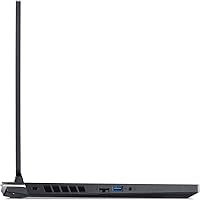
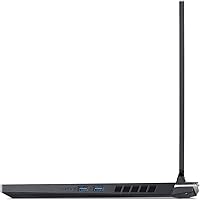
  • Ports: Includes one USB-C Gen 2 with Thunderbolt 4, three USB-A ports (mix of Gen 1 and Gen 2), one HDMI 2.1 output, and a headphone jack.
  • Cooling System: Dual-fan design with dual air intakes and a quad-exhaust port layout to manage heat during sustained gaming loads.
  • Operating System: Ships with Windows 11 Home pre-installed and activated.
  • Keyboard: Full-size backlit keyboard with dedicated numpad, designed for gaming and general typing use in low-light conditions.
  • Dimensions: Measures 14.19″ wide, 10.67″ deep, and 1.06″ thick, fitting a standard large laptop bag or backpack sleeve.
  • Weight: Weighs 5.51 lbs, which is typical for a 15.6″ gaming laptop but on the heavier side for daily commuting.
  • Build Material: Chassis is primarily plastic construction in matte black, prioritizing function and cost efficiency over premium aesthetics.
  • Warranty: Covered by Acer's One-Year International Travelers Limited Warranty (ITW) for hardware defects.
  • Power Input: Powered via a dedicated DC-in AC adapter jack running at 110 volts.
  • Battery: Includes one built-in Lithium-Ion battery; real-world runtime is typically three to four hours under light use and less under gaming load.

Related Reviews
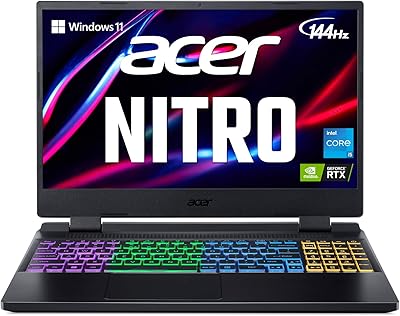
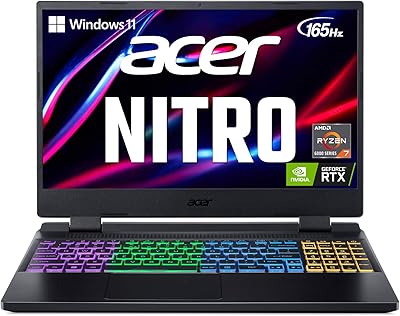
Acer Nitro 5 AN515-58 Gaming Laptop
70%
83%
Gaming Performance
81%
Display Quality
86%
Value for Money
61%
Thermal Management
54%
Fan Noise
More
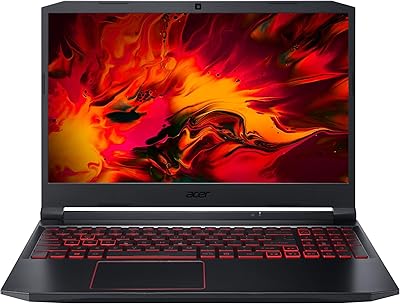
Acer Nitro 5 AN515-46-R0EQ Gaming Laptop
83%
91%
Performance
88%
Display Quality
85%
Cooling System
60%
Battery Life
89%
Value for Money
More
Acer Nitro 5 15.6-inch Gaming Laptop
70%
88%
Display Quality
74%
Gaming Performance
61%
Thermal Management
48%
Battery Life
63%
Build Quality
More
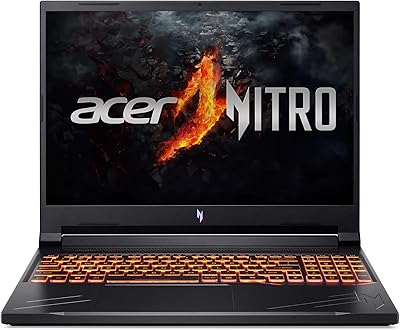
Acer Nitro 16 RTX 4050 Gaming Laptop
71%
83%
Gaming Performance
86%
Display Quality
88%
Value for Money
54%
RAM & Memory
41%
Battery Life
More
Acer Nitro V RTX 4060 Gaming Laptop

75%
88%
Gaming Performance
84%
Display Quality
91%
MUX Switch Value
74%
Thermal Management
61%
Build Quality
More
Acer Nitro KG251Q 24.5-inch Gaming Monitor
77%
93%
Refresh Rate Performance
91%
Value for Money
86%
Motion Clarity
82%
Image Contrast & Blacks
61%
Color Accuracy
More
Acer Nitro EDA323QU 31.5-inch Curved Gaming Monitor
74%
89%
Value for Money
87%
Image Sharpness
84%
Refresh Rate Performance
82%
AMD FreeSync
41%
Stand Ergonomics
More
Acer Nitro EDA320Q 31.5″ Curved Gaming Monitor
71%
91%
Value for Money
74%
Image Quality
78%
Gaming Performance
84%
Curvature & Immersion
43%
Ergonomics & Adjustability
More
Acer Nitro V 15.6″ Gaming Laptop
74%
88%
Gaming Performance
91%
Processing Power
86%
RAM & Multitasking
89%
Storage
57%
Thermal Management
More
Acer Nitro 16 RTX 4060 Gaming Laptop
70%
91%
Gaming Performance
86%
Value for Money
61%
Thermal Management
78%
Display Quality
63%
Build Quality
More

FAQ

Good news — the RAM is not soldered. This Nitro 5 has two DDR4 SO-DIMM slots and ships with a single 8GB stick, which means you have one slot free. You can add a second stick immediately or swap both out, up to a maximum of 32GB. Most users find that bumping to 16GB makes a noticeable difference in day-to-day multitasking and gaming stability.

Under moderate load — browsing, light gaming, or streaming — the fans are fairly quiet. Push the GPU hard in a demanding title and the fans do ramp up to an audible level, which some users find distracting. It is not unusually loud for this class of laptop, but if you are sensitive to fan noise, a headset is a practical solution during long sessions.

Yes, it handles the dual-purpose role well. The 12th Gen Core i5 manages web browsing, office applications, video calls, and light creative work without breaking a sweat. Just keep in mind the battery life is not great, so bringing the charger to class is a realistic necessity rather than an option.

Esports titles like Valorant, CS2, Rocket League, and Fortnite run extremely well — you will easily push high frame rates that take full advantage of the 144Hz display. Mid-tier games like Elden Ring or Cyberpunk 2077 run playably at medium settings. Very demanding modern AAA titles at high or ultra settings are where this machine starts to show its limits, so managing your settings expectations is key.

Yes, and this is one of the better features at this price point. There is an unused M.2 PCIe slot for a second SSD, plus a 2.5″ SATA bay for a traditional hard drive. If you have a growing game library, adding a second drive is a cost-effective way to expand without buying a new machine.

The RTX 3050 technically supports ray tracing, but the honest answer is that enabling it comes at a real cost to frame rates given the 4GB VRAM limit. For most games, turning ray tracing on will push you down to medium settings to maintain playable performance. In competitive or fast-paced titles, most users wisely leave ray tracing off entirely and prioritize frame rate instead.

Expect roughly three to four hours doing light work like browsing or note-taking, and considerably less if you are gaming. This is a known limitation of virtually all gaming laptops in this category — the hardware draws too much power for long unplugged sessions. Treat this Nitro 5 as a plugged-in machine with portable flexibility, rather than a true all-day laptop.

Yes, the USB-C port supports Thunderbolt 4, which means you can connect high-speed external drives, docks, or external displays through a single cable. That is a genuinely useful feature at this price tier and adds real flexibility for users who want to connect this mid-range gaming machine to a larger monitor or external peripheral setup.

The 15.6″ IPS panel looks decent for media consumption — colors are reasonably accurate and the viewing angles are solid for a budget screen. It is not a display you would buy for professional photo editing, but for Netflix, YouTube, or casual streaming, it looks perfectly fine. The 144Hz refresh rate is just a bonus on top.

It is plastic, and it does feel like a budget laptop when you pick it up. The lid has some flex, and the chassis is not going to impress anyone coming from a metal-bodied machine. That said, it feels sturdy enough for daily use and has not shown widespread durability issues in real-world ownership. If you treat it reasonably well, it holds up fine — just go in with calibrated expectations about premium feel.

Where to Buy