Overview

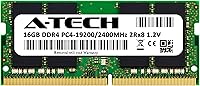
The A-Tech 16GB DDR4 2400MHz SODIMM Laptop RAM is exactly what it sounds like: a no-frills memory upgrade from a third-party brand that has earned a solid reputation in the aftermarket RAM space. Worth clarifying upfront — you're getting a single 16GB module, not a two-stick kit, so factor that into your slot planning before ordering. Specs-wise, it sits comfortably in the mid-range: nothing exotic, nothing cutting-edge, but perfectly capable for the vast majority of everyday laptop users. What separates it from the flood of anonymous sticks on Amazon is the lifetime warranty backing every purchase. If you need more headroom without overspending, this RAM upgrade delivers that reliably.
Features & Benefits

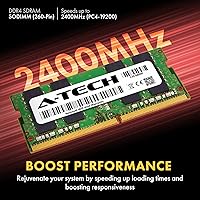
The 260-pin DDR4 SODIMM form factor drops into most modern laptops, Mini PCs, and AIO systems without any adapter or fuss. Running at 2400MHz (PC4-19200) with CL17 latency, this RAM upgrade isn't aimed at overclocking enthusiasts — it's tuned for stable, consistent everyday performance. The dual-rank (2Rx8) layout offers a modest bandwidth edge over single-rank alternatives, which can translate to slightly smoother multitasking under real workloads. Operating at the JEDEC-standard 1.2V, it's energy-efficient and slides right into any compatible DDR4 system without BIOS tinkering. There's no ECC or buffering required on the motherboard side, keeping the whole process genuinely accessible for non-technical users.

Best For

This SODIMM stick makes the most sense for laptop owners hitting a RAM ceiling — the person juggling 30 browser tabs, a video call, and a handful of background apps while everything slows to a crawl. It's also a natural fit for anyone locked into an older DDR4 system that tops out at 2400MHz and simply can't leverage faster modules. First-time DIY upgraders will appreciate that there's no configuration involved: install it, boot up, done. Budget-conscious buyers get something generic brands can't match — a real company standing behind a warranty. Mini PC and AIO users with a free SODIMM slot will find this RAM upgrade a clean, practical option as well.

User Feedback

Across nearly 2,000 reviews, the response is largely positive — most buyers report that this memory module was recognized by their system immediately and that day-to-day responsiveness improved in a noticeable, practical way. The recurring issue in lower-rated reviews comes down to compatibility mismatches: users who didn't verify their laptop's spec sheet beforehand occasionally found the module unsupported. That's not a product defect, but it's the most preventable source of disappointment here. DOA reports are uncommon, and a meaningful number of reviewers specifically mention that A-Tech's customer support stepped in quickly when problems did arise. For buyers who check compatibility first, the overall ownership experience tends to be straightforward and trouble-free.

Pros

  • Drop-in installation with no configuration needed — most systems recognize this memory module immediately on first boot.
  • Lifetime warranty provides meaningful long-term protection rarely offered at this price point.
  • Dual-rank design offers a modest real-world throughput edge over comparable single-rank modules.
  • Operates at the standard 1.2V DDR4 voltage, so there are no compatibility surprises with power delivery.
  • A-Tech's customer support has a strong track record of resolving issues quickly, based on consistent buyer feedback.
  • Solid choice for extending the life of an older DDR4 laptop without investing in a full system replacement.
  • Non-ECC Unbuffered design works with virtually all mainstream consumer laptops without any special motherboard support.
  • Compact and lightweight — fits tight chassis designs where thicker or heavier modules might not seat properly.

Cons

  • Compatibility is not guaranteed — buyers must verify their system's manual before purchasing or risk an incompatible fit.
  • A small but consistent number of buyers report receiving DOA units, making the warranty claim process a real consideration.
  • 2400MHz is the ceiling here; systems capable of faster speeds will run this SODIMM stick below their potential.
  • Sold as a single module — buyers expecting a dual-channel kit will need to purchase two units separately.
  • No XMP or performance profiles; what you see is what you get, with no room to tune speed or timings.
  • Third-party brand recognition may raise hesitation for buyers used to sticking with Crucial, Kingston, or Samsung.
  • Performance gains are bottleneck-dependent — users with slow storage or an underpowered CPU may see minimal difference.
  • Not compatible with ultrabooks or thin-and-light laptops that use soldered-on memory with no accessible slot.

Ratings

The scores below were generated by AI after analyzing thousands of verified global purchaser reviews for the A-Tech 16GB DDR4 2400MHz SODIMM Laptop RAM, with spam, incentivized, and bot-flagged submissions actively filtered out. Our model weighs both volume and sentiment depth, so a handful of strong complaints can meaningfully pull a score down even when overall ratings look high. What you see here reflects the full picture — genuine strengths and recurring frustrations alike.

Compatibility
74%
26%
On widely used laptop models — Dell Inspiron, HP Pavilion, Lenovo IdeaPad, and similar mainstream lines — this memory module installs without drama and is recognized immediately. Buyers upgrading older DDR4 machines that are capped at 2400MHz report a particularly smooth experience with zero configuration required.
Compatibility mismatches are the single most common complaint across the review base. Users who skipped checking their system's manual often found the module unsupported, and a subset of thin-and-light laptop owners discovered too late that their RAM is soldered and non-upgradeable.
Installation Ease
91%
The vast majority of buyers — including self-described non-technical users — describe the physical installation as straightforward and quick. No driver installation, no BIOS configuration needed in most cases; the module slots in, the system boots, and it just works.
A small number of users found seating the module fully required more firm pressure than expected, which caused brief anxiety about damaging the slot. This is a normal SODIMM characteristic but worth noting for first-timers who aren't accustomed to the click-in mechanism.
Performance Improvement
83%
Users upgrading from 8GB consistently describe a noticeable reduction in slowdowns during everyday multitasking — browser-heavy workflows, video calls running alongside productivity apps, and light media editing all become considerably more manageable after the upgrade.
This RAM upgrade removes a bottleneck; it doesn't transform a machine. Users expecting dramatic speed gains on systems also limited by slow storage or aging CPUs reported underwhelming results, which is a realistic expectation issue rather than a product defect.
Value for Money
88%
At its price point, buyers consistently feel they're getting a fair deal — particularly when factoring in the lifetime warranty, which most anonymous budget modules don't offer. For users who just need reliable everyday RAM without paying premium-brand prices, the value equation holds up well.
Shoppers who later discover their system supports faster DDR4 speeds feel they left money on the table, since a small price premium could have bought a 3200MHz module that their board could have fully utilized. Research before purchasing matters here.
Build & Component Quality
82%
18%
The module feels solid in hand, with no reports of bent pins or flimsy PCB construction in the majority of reviews. The dual-rank (2Rx8) layout is a thoughtful choice at this capacity tier and reflects a level of component consideration beyond what budget-tier sticks typically offer.
A-Tech does not publicly disclose which DRAM chips are used on this module, so buyers cannot verify the chip origin. A small portion of reviewers flagged DOA units, suggesting some variability in quality control that the warranty process is designed to address.
System Stability
86%
Once installed in a compatible system, this SODIMM stick runs stably under sustained workloads. Users who stress-tested their laptops with memory-intensive tasks like video rendering or large spreadsheet processing reported no crashes, blue screens, or memory errors over extended use.
In a smaller subset of cases, users mixing this module with existing RAM from other brands experienced intermittent instability. Matched-pair configurations or sole-module installations tend to produce the cleanest results.
Warranty & Support
89%
A-Tech's lifetime warranty is a genuine differentiator, and customer support responsiveness is one of the most frequently praised aspects in negative reviews — meaning even unhappy buyers often end up satisfied after reaching out. This is the kind of post-purchase experience that builds long-term brand trust.
A few buyers reported that the warranty claims process required some back-and-forth before a replacement was dispatched, which caused delays for users who needed the RAM urgently. Having a backup plan during the claim window is advisable.
Speed & Latency
77%
23%
For its intended use case — everyday computing on DDR4 2400MHz-capped systems — the CL17 latency and 2400MHz speed are entirely adequate. Users running standard productivity workloads will find the performance envelope comfortable and consistent.
The 2400MHz ceiling is a hard limit. Buyers who installed this RAM in boards capable of 3200MHz or higher found their system automatically downclocked the module, and several noted that purpose-built higher-speed alternatives would have been a smarter purchase for their hardware.
Packaging & Delivery
84%
Most buyers report the module arriving well-protected in anti-static packaging, which is the appropriate standard for sensitive electronics. Delivery through Amazon's fulfillment network tends to be reliable, with the module arriving intact and ready to install.
A small number of reviews flag damaged outer packaging upon delivery, though the module itself was unaffected in most of those cases. It's worth inspecting the anti-static sleeve for any signs of discharge before installation.
Brand Reputation
79%
21%
A-Tech has cultivated a credible reputation in the aftermarket memory space, and the volume of positive reviews across a multi-year sales history suggests consistent product delivery. For buyers familiar with the brand, there's a reasonable level of trust established.
A-Tech doesn't carry the instant recognition of Crucial, Kingston, or Samsung among less experienced buyers, which creates initial hesitation. Some users mention needing to research the brand before committing, adding friction that established names don't generate.
Multitasking Headroom
87%
Upgrading to 16GB gives most laptop users meaningful breathing room for parallel workloads — keeping a video call open while running a browser with multiple tabs, a PDF editor, and a spreadsheet simultaneously becomes far less punishing on system resources.
Users with particularly demanding workloads — 3D rendering, large database operations, or running virtual machines — may find that 16GB still falls short of what they need, and a 32GB configuration would have been a more forward-looking investment.
Energy Efficiency
88%
The 1.2V JEDEC-standard operating voltage is the sweet spot for DDR4 power draw, and users who monitor their laptop's thermals and battery behavior report no notable increase in heat generation or power consumption after the upgrade.
There is nothing here for power users to optimize further — no low-voltage variant is offered, and the module does not support any form of dynamic voltage adjustment. This is a non-issue for most buyers but worth noting for battery-critical use cases.

Suitable for:

The A-Tech 16GB DDR4 2400MHz SODIMM Laptop RAM is a strong pick for everyday laptop users who feel their machine dragging under the weight of normal workloads — think remote workers with too many browser tabs open, students running multiple applications at once, or anyone doing light photo and video work who keeps hitting slowdowns. It fits particularly well in aging DDR4 laptops that are otherwise still capable machines but were shipped with only 8GB from the factory. First-time upgraders will appreciate that there's genuinely nothing complicated about the installation — no software configuration, no BIOS adjustments in most cases. Budget-focused buyers also benefit from the lifetime warranty, which provides a layer of accountability you simply don't get from unbranded sticks at a similar price. If your system has an open SODIMM slot and tops out at 2400MHz, this RAM upgrade is a practical, low-risk way to extend the useful life of your hardware.
Not suitable for:

The A-Tech 16GB DDR4 2400MHz SODIMM Laptop RAM is not the right choice for buyers with modern systems that support DDR4 speeds above 2400MHz — installing this SODIMM stick in a board rated for 3200MHz or higher will simply result in the system downclocking it to 2400MHz, leaving performance on the table. It's also not suitable for users whose laptops have soldered RAM or no accessible SODIMM slots, which is increasingly common in ultra-thin notebooks. Anyone expecting this RAM upgrade to revive a system bottlenecked by an aging CPU or slow storage will likely be disappointed — RAM alone can only remove one specific constraint. Enthusiasts chasing the tightest latency timings or highest frequencies for gaming or benchmarking should look at purpose-built high-performance kits instead. Finally, buyers with systems that require ECC memory — certain workstation-class machines or specific NAS devices — should note that this module is Non-ECC and will not fulfill that requirement.
Specifications

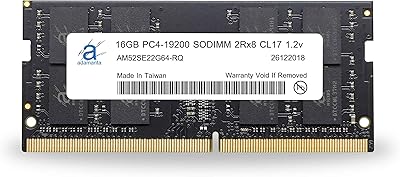
  • Brand: Manufactured by A-Tech Components, a third-party memory specialist with a long-standing presence in the aftermarket RAM market.
  • Model Number: The official model identifier for this module is AT16G1D4S2400ND8N12V.
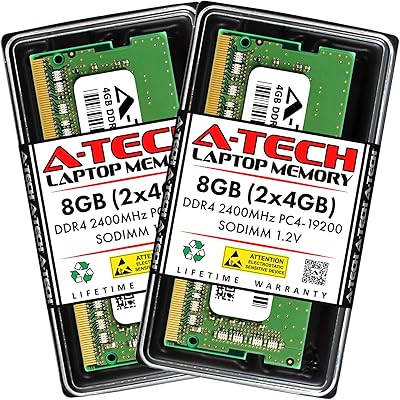
  • Capacity: This is a single 16GB module; buyers receive one stick, not a dual-channel kit.
  • Memory Type: DDR4 SDRAM, the standard fourth-generation double data rate memory technology used in modern consumer laptops and desktops.
  • Form Factor: 260-pin SODIMM, the compact form factor designed for laptops, Mini PCs, and All-in-One systems.
  • Speed: Rated at 2400MHz (PC4-19200 / PC4-2400T), representing the maximum transfer rate this module supports under standard operation.
  • Latency: CL17 (CAS Latency 17), a standard timing profile for DDR4 2400MHz modules in the consumer segment.
  • Rank Configuration: Dual Rank (2Rx8), which means the module uses both sides of the PCB to organize memory cells, offering a modest bandwidth advantage over single-rank alternatives.
  • ECC Type: Non-ECC Unbuffered, the standard configuration for mainstream consumer laptops that do not require error-correcting memory.
  • Voltage: Operates at 1.2V, the JEDEC-standard voltage for DDR4 memory, ensuring broad compatibility and energy efficiency.
  • Compatible Platforms: Designed for DDR4 SODIMM-compatible laptops, notebooks, Mini PCs, and All-in-One desktop systems with a 260-pin slot.
  • Warranty: Backed by A-Tech's lifetime warranty, covering defects in materials and workmanship for the life of the product.
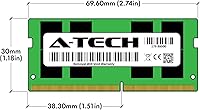
  • Dimensions: The module measures 2.74 x 1.18 x 0.15 inches, a standard SODIMM footprint that fits in most compatible slots without clearance issues.
  • Weight: Weighs approximately 0.317 ounces, reflecting the lightweight construction typical of SODIMM memory modules.
  • Release Date: First made available in November 2018 and has remained in continuous production since.

Related Reviews

A-Tech 16GB DDR4 3200MHz SODIMM Laptop RAM
78%
83%
Compatibility
91%
Installation Ease
78%
Performance Uplift
86%
Value for Money
74%
Build Quality
More
Adamanta 16GB DDR4 2400MHz SODIMM Laptop RAM


83%
85%
Performance
92%
Value for Money
89%
Ease of Installation
88%
Compatibility
80%
Power Efficiency
More
A-Tech 8GB (2x4GB) DDR4 2400MHz SODIMM Laptop RAM
85%
88%
Performance Improvement
93%
Installation Ease
85%
Energy Efficiency
82%
Compatibility with Laptops
91%
Value for Money
More
A-Tech 8GB DDR4 2666MHz SODIMM Laptop RAM
85%
88%
Performance Improvement
90%
Ease of Installation
85%
Energy Efficiency
81%
Compatibility with Laptops
87%
Stability and Reliability
More
A-Tech 8GB DDR4 2133 MHz SODIMM Laptop RAM
85%
90%
Installation Ease
82%
Compatibility
85%
Performance Boost
92%
Value for Money
88%
Power Efficiency
More
A-Tech 32GB DDR4 3200MHz SODIMM Laptop RAM
80%
91%
Value for Money
74%
Compatibility Range
93%
Installation Ease
83%
Performance Improvement
86%
Build & Module Quality
More
A-Tech 8GB DDR4 3200 MHz SODIMM Laptop RAM
89%
91%
Performance Boost
95%
Ease of Installation
89%
Value for Money
88%
System Compatibility
90%
Speed and Responsiveness
More
Adamanta 32GB (2x16GB) DDR4 2400MHz SODIMM Laptop RAM
86%
91%
Performance Boost
88%
Ease of Installation
90%
Multitasking Efficiency
85%
Compatibility with Older Laptops
89%
Energy Efficiency
More
A-Tech 32GB (2x16GB) DDR4 2133 MHz SODIMM Laptop RAM
87%
91%
Performance for Multitasking
93%
Ease of Installation
87%
Energy Efficiency
92%
Value for Money
85%
System Compatibility
More
Crucial 16GB DDR4-2666 SODIMM RAM
87%
94%
Performance Boost
88%
Ease of Installation
83%
Compatibility with Laptops
90%
Multitasking Performance
87%
Power Efficiency
More

FAQ

The safest approach is to check your laptop's official service manual or the manufacturer's product page, which will list the exact memory type and maximum speed supported. You can also use tools like Crucial's system scanner or Kingston's compatibility checker — both free — to cross-reference your model. Never assume compatibility based on speed alone; the form factor and generation both have to match.

It's a single 16GB module. You're getting one stick, not a kit. If you want dual-channel operation, you'd need to purchase two of them and install them in both SODIMM slots — provided your laptop has two slots available.

It will likely work, but it will run at 2400MHz, not 3200MHz. Modern systems are generally backward compatible with slower DDR4 speeds, but your board will downclock this memory module to match its rated speed. If your laptop can fully utilize 3200MHz, you'd be leaving some performance on the table by going with this SODIMM stick.

In most cases, no. DDR4 memory at standard JEDEC speeds like 2400MHz is plug-and-play — your system should detect and configure it automatically on the first boot. If you do see a memory-related prompt on startup, simply selecting the default or recommended profile is all that's needed.

Technically yes, most systems will accept mixed capacity configurations. However, mixing sizes and potentially mixing brands can sometimes prevent dual-channel mode from functioning optimally. Your system will still run, but for best stability and performance, matched pairs are generally the cleaner choice.

A-Tech's lifetime warranty covers manufacturing defects — essentially, if the module fails under normal use, they'll replace it. It does not cover physical damage from improper handling or installation. To make a claim, you'd contact A-Tech's support team directly; multiple buyers have noted that the process is straightforward and responses come quickly.

It depends on your laptop's spec ceiling. If your gaming laptop is an older DDR4 model capped at 2400MHz, this RAM upgrade is a reasonable fit. If your system supports faster speeds like 3200MHz or 3600MHz — which most modern gaming laptops do — you'd be better served by a module rated for those speeds to avoid leaving performance behind.

This varies by manufacturer and region. Some laptop brands explicitly allow user-serviceable RAM upgrades without voiding the warranty, while others do not. Check your laptop's warranty terms or contact the manufacturer before opening anything up. In many countries, consumer protection laws also limit a manufacturer's ability to void a warranty solely due to third-party part installation.

Start by reseating the module — remove it fully, check the slot for debris, and firmly press it back in until the retention clips click. If it's still unrecognized, try booting with just the new stick in slot one. If the problem persists, it's worth contacting A-Tech's support team, as a small number of units do arrive defective and the warranty process exists precisely for that situation.

Some NAS devices do use SODIMM slots and support standard DDR4 memory, so it's possible — but compatibility is highly dependent on the specific NAS model. You'll need to verify that your NAS accepts 260-pin DDR4 SODIMM modules and supports Non-ECC Unbuffered memory. Some higher-end NAS systems specifically require ECC memory, which this module does not provide, so checking the spec sheet first is essential.