

Overview

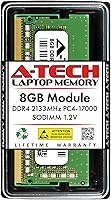
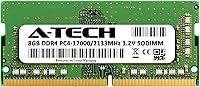
The A-Tech 8GB DDR4 2133MHz SODIMM Laptop RAM is one of the more sensible ways to breathe new life into a sluggish laptop without spending a lot of money. RAM — the memory your computer uses to juggle active tasks — is often the first upgrade worth making when a machine starts feeling slow. A-Tech is a well-established third-party memory brand, and this RAM upgrade comes backed by a lifetime warranty, which is reassuring at this price tier. Running at 2133MHz, it sits at the entry level of the DDR4 spectrum — enough for everyday computing, though not aimed at heavy gaming or intensive workloads. Think of it as a practical capacity boost, not a performance transformation.

Features & Benefits

At 8GB, this memory module hits a practical sweet spot for most laptop users — enough to keep a browser with a dozen tabs, a spreadsheet, and a video call running without the system grinding to a halt. It operates at 1.2 volts, the standard low-voltage spec for DDR4, so it won't put extra strain on your battery. The 260-pin SODIMM format is the go-to for laptops and compact desktops, and the non-ECC unbuffered configuration is exactly what consumer machines expect. CL15 latency is unremarkable but entirely appropriate for this speed tier. What really stands out is the lifetime warranty — for a budget stick of RAM, that kind of coverage is not common.

Best For

This RAM upgrade makes the most sense for anyone whose laptop shipped with just 4GB of memory and has been struggling ever since. Students switching between a research browser, a Word doc, and a video call will feel a real difference. Remote workers juggling productivity apps and cloud tools should notice the same improvement. The installation process is straightforward: pop the bottom panel, seat the stick, and you're done — no technical expertise required. One important note before buying: check your laptop's manual or the manufacturer's support page to confirm it accepts DDR4 at 2133MHz. Compatibility verification matters more than anything else with memory upgrades, and skipping that step is the most common source of buyer regret.

User Feedback

Across a large pool of verified buyers, the most common praise centers on immediate responsiveness after installation — people notice their laptops handling everyday tasks more fluidly, especially when switching between multiple open applications. The overall satisfaction rate is notably high for this price range. The main recurring concern is compatibility mismatch: a handful of reviewers report their system didn't recognize the module, nearly always traced back to their laptop's unsupported memory specs rather than a defective unit. A-Tech's support team reportedly handles these cases well, including sending replacements when a stick genuinely arrives faulty. The lifetime warranty adds real credibility to that claim — it's not just a throwaway promise.

Pros

  • Installing this memory module takes minutes — pop the panel, seat the stick, done, no technical background needed.
  • The lifetime warranty is a genuine differentiator at this price point and gives real peace of mind.
  • 8GB hits the practical sweet spot for everyday tasks like browsing, documents, video calls, and light multitasking.
  • Running at 1.2 volts, this SODIMM stick draws minimal power, which matters on battery-dependent laptops.
  • Most buyers report immediate improvement in system responsiveness right after installation.
  • A-Tech's customer support has a solid track record for handling replacements when issues do arise.
  • Non-ECC unbuffered design is exactly what consumer laptops expect — no configuration headaches or compatibility quirks.
  • The 260-pin SODIMM form factor covers a wide range of laptops, mini PCs, and all-in-one systems.
  • For anyone upgrading from 4GB, the real-world difference in day-to-day usability is hard to overstate.

Cons

  • 2133MHz is entry-level DDR4 — pairing it with a system that supports faster speeds wastes potential bandwidth.
  • Compatibility is not guaranteed out of the box; buyers must manually verify their laptop's supported specs before ordering.
  • A small number of buyers report receiving modules that were not recognized on arrival, requiring a support exchange.
  • 8GB may feel limiting sooner than expected for users whose workloads grow over time.
  • No included installation guide or tools; first-time upgraders are entirely on their own for the physical process.
  • The module is not rated for or tested against any specific laptop model, so compatibility research falls entirely on the buyer.
  • There are occasional reports of inconsistent quality control, with rare DOA units slipping through.
  • Buyers in regions with limited return logistics may find the warranty process slower or more frustrating to navigate.

Ratings

The scores below were generated by AI after analyzing thousands of verified buyer reviews for the A-Tech 8GB DDR4 2133MHz SODIMM Laptop RAM worldwide, with spam, bot-submitted, and incentivized feedback actively filtered out before any scoring was applied. The analysis covers everything from out-of-box installation to long-term reliability, and both the genuine strengths and the recurring frustrations are reflected honestly in each category.

Value for Money
91%
Among budget RAM upgrades, this module consistently earns praise for delivering a tangible day-to-day improvement without asking buyers to stretch their budget. The combination of 8GB capacity and a lifetime warranty at this price tier is genuinely difficult to beat, and most buyers feel the purchase pays for itself quickly in recovered productivity.
A handful of buyers who received incompatible units felt the value proposition collapsed when they had to go through a return process, losing time even if the warranty eventually covered them. For users whose systems support faster DDR4 speeds, paying roughly the same for a 2666MHz module would have been a smarter spend.
Compatibility Range
67%
33%
The 260-pin SODIMM form factor covers a broad swath of laptops, mini PCs, and all-in-one systems from the mid-2010s onward, making this RAM upgrade a practical option for a wide installed base. Buyers with older workhorse machines running everyday tasks report smooth recognition and stable operation right after installation.
Compatibility is the single most common source of frustration in buyer feedback. A meaningful portion of negative reviews traces directly to users who did not verify their laptop's supported memory specifications beforehand, and some systems simply will not accept third-party modules regardless of spec matching. The listing does not provide a curated compatibility checker, which puts the research burden entirely on the buyer.
Installation Experience
93%
The plug-and-play nature of this SODIMM stick is one of its most praised qualities — buyers with no prior hardware experience consistently report completing the install in under ten minutes with just a small screwdriver. There are no drivers to install, no BIOS configuration required in most cases, and the module seats cleanly into standard laptop slots.
A small number of users encountered systems where the RAM was not detected on the first boot, requiring them to reseat the module or update firmware — a step that can feel intimidating for first-timers. Laptops with soldered memory or sealed chassis occasionally trip up buyers who assumed all laptops were upgradeable.
System Stability
88%
The overwhelming majority of buyers report rock-solid stability after installation, with no unexpected crashes, memory errors, or blue screens even after extended daily use. Running a laptop through a full workday of browser tabs, documents, and video calls, buyers consistently note the machine feels more composed and less prone to stalling.
A small subset of users report intermittent instability that is difficult to attribute definitively to the module itself versus firmware or system-level conflicts. These cases are rare but worth noting, particularly for users with older laptops that have not had a BIOS update in years.
Performance Uplift
74%
26%
For laptops limping along on 4GB, jumping to 8GB with this memory module produces a noticeable shift in how fluidly everyday tasks run — fewer spinning cursors, faster app switching, and a much more responsive feel when multitasking. Students and remote workers handling typical productivity workloads report the improvement as immediate and meaningful.
At 2133MHz, this is entry-level DDR4, and buyers expecting a dramatic speed transformation will be disappointed. The gains are real but bounded — a laptop that felt slow due to an aging CPU or a nearly full hard drive will not feel fast just because the RAM was upgraded.
Build & Physical Quality
82%
18%
The module feels solid in hand and seats firmly in the slot without wobble, which is more important than it sounds — a poorly fitted stick can cause intermittent errors over time. Buyers who have handled multiple third-party RAM brands note that A-Tech's build quality is competitive and does not feel cheap relative to the price.
There are occasional reports of modules arriving with minor physical defects or showing early signs of failure within the first few months, suggesting some batch-level inconsistency in manufacturing. These cases are genuinely infrequent but do exist in the verified review pool.
Warranty & Support
86%
A lifetime warranty on a budget RAM module is not something buyers take for granted, and A-Tech's support team receives consistent praise for being reachable and resolving legitimate replacement requests without excessive back-and-forth. For buyers who plan to keep their laptop for several more years, this coverage adds meaningful long-term confidence.
A portion of buyers report that initiating a warranty claim requires patience, with some waiting several days for a response during busy periods. International buyers occasionally face shipping complications that make the replacement process slower than the warranty terms imply.
Packaging & Delivery
78%
22%
The module arrives in protective anti-static packaging, which is the correct standard for memory components and reassures buyers that the stick has not been exposed to damaging static discharge in transit. Most buyers receive the product intact and ready to install without any unboxing issues.
The packaging is functional but minimal — there is no installation guide, no compatibility reference card, and no accessories included. First-time upgraders who were hoping for a little more guidance are left to rely on online resources entirely.
Low Power Efficiency
84%
Running at the JEDEC standard 1.2V, this SODIMM stick draws noticeably less power than older DDR3 modules that operated at 1.5V, which matters for laptop users who spend long stretches away from a power outlet. Several buyers note that battery life did not take a hit after the upgrade, which is a relief when adding any new component.
The power efficiency advantage is largely invisible to most users since it simply maintains the status quo for modern DDR4 systems rather than delivering any perceptible improvement over other DDR4 modules running at the same voltage.
Brand Reputation
79%
21%
A-Tech has built a credible track record as a third-party memory brand, and buyers who have purchased from them multiple times describe the experience as consistently reliable. The brand sits in a trustworthy middle tier — not the prestige of Kingston or Crucial, but well above generic no-name alternatives.
A-Tech lacks the instant brand recognition of category leaders, which makes some buyers hesitant and more likely to scrutinize the product before committing. Buyers who have had a negative experience — even once — tend to view the brand with lasting skepticism.
Multitasking Headroom
83%
At 8GB, this RAM upgrade gives most everyday laptops enough working memory to handle a realistic productivity setup — a dozen browser tabs, a cloud-based document, a music stream, and a communication app — without the system visibly struggling. Remote workers who switched from 4GB frequently describe the difference as night and day for their daily workflow.
Heavy multitaskers or users who habitually run memory-hungry applications will find 8GB starts to feel tight sooner than expected, especially as browsers and productivity suites continue to increase their baseline memory consumption year over year.
Reorder & Upgrade Scalability
71%
29%
Buyers who have purchased multiple sticks to fill a second slot and reach 16GB report consistent results, with dual-channel configurations running stably when both modules are matched in speed and capacity. The module is easy to source again if a second stick is needed later.
Because rank configuration can vary between units shipped — either 1Rx8 or 2Rx8 — buyers attempting to pair two sticks for dual-channel operation cannot always guarantee they will receive matching ranks, which can occasionally introduce performance inconsistencies in dual-slot setups.

Suitable for:

The A-Tech 8GB DDR4 2133MHz SODIMM Laptop RAM is a solid pick for anyone whose laptop shipped with 4GB of memory and has been showing its age — slow tab switching, sluggish app launches, and general unresponsiveness are all classic signs that more RAM is the fix. Students who spend their day juggling a browser, a word processor, and a video call will notice a real improvement in how smoothly everything runs side by side. Remote workers in similar situations — hopping between productivity tools, cloud apps, and communication platforms — stand to benefit just as much. It also suits budget-conscious buyers who want a dependable upgrade without overspending, particularly since the lifetime warranty provides a level of long-term coverage that is genuinely uncommon in this price tier. If your laptop takes DDR4 SODIMM modules and you have confirmed it supports 2133MHz, this RAM upgrade is a straightforward, low-risk way to extend the useful life of your machine.

Not suitable for:

The A-Tech 8GB DDR4 2133MHz SODIMM Laptop RAM is not the right choice for buyers chasing maximum memory performance. Gamers, video editors, or anyone running demanding software will find that 2133MHz sits at the slower end of the DDR4 range, and pairing it with a system that supports faster speeds like 2666MHz or 3200MHz means leaving performance on the table. Power users who need more than 8GB for memory-intensive workloads like virtual machines, large dataset processing, or professional creative software should look at higher-capacity options. This module is also not a fit for anyone who has not first verified compatibility — not all laptops accept third-party RAM, and some have memory soldered directly to the motherboard with no upgrade slot at all. Buyers expecting a dramatic speed transformation will likely be disappointed; this is a capacity and stability upgrade, not a raw performance one.

Specifications

  • Capacity: This module provides 8GB of DDR4 memory, enough headroom for web browsing, office applications, and moderate multitasking on most laptops.
  • Memory Type: Uses DDR4 SDRAM technology, the standard double-data-rate generation for laptops manufactured roughly between 2015 and the early 2020s.
  • Form Factor: Built in the 260-pin SODIMM configuration, the compact format used in laptops, mini PCs, and all-in-one desktop systems.
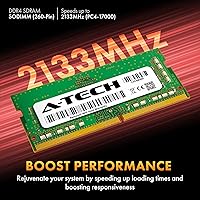
  • Speed Rating: Rated at 2133MHz (PC4-17000, also labeled PC4-2133P), placing it at the entry-level tier of the DDR4 speed range.
  • Latency: Ships with a CL15 (CAS Latency 15) timing, which is standard and functional for this speed tier without being a high-performance rating.
  • Voltage: Operates at 1.2V in line with the JEDEC DDR4 standard, keeping power draw low compared to older DDR3 modules that ran at 1.5V.
  • ECC Type: Non-ECC Unbuffered, meaning it does not include error-correcting code hardware — the correct configuration for virtually all consumer laptops.
  • Module Rank: Available in either 1Rx8 (single rank) or 2Rx8 (dual rank) configurations depending on the specific unit shipped.
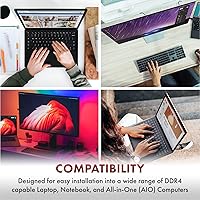
  • Compatible Systems: Designed for laptops, notebooks, mini PCs, and all-in-one systems that accept standard 260-pin DDR4 SODIMM modules.
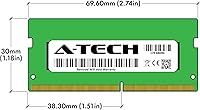
  • Dimensions: Measures 2.74 x 1.18 x 0.15 inches, consistent with the standard SODIMM physical footprint used across most laptop memory slots.
  • Weight: Weighs 0.634 ounces, reflecting the minimal physical profile typical of a single SODIMM stick.
  • Warranty: Covered by A-Tech's lifetime warranty, which includes support for replacement in cases of manufacturing defects throughout the product's lifespan.
  • Brand: Manufactured by A-Tech Components, a third-party memory specialist known for producing compatible modules across a wide range of consumer platforms.
  • JEDEC Standard: Fully compliant with the JEDEC DDR4 1.2V standard, ensuring baseline compatibility with systems designed around industry-standard DDR4 specifications.
  • ASIN: Listed on Amazon under ASIN B07KGMKMRN, first made available in November 2018 and not discontinued as of the latest product data.

Related Reviews

A-Tech 8GB DDR4 2666MHz SODIMM Laptop RAM
81%
93%
Value for Money
91%
Installation Ease
78%
Compatibility Range
82%
Performance Impact
84%
Build & Module Quality
More
A-Tech 8GB DDR4 3200 MHz SODIMM Laptop RAM
89%
91%
Performance Boost
95%
Ease of Installation
89%
Value for Money
88%
System Compatibility
90%
Speed and Responsiveness
More
A-Tech 8GB DDR4 2400MHz SODIMM Laptop RAM
82%
91%
Value for Money
68%
Compatibility
88%
Ease of Installation
78%
Performance Improvement
83%
Reliability & Longevity
More
A-Tech 16GB DDR4 3200MHz SODIMM Laptop RAM
78%
83%
Compatibility
91%
Installation Ease
78%
Performance Uplift
86%
Value for Money
74%
Build Quality
More
KLEVV DDR4 8GB 3200MHz SODIMM Laptop RAM

87%
88%
Performance
90%
Compatibility
94%
Ease of Installation
92%
Value for Money
85%
Stability during Regular Use
More
A-Tech 32GB DDR4 3200MHz SODIMM Laptop RAM
80%
91%
Value for Money
74%
Compatibility Range
93%
Installation Ease
83%
Performance Improvement
86%
Build & Module Quality
More
A-Tech 32GB DDR4 2133MHz SODIMM Laptop RAM
82%
91%
Value for Money
74%
Compatibility
93%
Installation Ease
83%
Performance Uplift
86%
Reliability & Stability
More
Crucial 8GB DDR4-2400 SODIMM Laptop RAM
84%
91%
Value for Money
93%
Installation Ease
77%
Performance Impact
73%
Compatibility Range
94%
Long-term Reliability
More
Timetec 8GB DDR4 2400MHz SODIMM Laptop RAM
78%
91%
Value for Money
88%
Installation Ease
74%
Compatibility
86%
Performance Improvement
83%
Reliability
More
A-Tech 128GB DDR5 5200MHz SODIMM Laptop RAM
88%
93%
Performance
88%
Compatibility with Laptops
91%
Ease of Installation
95%
Multitasking Performance
86%
Energy Efficiency (1.1V)
More

FAQ

The safest approach is to check your laptop's user manual or look up your model on the manufacturer's support page — both will list the supported memory type, maximum capacity, and speed. You need a laptop that accepts DDR4 SODIMM modules at 2133MHz or higher. If your system supports faster speeds like 2666MHz, this stick will still work but will run at the slower 2133MHz rate.

For most laptops, yes. You typically remove a few screws from the bottom panel, locate the memory slot, align the module at an angle, press it down until it clicks, and replace the panel. The whole process usually takes under ten minutes. That said, some newer ultrabooks have soldered memory with no upgrade slot at all, so confirm your laptop has an accessible slot before you buy.

It depends on where you're starting from. If your laptop currently has 4GB of RAM and frequently freezes or slows down when multitasking, upgrading to 8GB will make a meaningful difference in day-to-day responsiveness. If you already have 8GB or more, the improvement will be far less dramatic. This RAM upgrade addresses capacity constraints, not raw processing speed.

Possibly, but only if your laptop has two memory slots and the existing stick is also 8GB DDR4. If one slot is occupied by a 4GB stick, you can run both for 12GB total, though for best performance, matching pairs of the same speed and capacity are ideal. Check how many slots your laptop has and what's already installed before planning a dual-stick configuration.

It will work, but the module will operate at 2133MHz rather than your system's maximum supported speed. This is called downclocking and is perfectly stable — your laptop will simply run the memory at the lower rate. You won't see any damage or crashes from the mismatch, but if you want to take full advantage of your system's memory bandwidth, a 2666MHz-rated module would be a better match.

Not at all — non-ECC unbuffered is exactly what consumer laptops are designed to use. ECC (error-correcting code) memory is a feature found in servers and workstations where data integrity is critical. For everyday laptop use, it adds unnecessary cost and complexity without practical benefit. This module is built to the standard that virtually every consumer laptop expects.

Yes, it's covered by A-Tech's lifetime warranty. If the module fails due to a manufacturing defect, you can contact A-Tech's support team for a replacement. Based on buyer feedback, their support team is generally responsive and handles legitimate claims without excessive friction.

It works in any device that accepts a standard 260-pin DDR4 SODIMM module, which includes many mini PCs and all-in-one systems in addition to laptops. Just verify the specific model you own supports DDR4 SODIMM at this pin count — the slot format used in mini PCs can sometimes differ.

Start by reseating the module — remove it fully and press it back in firmly until it clicks into place. If the system still doesn't detect it, double-check that your laptop's BIOS is up to date, as outdated firmware occasionally causes recognition issues with newer RAM. If the problem persists, the module may be incompatible with your specific system, or in rare cases, it could be a defective unit — both situations are covered under A-Tech's warranty process.

For most everyday users — web browsing, email, video calls, document editing — 8GB is still perfectly functional and will handle typical workloads without much strain. If you regularly work with photo or video editing software, run virtual machines, or keep dozens of browser tabs open simultaneously, 16GB would give you more comfortable headroom. For a straightforward productivity upgrade from 4GB, 8GB hits the right balance for the majority of users.