Overview

The A-Tech 32GB DDR4 3200MHz SODIMM Laptop RAM sits squarely in the mid-range memory market — solid specs, no inflated brand premium, and a straightforward upgrade path for anyone whose laptop is starting to feel sluggish. A-Tech is not Kingston or Crucial, but they have built a genuine reputation as a third-party memory supplier backed by a real lifetime warranty. One thing worth flagging upfront: this is a single 32GB module, not a dual-kit, so check your slot configuration before ordering. The SODIMM form factor and DDR4 standard are the two compatibility checkboxes to clear — get those right and installation takes about ten minutes.
Features & Benefits

At 32GB per module, this memory upgrade gives you genuine headroom for demanding tasks — video editing timelines, dozens of open browser tabs, or virtual machines running side by side. The 3200MHz DDR4 speed is a real-world step up from slower legacy modules, though honest expectation-setting matters: actual gains depend on your current hardware and how you use the machine. It runs at 1.2 volts, which is standard JEDEC DDR4 operating voltage — efficient and compatible with modern laptop power profiles. The non-ECC unbuffered design is exactly what consumer laptops expect, so there are no configuration hurdles. The lifetime warranty covers you for the life of the module, which is worth more than it sounds.

Best For

This 32GB SODIMM stick makes the most sense for people genuinely running out of headroom on their current machine. Students juggling multiple applications, professionals handling large spreadsheets or data sets, and creative users doing light video or photo editing are natural fits. It also works well for mini PC or all-in-one owners with a single RAM slot — maxing out one slot with 32GB is a smarter call than splitting capacity across two smaller sticks. Budget-conscious buyers who want reliable, warrantied hardware without paying for a name-brand premium will find this RAM upgrade a sensible middle ground, provided they have confirmed compatibility with their specific system beforehand.

User Feedback

Approaching a thousand ratings with a 4.7-star average is a strong signal of consistent quality, not a fluke. Buyers most often praise the painless installation, immediate improvement on older or underpowered machines, and the fact that the module simply works out of the box without fiddling. That said, a small but recurring thread in negative reviews involves compatibility hiccups — typically tied to specific laptop models or BIOS restrictions, not faulty hardware. A handful of returns appear to come from users who skipped the step of verifying their system can actually handle 32GB in a single slot. That is a pre-purchase research issue, and checking your system manual or manufacturer specs page before buying remains essential advice.

Pros

  • 32GB in a single module is genuinely future-proof for most laptop use cases over the next several years.
  • DDR4 3200MHz speed is a meaningful step up for systems currently running slower or lower-capacity RAM.
  • Plug-and-play installation takes under fifteen minutes with no software configuration required.
  • The lifetime warranty provides real peace of mind that most budget memory brands do not offer.
  • A-Tech's tech support is accessible before and after purchase, which matters for less experienced upgraders.
  • Consistent 4.7-star rating across nearly a thousand reviews suggests reliable quality control.
  • The 1.2V operating voltage keeps power draw in line with modern laptop efficiency standards.
  • Single-module format is ideal for systems with only one open or accessible RAM slot.
  • Buyers upgrading aging laptops consistently report noticeable real-world performance improvements.
  • Priced competitively against name-brand equivalents without sacrificing core specifications.

Cons

  • A-Tech lacks the brand recognition of tier-one memory makers, which may concern some buyers despite the solid track record.
  • Compatibility is not guaranteed across all laptop models — verifying support for 32GB single-slot modules is a required pre-purchase step.
  • Some users have reported BIOS-level recognition issues on specific older laptop platforms.
  • This RAM upgrade will not compensate for other system bottlenecks like a slow storage drive or underpowered processor.
  • No RGB or aesthetic customization — purely functional, which matters if the module will be visible in an open-chassis mini PC.
  • The single-module format means no dual-channel memory benefit unless your system already has a second populated slot.
  • A small number of buyers received modules that failed early, suggesting occasional quality-control inconsistencies.
  • Tech support quality, while generally praised, appears to vary depending on the complexity of the compatibility question.

Ratings

Our editorial team trained an AI model on thousands of verified global purchases of the A-Tech 32GB DDR4 3200MHz SODIMM Laptop RAM, actively filtering out incentivized reviews, one-time spam accounts, and bot-generated feedback to surface what real buyers consistently experience. The scores below reflect a transparent synthesis of both praise and frustration — nothing is smoothed over to make the product look better than it is. Where users are divided, the scores show it.

Value for Money
91%
Buyers consistently highlight that this 32GB SODIMM stick delivers name-brand-level specs at a noticeably lower price point than Kingston or Crucial equivalents. For users extending the life of a capable but aging laptop, the cost-to-performance ratio feels hard to beat — especially when the lifetime warranty is factored in.
A small segment of buyers who later encountered compatibility issues felt the savings were not worth the troubleshooting hassle. If your laptop requires a return or swap, the cost advantage shrinks considerably.
Compatibility Range
74%
26%
The 260-pin DDR4 SODIMM format covers a genuinely broad range of laptops, mini PCs, and all-in-one systems released in the last several years. Most buyers installing it in mainstream Dell, HP, Lenovo, and Asus laptops report clean, immediate recognition with no manual configuration needed.
A recurring frustration surfaces around specific older or less common laptop models where the module is not recognized or runs at a reduced speed. The burden of pre-purchase compatibility research falls entirely on the buyer, and A-Tech does not publish a searchable compatibility database.
Installation Ease
93%
The overwhelming majority of reviewers — including first-time hardware upgraders — describe the installation as straightforward and quick. Pop the bottom panel, seat the module at the correct angle, press down until it clicks, and you are done. Most report being up and running within fifteen minutes.
A handful of users ran into systems where the bottom panel was difficult to remove without risk of damage, which is a laptop design issue rather than a problem with this memory module. A few buyers on sealed or warranty-sensitive machines noted hesitation around opening their device at all.
Performance Improvement
83%
Users upgrading from 8GB or 16GB configurations frequently describe the jump to 32GB as a night-and-day difference for multitasking — particularly those juggling spreadsheets, browser-heavy research workflows, or light video editing. Older laptops seem to show the most dramatic real-world improvement.
Buyers upgrading already well-specced systems report more modest gains, which is expected but sometimes leads to disappointment. The 3200MHz speed can also be throttled down by some laptop BIOSes to a lower default, meaning not every user gets the full rated performance without manual verification.
Build & Module Quality
86%
The physical module feels solid and properly constructed, with no reports of bent pins or flimsy PCB quality in the vast majority of reviews. Buyers who have handled Crucial or Kingston modules note that this RAM upgrade feels comparable in terms of physical finish and component density.
A small percentage of buyers received modules that failed early or were dead on arrival. While the warranty handles these cases, it points to occasional quality-control inconsistency in production batches that tier-one brands tend to see less of.
Reliability Over Time
84%
The majority of long-term reviewers — those who purchased a year or more ago — report zero issues with stability or degradation. Systems running this 32GB SODIMM stick through daily demanding workloads continue to operate without crashes or memory errors.
There are isolated reports of intermittent system instability appearing weeks after installation, though it is difficult to attribute these definitively to the module versus other system variables. Users with sensitive or older systems may want to run a memory diagnostic tool after installation.
Warranty & Support
88%
A-Tech's lifetime warranty is genuine and users who have needed to invoke it report a relatively smooth replacement process. The availability of pre-purchase tech support is also praised by less technical buyers who wanted compatibility reassurance before committing.
Response times from A-Tech's support team appear to vary, with some buyers reporting delays during peak periods. A few users noted that the support experience felt more transactional than consultative when dealing with nuanced compatibility questions.
Speed Recognition
71%
29%
In most modern laptops, the module is recognized at or near its rated 3200MHz speed without any user intervention. Buyers with recent Intel and AMD platforms generally get what they paid for right out of the box.
A notable subset of users found their system defaulted to 2400MHz or 2666MHz instead of the rated 3200MHz, with no straightforward way to correct it at the laptop BIOS level. This is partly a platform limitation, but it does mean the rated speed is not a guaranteed outcome.
Packaging & Delivery
82%
18%
The module arrives in protective anti-static packaging, which is the correct handling standard for sensitive memory hardware. Buyers generally report the module arriving in clean, undamaged condition with no visible handling issues.
The packaging is functional rather than premium — there is no detailed installation guide or compatibility checklist included, which would genuinely help first-time upgraders who need a little extra reassurance at the point of unboxing.
Single-Slot Efficiency
78%
22%
For systems with only one accessible or active memory slot, a single 32GB module is the most practical path to maximizing available RAM. Mini PC and compact all-in-one users especially appreciate not needing to source a matched pair.
Users with two available slots lose the potential dual-channel bandwidth advantage that a matched kit would provide. For workloads sensitive to memory bandwidth — such as systems using integrated graphics — this trade-off is worth considering before purchasing a single stick.
Brand Confidence
69%
31%
A-Tech has built enough of a track record that most buyers feel comfortable purchasing, particularly given the lifetime warranty backing. The high review volume and consistently strong ratings across multiple product lines suggest this is not a fly-by-night operation.
Buyers who strongly prefer established memory brands are harder to convince, and A-Tech's relative anonymity can create hesitation at the point of purchase. The brand does not carry the same resale confidence or cross-retailer recognition that Kingston or Samsung enjoy.
Thermal Performance
81%
19%
Users running extended workloads report no unusual heat-related issues attributable to this memory module. The 1.2V operating voltage keeps the module running within normal thermal parameters for a compact laptop environment.
There is no heat spreader on this module, which is standard for laptop SODIMM designs but means it relies entirely on your laptop's internal airflow management. In very thermally constrained thin-and-light designs, this is worth being aware of.
Documentation & Guidance
58%
42%
A-Tech does provide access to a tech support team that can assist with compatibility questions, which partially compensates for the lack of printed documentation. For buyers who reach out proactively, the guidance available is genuinely useful.
The product ships with minimal in-box documentation, and there is no step-by-step installation guide or QR code linking to setup resources. Less experienced buyers are left to rely on YouTube tutorials or A-Tech's support email, which is a noticeable gap for a product positioned as easy to install.

Suitable for:

The A-Tech 32GB DDR4 3200MHz SODIMM Laptop RAM is a strong fit for anyone whose current machine is capable but clearly RAM-starved — think the laptop that slows to a crawl with a dozen browser tabs open, or freezes when switching between a video editing timeline and a few background apps. Students running research-heavy workflows, professionals managing large Excel files or databases, and creative users doing photo or light video work will all notice a genuine difference after this upgrade. It is also a smart pick for people who own a capable older laptop and would rather spend modestly on RAM than buy a new machine entirely. Mini PC and all-in-one owners with a single memory slot will find the 32GB single-module design especially practical, since maxing out one slot cleanly beats the dual-stick juggling act. If you are comfortable doing a basic hardware swap and want a reliable, warrantied module without paying a premium-brand surcharge, this memory upgrade fits the brief well.
Not suitable for:

The A-Tech 32GB DDR4 3200MHz SODIMM Laptop RAM is not the right choice if you have not first confirmed your laptop can actually accept a 32GB module in a single slot — many older systems top out at 16GB per slot regardless of how much total RAM they advertise. Buyers hoping for dramatic speed improvements on a well-configured modern machine should also temper expectations; if your system already has adequate RAM, this upgrade will not deliver the kind of transformation it does on a starved older laptop. It is not a fit for desktop builds, as this is a SODIMM module designed specifically for portable and compact form-factor systems. Users who need ECC memory for workstation-grade error correction — such as those running certain scientific or financial applications — should look elsewhere, since this is a standard consumer non-ECC module. Finally, if brand prestige matters to you and you specifically want Kingston, Crucial, or Samsung on the label, A-Tech is a value-tier alternative and should be evaluated on that basis.
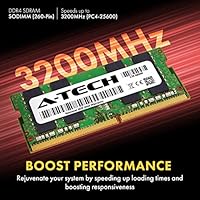
Specifications

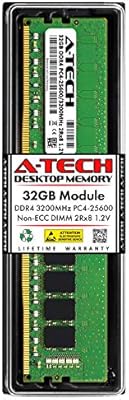
  • Brand: Manufactured by A-Tech, a third-party memory specialist known for broad compatibility coverage and consumer-focused support.
  • Model Number: The official part number for this module is AT32G1D4S3200ND8N12V.
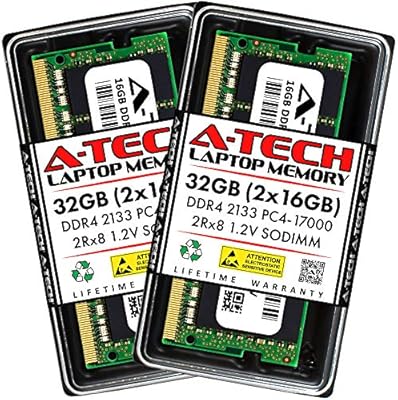
  • Capacity: This is a single 32GB DDR4 memory module sold individually, not as part of a matched kit.
  • Memory Type: Uses DDR4 SDRAM technology, the current standard for modern laptops and compact desktop systems.
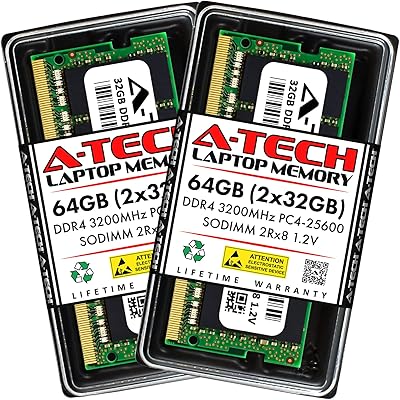
  • Speed: Operates at 3200MHz, conforming to the PC4-25600 (PC4-3200AA) speed specification.
  • Form Factor: SODIMM with a 260-pin edge connector, the compact format used in laptops, mini PCs, and all-in-one systems.
  • Module Rank: Dual Rank (2Rx8) configuration, which means the module uses both sides of the PCB to organize memory cells.
  • ECC Type: Non-ECC Unbuffered, which is the standard configuration required by consumer-grade laptops and is not compatible with server or workstation ECC memory slots.
  • Voltage: Runs at 1.2V, the JEDEC-standard operating voltage for DDR4, supporting efficient power consumption in portable systems.
  • Latency: Rated at CL22 latency timings, which is typical for DDR4 3200MHz modules at standard JEDEC specifications.
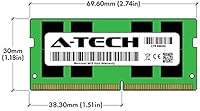
  • Dimensions: The module measures 2.74 x 1.18 x 0.15 inches, consistent with the standard SODIMM physical footprint.
  • Weight: Weighs 0.704 ounces, making it a negligible addition to overall system weight.
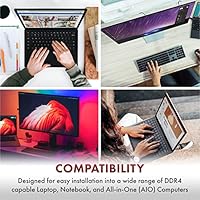
  • Compatible Platforms: Designed for use in laptops, notebooks, mini PCs, and all-in-one systems that accept 260-pin DDR4 SODIMM modules.
  • Warranty: Covered by A-Tech's lifetime warranty, with tech support available both before and after purchase.
  • Release Date: This module was first made available in December 2020 and remains an active, non-discontinued product.
  • Color: The PCB and components have no specific color designation; the listing describes it as multicolor, reflecting standard component variation.

Related Reviews

A-Tech 16GB DDR4 3200MHz SODIMM Laptop RAM
78%
83%
Compatibility
91%
Installation Ease
78%
Performance Uplift
86%
Value for Money
74%
Build Quality
More
A-Tech 32GB (2x16GB) DDR4 2133 MHz SODIMM Laptop RAM
87%
91%
Performance for Multitasking
93%
Ease of Installation
87%
Energy Efficiency
92%
Value for Money
85%
System Compatibility
More
A-Tech 32GB DDR4 3200MHz RAM
88%
89%
Performance for Gaming
92%
Multitasking Efficiency
94%
Ease of Installation
88%
Compatibility with Intel/AMD Systems
85%
Reliability and Stability
More
DATO 32GB DDR4 3200MHz SODIMM Laptop Memory
84%
92%
Performance Boost
85%
Energy Efficiency
89%
Installation Ease
80%
Compatibility with Laptops
86%
Reliability
More
KLEVV DDR4 8GB 3200MHz SODIMM Laptop RAM
87%
88%
Performance
90%
Compatibility
94%
Ease of Installation
92%
Value for Money
85%
Stability during Regular Use
More
NVTEK 32GB DDR4 3200MHz SODIMM Laptop Memory
86%
89%
Performance
88%
Compatibility
80%
Installation Ease
91%
Energy Efficiency
92%
Value for Money
More
A-Tech 64GB DDR4 3200MHz SODIMM RAM Kit
88%
89%
Performance
94%
Ease of Installation
91%
Value for Money
85%
Compatibility
90%
Energy Efficiency
More
Adamanta 32GB DDR4 2666MHz SODIMM Laptop RAM
87%
92%
Value for Money
88%
Performance Boost
94%
Ease of Installation
85%
Energy Efficiency
90%
Stability and Reliability
More
A-Tech 8GB DDR4 2666MHz SODIMM Laptop RAM
85%
88%
Performance Improvement
90%
Ease of Installation
85%
Energy Efficiency
81%
Compatibility with Laptops
87%
Stability and Reliability
More
A-Tech 8GB (2x4GB) DDR4 2400MHz SODIMM Laptop RAM
85%
88%
Performance Improvement
93%
Installation Ease
85%
Energy Efficiency
82%
Compatibility with Laptops
91%
Value for Money
More

FAQ

The safest approach is to check your laptop manufacturer's official support page or your system manual for the maximum supported RAM per slot and the required memory type. You need a machine that accepts 260-pin DDR4 SODIMM modules and can handle 32GB in a single slot — not all laptops can, even if they support DDR4 overall. Tools like Crucial's online compatibility scanner can also cross-reference your laptop model quickly.

This is a single 32GB module. If you need 64GB total, you would need to purchase two of these separately, and your laptop would need to have two available SODIMM slots that both support 32GB.

It depends on your laptop manufacturer's policy. Many brands, including Dell and Lenovo, explicitly allow user-serviceable RAM upgrades without voiding the warranty. Apple, on the other hand, has largely moved to soldered RAM, making this a non-issue for newer Mac models anyway. Check your laptop's warranty terms or contact the manufacturer directly if you are unsure.

In most cases, no. The A-Tech 32GB DDR4 3200MHz SODIMM Laptop RAM follows standard JEDEC DDR4 specifications, so most laptops will detect and configure it automatically on first boot. On some systems, you may see a brief memory training screen or a BIOS notification, which is normal and resolves itself. Manually enabling XMP or DOCP profiles is generally not applicable to laptop SODIMM modules.

For purely light tasks like email and browsing, 16GB is usually plenty. But if you regularly run multiple applications at once, work with large files, use virtual machines, or keep dozens of browser tabs open, the jump to 32GB removes a genuine bottleneck. Many users report that it also extends the useful lifespan of an older machine significantly.

Technically yes, but mixing RAM modules can sometimes cause instability or force both sticks to run at the lower module's speed. For best results and to take advantage of dual-channel performance, using a matched pair of identical modules is recommended. If your laptop only has one slot, this concern does not apply.

For most laptops with an accessible bottom panel, swapping RAM is one of the easier hardware upgrades you can do at home. You typically need a small Phillips-head screwdriver, a few minutes, and a careful hand. A-Tech's support team is available if you run into any issues during the process.

A-Tech's lifetime warranty covers defects in materials and workmanship for the life of the product. It does not cover damage from improper installation, electrical surges, or physical mishandling. In practice, the warranty means that if this 32GB SODIMM stick fails under normal use, A-Tech will replace it — which is a meaningful commitment for a memory module.

DDR4 3200MHz is the module's rated speed, but some laptops with older or more conservative BIOS versions will default to a lower speed like 2400MHz or 2666MHz. This is a system-side limitation, not a defect with the module itself. In most cases it does not cause any instability, just slightly lower peak performance than the rated spec.

Kingston and Crucial are tier-one memory brands with massive production scale and extensive compatibility databases. A-Tech operates as a reputable value-tier alternative — the specs are comparable, the warranty is genuine, and the user satisfaction data is strong, but the brand carries less name recognition. For buyers prioritizing cost-efficiency over brand prestige, A-Tech is a reasonable trade-off, not a compromise on quality.